display VOLKSWAGEN POLO 2015 Owner´s Manual
[x] Cancel search | Manufacturer: VOLKSWAGEN, Model Year: 2015, Model line: POLO, Model: VOLKSWAGEN POLO 2015Pages: 100, PDF Size: 4.14 MB
Page 3 of 100
Downloaded from www.Manualslib.com manuals search engine 12/29/2015Bedienungsanleitung < Service & Zubehör < Volkswagen Deutschland
1/1
This owner's manual is valid for all models and versions of the Polo.
An alphabetical index is included at the end of this manual.
A list of abbreviations at the end of the manual explains the abbreviations used.
Directions and positions such as left, right, front and rear are normally relative to the vehicle's direction of travel, unless otherwise indicated.
Illustrations help with orientation and should be regarded as a general guide.
This owner's manual was written for left-hand drive vehicles. In right-hand drive vehicles the controls may sometimes be different to those
displayed in illustrations or described in the text → Overview of the driver side .
Any technical changes that may be made to the vehicle after publication of this booklet are contained in a supplement that is included with
the vehicle wallet.
All equipment and models are described without indicating whether the equipment is optional or specific to the model type. This means that
your vehicle may not have some of the equipment described, or it may only be available in certain markets. The scope of equipment fitted in
your vehicle can be found in the sales documentation and you can contact your Volkswagen dealership for further information.
All data in this owner's manual correspond to the information available at the time of going to print. Because the vehicle is constantly being
developed and further improved, there may be differences between your vehicle and the data in this owner's manual. No discrepancy in data,
illustrations or descriptions shall form the basis for any legal claim.
Please ensure that the complete vehicle wallet is always in the vehicle if you lend or sell the vehicle to someone else.
Service schedule
Owner's manual
Supplements
Radio/navigation system
Provision for a mobile telephone
Other supplements
About this owner's manual
Standard booklets in the vehicle wallet:
Additional booklets in the vehicle wallet (optional):
Page 9 of 100
Downloaded from www.Manualslib.com manuals search engine 12/29/2015Bedienungsanleitung < Service & Zubehör < Volkswagen Deutschland
6/32
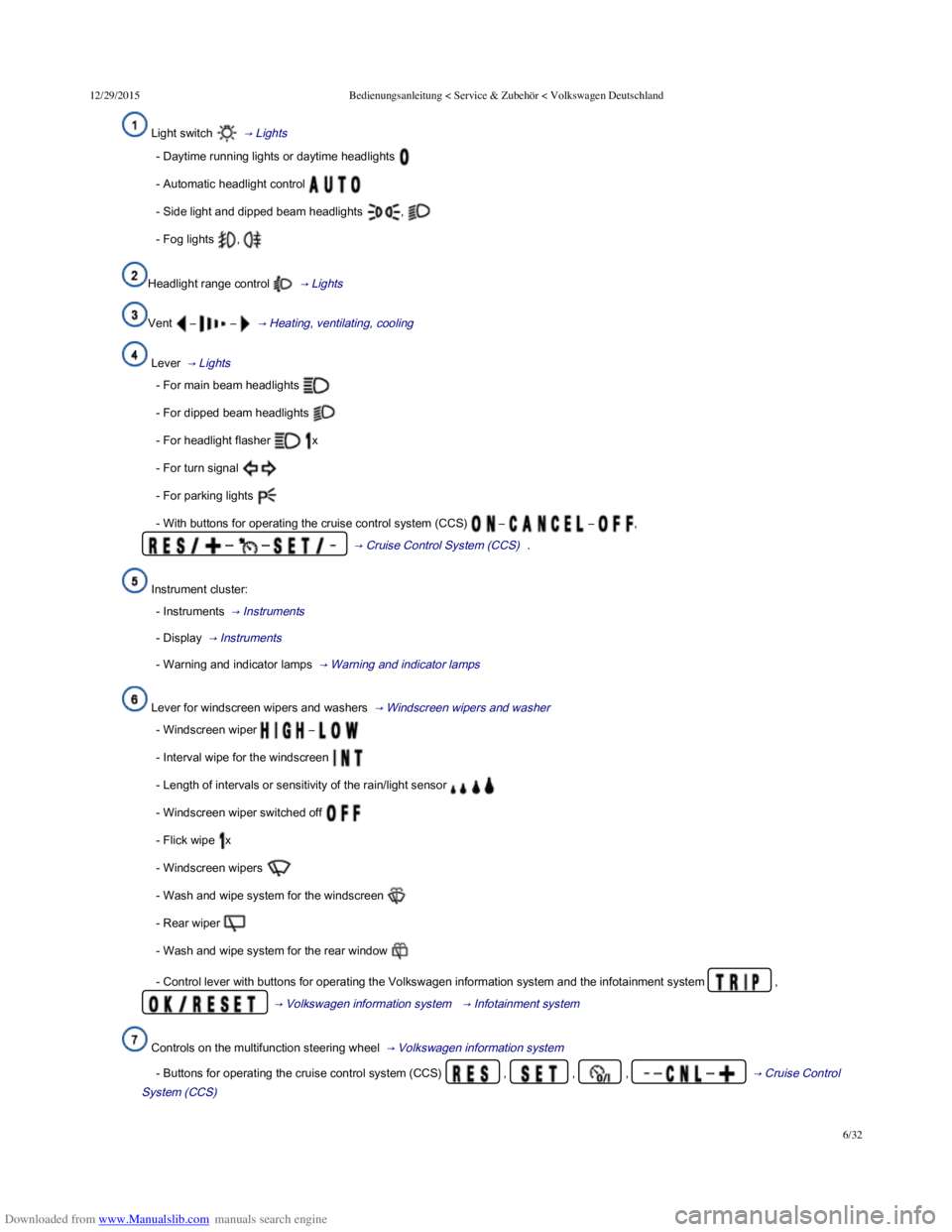
Light switch → Lights
- Daytime running lights or daytime headlights
- Automatic headlight control
- Side light and dipped beam headlights ,
- Fog lights ,
Headlight range control → Lights
Vent – – → Heating, ventilating, cooling
Lever → Lights
- For main beam headlights
- For dipped beam headlights
- For headlight flasher x
- For turn signal
- For parking lights
- With buttons for operating the cruise control system (CCS) – – ,
– – → Cruise Control System (CCS) .
Instrument cluster:
- Instruments → Instruments
- Display → Instruments
- Warning and indicator lamps → Warning and indicator lamps
Lever for windscreen wipers and washers → Windscreen wipers and washer
- Windscreen wiper –
- Interval wipe for the windscreen
- Length of intervals or sensitivity of the rain/light sensor
- Windscreen wiper switched off
- Flick wipe x
- Windscreen wipers
- Wash and wipe system for the windscreen
- Rear wiper
- Wash and wipe system for the rear window
- Control lever with buttons for operating the Volkswagen information system and the infotainment system ,
→ Volkswagen information system → Infotainment system
Controls on the multifunction steering wheel → Volkswagen information system
- Buttons for operating the cruise control system (CCS) , , , – – → Cruise Control
System (CCS)
Page 11 of 100
Downloaded from www.Manualslib.com manuals search engine 12/29/2015Bedienungsanleitung < Service & Zubehör < Volkswagen Deutschland
8/32
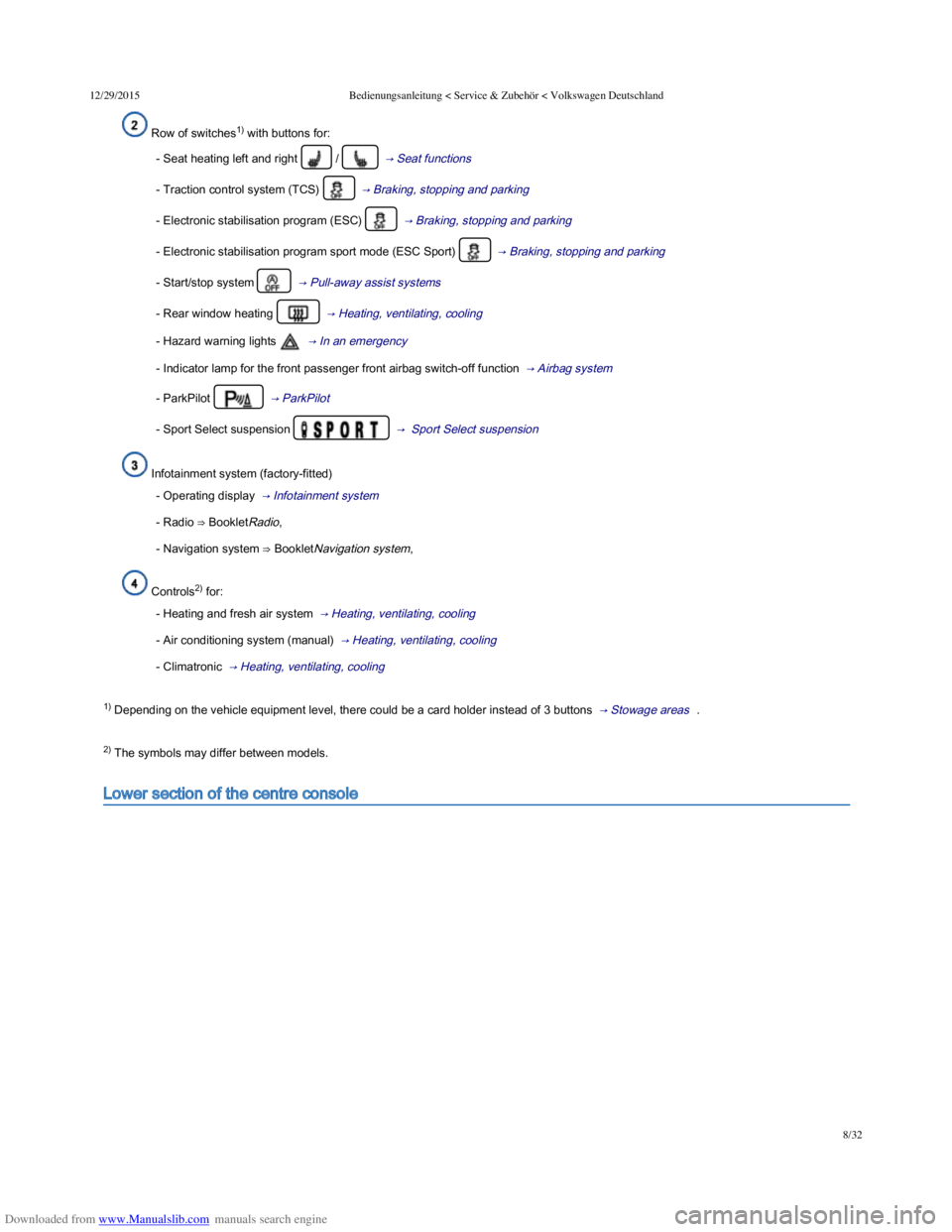
Row of switches1) with buttons for:
- Seat heating left and right / → Seat functions
- Traction control system (TCS) → Braking, stopping and parking
- Electronic stabilisation program (ESC) → Braking, stopping and parking
- Electronic stabilisation program sport mode (ESC Sport) → Braking, stopping and parking
- Start/stop system → Pull-away assist systems
- Rear window heating → Heating, ventilating, cooling
- Hazard warning lights → In an emergency
- Indicator lamp for the front passenger front airbag switch-off function → Airbag system
- ParkPilot → ParkPilot
- Sport Select suspension → Sport Select suspension
Infotainment system (factory-fitted)
- Operating display → Infotainment system
- Radio ⇒ BookletRadio,
- Navigation system ⇒ BookletNavigation system,
Controls2) for:
- Heating and fresh air system → Heating, ventilating, cooling
- Air conditioning system (manual) → Heating, ventilating, cooling
- Climatronic → Heating, ventilating, cooling
1) Depending on the vehicle equipment level, there could be a card holder instead of 3 buttons → Stowage areas .
2) The symbols may differ between models.
Lower section of the centre console
Page 13 of 100
Downloaded from www.Manualslib.com manuals search engine 12/29/2015Bedienungsanleitung < Service & Zubehör < Volkswagen Deutschland
10/32
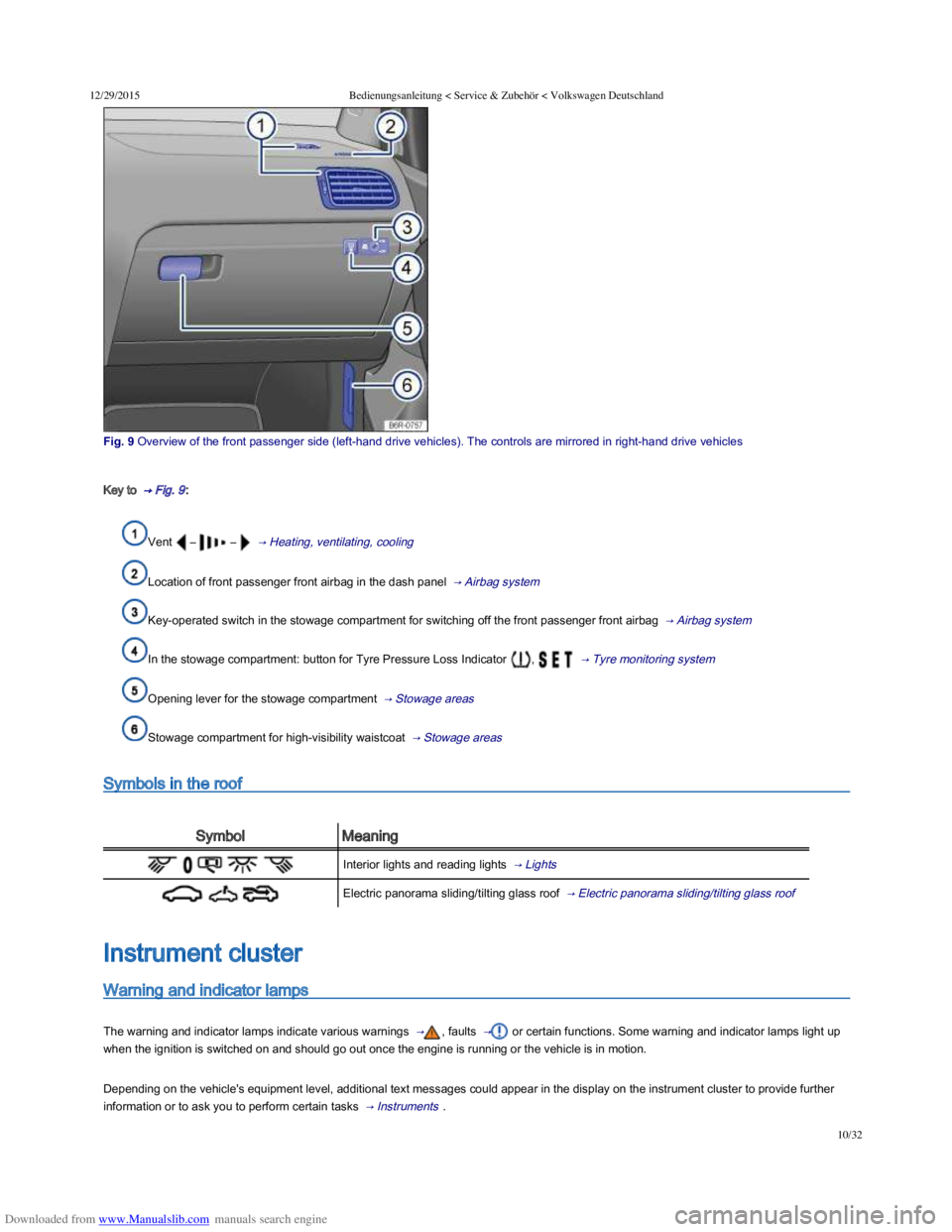
Fig. 9 Overview of the front passenger side (lefthand drive vehicles). The controls are mirrored in righthand drive vehicles
Key to → Fig. 9 :
Vent – – → Heating, ventilating, cooling
Location of front passenger front airbag in the dash panel → Airbag system
Key-operated switch in the stowage compartment for switching off the front passenger front airbag → Airbag system
In the stowage compartment: button for Tyre Pressure Loss Indicator , → Tyre monitoring system
Opening lever for the stowage compartment → Stowage areas
Stowage compartment for high-visibility waistcoat → Stowage areas
Symbols in the roof
SymbolMeaning
Interior lights and reading lights → Lights
Electric panorama sliding/tilting glass roof → Electric panorama sliding/tilting glass roof
Warning and indicator lamps
The warning and indicator lamps indicate various warnings → , faults → or certain functions. Some warning and indicator lamps light up
when the ignition is switched on and should go out once the engine is running or the vehicle is in motion.
Depending on the vehicle's equipment level, additional text messages could appear in the display on the instrument cluster to provide further
information or to ask you to perform certain tasks → Instruments .
Instrument cluster
Page 14 of 100
Downloaded from www.Manualslib.com manuals search engine 12/29/2015Bedienungsanleitung < Service & Zubehör < Volkswagen Deutschland
11/32
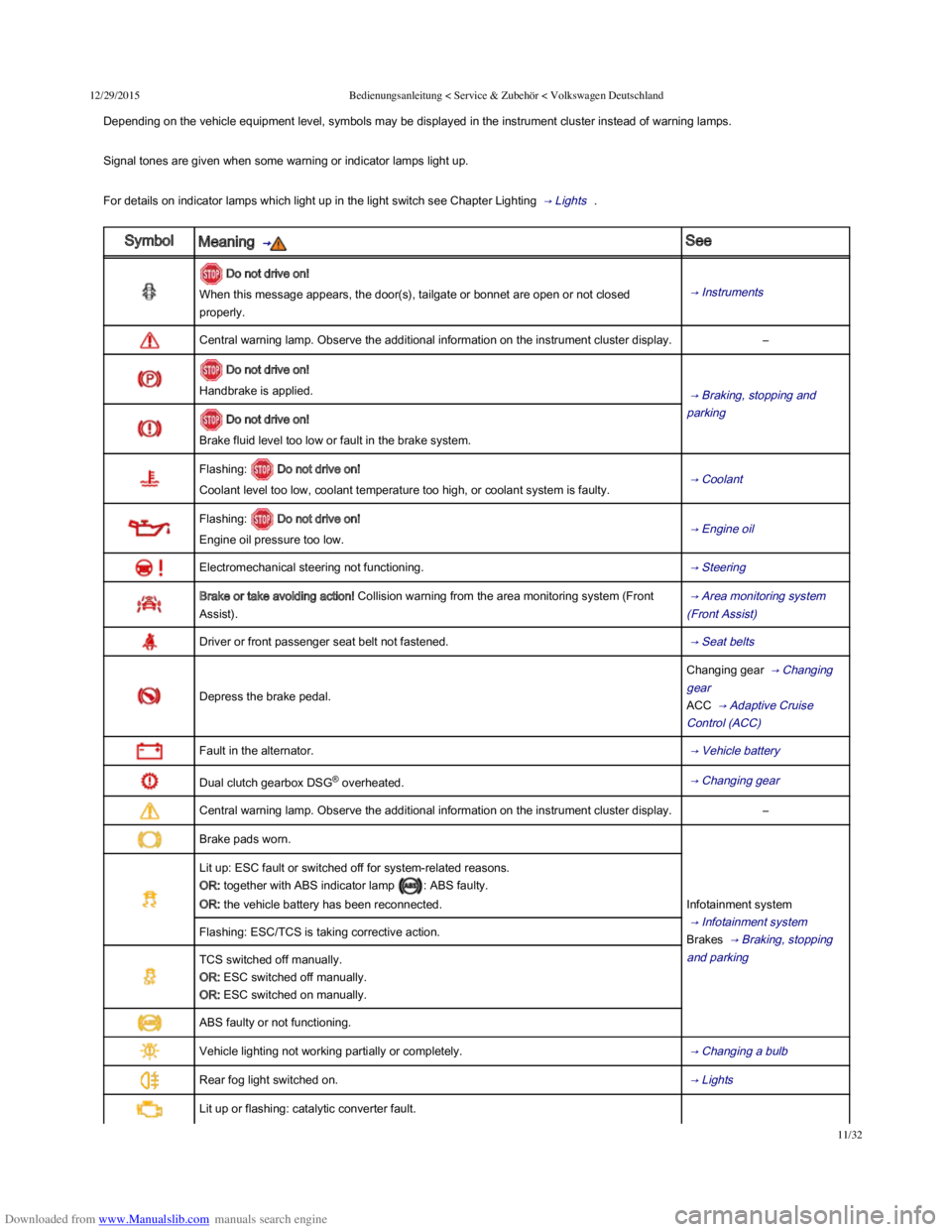
Depending on the vehicle equipment level, symbols may be displayed in the instrument cluster instead of warning lamps.
Signal tones are given when some warning or indicator lamps light up.
For details on indicator lamps which light up in the light switch see Chapter Lighting → Lights .
SymbolMeaning → See
Do not drive on!
When this message appears, the door(s), tailgate or bonnet are open or not closed
properly.
→ Instruments
Central warning lamp. Observe the additional information on the instrument cluster display.–
Do not drive on!
Handbrake is applied. → Braking, stopping and
parking Do not drive on!
Brake fluid level too low or fault in the brake system.
Flashing: Do not drive on!
Coolant level too low, coolant temperature too high, or coolant system is faulty. → Coolant
Flashing: Do not drive on!
Engine oil pressure too low. → Engine oil
Electromechanical steering not functioning. → Steering
Brake or take avoiding action! Collision warning from the area monitoring system (Front
Assist).
→ Area monitoring system
(Front Assist)
Driver or front passenger seat belt not fastened. → Seat belts
Depress the brake pedal.
Changing gear → Changing
gear
ACC → Adaptive Cruise
Control (ACC)
Fault in the alternator. → Vehicle battery
Dual clutch gearbox DSG® overheated. → Changing gear
Central warning lamp. Observe the additional information on the instrument cluster display.–
Brake pads worn.
Infotainment system
→ Infotainment system
Brakes → Braking, stopping
and parking
Lit up: ESC fault or switched off for system-related reasons.
OR: together with ABS indicator lamp : ABS faulty.
OR: the vehicle battery has been reconnected.
Flashing: ESC/TCS is taking corrective action.
TCS switched off manually.
OR: ESC switched off manually.
OR: ESC switched on manually.
ABS faulty or not functioning.
Vehicle lighting not working partially or completely. → Changing a bulb
Rear fog light switched on. → Lights
Lit up or flashing: catalytic converter fault.
Starting the engine → Starting
Page 15 of 100
Downloaded from www.Manualslib.com manuals search engine 12/29/2015Bedienungsanleitung < Service & Zubehör < Volkswagen Deutschland
12/32
Starting the engine → Starting
and stopping the engine
Engine management, exhaust
gas purification → Engine
management system and
exhaust purification system
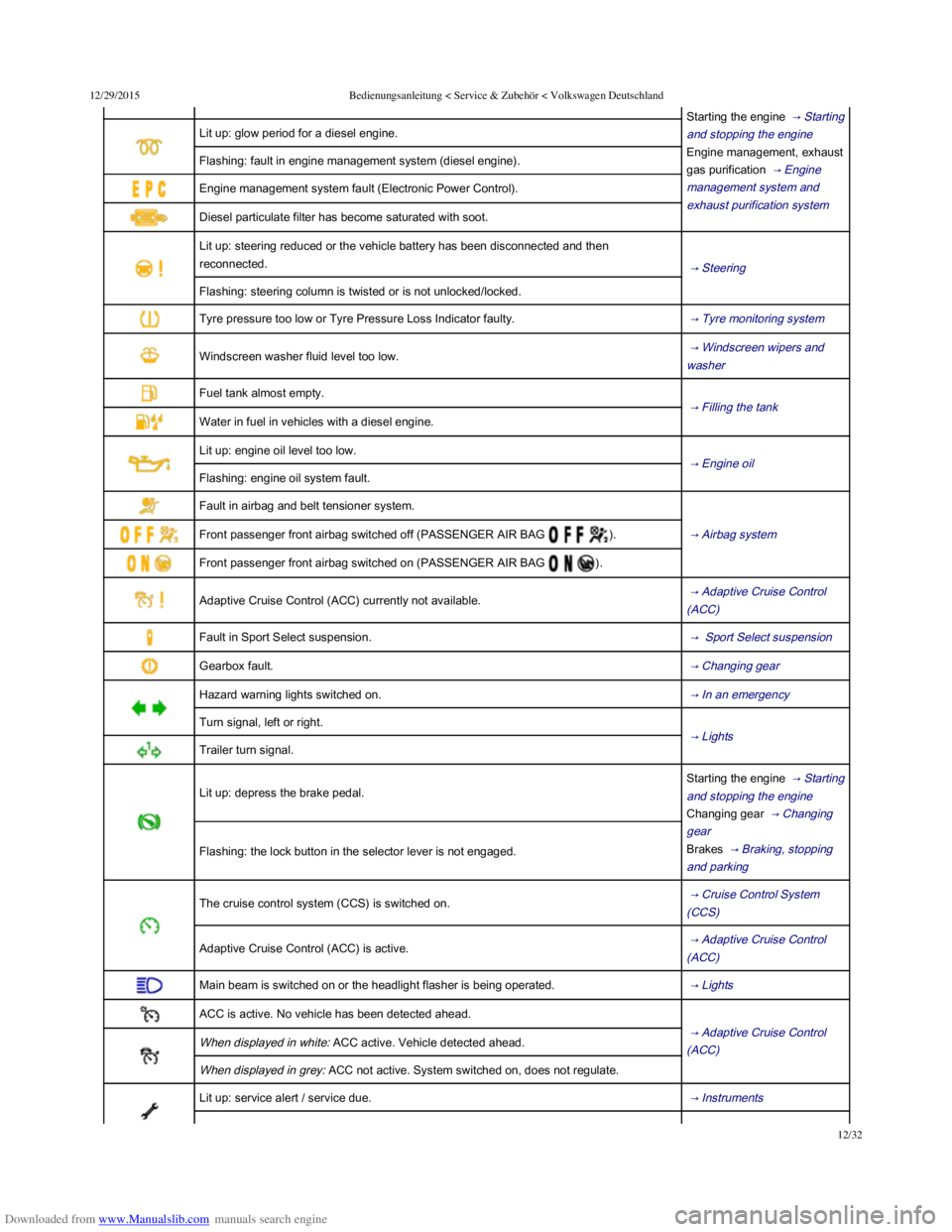
Lit up: glow period for a diesel engine.
Flashing: fault in engine management system (diesel engine).
Engine management system fault (Electronic Power Control).
Diesel particulate filter has become saturated with soot.
Lit up: steering reduced or the vehicle battery has been disconnected and then
reconnected. → Steering
Flashing: steering column is twisted or is not unlocked/locked.
Tyre pressure too low or Tyre Pressure Loss Indicator faulty. → Tyre monitoring system
Windscreen washer fluid level too low. → Windscreen wipers and
washer
Fuel tank almost empty.
→ Filling the tank
Water in fuel in vehicles with a diesel engine.
Lit up: engine oil level too low.
→ Engine oil
Flashing: engine oil system fault.
Fault in airbag and belt tensioner system.
→ Airbag system Front passenger front airbag switched off (PASSENGER AIR BAG ).
Front passenger front airbag switched on (PASSENGER AIR BAG ).
Adaptive Cruise Control (ACC) currently not available. → Adaptive Cruise Control
(ACC)
Fault in Sport Select suspension. → Sport Select suspension
Gearbox fault. → Changing gear
Hazard warning lights switched on. → In an emergency
Turn signal, left or right.
→ Lights
Trailer turn signal.
Lit up: depress the brake pedal.
Starting the engine → Starting
and stopping the engine
Changing gear → Changing
gear
Brakes → Braking, stopping
and parking
Flashing: the lock button in the selector lever is not engaged.
The cruise control system (CCS) is switched on. → Cruise Control System
(CCS)
Adaptive Cruise Control (ACC) is active. → Adaptive Cruise Control
(ACC)
Main beam is switched on or the headlight flasher is being operated. → Lights
ACC is active. No vehicle has been detected ahead.
→ Adaptive Cruise Control
(ACC) When displayed in white: ACC active. Vehicle detected ahead.
When displayed in grey: ACC not active. System switched on, does not regulate.
Lit up: service alert / service due. → Instruments
→ Changing gear
Page 16 of 100
Downloaded from www.Manualslib.com manuals search engine 12/29/2015Bedienungsanleitung < Service & Zubehör < Volkswagen Deutschland
13/32
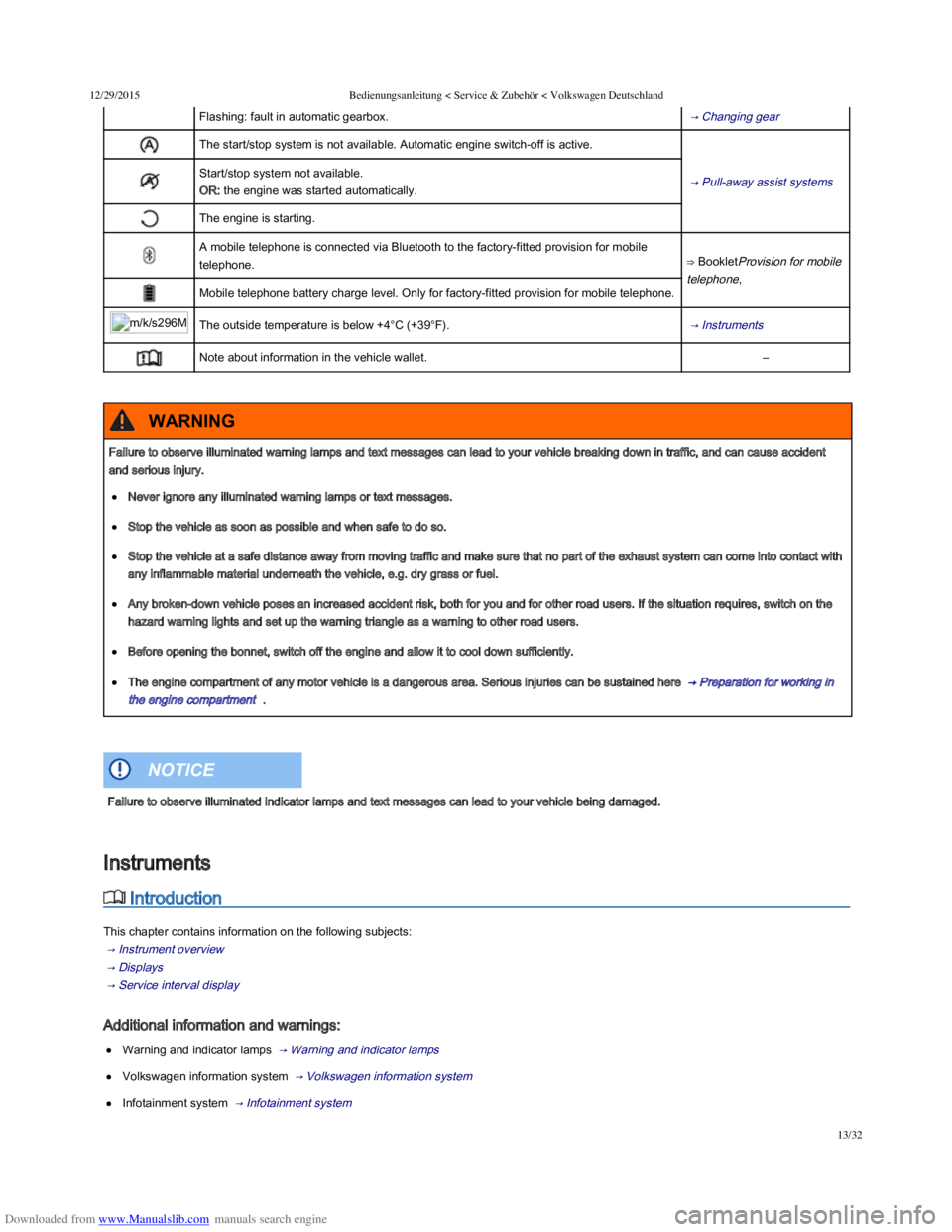
Flashing: fault in automatic gearbox. → Changing gear
The start/stop system is not available. Automatic engine switch-off is active.
→ Pull-away assist systems Start/stop system not available.
OR: the engine was started automatically.
The engine is starting.
A mobile telephone is connected via Bluetooth to the factory-fitted provision for mobile
telephone.⇒ BookletProvision for mobile
telephone,
Mobile telephone battery charge level. Only for factory-fitted provision for mobile telephone.
m/k/s296MKThe outside temperature is below +4°C (+39°F). → Instruments
Note about information in the vehicle wallet.–
Introduction
This chapter contains information on the following subjects:
→ Instrument overview
→ Displays
→ Service interval display
Additional information and warnings:
Warning and indicator lamps → Warning and indicator lamps
Volkswagen information system → Volkswagen information system
Infotainment system → Infotainment system
Failure to observe illuminated warning lamps and text messages can lead to your vehicle breaking down in traffic, and can cause accident
and serious injury.
Never ignore any illuminated warning lamps or text messages.
Stop the vehicle as soon as possible and when safe to do so.
Stop the vehicle at a safe distance away from moving traffic and make sure that no part of the exhaust system can come into contact with
any inflammable material underneath the vehicle, e.g. dry grass or fuel.
Any broken-down vehicle poses an increased accident risk, both for you and for other road users. If the situation requires, switch on the
hazard warning lights and set up the warning triangle as a warning to other road users.
Before opening the bonnet, switch off the engine and allow it to cool down sufficiently.
The engine compartment of any motor vehicle is a dangerous area. Serious injuries can be sustained here → Preparation for working in
the engine compartment .
WARNING
Failure to observe illuminated indicator lamps and text messages can lead to your vehicle being damaged.
NOTICE
Instruments
Page 17 of 100
Downloaded from www.Manualslib.com manuals search engine 12/29/2015Bedienungsanleitung < Service & Zubehör < Volkswagen Deutschland
14/32
Selected gear display (for vehicles with an automatic gearbox) → Changing gear
Information on service intervals ⇒ BookletService schedule,
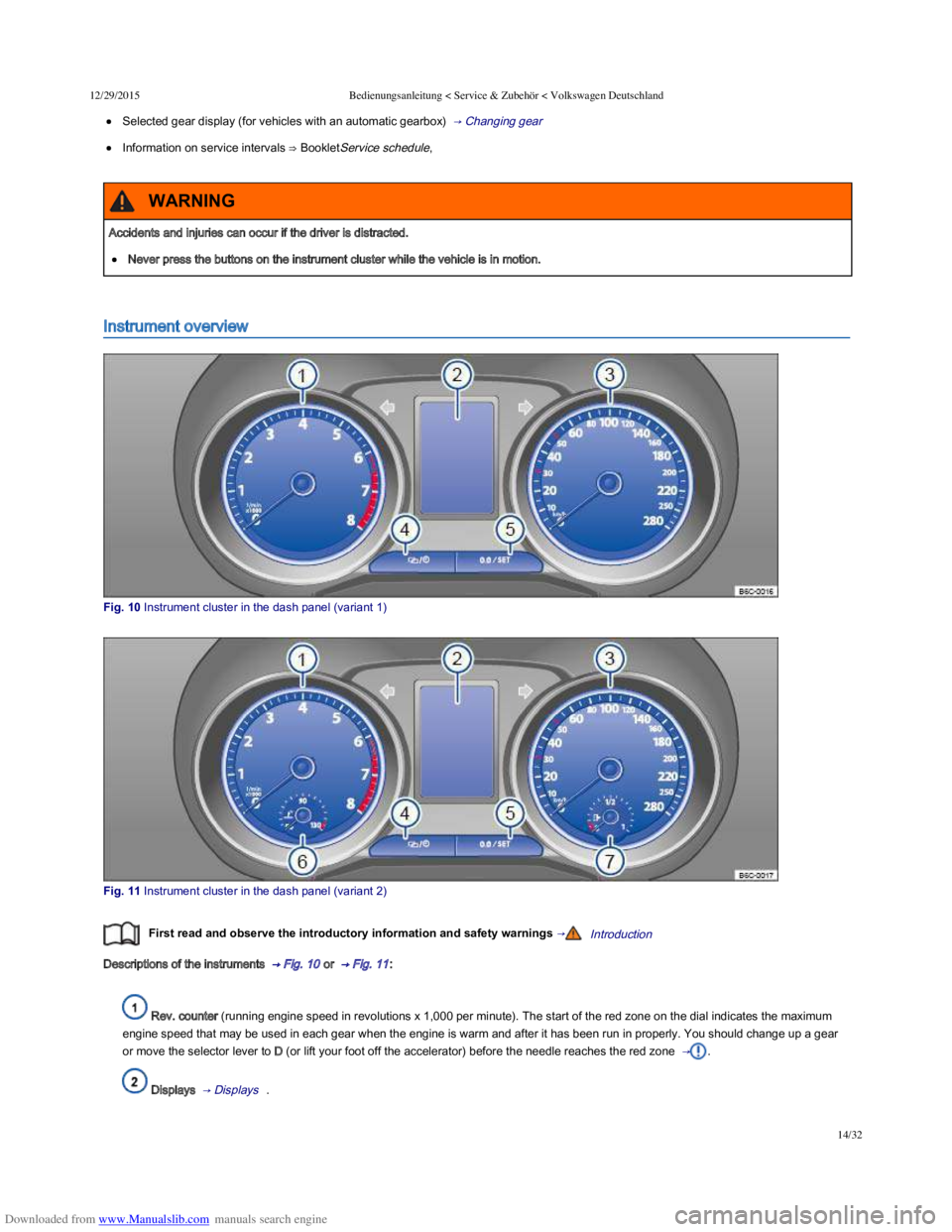
Instrument overview
Fig. 10 Instrument cluster in the dash panel (variant 1)
Fig. 11 Instrument cluster in the dash panel (variant 2)
First read and observe the introductory information and safety warnings →Introduction
Descriptions of the instruments → Fig. 10 or → Fig. 11 :
Rev. counter (running engine speed in revolutions x 1,000 per minute). The start of the red zone on the dial indicates the maximum
engine speed that may be used in each gear when the engine is warm and after it has been run in properly. You should change up a gear
or move the selector lever to D (or lift your foot off the accelerator) before the needle reaches the red zone → .
Displays → Displays .
Accidents and injuries can occur if the driver is distracted.
Never press the buttons on the instrument cluster while the vehicle is in motion.
WARNING
Page 18 of 100
Downloaded from www.Manualslib.com manuals search engine 12/29/2015Bedienungsanleitung < Service & Zubehör < Volkswagen Deutschland
15/32
Speedometer
Setting button for the clock → Time 1).
Reset button for the trip recorder display (trip).
- Press the button to reset to 0.
Coolant temperature display → Coolant .
Fuel gauge → Filling the tank .
Changing up a gear early will help to save fuel and minimise engine noise.
The fuel gauge is located in the lower field of the display → Fig. 10 ② or in the speedometer → Fig. 11 ⑦ .
1) In some versions of the vehicle, it may be possible to adjust the clock settings using the Settings menu on the instrument cluster display
→ Volkswagen information system .
Displays
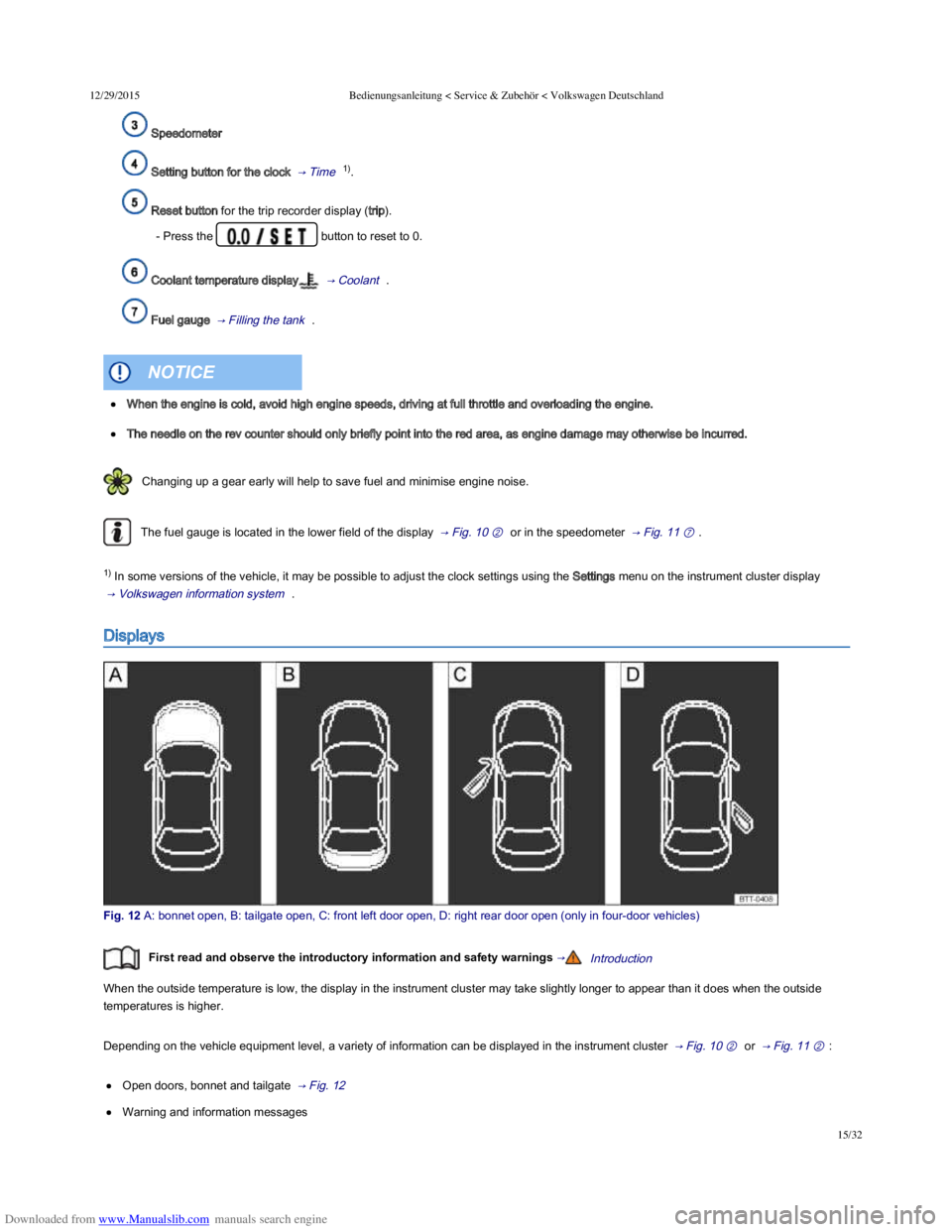
Fig. 12 A: bonnet open, B: tailgate open, C: front left door open, D: right rear door open (only in fourdoor vehicles)
First read and observe the introductory information and safety warnings →Introduction
When the outside temperature is low, the display in the instrument cluster may take slightly longer to appear than it does when the outside
temperatures is higher.
Depending on the vehicle equipment level, a variety of information can be displayed in the instrument cluster → Fig. 10 ② or → Fig. 11 ② :
Open doors, bonnet and tailgate → Fig. 12
Warning and information messages
When the engine is cold, avoid high engine speeds, driving at full throttle and overloading the engine.
The needle on the rev counter should only briefly point into the red area, as engine damage may otherwise be incurred.
NOTICE
Page 19 of 100
Downloaded from www.Manualslib.com manuals search engine 12/29/2015Bedienungsanleitung < Service & Zubehör < Volkswagen Deutschland
16/32
Mileage displays
Time
Radio and navigation information ⇒ BookletRadio, or ⇒ BookletNavigation system,
Telephone information ⇒ BookletNavigation system, or ⇒ BookletRadio/navigation system,
Outside temperature
Compass display
Selector lever positions → Changing gear
Gear change indicator → Changing gear
Driving data display (multifunction display (MFD)) and menus for various settings → Volkswagen information system
Service interval display → Service interval display
Speed warning for winter tyres
Start/stop system status display → Pull-away assist systems
Status display for active cylinder management (ACT®) → Driving with respect for the environment
Engine code
Fuel gauge → Filling the tank
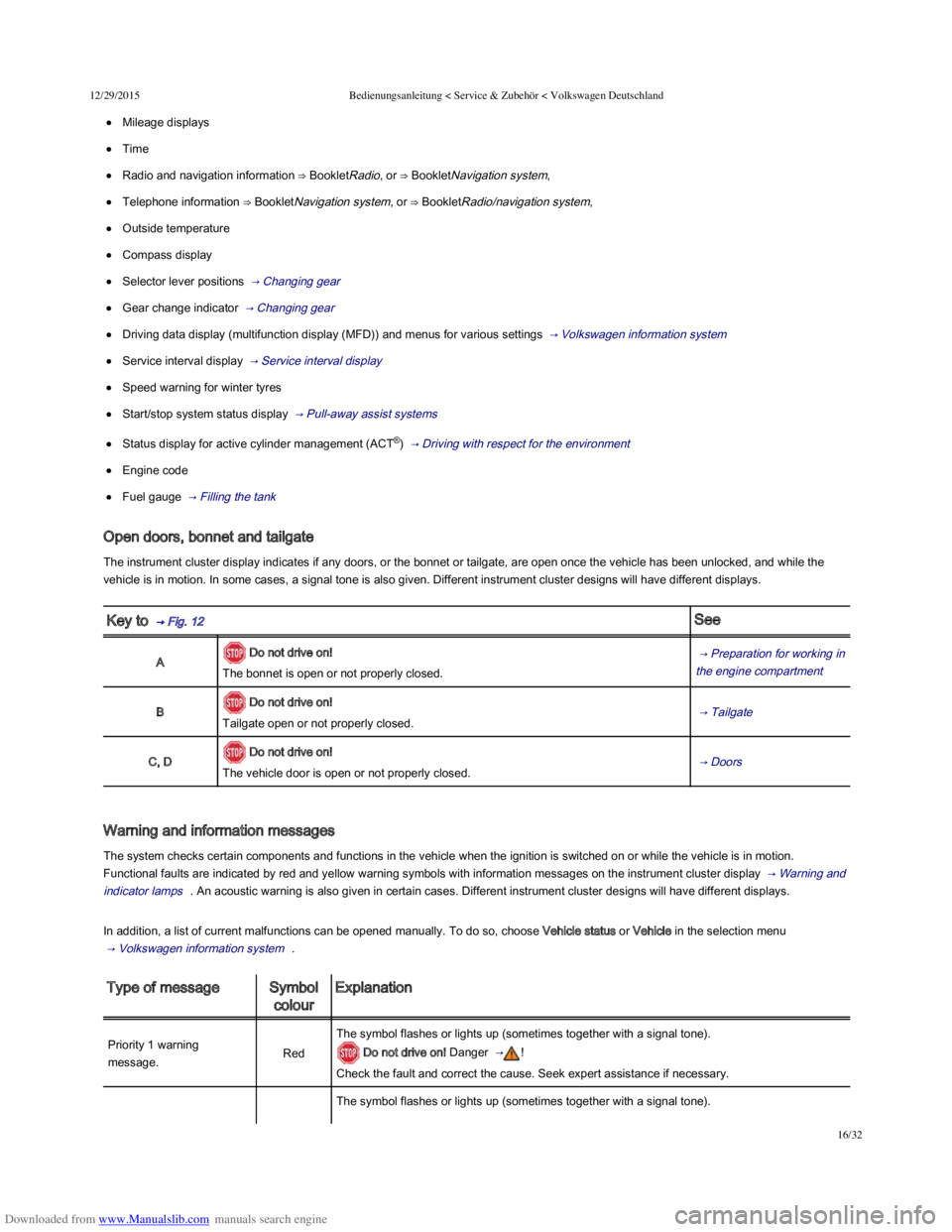
Open doors, bonnet and tailgate
The instrument cluster display indicates if any doors, or the bonnet or tailgate, are open once the vehicle has been unlocked, and while the
vehicle is in motion. In some cases, a signal tone is also given. Different instrument cluster designs will have different displays.
Key to → Fig. 12 See
A Do not drive on!
The bonnet is open or not properly closed.
→ Preparation for working in
the engine compartment
B Do not drive on!
Tailgate open or not properly closed. → Tailgate
C, D Do not drive on!
The vehicle door is open or not properly closed. → Doors
Warning and information messages
The system checks certain components and functions in the vehicle when the ignition is switched on or while the vehicle is in motion.
Functional faults are indicated by red and yellow warning symbols with information messages on the instrument cluster display → Warning and
indicator lamps . An acoustic warning is also given in certain cases. Different instrument cluster designs will have different displays.
In addition, a list of current malfunctions can be opened manually. To do so, choose Vehicle status or Vehicle in the selection menu
→ Volkswagen information system .
Type of messageSymbol
colour
Explanation
Priority 1 warning
message.Red
The symbol flashes or lights up (sometimes together with a signal tone).
Do not drive on! Danger → !
Check the fault and correct the cause. Seek expert assistance if necessary.
The symbol flashes or lights up (sometimes together with a signal tone).