Manual lock VOLKSWAGEN T-ROC 2019 User Guide
[x] Cancel search | Manufacturer: VOLKSWAGEN, Model Year: 2019, Model line: T-ROC, Model: VOLKSWAGEN T-ROC 2019Pages: 502, PDF Size: 8.58 MB
Page 108 of 502
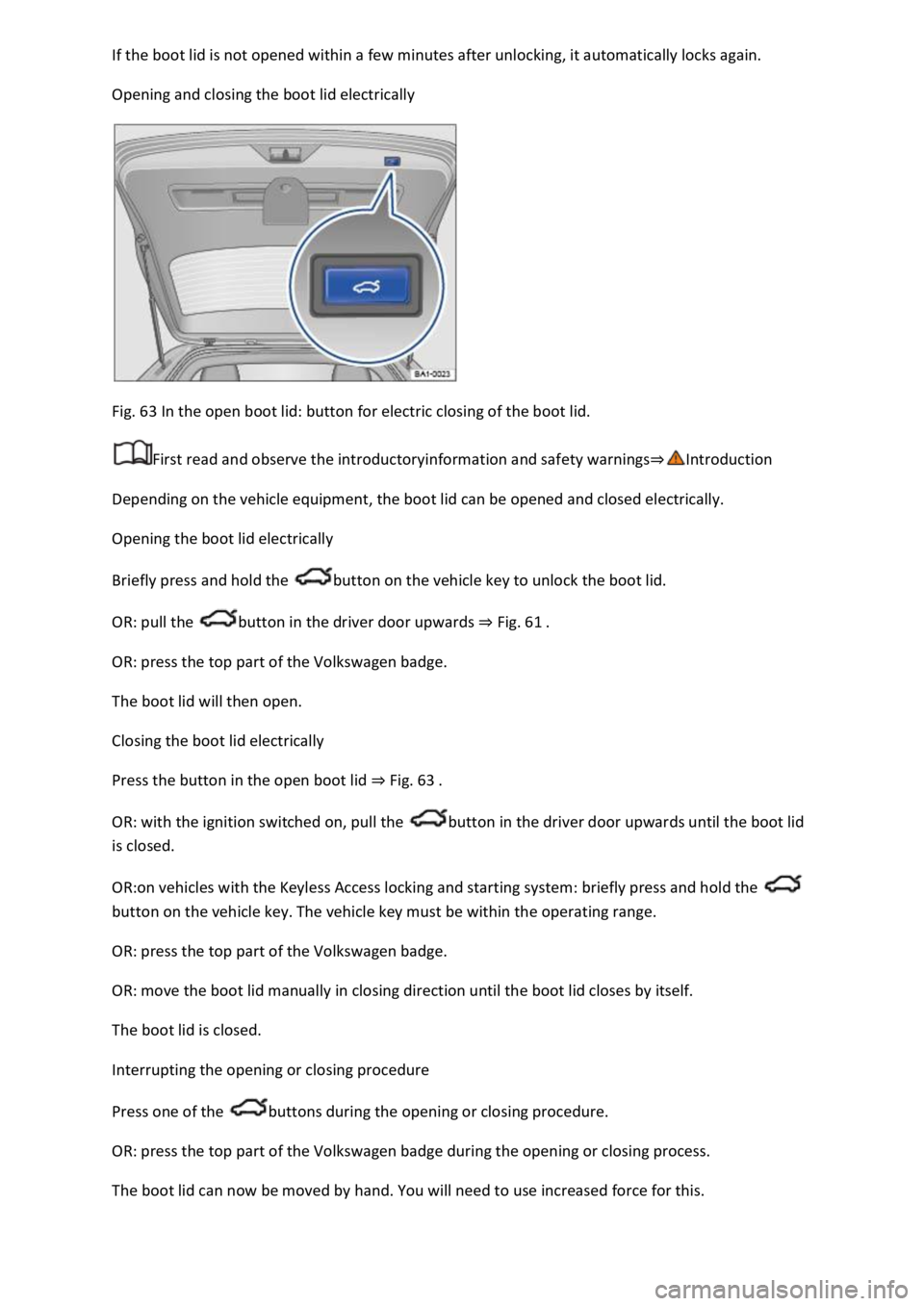
Opening and closing the boot lid electrically
Fig. 63 In the open boot lid: button for electric closing of the boot lid.
First read and observe the introductoryinformation and safety warnings
Depending on the vehicle equipment, the boot lid can be opened and closed electrically.
Opening the boot lid electrically
Briefly press and hold the button on the vehicle key to unlock the boot lid.
OR: pull the button in the driver door upwards Fig. 61
OR: press the top part of the Volkswagen badge.
The boot lid will then open.
Closing the boot lid electrically
Press the button in the open boot lid Fig. 63
OR: with the ignition switched on, pull the button in the driver door upwards until the boot lid
is closed.
OR:on vehicles with the Keyless Access locking and starting system: briefly press and hold the
button on the vehicle key. The vehicle key must be within the operating range.
OR: press the top part of the Volkswagen badge.
OR: move the boot lid manually in closing direction until the boot lid closes by itself.
The boot lid is closed.
Interrupting the opening or closing procedure
Press one of the buttons during the opening or closing procedure.
OR: press the top part of the Volkswagen badge during the opening or closing process.
The boot lid can now be moved by hand. You will need to use increased force for this.
Page 109 of 502
button again moves the boot lid back into the starting position.
Signal tones
If the boot lid is opened or closed from the vehicle interior or using the vehicle key, signal tones will
sound.
Changing and storing the opening angle
If the area behind or above the vehicle is smaller than the path of the boot lid, the opening angle of
the boot lid can be changed.
Stop the opening procedure at the desired open position (at least half open).
In the boot lid, press and hold the button Fig. 63until the hazard warning lights flash.
The changed opening angle will be stored.
The hazard warning lights flash and an acoustic signal sounds to confirm that the changed opening
angle has been stored.
Resetting and storing the opening angle
The opening angle must be reset and stored again in order for the boot lid to open fully again.
Push the opened boot lid up as far as it will go by hand. You will need to use increased force for this.
In the boot lid, press and hold the button Fig. 63until the hazard warning lights flash.
The opening angle will be reset.
The hazard warning lights flash and an acoustic signal sounds to confirm that the opening angle has
been reset.
NOTICE
Before opening or closing the boot lid, please check that there is enough space to open and close it,
for example when in a garage.
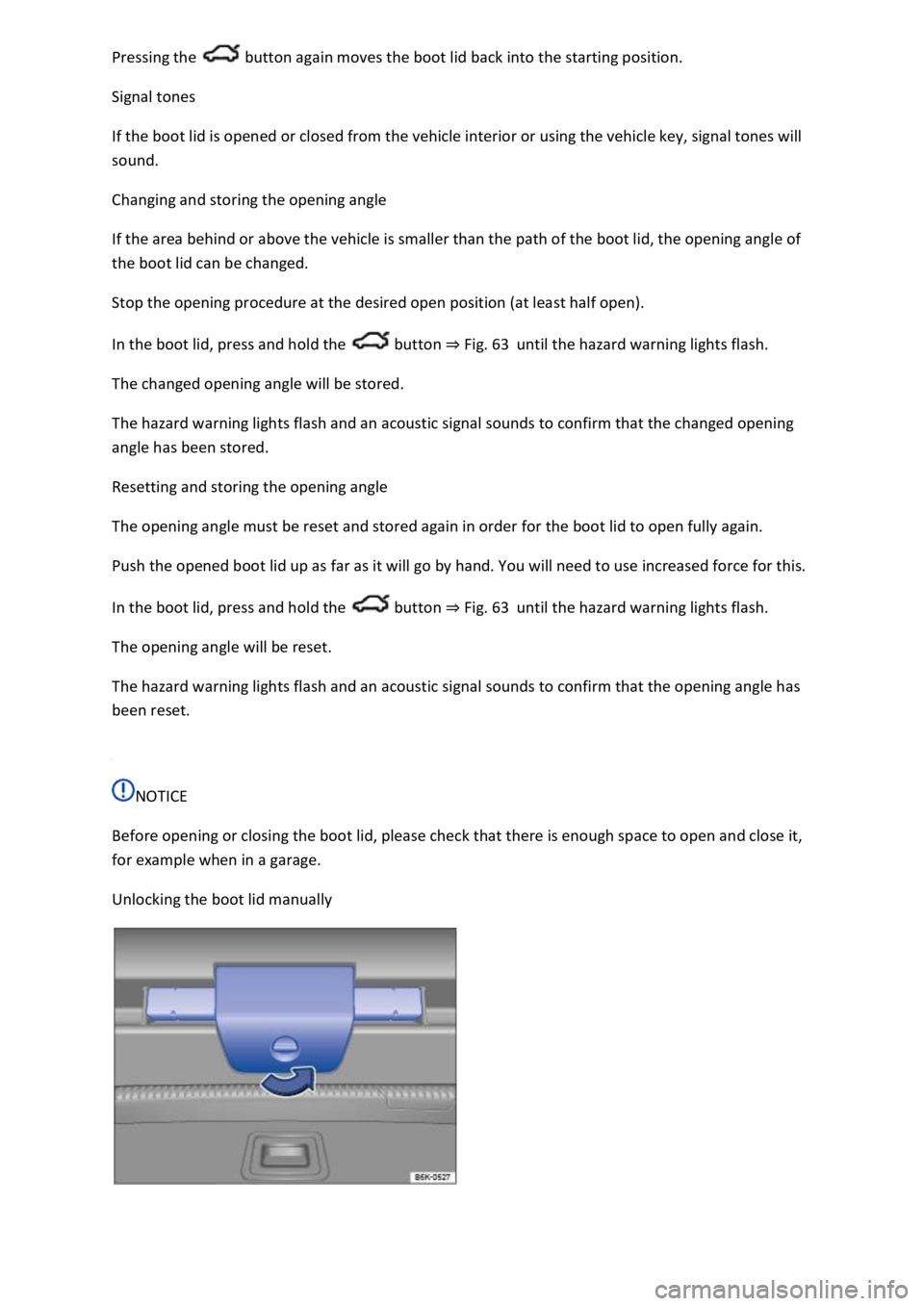
Unlocking the boot lid manually
Page 110 of 502
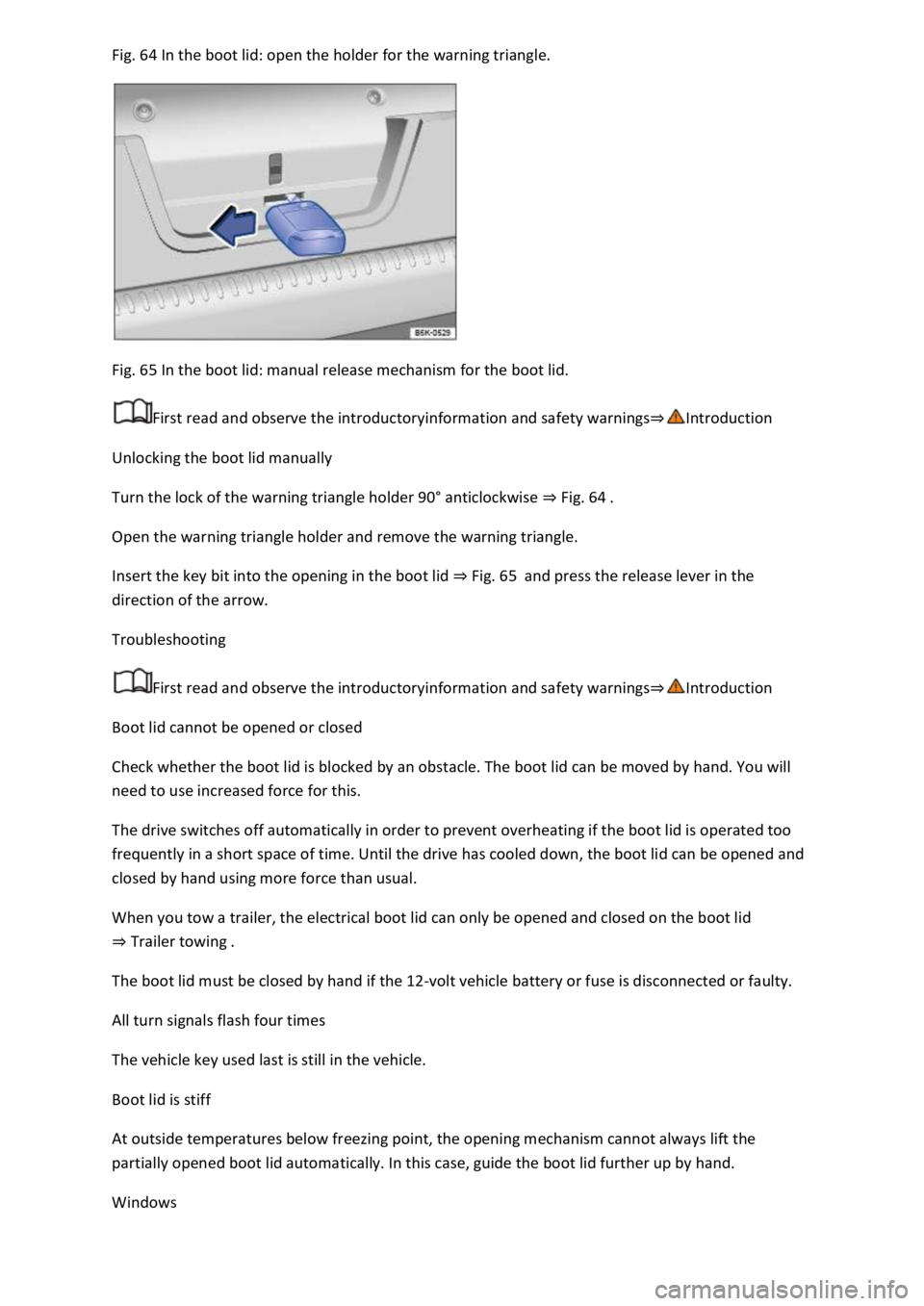
64 In the boot lid: open the holder for the warning triangle.
Fig. 65 In the boot lid: manual release mechanism for the boot lid.
First read and observe the introductoryinformation and safety warnings
Unlocking the boot lid manually
Turn the lock of the warning triangle holder 90
Page 131 of 502
tion:
The lights are switched off.Leaving Home function (orientation lighting) can be switched on
Coming Home and Leaving Home function (orientation lighting)Side lights or continuous
parking light on both sides of the vehicle switched on Switching the parking lights on and off
symbol in the light switch lights up green.Dipped beam is switched off the side lights will stay
on as long as the vehicle key is in the ignition lock or, in vehicles with Keyless Access, the driver door
is closed.
Daytime running lights
The daytime running lights (dependent on equipment level) can increase the visibility of your vehicle
in traffic during the day.
The daytime running lights are switched on every time the ignition is switched on when the light
switch is in position , or (when brightness is detected).
The daytime running lights cannot be switched on or off manually.
WARNING
Accidents and serious injuries can occur if the road is not sufficiently illuminated and other road
users have difficulty seeing the vehicle, or cannot see it at all.
The light assist systems are designed only to provide support; the driver is responsible for the
correct vehicle lights being switched on.
Always switch on the dipped beam headlights if it is dark, raining or visibility is poor.
WARNING
The side lights or daytime running lights are not bright enough to illuminate the road ahead and to
ensure that other road users are able to see you.
Always switch on the dipped beam headlights if it is dark, raining or visibility is poor.
The tail light clusters are not switched on with the daytime running lights. If the tail light clusters are
not switched on, the vehicle may not be visible to other road users if it is dark, raining, or if visibility
is poor.
WARNING
The automatic headlights ( ) switch dipped beam on and off only when there is a change in
the level of brightness.
Switch on dipped beam manually if required by the weather conditions, e.g. in fog.
Page 137 of 502

Lock the vehicle from the outside.
Automatic switch-off of side lights and parking lights
If the battery capacity is not sufficient for the side lights or parking light to remain switched on for
two hours, the 12-volt vehicle battery can be discharged to such an extent that it is no longer
possible to start the engine
In the case of standing times of more than two hours, the vehicle will detect a weak 12-volt vehicle
battery and switch off the side lights or parking light so that the engine can still be started.
WARNING
Accidents and serious injuries can occur if the vehicle is parked without sufficient illumination, as
other road users might have difficulty seeing the vehicle, or may not see it at all.
Always park the vehicle safely and with sufficient lighting. Observe any applicable local regulations.
If the vehicle lighting is required for several hours, switch on the right or left parking light if possible.
The illumination time of the parking light on one side is generally twice as long as for continuous
parking light on both sides of the vehicle.
Coming Home and Leaving Home function (orientation lighting)
The Coming Home and Leaving Home function lights up the area immediately surrounding the
vehicle when you get in or out of the vehicle in darkness.
Not in China: the Coming Home function is switched on manually. In contrast, the Leaving
Home function is controlled automatically by a rain/light sensor.
Only in China: the Coming Home and Leaving Home function is controlled automatically by a
rain/light sensor.
The switch-off delay can be adjusted and the function activated or deactivated in the Vehicle
settings menu in the Infotainment system Infotainment system controls and displays
Activating the Coming Home function
Not in China
Switch off the ignition.
Operate the headlight flasher for approximately one second.
The Coming Home lighting is switched on when the driver door is opened. The switch-off delay starts
when the last vehicle door or the boot lid has been closed.
Activating the Coming Home function
Page 154 of 502
WARNING
Stale air can quickly make the driver tired and affect their concentration, which in turn can cause
collisions, accidents and serious injuries.
Never switch off the blower or switch on the air recirculation mode for an extended period as this
prevents fresh air from entering the vehicle interior.
NOTICE
Food, medicine and other items that are sensitive to heat or cold could be either damaged or
rendered useless by the air flowing out of the vents.
Never leave food, medicines or other temperature-sensitive objects in front of the vents.
NOTICE
If the air conditioning system is not working, switch the air conditioning system off immediately and
have it checked by a qualified workshop. This can help to prevent secondary damage.
Some settings can be stored in the user accounts of the personalisation function and therefore
change automatically when the user account changes Personalisation
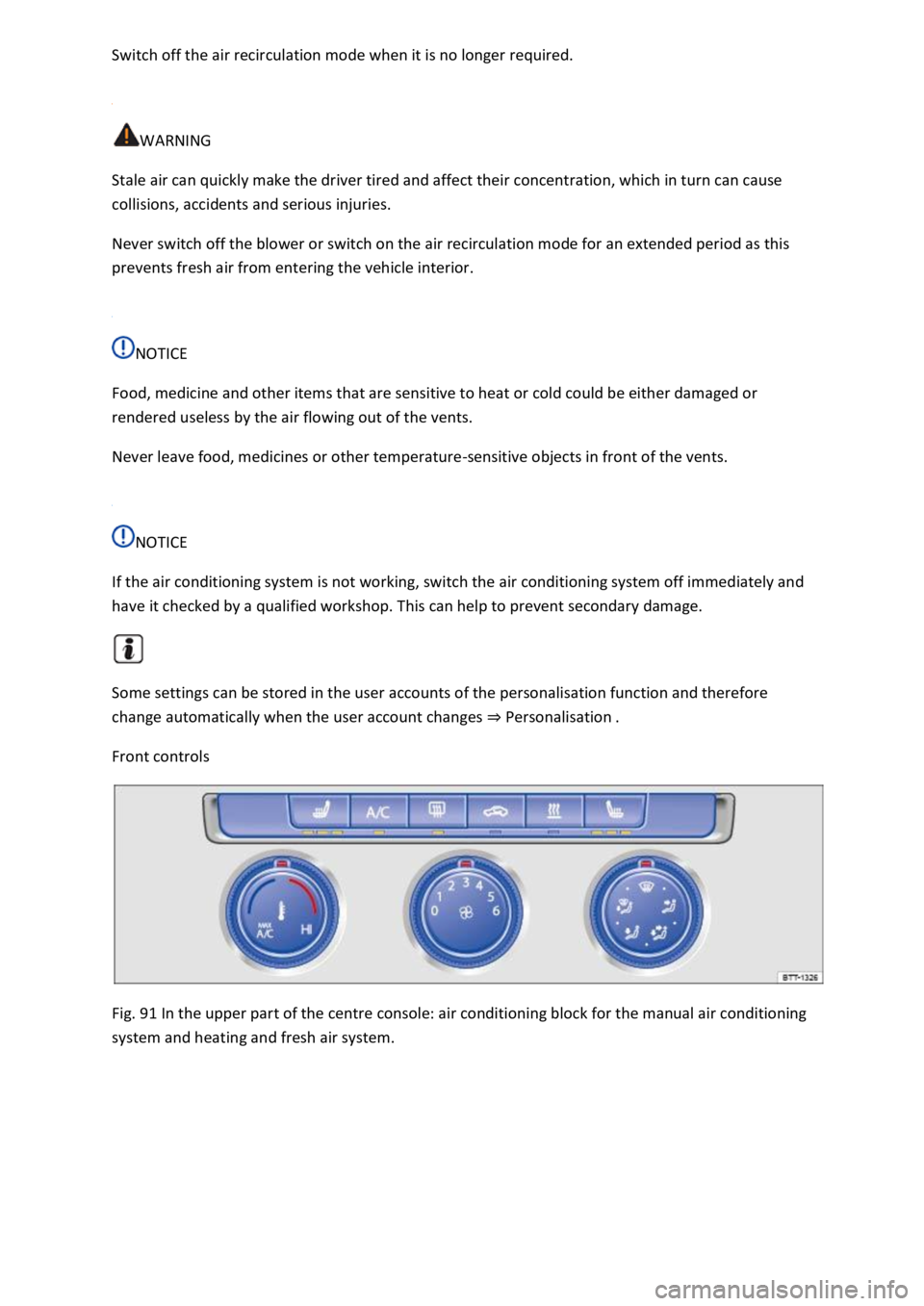
Front controls
Fig. 91 In the upper part of the centre console: air conditioning block for the manual air conditioning
system and heating and fresh air system.
Page 155 of 502
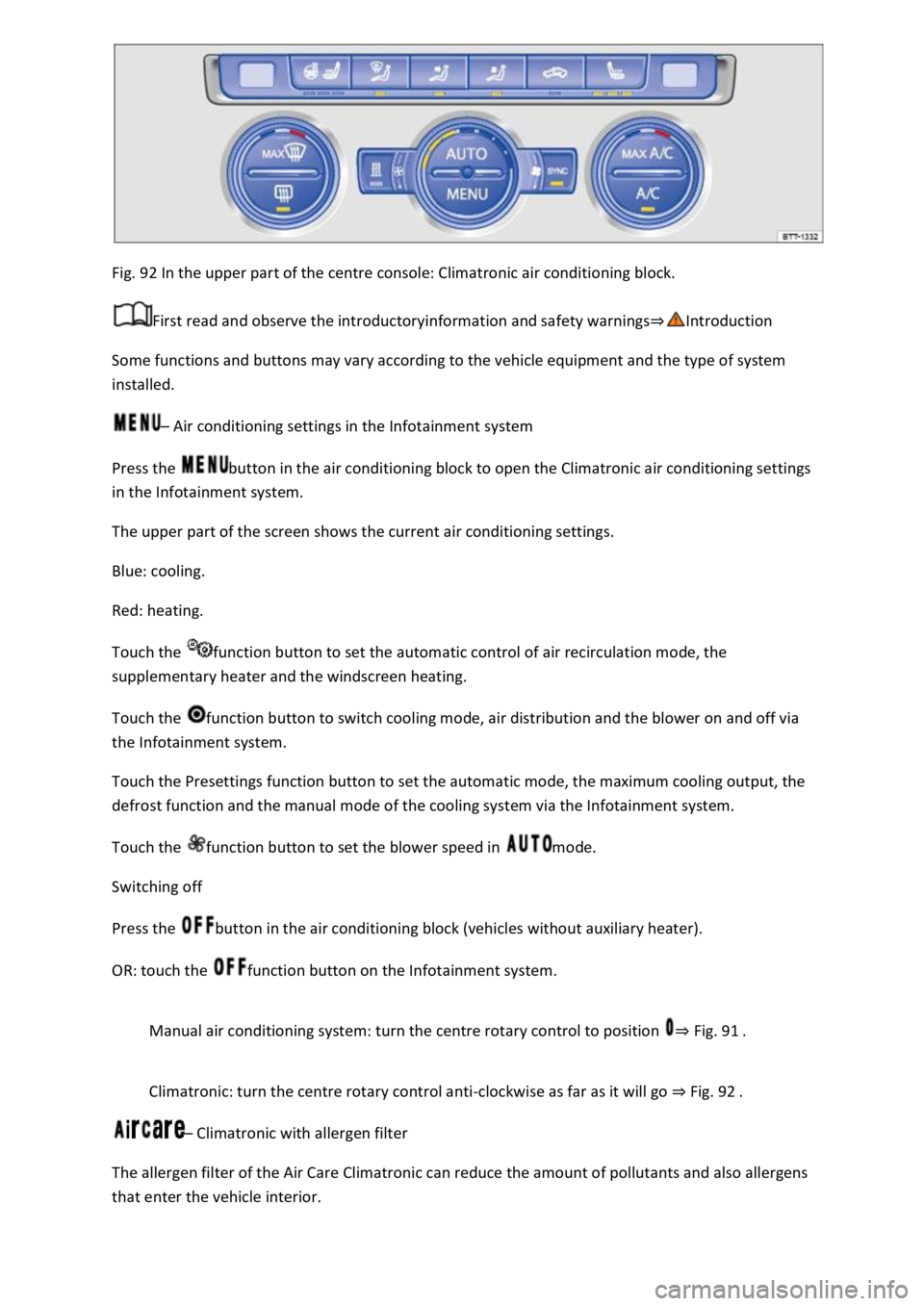
Fig. 92 In the upper part of the centre console: Climatronic air conditioning block.
First read and observe the introductoryinformation and safety warnings
Some functions and buttons may vary according to the vehicle equipment and the type of system
installed.
Air conditioning settings in the Infotainment system
Press the button in the air conditioning block to open the Climatronic air conditioning settings
in the Infotainment system.
The upper part of the screen shows the current air conditioning settings.
Blue: cooling.
Red: heating.
Touch the function button to set the automatic control of air recirculation mode, the
supplementary heater and the windscreen heating.
Touch the function button to switch cooling mode, air distribution and the blower on and off via
the Infotainment system.
Touch the Presettings function button to set the automatic mode, the maximum cooling output, the
defrost function and the manual mode of the cooling system via the Infotainment system.
Touch the function button to set the blower speed in mode.
Switching off
Press the button in the air conditioning block (vehicles without auxiliary heater).
OR: touch the function button on the Infotainment system.
Manual air conditioning system: turn the centre rotary control to position Fig. 91
Climatronic: turn the centre rotary control anti-clockwise as far as it will go Fig. 92
Climatronic with allergen filter
The allergen filter of the Air Care Climatronic can reduce the amount of pollutants and also allergens
that enter the vehicle interior.
Page 156 of 502
button in the air conditioning block.
Touch the Air Care function button.
Touch the Active function button to switch the Air Care function on or off.
Synchronising the temperature settings
Press the button to adopt the temperature settings of the driver side for the front passenger
side.
Automatic mode
The automatic mode ensures constant temperatures in the vehicle interior. The air temperature, air
quantity and air distribution are regulated automatically. Automatic mode switches off if ventilation
is adjusted manually.
Cooling mode
Press the button in the air conditioning block to switch cooling mode on or off.
In cooling mode, the air is dehumidified.
Maximum cooling
Manual air conditioning system: turn the left rotary control to position . Air
recirculation mode is switched on automatically.
Climatronic: press the button. Air recirculation mode is switched on automatically
and the air distribution is set to the position.
/ Temperature
Manual air conditioning system: turn the left rotary control Fig. 91
Climatronic: turn the outer rotary controls Fig. 92to adjust the temperatures for the driver
and front passenger sides.
The set temperatures are displayed above the rotary controls for Climatronic.
Seat and steering wheel heating
Press the buttons or to switch the seat heating on and off Seat heating
To operate the seat heating and steering wheel heating at the same time with the button, link
the two functions via the air conditioning settings in the Infotainment system Switching the
steering wheel heating on or off together with the seat heating (only for Climatronic)
/ Auxiliary heater
Page 157 of 502
button in the air conditioning block to switch the auxiliary heater on and off when the
ignition is switched off
Touch the function button in the Infotainment system air conditioning settings to access the
Auxiliary heater menu Auxiliary heater and ventilation
The auxiliary heater provides additional heating when the ignition is switched on.
Blower
Turn the middle rotary control.
When Climatronic is in automatic mode, no blower speed is displayed in the rotary control.
Air recirculation mode
Press the button.
Air distribution
air distribution to the upper body via the vents in the dash panel.
air distribution to footwell.
air distribution to the upper body and the footwell.
air distribution to the windscreen and the footwell.
air distribution to the windscreen.
| Defrost function
Manual air conditioning system: turn the right rotary knob to position Fig. 91
Climatronic: press the button Fig. 92
Manual air conditioning system: in the defrost function, the air recirculation mode switches off
and the air conditioning compressor for the cooling system switches on in order to dehumidify the
air. When the defrost function is switched on, it is not possible to switch the air recirculation mode
on or the air conditioning compressor off1).
Rear window heating
Press to switch the rear window heating on or off while the engine is running.
The rear window heating will switch off after 10 minutes at the latest.
Recommended settings for manual air conditioning system
Switch off air recirculation mode.
Set blower to setting or .
Page 159 of 502
position.
WARNING
Stale air can quickly make the driver tired and affect their concentration, which in turn can cause
collisions, accidents and serious injuries.
Never use the air recirculation mode for an extended period as no fresh air will enter the vehicle
interior.
If the cooling system is switched off, condensation can form on the windows very quickly in air
recirculation mode and reduce visibility considerably.
Switch off the air recirculation mode when it is no longer required.
NOTICE
In vehicles with an air conditioning system, do not smoke when the air recirculation mode is
switched on. The smoke can leave a residue on the cooling system evaporator and the dust and
pollen filter with pollution filter insert, producing a lasting unpleasant odour.
When reversing the vehicle, or when the wash and wipe system is being used, the air recirculation
mode will switch on to prevent odours from entering the vehicle interior.
Climatronic
If the outside temperature is very high, the manual air recirculation mode can be activated for a
short time to help cool the vehicle interior more quickly.
Seat heating
First read and observe the introductoryinformation and safety warnings
The seat cushions and backrests can be heated electrically when the engine is running.
Operating the seat heating
Press the or button in the air conditioning block in order to switch the seat heating to the
highest temperature setting.
Press the or button repeatedly until the desired setting is reached.
To switch the seat heating off, press the or button repeatedly until no LEDs are lit.