Manual lock VOLKSWAGEN T-ROC 2019 Owners Manual
[x] Cancel search | Manufacturer: VOLKSWAGEN, Model Year: 2019, Model line: T-ROC, Model: VOLKSWAGEN T-ROC 2019Pages: 502, PDF Size: 8.58 MB
Page 30 of 502

Time
First read and observe the introductory information and safety warnings
Press the button or function button.
Press the Vehicle and function buttons.
Select the Time and date menu option to set the time Vehicle settings menu
To set the time (on all vehicle clocks), press and hold the button in the instrument cluster until
the word Time appears in the display Analogue instrument cluster
Release the button. The time is shown in the instrument cluster display and the hour setting is
marked.
Then press the button repeatedly until the required hour value is displayed. Press and hold the
button to scroll through quickly.
Once you have set the hour, wait until the minutes display is marked in the instrument cluster
display.
Then press the button repeatedly until the required minute value is displayed. Press and hold the
button to scroll through quickly.
Release the button to finish setting the clock.
Select the Range information profile.
Press and hold the button on the multifunction steering wheel until the Service menu is available
on the instrument cluster display Service menu
Select the Time menu.
Set the correct time with the arrow buttons or .
Lap timer
First read and observe the introductory information and safety warnings
With the appropriate equipment the lap timer can be shown on the instrument cluster display
Instrument cluster menus
The lap timer has the option of timing your own laps manually in the vehicle on a race track, to store
the times and to compare them with best times.
Page 43 of 502

needle may move further in a clockwise direction under high engine
loads and at high outside temperatures. This is no cause for concern unless the indicator lamp
in the instrument cluster display is lit up or flashing Engine oil
Adapting the display areas to the driving situation
Choose the three possible instruments corresponding to your individual driving style and the driving
situation.
WARNING
Accidents and injuries can occur if the driver is distracted. Operating the Infotainment system can
distract you from the road.
Always drive carefully and responsibly.
NOTICE
When starting from cold, avoid high engine speeds, driving at full throttle and over-loading the
engine.
Due to the principle of performance determination used in the vehicle, the physical accuracy of the
displayed values is not guaranteed.
Lap timer
First read and observe the introductoryinformation and safety warnings
The lap timer provides you with the option of timing your own laps manually in the vehicle on a race
track, storing the times and comparing them with previously measured best times.
Fig. 24 On the Infotainment system display: lap timer with stopwatch, function button and lap times.
Page 46 of 502

User management and settings
When the ignition is switched on, you can use the Personalisation menu in the Infotainment system
for user management and to make settings. The menu can be accessed via the vehicle settings in the
Infotainment system.
Changing the user account
You can select the user account either via the Personalisation menu or via the Vehicle status menu.
Manually assigning vehicle keys to user accounts
You can assign a vehicle key to the currently active user account. For this purpose, select Manual key
assignment.
Automatically assigning vehicle keys to user accounts
If you have selected Automatic key assignment, the following vehicle key is assigned to the user
account upon changing the user account:
Vehicles without Keyless Access: vehicle key used to unlock the vehicle.
Vehicles with Keyless Access: vehicle key that is identified first by the personalisation function
when you open the driver door.
Personalised vehicle settings
Opening and closing (single door unlocking, window convenience opening etc.)
Light and vision (daytime running lights, cornering light, lane change flash etc.)
Settings for air conditioning system
Active driver assist systems
Driving profile selection
Multifunction display and instrument cluster (selection of displays)
Infotainment system (display brightness and station sorting)
A new vehicle key will be assigned to the current user account. To assign the vehicle key to a
different user account, select the required user account and manually assign it to the vehicle key.
Safety
Page 84 of 502

and push it down until it audible locks
into place.
In an emergency
Making you and your vehicle safe
Observe any legislation concerning the safety of a broken-down vehicle. For example, many
countries stipulate that you have to switch on the hazard warning lights and wear a high-visibility
waistcoat Equipment for an emergency
Checklist
To ensure your own safety and that of your passengers, carry out the following actions in the
specified order
Stop the vehicle at a safe distance away from moving traffic and on a suitable surface .
Switch on the hazard warning lights using the button Centre console.
Switch on the electronic parking brake Electronic parking brake.
Select the neutral position Manual gearbox: selecting a gear or move the selector lever to P position
DSG
Page 91 of 502

that are larger than 20 mm out of the reach of children.
Call for medical help immediately you suspect that someone has swallowed a battery.
NOTICE
The vehicle key can be damaged if the button cell is not changed properly.
Unsuitable batteries can damage the vehicle key. Replace discharged batteries only with new
batteries of the same voltage rating, size and specification.
Make sure the polarity is correct when inserting the battery.
Dispose of discharged batteries in accordance with environmental regulations.
Synchronising the vehicle key
If you cannot lock or unlock the vehicle with the vehicle key, synchronise the vehicle key or replace
the button cell Replacing the button cell
Fold out the key bit.
Remove the cap on the driver door handle Opening and closing the driver door manually
Stand beside the vehicle.
Press the button on the vehicle key.
Unlock the vehicle using the key bit.
Fit the cap Opening and closing the driver door manually
The synchronisation process is complete.
Troubleshooting
Vehicle cannot be locked or unlocked
The remote control is subject to interference caused by obstacles, adverse weather conditions or
other transmitters operating in the same frequency range in the vicinity of the vehicle, e.g. mobile
devices.
OR: the central locking switches off briefly to protect it from overloading.
Close the driver door.
OR: synchronise the vehicle key Synchronising the vehicle key
Indicator lamp does not flash
If the indicator lamp in the vehicle key does not flash when a button is pressed, the button cell in the
vehicle key must be changed Replacing the button cell
Page 96 of 502

the inside using the central locking button. This may mean that people lock themselves in the
vehicle. People locked in the vehicle may be subjected to very high or very low temperatures.
Temperatures inside a locked vehicle may become extremely hot or cold, depending on the season.
This can cause serious injuries and illness or fatalities, especially in the case of small children.
Never leave anyone inside a locked vehicle. People in the vehicle could become trapped in an
emergency and will not be able to get themselves to safety.
NOTICE
When carrying out manual opening or closing, remove parts carefully and install them again
correctly in order to avoid damage to the vehicle.
Indicator lamp in the driver door
First read and observe the introductoryinformation and safety warnings
The central locking indicator lamp is located in the driver door Vehicle overviews
Vehicle is locked: a red LED flashes for approximately two seconds, firstly at short intervals and then
more slowly. The indicator lamp does not flash if the vehicle was locked with the central locking
button in the driver door Central locking button
Automatic locking and unlocking
First read and observe the introductoryinformation and safety warnings
Settings for central locking can be made in the Vehicle settings menu in the Infotainment system
Infotainment system controls and displays
Automatic locking (Auto Lock)
The vehicle can lock itself automatically at speeds above approximately 15 km/h (9 mph). The
indicator lamp in the central locking button will light up yellow when the vehicle is locked.
Automatic unlocking (Auto Unlock)
If one of the following conditions applies, all doors and the boot lid will be automatically unlocked:
The vehicle is at a standstill and the vehicle key has been removed.
In vehicles with DSG
Page 98 of 502
in
the button goes out. The unopened doors and boot lid remain locked and cannot be opened from
the outside.
If the driver door is open, it will not be locked.
Opening and closing the driver door manually
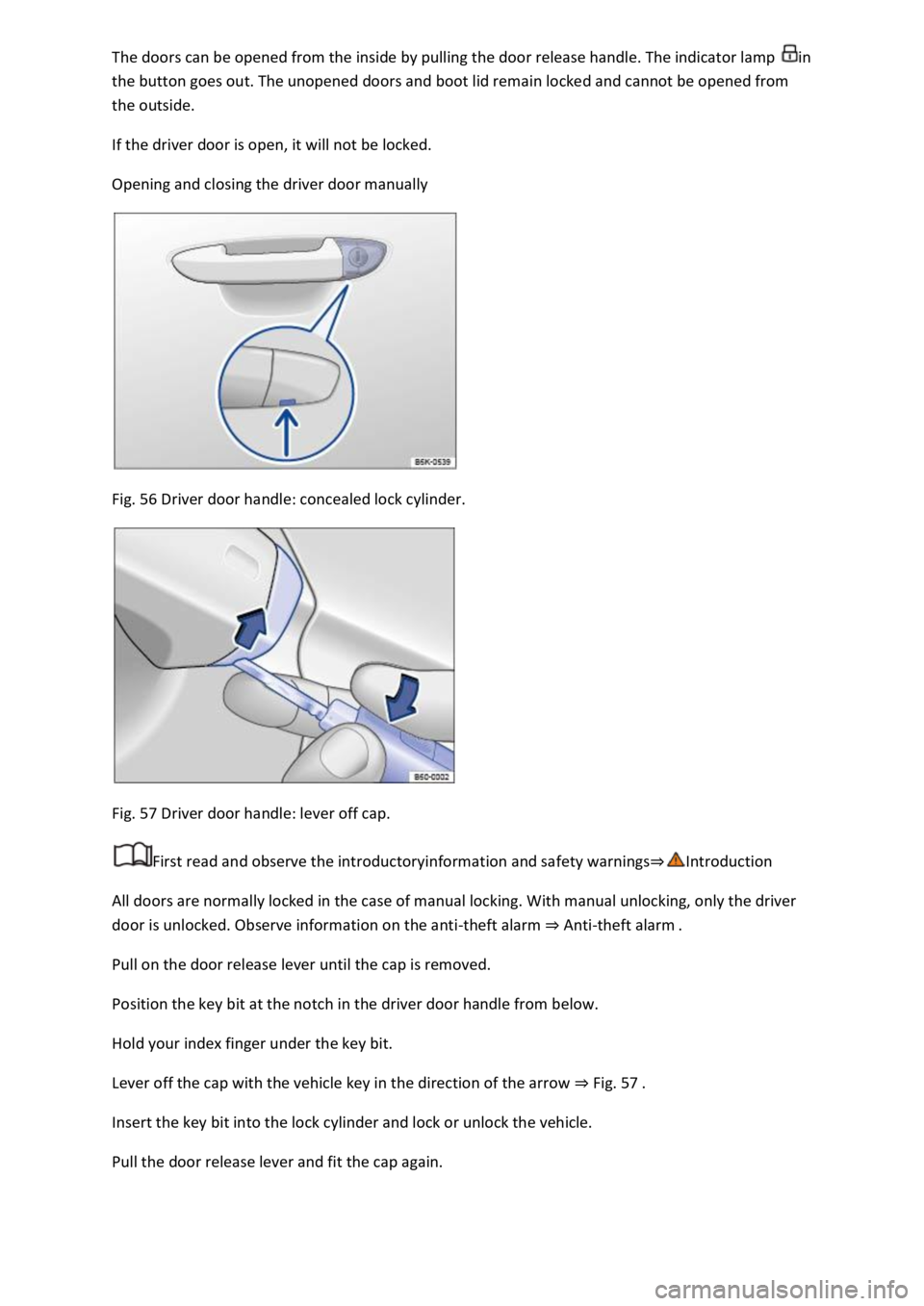
Fig. 56 Driver door handle: concealed lock cylinder.
Fig. 57 Driver door handle: lever off cap.
First read and observe the introductoryinformation and safety warnings
All doors are normally locked in the case of manual locking. With manual unlocking, only the driver
door is unlocked. Observe information on the anti-theft alarm Anti-theft alarm
Pull on the door release lever until the cap is removed.
Position the key bit at the notch in the driver door handle from below.
Hold your index finger under the key bit.
Lever off the cap with the vehicle key in the direction of the arrow Fig. 57
Insert the key bit into the lock cylinder and lock or unlock the vehicle.
Pull the door release lever and fit the cap again.
Page 99 of 502
Unlocking or locking the vehicle with Keyless Accessis not activated if the vehicle
was locked manually.
Things to note when unlocking manually
The alarm is triggered when the driver door is opened Anti-theft alarm
After unlocking, an emergency start must be carried out Starting and stopping the engine
Switch on the ignition to switch off the alarm.
The electronic immobiliser recognises a valid vehicle key.
The anti-theft alarm is not activated when the vehicle is locked manually using the key bit Anti-
theft alarm
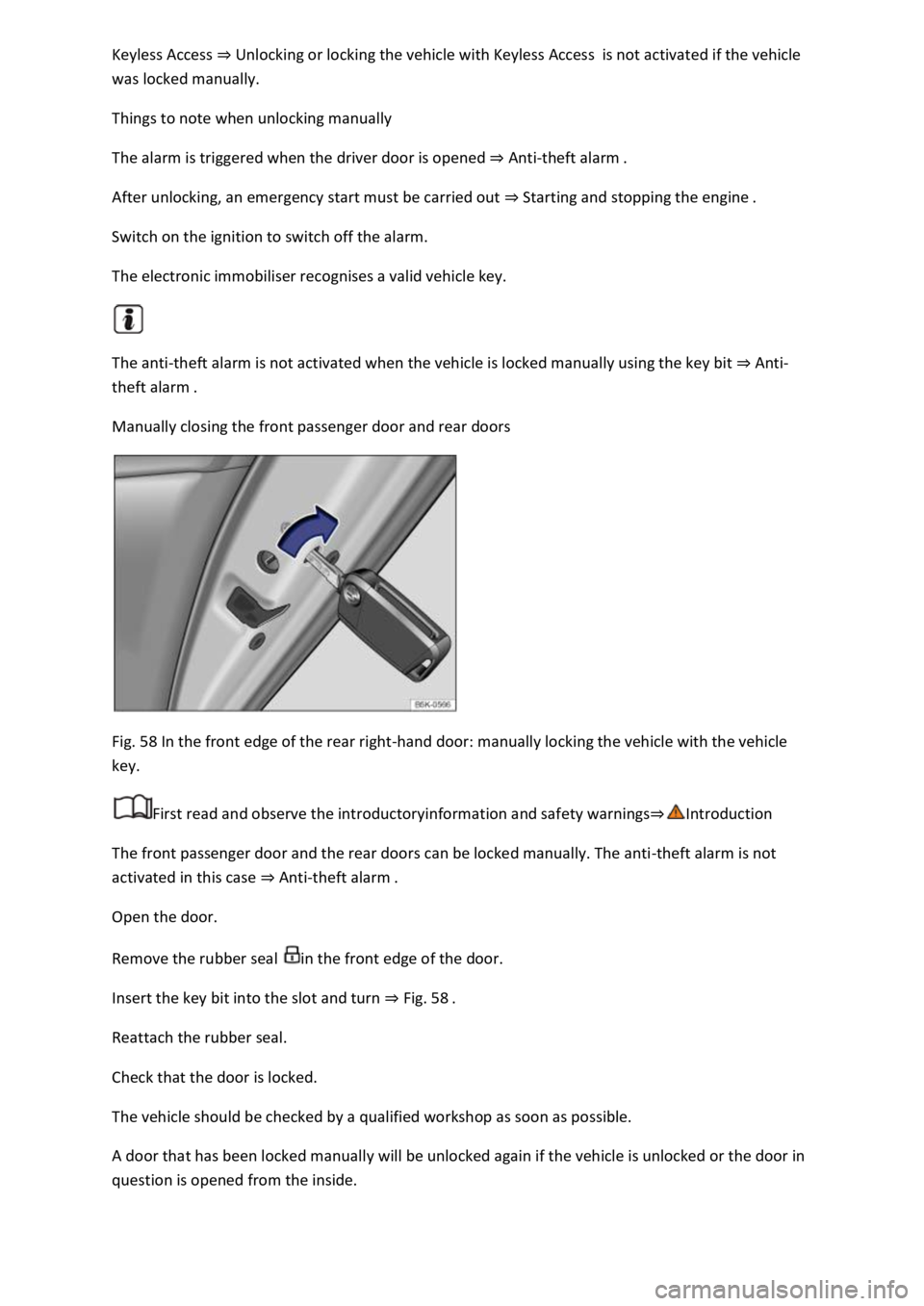
Manually closing the front passenger door and rear doors
Fig. 58 In the front edge of the rear right-hand door: manually locking the vehicle with the vehicle
key.
First read and observe the introductoryinformation and safety warnings
The front passenger door and the rear doors can be locked manually. The anti-theft alarm is not
activated in this case Anti-theft ala
Open the door.
Remove the rubber seal in the front edge of the door.
Insert the key bit into the slot and turn Fig. 58
Reattach the rubber seal.
Check that the door is locked.
The vehicle should be checked by a qualified workshop as soon as possible.
A door that has been locked manually will be unlocked again if the vehicle is unlocked or the door in
question is opened from the inside.
Page 103 of 502

steam if a valid vehicle key is simultaneously within the operating range. If at least one window is
open and sensor surfaces on the door handles are continuously activated, all windows will close. All
windows could open if the jet of water or steam is moved away from the door handle sensors briefly
and then moved back again
It may not be possible to lock or unlock the vehicle using the Keyless Access if the 12-volt vehicle
battery or button cell in the vehicle key is weak or discharged. The vehicle can be locked or unlocked
manually
If there is no valid vehicle key in the vehicle or if it is not detected, a corresponding message will be
shown on the instrument cluster display. This may occur if the vehicle key is exposed to interference
from another radio signal or is covered by another item, e.g. an aluminium case Starting and
stopping the engine
Anti-theft alarm
Depending on the vehicle equipment level, the vehicle may have an anti-theft alarm.
The anti-theft alarm is activated automatically when the vehicle is locked using the vehicle key.
The anti-theft alarm outputs acoustic and visual warning signals for up to five minutes.
When does the system trigger an alarm?
If a door is opened.
If the bonnet is opened.
If the boot lid is opened.
If the ignition is switched on with a valid vehicle key. (The alarm may sound briefly.)
If the 12-volt vehicle battery is disconnected.
If there is movement inside the vehicle (in vehicles with interior monitoring) Interior monitoring
system and anti-tow alarm
If the vehicle is lifted or towed (vehicles with anti-tow alarm) Interior monitoring system and anti-
tow alarm
If the vehicle is transported on a car ferry or by rail (vehicles with anti-tow alarm or interior
monitoring) Interior monitoring system and anti-tow alarm
If a trailer that is connected to the anti-theft alarm system is removed Trailer towing
Switching off the alarm
Unlock the vehicle using the unlocking button on the vehicle key.
Page 105 of 502

rror are left in
the vehicle.
If there is a mobile phone in the vehicle with the vibration alarm switched on.
Permanent deactivation of interior monitoring and the anti-tow alarm is not possible.
If doors or the boot lid are still open when the anti-theft alarm is activated, only the anti-theft alarm
will be activated. Interior monitoring and the anti-tow alarm are not activated until all doors and the
boot lid are closed.
SAFELOCK is also deactivated when the interior monitoring and anti-tow alarm are switched off
SAFELOCK
Boot lid
Introduction
This chapter contains information on the followingsubjects:
Opening and closing the boot lid
Opening and closing the boot lid electrically
Unlocking the boot lid manually
Troubleshooting
The boot lid is locked and unlocked at the same time as the doors.
WARNING
Incorrect and unsupervised unlocking, opening or closing of the boot lid can cause accidents and
serious injuries.
The boot lid should be opened or closed only when you are sure that nobody is in its path.
Always check that the boot lid is closed properly once it has been closed. The closed boot lid must be
flush with the surrounding body panels.
Always keep the boot lid closed while the vehicle is in motion.
Never open the boot lid when loads, e.g. bicycles, are attached to it. The boot lid may close under its
own weight due to the additional load. Support the boot lid as necessary or remove the load from
the boot lid beforehand.