ECU VOLKSWAGEN T-ROC 2020 Owner's Manual
[x] Cancel search | Manufacturer: VOLKSWAGEN, Model Year: 2020, Model line: T-ROC, Model: VOLKSWAGEN T-ROC 2020Pages: 502, PDF Size: 8.58 MB
Page 169 of 502
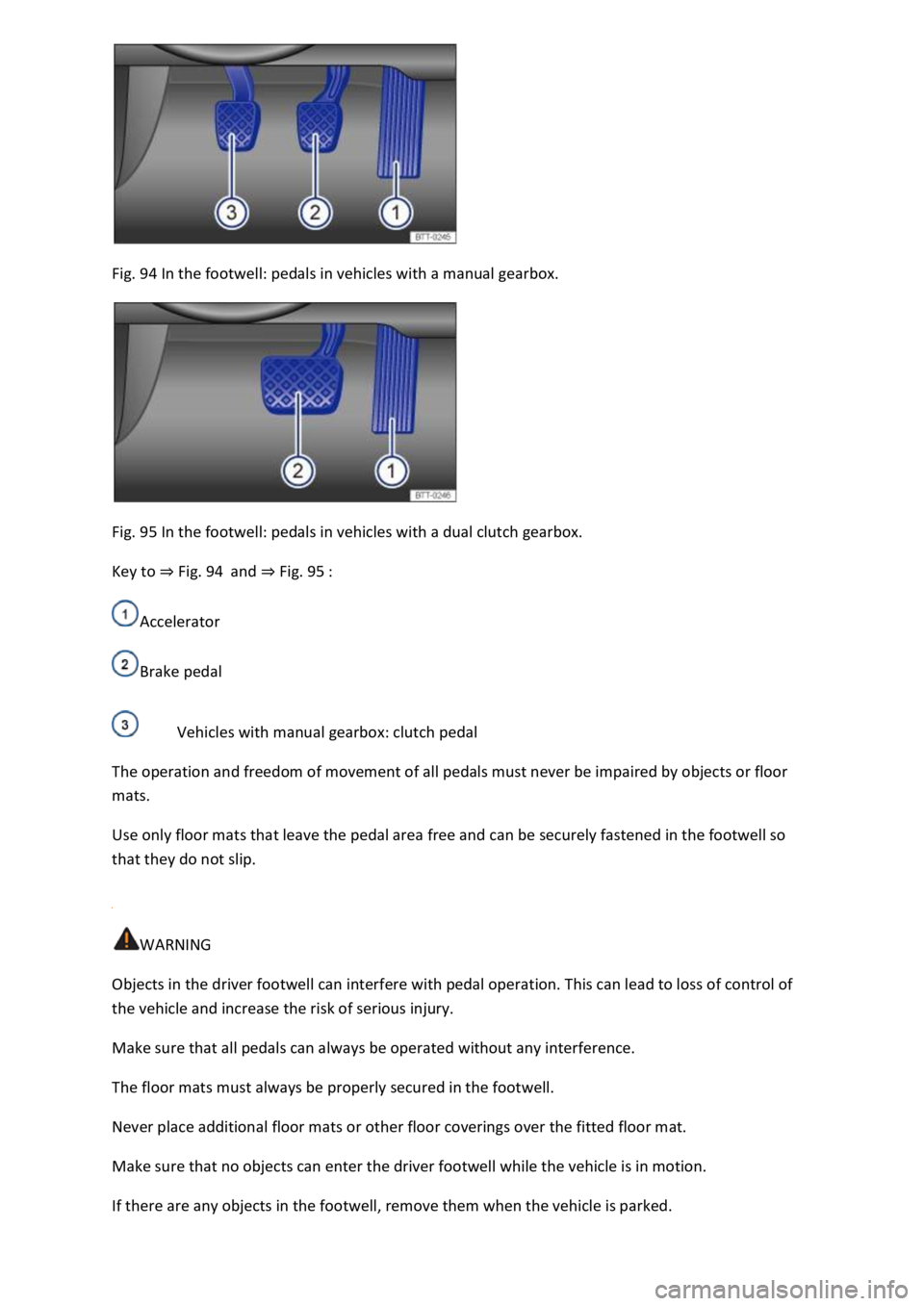
Fig. 94 In the footwell: pedals in vehicles with a manual gearbox.
Fig. 95 In the footwell: pedals in vehicles with a dual clutch gearbox.
Key to Fig. 94and Fig. 95
Accelerator
Brake pedal
Vehicles with manual gearbox: clutch pedal
The operation and freedom of movement of all pedals must never be impaired by objects or floor
mats.
Use only floor mats that leave the pedal area free and can be securely fastened in the footwell so
that they do not slip.
WARNING
Objects in the driver footwell can interfere with pedal operation. This can lead to loss of control of
the vehicle and increase the risk of serious injury.
Make sure that all pedals can always be operated without any interference.
The floor mats must always be properly secured in the footwell.
Never place additional floor mats or other floor coverings over the fitted floor mat.
Make sure that no objects can enter the driver footwell while the vehicle is in motion.
If there are any objects in the footwell, remove them when the vehicle is parked.
Page 177 of 502

If the front brake pads are checked, the rear brake pads should be checked at the same time. A
visual check of the thickness of all brake pads should be carried out regularly by checking the brake
pads through the openings in the rims or from the underside of the vehicle. If necessary, remove the
wheels to carry out a comprehensive check. Volkswagen recommends using a Volkswagen
dealership for this purpose.
Driving a loaded vehicle
For good vehicle handling when driving a loaded vehicle, please observe the following:
Stow all items of luggage securely Stowing luggage and loads
Accelerate particularly cautiously and carefully.
Avoid sudden braking and driving manoeuvres.
Brake earlier than in normal driving.
If applicable, observe the information concerning the roof carrier Roof carrier
WARNING
Moving loads can severely impair the vehicle's stability and driving safety which could cause
accidents and serious injuries.
Secure items properly so they cannot slide about.
Use suitable lashing or securing straps when securing heavy objects.
Securely engage the rear seat backrests.
Driving with an open boot lid
Driving with an open boot lid is particularly dangerous. All objects and the open boot lid must be
secured properly. Take the appropriate measures to reduce the amount of poisonous exhaust fumes
that could enter into the vehicle.
WARNING
Driving with an unlocked or open boot lid can cause serious injuries.
Always drive with the boot lid closed.
Always stow all items in the luggage compartment securely. Loose objects can fall out of the luggage
compartment and injure other road users.
Always drive especially carefully and think ahead.
Page 220 of 502

To ensure your own safety and the safety of your passengers, observe the following points before
driving offroad:
Obtain sufficient information before driving into offroad terrain with the vehicle.
Do not plan day stages that are too long. Take increased fuel consumption for offroad driving into
account.
Fill up the tank. Fuel consumption is considerably higher offroad.
Check that your tyres are suitable for the offroad journey you have planned. Recommendation for
difficult offroad terrain: always have offroad tyres fitted to your vehicle.
Check the tyre pressure on all tyres and correct if necessary. This includes the temporary spare
wheel, if present.
Check engine oil level and refill engine oil as necessary. The engine will be supplied with engine oil
when it is driven on or across a slope only if the engine oil level is sufficient.
Completely refill the washer fluid reservoir with water and washer fluid.
Fit the towing eye at the front or rear. It is not always possible to fit the towing eye when the vehicle
is stuck.
Check the vehicle toolkit and add tools according to individual requirements Useful accessories for
offroad driving.
Stow luggage in the vehicle as evenly and as low as possible. Secure all loose items.
Before driving offroad, Volkswagen recommends attending an offroad driving course, particularly if
you have no or very little experience.
Page 228 of 502
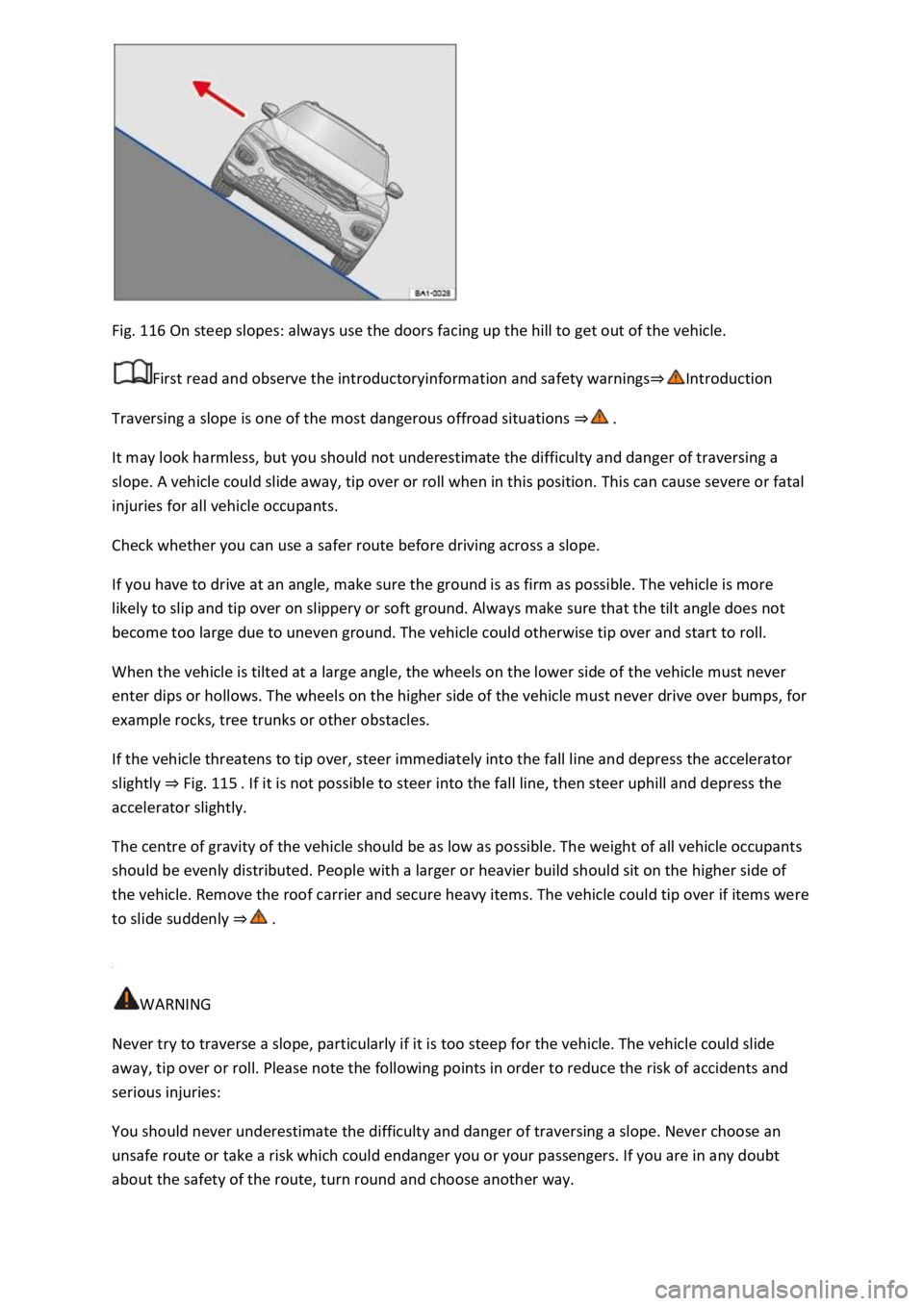
Fig. 116 On steep slopes: always use the doors facing up the hill to get out of the vehicle.
First read and observe the introductoryinformation and safety warnings
Traversing a slope is one of the most dangerous offroad situations
It may look harmless, but you should not underestimate the difficulty and danger of traversing a
slope. A vehicle could slide away, tip over or roll when in this position. This can cause severe or fatal
injuries for all vehicle occupants.
Check whether you can use a safer route before driving across a slope.
If you have to drive at an angle, make sure the ground is as firm as possible. The vehicle is more
likely to slip and tip over on slippery or soft ground. Always make sure that the tilt angle does not
become too large due to uneven ground. The vehicle could otherwise tip over and start to roll.
When the vehicle is tilted at a large angle, the wheels on the lower side of the vehicle must never
enter dips or hollows. The wheels on the higher side of the vehicle must never drive over bumps, for
example rocks, tree trunks or other obstacles.
If the vehicle threatens to tip over, steer immediately into the fall line and depress the accelerator
slightly Fig. 115
accelerator slightly.
The centre of gravity of the vehicle should be as low as possible. The weight of all vehicle occupants
should be evenly distributed. People with a larger or heavier build should sit on the higher side of
the vehicle. Remove the roof carrier and secure heavy items. The vehicle could tip over if items were
to slide suddenly
WARNING
Never try to traverse a slope, particularly if it is too steep for the vehicle. The vehicle could slide
away, tip over or roll. Please note the following points in order to reduce the risk of accidents and
serious injuries:
You should never underestimate the difficulty and danger of traversing a slope. Never choose an
unsafe route or take a risk which could endanger you or your passengers. If you are in any doubt
about the safety of the route, turn round and choose another way.
Page 262 of 502

button button Fig. 126
(arrow) goes out.
The electronic parking brake switches on automatically to hold the vehicle securely. However, the
electronic parking brake will not switch on if the brake pedal is depressed when the Auto Hold
function is switched off
Temporarily switching off the Auto Hold function with the button
It can sometimes be necessary to switch off the Auto Hold function temporarily to enable the vehicle
to roll more easily, for example when manoeuvring.
Press the brake pedal when the engine is on.
Press the button. The Auto Hold function is deactivated.
The Auto Hold function will be reactivated as soon as the brake pedal is depressed again when the
vehicle has come to a standstill.
System limits
If the clutch slips during switching off of the ignition or opening of the driver door, the vehicle may
not be secured against rolling away by either the Auto Hold function or the electronic parking brake
lamp in the instrument cluster displaylights upred. The electronic parking brake is switched on.
WARNING
The intelligent Auto Hold function cannot overcome the laws of physics, and operates only within
the limits of the system. Do not let the extra convenience afforded by the Auto Hold function tempt
you into taking any safety risks when driving.
Make sure that the indicator lamp lights up green or red on the instrument cluster display if the
vehicle is to be held securely. The vehicle is being held by the Auto Hold function if the green
indicator lamp is lit and by the electronic parking brake if the red warning lamp is lit.
Never leave the vehicle if the engine is running and the Auto Hold function is switched on.
In some cases, the Auto Hold function cannot sufficiently hold the vehicle on uphill gradients or
brake it sufficiently on downhill gradients, e.g. if the ground is slippery or icy.
NOTICE
Switch off the Auto Hold function before driving into a car wash. Damage may otherwise be caused
by automatic activation of the electronic parking brake.
Safety notes on the parking systems
The parking systems include the following:
Park Distance Control Park Distance Control
Page 282 of 502

Introduction
This chapter contains information on the followingsubjects:
Stowage compartment on the front passenger side
Stowage compartment in the front centre armrest
Drawers
Coat and bag hooks
Stow only light and small objects in the stowage areas.
There is a stowage compartment for the vehicle wallet under the left front seat. Always keep the
vehicle wallet in this stowage compartment.
The USB socket and the function for wireless charging in accordance with the QI standard
Infotainment system, may be located in the stowage compartment in the lower part of the
centre console.
WARNING
Loose objects may be flung through the vehicle interior in the event of a sudden driving or braking
manoeuvre. This can cause serious injury and can also lead to loss of control of the vehicle.
Do not stow any pets or any hard, heavy or sharp objects in the vehicle's open stowage
compartments, on the dash panel, on the luggage compartment cover or in items of clothing and
bags in the vehicle interior.
Always keep stowage compartments closed while the vehicle is in motion.
WARNING
Objects in the driver footwell can interfere with pedal operation. This can lead to loss of control of
the vehicle and increase the risk of serious injury.
Ensure that all pedals can always be operated without any hindrance.
The floor mats must always be properly secured in the footwell.
No additional foot mats or other floor coverings should be placed over the fitted foot mat.
Ensure that no objects can enter the driver footwell while the vehicle is in motion.
WARNING
Cigarette lighters left in the vehicle can become damaged or may ignite unnoticed. This can cause
serious burns and vehicle damage.
Page 292 of 502

Place the subwoofer carefully in the rim base. The tip of the arrow symbol FRONT on the subwoofer
must face forwards.
Plug in connector Fig.
0until it audibly engages.
Screw the handwheel Fig.
0onto the threaded pin in the opposite direction to the arrow
until the subwoofer is properly secured.
Place the variable luggage compartment floor on the floor covering.
Installing the subwoofer (type 2)
Place the subwoofer carefully in the rim base. The tip of the arrow symbol FRONT Fig.
0on
the subwoofer must face forwards.
Plug in connector Fig. 1
0until the catch audibly engages.
Screw the handwheel Fig.
0onto the threaded pin in the opposite direction to the arrow
until the subwoofer is properly secured.
Place the variable luggage compartment floor on the floor covering.
Mobile online services
Volkswagen Car-Net
Introduction
This chapter contains information on the followingsubjects:
Legal requirements
Deactivating Car-Net services
Service impairment or interruption
Apps
Volkswagen Car-Net is not available in all countries and is subject to country-specific limitations on
duration of use.
Volkswagen Car-Net allows you to communicate with your vehicle in order to exchange data,
request information or control functions.
In order to be able to use Volkswagen Car-Net, the vehicle has to be ordered with Car-Net and
factory-fitted with the system. Depending on the service or service portfolio, Volkswagen Car-Net
can be operated via the factory-fitted Infotainment system, via a Car-Net portal on the Internet or
using a mobile device.
Information about the Volkswagen Car-Net services, applications, availability, compatible mobile
devices and service portfolio, as well as service descriptions, are available on the Volkswagen
website:
In Europe and Japan: www.volkswagen.com/car-net
Page 293 of 502

hina: www.vwcarnet.com.cn
Before using the Volkswagen Car-Net services for the first time, please read and observe the
information in the relevant service description. This will quickly help you to become familiar with the
services and make you aware of potential risks to yourself and others, and how to avoid them.
WARNING
Accidents and injuries can occur if the driver is distracted.
Always drive carefully and responsibly.
WARNING
Failure to observe the information in the service description can lead to your vehicle breaking down
in traffic, and can cause accidents and serious injuries.
Always use the most up-to-date edition of the relevant service descriptions which is available on the
Volkswagen website.
WARNING
The following conditions can make it impossible to make a telephone call, run a Volkswagen Car-Net
service or transfer data:
If your current location is in an area with no or insufficient mobile communications and GPS
reception. This can also include tunnels, streets with tall buildings, garages, multi-storey car parks,
underpasses, mountains and valleys.
If you are in an area with sufficient mobile communications and GPS reception but the
telecommunications provider's mobile network is overloaded, out of order or unavailable.
If the components in the vehicle required for the services and data transmission are damaged, not
working or do not have sufficient electrical power.
The battery for the mobile device is empty, does not have a sufficient charge level or has no more
call credit.
WARNING
Using computers and mobile devices in public or non-secured LAN and WLAN networks can lead to a
loss of control over your Volkswagen Car-Net services.
In addition to the usual precautionary measures to be taken when using the Internet, you should
protect your computer and mobile device with suitable anti-virus software and regularly update its
signatures.
Page 295 of 502
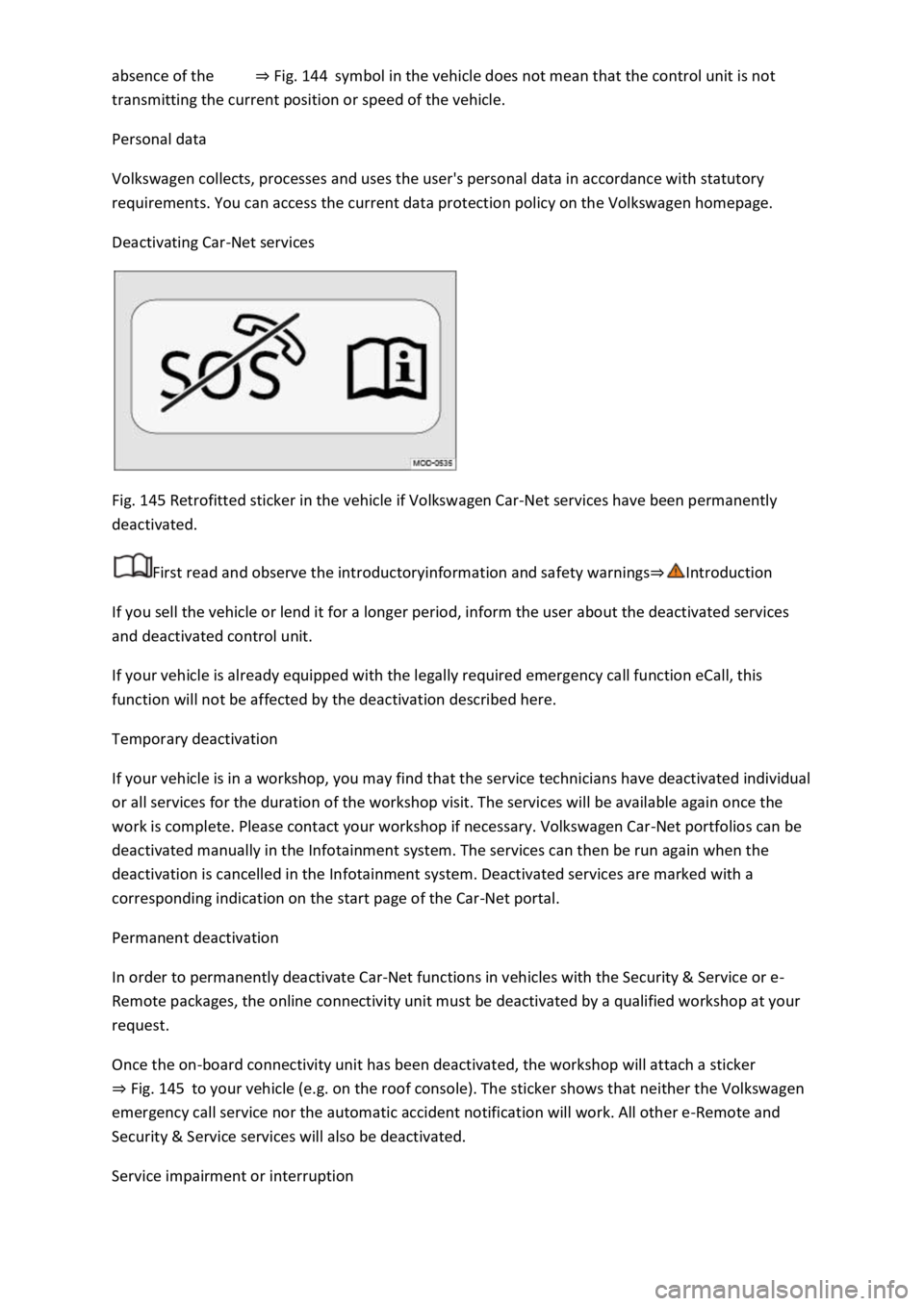
Fig. 144symbol in the vehicle does not mean that the control unit is not
transmitting the current position or speed of the vehicle.
Personal data
Volkswagen collects, processes and uses the user's personal data in accordance with statutory
requirements. You can access the current data protection policy on the Volkswagen homepage.
Deactivating Car-Net services
Fig. 145 Retrofitted sticker in the vehicle if Volkswagen Car-Net services have been permanently
deactivated.
First read and observe the introductoryinformation and safety warnings
If you sell the vehicle or lend it for a longer period, inform the user about the deactivated services
and deactivated control unit.
If your vehicle is already equipped with the legally required emergency call function eCall, this
function will not be affected by the deactivation described here.
Temporary deactivation
If your vehicle is in a workshop, you may find that the service technicians have deactivated individual
or all services for the duration of the workshop visit. The services will be available again once the
work is complete. Please contact your workshop if necessary. Volkswagen Car-Net portfolios can be
deactivated manually in the Infotainment system. The services can then be run again when the
deactivation is cancelled in the Infotainment system. Deactivated services are marked with a
corresponding indication on the start page of the Car-Net portal.
Permanent deactivation
In order to permanently deactivate Car-Net functions in vehicles with the Security & Service or e-
Remote packages, the online connectivity unit must be deactivated by a qualified workshop at your
request.
Once the on-board connectivity unit has been deactivated, the workshop will attach a sticker
Fig. 145to your vehicle (e.g. on the roof console). The sticker shows that neither the Volkswagen
emergency call service nor the automatic accident notification will work. All other e-Remote and
Security & Service services will also be deactivated.
Service impairment or interruption
Page 296 of 502

Even when the above-mentioned requirements for using the services are met, the functionality of
the Car-Net services can be impaired or interrupted due to factors that lie outside the control of
Volkswagen AG. Such factors include in particular:
s.
The telecommunications provider has changed the mobile telecommunication standard for
transferring mobile data, e.g. from UMTS to EDGE or GPRS
An existing mobile telecommunications standard has been shut down by the telecommunications
provider.
Impairment or interruption to mobile and GPS reception, e.g. due to high speeds, solar storms,
weather, landscape, interfering devices or intensive use of the mobile network in the relevant cells.
Restricted availability, completeness or correctness of information provided by third parties, e.g.
maps.
Countries where Volkswagen Car-Net services are not available.
Apps
First read and observe the introductoryinformation and safety warnings
The Volkswagen Car-Net app can execute Volkswagen Car-Net services in the vehicle and provide
information.
Volkswagen App-Connect allows content from Volkswagen apps and third party apps on mobile
devices to be shown on the Infotainment system screen.
There may be problems with compatibility with third party apps.
A wide range of applications may be available and they may be vehicle-specific and country-specific
o depend on
availability of services offered by third parties.
We are unable to guarantee that the available apps can be run on all mobile devices and all
operating systems.
Applications offered by Volkswagen can be changed, discontinued, deactivated, reactivated and
expanded without prior notice.
Transporting items
Stowing luggage and loads
Cargo and luggage can be transported in the vehicle, on a trailer Technical requirementsand on
the roof Roof carrier
Stowing luggage safely in the vehicle
Always distribute any loads in the vehicle as evenly as possible.