warning VOLKSWAGEN T-ROC 2020 Manual PDF
[x] Cancel search | Manufacturer: VOLKSWAGEN, Model Year: 2020, Model line: T-ROC, Model: VOLKSWAGEN T-ROC 2020Pages: 502, PDF Size: 8.58 MB
Page 101 of 502

SAFELOCK deactivates the door release levers if the vehicle has been locked. This makes it more
difficult to break into the vehicle. The doors can no longer be opened from the inside
Press the button on the vehicle key once.
Press the button on the vehicle key twice in quick succession.
Vehicles with the Keyless Access locking and starting system: touch the sensor on the outside of the
door handle twiceUnlocking or locking the vehicle with Keyless Access
OR: press the central locking button in the driver door once Central locking button
There may be an indication of the activated SAFELOCK in the display of the instrument cluster
(SAFELOCK).
Deactivating SAFELOCK
Switch on the ignition.
OR: deactivate interior monitoring and the anti-tow alarm Temporarily switching off the interior
monitoring system and anti-tow alarm
Before locking the vehicle, temporarily deactivate the interior monitoring and the anti-tow alarm in
the Vehicle Settings menu in the Infotainment system Infotainment sy
The following applies when SAFELOCK is deactivated:
The interior monitoring and the anti-tow alarm are activated and deactivated in the Vehicle settings
menu in the Infotainment system Infotainment system controls and display
WARNING
Careless or unsupervised use of SAFELOCK can cause serious injuries.
Never leave other persons in the vehicle if the vehicle has been locked using the vehicle key. The
doors can no longer be opened from the inside once SAFELOCK is activated.
If you unlock the driver door mechanically using the vehicle key, only the driver door is unlocked,
and not the whole vehicle. The doors are released (but not unlocked) and the central locking button
is activated only when the ignition is switched on.
Troubleshooting
First read and observe the introductoryinformation and safety warnings
Indicator lamp lights up continuously
The red LED in the vehicle door flashes at short intervals and then lights up continuously.
Page 103 of 502

steam if a valid vehicle key is simultaneously within the operating range. If at least one window is
open and sensor surfaces on the door handles are continuously activated, all windows will close. All
windows could open if the jet of water or steam is moved away from the door handle sensors briefly
and then moved back again
It may not be possible to lock or unlock the vehicle using the Keyless Access if the 12-volt vehicle
battery or button cell in the vehicle key is weak or discharged. The vehicle can be locked or unlocked
manually
If there is no valid vehicle key in the vehicle or if it is not detected, a corresponding message will be
shown on the instrument cluster display. This may occur if the vehicle key is exposed to interference
from another radio signal or is covered by another item, e.g. an aluminium case Starting and
stopping the engine
Anti-theft alarm
Depending on the vehicle equipment level, the vehicle may have an anti-theft alarm.
The anti-theft alarm is activated automatically when the vehicle is locked using the vehicle key.
The anti-theft alarm outputs acoustic and visual warning signals for up to five minutes.
When does the system trigger an alarm?
If a door is opened.
If the bonnet is opened.
If the boot lid is opened.
If the ignition is switched on with a valid vehicle key. (The alarm may sound briefly.)
If the 12-volt vehicle battery is disconnected.
If there is movement inside the vehicle (in vehicles with interior monitoring) Interior monitoring
system and anti-tow alarm
If the vehicle is lifted or towed (vehicles with anti-tow alarm) Interior monitoring system and anti-
tow alarm
If the vehicle is transported on a car ferry or by rail (vehicles with anti-tow alarm or interior
monitoring) Interior monitoring system and anti-tow alarm
If a trailer that is connected to the anti-theft alarm system is removed Trailer towing
Switching off the alarm
Unlock the vehicle using the unlocking button on the vehicle key.
Page 105 of 502

rror are left in
the vehicle.
If there is a mobile phone in the vehicle with the vibration alarm switched on.
Permanent deactivation of interior monitoring and the anti-tow alarm is not possible.
If doors or the boot lid are still open when the anti-theft alarm is activated, only the anti-theft alarm
will be activated. Interior monitoring and the anti-tow alarm are not activated until all doors and the
boot lid are closed.
SAFELOCK is also deactivated when the interior monitoring and anti-tow alarm are switched off
SAFELOCK
Boot lid
Introduction
This chapter contains information on the followingsubjects:
Opening and closing the boot lid
Opening and closing the boot lid electrically
Unlocking the boot lid manually
Troubleshooting
The boot lid is locked and unlocked at the same time as the doors.
WARNING
Incorrect and unsupervised unlocking, opening or closing of the boot lid can cause accidents and
serious injuries.
The boot lid should be opened or closed only when you are sure that nobody is in its path.
Always check that the boot lid is closed properly once it has been closed. The closed boot lid must be
flush with the surrounding body panels.
Always keep the boot lid closed while the vehicle is in motion.
Never open the boot lid when loads, e.g. bicycles, are attached to it. The boot lid may close under its
own weight due to the additional load. Support the boot lid as necessary or remove the load from
the boot lid beforehand.
Page 106 of 502

ot in use. Ensure that no one
remains in the vehicle.
Never leave children playing unattended in or around the vehicle, especially when the boot lid is
open. Children could climb into the luggage compartment and shut the boot lid, thereby trapping
themselves inside. Temperatures inside a locked vehicle may become extremely hot or cold,
depending on the season. This can cause serious injuries and illness or fatalities, especially in the
case of small children.
WARNING
Serious injuries could occur if the boot lid is unlocked or opened incorrectly or without due care and
attention.
The boot lid may not always be detected as being unlocked if there is a carrier and items attached to
it. The boot lid may open suddenly while the vehicle is in motion if it is unlocked.
WARNING
If heavy snow or heavy items are located on the boot lid, the additional weight could cause the boot
lid to close on its own and cause severe injuries.
Never open the boot lid if it is covered by a large amount of snow or a load is attached to it, e.g. on a
luggage carrier.
Remove the snow or load before opening the boot lid.
WARNING
Do not push down the boot lid with your hand on the rear window. The rear window could shatter
and cause injuries.
NOTICE
Never use the opening mechanism to fix or hold a load. This could lead to damage that makes it
impossible to close the boot lid.
NOTICE
Never use the rear window wiper or the rear spoiler to fix or hold a load. This could cause damage
which results in the rear window wiper or rear spoiler being torn off.
Opening and closing the boot lid
Page 107 of 502
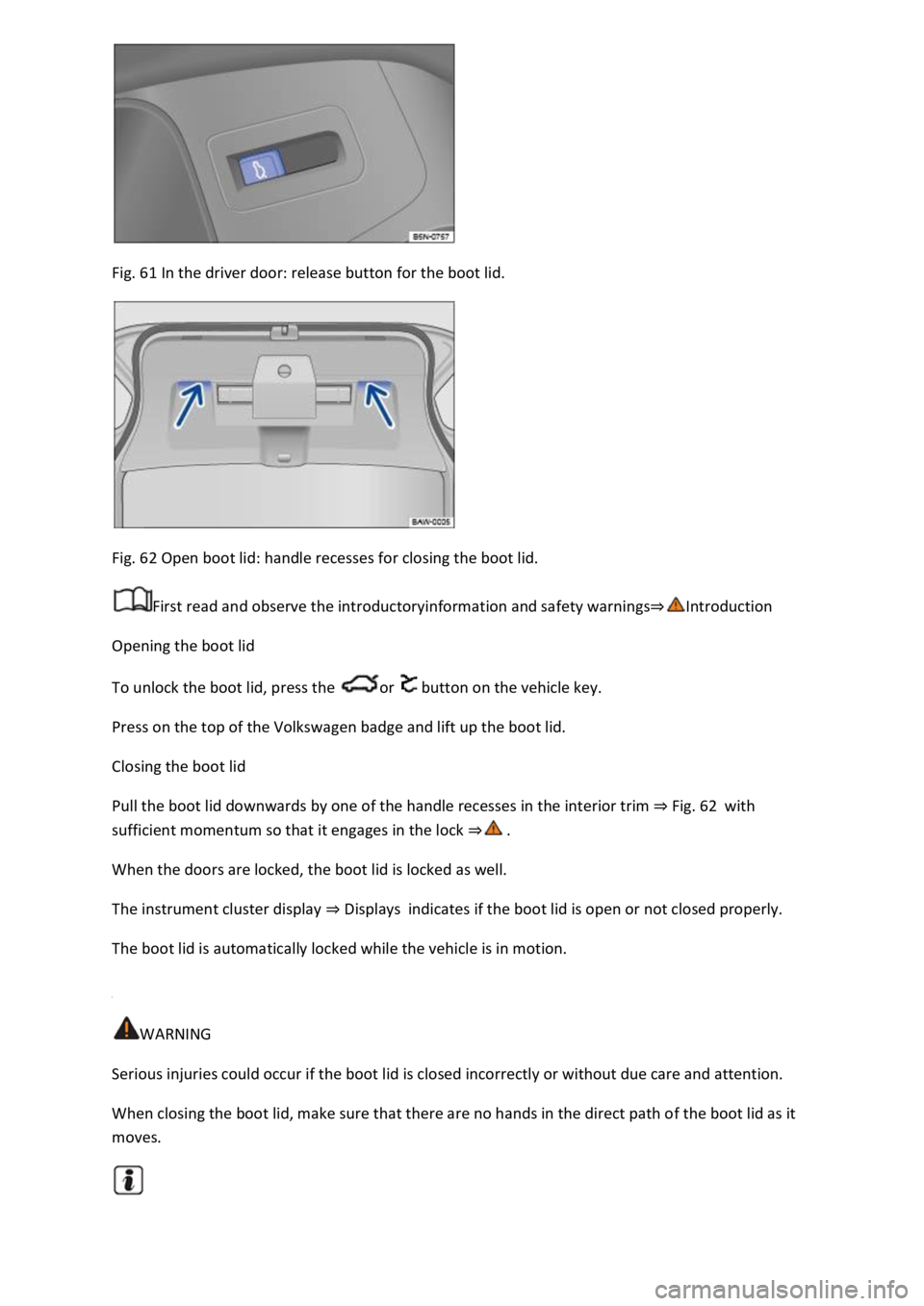
Fig. 61 In the driver door: release button for the boot lid.
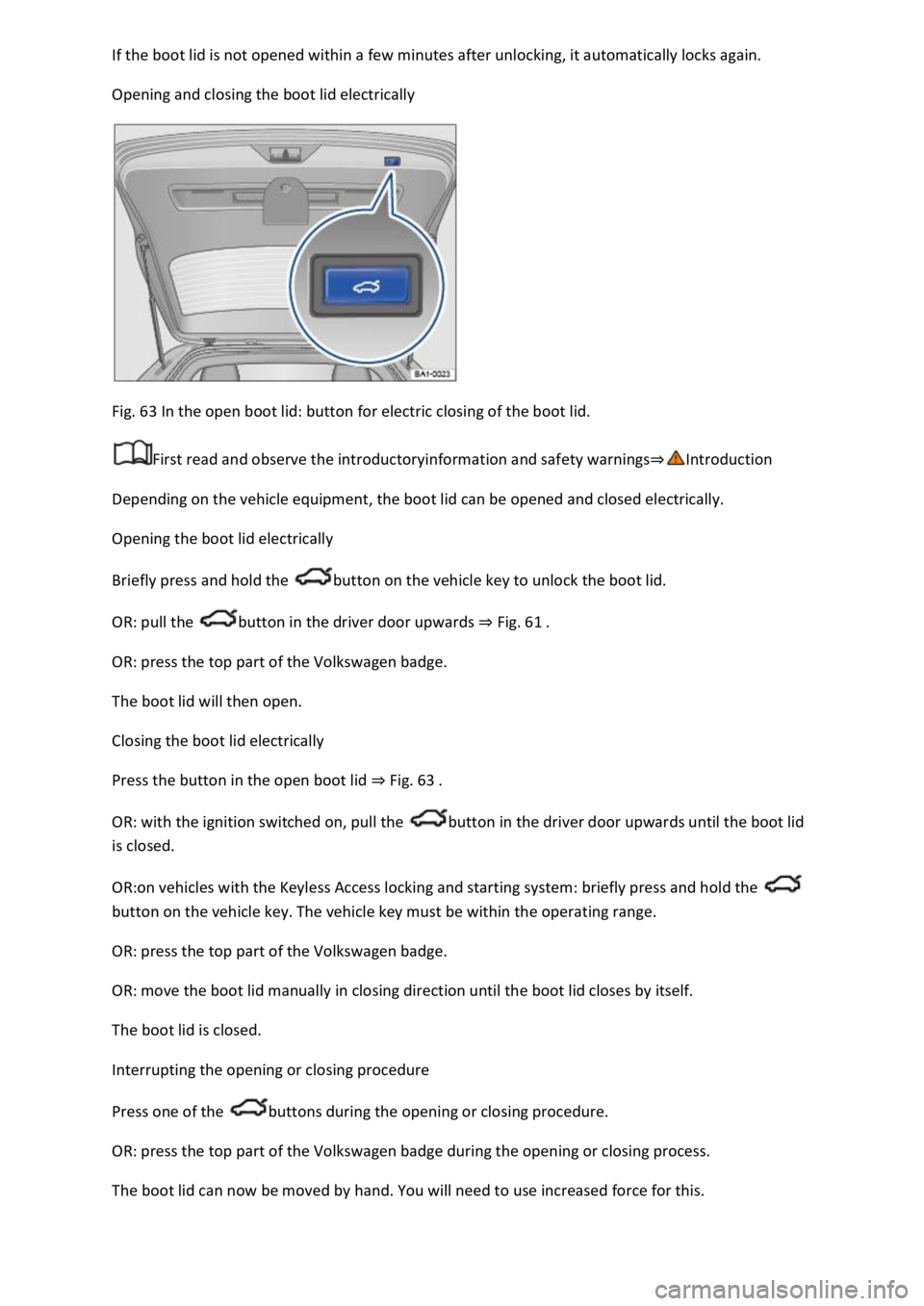
Fig. 62 Open boot lid: handle recesses for closing the boot lid.
First read and observe the introductoryinformation and safety warnings
Opening the boot lid
To unlock the boot lid, press the or button on the vehicle key.
Press on the top of the Volkswagen badge and lift up the boot lid.
Closing the boot lid
Pull the boot lid downwards by one of the handle recesses in the interior trim Fig. 62with
sufficient momentum so that it engages in the lock
When the doors are locked, the boot lid is locked as well.
The instrument cluster display Displaysindicates if the boot lid is open or not closed properly.
The boot lid is automatically locked while the vehicle is in motion.
WARNING
Serious injuries could occur if the boot lid is closed incorrectly or without due care and attention.
When closing the boot lid, make sure that there are no hands in the direct path of the boot lid as it
moves.
Page 108 of 502
Opening and closing the boot lid electrically
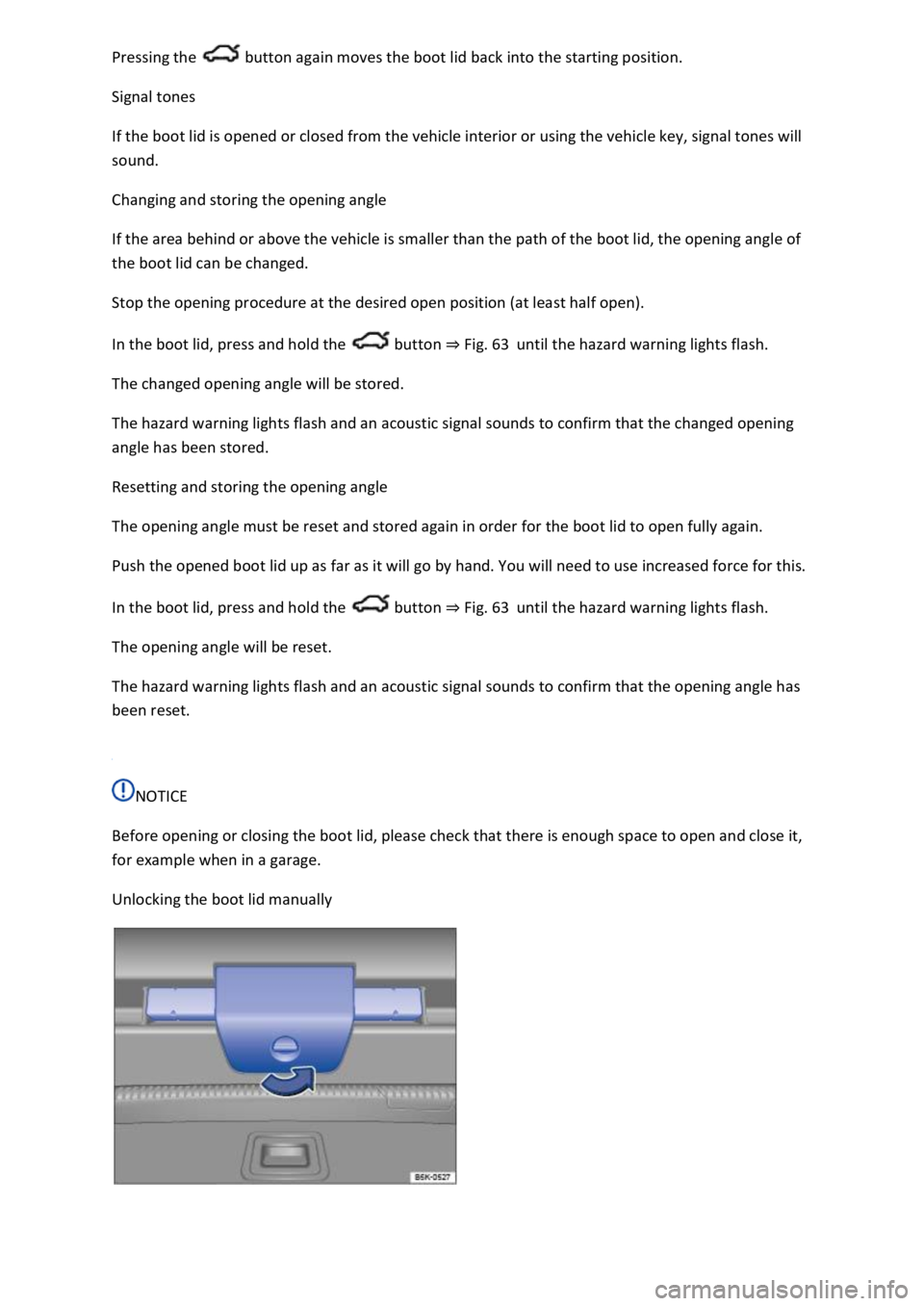
Fig. 63 In the open boot lid: button for electric closing of the boot lid.
First read and observe the introductoryinformation and safety warnings
Depending on the vehicle equipment, the boot lid can be opened and closed electrically.
Opening the boot lid electrically
Briefly press and hold the button on the vehicle key to unlock the boot lid.
OR: pull the button in the driver door upwards Fig. 61
OR: press the top part of the Volkswagen badge.
The boot lid will then open.
Closing the boot lid electrically
Press the button in the open boot lid Fig. 63
OR: with the ignition switched on, pull the button in the driver door upwards until the boot lid
is closed.
OR:on vehicles with the Keyless Access locking and starting system: briefly press and hold the
button on the vehicle key. The vehicle key must be within the operating range.
OR: press the top part of the Volkswagen badge.
OR: move the boot lid manually in closing direction until the boot lid closes by itself.
The boot lid is closed.
Interrupting the opening or closing procedure
Press one of the buttons during the opening or closing procedure.
OR: press the top part of the Volkswagen badge during the opening or closing process.
The boot lid can now be moved by hand. You will need to use increased force for this.
Page 109 of 502
button again moves the boot lid back into the starting position.
Signal tones
If the boot lid is opened or closed from the vehicle interior or using the vehicle key, signal tones will
sound.
Changing and storing the opening angle
If the area behind or above the vehicle is smaller than the path of the boot lid, the opening angle of
the boot lid can be changed.
Stop the opening procedure at the desired open position (at least half open).
In the boot lid, press and hold the button Fig. 63until the hazard warning lights flash.
The changed opening angle will be stored.
The hazard warning lights flash and an acoustic signal sounds to confirm that the changed opening
angle has been stored.
Resetting and storing the opening angle
The opening angle must be reset and stored again in order for the boot lid to open fully again.
Push the opened boot lid up as far as it will go by hand. You will need to use increased force for this.
In the boot lid, press and hold the button Fig. 63until the hazard warning lights flash.
The opening angle will be reset.
The hazard warning lights flash and an acoustic signal sounds to confirm that the opening angle has
been reset.
NOTICE
Before opening or closing the boot lid, please check that there is enough space to open and close it,
for example when in a garage.
Unlocking the boot lid manually
Page 110 of 502
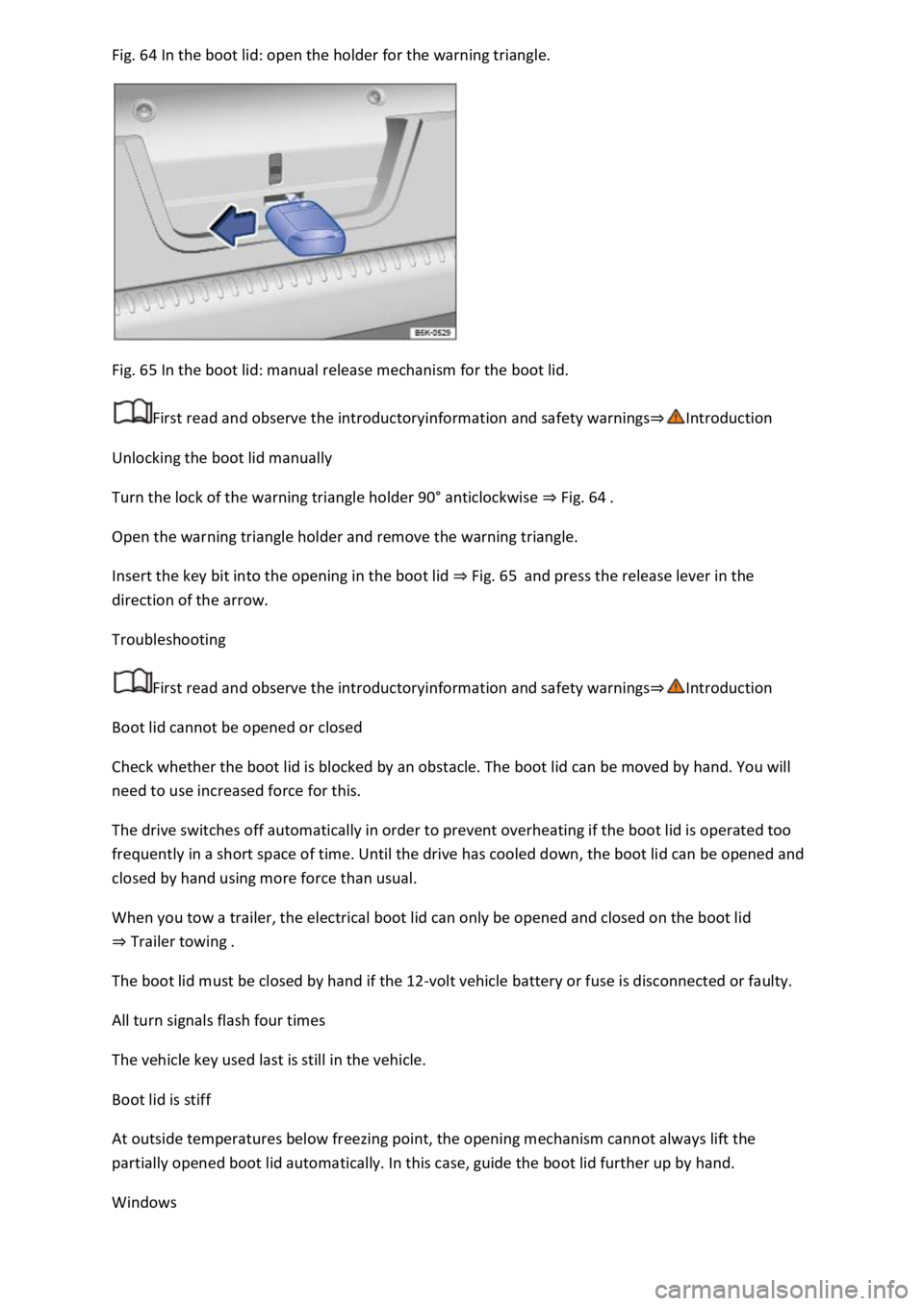
64 In the boot lid: open the holder for the warning triangle.
Fig. 65 In the boot lid: manual release mechanism for the boot lid.
First read and observe the introductoryinformation and safety warnings
Unlocking the boot lid manually
Turn the lock of the warning triangle holder 90
Page 111 of 502

The buttons are located in the doors Vehicle overviews
Opening the windows: press the button. Closing the windows: pull the button.Press to disable
the electric window buttons in the rear doors.
The windows can still be opened or closed using the buttons for a short time after the ignition has
been switched off, provided the driver door and the front passenger door are not opened.
One-touch opening and closing
The one-touch opening and closing function can be used to fully open and close the windows. The
individual buttons do not have to be held to do this.
One-touch closing: pull the button for the appropriate window up briefly into the second position.
One-touch opening: press the button for the appropriate window down briefly into the second
position.
Stopping the one-touch function: press or pull the button for the appropriate window again.
Convenience opening and closing
The windows can be opened and closed from outside the vehicle using the vehicle key when the
ignition is switched off:
Press and hold the locking or unlocking button on the vehicle key.
In vehicles with keyless locking and starting system Keyless Access: place your finger on the locking
sensor in the door handle for a few seconds until the windows are closed Unlocking or locking the
vehicle with Keyless Access operating range.
To interrupt this function, release the locking or unlocking button OR remove your finger from the
sensor.
A valid vehicle key must be located within the operating range. All turn signals will flash once as
confirmation that all the windows and the glass roof have been closed.
Set the convenience opening settings in the Vehicle settings menu in the Infotainment system
Infotainment system controls and displays
WARNING
Careless or unsupervised use of the electric windows can cause serious injuries.
The electric windows should only be opened or closed when you are sure that nobody is in their
operating area.
Never leave children or people requiring assistance alone in the vehicle when the vehicle is locked.
The windows can no longer be opened in an emergency.
Page 112 of 502

opened or closed using the buttons for a short time after the ignition has been switched off,
provided the driver door and the front passenger door are not opened.
When transporting children on the rear bench seat, the rear electric windows should always be
deactivated using the safety button so that they cannot be opened or closed.
NOTICE
If windows are open when it starts to rain, water can soak the interior equipment of the vehicle and
cause damage to the vehicle.
One-touch opening and closing and the roll-back function will not work if there is a malfunction in
the electric windows. Go to a qualified workshop.
Convenience opening and closing only works when one-touch opening and closing is activated for all
electric windows.
Some settings can be saved in the user accounts for personalisation and therefore change
automatically when the user account is changed Personalisation
Electric window roll-back function
The roll-back function for the electric windows can reduce the risk of injuries when the windows are
closing.
If the window is not able to close because it is stiff or because of an obstruction, the window will
immediately open again
Check to see why the window has not closed.
Try to close the window again.
If the window closing process is interrupted again, the roll-back function will be disabled for a few
seconds.
If the window still cannot close, it will come to a stop at this point. To close the window without the
roll-back function, press the button again within a few seconds
WARNING
Closing the electric windows without the roll-back function can lead to serious injuries.
Always close the window carefully.