front VOLKSWAGEN T-ROC 2021 Owner´s Manual
[x] Cancel search | Manufacturer: VOLKSWAGEN, Model Year: 2021, Model line: T-ROC, Model: VOLKSWAGEN T-ROC 2021Pages: 502, PDF Size: 9.42 MB
Page 1 of 502
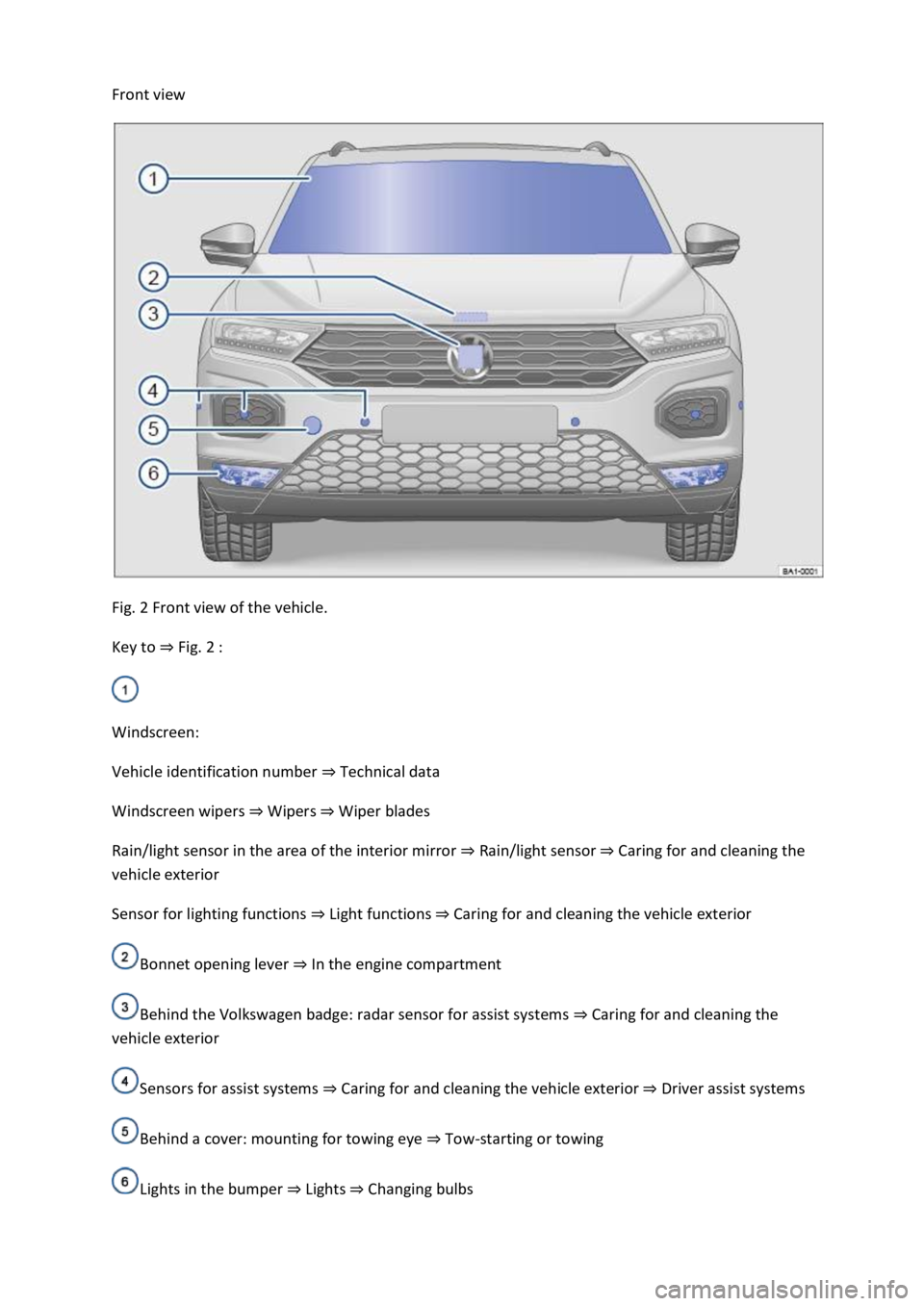
Front view
Fig. 2 Front view of the vehicle.
Key to ⇒ Fig. 2 :
Windscreen:
Vehicle identification number ⇒ Technical data
Windscreen wipers ⇒ Wipers ⇒ Wiper blades
Rain/light sensor in the area of the interior mirror ⇒ Rain/light sensor ⇒ Caring for and cleaning the
vehicle exterior
Sensor for lighting functions ⇒ Light functions ⇒ Caring for and cleaning the vehicle exterior
Bonnet opening lever ⇒ In the engine compartment
Behind the Volkswagen badge: radar sensor for assist systems ⇒ Caring for and cleaning the
vehicle exterior
Sensors for assist systems ⇒ Caring for and cleaning the vehicle exterior ⇒ Driver assist systems
Behind a cover: mounting for towing eye ⇒ Tow-starting or towing
Lights in the bumper ⇒ Lights ⇒ Changing bulbs
Page 6 of 502

Bonnet release lever ⇒ In the engine compartment
Fuse box cover ⇒ Changing fuses
Lever for adjusting the steering column position ⇒ Steering wheel
Light switch ⇒ Vehicle lighting
Turn signal and main beam lever ⇒ Vehicle lighting
With switches and buttons for the driver assist systems ⇒ Button for driver assist systems ⇒ Driver
assist systems
Vents ⇒ Heating and air conditioning system
Instrument cluster ⇒ Instrument cluster
With warning and indicator lamps ⇒ Symbols in instrument cluster
Lever for wipers and washers ⇒ Wipers
With buttons for operating the menus ⇒ Instrument cluster
Controls on the multifunction steering wheel:
Operating driver assist systems ⇒ Operating using the multifunction steering wheel ⇒ Driver assist
systems
Audio, navigation
Opening the telephone menu or accepting telephone calls
Volume adjustment
Activating voice control (no function in some models)
Horn
Location of the driver front airbag ⇒ Airbag system
Ignition lock ⇒ Starting and stopping the engine
Pedals ⇒ Pedals
Page 8 of 502

Hazard warning lights ⇒ In an emergency
Indicator lamp for the front passenger front airbag switch-off function ⇒ Airbag system
Driver assist systems ⇒ Driver assist systems
Controls for the air conditioning system, heating and fresh air system ⇒ Heating, ventilating,
cooling
Controls for the air conditioning system, heating and fresh air system ⇒ Heating, ventilating,
cooling
Key to ⇒ Fig. 9 :
Lever:
DSG® dual clutch gearbox ⇒ DSG® dual clutch gearbox
Manual gearbox ⇒ Manual gearbox: selecting a gear
Multimedia connections ⇒BookletInfotainment system,.
Cigarette lighter or 12-volt socket ⇒ Ashtray and cigarette lighter ⇒ Electrical sockets
Control for the 4MOTION Active Control ⇒ Driving profile selection and 4MOTION Active
Control
Stowage compartment with drink holder ⇒ Stowage areas
Buttons:
Electronic parking brake ⇒ Electronic parking brake
Auto Hold function ⇒ Auto Hold function
Page 9 of 502
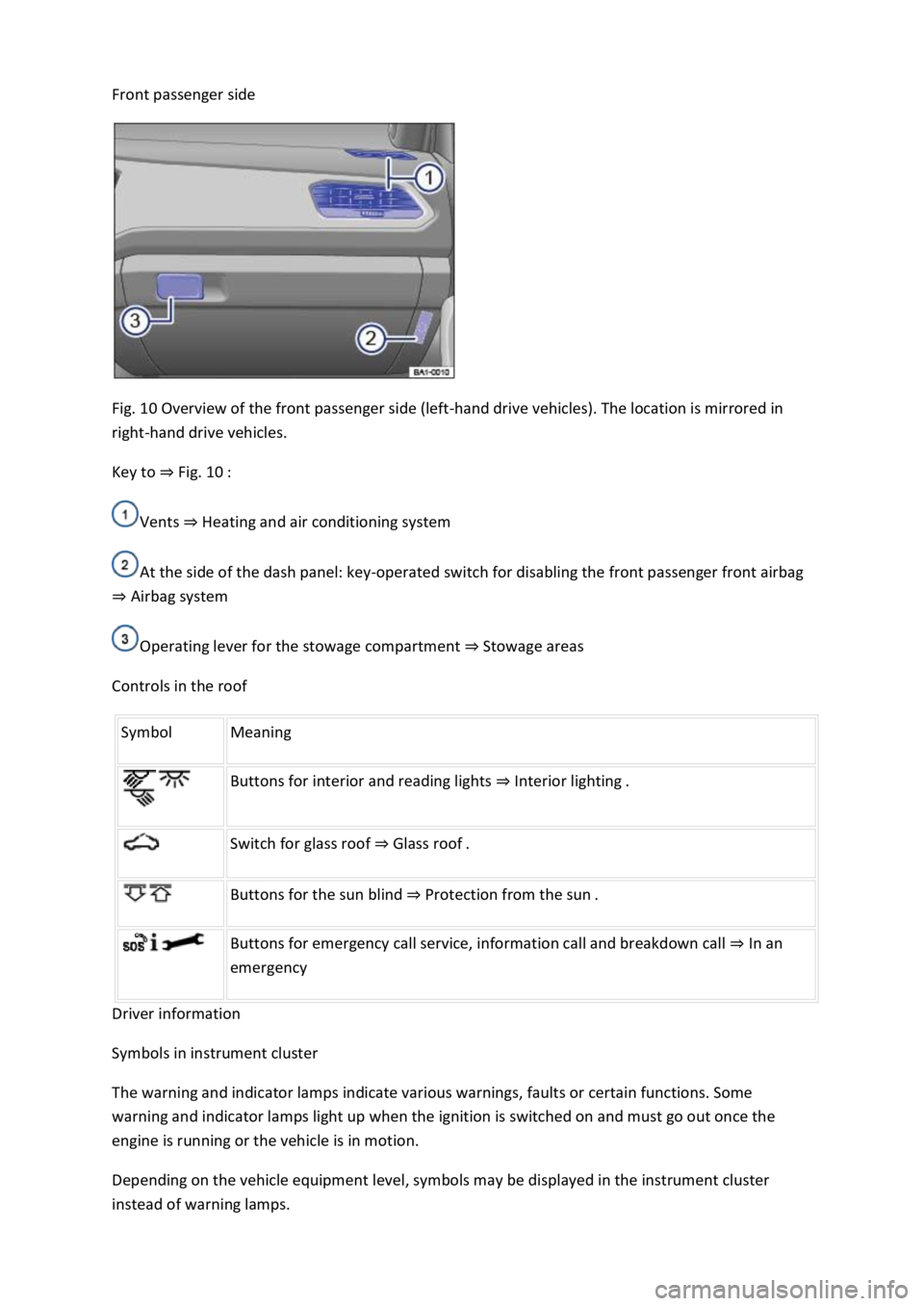
Front passenger side
Fig. 10 Overview of the front passenger side (left-hand drive vehicles). The location is mirrored in
right-hand drive vehicles.
Key to ⇒ Fig. 10 :
Vents ⇒ Heating and air conditioning system
At the side of the dash panel: key-operated switch for disabling the front passenger front airbag
⇒ Airbag system
Operating lever for the stowage compartment ⇒ Stowage areas
Controls in the roof
Symbol Meaning
Buttons for interior and reading lights ⇒ Interior lighting .
Switch for glass roof ⇒ Glass roof .
Buttons for the sun blind ⇒ Protection from the sun .
Buttons for emergency call service, information call and breakdown call ⇒ In an
emergency
Driver information
Symbols in instrument cluster
The warning and indicator lamps indicate various warnings, faults or certain functions. Some
warning and indicator lamps light up when the ignition is switched on and must go out once the
engine is running or the vehicle is in motion.
Depending on the vehicle equipment level, symbols may be displayed in the instrument cluster
instead of warning lamps.
Page 10 of 502
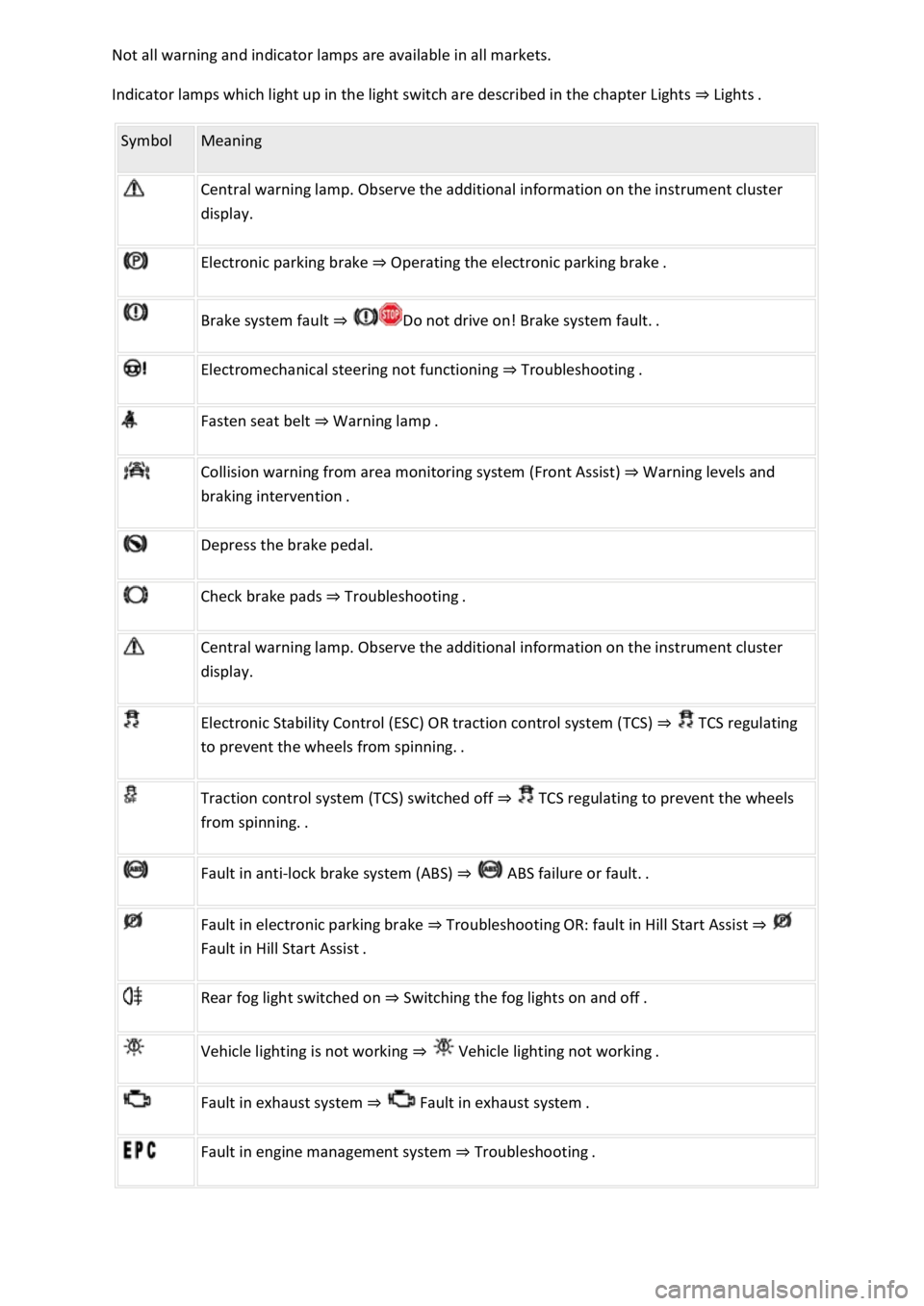
Not all warning and indicator lamps are available in all markets.
Indicator lamps which light up in the light switch are described in the chapter Lights ⇒ Lights .
Symbol Meaning
Central warning lamp. Observe the additional information on the instrument cluster
display.
Electronic parking brake ⇒ Operating the electronic parking brake .
Brake system fault ⇒ Do not drive on! Brake system fault. .
Electromechanical steering not functioning ⇒ Troubleshooting .
Fasten seat belt ⇒ Warning lamp .
Collision warning from area monitoring system (Front Assist) ⇒ Warning levels and
braking intervention .
Depress the brake pedal.
Check brake pads ⇒ Troubleshooting .
Central warning lamp. Observe the additional information on the instrument cluster
display.
Electronic Stability Control (ESC) OR traction control system (TCS) ⇒ TCS regulating
to prevent the wheels from spinning. .
Traction control system (TCS) switched off ⇒ TCS regulating to prevent the wheels
from spinning. .
Fault in anti-lock brake system (ABS) ⇒ ABS failure or fault. .
Fault in electronic parking brake ⇒ Troubleshooting OR: fault in Hill Start Assist ⇒
Fault in Hill Start Assist .
Rear fog light switched on ⇒ Switching the fog lights on and off .
Vehicle lighting is not working ⇒ Vehicle lighting not working .
Fault in exhaust system ⇒ Fault in exhaust system .
Fault in engine management system ⇒ Troubleshooting .
Page 11 of 502
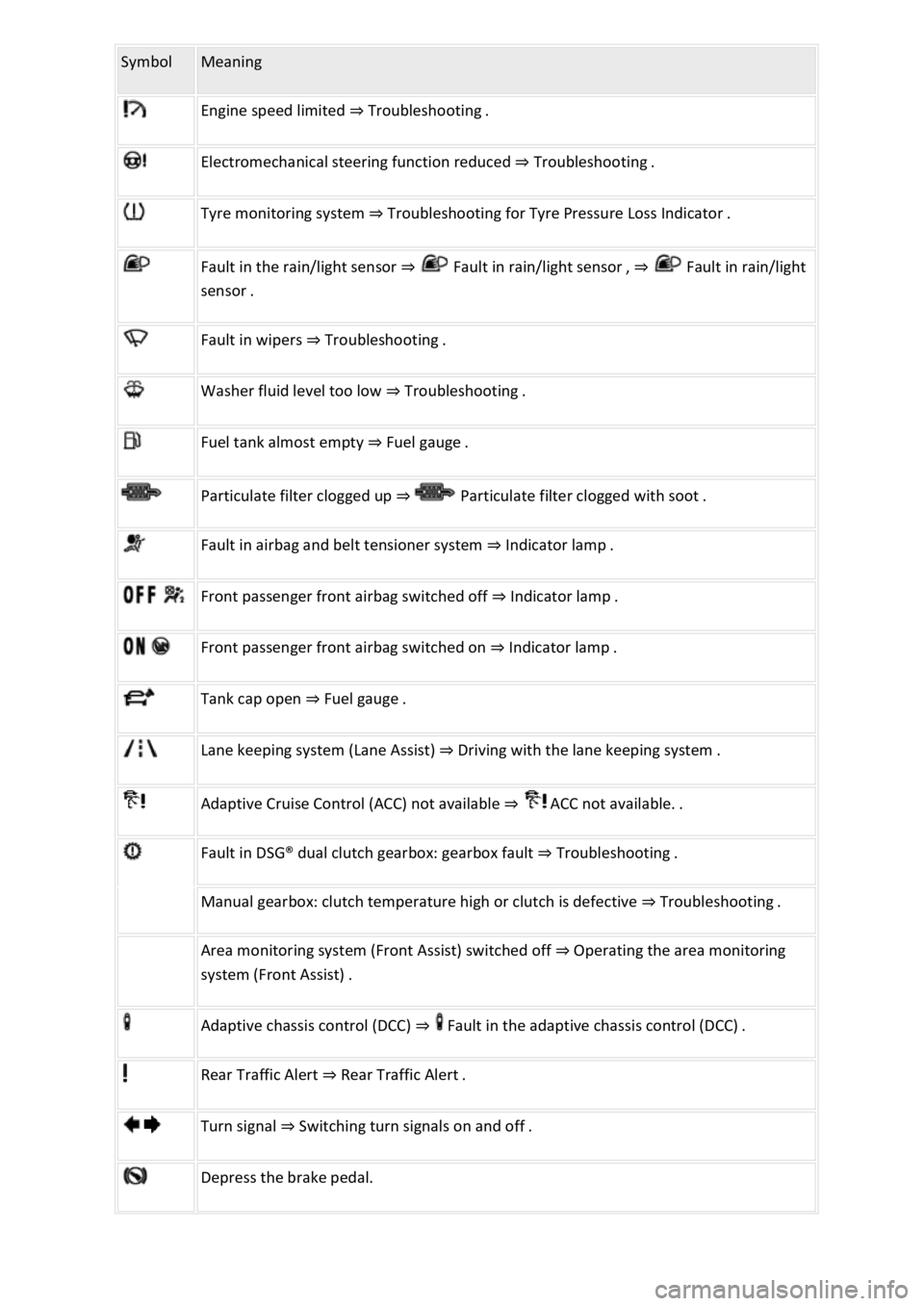
Symbol Meaning
Engine speed limited ⇒ Troubleshooting .
Electromechanical steering function reduced ⇒ Troubleshooting .
Tyre monitoring system ⇒ Troubleshooting for Tyre Pressure Loss Indicator .
Fault in the rain/light sensor ⇒ Fault in rain/light sensor , ⇒ Fault in rain/light
sensor .
Fault in wipers ⇒ Troubleshooting .
Washer fluid level too low ⇒ Troubleshooting .
Fuel tank almost empty ⇒ Fuel gauge .
Particulate filter clogged up ⇒ Particulate filter clogged with soot .
Fault in airbag and belt tensioner system ⇒ Indicator lamp .
Front passenger front airbag switched off ⇒ Indicator lamp .
Front passenger front airbag switched on ⇒ Indicator lamp .
Tank cap open ⇒ Fuel gauge .
Lane keeping system (Lane Assist) ⇒ Driving with the lane keeping system .
Adaptive Cruise Control (ACC) not available ⇒ ACC not available. .
Fault in DSG® dual clutch gearbox: gearbox fault ⇒ Troubleshooting .
Manual gearbox: clutch temperature high or clutch is defective ⇒ Troubleshooting .
Area monitoring system (Front Assist) switched off ⇒ Operating the area monitoring
system (Front Assist) .
Adaptive chassis control (DCC) ⇒ Fault in the adaptive chassis control (DCC) .
Rear Traffic Alert ⇒ Rear Traffic Alert .
Turn signal ⇒ Switching turn signals on and off .
Depress the brake pedal.
Page 12 of 502
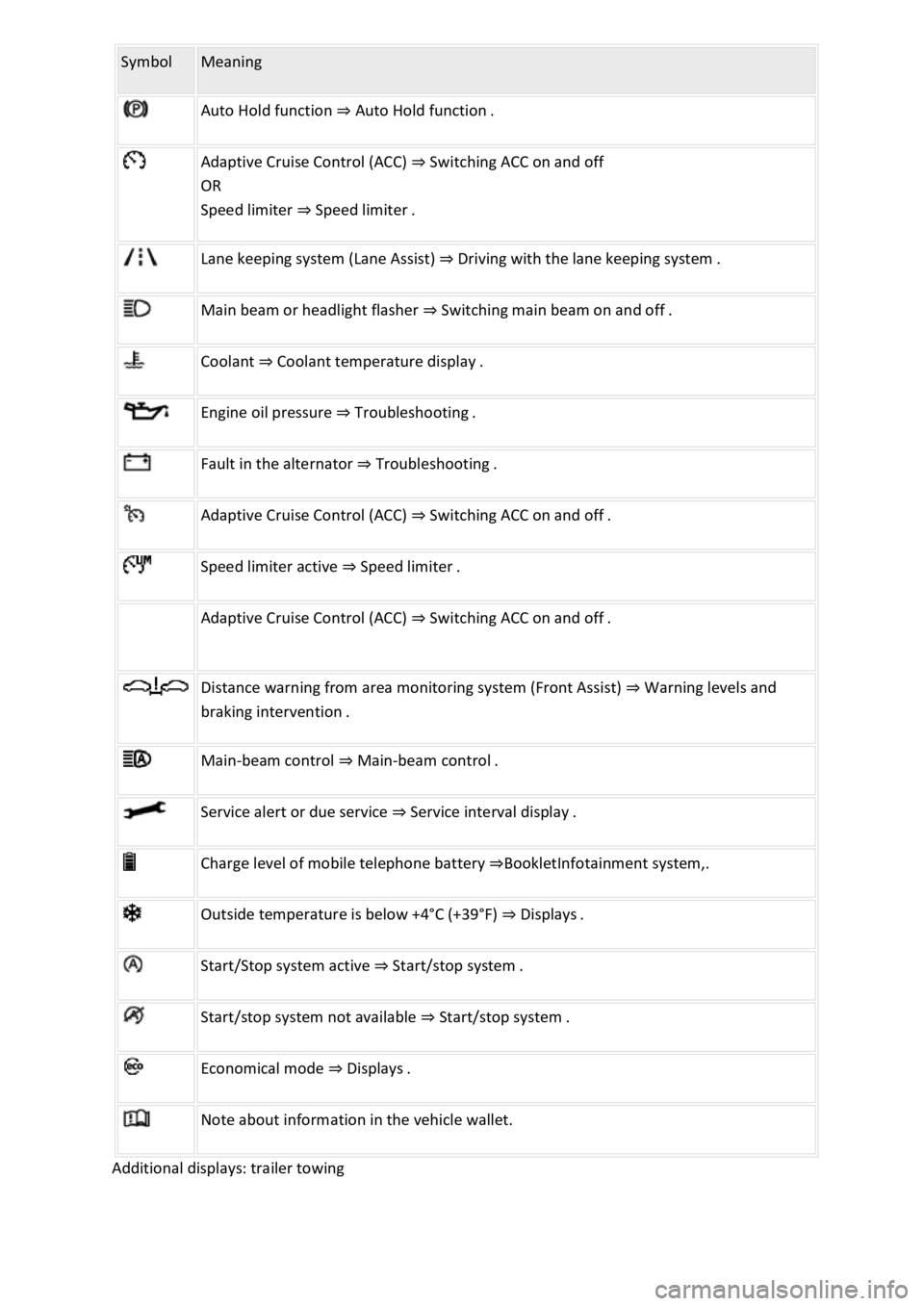
Symbol Meaning
Auto Hold function ⇒ Auto Hold function .
Adaptive Cruise Control (ACC) ⇒ Switching ACC on and off
OR
Speed limiter ⇒ Speed limiter .
Lane keeping system (Lane Assist) ⇒ Driving with the lane keeping system .
Main beam or headlight flasher ⇒ Switching main beam on and off .
Coolant ⇒ Coolant temperature display .
Engine oil pressure ⇒ Troubleshooting .
Fault in the alternator ⇒ Troubleshooting .
Adaptive Cruise Control (ACC) ⇒ Switching ACC on and off .
Speed limiter active ⇒ Speed limiter .
Adaptive Cruise Control (ACC) ⇒ Switching ACC on and off .
Distance warning from area monitoring system (Front Assist) ⇒ Warning levels and
braking intervention .
Main-beam control ⇒ Main-beam control .
Service alert or due service ⇒ Service interval display .
Charge level of mobile telephone battery ⇒BookletInfotainment system,.
Outside temperature is below +4°C (+39°F) ⇒ Displays .
Start/Stop system active ⇒ Start/stop system .
Start/stop system not available ⇒ Start/stop system .
Economical mode ⇒ Displays .
Note about information in the vehicle wallet.
Additional displays: trailer towing
Page 21 of 502

With some equipment levels, some settings and displays may also appear in the Infotainment
system.
If several warnings are present, the symbols will appear for several seconds, one after another. The
symbols will continue to appear until the faults are rectified.
If warning messages about malfunctions are displayed when the ignition is switched on, it may not
be possible to adjust some settings as described, or the information display may appear differently.
If this is the case, take the vehicle to a qualified workshop to have the malfunctions rectified.
Instrument cluster menus
First read and observe the introductoryinformation and safety warnings⇒Introduction
The content and layout of the menus and displays depend on the vehicle electronics and the level of
vehicle equipment.
A qualified workshop can program and modify other functions depending on the vehicle equipment
level. Volkswagen recommends using a Volkswagen dealership for this purpose.
Some menu options can be accessed only when the vehicle is stationary.
Driving data⇒ Driving data display (multifunction display)
Assist systems.
Lane Assist on/off ⇒ Lane keeping system (Lane Assist)
Front Assist on/off ⇒ Area monitoring system (Front Assist) .
Blind Spot Monitor on/off ⇒ Blind Spot Monitor .
ACC (display only) ⇒ Adaptive Cruise Control (ACC) .
Views1)⇒ Digital instrument cluster (Active Info Display) .
Navigation ⇒BookletInfotainment system,.
Audio ⇒BookletInfotainment system,.
Telephone ⇒BookletInfotainment system,.
Vehicle status⇒ Warning and information messages .
Lap timer⇒ Lap timer .
Personalisation (user selection)⇒ Personalisation .
1) Only in vehicles with an Active Info Display.
Service menu
Page 47 of 502

General notes
Checklist
Observe the following information both before and during every journey to ensure your own safety,
and the safety of all passengers and other road users ⇒ :
Check that all lights and turn signals are working properly.
Check the tyre pressure and fuel level Tyre pressure, Fuel gauge.
Check the washer fluid level Washer fluid.
Make sure that you have a good, clear view through all of the windows Caring for and cleaning the
vehicle exterior.
Secure any objects and luggage in the stowage compartments, the luggage compartment or on the
roof Transporting items.
Ensure that you are able to operate the pedals freely at all times.
Secure any children travelling in the vehicle in a restraint system suitable for their weight and size
Safe transport of children.
Adjust the front seats, head restraints and mirrors properly to match the size of the occupants
Sitting position, Mirrors.
Wear shoes that provide proper support for your feet when using the pedals.
The floor mat in the footwell on the driver side must leave the pedal area free and must be securely
fastened.
Page 50 of 502

Vehicle lighting Lights necessary for traffic safety:
Turn signals
Side lights, dipped beam headlights and main beam headlights
Tail light clusters
Brake lights
Rear fog light
Number plate light
Information on changing bulbs ⇒ Changing bulbs .
DANGER
Please observe important safety information about the front passenger front airbag ⇒ Fitting and
using child seats .
WARNING
Driving under the influence of alcohol, drugs, medication or narcotics could cause accidents and fatal
injuries.
Alcohol, drugs, medication and narcotics can severely impair senses, reaction times and driving
safety. This could cause you to lose control of the vehicle.
WARNING
Always observe current traffic regulations and speed limits, and think ahead when driving. The
correct interpretation of the driving situation can make the difference between reaching your
destination safely and having an accident with serious injuries.
NOTICE
Volkswagen is not responsible for any vehicle damage caused by low-quality fuel, inadequate
servicing work or non-availability of Genuine Parts.
Observe the instructions and information for vehicles with an N1 approval ⇒ Information about
vehicles with N1 approval (light commercial vehicle) .