start VOLKSWAGEN T-ROC 2021 Owner´s Manual
[x] Cancel search | Manufacturer: VOLKSWAGEN, Model Year: 2021, Model line: T-ROC, Model: VOLKSWAGEN T-ROC 2021Pages: 502, PDF Size: 9.42 MB
Page 1 of 502
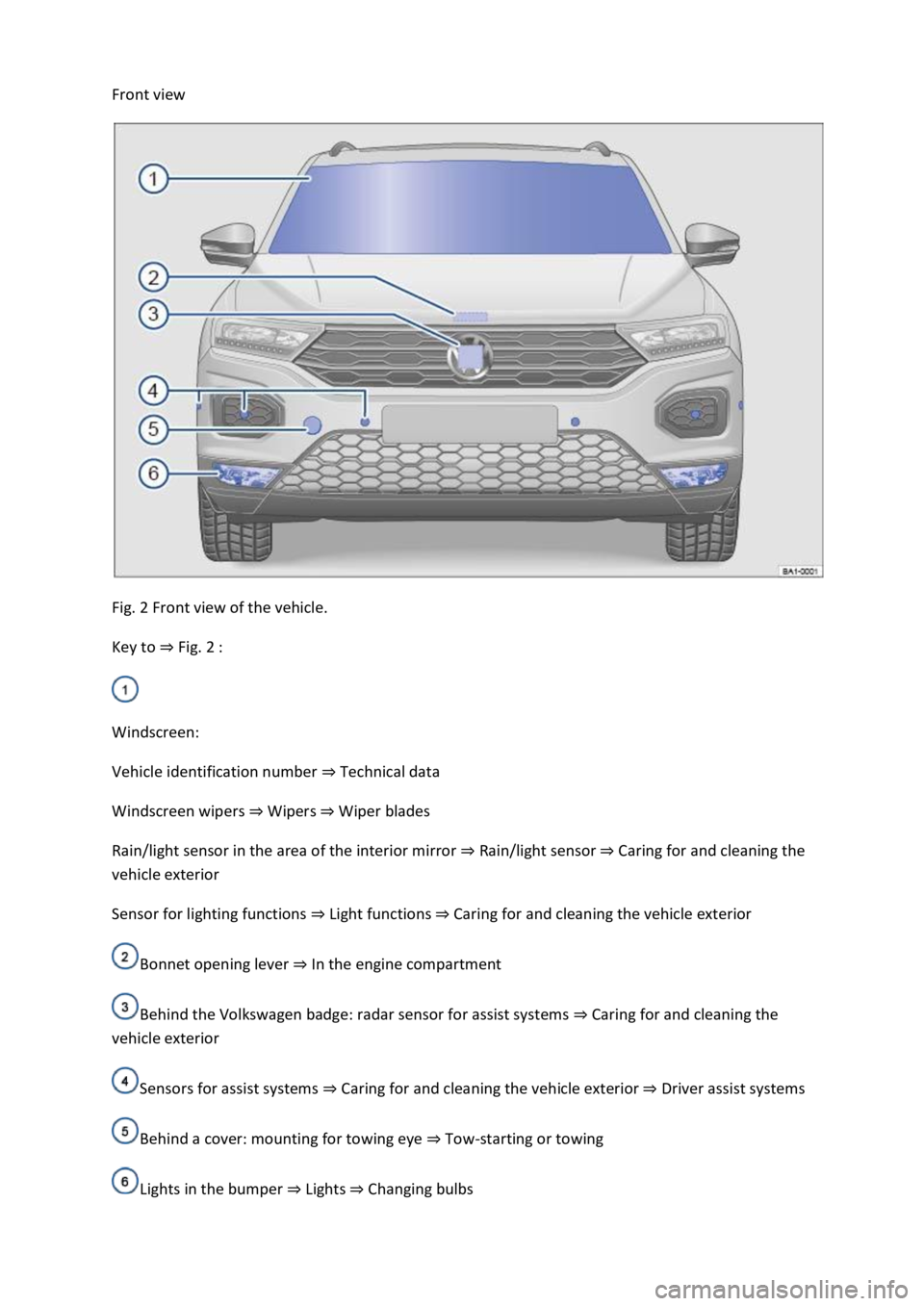
Front view
Fig. 2 Front view of the vehicle.
Key to ⇒ Fig. 2 :
Windscreen:
Vehicle identification number ⇒ Technical data
Windscreen wipers ⇒ Wipers ⇒ Wiper blades
Rain/light sensor in the area of the interior mirror ⇒ Rain/light sensor ⇒ Caring for and cleaning the
vehicle exterior
Sensor for lighting functions ⇒ Light functions ⇒ Caring for and cleaning the vehicle exterior
Bonnet opening lever ⇒ In the engine compartment
Behind the Volkswagen badge: radar sensor for assist systems ⇒ Caring for and cleaning the
vehicle exterior
Sensors for assist systems ⇒ Caring for and cleaning the vehicle exterior ⇒ Driver assist systems
Behind a cover: mounting for towing eye ⇒ Tow-starting or towing
Lights in the bumper ⇒ Lights ⇒ Changing bulbs
Page 3 of 502
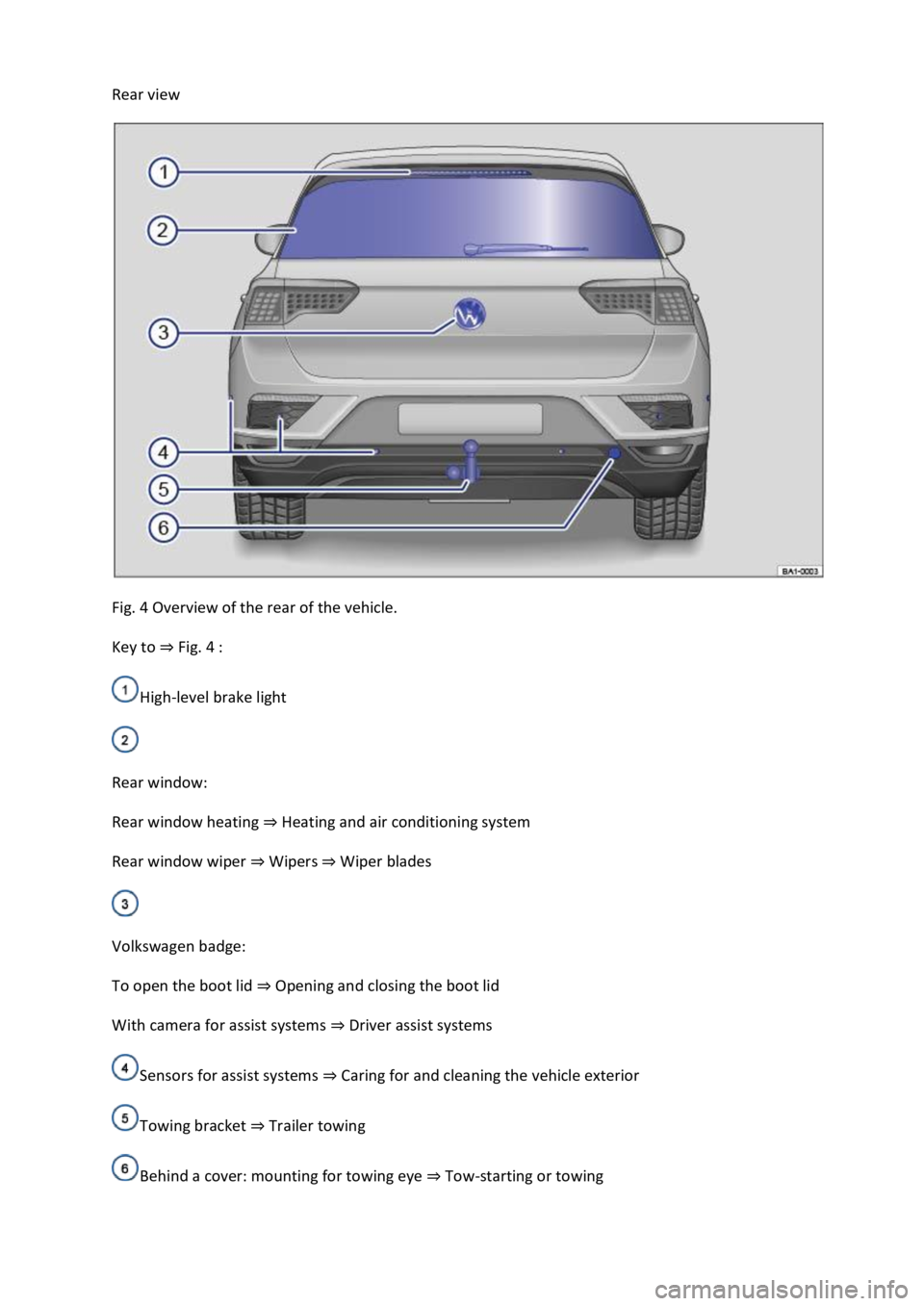
Rear view
Fig. 4 Overview of the rear of the vehicle.
Key to ⇒ Fig. 4 :
High-level brake light
Rear window:
Rear window heating ⇒ Heating and air conditioning system
Rear window wiper ⇒ Wipers ⇒ Wiper blades
Volkswagen badge:
To open the boot lid ⇒ Opening and closing the boot lid
With camera for assist systems ⇒ Driver assist systems
Sensors for assist systems ⇒ Caring for and cleaning the vehicle exterior
Towing bracket ⇒ Trailer towing
Behind a cover: mounting for towing eye ⇒ Tow-starting or towing
Page 6 of 502

Bonnet release lever ⇒ In the engine compartment
Fuse box cover ⇒ Changing fuses
Lever for adjusting the steering column position ⇒ Steering wheel
Light switch ⇒ Vehicle lighting
Turn signal and main beam lever ⇒ Vehicle lighting
With switches and buttons for the driver assist systems ⇒ Button for driver assist systems ⇒ Driver
assist systems
Vents ⇒ Heating and air conditioning system
Instrument cluster ⇒ Instrument cluster
With warning and indicator lamps ⇒ Symbols in instrument cluster
Lever for wipers and washers ⇒ Wipers
With buttons for operating the menus ⇒ Instrument cluster
Controls on the multifunction steering wheel:
Operating driver assist systems ⇒ Operating using the multifunction steering wheel ⇒ Driver assist
systems
Audio, navigation
Opening the telephone menu or accepting telephone calls
Volume adjustment
Activating voice control (no function in some models)
Horn
Location of the driver front airbag ⇒ Airbag system
Ignition lock ⇒ Starting and stopping the engine
Pedals ⇒ Pedals
Page 10 of 502
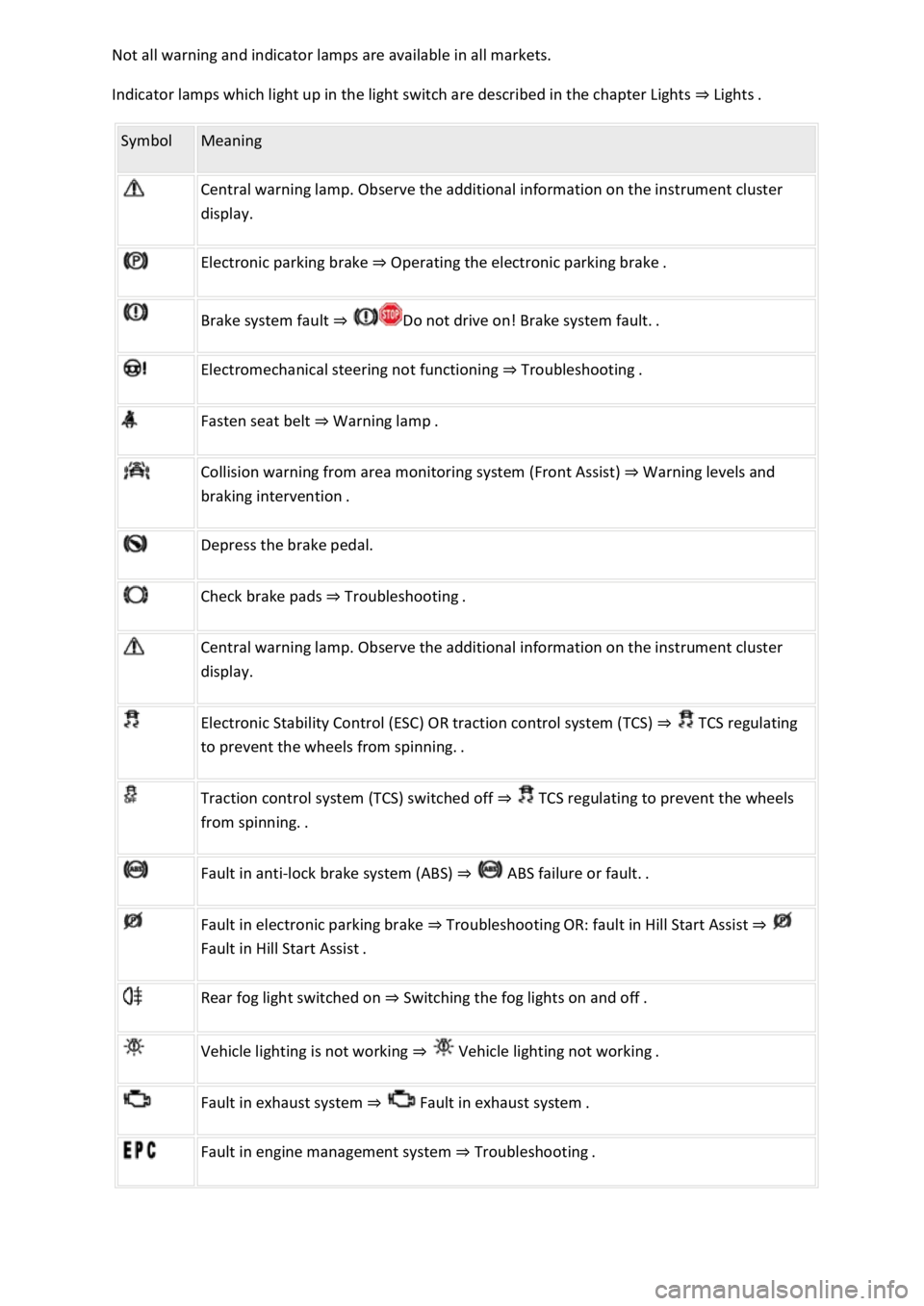
Not all warning and indicator lamps are available in all markets.
Indicator lamps which light up in the light switch are described in the chapter Lights ⇒ Lights .
Symbol Meaning
Central warning lamp. Observe the additional information on the instrument cluster
display.
Electronic parking brake ⇒ Operating the electronic parking brake .
Brake system fault ⇒ Do not drive on! Brake system fault. .
Electromechanical steering not functioning ⇒ Troubleshooting .
Fasten seat belt ⇒ Warning lamp .
Collision warning from area monitoring system (Front Assist) ⇒ Warning levels and
braking intervention .
Depress the brake pedal.
Check brake pads ⇒ Troubleshooting .
Central warning lamp. Observe the additional information on the instrument cluster
display.
Electronic Stability Control (ESC) OR traction control system (TCS) ⇒ TCS regulating
to prevent the wheels from spinning. .
Traction control system (TCS) switched off ⇒ TCS regulating to prevent the wheels
from spinning. .
Fault in anti-lock brake system (ABS) ⇒ ABS failure or fault. .
Fault in electronic parking brake ⇒ Troubleshooting OR: fault in Hill Start Assist ⇒
Fault in Hill Start Assist .
Rear fog light switched on ⇒ Switching the fog lights on and off .
Vehicle lighting is not working ⇒ Vehicle lighting not working .
Fault in exhaust system ⇒ Fault in exhaust system .
Fault in engine management system ⇒ Troubleshooting .
Page 12 of 502
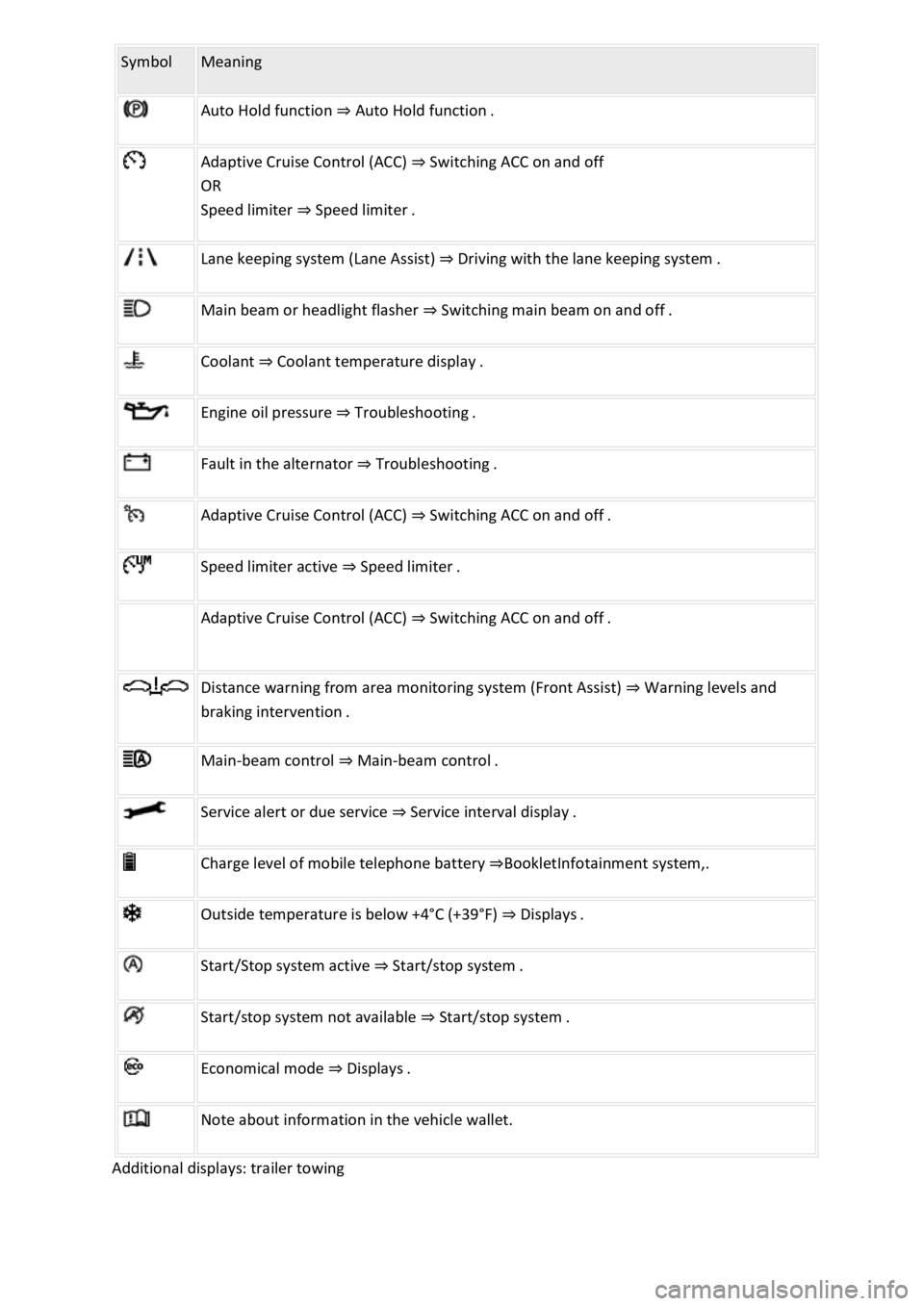
Symbol Meaning
Auto Hold function ⇒ Auto Hold function .
Adaptive Cruise Control (ACC) ⇒ Switching ACC on and off
OR
Speed limiter ⇒ Speed limiter .
Lane keeping system (Lane Assist) ⇒ Driving with the lane keeping system .
Main beam or headlight flasher ⇒ Switching main beam on and off .
Coolant ⇒ Coolant temperature display .
Engine oil pressure ⇒ Troubleshooting .
Fault in the alternator ⇒ Troubleshooting .
Adaptive Cruise Control (ACC) ⇒ Switching ACC on and off .
Speed limiter active ⇒ Speed limiter .
Adaptive Cruise Control (ACC) ⇒ Switching ACC on and off .
Distance warning from area monitoring system (Front Assist) ⇒ Warning levels and
braking intervention .
Main-beam control ⇒ Main-beam control .
Service alert or due service ⇒ Service interval display .
Charge level of mobile telephone battery ⇒BookletInfotainment system,.
Outside temperature is below +4°C (+39°F) ⇒ Displays .
Start/Stop system active ⇒ Start/stop system .
Start/stop system not available ⇒ Start/stop system .
Economical mode ⇒ Displays .
Note about information in the vehicle wallet.
Additional displays: trailer towing
Page 14 of 502

Instrument cluster
Introduction
This chapter contains information on the followingsubjects:
⇒ Analogue instrument cluster
⇒ Rev counter
⇒ Digital instrument cluster (Active Info Display)
⇒ Displays
⇒ Instrument cluster menus
⇒ Service menu
⇒ Driving data display (multifunction display)
⇒ Warning and information messages
⇒ Driver Alert System (recommendation for rest breaks)
⇒ Dynamic Road Sign Display (Sign Assist)
⇒ Time
⇒ Lap timer
⇒ Fuel gauge
⇒ Coolant temperature display
⇒ Service interval display
The vehicle is equipped either with an analogue or a digital instrument cluster (Active Info Display).
When you start the engine after the 12-volt battery has been totally discharged or changed, you may
find that system settings (time, date, personal convenience settings and programming) have been
changed or deleted. Check and correct the settings as necessary once the 12-volt vehicle battery has
been sufficiently charged.
WARNING
Accidents and injuries can occur if the driver is distracted.
Never press the buttons on the instrument cluster while the vehicle is in motion.
Any settings for the instrument cluster display and displays in the Infotainment system should be
made only when the vehicle is stationary in order to reduce the risk of accidents and serious injuries.
Page 15 of 502
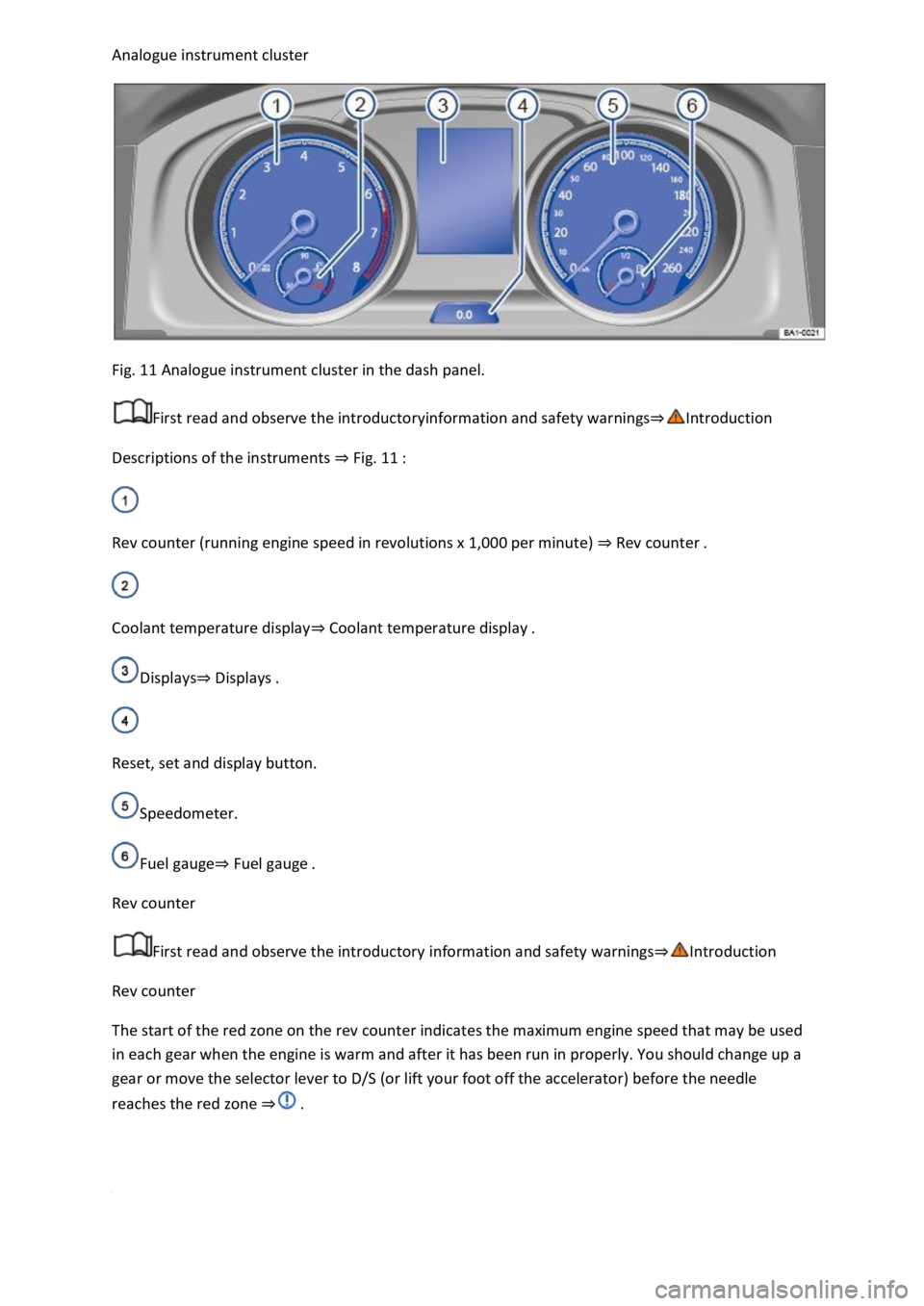
Analogue instrument cluster
Fig. 11 Analogue instrument cluster in the dash panel.
First read and observe the introductoryinformation and safety warnings⇒Introduction
Descriptions of the instruments ⇒ Fig. 11 :
Rev counter (running engine speed in revolutions x 1,000 per minute) ⇒ Rev counter .
Coolant temperature display⇒ Coolant temperature display .
Displays⇒ Displays .
Reset, set and display button.
Speedometer.
Fuel gauge⇒ Fuel gauge .
Rev counter
First read and observe the introductory information and safety warnings⇒Introduction
Rev counter
The start of the red zone on the rev counter indicates the maximum engine speed that may be used
in each gear when the engine is warm and after it has been run in properly. You should change up a
gear or move the selector lever to D/S (or lift your foot off the accelerator) before the needle
reaches the red zone ⇒ .
Page 18 of 502

OR: press the or arrow button on the multifunction steering wheel to select the required
map size. A frame appears around the selected option.
Press the button on the multifunction steering wheel to confirm your selection.
With some equipment levels, navigation is shown on two screens or only one. The navigation map
can be displayed on the Active Info Display and Infotainment system or only on the Infotainment
system display. In the latter case, only navigation arrows are shown on the Active Info Display.
Displays
First read and observe the introductoryinformation and safety warnings⇒Introduction
Possible instrument cluster displays
Open doors, bonnet and boot lid.
Warning and information messages.
Mileage displays.
Time ⇒ Time .
Radio and navigation information ⇒BookletInfotainment system,.
Telephone information ⇒BookletInfotainment system,.
Outside temperature.
Compass display.
Selector lever positions.
Gear-change indicator ⇒ Gear-change indicator .
Driving data display (multifunction display) and menus for various settings ⇒ Instrument cluster
menus .
Service interval display ⇒ Service interval display .
Speed warning ⇒ Instrument cluster menus .
Speed warning for winter tyres.
Start/stop system status display ⇒ Start/stop system .
Road signs detected by the Dynamic Road Sign Display system ⇒ Dynamic Road Sign Display (Sign
Assist) .
Status display for Active Cylinder Management (ACT®) ⇒ Driving economically .
Economical mode .
Engine code.
Display of driver assist systems ⇒ Driver assist systems .
Page 22 of 502

First read and observe the introductoryinformation and safety warnings⇒Introduction
Settings can be made in the Service menu1) depending on the vehicle equipment.
Opening the Service menu
To open the Service menu, select the Range information profile and press and hold the OK button on
the multifunction steering wheel for around four seconds. You can now navigate in the menu in the
usual way using the buttons on the multifunction steering wheel.
Resetting the service interval display
Select the Service menu and follow the instructions on the instrument cluster display.
Resetting oil change service
Select the Reset oil service menu and follow the instructions on the instrument cluster display.
Resetting driving data
Select the Reset trip menu and follow the instructions on the instrument cluster display to reset the
desired value.
Engine code
Select the Engine code menu. The engine codes are now shown on the instrument cluster display.
Setting the time
Select the Time menu and set the correct time with the arrow buttons or .
1) Only in vehicles with an Active Info Display.
Driving data display (multifunction display)
First read and observe the introductoryinformation and safety warnings⇒Introduction
The driving data display (multifunction display) shows a variety of travel and fuel consumption data.
Switching between displays
Vehicles without multifunction steering wheel:
Press the rocker switch on the wiper lever ⇒ Operating using the wiper lever .
Vehicles with multifunction steering wheel:
Press the or button ⇒ Operating using the multifunction steering wheel .
Switching between memories
Press the button on the wiper lever, or press the button on the multifunction
steering wheel.
Since start memory
Page 25 of 502

Driver Alert System (recommendation for rest breaks)
First read and observe the introductoryinformation and safety warnings⇒Introduction
The Driver Alert System informs the driver if their driving shows signs of tiredness.
Fig. 13 On the instrument cluster display: Driver Alert System symbol.
Function and operation
The Driver Alert System determines the driving behaviour of the driver at the start of a journey and
uses this to calculate a fatigue assessment. This is continuously compared with the current
behaviour of the driver while driving. If the system detects that the driver may be tired, an acoustic
warning signal will sound and a symbol ⇒ Fig. 13 will be displayed on the instrument cluster display
as a visual indication in combination with a supplementary text message. The message in the
instrument cluster display is displayed for about five seconds and may be repeated once. The last
displayed message is saved by the system.
The message on the instrument cluster display can be switched off by pressing the
button on the wiper lever or the button on the multifunction steering wheel ⇒ Operating the
instrument cluster . The message can be displayed again on the instrument cluster display using the
multifunction display ⇒ Warning and information messages .
Function conditions
The driving behaviour can be evaluated only when the speed is above 60 km/h (37 mph) up to
approximately 200 km/h (125 mph).
Switching on and off
The Driver Alert System can be activated and deactivated in the vehicle settings in the Infotainment
system ⇒ Vehicle settings menu .
Function limitations
The Driver Alert System has system-related limitations. The following conditions can limit the
function of the Driver Alert System, or prevent it from working altogether:
Speeds below 60 km/h (37 mph).
Speeds above 200 km/h (125 mph).
Twisting roads.
Poor roads.
Adverse weather conditions.