start VOLKSWAGEN T-ROC 2021 Owner´s Manual
[x] Cancel search | Manufacturer: VOLKSWAGEN, Model Year: 2021, Model line: T-ROC, Model: VOLKSWAGEN T-ROC 2021Pages: 502, PDF Size: 9.42 MB
Page 31 of 502

The following higher-level menus can be displayed:
Lap timer
Lap (with the current lap number)
Statistics
Switching between the menus
Vehicles without multifunction steering wheel:
Press the rocker switch on the wiper lever ⇒ Operating the instrument cluster .
Vehicles with multifunction steering wheel:
Press the or button ⇒ Operating the instrument cluster .
The following list shows an example of how the menus in the instrument cluster display are
structured. The actual scope of the menus and the names of the individual menu options vary
according to the instrument cluster design and the vehicle electronics.
Menu displays and functions
Lap timer menu
StartStarts the lap timer.Since startTiming starts when the vehicle drives off. If the vehicle is already
in motion, timing will begin when the vehicle has come to a temporary standstill.StatisticsAn
overview of the laps driven until now are displayed.
Lap menu
Stop!Active timing is interrupted. This will not end the lap.ContinuePaused timing resumes.Split
time:A split time will be displayed for approximately five seconds. Active timing continues parallel to
this.New lapTiming of the current lap will then be interrupted and a new lap will begin. The time of
the completed lap will be carried over to the statistics.Abort lapThe timing is ended and disregarded.
The current lap is not entered into the statistics.EndTiming is ended. The lap is entered into the
statistics.
Statistics menu
BackIt will be reset to the previous menu.ResetAll stored statistics data will be reset.
In the Statistics menu, the lap times most recently achieved are shown. If the maximum number of
99 laps or the maximum time of 99 hours, 59 minutes and 59 seconds has been reached, a new
timing can only be started after the statistics have been reset.
WARNING
Accidents and injuries can occur if the driver is distracted.
Make lap timer settings and access statistics only when the vehicle is stationary.
Page 41 of 502
Always drive carefully and responsibly.
When you start the engine after the 12-volt vehicle battery has been totally discharged or changed,
you may find that system settings (time, date, personal convenience settings and programming) and
user accounts have been changed or deleted. Check and correct the settings as necessary once the
12-volt vehicle battery has been sufficiently charged.
Vehicle settings menu
First read and observe the introductoryinformation and safety warnings⇒Introduction
You can switch individual functions and systems on and off and make settings in the vehicle settings
of the Infotainment system.
Opening the Vehicle settings menu
Switch on the ignition.
Switch on Infotainment system if necessary.
Press the button or function button.
Touch the Vehicle and function buttons to open the Vehicle settings menu.
Touch the corresponding function buttons to open additional menus in the Vehicle settings menu or
to make settings in the menu options.
If the checkbox in the function button is ticked , the respective function is switched on.
Touch the function button to return to the previous menu.
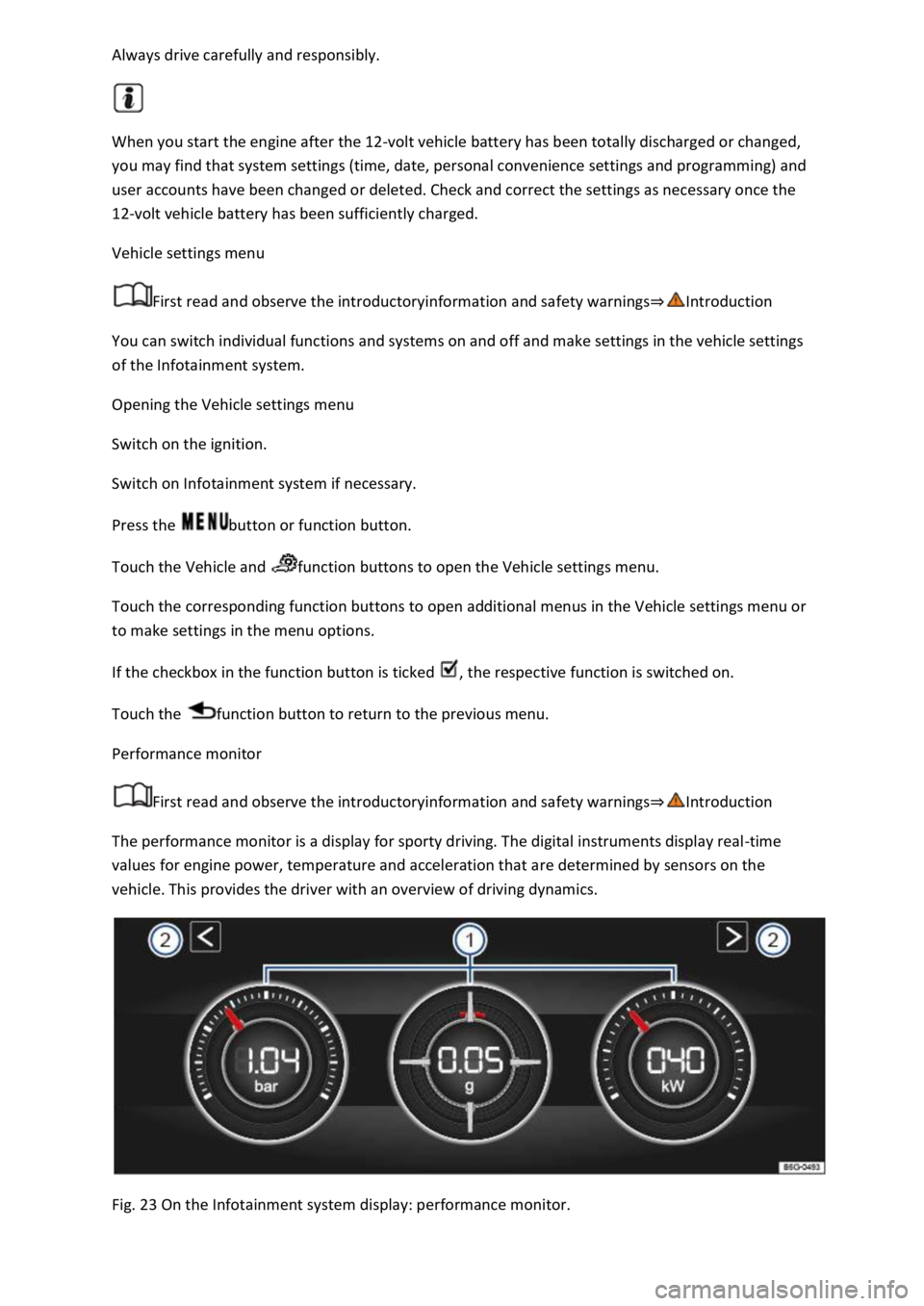
Performance monitor
First read and observe the introductoryinformation and safety warnings⇒Introduction
The performance monitor is a display for sporty driving. The digital instruments display real-time
values for engine power, temperature and acceleration that are determined by sensors on the
vehicle. This provides the driver with an overview of driving dynamics.
Fig. 23 On the Infotainment system display: performance monitor.
Page 43 of 502
its operating temperature. The needle may move further in a clockwise direction under high engine
loads and at high outside temperatures. This is no cause for concern unless the indicator lamp
in the instrument cluster display is lit up or flashing ⇒ Engine oil .
Adapting the display areas to the driving situation
Choose the three possible instruments corresponding to your individual driving style and the driving
situation.
WARNING
Accidents and injuries can occur if the driver is distracted. Operating the Infotainment system can
distract you from the road.
Always drive carefully and responsibly.
NOTICE
When starting from cold, avoid high engine speeds, driving at full throttle and over-loading the
engine.
Due to the principle of performance determination used in the vehicle, the physical accuracy of the
displayed values is not guaranteed.
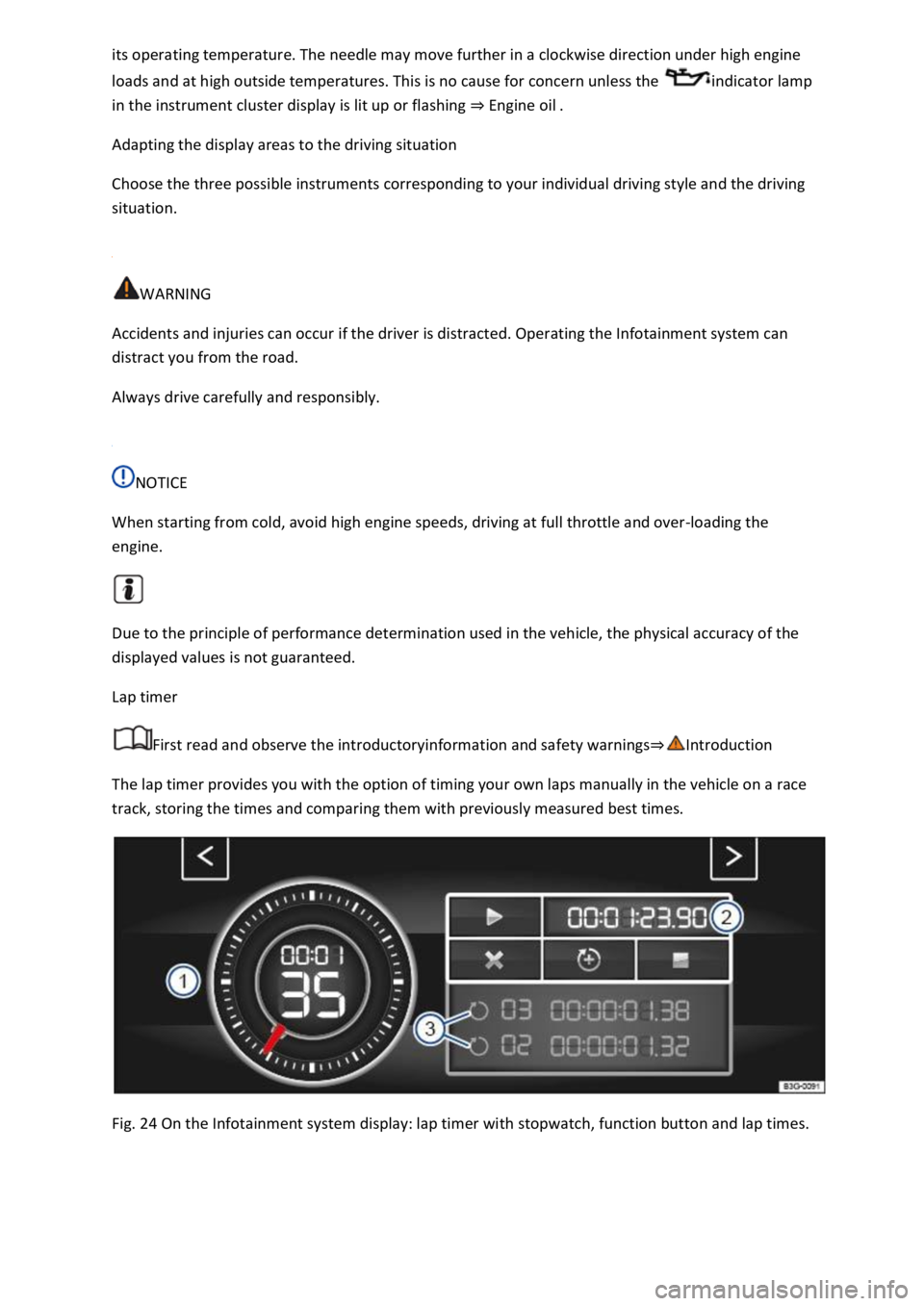
Lap timer
First read and observe the introductoryinformation and safety warnings⇒Introduction
The lap timer provides you with the option of timing your own laps manually in the vehicle on a race
track, storing the times and comparing them with previously measured best times.
Fig. 24 On the Infotainment system display: lap timer with stopwatch, function button and lap times.
Page 44 of 502
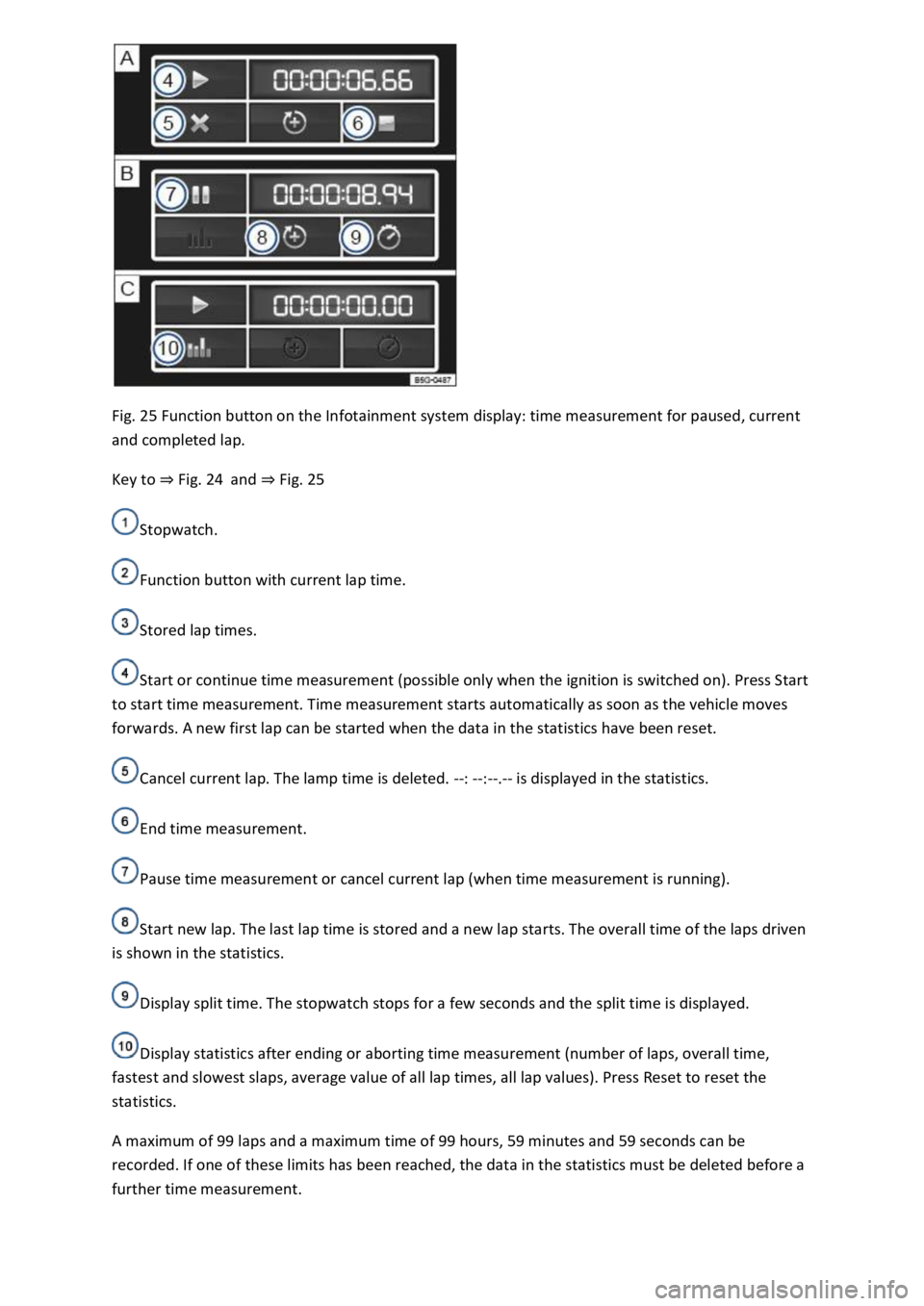
Fig. 25 Function button on the Infotainment system display: time measurement for paused, current
and completed lap.
Key to ⇒ Fig. 24 and ⇒ Fig. 25
Stopwatch.
Function button with current lap time.
Stored lap times.
Start or continue time measurement (possible only when the ignition is switched on). Press Start
to start time measurement. Time measurement starts automatically as soon as the vehicle moves
forwards. A new first lap can be started when the data in the statistics have been reset.
Cancel current lap. The lamp time is deleted. --: --:--.-- is displayed in the statistics.
End time measurement.
Pause time measurement or cancel current lap (when time measurement is running).
Start new lap. The last lap time is stored and a new lap starts. The overall time of the laps driven
is shown in the statistics.
Display split time. The stopwatch stops for a few seconds and the split time is displayed.
Display statistics after ending or aborting time measurement (number of laps, overall time,
fastest and slowest slaps, average value of all lap times, all lap values). Press Reset to reset the
statistics.
A maximum of 99 laps and a maximum time of 99 hours, 59 minutes and 59 seconds can be
recorded. If one of these limits has been reached, the data in the statistics must be deleted before a
further time measurement.
Page 71 of 502

The airbags can protect vehicle occupants during frontal and side collisions by reducing their
movement in the direction of the collision.
Each triggered airbag is filled by a gas generator. This causes the airbag covers to break open and the
airbags inflate forcefully to cover their deployment zones within milliseconds. Once a vehicle
occupant wearing a seat belt starts to sink into the inflated airbag, the gas inside the airbag starts to
escape to cushion the occupant and slow down their movement. This reduces the risk of severe and
fatal injuries. A triggered airbag will not always prevent other injuries from occurring, such as
swelling, bruising, burning and grazing. Deployment of an airbag can also result in frictional heat.
The most important factors for triggering the airbag are the type of accident, the angle of impact,
the vehicle speed and the type of object with which the vehicle collides. Therefore, visible damage
to the vehicle does not always mean that the airbag should have been triggered.
The triggering of the airbag system depends on the vehicle deceleration rate caused by the collision
and registered by the electronic control unit. If this rate is below the reference value programmed
into the control unit, the airbags will not be triggered, even though the vehicle may be badly
damaged as a result of the collision. Vehicle damage, repair costs or even the lack of vehicle damage
in an accident is not necessarily an indication of whether an airbag should inflate or not. It is not
possible to define a range of vehicle speeds and reference values, since the circumstances will vary
considerably between one collision and another. It is therefore impossible to cover every possible
kind and angle of impact that would trigger the airbags. Important factors in the triggering of the
airbag include, for example, the nature (hard or soft) of the object that the vehicle hits, the angle of
impact as well as vehicle speed.
Airbags serve only as a supplement to the three-point seat belt in some accident situations when the
vehicle's deceleration is sufficient to trigger the airbags. Airbags can be triggered only once and only
in certain situations. The seat belts are always there to provide protection in situations when the
airbags are not triggered or have already been triggered. For example, if the vehicle collides with a
further vehicle following the initial collision, or is hit by another vehicle.
The airbag system is part of the vehicle's overall passive safety concept. The airbag system can work
effectively only when the occupants are wearing their seat belts correctly and have assumed a
proper sitting position ⇒ Sitting position .
Components of the vehicle safety concept
The following vehicle safety equipment makes up the vehicle's safety concept to reduce the risk of
severe and fatal injuries. Depending on the vehicle equipment level, some of the equipment may not
be fitted in your vehicle or may not be available in some countries.
Optimised seat belts for all seats.
Front airbags for driver and front passenger.
Airbag indicator lamp .
Control units and sensors.
Adjustable steering column.
If applicable, mounting points for the top tether for child seats.
Page 84 of 502

Insert the latch plate into the buckle for the appropriate seat and push it down until it audible locks
into place.
In an emergency
Making you and your vehicle safe
Observe any legislation concerning the safety of a broken-down vehicle. For example, many
countries stipulate that you have to switch on the hazard warning lights and wear a high-visibility
waistcoat ⇒ Equipment for an emergency .
Checklist
To ensure your own safety and that of your passengers, carry out the following actions in the
specified order ⇒ :
Stop the vehicle at a safe distance away from moving traffic and on a suitable surface .
Switch on the hazard warning lights using the button Centre console.
Switch on the electronic parking brake Electronic parking brake.
Select the neutral position Manual gearbox: selecting a gear or move the selector lever to P position
DSG® dual clutch gearbox.
Stop the engine and remove the key from the ignition Starting and stopping the engine.
Ensure that all occupants exit the vehicle and go straight to a safe place away from moving traffic,
e.g. behind the safety barrier. Heed the country-specific regulations concerning high-visibility
waistcoats.
Take all vehicle keys with you when you leave the vehicle.
Set up the warning triangle to draw the attention of other road users to your vehicle.
Allow the engine to cool down and, if necessary, seek expert assistance.
Page 85 of 502

When the hazard warning lights are switched on, for example if you are being towed, you can still
indicate a change in direction or lane change by operating the turn signal. The hazard warning lights
will be interrupted temporarily.
Switch on the hazard warning lights, e.g. in the following situations:
When traffic ahead suddenly starts moving more slowly or you reach the tail end of a traffic jam to
warn vehicles behind you.
There is an emergency situation.
The vehicle has broken down.
When tow-starting or towing.
Always follow local regulations on the use of the hazard warning lights.
If the hazard warning lights are not working, you must use an alternative method of drawing
attention to the broken-down vehicle. This method must comply with traffic legislation.
WARNING
Any broken-down vehicle poses a high accident risk for the vehicle occupants and for other road
users.
Stop the vehicle as soon as possible and when safe to do so.
Park the vehicle at a safe distance from moving traffic.
Switch on the hazard warning lights.
Never leave other persons alone in the vehicle, particularly children or people requiring assistance.
This applies in particular when the doors are locked. People locked in the vehicle may be subjected
to very high or very low temperatures.
WARNING
Ignoring any of the items on this important safety checklist can lead to accidents and severe injuries.
Always follow the instructions in the checklist and observe the general safety procedures.
WARNING
The components of the exhaust system become very hot. This can cause fires and serious injuries.
Park the vehicle so that no part of the exhaust system can come into contact with any inflammable
material underneath the vehicle, e.g. dry grass, fuel.
Page 86 of 502
NOTICE
When pushing the vehicle by hand, do not press on the tail light clusters, the rear spoiler or large
panels. This could damage the vehicle and the rear spoiler could become detached.
The 12-volt vehicle battery will discharge if the hazard warning lights are left on over a long period of
time – even when the ignition is switched off.
Depending on the vehicle equipment, the brake lights flash rapidly if you brake sharply or initiate full
braking at a speed of more than 80 km/h (50 mph). This is a particularly effective way of attracting
the attention of vehicles behind you. If you then continue to brake, the hazard warning lights will be
switched on automatically at speeds under approximately 10 km/h (6 mph). Once you start to
accelerate, the hazard warning lights will switch off again automatically.
Equipment for an emergency
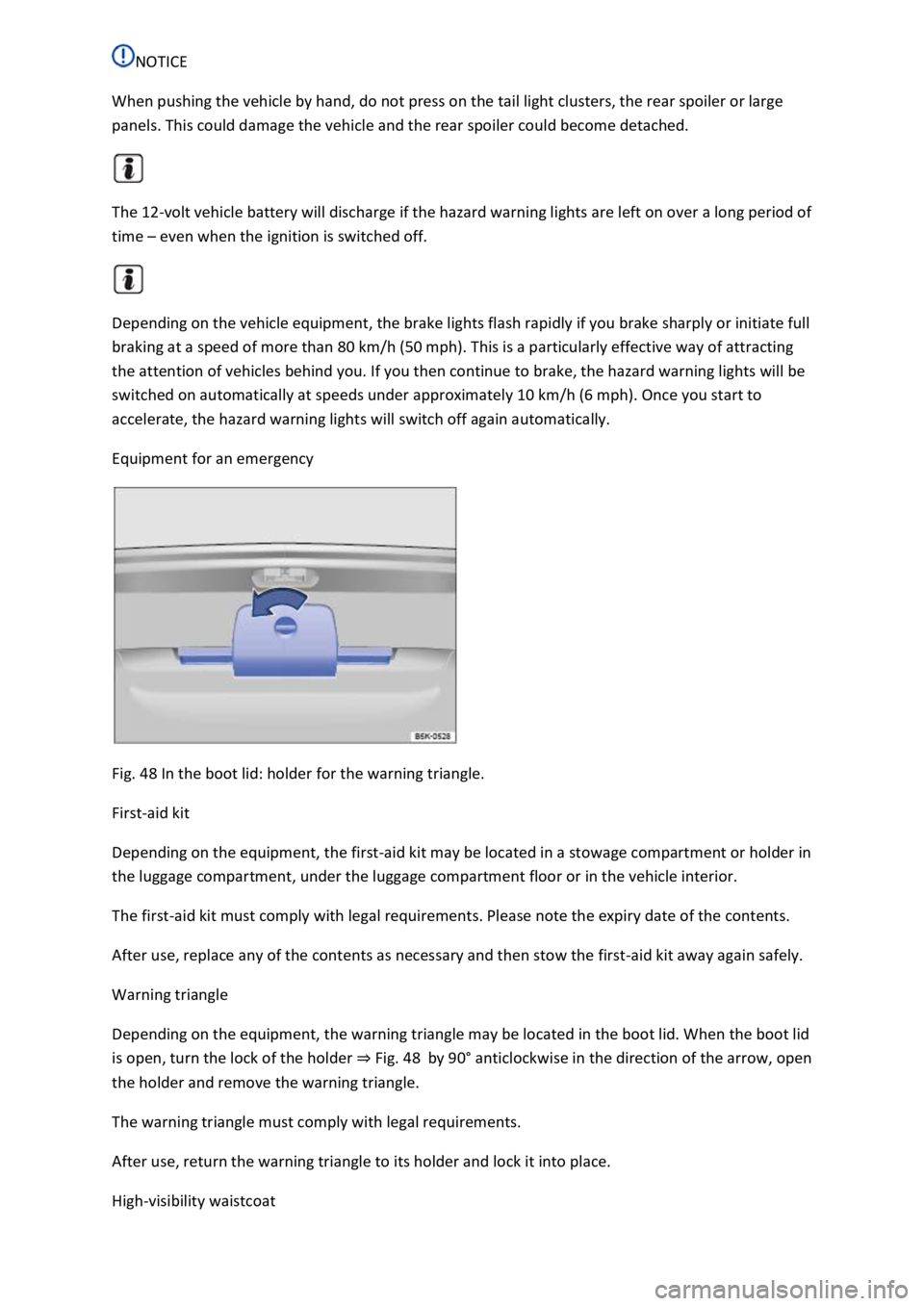
Fig. 48 In the boot lid: holder for the warning triangle.
First-aid kit
Depending on the equipment, the first-aid kit may be located in a stowage compartment or holder in
the luggage compartment, under the luggage compartment floor or in the vehicle interior.
The first-aid kit must comply with legal requirements. Please note the expiry date of the contents.
After use, replace any of the contents as necessary and then stow the first-aid kit away again safely.
Warning triangle
Depending on the equipment, the warning triangle may be located in the boot lid. When the boot lid
is open, turn the lock of the holder ⇒ Fig. 48 by 90° anticlockwise in the direction of the arrow, open
the holder and remove the warning triangle.
The warning triangle must comply with legal requirements.
After use, return the warning triangle to its holder and lock it into place.
High-visibility waistcoat
Page 89 of 502
Please also observe the other information on Volkswagen Car-Net ⇒ Mobile online services .
Opening and closing
Vehicle key
Functions of the vehicle key
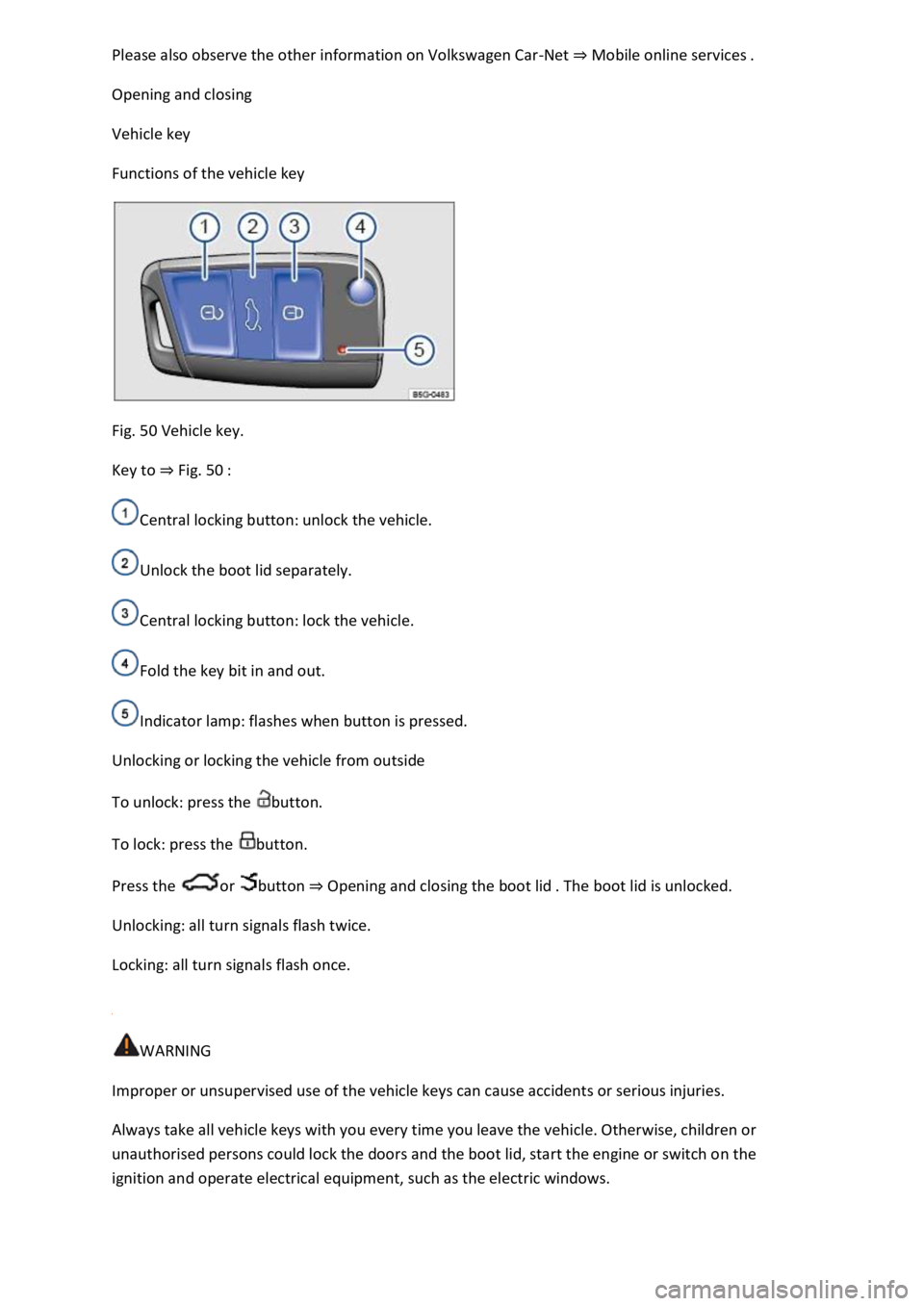
Fig. 50 Vehicle key.
Key to ⇒ Fig. 50 :
Central locking button: unlock the vehicle.
Unlock the boot lid separately.
Central locking button: lock the vehicle.
Fold the key bit in and out.
Indicator lamp: flashes when button is pressed.
Unlocking or locking the vehicle from outside
To unlock: press the button.
To lock: press the button.
Press the or button ⇒ Opening and closing the boot lid . The boot lid is unlocked.
Unlocking: all turn signals flash twice.
Locking: all turn signals flash once.
WARNING
Improper or unsupervised use of the vehicle keys can cause accidents or serious injuries.
Always take all vehicle keys with you every time you leave the vehicle. Otherwise, children or
unauthorised persons could lock the doors and the boot lid, start the engine or switch on the
ignition and operate electrical equipment, such as the electric windows.
Page 92 of 502
Keyless locking and starting system Keyless Access
Introduction
This chapter contains information on the followingsubjects:
⇒ Unlocking or locking the vehicle with
⇒ Troubleshooting
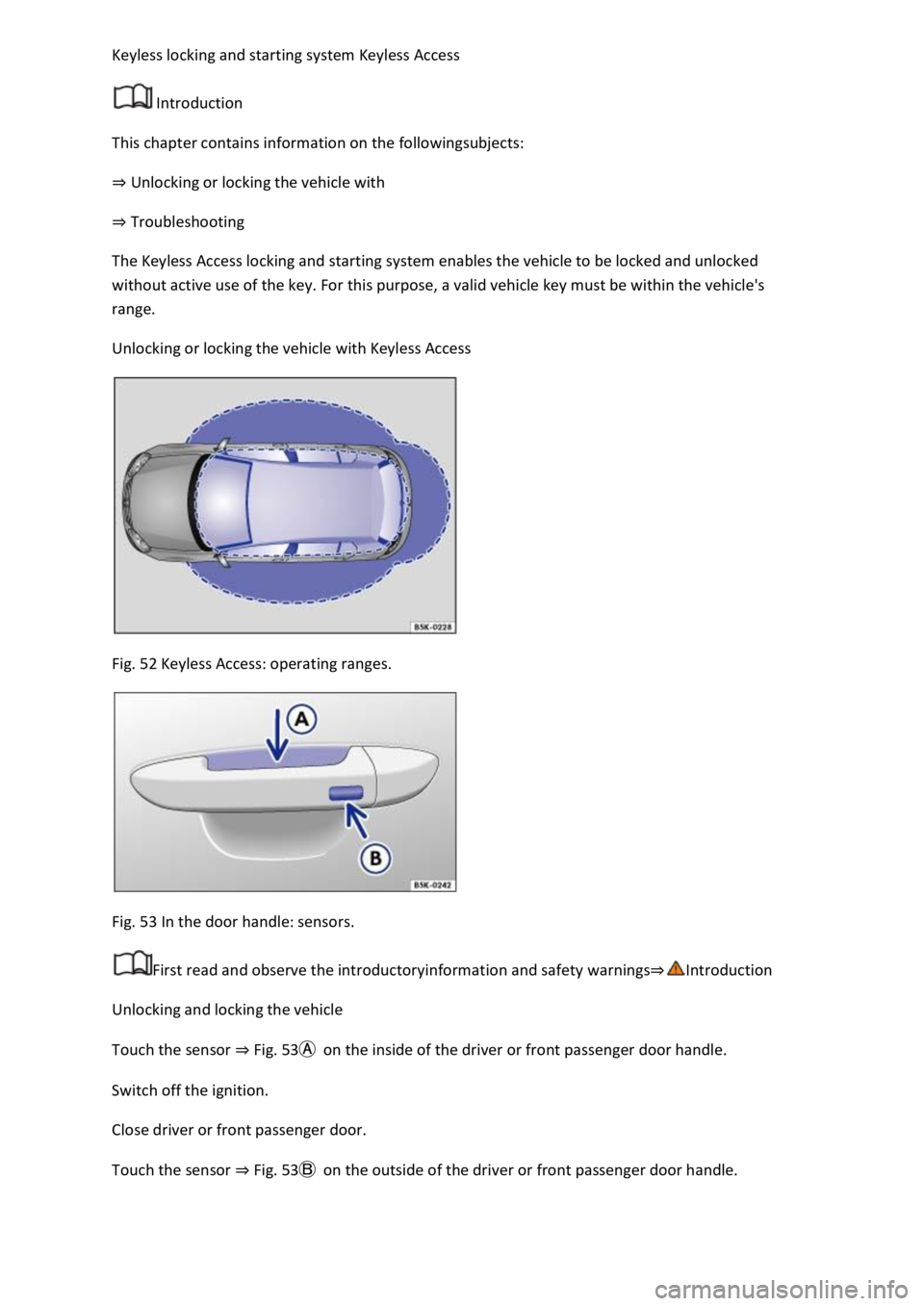
The Keyless Access locking and starting system enables the vehicle to be locked and unlocked
without active use of the key. For this purpose, a valid vehicle key must be within the vehicle's
range.
Unlocking or locking the vehicle with Keyless Access
Fig. 52 Keyless Access: operating ranges.
Fig. 53 In the door handle: sensors.
First read and observe the introductoryinformation and safety warnings⇒Introduction
Unlocking and locking the vehicle
Touch the sensor ⇒ Fig. 53Ⓐ on the inside of the driver or front passenger door handle.
Switch off the ignition.
Close driver or front passenger door.
Touch the sensor ⇒ Fig. 53Ⓑ on the outside of the driver or front passenger door handle.