buttons VOLKSWAGEN T-ROC 2021 Owner´s Manual
[x] Cancel search | Manufacturer: VOLKSWAGEN, Model Year: 2021, Model line: T-ROC, Model: VOLKSWAGEN T-ROC 2021Pages: 502, PDF Size: 9.42 MB
Page 233 of 502
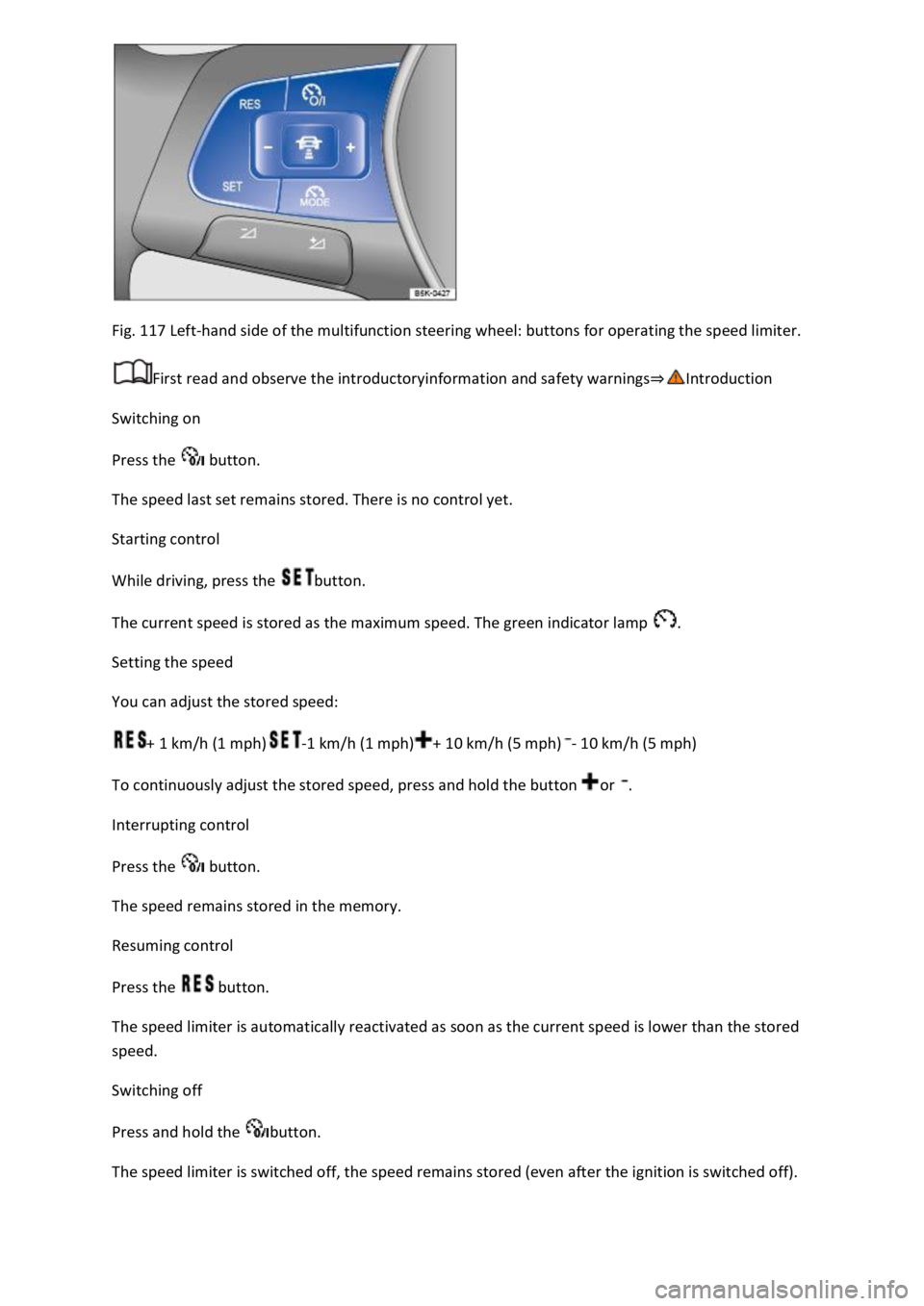
Fig. 117 Left-hand side of the multifunction steering wheel: buttons for operating the speed limiter.
First read and observe the introductoryinformation and safety warnings⇒Introduction
Switching on
Press the button.
The speed last set remains stored. There is no control yet.
Starting control
While driving, press the button.
The current speed is stored as the maximum speed. The green indicator lamp .
Setting the speed
You can adjust the stored speed:
+ 1 km/h (1 mph)-1 km/h (1 mph)+ 10 km/h (5 mph)- 10 km/h (5 mph)
To continuously adjust the stored speed, press and hold the button or .
Interrupting control
Press the button.
The speed remains stored in the memory.
Resuming control
Press the button.
The speed limiter is automatically reactivated as soon as the current speed is lower than the stored
speed.
Switching off
Press and hold the button.
The speed limiter is switched off, the speed remains stored (even after the ignition is switched off).
Page 239 of 502

Fig. 121 Left-hand side of the multifunction steering wheel: buttons for operating ACC.
First read and observe the introductoryinformation and safety warnings⇒Introduction
Switching on ACC
Press the button.
The indicator lamp lights up grey, ACC does not regulate.
Starting control
Press the button while driving forwards.
ACC stores the current speed and maintains the set distance. If the current speed is outside the
defined speed range, ACC will set the minimum speed (when driving more slowly than the limit) or
maximum speed (when driving faster than the limit).
The following indicator lamps light up, depending on the driving situation:
ACC regulating.No vehicle has been detected ahead.Vehicle detected ahead (white).
Interrupting control
Briefly press the button or press the brake pedal.
The indicator lights up grey, the speed and distance remain stored.
Control is automatically interrupted if the traction control system (TCS) is deactivated.
Resuming control
Press the button.
ACC adopts the last set speed and last set distance. The instrument cluster display shows the set
speed and the indicator lamp lights up green.
Switching off ACC
Press and hold the button.
The set speed is deleted.
Changing to the speed limiter
Press the button.
ACC is switched off.
Setting ACC
Page 240 of 502
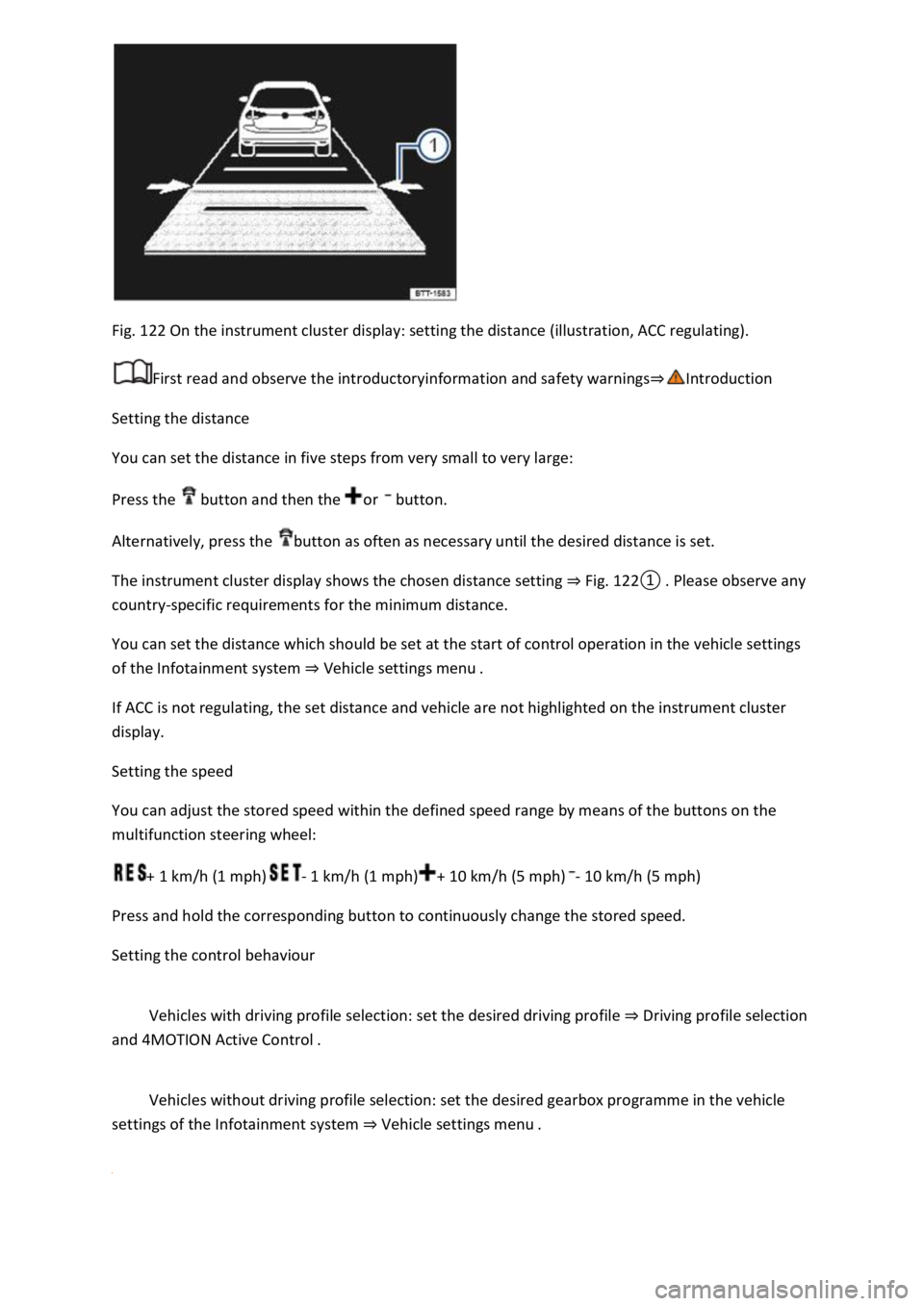
Fig. 122 On the instrument cluster display: setting the distance (illustration, ACC regulating).
First read and observe the introductoryinformation and safety warnings⇒Introduction
Setting the distance
You can set the distance in five steps from very small to very large:
Press the button and then the or button.
Alternatively, press the button as often as necessary until the desired distance is set.
The instrument cluster display shows the chosen distance setting ⇒ Fig. 122① . Please observe any
country-specific requirements for the minimum distance.
You can set the distance which should be set at the start of control operation in the vehicle settings
of the Infotainment system ⇒ Vehicle settings menu .
If ACC is not regulating, the set distance and vehicle are not highlighted on the instrument cluster
display.
Setting the speed
You can adjust the stored speed within the defined speed range by means of the buttons on the
multifunction steering wheel:
+ 1 km/h (1 mph)- 1 km/h (1 mph)+ 10 km/h (5 mph)- 10 km/h (5 mph)
Press and hold the corresponding button to continuously change the stored speed.
Setting the control behaviour
Vehicles with driving profile selection: set the desired driving profile ⇒ Driving profile selection
and 4MOTION Active Control .
Vehicles without driving profile selection: set the desired gearbox programme in the vehicle
settings of the Infotainment system ⇒ Vehicle settings menu .
Page 268 of 502
Switching on and off
First read and observe the introductoryinformation and safety warnings⇒Introduction
Switching on the rear view camera system
Select reverse gear.
OR: press the button.
Switching off the rear view camera system
Drive forwards at a speed of at least 10 km/h (6 mph).
Display representation
First read and observe the introductoryinformation and safety warnings⇒Introduction
The functions and displays of the rear view camera system image vary according to the equipment
level and may differ from each other.
The display of the reversing camera picture varies if the factory-fitted towing bracket is electrically
connected to the trailer ⇒ Notes on towing a trailer .
Functions and symbols of the rear view camera system
You can make settings by means of the function buttons when the rear view camera system is
switched on. Some setting options depend on the vehicle equipment.
xClose current display.Adjust display: brightness, contrast, colour.Switch to Park
Distance Control ⇒ Park Distance Control .Show Park Distance Control display.Hide Park
Distance Control display.
Orientation lines
Red line: safety distance to the rear.
Green lateral lines: extension of the vehicle.
Prerequisites
First read and observe the introductoryinformation and safety warnings⇒Introduction
The prerequisites for parking using the rear view camera system must be met.
Do not exceed a speed of approximately 15 km/h (9 mph).
Width of the parking space: vehicle width + 0.2 m.
The following conditions must be met in order to display a correct image:
The boot lid is closed.
The surrounding area has a flat surface.
Vehicle does not have a heavy load at the rear.
Page 411 of 502
peed index ⇒ .
Speed limitation
Winter tyres have a speed limit depending on the speed index ⇒ Tyre lettering and tyre type .
Speed warning settings can be made and adjusted in the Infotainment system using the
button and the and Tyres function buttons.
If you use V-rated winter tyres, the speed limits and required tyre pressure are determined by the
engine size. In this case, always ask a Volkswagen dealership about the maximum permitted speed
and required tyre pressure.
All-wheel drive (4MOTION)
Thanks to its all-wheel drive, the vehicle has good traction in winter conditions, even with the
standard tyres. Nevertheless, Volkswagen still recommends that winter tyres or all-year tyres should
be fitted on all four wheels in winter, above all because this will give improved braking efficiency.
Observe information on snow chains⇒ Snow chains .
WARNING
The improved driving characteristics afforded by the winter tyres in winter conditions should not
encourage you to take any risks.
driving style to suit visibility, weather, road and traffic conditions.
The vehicle handling is better if summer tyres are fitted at temperatures above +7°C (+45°F). The
rolling noise is quieter, the tyre wear lower and the energy efficiency higher in this case.
In vehicles with a Tyre Pressure Loss Indicator, the system has to re-synchronise after wheels are
changed ⇒ Tyre monitoring system .
Volkswagen dealerships can provide details on permissible winter tyre sizes.
Snow chains
First read and observe the introductoryinformation and safety warnings⇒Introduction
Page 488 of 502
Fig. 214 Vehicle identification number.
Vehicle data sticker
The vehicle data sticker ⇒ Fig. 213 is located on the cover of the owner's manual and under the
rear luggage compartment trim on the luggage compartment wall. It contains the following data:
Vehicle identification number (chassis number)
Vehicle type, engine power, gearbox type
Engine and gearbox codes, paint number, interior equipment. In the example, the engine code
is CPTA ⇒ Fig. 213 .
Additional equipment, PR numbers
Type plate
The type plate ⇒ Fig. 213 can be seen on the lower part of the door pillar when the driver door is
open. Vehicles for certain export countries do not have a type plate.
The type plate contains the following data:
Approval
Gross vehicle weight rating
Gross combination weight rating (vehicle plus trailer)
Gross front axle weight rating
Gross rear axle weight rating
Vehicle identification number (VIN)
The vehicle identification number can be read from outside the vehicle through a viewer in the
windscreen ⇒ Fig. 214 (arrow). The viewer is located in the lower corner of the windscreen. The
vehicle identification number is also stamped on the right-hand water drainage channel. The water
drainage channel is located between the suspension turret and wing. Open the bonnet to gain
access to the vehicle identification number ⇒ In the engine compartment .
The vehicle identification number can be displayed in the Infotainment system using the button
and the and Service function buttons ⇒ Infotainment system controls and displays .
Vehicle data
Page 490 of 502
Gross combination weight rating (vehicle plus trailer)
Gross front axle weight rating
Gross rear axle weight rating
Vehicle identification number (VIN)
The vehicle identification number can be read from outside the vehicle through a viewer in the
windscreen ⇒ Fig. 216 (arrow). The viewer is located in the lower corner of the windscreen. The
vehicle identification number is also stamped on the right-hand water drainage channel. The water
drainage channel is located between the suspension turret and wing. Open the bonnet to gain
access to the vehicle identification number ⇒ In the engine compartment .
The vehicle identification number can be displayed in the Infotainment system using the button
and the and Service function buttons ⇒ Infotainment system controls and displays .
Dimensions
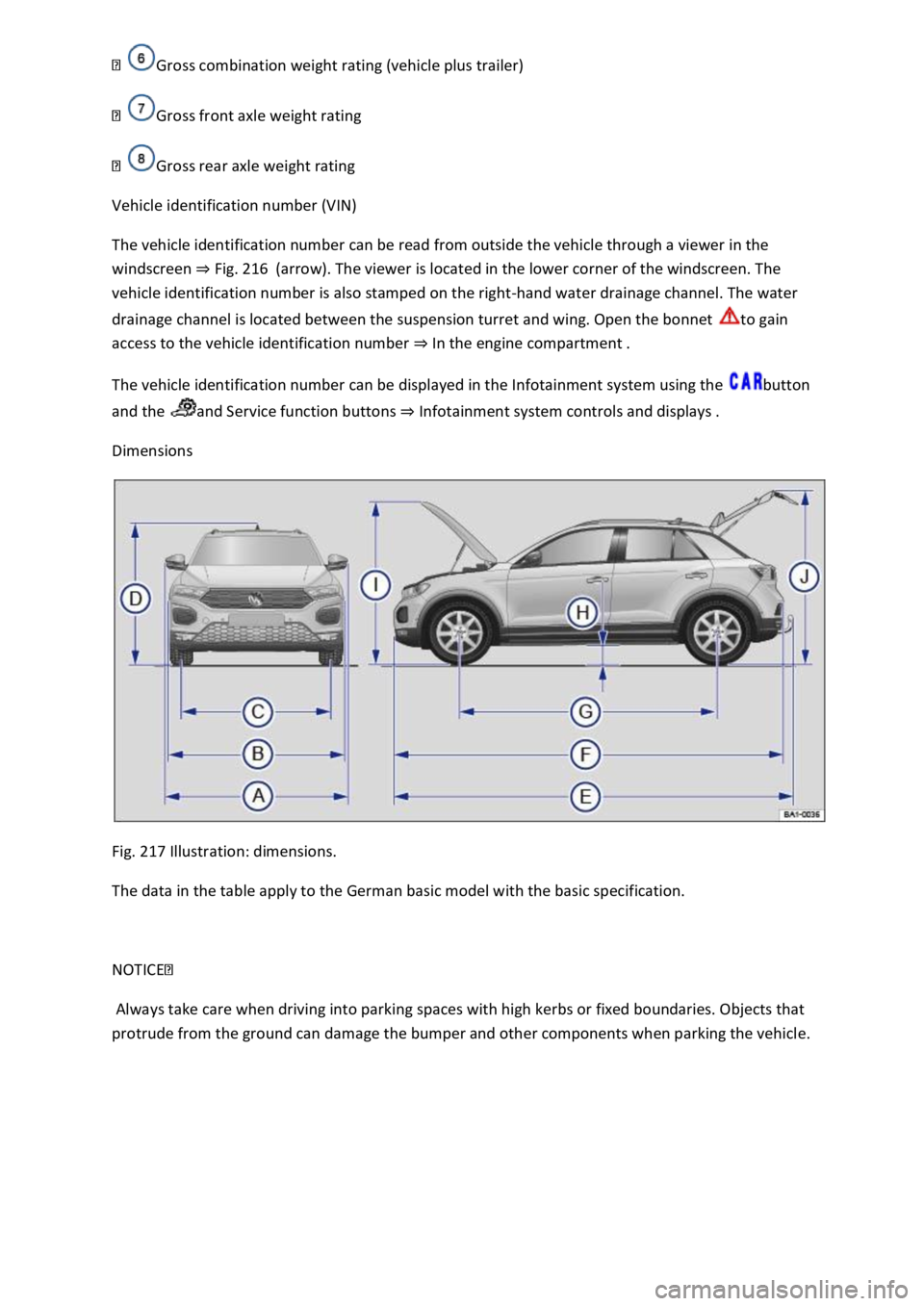
Fig. 217 Illustration: dimensions.
The data in the table apply to the German basic model with the basic specification.
NOTICE
Always take care when driving into parking spaces with high kerbs or fixed boundaries. Objects that
protrude from the ground can damage the bumper and other components when parking the vehicle.