buttons VOLKSWAGEN T-ROC 2021 Owner´s Manual
[x] Cancel search | Manufacturer: VOLKSWAGEN, Model Year: 2021, Model line: T-ROC, Model: VOLKSWAGEN T-ROC 2021Pages: 502, PDF Size: 9.42 MB
Page 37 of 502
The buttons on the wiper lever are omitted in vehicles equipped with a multifunction steering wheel
⇒ Operating using the wiper lever .
WARNING
Accidents and injuries can occur if the driver is distracted.
Never operate the menus on the instrument cluster display while the vehicle is in motion.
Check the system settings after charging or replacing the 12-volt vehicle battery. System settings
may be changed or deleted if the power supply is interrupted.
Operating using the wiper lever
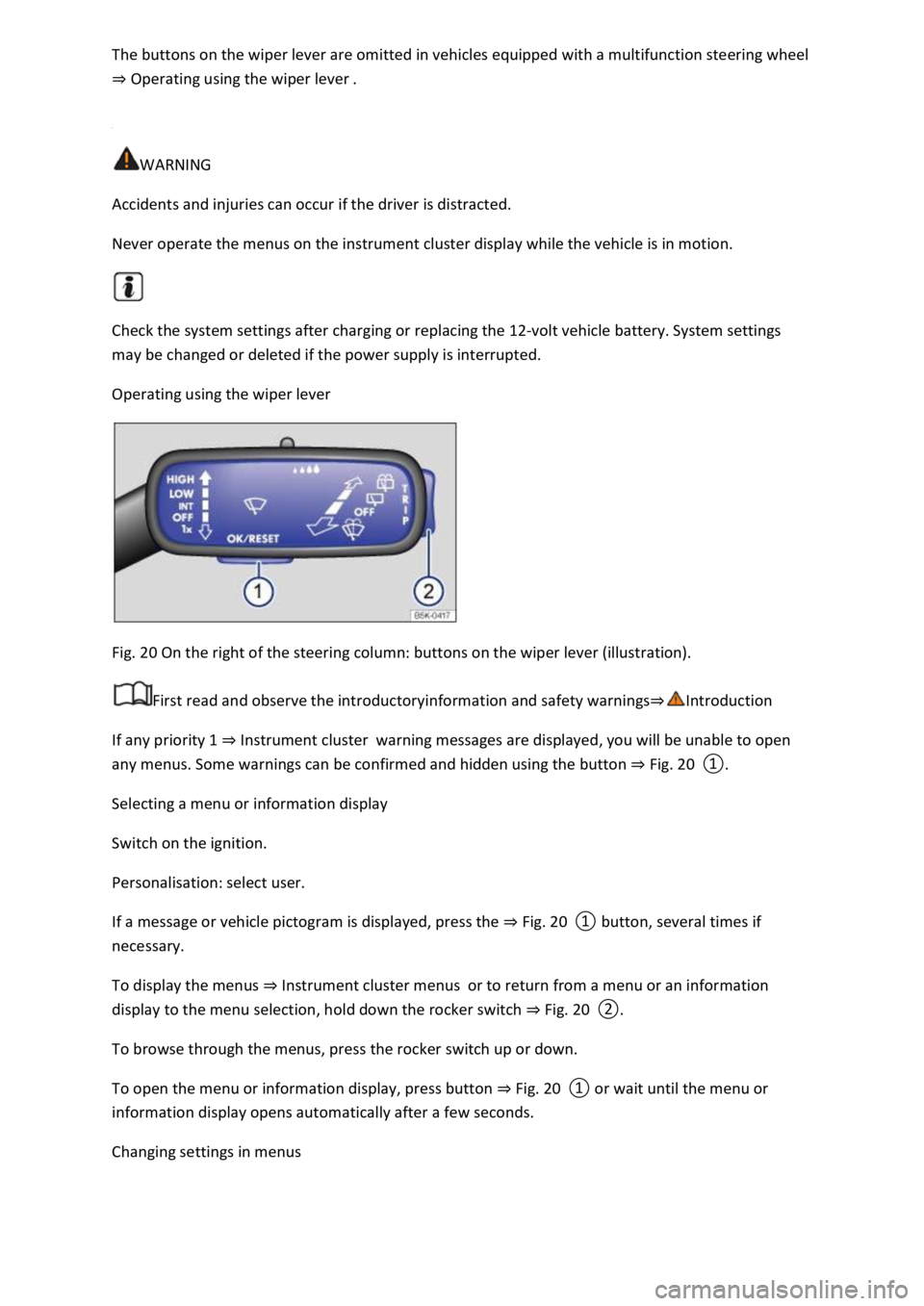
Fig. 20 On the right of the steering column: buttons on the wiper lever (illustration).
First read and observe the introductoryinformation and safety warnings⇒Introduction
If any priority 1 ⇒ Instrument cluster warning messages are displayed, you will be unable to open
any menus. Some warnings can be confirmed and hidden using the button ⇒ Fig. 20 ①.
Selecting a menu or information display
Switch on the ignition.
Personalisation: select user.
If a message or vehicle pictogram is displayed, press the ⇒ Fig. 20 ① button, several times if
necessary.
To display the menus ⇒ Instrument cluster menus or to return from a menu or an information
display to the menu selection, hold down the rocker switch ⇒ Fig. 20 ②.
To browse through the menus, press the rocker switch up or down.
To open the menu or information display, press button ⇒ Fig. 20 ① or wait until the menu or
information display opens automatically after a few seconds.
Changing settings in menus
Page 40 of 502

Introduction
This chapter contains information on the followingsubjects:
⇒ Vehicle settings menu
⇒ Performance monitor
⇒ Lap timer
⇒ Personalisation
The Infotainment system combines key vehicle systems in a central operating unit, e.g. menu
settings, radio or navigation system.
General information on operation
The following section contains relevant information on the settings that can be adjusted in the
Vehicle settings menu. Basic information on operating the Infotainment system and on warning and
safety instructions is contained in a separate manual ⇒BookletInfotainment system,.
Systems settings and vehicle information display
After pressing the button or touching the function button followed by the Vehicle function
button, touch the corresponding function buttons to display information or make settings. The
current status of systems can be checked or system faults displayed by touching the function
button in the Vehicle status menu.
Vehicle settings (setup) ⇒ Vehicle settings menu .
Think Blue. Trainer. ⇒ Think Blue. Trainer.
Performance monitor ⇒ Performance monitor .
Lap timer ⇒ Lap timer .
Offroad display ⇒ Offroad driving situations .
Auxiliary heater settings ⇒ Auxiliary heater and ventilation .
Active media.
Driving data.
Vehicle status.
Convenience consumers.
Radio station selection.
WARNING
Accidents and injuries can occur if the driver is distracted. Operating the Infotainment system can
distract you from the road.
Page 41 of 502
Always drive carefully and responsibly.
When you start the engine after the 12-volt vehicle battery has been totally discharged or changed,
you may find that system settings (time, date, personal convenience settings and programming) and
user accounts have been changed or deleted. Check and correct the settings as necessary once the
12-volt vehicle battery has been sufficiently charged.
Vehicle settings menu
First read and observe the introductoryinformation and safety warnings⇒Introduction
You can switch individual functions and systems on and off and make settings in the vehicle settings
of the Infotainment system.
Opening the Vehicle settings menu
Switch on the ignition.
Switch on Infotainment system if necessary.
Press the button or function button.
Touch the Vehicle and function buttons to open the Vehicle settings menu.
Touch the corresponding function buttons to open additional menus in the Vehicle settings menu or
to make settings in the menu options.
If the checkbox in the function button is ticked , the respective function is switched on.
Touch the function button to return to the previous menu.
Performance monitor
First read and observe the introductoryinformation and safety warnings⇒Introduction
The performance monitor is a display for sporty driving. The digital instruments display real-time
values for engine power, temperature and acceleration that are determined by sensors on the
vehicle. This provides the driver with an overview of driving dynamics.
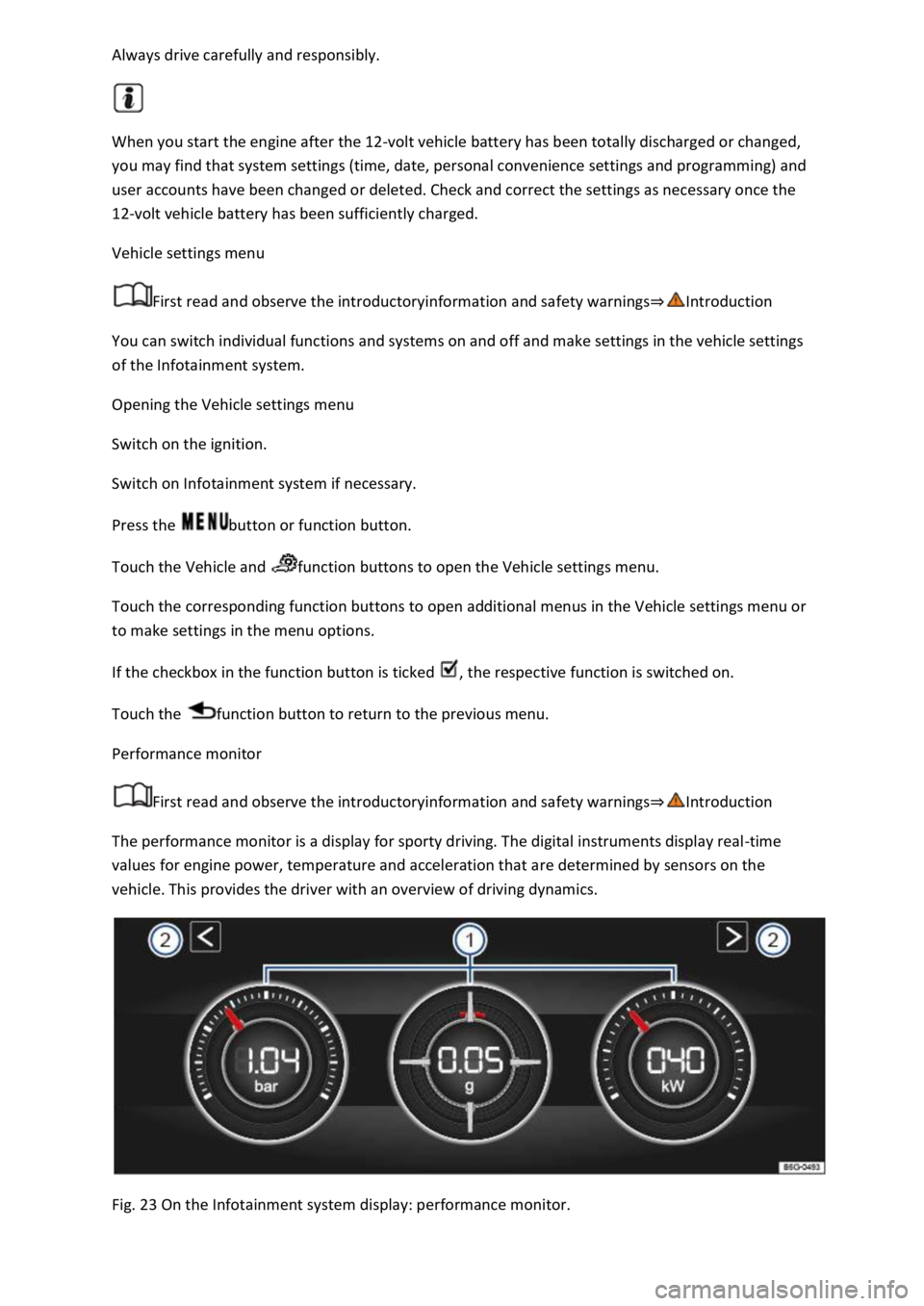
Fig. 23 On the Infotainment system display: performance monitor.
Page 42 of 502

Key to ⇒ Fig. 23 :
Display areas.
Arrow buttons for changing to the lap timer.
Opening the performance monitor
Press the MENU button or function button on the Infotainment system.
Touch the Vehicle function button.
Touch the Selection function button.
Touch the Sport function button.
If you would like to switch between the performance monitor and the lap timer ⇒ Lap timer , touch
one of the arrow buttons on the left and right above the instruments ⇒ Fig. 23 ②.
Selecting instruments and setting units
The display can show a maximum of three instruments at the same time. Each instrument can be
selected for each display area ⇒ Fig. 23 ① (left, middle, right).
To change between instruments, swipe vertically over the display. The currently selected instrument
will then disappear and a new instrument will appear.
The units can be adjusted for some instruments in the Infotainment system ⇒ Vehicle settings
menu .
The following instruments can be displayed:
Charge pressure display: the charge pressure display ⇒ Fig. 23 ① (left) shows the pressure in the
charge air system between the turbocharger and engine (in the unit bar). The further to the right the
needle on the scale, the higher the engine power output.
Accelerometer (G-meter): the accelerometer (G-meter) ⇒ Fig. 23 ① (centre) shows the
acceleration value in the centre (in the unit g). The red marking in the grid-type area shows the
acceleration level and the direction of the acting force (in the opposite direction according to
physical laws). If you drive to the left, for example, the red marking will move in the right area of the
instrument (and vice versa). If you accelerate, the red marking will move down. If you brake, the red
marking will move up. The level of acceleration is indicated by the position of the red marking which
moves outwards. If the acceleration increases, the red marking will move away from the centre area.
Power display: the power display ⇒ Fig. 23 ① (right) shows the current engine power output as a
digital value and on the surrounding scale (in kW).
Coolant temperature display: the needle may move further in a clockwise direction under high
engine loads and with high outside temperatures. This is no cause for concern unless the
indicator lamp in the instrument cluster display is lit up or flashing ⇒ Coolant temperature display .
Oil temperature display: the needle is in the middle area under normal driving conditions. If the
needle is in the bottom left area, this means that the engine has not yet reached its operating
temperature. Avoid excessively high speeds and acceleration when the engine has not yet reached
Page 45 of 502

Opening the lap timer
Press the MENU button or function button, depending on the version of the Infotainment system.
Touch the Vehicle function button.
Touch the Selection function button.
Touch the Sport function button. The performance monitor is displayed.
Touch one of the arrow buttons ⇒ Fig. 23 ② in the performance monitor to change to the lap
timer.
You can change between the lap timer and performance monitor at any time using the arrow
buttons ⇒ Fig. 23 ② and ⇒ Fig. 24 .
Measuring lap times
The stopwatch measures the lap time in two areas:
The red needle and the numerical value in the centre show the running time in seconds. The smaller
display in the inner area shows minutes and hours.
The display on the right side shows the current lap time with an accuracy of 1/100 seconds. There is
no difference between the stopwatch and lap times if there are not yet any laps with split times
stored in the lap timer.
WARNING
Avoid operating the lap timer when the vehicle is in motion if possible.
Make lap timer settings and access statistics only when the vehicle is stationary.
When the vehicle is in motion, use the lap timer only in driving situations which are easy to control.
Personalisation
First read and observe the introductoryinformation and safety warnings⇒Introduction
The personalisation function allows personalised vehicle settings, such as air conditioning system,
instrument cluster or lighting settings, to be saved in a user account. Four user accounts are
available. Users are identified by the vehicle keys upon unlocking the vehicle. A user account is
assigned to each vehicle key.
Changes to the settings will be assigned to the active user account and saved upon locking the
vehicle or changing the user account.
Welcome and user account selection
When personalisation is activated, the name of the current user account appears on the instrument
cluster display for approximately ten seconds after you switch on the ignition.
During this time, you can select a user account using the buttons on the wiper lever or multifunction
steering wheel ⇒ Infotainment system controls and displays .
Page 87 of 502
Depending on the vehicle equipment, the high-visibility waistcoat may be located in a stowage
compartment in the front door trim or in the stowage compartment on the front passenger side
⇒ Driver door , ⇒ Front passenger side .
The high-visibility waistcoat must comply with legal requirements.
Fire extinguisher
Depending on the equipment, a fire extinguisher may be located in a holder in the footwell under
the front passenger seat.
The fire extinguisher must meet legal requirements, be ready for use at all times and be checked on
a regular basis (see inspection seal on the fire extinguisher).
WARNING
In the event of a sudden driving or braking manoeuvre or accident, loose objects could be flung
though the vehicle and cause severe injuries.
Always secure the first-aid kit, warning triangle and fire extinguisher safely in the holders in the
vehicle.
Stow the high-visibility waistcoat in the stowage compartments so that it can be easily accessed.
Information call, breakdown call and emergency call service
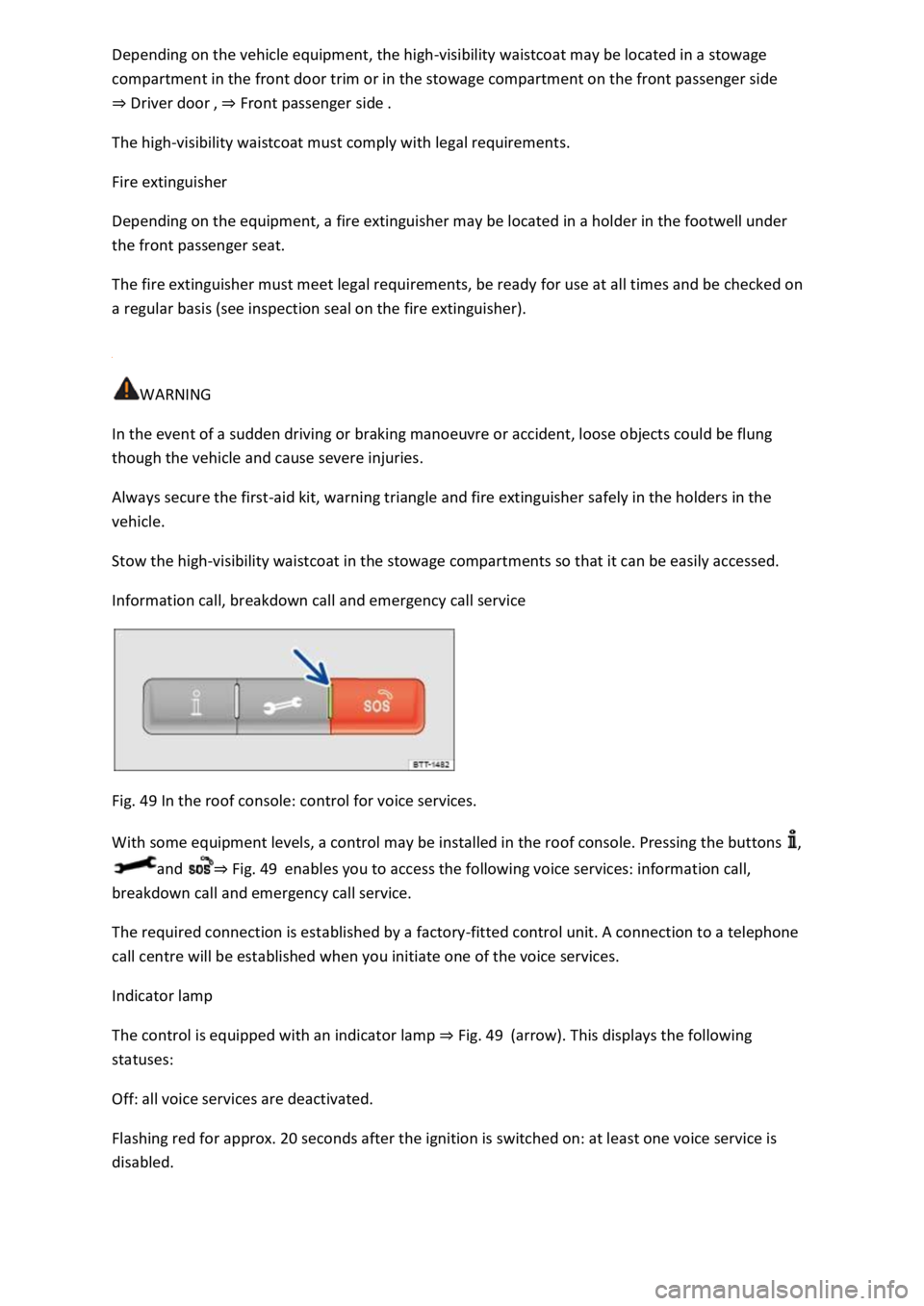
Fig. 49 In the roof console: control for voice services.
With some equipment levels, a control may be installed in the roof console. Pressing the buttons ,
and ⇒ Fig. 49 enables you to access the following voice services: information call,
breakdown call and emergency call service.
The required connection is established by a factory-fitted control unit. A connection to a telephone
call centre will be established when you initiate one of the voice services.
Indicator lamp
The control is equipped with an indicator lamp ⇒ Fig. 49 (arrow). This displays the following
statuses:
Off: all voice services are deactivated.
Flashing red for approx. 20 seconds after the ignition is switched on: at least one voice service is
disabled.
Page 97 of 502
Depending on the settings made for central locking in the Infotainment system, it may be the case
that all of the doors and the boot lid are unlocked only when the button has been pressed twice.
Central locking button
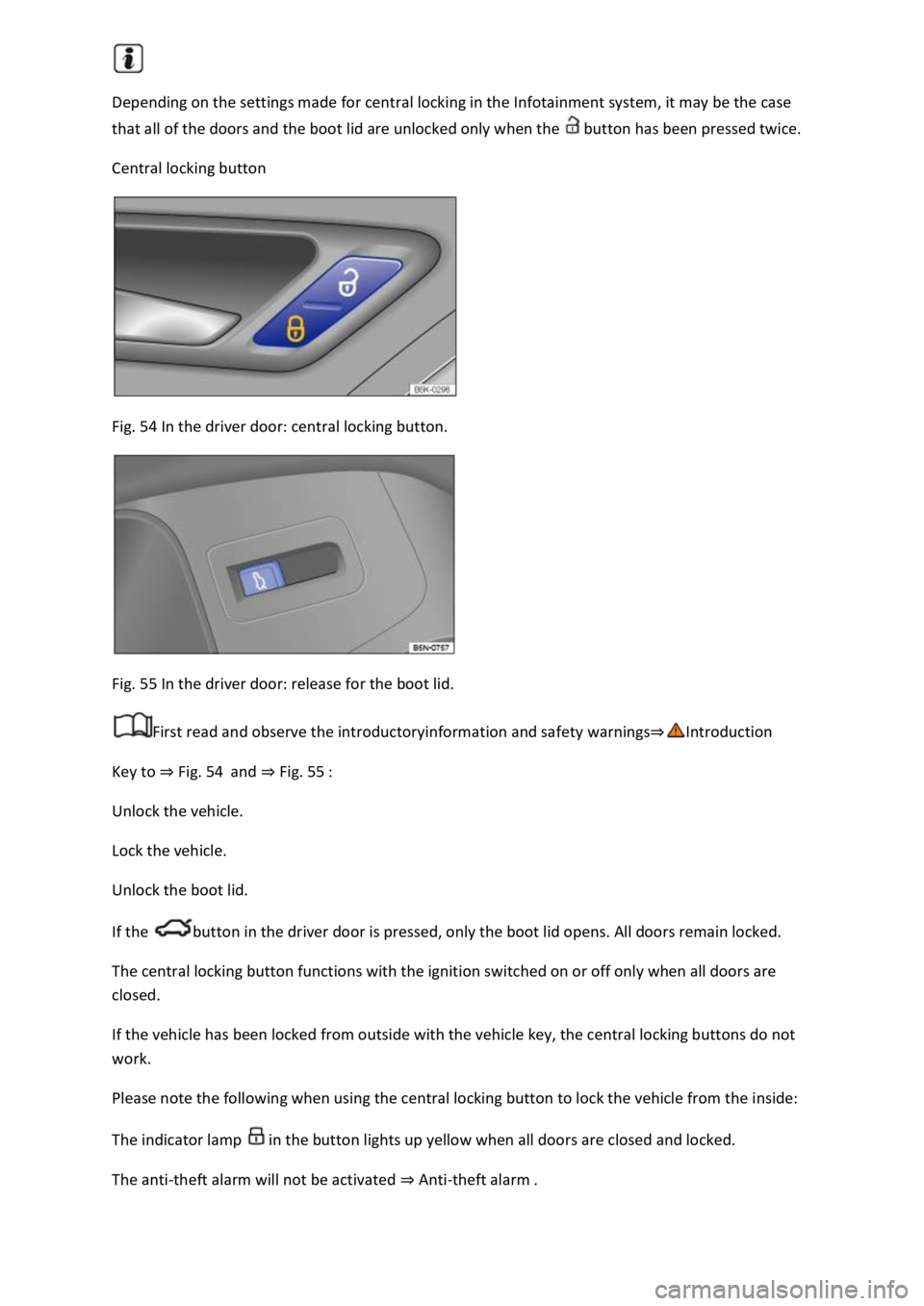
Fig. 54 In the driver door: central locking button.
Fig. 55 In the driver door: release for the boot lid.
First read and observe the introductoryinformation and safety warnings⇒Introduction
Key to ⇒ Fig. 54 and ⇒ Fig. 55 :
Unlock the vehicle.
Lock the vehicle.
Unlock the boot lid.
If the button in the driver door is pressed, only the boot lid opens. All doors remain locked.
The central locking button functions with the ignition switched on or off only when all doors are
closed.
If the vehicle has been locked from outside with the vehicle key, the central locking buttons do not
work.
Please note the following when using the central locking button to lock the vehicle from the inside:
The indicator lamp in the button lights up yellow when all doors are closed and locked.
The anti-theft alarm will not be activated ⇒ Anti-theft alarm .
Page 108 of 502
If the boot lid is not opened within a few minutes after unlocking, it automatically locks again.
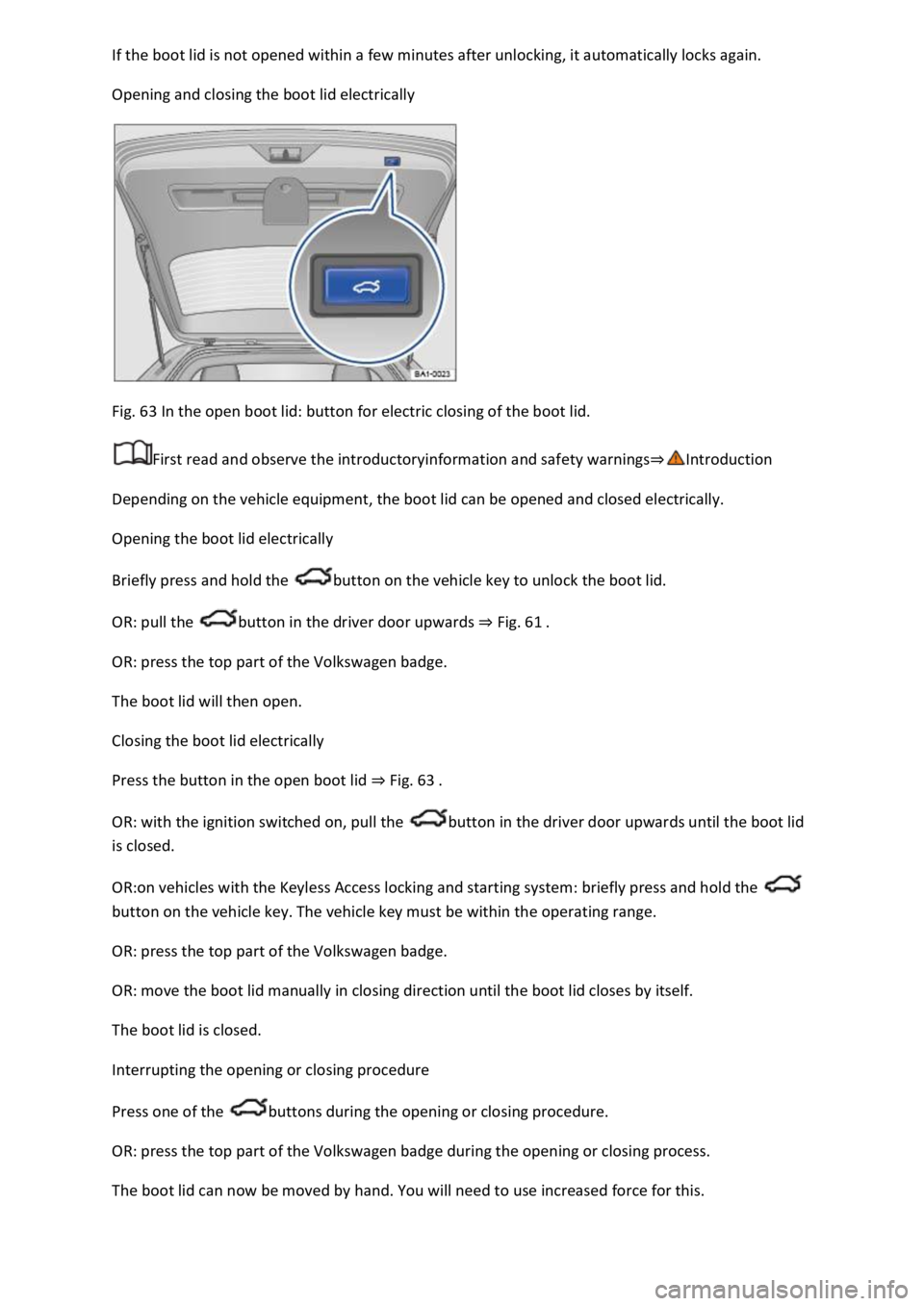
Opening and closing the boot lid electrically
Fig. 63 In the open boot lid: button for electric closing of the boot lid.
First read and observe the introductoryinformation and safety warnings⇒Introduction
Depending on the vehicle equipment, the boot lid can be opened and closed electrically.
Opening the boot lid electrically
Briefly press and hold the button on the vehicle key to unlock the boot lid.
OR: pull the button in the driver door upwards ⇒ Fig. 61 .
OR: press the top part of the Volkswagen badge.
The boot lid will then open.
Closing the boot lid electrically
Press the button in the open boot lid ⇒ Fig. 63 .
OR: with the ignition switched on, pull the button in the driver door upwards until the boot lid
is closed.
OR:on vehicles with the Keyless Access locking and starting system: briefly press and hold the
button on the vehicle key. The vehicle key must be within the operating range.
OR: press the top part of the Volkswagen badge.
OR: move the boot lid manually in closing direction until the boot lid closes by itself.
The boot lid is closed.
Interrupting the opening or closing procedure
Press one of the buttons during the opening or closing procedure.
OR: press the top part of the Volkswagen badge during the opening or closing process.
The boot lid can now be moved by hand. You will need to use increased force for this.
Page 111 of 502

Opening and closing windows
The buttons are located in the doors ⇒ Vehicle overviews .
Opening the windows: press the button. Closing the windows: pull the button.Press to disable
the electric window buttons in the rear doors.
The windows can still be opened or closed using the buttons for a short time after the ignition has
been switched off, provided the driver door and the front passenger door are not opened.
One-touch opening and closing
The one-touch opening and closing function can be used to fully open and close the windows. The
individual buttons do not have to be held to do this.
One-touch closing: pull the button for the appropriate window up briefly into the second position.
One-touch opening: press the button for the appropriate window down briefly into the second
position.
Stopping the one-touch function: press or pull the button for the appropriate window again.
Convenience opening and closing
The windows can be opened and closed from outside the vehicle using the vehicle key when the
ignition is switched off:
Press and hold the locking or unlocking button on the vehicle key.
In vehicles with keyless locking and starting system Keyless Access: place your finger on the locking
sensor in the door handle for a few seconds until the windows are closed ⇒ Unlocking or locking the
vehicle with Keyless Access . The vehicle key must be within the operating range.
To interrupt this function, release the locking or unlocking button OR remove your finger from the
sensor.
A valid vehicle key must be located within the operating range. All turn signals will flash once as
confirmation that all the windows and the glass roof have been closed.
Set the convenience opening settings in the Vehicle settings menu in the Infotainment system
⇒ Infotainment system controls and displays .
WARNING
Careless or unsupervised use of the electric windows can cause serious injuries.
The electric windows should only be opened or closed when you are sure that nobody is in their
operating area.
Never leave children or people requiring assistance alone in the vehicle when the vehicle is locked.
The windows can no longer be opened in an emergency.
Page 112 of 502

Always take all vehicle keys with you every time you leave the vehicle. The windows can still be
opened or closed using the buttons for a short time after the ignition has been switched off,
provided the driver door and the front passenger door are not opened.
When transporting children on the rear bench seat, the rear electric windows should always be
deactivated using the safety button so that they cannot be opened or closed.
NOTICE
If windows are open when it starts to rain, water can soak the interior equipment of the vehicle and
cause damage to the vehicle.
One-touch opening and closing and the roll-back function will not work if there is a malfunction in
the electric windows. Go to a qualified workshop.
Convenience opening and closing only works when one-touch opening and closing is activated for all
electric windows.
Some settings can be saved in the user accounts for personalisation and therefore change
automatically when the user account is changed ⇒ Personalisation .
Electric window roll-back function
The roll-back function for the electric windows can reduce the risk of injuries when the windows are
closing.
If the window is not able to close because it is stiff or because of an obstruction, the window will
immediately open again ⇒ .
Check to see why the window has not closed.
Try to close the window again.
If the window closing process is interrupted again, the roll-back function will be disabled for a few
seconds.
If the window still cannot close, it will come to a stop at this point. To close the window without the
roll-back function, press the button again within a few seconds ⇒ .
WARNING
Closing the electric windows without the roll-back function can lead to serious injuries.
Always close the window carefully.