warning lights VOLKSWAGEN T-ROC 2021 Owner´s Manual
[x] Cancel search | Manufacturer: VOLKSWAGEN, Model Year: 2021, Model line: T-ROC, Model: VOLKSWAGEN T-ROC 2021Pages: 502, PDF Size: 9.42 MB
Page 196 of 502

The indicator lamp lights up yellow.
Clutch is not transmitting the full engine torque.
If necessary, remove foot from the clutch pedal.
Clutch overheated
The indicator lamp lights up yellow.
An acoustic warning may also be given ⇒ .
The clutch can overheat, for example if the vehicle pulls off frequently, travels at a crawl for long
periods, or in stop and go traffic.
Overheating is indicated by the warning lamp and in some cases by additional warning lamps and a
text message in the instrument cluster display.
You can continue to drive.
Clutch faulty
The indicator lamp lights up yellow.
The clutch is faulty.
Drive on carefully!
Seek expert assistance. Failure to do so can cause considerable clutch damage.
DSG® dual clutch gearbox
Function of the DSG® dual clutch gearbox
Description
The vehicle is equipped with a DSG® dual clutch gearbox.
The DSG® dual clutch gearbox is a gearbox which uses dual-clutch technology to change gear
automatically. It uses a dual clutch and two gear train halves to enable very fast gear changes with
no loss of torque. The DSG® dual clutch gearbox thus combines the performance and economy of a
manual gearbox with the comfort and convenience of a conventional automatic gearbox.
Function
Engine power is transferred to the drive shaft via the gearbox. In order to change gears, the power
transmission between the engine and the gearbox has to be interrupted. This is what the clutch is
for.
With the DSG® dual clutch system with its two gear train halves, the engine power is always
connected to one gear train half when driving. Before a gear shift, the next-higher or lower gear is
already preselected in the load-free second gear train half. The clutch on the non-driven gear is then
closed, and the other is opened at the same time. This makes very fast gear changes possible.
Thanks to its design, the DSG® dual clutch gearbox is more efficient than an automatic gearbox.
Whereas in an automatic gearbox the torque converter is constantly in use, in the DSG® dual clutch
Page 204 of 502

Distance from vehicle ahead too close
The warning lamp lights up red.
Brake request by ACC ⇒ Adaptive Cruise Control (ACC) .
The brake pedal was not depressed or not fully depressed.
Brake immediately.
Gearbox overheated
The indicator lamp lights up yellow.
A signal tone may also be given. A text message may also be shown on the instrument cluster
display.
The DSG® dual clutch gearbox can become too hot, for example, if the vehicle pulls off regularly,
during long periods at crawling speed, or in stop-and-go traffic.
Do not drive on!
Allow the gearbox to cool down in selector lever position P⇒ .
Do not drive on if the indicator lamp does not go out.
Seek expert assistance. Failure to do so could result in considerable damage to the gearbox.
Releasing the selector lever lock manually
If the power fails in the vehicle (for example if the 12-volt vehicle battery is flat) and the vehicle has
to be towed, the selector lever lock must be released manually. Seek expert assistance for this.
The manual release mechanism is located under the cover of the gearshift gate.
Removing the cover of the gearshift gate:
Switch on the electronic parking brake. If the electronic parking brake cannot be switched on, the
vehicle will have to be prevented from rolling away using other means.
Switch off the ignition.
Carefully pull the cover upwards in the area around the selector lever gaiter with connected
electrical wiring ⇒ Fig. 108 .
Pull the cover up and over the selector lever ⇒ .
Depending on the vehicle equipment, there are two possible manual release mechanism variants.
Releasing the selector lever lock manually:
Using the flat blade of the screwdriver from the vehicle toolkit, carefully push the release lever in the
direction of the arrow and keep it in this position ⇒ Fig. 108 .
Press the lock button on the front of the selector lever and move the selector lever into position N.
Page 209 of 502

The indicator lamp lights up yellow.
The steering should be checked by a qualified workshop as soon as possible.
If the yellow warning lamp remains off after the engine has been restarted and you have driven a
short distance, you do not need to consult a qualified workshop.
Fault in steering
The indicator lamp lights up yellow.
The 12-volt vehicle battery was disconnected.
Drive a short distance at a speed of 15 – 20 km/h (9 – 12 mph).
If the yellow warning lamp is still lit after the engine has been restarted, have the steering checked
by a qualified workshop immediately.
Fault in steering
The indicator lamp flashes yellow.
Turn the steering wheel back and forth.
Switch the ignition off and then on again.
Observe the messages on the instrument cluster display.
Do not continue your journey if the indicator lamp still flashes when the ignition is switched on.
Seek expert assistance.
Steering column is not unlocked or locked
The indicator lamp flashes yellow.
Follow any messages that are on the instrument cluster display.
Switch the ignition off and then on again.
Do not continue your journey if the steering column remains locked when the ignition is switched
on.
Seek expert assistance.
Steering requires increased force
The warning lamp lights up red.
The electromechanical steering has failed.
Do not drive on!
Seek expert assistance.
Driving profile selection and 4MOTION Active Control
Page 211 of 502
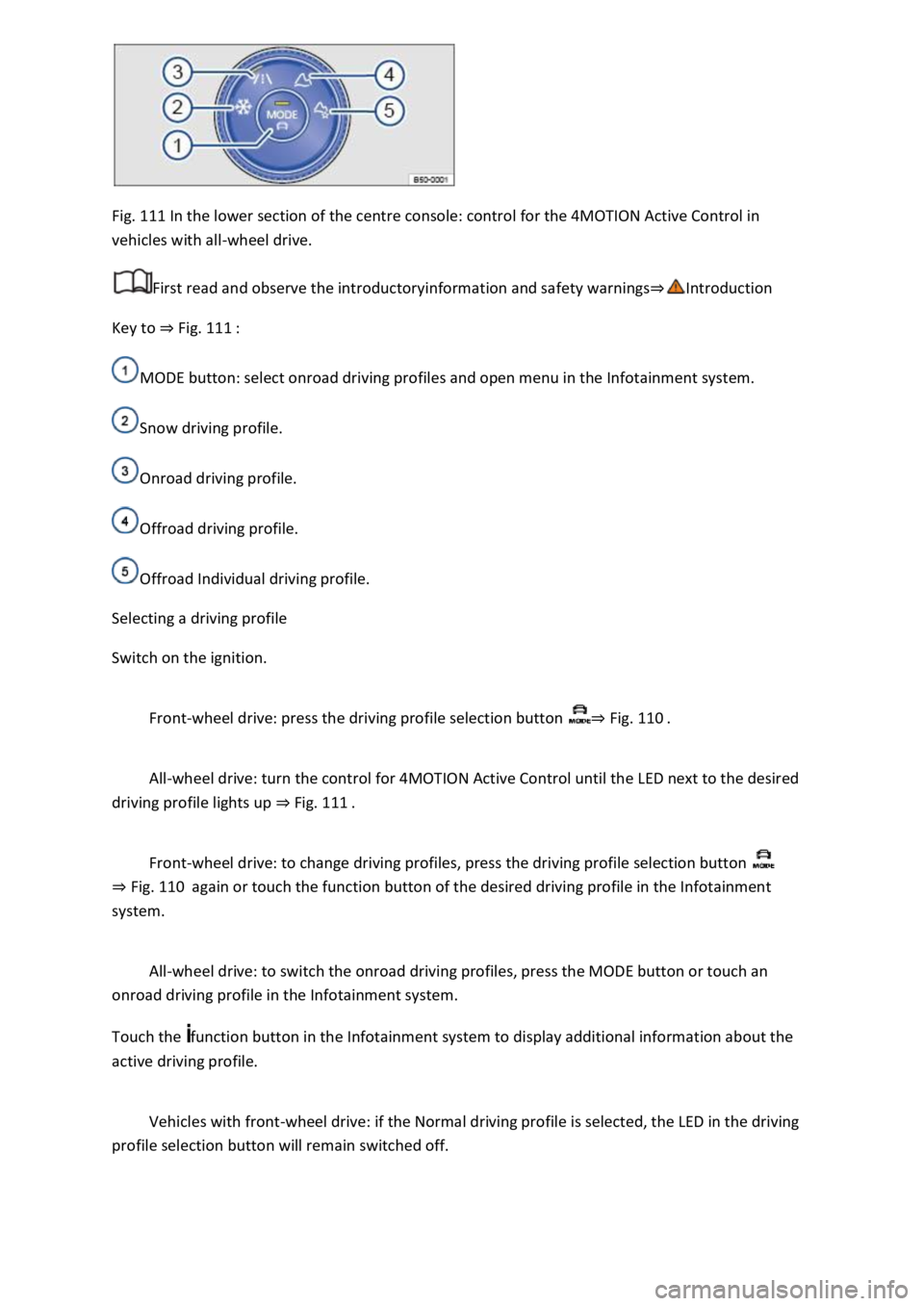
Fig. 111 In the lower section of the centre console: control for the 4MOTION Active Control in
vehicles with all-wheel drive.
First read and observe the introductoryinformation and safety warnings⇒Introduction
Key to ⇒ Fig. 111 :
MODE button: select onroad driving profiles and open menu in the Infotainment system.
Snow driving profile.
Onroad driving profile.
Offroad driving profile.
Offroad Individual driving profile.
Selecting a driving profile
Switch on the ignition.
Front-wheel drive: press the driving profile selection button ⇒ Fig. 110 .
All-wheel drive: turn the control for 4MOTION Active Control until the LED next to the desired
driving profile lights up ⇒ Fig. 111 .
Front-wheel drive: to change driving profiles, press the driving profile selection button
⇒ Fig. 110 again or touch the function button of the desired driving profile in the Infotainment
system.
All-wheel drive: to switch the onroad driving profiles, press the MODE button or touch an
onroad driving profile in the Infotainment system.
Touch the function button in the Infotainment system to display additional information about the
active driving profile.
Vehicles with front-wheel drive: if the Normal driving profile is selected, the LED in the driving
profile selection button will remain switched off.
Page 213 of 502
Individual: individual vehicle systems can be adjusted to suit personal requirements ⇒ Individually
adapting a driving profile .
WARNING
The vehicle handling may change as a result of the different driving profiles. Never allow driving
profile selection to tempt you into taking any risks when driving.
Always adapt your speed and driving style to the current visibility, weather and road or traffic
conditions.
In vehicles with a DSG® dual clutch gearbox, the system automatically changes to gear position S
when the Sport driving profile is selected. The system automatically change to gear position D when
the Eco driving profile is selected. Since coasting is active in the Eco driving profile, the gearbox
programme E is additionally displayed on the instrument cluster display.
Individually adapting a driving profile
First read and observe the introductoryinformation and safety warnings⇒Introduction
Selecting the Individual driving profile
Switch on the ignition.
Switch on the Infotainment system.
Press the driving profile selection button or turn the control for 4MOTION Active Control until
the LED next to the Onroad driving profile ⇒ Fig. 111 ③ lights up.
Touch the Adjust function button to open the Individual menu.
Selecting the Offroad Individual driving profile
Switch on the ignition.
Switch on the Infotainment system.
Turn the control for the 4MOTION Active Control until the LED next to the Offroad Individual driving
profile ⇒ Fig. 111 ⑤ lights up.
If the Offroad Individual driving profile is already selected, press the MODE button on the
control ⇒ Fig. 111 .
Touch the Adjust function button to open the Individual menu.
Troubleshooting
First read and observe the introductoryinformation and safety warnings⇒Introduction
Fault in the adaptive chassis control (DCC)
Page 234 of 502

Changing to Adaptive Cruise Control (ACC)
Press the button.
The speed limiter is switched off.
Troubleshooting
First read and observe the introductoryinformation and safety warnings⇒Introduction
Control is automatically interrupted.
Malfunction. Switch off the speed limiter and go to a qualified workshop.
For safety reasons, the speed limiter does not fully deactivate itself until you release the accelerator
once or switch the system off manually.
Adaptive Cruise Control (ACC)
Introduction
This chapter contains information on the followingsubjects:
⇒ Special driving situations
⇒ Limits of ACC
⇒ Switching ACC on and off
⇒ Setting ACC
⇒ Troubleshooting
The Adaptive Cruise Control (ACC) maintains a speed selected by the driver. If the vehicle
approaches a vehicle in front, the ACC automatically adapts the speed so that a distance you have
selected is maintained.
Speed range
ACC controls the vehicle in the speed range between 30 km/h (20 mph) and 160 km/h (100 mph)
or 210 km/h (130 mph). This speed range may differ in certain markets.
Driving with ACC
You can override the ACC at any time. Control will be interrupted when you brake. If you accelerate,
control will be interrupted for the duration of the acceleration process and will then continue again.
Control by ACC is less dynamic when towing a trailer ⇒ . The ACC will not perform control operation
if the trailer's brake lights are faulty.
Does the vehicle have ACC?
The vehicle is equipped with ACC if you can make settings for ACC in the vehicle settings of the
Infotainment system ⇒ Vehicle settings menu .
Brake request
Page 235 of 502
If automatic deceleration by ACC is not sufficient, ACC will request you to brake additionally by a
corresponding message on the instrument cluster. In addition, the red warning lamp lights up
and an acoustic warning is given. Brake immediately!
Radar sensor
ACC detects driving situations by means of the radar sensor at the front of the vehicle ⇒ Front view .
The radar sensor has a range of up to approximately 120 m.
WARNING
The intelligent technology used in the ACC cannot overcome the laws of physics, and functions only
within the limits of the system. Never let the extra convenience tempt you into taking safety risks
when driving. Careless or unintentional use of the Adaptive Cruise Control (ACC) can cause accidents
and lead to serious injury. The system is not a substitute for the full concentration of the driver.
Adapt your speed and distance from the vehicles ahead to suit visibility, weather, road and traffic
conditions.
Never use the ACC in poor visibility, on steep or winding roads, or on slippery road surfaces e.g. due
to snow, ice, wet roads, loose chippings, or on flooded roads.
Never use the ACC offroad or on non-surfaced roads. The ACC is designed for use on surfaced roads
only.
The ACC will not react to stationary vehicles.
The ACC will not react to persons, animals or vehicles crossing or approaching in the same lane.
Brake immediately if speed reduction by ACC is not sufficient.
Brake immediately if a request to brake appears on the instrument cluster display.
Brake if the vehicle starts rolling unintentionally after a request to brake.
Be prepared to control the speed yourself at all times.
Special driving situations
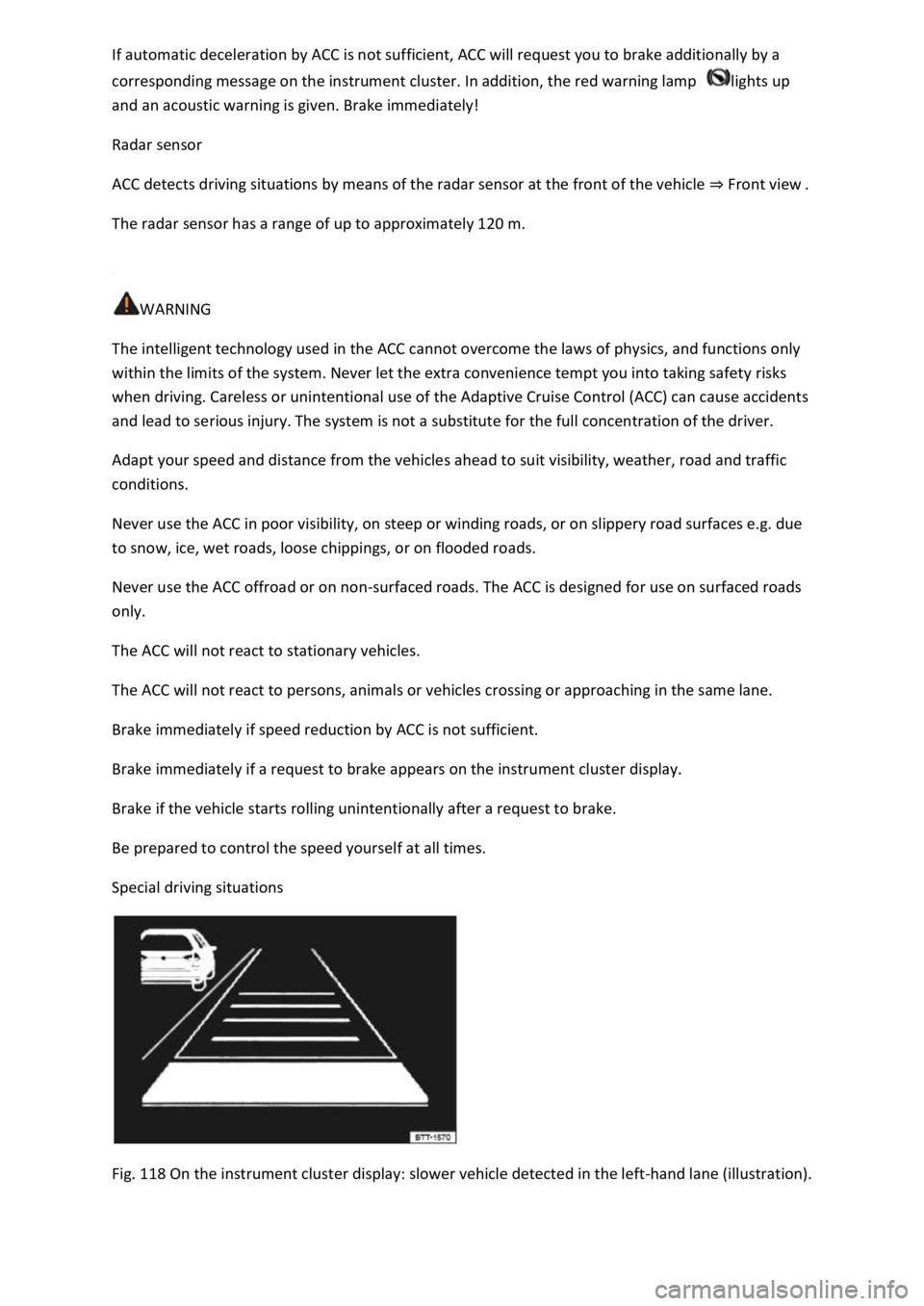
Fig. 118 On the instrument cluster display: slower vehicle detected in the left-hand lane (illustration).
Page 239 of 502

Fig. 121 Left-hand side of the multifunction steering wheel: buttons for operating ACC.
First read and observe the introductoryinformation and safety warnings⇒Introduction
Switching on ACC
Press the button.
The indicator lamp lights up grey, ACC does not regulate.
Starting control
Press the button while driving forwards.
ACC stores the current speed and maintains the set distance. If the current speed is outside the
defined speed range, ACC will set the minimum speed (when driving more slowly than the limit) or
maximum speed (when driving faster than the limit).
The following indicator lamps light up, depending on the driving situation:
ACC regulating.No vehicle has been detected ahead.Vehicle detected ahead (white).
Interrupting control
Briefly press the button or press the brake pedal.
The indicator lights up grey, the speed and distance remain stored.
Control is automatically interrupted if the traction control system (TCS) is deactivated.
Resuming control
Press the button.
ACC adopts the last set speed and last set distance. The instrument cluster display shows the set
speed and the indicator lamp lights up green.
Switching off ACC
Press and hold the button.
The set speed is deleted.
Changing to the speed limiter
Press the button.
ACC is switched off.
Setting ACC
Page 241 of 502

WARNING
If you do not maintain the minimum distance to a vehicle in front and the difference in speed
between the vehicle in front and your own vehicle is so great that the braking action of the ACC is
insufficient, you are in danger of colliding with the vehicle in front. The braking distance is also
longer in rain and winter road conditions.
ACC may not be able to detect all driving situations correctly.
Always be prepared to brake the vehicle yourself.
Speed and distance control are overridden when you press the accelerator. ACC does not brake
automatically in this case.
Observe any country-specific regulations relating to the minimum distance.
Always set a larger distance in wet or snowy conditions or when visibility is poor.
Some settings can be stored in the user accounts of the personalisation function and therefore
change automatically when the user account changes ⇒ Personalisation .
Troubleshooting
First read and observe the introductoryinformation and safety warnings⇒Introduction
ACC not available.
The indicator lamp lights up yellow.
The radar sensor is dirty. Clean the radar sensor ⇒ Vehicle care .
The visibility of the radar sensor is impaired due to the weather conditions, e.g. snow, or due to
detergent deposits or coatings. Clean the radar sensor ⇒ Vehicle care .
The visibility of the radar sensor is impaired by add-on parts, the trim frames of number plate
holders or stickers. Keep the area around the radar sensor free.
The radar sensor has been displaced or damaged, e.g. due to damage to the front of the vehicle.
Check whether damage is visible ⇒ Repairs and technical modifications .
Fault or malfunction. Switch off and restart the engine.
Structural modifications have been made to the front of the vehicle.
The genuine Volkswagen badge is not used.
If the problem persists, go to a qualified workshop.
ACC does not function as expected.
The radar sensor is dirty. Clean the radar sensor ⇒ Vehicle care .
The system limits are not met ⇒ Limits of ACC .
Page 242 of 502

The brakes have overheated, control was interrupted automatically. Allow the brakes to cool down
and check functioning again.
If the problem persists, go to a qualified workshop.
Control cannot be started.
A forward gear other than first gear is selected (manual gearbox) or the selector lever is in selector
lever position D/S or the Tiptronic gate.
The speed is at least 25 km/h (16 mph) in the case of vehicles with manual gearbox.
The brake lights on the vehicle and trailer ⇒ are working.
ESC is not regulating.
The brake pedal is not depressed.
Unusual noises during automatic braking.
This is normal and is not a fault.
Area monitoring system (Front Assist)
Introduction
This chapter contains information on the followingsubjects:
⇒ Warning levels and braking intervention
⇒ Limits of Front Assist
⇒ Pedestrian Monitoring
⇒ Operating the area monitoring system (Front Assist)
⇒ Troubleshooting
The area monitoring system (Front Assist) with City Emergency Braking System and Pedestrian
Monitoring can help to avoid accidents.
Within the limits of the system, Front Assist can warn the driver about imminent collisions, prepare
the vehicle for emergency braking, assist with braking, and initiate automatic braking. The warning
time varies depending on the traffic situation and driver behaviour.
Front Assist is not a substitute for the full concentration of the driver.
Driving with Front Assist
You can cancel the automatic braking interventions of Front Assist by steering or pressing the
accelerator.
Automatic braking
Front Assist can decelerate the vehicle to a standstill. The vehicle will then not be held permanently.
Depress the brake pedal.