warning lights VOLKSWAGEN T-ROC 2021 Owner´s Manual
[x] Cancel search | Manufacturer: VOLKSWAGEN, Model Year: 2021, Model line: T-ROC, Model: VOLKSWAGEN T-ROC 2021Pages: 502, PDF Size: 9.42 MB
Page 260 of 502

The emergency braking function should be used only in those situations where the vehicle cannot be
stopped using the foot brake ⇒ !
Pull the button. The vehicle brakes hard. A signal tone can be heard at the same time.
WARNING
Incorrect use of the electronic parking brake can cause accidents and serious injuries.
Never use the electronic parking brake to brake the vehicle, except in emergencies. The braking
distance is considerably longer as only the rear wheels are braked. Always use the foot brake.
WARNING
Failing to park the vehicle properly before leaving it may result in the vehicle rolling away. This can
cause accidents, serious injuries and damage to property.
Always park the vehicle in the specified order ⇒ Parking .
Ensure that the electronic parking brake is switched on before you leave the vehicle and the
indicator lamp in the instrument cluster lights up red after you switch off the ignition.
Troubleshooting
Fault in electronic parking brake
The indicator lamp lights up yellow. Go to a qualified workshop or a Volkswagen dealership.
Electronic parking brake does not switch off
The prerequisites for switch off are not met.
OR: the 12-volt vehicle battery is discharged.
Check whether all requirements for switching off the electronic parking brake are met ⇒ Switching
off .
Use jump leads ⇒ Jump starting the vehicle .
Noises from the electronic parking brake
You may hear noises when the electronic parking brake is switched on and off.
If the electronic parking brake has not been used for a long period, the system will carry out
occasional automatic and audible checks when the vehicle is parked.
Auto Hold function
Page 262 of 502

Press the button ⇒ . The indicator lamp in the button ⇒ Fig. 126
(arrow) goes out.
The electronic parking brake switches on automatically to hold the vehicle securely. However, the
electronic parking brake will not switch on if the brake pedal is depressed when the Auto Hold
function is switched off ⇒ .
Temporarily switching off the Auto Hold function with the button
It can sometimes be necessary to switch off the Auto Hold function temporarily to enable the vehicle
to roll more easily, for example when manoeuvring.
Press the brake pedal when the engine is on.
Press the button. The Auto Hold function is deactivated.
The Auto Hold function will be reactivated as soon as the brake pedal is depressed again when the
vehicle has come to a standstill.
System limits
If the clutch slips during switching off of the ignition or opening of the driver door, the vehicle may
not be secured against rolling away by either the Auto Hold function or the electronic parking brake
⇒ . After switching off the ignition or opening the driver door, make sure that the indicator
lamp in the instrument cluster displaylights upred. The electronic parking brake is switched on.
WARNING
The intelligent Auto Hold function cannot overcome the laws of physics, and operates only within
the limits of the system. Do not let the extra convenience afforded by the Auto Hold function tempt
you into taking any safety risks when driving.
Make sure that the indicator lamp lights up green or red on the instrument cluster display if the
vehicle is to be held securely. The vehicle is being held by the Auto Hold function if the green
indicator lamp is lit and by the electronic parking brake if the red warning lamp is lit.
Never leave the vehicle if the engine is running and the Auto Hold function is switched on.
In some cases, the Auto Hold function cannot sufficiently hold the vehicle on uphill gradients or
brake it sufficiently on downhill gradients, e.g. if the ground is slippery or icy.
NOTICE
Switch off the Auto Hold function before driving into a car wash. Damage may otherwise be caused
by automatic activation of the electronic parking brake.
Safety notes on the parking systems
The parking systems include the following:
Park Distance Control ⇒ Park Distance Control .
Page 273 of 502
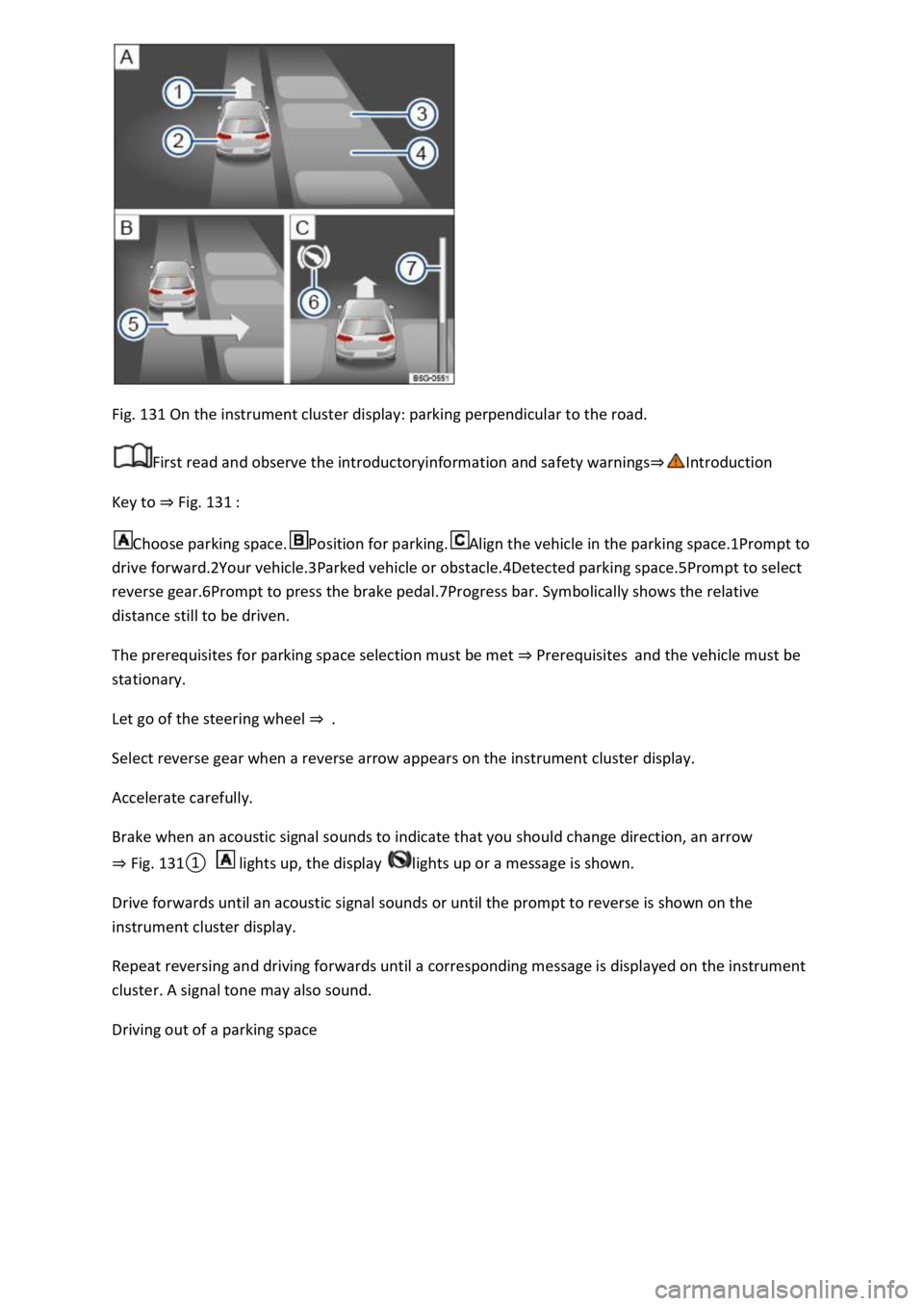
Fig. 131 On the instrument cluster display: parking perpendicular to the road.
First read and observe the introductoryinformation and safety warnings⇒Introduction
Key to ⇒ Fig. 131 :
Choose parking space.Position for parking.Align the vehicle in the parking space.1Prompt to
drive forward.2Your vehicle.3Parked vehicle or obstacle.4Detected parking space.5Prompt to select
reverse gear.6Prompt to press the brake pedal.7Progress bar. Symbolically shows the relative
distance still to be driven.
The prerequisites for parking space selection must be met ⇒ Prerequisites and the vehicle must be
stationary.
Let go of the steering wheel ⇒ .
Select reverse gear when a reverse arrow appears on the instrument cluster display.
Accelerate carefully.
Brake when an acoustic signal sounds to indicate that you should change direction, an arrow
⇒ Fig. 131① lights up, the display lights up or a message is shown.
Drive forwards until an acoustic signal sounds or until the prompt to reverse is shown on the
instrument cluster display.
Repeat reversing and driving forwards until a corresponding message is displayed on the instrument
cluster. A signal tone may also sound.
Driving out of a parking space
Page 274 of 502
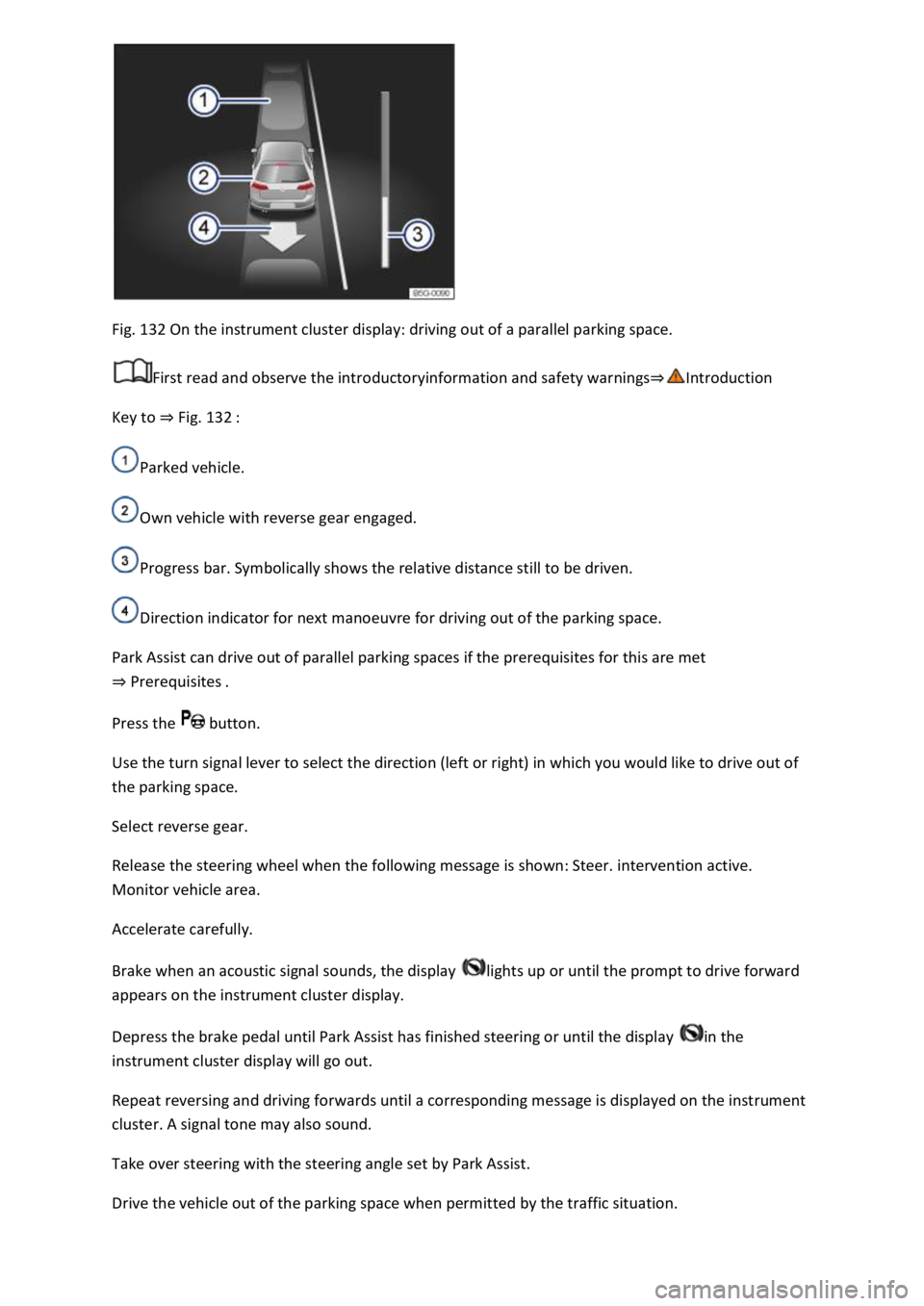
Fig. 132 On the instrument cluster display: driving out of a parallel parking space.
First read and observe the introductoryinformation and safety warnings⇒Introduction
Key to ⇒ Fig. 132 :
Parked vehicle.
Own vehicle with reverse gear engaged.
Progress bar. Symbolically shows the relative distance still to be driven.
Direction indicator for next manoeuvre for driving out of the parking space.
Park Assist can drive out of parallel parking spaces if the prerequisites for this are met
⇒ Prerequisites .
Press the button.
Use the turn signal lever to select the direction (left or right) in which you would like to drive out of
the parking space.
Select reverse gear.
Release the steering wheel when the following message is shown: Steer. intervention active.
Monitor vehicle area.
Accelerate carefully.
Brake when an acoustic signal sounds, the display lights up or until the prompt to drive forward
appears on the instrument cluster display.
Depress the brake pedal until Park Assist has finished steering or until the display in the
instrument cluster display will go out.
Repeat reversing and driving forwards until a corresponding message is displayed on the instrument
cluster. A signal tone may also sound.
Take over steering with the steering angle set by Park Assist.
Drive the vehicle out of the parking space when permitted by the traffic situation.
Page 280 of 502

When accelerating on a slippery surface, for example on ice and snow, accelerate carefully. The
wheels can spin even when brake support systems are active, and this can lead to a loss of control of
the vehicle.
WARNING
The effectiveness of ESC can be reduced considerably if other components and systems which affect
driving dynamics are not serviced properly or are not functioning properly. This also applies, but not
exclusively, to the brakes, tyres and other named systems.
Please always bear in mind that modifications and changes to the vehicle can affect the way brake
support systems operate.
Alterations to the suspension or the use of non-approved wheel and tyre combinations can affect
the function of brake support systems and reduce their effectiveness.
Suitable tyres support the effectiveness of ESC.
WARNING
Driving without the brake servo can considerably increase the braking distance and thus cause
accidents and serious injuries.
Never switch the engine or ignition off while the vehicle is in motion.
If the brake servo does not function or the vehicle is being towed, the brake pedal will have to be
depressed more forcefully as the braking distance will be increased due to the lack of assistance for
the brake system.
Switching the TCS on and off
Switch off the traction control system (TCS) if the vehicle does not have sufficient traction:
When driving in deep snow or on loose surfaces.
When rocking the vehicle free if it is stuck.
Then switch on TCS again.
Switching TCS on and off
TCS can be switched off and on in the Infotainment system ⇒ Infotainment system controls and
displays .
When the TCS is switched off, the yellow indicator lamp lights up on the instrument cluster
display.
As soon as the TCS starts regulating, the indicator lamp flashes yellow.
Troubleshooting
Page 281 of 502

Do not drive on! Brake system fault.
Warning lamp lights up red.
Seek expert assistance immediately.
ABS failure or fault.
Warning lamp lights up yellow.
Go to a qualified workshop. The vehicle can be braked without the anti-lock brake system.
TCS regulating to prevent the wheels from spinning.
Indicator lamp flashes yellow.
ESC switched off for system-related reasons.
Indicator lamp lights up yellow.
Switch the ignition on and off.
Drive a short distance at a speed of 15 – 20 km/h (9 – 12 mph) if necessary.
If is still lit up, seek expert assistance.
The brake support systems make noises
Noises may be heard when the brake support systems are performing control interventions.
Unexpected reduction in engine power
Faults can occur in the ESC and TCS systems if the four wheels have different types of tyres.
Any differences in the rolling radius of the tyres can cause the system to reduce engine power
unexpectedly.
WARNING
If the brake system warning lamp lights up together with the ABS indicator lamp , the ABS
control function may have failed. This can cause the rear wheels to lock quickly when you brake.
Locked rear wheels can lead to a loss of control of the vehicle. If possible, reduce your speed and
drive carefully at low speed to the nearest qualified workshop in order to have the brake system
tested. Avoid sudden braking and driving manoeuvres on the way.
If the ABS indicator lamp does not go out or comes on while the vehicle is in motion, ABS is not
working properly. The vehicle can be stopped using the normal brakes only (without the anti-lock
brake system). The protection provided by the anti-lock brake system is no longer available. Go to a
qualified workshop as soon as possible.
Practical equipment
Stowage areas
Page 297 of 502

Always stow luggage and heavy objects in the luggage compartment ⇒ .
Place heavy objects as far forward in the luggage compartment as possible.
Observe gross axle weight ratings and the gross vehicle weight rating ⇒ Technical data .
Secure luggage to the fastening rings in the luggage compartment using suitable lashing, fixing and
securing straps ⇒ Luggage compartment equipment .
Also stow small objects safely.
If necessary, fold back the rear seat backrest and engage it securely.
If necessary, adjust the headlight range ⇒ Headlights .
Adjust the tyre pressure according to the vehicle load. Observe the tyre pressure sticker ⇒ Tyre
pressure .
In vehicles with a tyre monitoring system, set the new vehicle load level as necessary ⇒ Tyre
monitoring system .
WARNING
Objects that are not secured, or are secured incorrectly, can cause serious injuries in the event of a
sudden driving or braking manoeuvre or accident. This applies particularly if objects are struck by an
airbag when activated and then flung through the vehicle interior. Please observe the following rules
to reduce the risk of accidents:
Always stow all objects in the vehicle securely.
Small and light objects should also be secured.
Objects should be stowed in the vehicle interior in such a way that they can never enter the airbag
deployment zones while the vehicle is in motion.
Always keep stowage compartments closed while the vehicle is in motion.
Stowed objects must never cause passengers to assume an incorrect sitting position.
If an item is being stowed on a seat, this seat must not be used by any passengers.
Do not stow any hard, heavy or sharp objects loose in any of the vehicle's open stowage areas, on
the surface behind the rear seat backrest or on the dash panel.
Remove any hard, heavy or sharp objects from items of clothing and bags inside the vehicle and
stow them securely.
WARNING
Transporting heavy objects changes the vehicle's handling and increases the braking distance. Heavy
loads that are not properly stowed or secured in the vehicle can lead to a loss of vehicle control and
can cause serious injury.
Page 310 of 502
Retrofitting a towing bracket
Only use a towing bracket which has been approved by Volkswagen for your vehicle type. Always
check and observe the data provided by the towing bracket manufacturer.
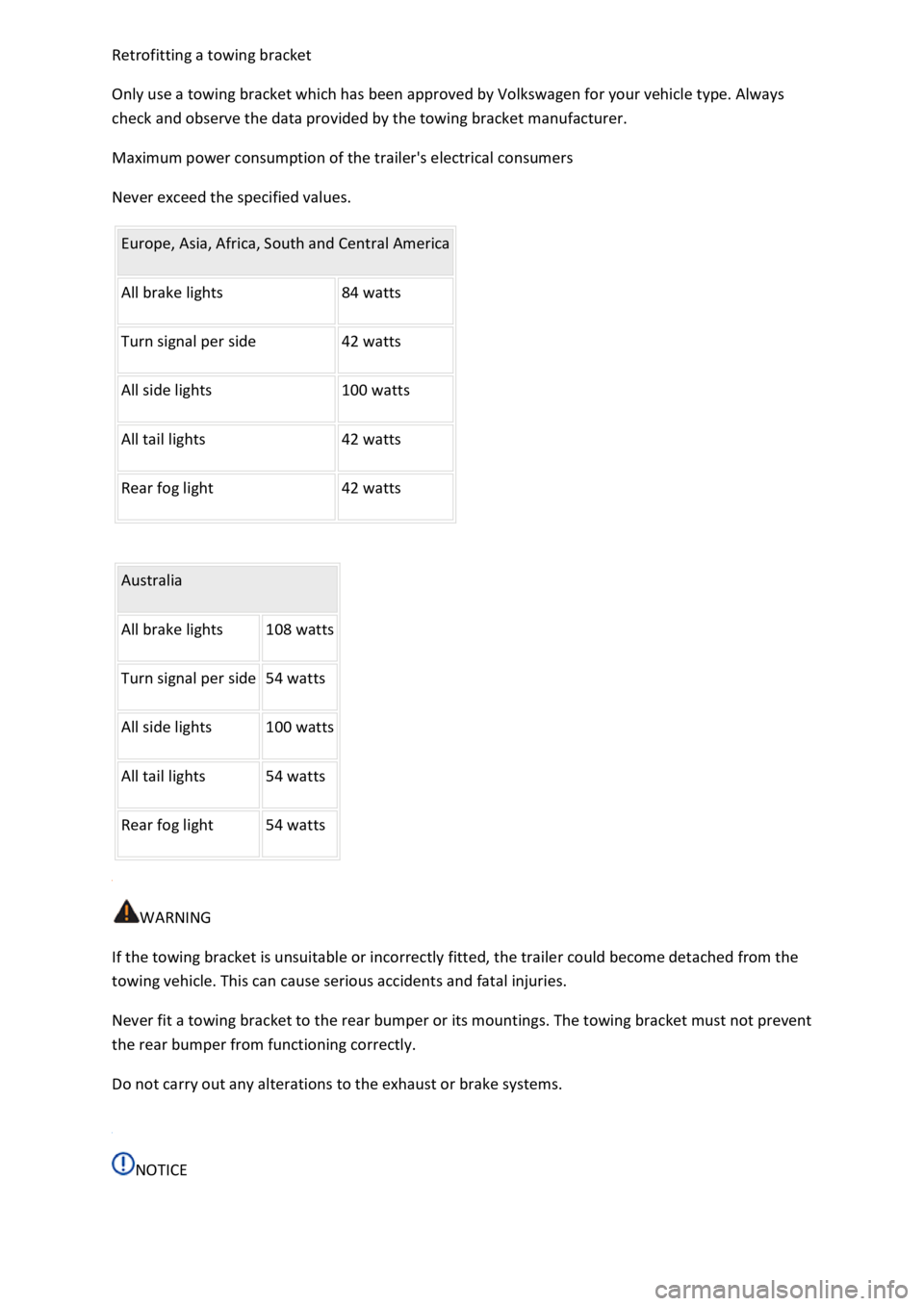
Maximum power consumption of the trailer's electrical consumers
Never exceed the specified values.
Europe, Asia, Africa, South and Central America
All brake lights 84 watts
Turn signal per side 42 watts
All side lights 100 watts
All tail lights 42 watts
Rear fog light 42 watts
Australia
All brake lights 108 watts
Turn signal per side 54 watts
All side lights 100 watts
All tail lights 54 watts
Rear fog light 54 watts
WARNING
If the towing bracket is unsuitable or incorrectly fitted, the trailer could become detached from the
towing vehicle. This can cause serious accidents and fatal injuries.
Never fit a towing bracket to the rear bumper or its mountings. The towing bracket must not prevent
the rear bumper from functioning correctly.
Do not carry out any alterations to the exhaust or brake systems.
NOTICE
Page 333 of 502

Fault in exhaust system
The yellow catalytic converter lamp lights up or flashes.
Faults in the exhaust system caused by misfiring, which can damage the catalytic converter.
to the nearest qualified workshop immediately.
There may be engine faults and fuel consumption may be higher if the indicator lamps are lit up or
flashing.
If and when
Vehicle toolkit
Introduction
This chapter contains information on the followingsubjects:
⇒ Stowage
⇒ Vehicle toolkit contents
Observe any country-specific legislation when securing your vehicle in the event of a breakdown.
Vehicle toolkit in the vehicle
In vehicles that are factory-fitted with a spare wheel, emergency spare wheel or winter wheels,
additional vehicle tools may be located in the luggage compartment.
WARNING
In the event of a sudden driving or braking manoeuvre or accident, a loose vehicle toolkit,
breakdown set and spare wheel or temporary spare wheel could be flung though the vehicle and
cause severe injuries.
always secured in the luggage compartment.
WARNING
Unsuitable or damaged tools in the vehicle toolkit can lead to accidents and injuries.
Stowage
Page 338 of 502

NOTICE
Damaged or dirty wiper blades can scratch the window glass.
can damage the graphite coating of the wiper blades during cleaning.
Wax deposits from car washes on the windscreen and rear window can cause the wiper blades to
rub. Remove wax residue using a special cleaning product or cleaning cloths.
Changing bulbs
Introduction
This chapter contains information on the followingsubjects:
⇒ Checklist
⇒ Changing bulbs in the front headlights (halogen bulbs)
⇒ Changing the bulbs in the headlights (lights with LED technology)
⇒ Changing the front turn signal bulbs
⇒ Changing bulbs in the front bumper
⇒ Changing bulbs in the tail light clusters (LED lights)
⇒ Changing bulbs in the number plate light (LED lights)
⇒ Troubleshooting
Changing the vehicle bulbs requires a certain amount of technical skill. Volkswagen therefore
recommends having bulbs replaced by a qualified workshop if you are uncertain. The work must be
performed by an expert if other vehicle parts around the affected bulbs need to be removed.
Volkswagen recommends having bulbs replaced by a Volkswagen dealership.
You should keep a box with spare light bulbs for the lights that ensure the vehicle is roadworthy in
the vehicle at all times. Spare bulbs are available from Volkswagen dealerships. In some countries it
is a legal requirement to have these spare bulbs in the vehicle.
It may be illegal to drive with defective lights of the exterior lighting.
Information on indicator and warning lamps can be found in the troubleshooting section at the end
of the chapter ⇒ Troubleshooting .
LED lights on the vehicle
The exterior lighting may feature LEDs: Owners cannot replace the LEDs themselves. If some LEDs
fail, this may be an indication that more elements are on the point of failure. In this case, have the
lights checked and replaced if necessary at a qualified workshop.