Key VOLKSWAGEN T-ROC 2021 Owner´s Manual
[x] Cancel search | Manufacturer: VOLKSWAGEN, Model Year: 2021, Model line: T-ROC, Model: VOLKSWAGEN T-ROC 2021Pages: 502, PDF Size: 9.42 MB
Page 141 of 502
Depending on the equipment level, the background lighting provides indirect light in various areas of
the vehicle interior.
The front footwell may also be illuminated.
The brightness of the background lighting can be adjusted in the Infotainment system in the Vehicle
settings menu ⇒ Infotainment system controls and displays .
The lights go out when the vehicle is locked or after a delay of a few minutes when the vehicle key is
removed from the ignition lock. This prevents the 12-volt vehicle battery from discharging.
Some settings can be stored in the user accounts of the personalisation function and therefore
change automatically when the user account changes ⇒ Personalisation .
Visibility
Wipers
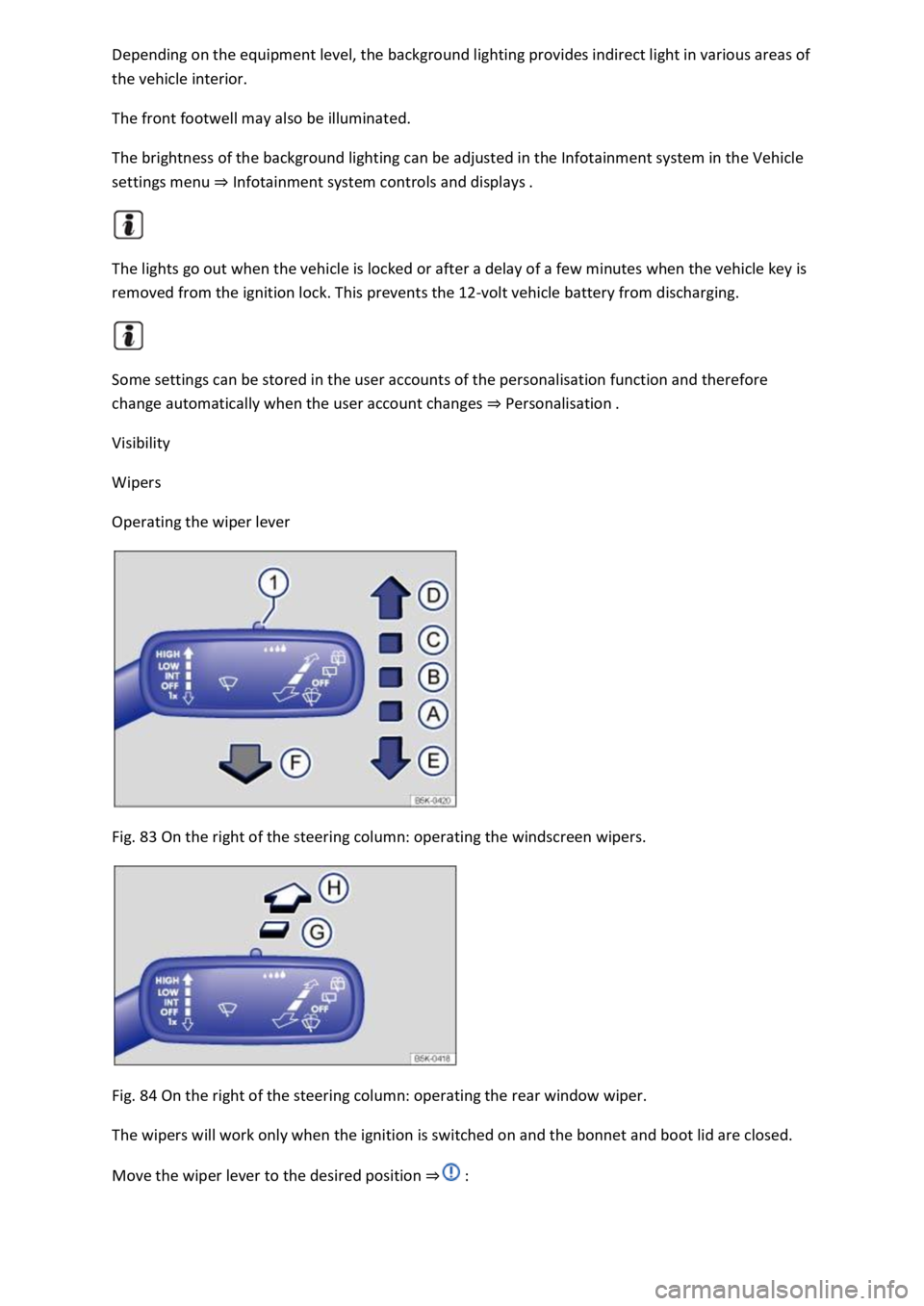
Operating the wiper lever
Fig. 83 On the right of the steering column: operating the windscreen wipers.
Fig. 84 On the right of the steering column: operating the rear window wiper.
The wipers will work only when the ignition is switched on and the bonnet and boot lid are closed.
Move the wiper lever to the desired position ⇒ :
Page 149 of 502

Swivel the rotary knob forwards, backwards, right or left in the direction of the arrow in order to
adjust the exterior mirror.
Electrically fold in the exterior mirrors ⇒ .Switch on the exterior mirror heating. The
exterior mirror heating heats only at ambient temperatures below +20°C (+68°F) and initially with
the highest setting. Heating takes place dependent on the ambient temperature after around
two minutes.Adjust the left-hand exterior mirror.Adjust the right-hand exterior mirror.Zero
position. The exterior mirror cannot be adjusted and all functions are switched off.
Activating the exterior mirror functions
The following exterior mirror functions must be activated once in the Infotainment system in
the Vehicle settings menu ⇒ Infotainment system controls and displays :
Synchronous mirror adjustment
Synchronous mirror adjustment means that the right-hand exterior mirror is also adjusted at the
same time when you adjust the left-hand exterior mirror.
Turn the rotary knob to position .
Adjust the left-hand exterior mirror. The right-hand exterior mirror will be adjusted at the same time
(synchronously).
Correct the settings for the right-hand exterior mirror if necessary: swivel the rotary knob to
position and adjust the right-hand exterior mirror.
Folding in the exterior mirrors while parking
When the vehicle is locked or unlocked from the outside, the exterior mirrors fold in or out
automatically. For this, the rotary knob must be in position , , or .
If the rotary knob for the electrically adjustable exterior mirrors is in position , the exterior
mirrors stay folded in.
Saving and recalling the front passenger exterior mirror settings for reversing
Unlock the vehicle with the vehicle key to which the settings should be assigned.
Switch on the electronic parking brake.
Switch on the ignition.
Put the gearbox into neutral.
Select reverse gear.
Adjust the front passenger exterior mirror so that you have a good view of the kerb area, for
example.
The set mirror position will be saved and assigned to the vehicle key.
Turn the rotary knob for the exterior mirrors to position .
Page 168 of 502

Remove the battery cover.
Remove the button cell.
Insert a new button cell of the same type, paying attention to the correct polarity.
Insert the battery cover into the remote control housing.
Slide the battery cover in the opposite direction of the arrow ⇒ Fig. 93 until it clicks into place.
DANGER
Swallowing batteries with a diameter of 20 mm or other button cells can result in serious or even
fatal injuries within a very short period of time.
Always keep the remote control key, key ring with batteries, spare batteries, button cells and other
batteries that are larger than 20 mm out of the reach of children.
Call for medical help immediately you suspect that someone has swallowed a battery.
NOTICE
The remote control contains electronic components. For this reason, protect the remote control
from moisture, excessive vibration and direct sunlight.
Unsuitable batteries can damage the remote control. Replace discharged batteries only with new
batteries of the same voltage rating, size and specification.
Make sure the polarity is correct when inserting the battery.
Dispose of discharged batteries in accordance with environmental regulations.
The battery in the remote control may contain perchlorate. Observe the applicable legislation
regarding disposal.
Driving
Notes on driving
Pedals
Page 169 of 502
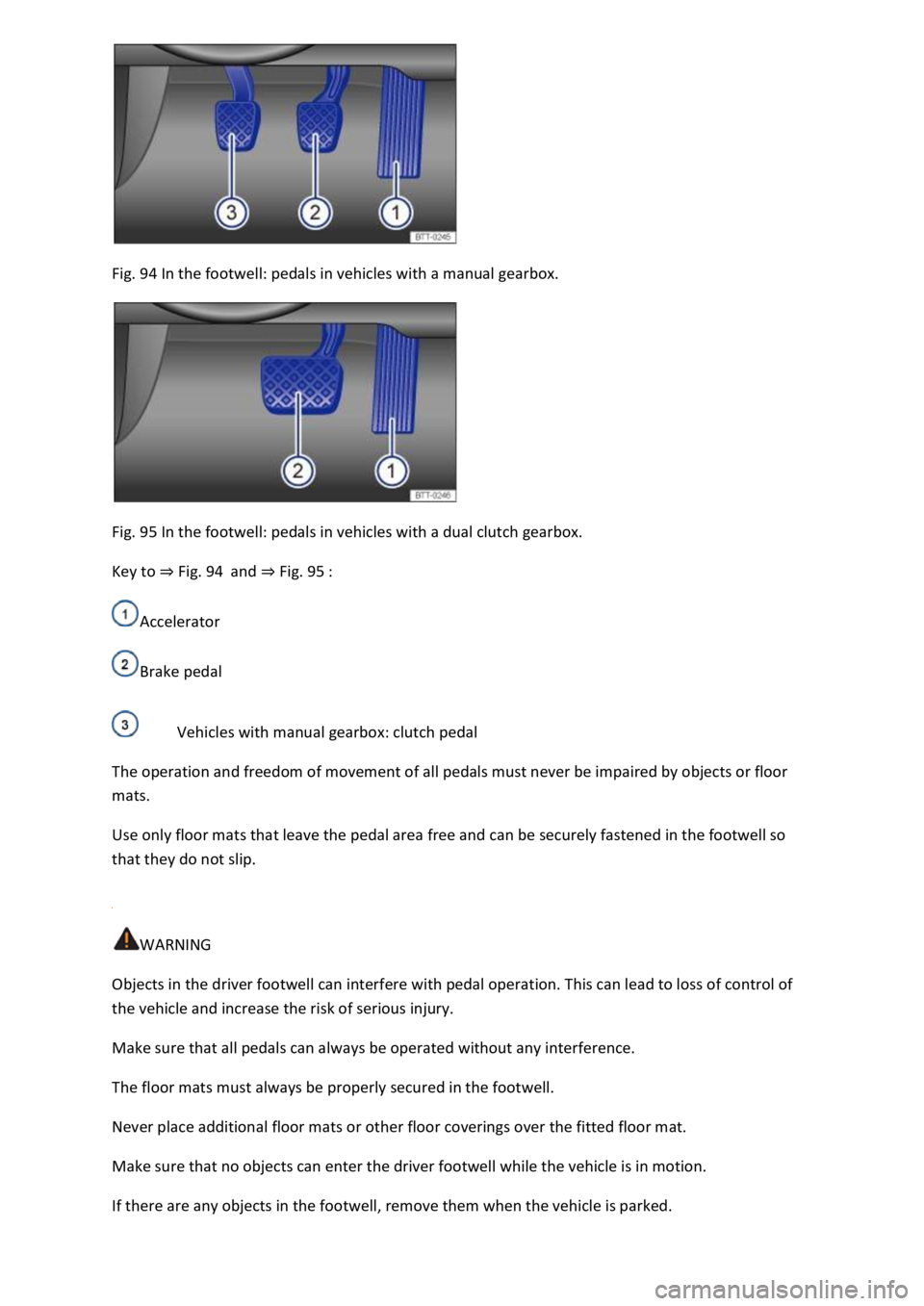
Fig. 94 In the footwell: pedals in vehicles with a manual gearbox.
Fig. 95 In the footwell: pedals in vehicles with a dual clutch gearbox.
Key to ⇒ Fig. 94 and ⇒ Fig. 95 :
Accelerator
Brake pedal
Vehicles with manual gearbox: clutch pedal
The operation and freedom of movement of all pedals must never be impaired by objects or floor
mats.
Use only floor mats that leave the pedal area free and can be securely fastened in the footwell so
that they do not slip.
WARNING
Objects in the driver footwell can interfere with pedal operation. This can lead to loss of control of
the vehicle and increase the risk of serious injury.
Make sure that all pedals can always be operated without any interference.
The floor mats must always be properly secured in the footwell.
Never place additional floor mats or other floor coverings over the fitted floor mat.
Make sure that no objects can enter the driver footwell while the vehicle is in motion.
If there are any objects in the footwell, remove them when the vehicle is parked.
Page 170 of 502

NOTICE
Free access to the pedals must be ensured at all times. For example, a larger brake pedal travel will
be necessary in order to stop the vehicle if a brake circuit fails. The brake pedal will have to be
depressed further and harder than normal.
Gear-change indicator
Fig. 96 On the instrument cluster display: gear-change indicator.
Key to ⇒ Fig. 96 :
Currently selected gear.
Recommended gear.
Depending on the vehicle's equipment level, the instrument cluster display may indicate a gear
which should be selected to reduce fuel consumption while the vehicle is in motion.
Vehicles with DSG dual clutch gearbox: the selector lever must be in the Tiptronic position for
this ⇒ Changing gear using Tiptronic .
No recommended gear is indicated if the most suitable gear is already selected. The currently
selected gear is displayed.
Information on cleaning the particulate filter
The engine management system recognises when the particulate filter is becoming saturated and
supports regeneration of the filter by recommending the most suitable gear when driving. Compared
with normal driving, this may mean driving with an increased engine speed ⇒ Particulate filter .
CAUTION
The gear-change indicator is designed only to assist the driver and cannot replace the driver's own
judgement.
The driver has full responsibility for selecting the correct gear in all situations, e.g. when overtaking
or when driving up and down hills.
Driving in the correct gear can help to reduce fuel consumption.
Page 173 of 502
The alternator is driven by the engine and generates electrical power for convenience consumers
such as the air conditioning system, windscreen heating and ventilation. Saving electrical energy is
easy, e.g.:
Open the windows and doors before driving at high outside temperatures and drive for a short
distance with a window open. Only then switch the air conditioning system on.
Switch the convenience consumers off as soon as they have served their purpose.
WARNING
Adapt your speed and distance from the vehicles ahead to suit visibility, weather, road and traffic
conditions.
Inform yourself about other ways of protecting the environment. Think Blue. is the global
Volkswagen trademark for sustainability and environmental compatibility.
Your Volkswagen dealership can provide you with further information on maintenance and energy-
efficient replacement parts, e.g. new tyres.
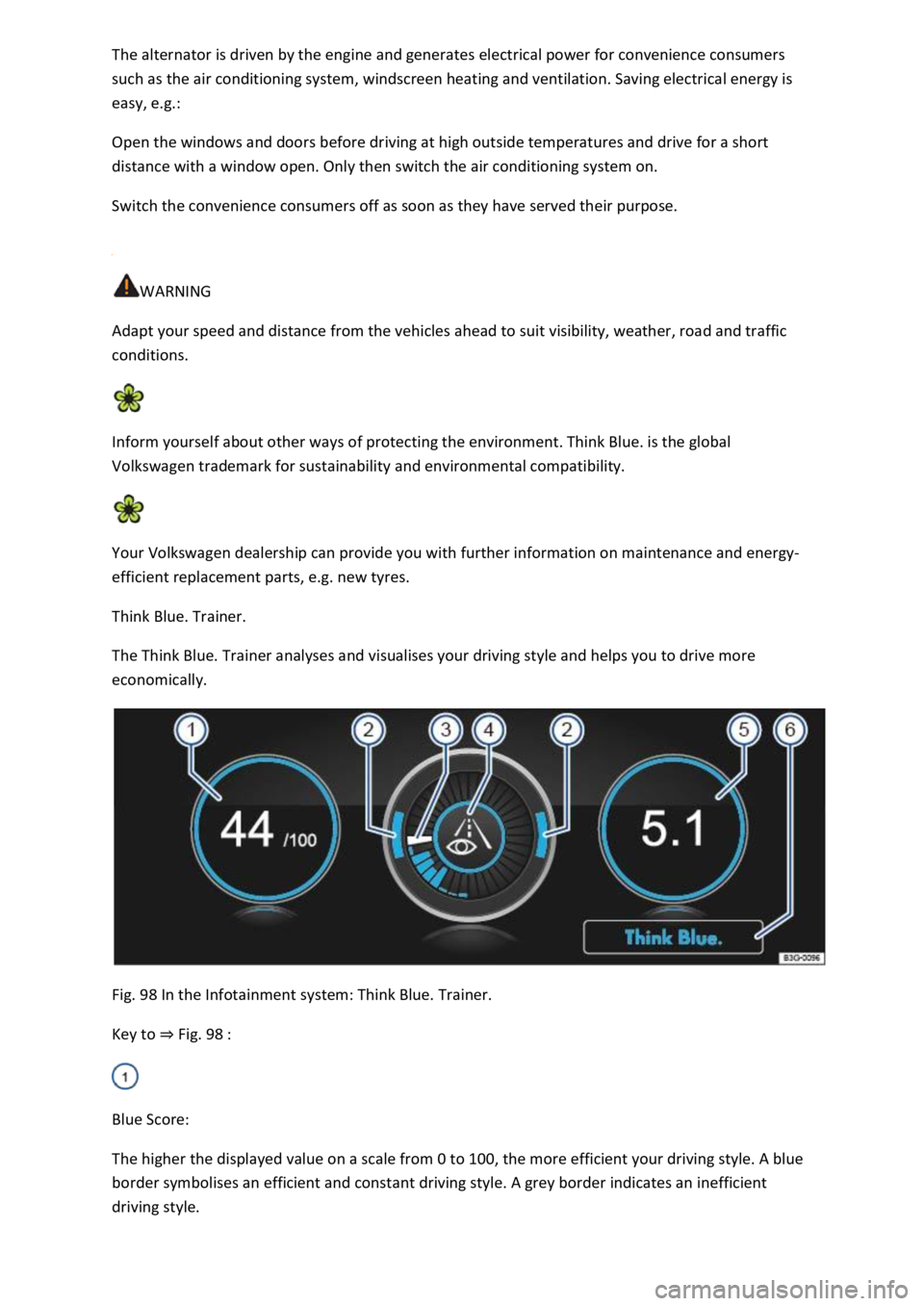
Think Blue. Trainer.
The Think Blue. Trainer analyses and visualises your driving style and helps you to drive more
economically.
Fig. 98 In the Infotainment system: Think Blue. Trainer.
Key to ⇒ Fig. 98 :
Blue Score:
The higher the displayed value on a scale from 0 to 100, the more efficient your driving style. A blue
border symbolises an efficient and constant driving style. A grey border indicates an inefficient
driving style.
Page 181 of 502
Starting and stopping the engine
Ignition lock
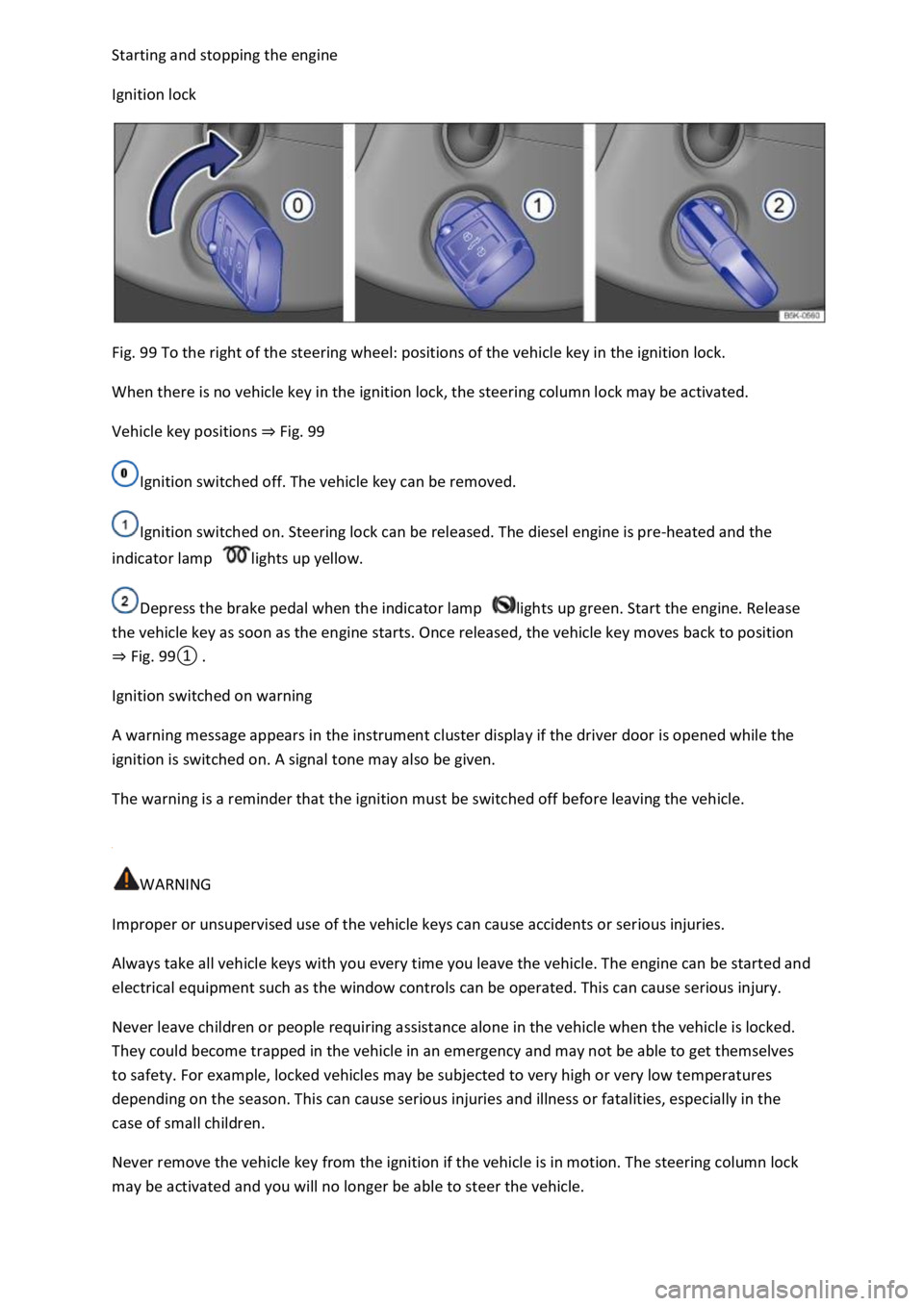
Fig. 99 To the right of the steering wheel: positions of the vehicle key in the ignition lock.
When there is no vehicle key in the ignition lock, the steering column lock may be activated.
Vehicle key positions ⇒ Fig. 99
Ignition switched off. The vehicle key can be removed.
Ignition switched on. Steering lock can be released. The diesel engine is pre-heated and the
indicator lamp lights up yellow.
Depress the brake pedal when the indicator lamp lights up green. Start the engine. Release
the vehicle key as soon as the engine starts. Once released, the vehicle key moves back to position
⇒ Fig. 99① .
Ignition switched on warning
A warning message appears in the instrument cluster display if the driver door is opened while the
ignition is switched on. A signal tone may also be given.
The warning is a reminder that the ignition must be switched off before leaving the vehicle.
WARNING
Improper or unsupervised use of the vehicle keys can cause accidents or serious injuries.
Always take all vehicle keys with you every time you leave the vehicle. The engine can be started and
electrical equipment such as the window controls can be operated. This can cause serious injury.
Never leave children or people requiring assistance alone in the vehicle when the vehicle is locked.
They could become trapped in the vehicle in an emergency and may not be able to get themselves
to safety. For example, locked vehicles may be subjected to very high or very low temperatures
depending on the season. This can cause serious injuries and illness or fatalities, especially in the
case of small children.
Never remove the vehicle key from the ignition if the vehicle is in motion. The steering column lock
may be activated and you will no longer be able to steer the vehicle.
Page 182 of 502

The key bit in the vehicle key must be folded out fully and locked in position.
Only attach light objects weighing less than 100 g to the vehicle key.
NOTICE
The 12-volt battery may be discharged unintentionally and prevent the engine from restarting if the
ignition is switched on while the engine is switched off.
Always switch off the ignition before you leave the vehicle.
For vehicles with DSG dual clutch gearbox in some markets: if the vehicle key cannot be
removed from the ignition lock when the vehicle is stopped, move the selector lever to P. If
necessary, press the lock button in the selector lever and then release it.
Starter button
The starter button replaces the ignition lock (Press & Drive).
Fig. 100 In the lower section of the centre console: starter button for starting the engine.
The starter button is used to start the vehicle (Press & Drive).
The vehicle can be activated only if there is a valid vehicle key in the vehicle.
When leaving the vehicle, the electronic steering column lock will be activated when the ignition is
switched off and the driver door is opened ⇒ Steering .
Switching the ignition on and off
Press the starter button once without depressing the brake or clutch pedal ⇒ .
Automatic ignition switch-off
The ignition switches off automatically after a short time if the driver moves away from the vehicle
with the vehicle key when the ignition is switched on. If the dipped beam headlights were switched
on at the time, the side lights will remain switched on for approximately 30 minutes. The side lights
can be switched off manually or by locking the vehicle ⇒ Lights .
Automatic ignition switch-off in vehicles with a start/stop system
Page 183 of 502

When all the following conditions are fulfilled at the same time, the vehicle ignition will be switched
off automatically when engine stop is active when the vehicle is stationary:
The driver seat belt has been unfastened.
No pedals are depressed.
The driver door is opened.
If the ignition is deactivated automatically while the dipped beam headlights are switched on,
the side lights remain switched on and lit for approximately 30 minutes.
The side lights can be switched off manually or will go off when the vehicle is locked.
Engine restart function
If no valid vehicle key is detected in the vehicle interior once the engine has been switched off, the
engine can be restarted within approximately five seconds. A corresponding message appears on the
instrument cluster display.
After this time, the engine cannot be re-started without a valid vehicle key in the vehicle interior.
WARNING
Unintentional vehicle movements can cause serious injury.
Do not depress the brake or clutch pedal when the ignition is switched on as the engine will start
immediately.
WARNING
Improper or unsupervised use of the vehicle keys can cause accidents or serious injuries.
Always take all vehicle keys with you every time you leave the vehicle. Children or unauthorised
persons could lock the vehicle, start the engine, switch on the ignition or operate electrical
equipment such as the electric windows.
Before leaving the vehicle, always switch off the ignition manually and observe any information
shown on the instrument cluster display.
Leaving the vehicle stationary for long periods with the ignition switched on can discharge the 12-
volt vehicle battery so that the engine can no longer be started.
Starting the engine
Page 184 of 502

Vehicles with ignition lock: turn the vehicle key to position ⇒ Fig. 99① . The ignition is
switched on.
Vehicles with a starter button: press the starter button once. The ignition is switched on.
Vehicles with a diesel engine: during the diesel engine preheating phase, the indicator lamp
lights up in the instrument cluster.
Depress and hold the brake pedal until the electronic parking brake has been switched off.
Vehicles with manual gearbox: fully depress the clutch pedal and hold it until the engine has
been started. Move the gear lever to neutral position.
Vehicles with DSG dual clutch gearbox: move the selector lever to position P or N.
Vehicles with ignition lock: turn the vehicle key to position ⇒ Fig. 99② – do not depress the
accelerator.
Release the vehicle key once the engine has started.
Vehicles with a starter button: press the starter button ⇒ Starter button – do not depress the
accelerator. There must be a valid vehicle key in the vehicle before the engine can be started.
If the engine does not start immediately, switch off the starter and try again after about a minute.
Vehicles with starter button: perform an emergency start if necessary ⇒ No valid vehicle key
recognised .
Vehicles with starter button: the starter button is deactivated if the vehicle was locked with the
vehicle key. If you are in the vehicle and need to start the engine, unlock the vehicle first or perform
an emergency start ⇒ No valid vehicle key recognised .
Switch off the electronic parking brake if you wish to pull away.
WARNING
The risk of serious injury can be reduced with the engine running or when starting the engine.
Never start or run the engine in unventilated or enclosed spaces. The exhaust fumes contain carbon
monoxide, an odourless and colourless toxic gas. Carbon monoxide can cause people to lose
consciousness. It can also cause death.
Never start or run the engine if oil, fuel or any other highly flammable fluids are under or near the
vehicle, or are leaking out of the vehicle, e.g. as the result of damage.