Wheel VOLKSWAGEN T-ROC 2021 Owner´s Manual
[x] Cancel search | Manufacturer: VOLKSWAGEN, Model Year: 2021, Model line: T-ROC, Model: VOLKSWAGEN T-ROC 2021Pages: 502, PDF Size: 9.42 MB
Page 231 of 502

If necessary, remove the towing eye and the snow chains.
Check the tyres, suspension struts and axles for damage and remove dirt, stones and other foreign
bodies from the tyre tread.
Inspect the vehicle underbody and remove all items that are jammed in the brake system, on the
wheels, in the running gear, in the exhaust system and in the engine, such as branches, leaves or
pieces of wood . If you see any damage or leaks, take your vehicle to a qualified workshop or seek
expert assistance.
Clean heavy soiling from the radiator grille and the vehicle underbody Vehicle care.
Check the engine compartment to see if any dirt is affecting engine operation In the engine
compartment.
Deselecting the Offroad driving profile Setting a driving profile.
Switch on TCS again Brake support systems.
WARNING
Objects caught underneath the vehicle underbody pose a danger. The vehicle underbody must
always be examined for trapped objects after every journey offroad.
Never drive if objects are trapped in the underbody, brake system, wheels, running gear, exhaust
system and engine.
Inflammable materials, e.g. dry leaves, could ignite on hot vehicle components. A fire can cause
serious injuries.
Trapped objects could damage the fuel lines, brake system, seals and other running gear
components. This could cause you to lose control of your vehicle and cause accidents.
Driver assist systems
Speed limiter
Introduction
This chapter contains information on the followingsubjects:
Page 232 of 502

⇒ Operating the speed limiter with the multifunction steering wheel
⇒ Troubleshooting
The speed limiter helps you to stop exceeding a stored speed.
Speed range
The speed limiter is available when driving forwards at speeds from approx. 30 km/h (20 mph).
Driving with the speed limiter
You can interrupt the speed limiter at any time by depressing the accelerator all the way down past
the point of resistance. As soon as the stored speed is exceeded, the green indicator lamp will
flash and an acoustic warning may sound. The speed remains stored in the memory.
The speed limiter function switches back on automatically as soon as the speed drops back below
the stored speed.
Displays
When the speed limiter is switched on, the instrument cluster display shows the stored speed and
the status of the speed limiter:
Shown small or grey: speed limiter not active.Shown large or white: speed limiter active.
Driving downhill
Driving downhill may cause the set speed to be exceeded.
Apply the foot brake to slow the vehicle down, and change down a gear as required.
WARNING
Always switch off the speed limiter after use to avoid unintentional speed control.
The speed limiter does not relieve the driver of their responsibility for the speed of the vehicle. Do
not drive at full throttle if this is not required.
Use of the speed limiter in adverse weather conditions is dangerous and can cause serious injury,
e.g. through aquaplaning, snow, ice, or leaves. Use the speed limiter only when the road and
weather conditions allow it to be used safely.
The speed limiter cannot limit the vehicle speed when travelling downhill. The vehicle speed can
increase under its own weight. Select a lower gear or use the foot brake to slow the vehicle down.
Operating the speed limiter with the multifunction steering wheel
Page 233 of 502
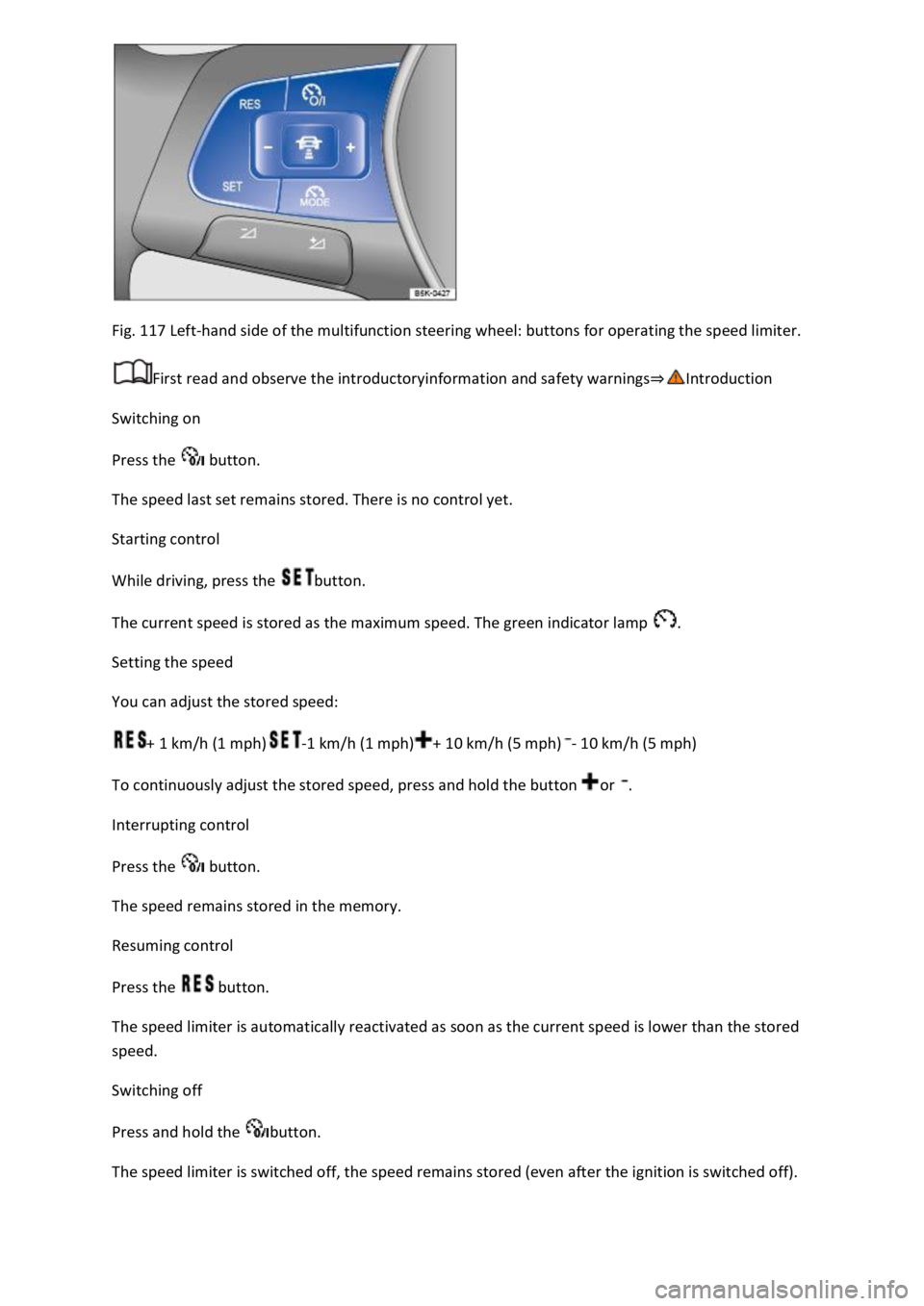
Fig. 117 Left-hand side of the multifunction steering wheel: buttons for operating the speed limiter.
First read and observe the introductoryinformation and safety warnings⇒Introduction
Switching on
Press the button.
The speed last set remains stored. There is no control yet.
Starting control
While driving, press the button.
The current speed is stored as the maximum speed. The green indicator lamp .
Setting the speed
You can adjust the stored speed:
+ 1 km/h (1 mph)-1 km/h (1 mph)+ 10 km/h (5 mph)- 10 km/h (5 mph)
To continuously adjust the stored speed, press and hold the button or .
Interrupting control
Press the button.
The speed remains stored in the memory.
Resuming control
Press the button.
The speed limiter is automatically reactivated as soon as the current speed is lower than the stored
speed.
Switching off
Press and hold the button.
The speed limiter is switched off, the speed remains stored (even after the ignition is switched off).
Page 239 of 502

Fig. 121 Left-hand side of the multifunction steering wheel: buttons for operating ACC.
First read and observe the introductoryinformation and safety warnings⇒Introduction
Switching on ACC
Press the button.
The indicator lamp lights up grey, ACC does not regulate.
Starting control
Press the button while driving forwards.
ACC stores the current speed and maintains the set distance. If the current speed is outside the
defined speed range, ACC will set the minimum speed (when driving more slowly than the limit) or
maximum speed (when driving faster than the limit).
The following indicator lamps light up, depending on the driving situation:
ACC regulating.No vehicle has been detected ahead.Vehicle detected ahead (white).
Interrupting control
Briefly press the button or press the brake pedal.
The indicator lights up grey, the speed and distance remain stored.
Control is automatically interrupted if the traction control system (TCS) is deactivated.
Resuming control
Press the button.
ACC adopts the last set speed and last set distance. The instrument cluster display shows the set
speed and the indicator lamp lights up green.
Switching off ACC
Press and hold the button.
The set speed is deleted.
Changing to the speed limiter
Press the button.
ACC is switched off.
Setting ACC
Page 240 of 502
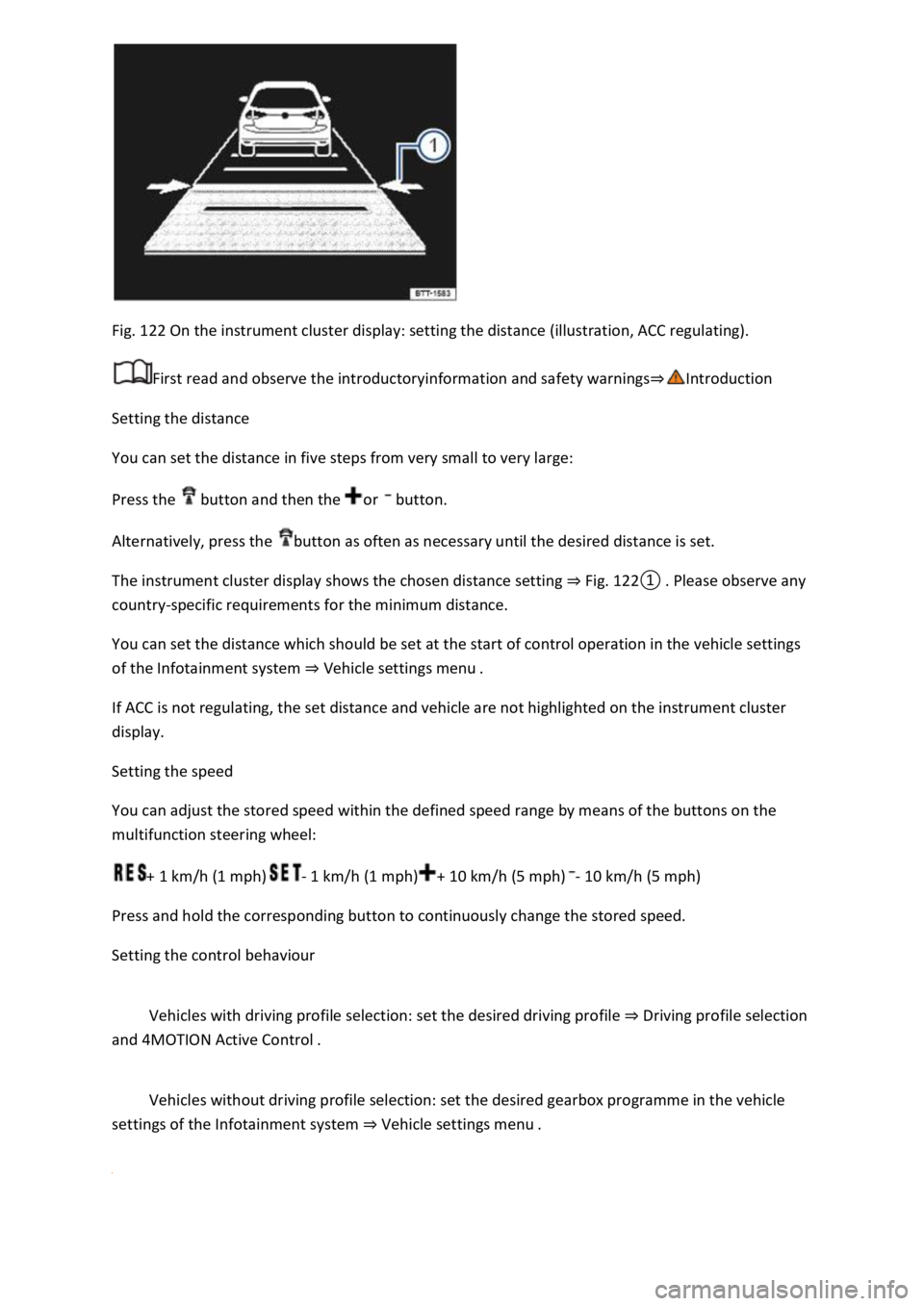
Fig. 122 On the instrument cluster display: setting the distance (illustration, ACC regulating).
First read and observe the introductoryinformation and safety warnings⇒Introduction
Setting the distance
You can set the distance in five steps from very small to very large:
Press the button and then the or button.
Alternatively, press the button as often as necessary until the desired distance is set.
The instrument cluster display shows the chosen distance setting ⇒ Fig. 122① . Please observe any
country-specific requirements for the minimum distance.
You can set the distance which should be set at the start of control operation in the vehicle settings
of the Infotainment system ⇒ Vehicle settings menu .
If ACC is not regulating, the set distance and vehicle are not highlighted on the instrument cluster
display.
Setting the speed
You can adjust the stored speed within the defined speed range by means of the buttons on the
multifunction steering wheel:
+ 1 km/h (1 mph)- 1 km/h (1 mph)+ 10 km/h (5 mph)- 10 km/h (5 mph)
Press and hold the corresponding button to continuously change the stored speed.
Setting the control behaviour
Vehicles with driving profile selection: set the desired driving profile ⇒ Driving profile selection
and 4MOTION Active Control .
Vehicles without driving profile selection: set the desired gearbox programme in the vehicle
settings of the Infotainment system ⇒ Vehicle settings menu .
Page 248 of 502

If the problem persists, switch off Front Assist and go to a qualified workshop.
Lane keeping system (Lane Assist)
Introduction
This chapter contains information on the followingsubjects:
⇒ Driving with the lane keeping system
⇒ Troubleshooting
The lane keeping system (Lane Assist) helps the driver stay in lane.
Using a camera in the windscreen, the lane departure warning system detects lane markings on the
road. If your vehicle moves too close to a recognised lane marking, the system will warn the driver
with a corrective steering intervention. The corrective steering intervention can be overridden by
the driver at any time.
Adaptive lane guidance (depending on vehicle equipment)
The adaptive lane guidance system detects the preferred position in a lane and keeps the vehicle in
this position.
Adaptive lane guidance is switched on and off in the Driver assistance menu in the Infotainment
system ⇒ Vehicle settings menu .
System limits
Use the lane keeping system only on motorways and good main roads.
The system is not active under the following conditions:
The lane keeping system has not detected any lane markings.
WARNING
The intelligent technology used in the lane keeping system cannot overcome the laws of physics, and
functions only within the limits of the system. Always take care when using the lane departure
warning system otherwise you could cause accidents or injuries. The system is not a substitute for
the full concentration of the driver.
Adapt your speed and distance from the vehicles ahead to suit visibility, weather, road and traffic
conditions.
Your hands should always be on the steering wheel so that you can steer at any time. The driver is
always responsible for staying in lane.
The lane keeping system cannot recognise all lane markings. Poor road surfaces, road structures or
objects could be recognised incorrectly as lane markings by the lane keeping system. The lane
keeping system should be switched off immediately in these situations.
Follow the information on the instrument cluster display and respond according to the commands.
Page 250 of 502

Temporarily switching off the lane keeping system
Switch off the lane keeping system in the following situations:
Very sporty driving.
In poor weather conditions and when driving on poor roads.
In roadworks and before crests in the road.
Driver intervention prompt
In the absence of any steering input, the system prompts the driver with acoustic warnings and a
display on the instrument cluster display to take over active steering.
If the driver does not respond, the system will give another warning by initiating a quick jolt of the
brake before switching to passive mode or activating Emergency Assist (with some equipment
levels).
Steering wheel vibration
The following situations can lead to vibration of the steering wheel:
If the corrective steering intervention is not sufficient to keep the vehicle in its lane.
If the system can no longer detect a lane during a significant steering intervention.
If there is a system fault, the lane keeping system can deactivate itself automatically.
Troubleshooting
First read and observe the introductoryinformation and safety warnings⇒Introduction
No camera visibility, error message, system switches itself off
Clean the windscreen ⇒ Caring for and cleaning the vehicle exterior .
Check whether any damage is visible on the windscreen in the camera's field of view.
The system is not responding as expected
Regularly clean the camera's field of view, and keep it free from snow and ice.
Do not cover the camera's field of view.
Check the area of the windscreen that is in the camera's field of view for damage.
Do not fit any objects to the steering wheel.
Traffic Jam Assist
Traffic Jam Assist helps the driver to keep in lane, and also provides assistance when following other
vehicles in congestion or slow-moving traffic.
Page 252 of 502

Poor road conditions.
Driving through road works.
In urban areas.
WARNING
The intelligent technology of Traffic Jam Assist cannot overcome the laws of physics, and functions
only within the limits of the system. Always take care when using Traffic Jam Assist as you could
otherwise cause accidents or injuries. The system is not a substitute for the full concentration of the
driver.
Adapt your speed and distance from the vehicles ahead to suit visibility, weather, road and traffic
conditions.
Do not use Traffic Jam Assist in urban traffic.
Do not use Traffic Jam Assist in poor visibility, on steep or winding roads, or on slippery road
surfaces e.g. on snow, ice, wet roads, loose chippings or flooded roads.
Never use Traffic Jam Assist offroad or on unsurfaced roads. Traffic Jam Assist is designed solely for
use on surfaced roads.
Traffic Jam Assist does not react to persons, animals or vehicles crossing or approaching in the same
lane.
If the speed reduction achieved by Traffic Jam Assist is insufficient, brake the vehicle immediately by
depressing the foot brake.
If the vehicle starts to roll unintentionally after the driver has been prompted to take control of the
vehicle, brake the vehicle immediately using the foot brake.
If a driver intervention prompt appears on the instrument cluster display, take control of the vehicle
immediately.
Your hands should always be on the steering wheel so that you can steer at any time. The driver is
always responsible for staying in lane.
The driver must be prepared to take control of the vehicle (by accelerating or braking) at all times.
If Traffic Jam Assist does not function as described in this chapter, do not use the system and go to a
qualified workshop.
If there is a fault in the system, visit a qualified workshop and have the system checked.
Semi-automatic vehicle control in a medical emergency (Emergency Assist)
Page 253 of 502

Emergency Assist detects a lack of activity on the part of the driver and can keep the vehicle in lane
automatically, or brake the vehicle to a standstill if required. The system can therefore actively help
to prevent an accident.
Emergency Assist is an extension of the lane keeping system (Lane Assist), and combines these
functions with the Adaptive Cruise Control (ACC). Please therefore read both these chapters and
observe the information about the system limits and warnings.
Description
If there is no driver activity, Emergency Assist prompts the driver to take control of the vehicle again
by visual and acoustic warnings and by braking jolts.
If the driver remains inactive, the system automatically controls the accelerator, brake and steering
to slow the vehicle down and keep it in lane ⇒ . If there is sufficient stopping distance, the system
decelerates the vehicle to a complete stop and switches on the electronic parking brake
automatically ⇒ Operating the electronic parking brake .
When Emergency Assist is actively controlling the vehicle, the hazard warning lights are switched on
and the vehicle performs slight snaking movements within its lane to warn other road users.
The hazard warning lights can be deactivated by pressing the accelerator or brake, by making a
steering intervention or, depending on the situation, by pressing the button for the hazard warning
lights.
When Emergency Assist has been triggered, the system is not available again until the ignition has
been switched off and then back on.
Prerequisites
The lane keeping system and ACC are switched on.
The selector lever is in position D/S or in the Tiptronic gate.
The system has detected a lane marking on both the right and left sides of the vehicle ⇒ Fig. 123 .
Switching Emergency Assist on and off
Emergency Assist is activated automatically when the lane keeping system ⇒ Driving with the lane
keeping system is switched on.
WARNING
The intelligent technology used in Emergency Assist cannot overcome the laws of physics, and
functions only within the limits of the system. The driver is always responsible for controlling the
vehicle.
Adapt your speed and distance from the vehicles ahead to suit visibility, weather, road and traffic
conditions.
Your hands should always be on the steering wheel so that you can steer at any time.
Emergency Assist cannot always prevent accidents and serious injuries on its own.
Page 255 of 502
Spot Monitor tempt you into taking any safety risks when driving. Careless or unintentional use of
the Blind Spot Monitor can cause accidents and serious injuries. The system is not a substitute for
the full concentration of the driver.
Adapt your speed and distance from the vehicles ahead to suit visibility, weather, road and traffic
conditions.
Your hands should always be on the steering wheel so that you can steer at any time.
Pay attention to the indicator lamps in the exterior mirrors and in the instrument cluster display and
respond according to the commands.
Always pay close attention to the surroundings of the vehicle.
Never use the Blind Spot Monitor if the radar sensors are dirty, covered or damaged. These
conditions can impair the proper functioning of the system.
It may be hard to see the indicator lamp in the exterior mirror in direct sunlight.
Some settings can be saved in the user accounts of the personalisation function and can therefore
change automatically when the user account is changed ⇒ Personalisation .
Driving with the Blind Spot Monitor
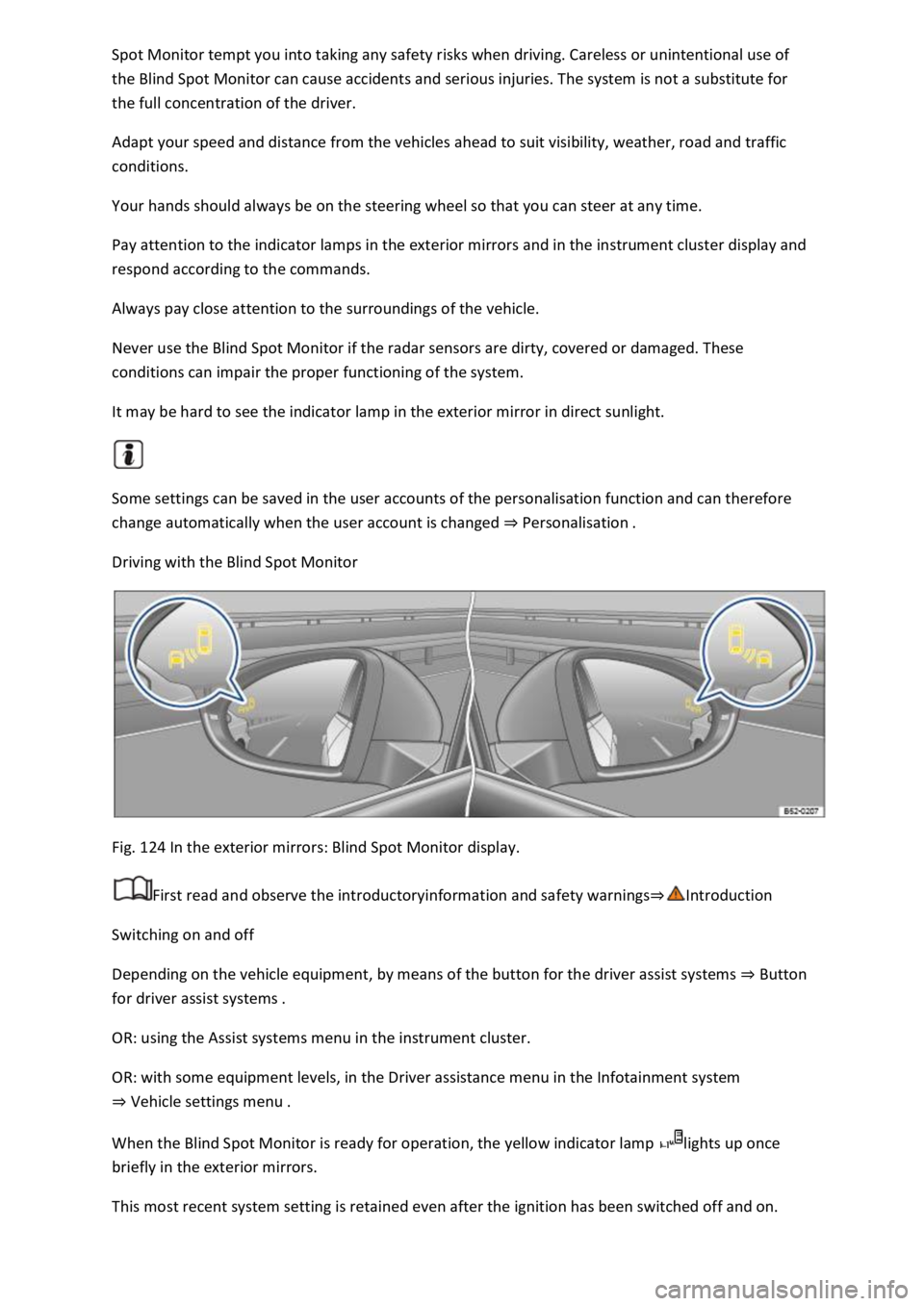
Fig. 124 In the exterior mirrors: Blind Spot Monitor display.
First read and observe the introductoryinformation and safety warnings⇒Introduction
Switching on and off
Depending on the vehicle equipment, by means of the button for the driver assist systems ⇒ Button
for driver assist systems .
OR: using the Assist systems menu in the instrument cluster.
OR: with some equipment levels, in the Driver assistance menu in the Infotainment system
⇒ Vehicle settings menu .
When the Blind Spot Monitor is ready for operation, the yellow indicator lamp lights up once
briefly in the exterior mirrors.
This most recent system setting is retained even after the ignition has been switched off and on.