battery VOLKSWAGEN TIGUAN 2017 Owner´s Manual
[x] Cancel search | Manufacturer: VOLKSWAGEN, Model Year: 2017, Model line: TIGUAN, Model: VOLKSWAGEN TIGUAN 2017Pages: 341, PDF Size: 9.14 MB
Page 74 of 341
The anti-theft alarm is activated automatically when the vehicle is locked using the vehicle key.
When does the system trigger an alarm?
The anti-theft alarm issues acoustic and visual alarm signals for up to five minutes if any of the
following unauthorised actions are performed while the vehicle is locked:
•A door that was unlocked mechanically with the vehicle key is opened.
•A door is opened.
•The bonnet is opened.
•The boot lid is opened.
•Switch on the ignition using an invalid vehicle key.
•If the 12-volt vehicle battery is disconnected.
•Movement inside the vehicle (in vehicles with interior monitoring ⇒ Interior monitoring system
and anti-tow alarm).
•The vehicle is towed (in vehicles with anti-tow alarm ⇒ Interior monitoring system and anti-tow
alarm).
•The vehicle is lifted (in vehicles with anti-tow alarm ⇒ Interior monitoring system and anti-tow
alarm).
•The vehicle is transported on a car ferry or by rail (in vehicles with anti-tow alarm or interior
monitoring ⇒ Interior monitoring system and anti-tow alarm).
•A trailer that is connected to the anti-theft alarm system is removed ⇒ Trailer towing.
Switching off the alarm
•Unlock the vehicle using the unlocking button on the vehicle key.
•OR: switch on the ignition using a valid vehicle key. A short alarm lasting around one second
may sound.
•In vehicles with keyless access, the alarm can also be switched off by gripping the door handle
⇒ Locking and unlocking the vehicle with keyless access.
The alarm will be triggered again if a person gains access to the same or a different secured
zone after the alarm has been switched off.
The anti-theft alarm will not be activated if the vehicle is locked from the inside using the
central locking button .
If you unlock the driver door mechanically using the vehicle key, only the driver door is
unlocked, and not the whole vehicle. The SAFELOCK mechanism on all doors is not deactivated
and the central locking button is not activated until you switch on the ignition (however the doors will
not be unlocked).
The anti-theft alarm will not function correctly if the 12-volt vehicle battery is weak or
discharged.
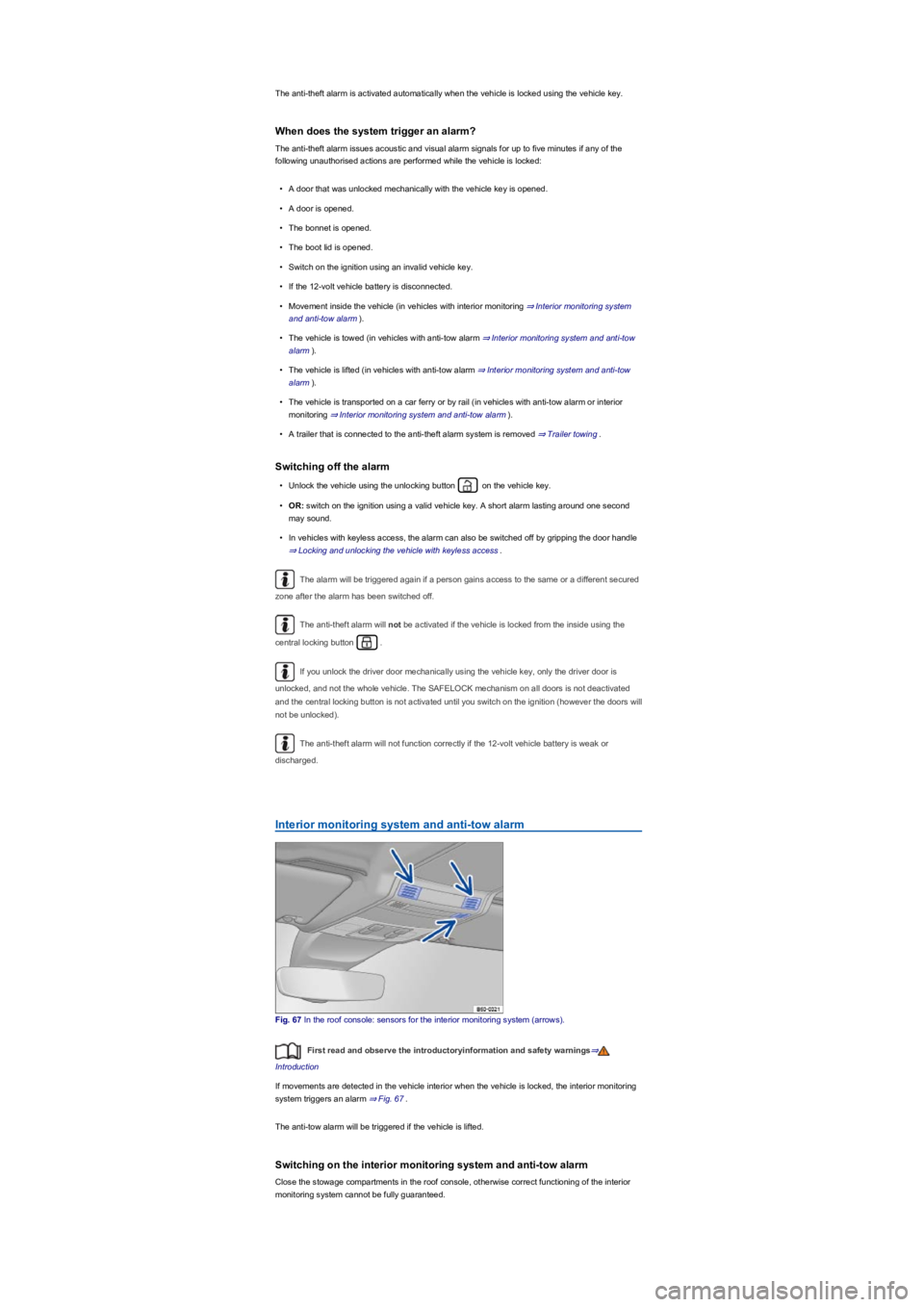
Interior monitoring system and anti-tow alarm
Fig. 67 In the roof console: sensors for the interior monitoring system (arrows).
First read and observe the introductoryinformation and safety warnings⇒
Introduction
If movements are detected in the vehicle interior when the vehicle is locked, the interior monitoring
system triggers an alarm ⇒ Fig. 67.
The anti-tow alarm will be triggered if the vehicle is lifted.
Switching on the interior monitoring system and anti-tow alarm
Close the stowage compartments in the roof console, otherwise correct functioning of the interior
monitoring system cannot be fully guaranteed.
Page 76 of 341
The doors and the boot lid can be locked or unlocked manually if the vehicle key or central locking
fails ⇒ Unlocking or locking the driver door manually⇒ Unlocking the boot lid manually.
If the turn signals do not flash as confirmation when you lock the vehicle:
•At least one of the doors or the boot lid is not closed.
•OR: convenience closing is in progress and not all windows have been closed.
Response when locking the vehicle with a second vehicle key
Keyless locking and starting system Keyless Access: Any vehicle key located inside the vehicle will
be blocked from starting the engine if the vehicle has been locked from the outside using a second
vehicle key. Press the button on the vehicle key in the vehicle interior to enable it to start the
engine ⇒ Starting and stopping the engine.
Automatic switch-off of the sensor surfaces
•The vehicle is not unlocked or locked for an extended period.
•A sensor has been triggered an excessive number of times.
Activating sensors again:
•Wait for a short period of time.
•OR: unlock the vehicle with the button on the vehicle key.
•OR: the boot lid is opened.
•OR: unlock the vehicle with the vehicle key ⇒ Doors.
It may not be possible to lock or unlock the vehicle using keyless access if the 12-volt vehicle
battery or button cell in the vehicle key is weak or discharged. The vehicle can be locked or
unlocked manually ⇒.
If there is no valid vehicle key in the vehicle or if it is not detected, a corresponding display
will be shown on the instrument cluster display. This may occur if the vehicle key is obstructed by
another radio signal or is covered by another item, e.g. a mobile telephone accessory or an
aluminium suitcase ⇒ Starting and stopping the engine.
The sensors may have limited functionality if they become very dirty.
Doors
Introduction
This chapter contains information on the followingsubjects:
⇒ Display
⇒ Childproof lock
⇒ Unlocking or locking the driver door manually
⇒ Locking the front passenger door and rear doors manually
If, for example, the vehicle key or central locking fails, the doors, boot lid and tilting and sliding
panoramic sunroof can be locked and, with some exceptions, unlocked manually.
Please note that the sensors in the door handles can be activated by a powerful jet of
water or steam if a valid vehicle key is simultaneously within its operating range. If at least
one window is open and the sensors in a door handle are continuously activated, all
windows will close. It is possible that all windows will open if the jet of water or steam is
moved away from the door handle sensors briefly and then moved back onto them
⇒ Locking and unlocking the vehicle with keyless access.
NOTICE
Any door that is not properly closed could open suddenly while the vehicle is in motion.
This could lead to severe injuries.
•Stop as soon as possible and close the door.
•Ensure that the door is closed properly and that the lock has engaged. The closed door
must be flush with the surrounding body panels.
•Doors should only be opened or closed when you are sure there is no-one in their path.
WARNING
Any door being held open by the door arrester could close unexpectedly in strong winds
or if the vehicle is on a slope. This could lead to injuries.
•Always keep a good grip on the handle when opening and closing doors.
WARNING
Page 83 of 341
The drive switches off automatically in order to prevent overheating if the boot lid is operated too
frequently in a short space of time. Until the drive has cooled down the boot lid can be opened and
closed by hand using more force than usual.
The boot lid must be closed by hand if the 12-volt vehicle battery or fuse is disconnected or faulty.
Vehicle turn signals flash four times
Check whether the vehicle key is still in the vehicle.
Boot lid is stiff
At outside temperatures below freezing point, the opening mechanism cannot always lift the
partially opened boot lid automatically. If this happens, guide the boot lid further up by hand.
Sensor-controlled luggage compartment opener (Easy Open) is not
working
•Easy Open works only when the ignition is switched off.
•Clean the sensors in the rear bumper.
•The towing bracket is swivelled out ⇒ Trailer towing.
•A towing bracket has been retrofitted to the vehicle ⇒ Trailer towing.
•During heavy rain, Easy Open may be deactivated in order to prevent accidental activation.
Automatic closing (Easy Close) is not working
•Switch off the ignition and close the driver door.
•The boot lid must be at least half-closed.
•Unhitch the trailer ⇒ Trailer towing.
•There is more than one vehicle key in the luggage compartment.
•Press the Easy Close button again.
Windows
Introduction
This chapter contains information on the followingsubjects:
⇒ Opening and closing windows
⇒ Electric window roll-back function
⇒ Troubleshooting
Opening and closing windows
First read and observe the introductoryinformation and safety warnings⇒
Introduction
The buttons are located in the doors ⇒ Driver door.
Open windows: press the button. Close windows: pull the button.Press to disable the
electric window buttons in the rear doors.
The windows can still be operated using the buttons in the doors for a short time after the ignition
has been switched off, provided that the driver door and front passenger door are not opened.
Careless or unsupervised use of the electric windows can cause serious injuries.
•The electric windows should be opened or closed only when you are sure that nobody
is in their operating area.
•Never leave children or people requiring assistance alone in the vehicle when the
vehicle is locked. The windows can no longer be opened in an emergency.
•Always take all vehicle keys with you every time you leave the vehicle. The windows
can still be operated using the buttons in the doors for a short time after the ignition
has been switched off, provided that the driver door and front passenger door are not
opened.
•When transporting children on the rear bench seat, the rear electric windows should
always be deactivated using the safety button so that they cannot be opened or closed.
WARNING
During sudden rain showers, water can enter the vehicle interior via open windows and
cause damage to the vehicle.
NOTICE
Page 85 of 341
The roll-back function is also activated if the windows are closed using the vehicle key for
convenience closing.
Troubleshooting
First read and observe the introductoryinformation and safety warnings⇒
Introduction
Restoring one-touch opening and closing
One-touch opening and closing is deactivated if the 12-volt vehicle battery has been disconnected
or discharged while the windows were not fully closed. The function will have to be reset.
•Switch on the ignition.
•Close all windows and doors.
•Pull up the button for the window and hold it in this position for a few seconds.
•Let go of the button then pull it up again and hold it in this position. One-touch opening and
closing is now ready for operation.
The one-touch function can be restored for individual windows or for several windows at the same
time.
Closing the window without the roll-back function
•Try to close the window again within a few seconds by holding the button. The roll-back
function will be deactivated for a small section of the path of the closing window.
•If the closing procedure takes longer than several seconds, the roll-back function will be
reactivated. If it is still stiff or obstructed, the window will stop and will open itself automatically
again.
•Please go to a qualified workshop if the window still cannot be closed.
Glass roof
Introduction
This chapter contains information on the followingsubjects:
⇒ Opening and closing the glass roof
⇒ Glass roof roll-back function
⇒ Troubleshooting
The term glass roof is used for the tilting and sliding panoramic sunroof.
The glass roof is a roof opening system featuring two glass elements. The rear glass element is
fixed and cannot be opened.
Closing the electric windows without the roll-back function can lead to severe injuries.
•Always close the window carefully.
•Ensure that nobody obstructs the path of the window, especially if a window is being
closed when the roll-back function is not active.
•The roll-back function does not prevent fingers or other body parts from being pressed
against the window frame and sustaining injury.
WARNING
Page 91 of 341
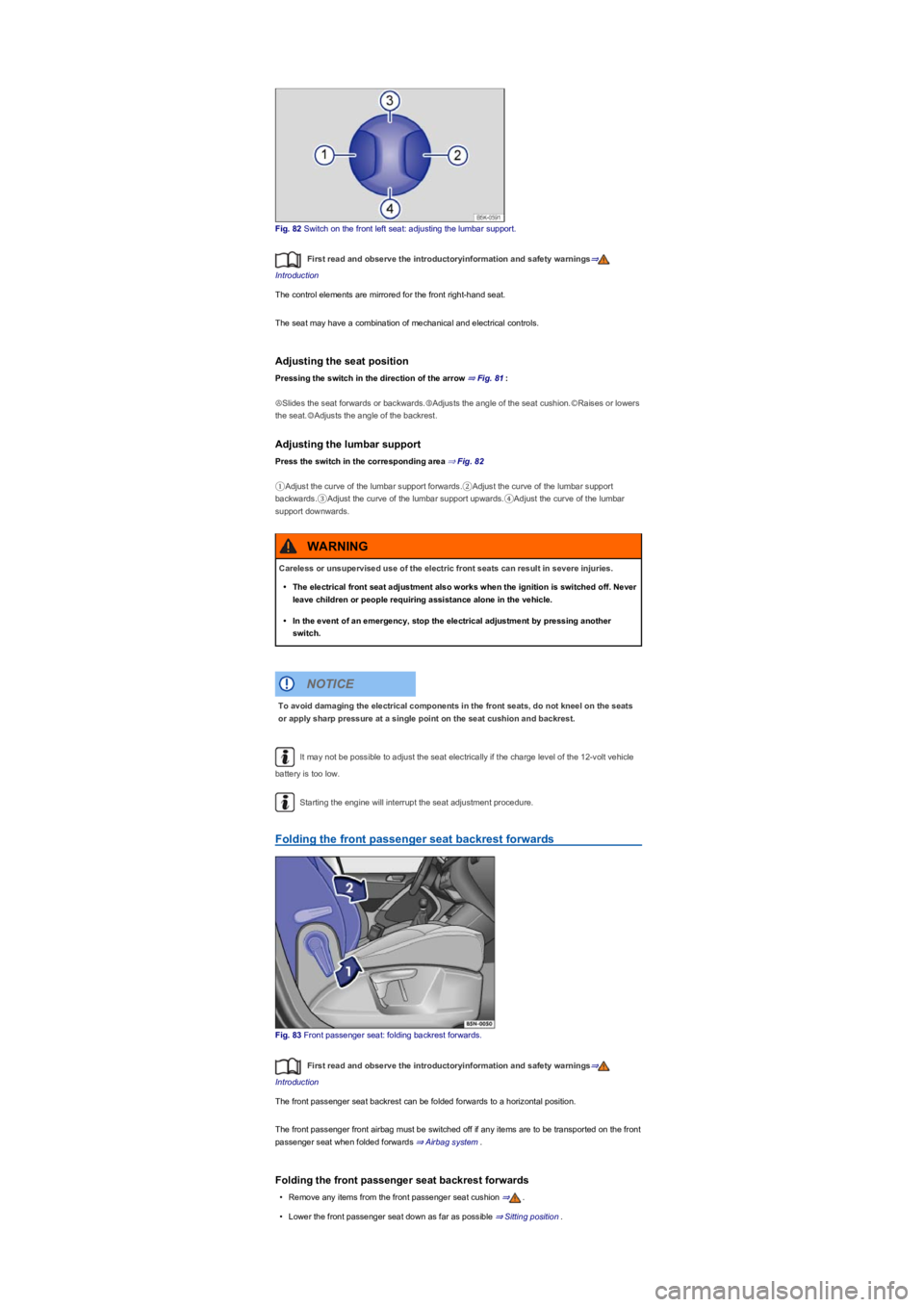
Fig. 82 Switch on the front left seat: adjusting the lumbar support.
First read and observe the introductoryinformation and safety warnings⇒
Introduction
The control elements are mirrored for the front right-hand seat.
The seat may have a combination of mechanical and electrical controls.
Adjusting the seat position
Pressing the switch in the direction of the arrow ⇒ Fig. 81:
ⒶSlides the seat forwards or backwards.ⒷAdjusts the angle of the seat cushion.ⒸRaises or lowers
the seat.ⒹAdjusts the angle of the backrest.
Adjusting the lumbar support
Press the switch in the corresponding area ⇒ Fig. 82
①Adjust the curve of the lumbar support forwards.②Adjust the curve of the lumbar support
backwards.③Adjust the curve of the lumbar support upwards.④Adjust the curve of the lumbar
support downwards.
It may not be possible to adjust the seat electrically if the charge level of the 12-volt vehicle
battery is too low.
Starting the engine will interrupt the seat adjustment procedure.
Folding the front passenger seat backrest forwards
Fig. 83 Front passenger seat: folding backrest forwards.
First read and observe the introductoryinformation and safety warnings⇒
Introduction
The front passenger seat backrest can be folded forwards to a horizontal position.
The front passenger front airbag must be switched off if any items are to be transported on the front
passenger seat when folded forwards ⇒ Airbag system.
Folding the front passenger seat backrest forwards
•Remove any items from the front passenger seat cushion ⇒.
•Lower the front passenger seat down as far as possible ⇒ Sitting position.
Careless or unsupervised use of the electric front seats can result in severe injuries.
•The electrical front seat adjustment also works when the ignition is switched off. Never
leave children or people requiring assistance alone in the vehicle.
•In the event of an emergency, stop the electrical adjustment by pressing another
switch.
WARNING
To avoid damaging the electrical components in the front seats, do not kneel on the seats
or apply sharp pressure at a single point on the seat cushion and backrest.
NOTICE
Page 102 of 341
When reverse gear is engaged, the cornering light on both sides of the vehicle switches on
to provide better illumination of the area when manoeuvring.
Switching the fog lights on and off
•Switching on the front fog lights : Pull the light switch ⇒ Fig. 97 out to the first stopper.
The indicator lamp in the light switch lights up green.
•Switching on the rear fog lights : pull the light switch all the way out. The indicator lamp
in the instrument cluster lights up yellow.
•To switch the fog lights off, press in the light switch or move it to position .
If the automatic headlights are switched on and the front or rear fog lights are
switched on, the dipped beam headlights will also be switched on irrespective of the current light
conditions outside.
In vehicles with a factory-fitted towing bracket: the vehicle's rear fog lights are switched off
automatically if a trailer with rear fog lights is electrically connected to the vehicle ⇒ Trailer towing.
Light functions
Side lights
If the light switch is in position both headlights light up with side lights together with parts of
the tail light clusters, number plate lighting and the buttons in the centre console and the dash
panel. The daytime running lights also switch on when the ignition is switched on.
If the vehicle is not locked from outside (when the ignition is switched off) the continuous parking
light on both sides of the vehicle switches on automatically after ten minutes to reduce 12-volt
vehicle battery discharge ⇒ Switching the parking lights on and off.
Automatic headlights
When the light switch is in position , the vehicle lighting and the instrument and switch
lighting will switch on and off automatically depending on the light conditions. When the lights are
switched on, the indicator lamp in the light switch lights up yellow.
The automatic headlight control function is merely an aid and will not always be able to detect all
driving situations.
In vehicles with a corresponding equipment level, the switch-on time for automatic headlight control
can be adjusted in the Infotainment system in the Vehicle settings menu ⇒ Operation and
display in the Infotainment system.
Cornering light
When cornering slowly or travelling around very tight bends, a static cornering light is switched on
automatically.
Accidents and serious injuries can occur if roads are not sufficiently illuminated and other
road users have difficulty seeing the vehicle, or cannot see it at all.
•The light assist functions are designed to provide assistance only. The driver is
responsible for making sure that the vehicle lights are switched on correctly.
•Always switch the dipped beam headlights on if it is dark, raining or visibility is poor.
WARNING
The side lights or daytime running lights are not bright enough to illuminate the road
ahead and to ensure that other road users are able to see you.
•Always switch the dipped beam headlights on if it is dark, raining or visibility is poor.
•The rear lights will not be switched on with the daytime running lights. If the rear lights
are not switched on, the vehicle may not be visible to other road users if it is dark,
raining, or if visibility is poor.
WARNING
The automatic headlights function ( ) switches the dipped beam headlights on and
off only when there is a change to the level of brightness.
•Switch on the dipped beam headlights manually if this is necessary due to particular
weather conditions, e.g. fog.
WARNING
Page 105 of 341
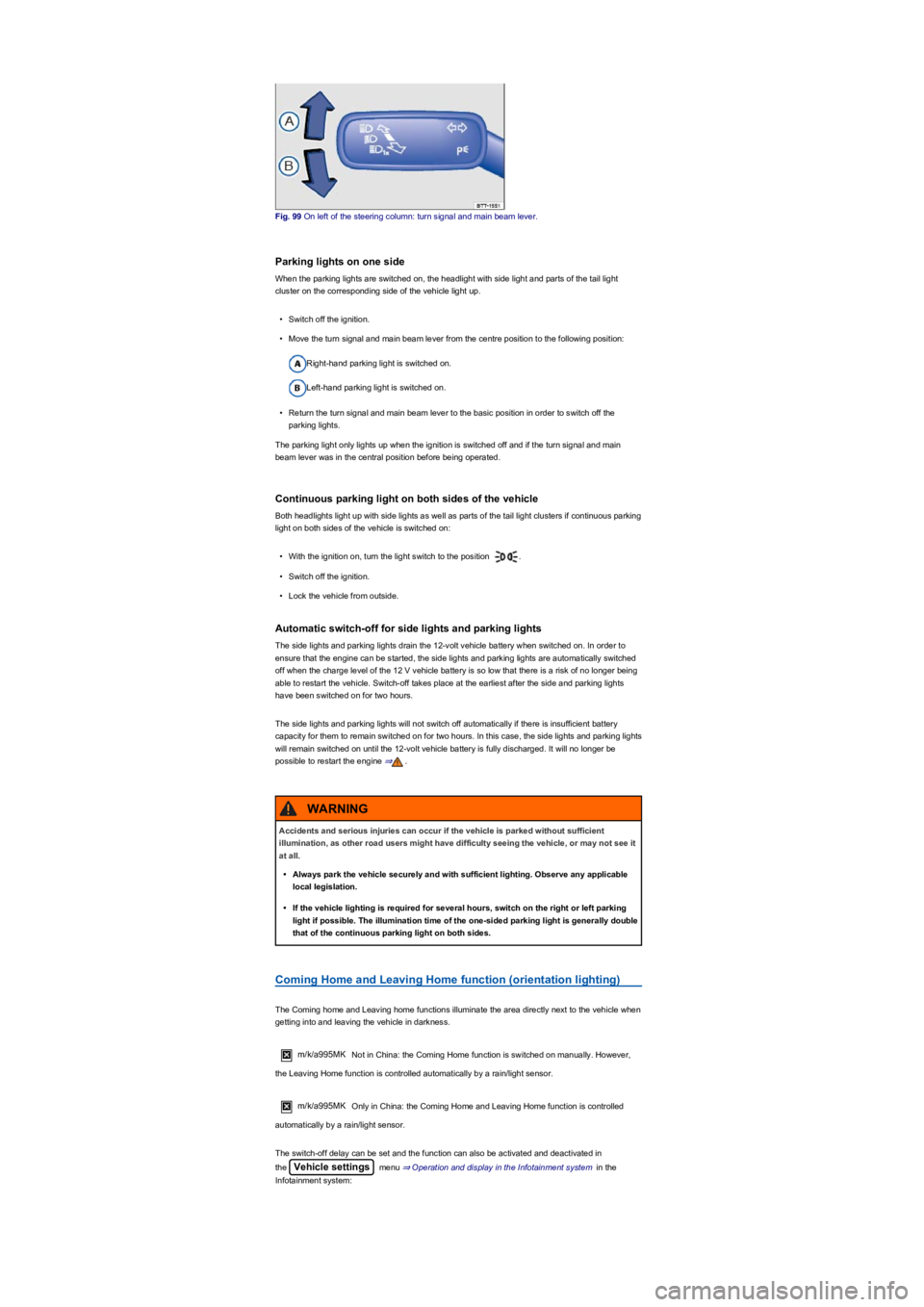
Fig. 99 On left of the steering column: turn signal and main beam lever.
Parking lights on one side
When the parking lights are switched on, the headlight with side light and parts of the tail light
cluster on the corresponding side of the vehicle light up.
•Switch off the ignition.
•Move the turn signal and main beam lever from the centre position to the following position:
Right-hand parking light is switched on.
Left-hand parking light is switched on.
•Return the turn signal and main beam lever to the basic position in order to switch off the
parking lights.
The parking light only lights up when the ignition is switched off and if the turn signal and main
beam lever was in the central position before being operated.
Continuous parking light on both sides of the vehicle
Both headlights light up with side lights as well as parts of the tail light clusters if continuous parking
light on both sides of the vehicle is switched on:
•With the ignition on, turn the light switch to the position .
•Switch off the ignition.
•Lock the vehicle from outside.
Automatic switch-off for side lights and parking lights
The side lights and parking lights drain the 12-volt vehicle battery when switched on. In order to
ensure that the engine can be started, the side lights and parking lights are automatically switched
off when the charge level of the 12 V vehicle battery is so low that there is a risk of no longer being
able to restart the vehicle. Switch-off takes place at the earliest after the side and parking lights
have been switched on for two hours.
The side lights and parking lights will not switch off automatically if there is insufficient battery
capacity for them to remain switched on for two hours. In this case, the side lights and parking lights
will remain switched on until the 12-volt vehicle battery is fully discharged. It will no longer be
possible to restart the engine ⇒.
Coming Home and Leaving Home function (orientation lighting)
The Coming home and Leaving home functions illuminate the area directly next to the vehicle when
getting into and leaving the vehicle in darkness.
m/k/a995MK Not in China: the Coming Home function is switched on manually. However,
the Leaving Home function is controlled automatically by a rain/light sensor.
m/k/a995MK Only in China: the Coming Home and Leaving Home function is controlled
automatically by a rain/light sensor.
The switch-off delay can be set and the function can also be activated and deactivated in
the Vehicle settings menu ⇒ Operation and display in the Infotainment system in the
Infotainment system:
Accidents and serious injuries can occur if the vehicle is parked without sufficient
illumination, as other road users might have difficulty seeing the vehicle, or may not see it
at all.
•Always park the vehicle securely and with sufficient lighting. Observe any applicable
local legislation.
•If the vehicle lighting is required for several hours, switch on the right or left parking
light if possible. The illumination time of the one-sided parking light is generally double
that of the continuous parking light on both sides.
WARNING
Page 108 of 341
•If the dynamic cornering light has been deactivated.
•If travel mode is activated ⇒ Switching over headlights for driving abroad (travel mode).
•When the Eco driving profile is selected in vehicles with driving profile selection ⇒ Driving
profile selection and 4MOTION Active Control.
Interior lighting
Instrument and switch lighting
The brightness of the instrument and switch lighting and the basic brightness level of the Head-up
Display ⇒ Instrument cluster can be adjusted in the Infotainment system in
the Vehicle settings menu ⇒ Operation and display in the Infotainment system.
The brightness setting is automatically adjusted to the changing light conditions in the vehicle.
When the light switch is in position , a sensor will switch the dipped beam and the lighting
in the instruments and switches on and off automatically depending on the ambient brightness
level.
When the light is switched off and the ignition switched on, the dash panel lighting (indicators
and scales) is switched on. As the ambient light becomes lower, the lighting of these scales is
automatically reduced and may be switched off entirely. This function is intended to remind the
driver to switch on the dipped beam in good time, i.e. when driving through tunnels.
Interior lights, reading lights, background lighting
Press the corresponding button:
Switches the front interior lights on or off.Switches the rear interior lights on or off.
The interior lights are switched on automatically when the vehicle is unlocked, a door is
opened or the vehicle key is removed from the ignition lock.Switches the reading lights on or
off.
Stowage compartment and luggage compartment lights
A light will be switched on and off automatically when the stowage compartment on the front
passenger side, or the boot lid, is opened or closed.
Background lighting
Depending on the equipment level, the background lighting provides indirect light in the various
areas of the vehicle interior.
The footwell and, where applicable, the closed blind of the glass roof may also be illuminated.
The brightness of the background lighting can be adjusted in the Infotainment system in
the Vehicle settings menu ⇒ Operation and display in the Infotainment system.
The lights go out when the vehicle is locked or after a delay of a few minutes when the
vehicle key is removed from the ignition lock. This prevents the 12-volt battery from discharging.
Some settings can be stored in the user accounts of the personalisation function and
therefore change automatically when the user account changes ⇒ Personalisation.
Visibility
Wipers
Operating the wiper lever
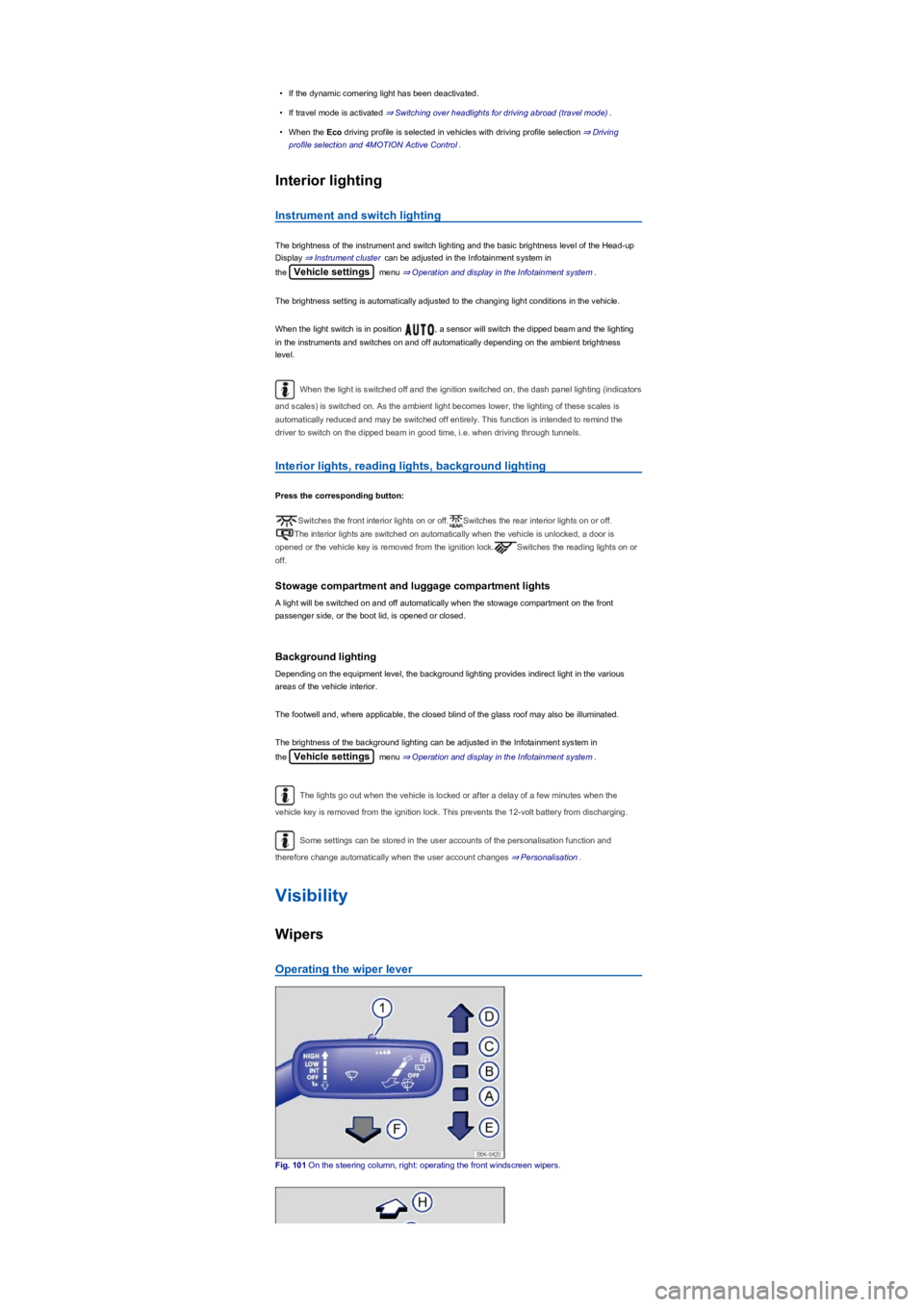
Fig. 101 On the steering column, right: operating the front windscreen wipers.
Page 114 of 341
•Select reverse gear while the ignition is switched on. The right exterior mirror will now adjust
itself to the stored position.
The front passenger exterior mirror will move out of the position saved for reversing when the
vehicle is driven forwards faster than approximately 15 km/h (9 mph) or when the rotary knob is
moved out of position into another position.
The exterior mirror heating should be switched off when it is no longer needed. Fuel is
otherwise wasted.
In the event of a fault, the electric exterior mirrors can be adjusted by hand by pressing on
the outer edge of the mirror.
Some settings can be stored in the user accounts of the personalisation function and
therefore change automatically when the user account changes ⇒ Personalisation.
Protection from the sun
Sun visors
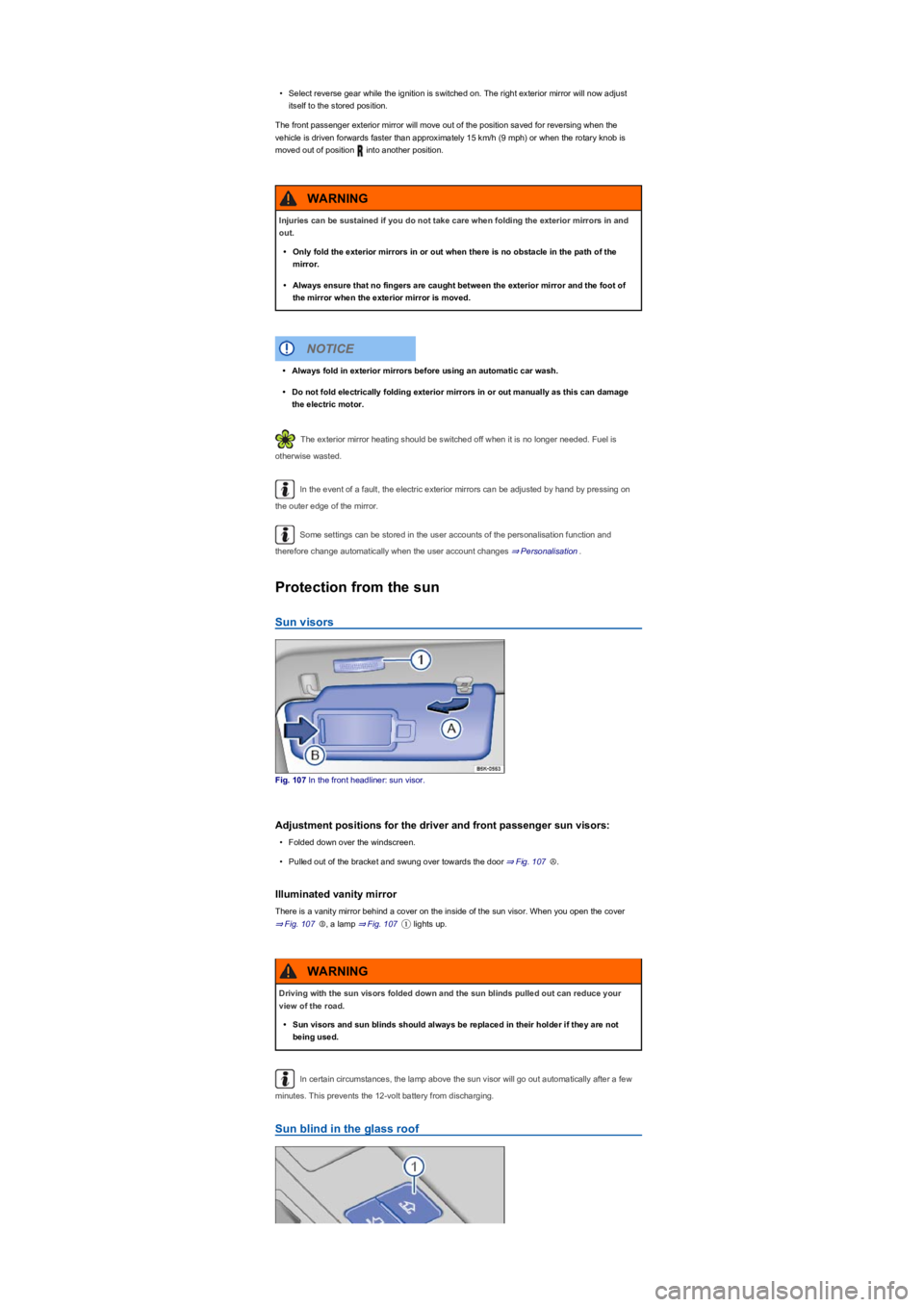
Fig. 107 In the front headliner: sun visor.
Adjustment positions for the driver and front passenger sun visors:
•Folded down over the windscreen.
•Pulled out of the bracket and swung over towards the door ⇒ Fig. 107Ⓐ.
Illuminated vanity mirror
There is a vanity mirror behind a cover on the inside of the sun visor. When you open the cover
⇒ Fig. 107Ⓑ, a lamp ⇒ Fig. 107① lights up.
In certain circumstances, the lamp above the sun visor will go out automatically after a few
minutes. This prevents the 12-volt battery from discharging.
Sun blind in the glass roof
Injuries can be sustained if you do not take care when folding the exterior mirrors in and
out.
•Only fold the exterior mirrors in or out when there is no obstacle in the path of the
mirror.
•Always ensure that no fingers are caught between the exterior mirror and the foot of
the mirror when the exterior mirror is moved.
WARNING
•Always fold in exterior mirrors before using an automatic car wash.
•Do not fold electrically folding exterior mirrors in or out manually as this can damage
the electric motor.
NOTICE
Driving with the sun visors folded down and the sun blinds pulled out can reduce your
view of the road.
•Sun visors and sun blinds should always be replaced in their holder if they are not
being used.
WARNING
Page 117 of 341
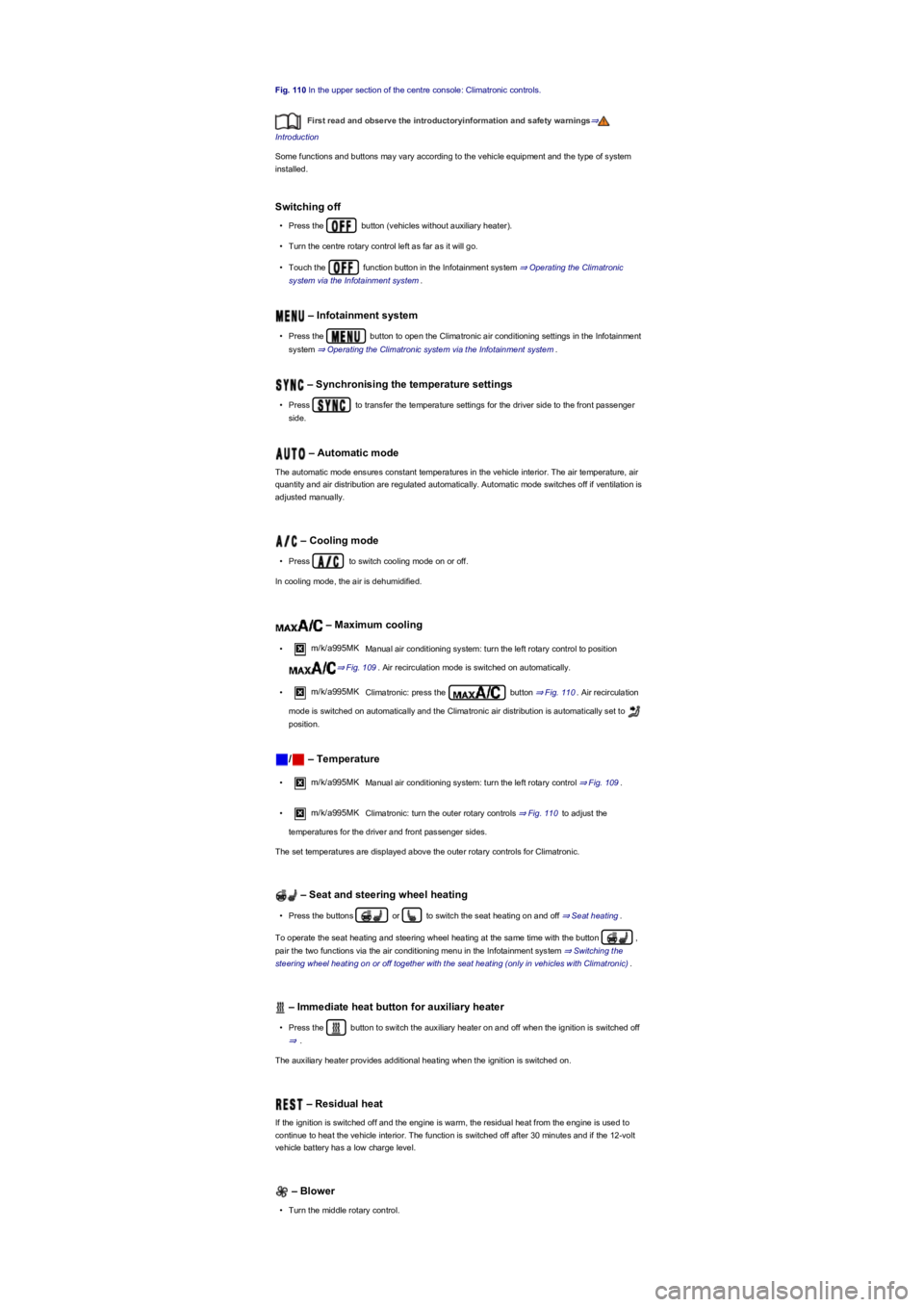
Fig. 110 In the upper section of the centre console: Climatronic controls.
First read and observe the introductoryinformation and safety warnings⇒
Introduction
Some functions and buttons may vary according to the vehicle equipment and the type of system
installed.
Switching off
•Press the button (vehicles without auxiliary heater).
•Turn the centre rotary control left as far as it will go.
•Touch the function button in the Infotainment system ⇒ Operating the Climatronic
system via the Infotainment system.
– Infotainment system
•Press the button to open the Climatronic air conditioning settings in the Infotainment
system ⇒ Operating the Climatronic system via the Infotainment system.
– Synchronising the temperature settings
•Press to transfer the temperature settings for the driver side to the front passenger
side.
– Automatic mode
The automatic mode ensures constant temperatures in the vehicle interior. The air temperature, air
quantity and air distribution are regulated automatically. Automatic mode switches off if ventilation is
adjusted manually.
– Cooling mode
•Press to switch cooling mode on or off.
In cooling mode, the air is dehumidified.
– Maximum cooling
•m/k/a995MK Manual air conditioning system: turn the left rotary control to position
⇒ Fig. 109. Air recirculation mode is switched on automatically.
•m/k/a995MK Climatronic: press the button ⇒ Fig. 110. Air recirculation
mode is switched on automatically and the Climatronic air distribution is automatically set to
position.
/ – Temperature
•m/k/a995MK Manual air conditioning system: turn the left rotary control ⇒ Fig. 109.
•m/k/a995MK Climatronic: turn the outer rotary controls ⇒ Fig. 110 to adjust the
temperatures for the driver and front passenger sides.
The set temperatures are displayed above the outer rotary controls for Climatronic.
– Seat and steering wheel heating
•Press the buttons or to switch the seat heating on and off ⇒ Seat heating.
To operate the seat heating and steering wheel heating at the same time with the button ,
pair the two functions via the air conditioning menu in the Infotainment system ⇒ Switching the
steering wheel heating on or off together with the seat heating (only in vehicles with Climatronic).
– Immediate heat button for auxiliary heater
•Press the button to switch the auxiliary heater on and off when the ignition is switched off
⇒.
The auxiliary heater provides additional heating when the ignition is switched on.
– Residual heat
If the ignition is switched off and the engine is warm, the residual heat from the engine is used to
continue to heat the vehicle interior. The function is switched off after 30 minutes and if the 12-volt
vehicle battery has a low charge level.
– Blower
•Turn the middle rotary control.