light VOLKSWAGEN TIGUAN 2017 Owner´s Manual
[x] Cancel search | Manufacturer: VOLKSWAGEN, Model Year: 2017, Model line: TIGUAN, Model: VOLKSWAGEN TIGUAN 2017Pages: 341, PDF Size: 9.14 MB
Page 16 of 341
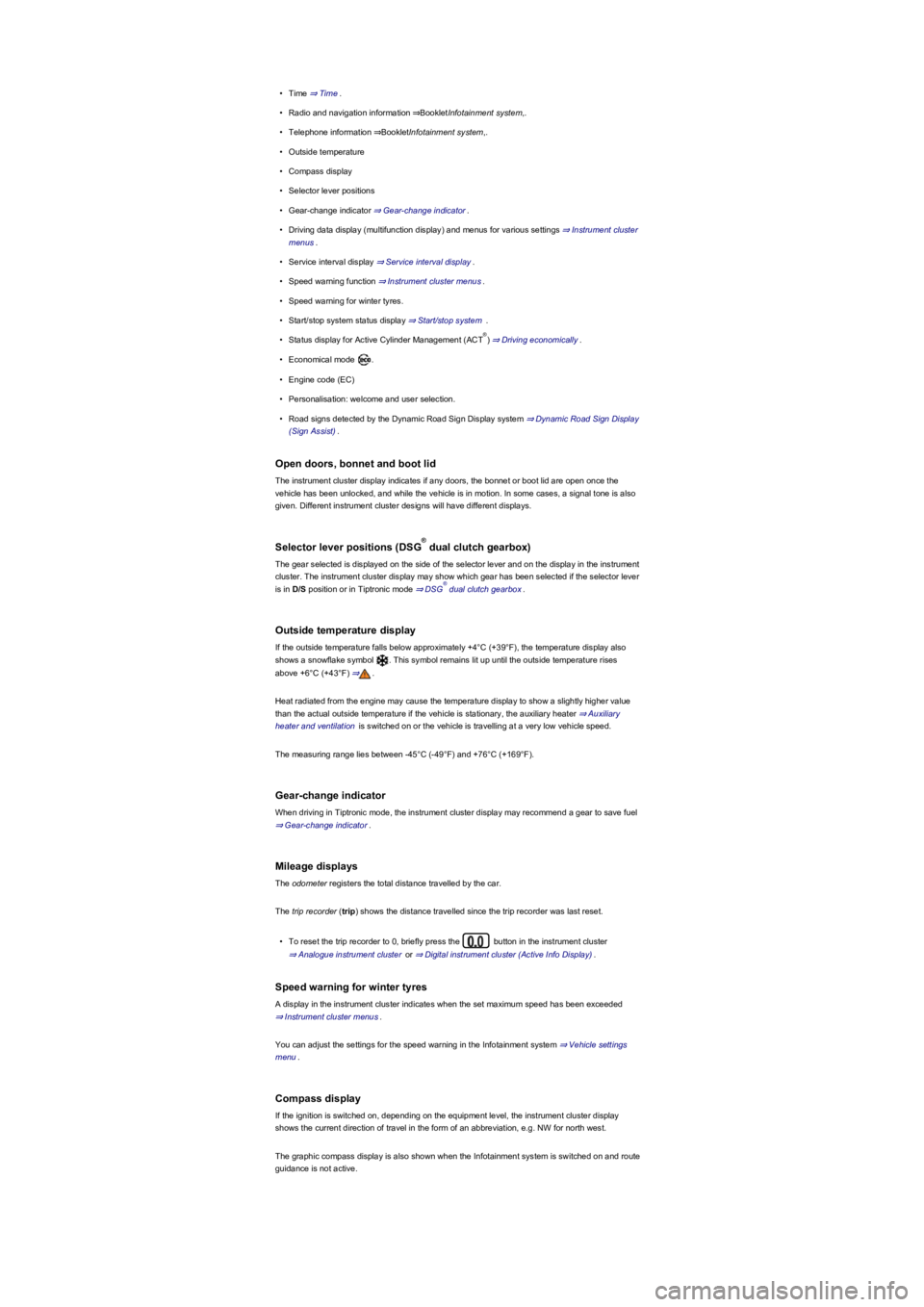
•Time ⇒ Time.
•Radio and navigation information ⇒BookletInfotainment system,.
•Telephone information ⇒BookletInfotainment system,.
•Outside temperature
•Compass display
•Selector lever positions
•Gear-change indicator ⇒ Gear-change indicator.
•Driving data display (multifunction display) and menus for various settings ⇒ Instrument cluster
menus.
•Service interval display ⇒ Service interval display.
•Speed warning function ⇒ Instrument cluster menus.
•Speed warning for winter tyres.
•Start/stop system status display ⇒ Start/stop system .
•Status display for Active Cylinder Management (ACT) ⇒ Driving economically.
•Economical mode .
•Engine code (EC)
•Personalisation: welcome and user selection.
•Road signs detected by the Dynamic Road Sign Display system ⇒ Dynamic Road Sign Display
(Sign Assist).
Open doors, bonnet and boot lid
The instrument cluster display indicates if any doors, the bonnet or boot lid are open once the
vehicle has been unlocked, and while the vehicle is in motion. In some cases, a signal tone is also
given. Different instrument cluster designs will have different displays.
Selector lever positions (DSG dual clutch gearbox)
The gear selected is displayed on the side of the selector lever and on the display in the instrument
cluster. The instrument cluster display may show which gear has been selected if the selector lever
is in D/S position or in Tiptronic mode ⇒ DSG dual clutch gearbox.
Outside temperature display
If the outside temperature falls below approximately +4°C (+39°F), the temperature display also
shows a snowflake symbol . This symbol remains lit up until the outside temperature rises
above +6°C (+43°F) ⇒.
Heat radiated from the engine may cause the temperature display to show a slightly higher value
than the actual outside temperature if the vehicle is stationary, the auxiliary heater ⇒ Auxiliary
heater and ventilation is switched on or the vehicle is travelling at a very low vehicle speed.
The measuring range lies between -45°C (-49°F) and +76°C (+169°F).
Gear-change indicator
When driving in Tiptronic mode, the instrument cluster display may recommend a gear to save fuel
⇒ Gear-change indicator.
Mileage displays
The odometer registers the total distance travelled by the car.
The trip recorder (trip) shows the distance travelled since the trip recorder was last reset.
•To reset the trip recorder to 0, briefly press the button in the instrument cluster
⇒ Analogue instrument cluster or ⇒ Digital instrument cluster (Active Info Display).
Speed warning for winter tyres
A display in the instrument cluster indicates when the set maximum speed has been exceeded
⇒ Instrument cluster menus.
You can adjust the settings for the speed warning in the Infotainment system ⇒ Vehicle settings
menu.
Compass display
If the ignition is switched on, depending on the equipment level, the instrument cluster display
shows the current direction of travel in the form of an abbreviation, e.g. NW for north west.
The graphic compass display is also shown when the Infotainment system is switched on and route
guidance is not active.
®
®
®
Page 19 of 341
•To deactivate, press the or button again. The stored speed will be
deleted.
The warning can be set for speeds from 30 km/h (18 mph) to 250 km/h (155 mph).
Some settings can be saved in the user accounts of the personalisation function and can
therefore change automatically when the user account is changed ⇒ Personalisation.
Changes depending on the instrument cluster version.
Not available in all countries.
Warning and information messages
First read and observe the introductoryinformation and safety warnings⇒
Introduction
The system runs a check on certain components and functions in the vehicle when the ignition is
switched on or while the vehicle is in motion. Malfunctions are indicated by red and yellow warning
symbols with information messages on the instrument cluster display ⇒ Warning and indicator lamp
overview. An acoustic warning is also given in certain cases. The appearance of the information
messages and symbols can vary depending on the version of the instrument cluster.
In addition, a list of current malfunctions can be opened manually. To do so, open the Vehicle
status or Vehicle menu ⇒ Instrument cluster menus.
Priority 1 warning (red)The symbol flashes or lights up (sometimes together with a signal tone).
Do not drive on! Danger. Check the fault and correct the cause. Seek expert assistance if
necessary.Priority 2 warning (yellow)The symbol flashes or lights up (sometimes together with a
signal tone). Malfunctions and insufficient service fluids can damage the vehicle and cause it to
break down. Check the fault as soon as possible. Seek expert assistance if necessary.Information
messageInformation about various procedures within the vehicle.
Depending on the vehicle equipment level, some settings and displays may also appear in
the Infotainment system.
If several warning reports are detected, the symbols will appear for several seconds, one
after another. The symbols will continue to appear until the faults are rectified.
If warning messages about malfunctions are displayed when the ignition is switched on, it
may not be possible to adjust some settings as described, or the information display may appear
differently. If this is the case, take the vehicle to a qualified workshop to have the malfunction
rectified.
Driver Alert System (recommendation for rest breaks)
First read and observe the introductoryinformation and safety warnings⇒
Introduction
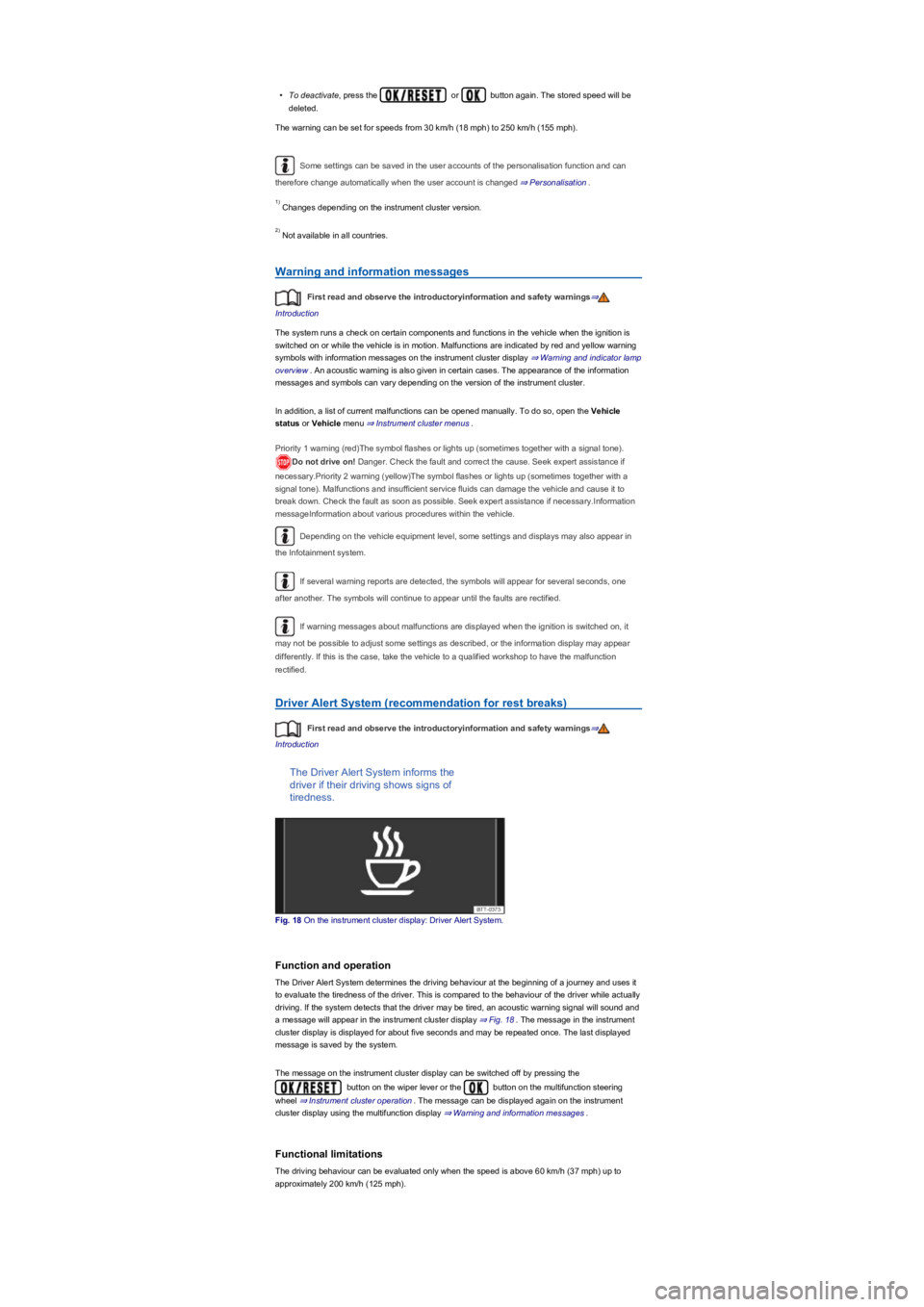
The Driver Alert System informs the
driver if their driving shows signs of
tiredness.
Fig. 18 On the instrument cluster display: Driver Alert System.
Function and operation
The Driver Alert System determines the driving behaviour at the beginning of a journey and uses it
to evaluate the tiredness of the driver. This is compared to the behaviour of the driver while actually
driving. If the system detects that the driver may be tired, an acoustic warning signal will sound and
a message will appear in the instrument cluster display ⇒ Fig. 18. The message in the instrument
cluster display is displayed for about five seconds and may be repeated once. The last displayed
message is saved by the system.
The message on the instrument cluster display can be switched off by pressing the
button on the wiper lever or the button on the multifunction steering
wheel ⇒ Instrument cluster operation. The message can be displayed again on the instrument
cluster display using the multifunction display ⇒ Warning and information messages.
Functional limitations
The driving behaviour can be evaluated only when the speed is above 60 km/h (37 mph) up to
approximately 200 km/h (125 mph).
1)
2)
Page 22 of 341
using the button or function button and the Vehicle, and
Driver assistance function buttons ⇒ Vehicle settings menu.
In trailer mode, the speed warning function display can be adjusted to the type of trailer or to legal
requirements. The settings can be adjusted in increments of 10 km/h (5 mph) within a range
between 60 km/h (40 mph) and 130 km/h (80 mph). If a higher speed is set than is permitted for
driving with a trailer in the country in which you are currently travelling, Dynamic Road Sign Display
automatically issues a warning at the usual speed limit, e.g. at 80 km/h (50 mph) in Germany.
If the speed warning for the trailer is deactivated, Dynamic Road Sign Display issues warnings as if
the vehicle was being driven without a trailer.
Functional limitations
Dynamic Road Sign Display is subject to system-related limitations. The following conditions can
restrict the function of Dynamic Road Sign Display, or prevent it from working altogether:
•Poor visibility, e.g. snow, rain, fog or heavy spray.
•Dazzling, e.g. from oncoming traffic or sunlight.
•High speeds.
•Covered or dirty camera.
•Traffic signs located outside of the camera's field of view.
•Partially or fully hidden traffic signs, e.g. by trees, snow, dirt or other vehicles.
•Non-standard traffic signs.
•Damaged or bent traffic signs.
•Variable traffic signs on gantries (changeable traffic sign display using LEDs or other light
sources).
•Out-of-date map material in the Infotainment system.
•Vehicles with traffic sign stickers, e.g. speed restrictions on trucks.
Some settings can be saved in the user accounts of the personalisation function and can
therefore change automatically when the user account is changed ⇒ Personalisation.
Time
First read and observe the introductoryinformation and safety warnings⇒
Introduction
•To set the time (on all vehicle clocks), press and hold the button in the instrument
cluster while the doors are closed until the word Time appears in the instrument cluster display
⇒ Analogue instrument cluster or ⇒ Digital instrument cluster (Active Info Display).
•Release the button. The time is shown in the instrument cluster display and the hour
setting is marked.
•Then press the button repeatedly until the required hour is displayed. Press and hold
the button to scroll through quickly.
The intelligent Dynamic Road Sign Display technology cannot overcome the laws of
physics, and functions only within the limits of the system. Do not let the extra
convenience afforded by Dynamic Road Sign Display tempt you into taking any risks when
driving, as this can cause accidents. The system is not a substitute for the full
concentration of the driver.
•Always adapt your speed and driving style to suit visibility, weather, road and traffic
conditions.
•Poor visibility, darkness, snow, rain and fog can cause road signs to be not displayed
or be incorrectly displayed by the system.
•If the camera's field of view is dirty, covered or damaged, the function of the Dynamic
Road Sign Display system may be impaired.
WARNING
Driving recommendations and traffic symbols displayed by the Dynamic Road Sign
Display system may differ from the current traffic situation.
•Not all road signs can be recognised by the system and displayed correctly.
•Road signs and traffic regulations have priority over the recommendations and
displays provided by the Dynamic Road Sign Display system.
WARNING
Availability of the Dynamic Road Sign Display system is restricted in
waypoint navigation mode (waypoint navigation) of the Infotainment system.
NOTICE
Page 23 of 341
•Once you have set the hour, wait until the minutes display in the instrument cluster is marked.
•Then press the button repeatedly until the required minute is displayed. Press and hold
the button to scroll through quickly.
•Release the button to finish setting the clock.
The analogue clock adjusts itself a few seconds after ignition is switched on.
You can also use the Infotainment system to adjust the time ⇒ Vehicle settings menu.
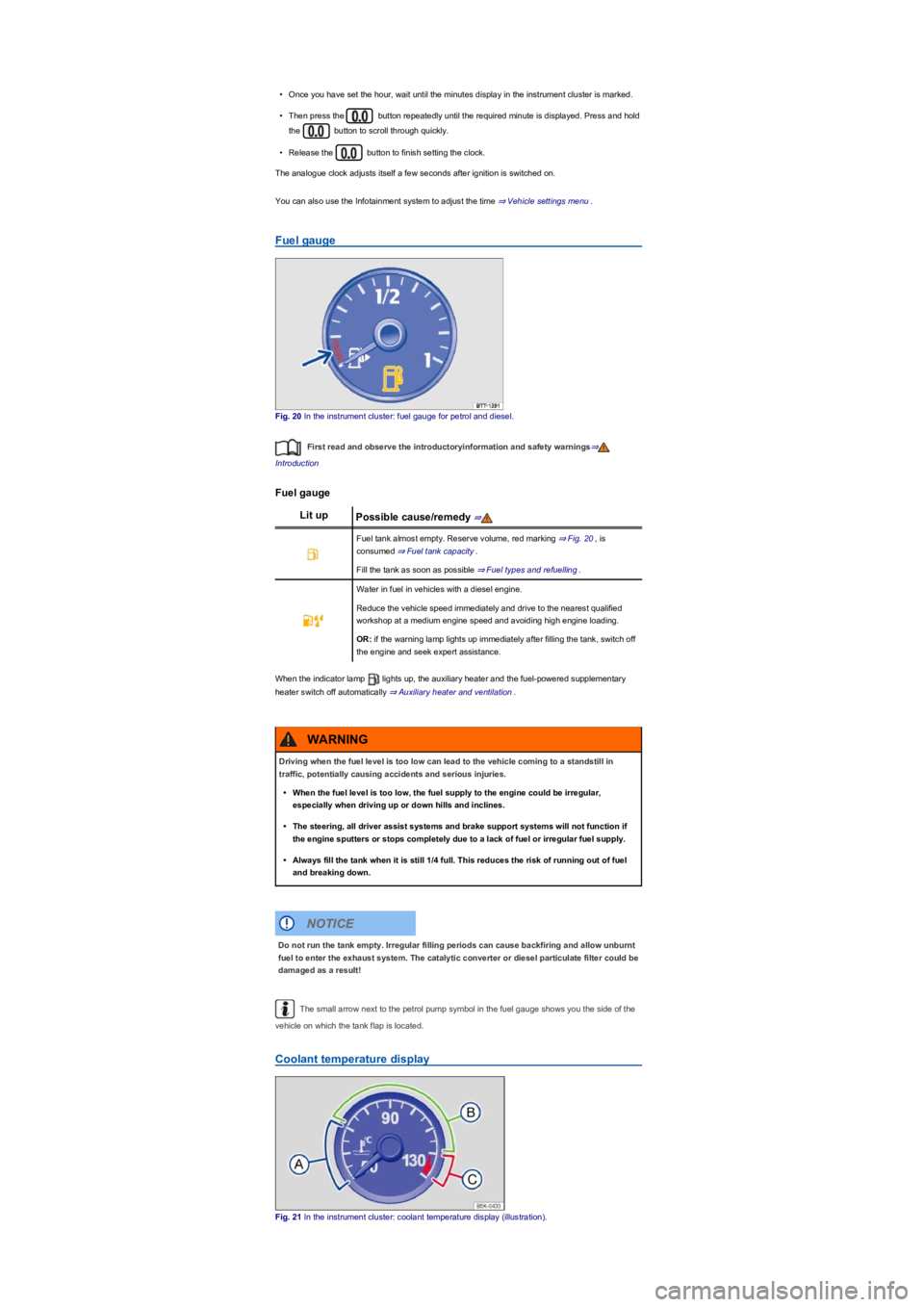
Fuel gauge
Fig. 20 In the instrument cluster: fuel gauge for petrol and diesel.
First read and observe the introductoryinformation and safety warnings⇒
Introduction
Fuel gauge
Lit upPossible cause/remedy ⇒
Fuel tank almost empty. Reserve volume, red marking ⇒ Fig. 20, is
consumed ⇒ Fuel tank capacity.
Fill the tank as soon as possible ⇒ Fuel types and refuelling.
Water in fuel in vehicles with a diesel engine.
Reduce the vehicle speed immediately and drive to the nearest qualified
workshop at a medium engine speed and avoiding high engine loading.
OR: if the warning lamp lights up immediately after filling the tank, switch off
the engine and seek expert assistance.
When the indicator lamp lights up, the auxiliary heater and the fuel-powered supplementary
heater switch off automatically ⇒ Auxiliary heater and ventilation.
The small arrow next to the petrol pump symbol in the fuel gauge shows you the side of the
vehicle on which the tank flap is located.
Coolant temperature display
Fig. 21 In the instrument cluster: coolant temperature display (illustration).
Driving when the fuel level is too low can lead to the vehicle coming to a standstill in
traffic, potentially causing accidents and serious injuries.
•When the fuel level is too low, the fuel supply to the engine could be irregular,
especially when driving up or down hills and inclines.
•The steering, all driver assist systems and brake support systems will not function if
the engine sputters or stops completely due to a lack of fuel or irregular fuel supply.
•Always fill the tank when it is still 1/4 full. This reduces the risk of running out of fuel
and breaking down.
WARNING
Do not run the tank empty. Irregular filling periods can cause backfiring and allow unburnt
fuel to enter the exhaust system. The catalytic converter or diesel particulate filter could be
damaged as a result!
NOTICE
Page 29 of 341
If the checkbox in the function button is ticked , the respective function is switched on.
Press the function button to return to the previous menu.
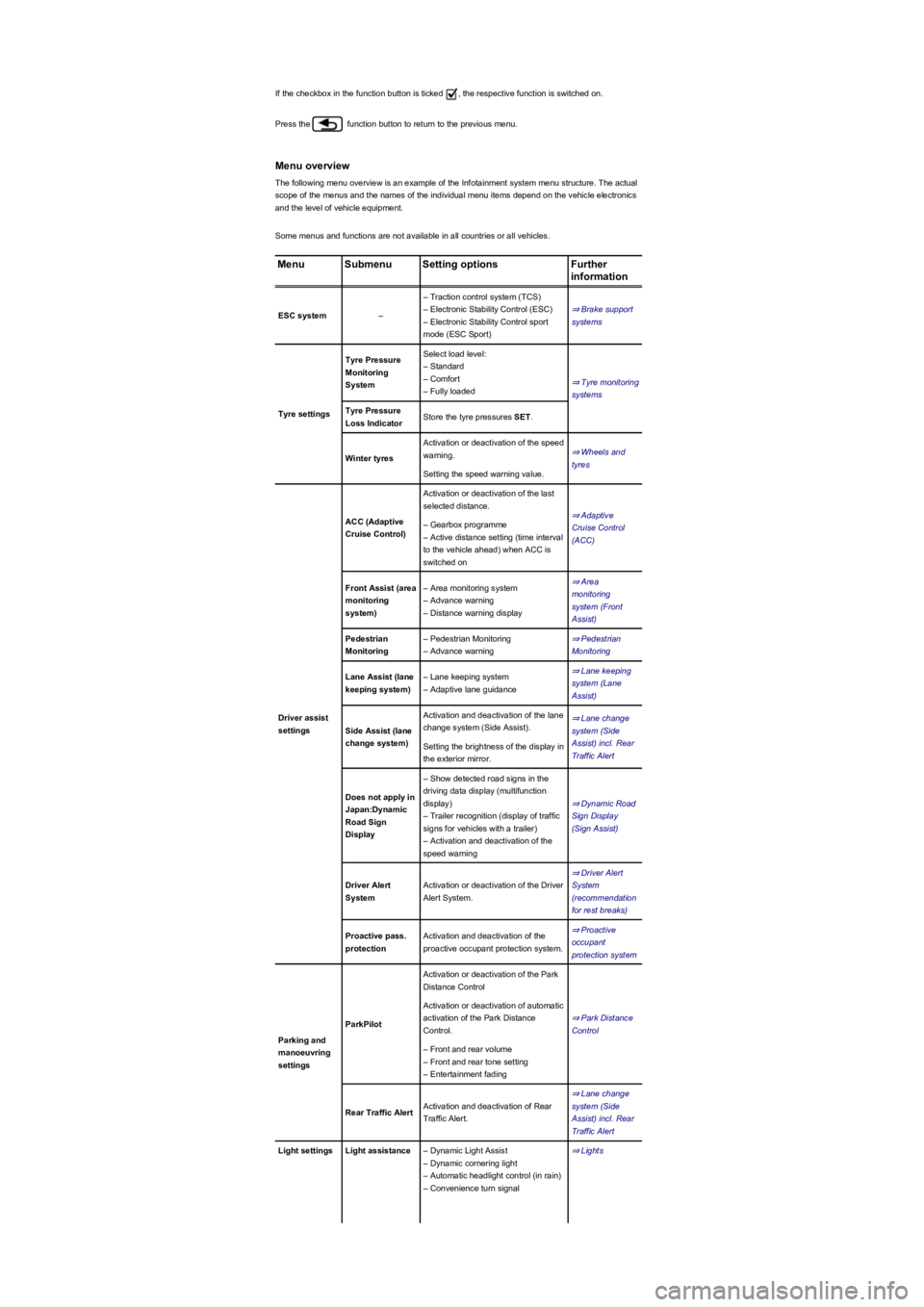
Menu overview
The following menu overview is an example of the Infotainment system menu structure. The actual
scope of the menus and the names of the individual menu items depend on the vehicle electronics
and the level of vehicle equipment.
Some menus and functions are not available in all countries or all vehicles.
MenuSubmenuSetting optionsFurther
information
ESC system–
– Traction control system (TCS)
– Electronic Stability Control (ESC)
– Electronic Stability Control sport
mode (ESC Sport)
⇒ Brake support
systems
Tyre settings
Tyre Pressure
Monitoring
System
Select load level:
– Standard
– Comfort
– Fully loaded
⇒ Tyre monitoring
systems
Tyre Pressure
Loss IndicatorStore the tyre pressures SET.
Winter tyres
Activation or deactivation of the speed
warning.⇒ Wheels and
tyres
Setting the speed warning value.
Driver assist
settings
ACC (Adaptive
Cruise Control)
Activation or deactivation of the last
selected distance.
⇒ Adaptive
Cruise Control
(ACC)
– Gearbox programme
– Active distance setting (time interval
to the vehicle ahead) when ACC is
switched on
Front Assist (area
monitoring
system)
– Area monitoring system
– Advance warning
– Distance warning display
⇒ Area
monitoring
system (Front
Assist)
Pedestrian
Monitoring
– Pedestrian Monitoring
– Advance warning
⇒ Pedestrian
Monitoring
Lane Assist (lane
keeping system)
– Lane keeping system
– Adaptive lane guidance
⇒ Lane keeping
system (Lane
Assist)
Side Assist (lane
change system)
Activation and deactivation of the lane
change system (Side Assist).
⇒ Lane change
system (Side
Assist) incl. Rear
Traffic Alert
Setting the brightness of the display in
the exterior mirror.
Does not apply in
Japan:Dynamic
Road Sign
Display
– Show detected road signs in the
driving data display (multifunction
display)
– Trailer recognition (display of traffic
signs for vehicles with a trailer)
– Activation and deactivation of the
speed warning
⇒ Dynamic Road
Sign Display
(Sign Assist)
Driver Alert
System
Activation or deactivation of the Driver
Alert System.
⇒ Driver Alert
System
(recommendation
for rest breaks)
Proactive pass.
protection
Activation and deactivation of the
proactive occupant protection system.
⇒ Proactive
occupant
protection system
Parking and
manoeuvring
settings
ParkPilot
Activation or deactivation of the Park
Distance Control
⇒ Park Distance
Control
Activation or deactivation of automatic
activation of the Park Distance
Control.
– Front and rear volume
– Front and rear tone setting
– Entertainment fading
Rear Traffic AlertActivation and deactivation of Rear
Traffic Alert.
⇒ Lane change
system (Side
Assist) incl. Rear
Traffic Alert
Light settingsLight assistance– Dynamic Light Assist
– Dynamic cornering light
– Automatic headlight control (in rain)
– Convenience turn signal
⇒ Lights
Page 30 of 341
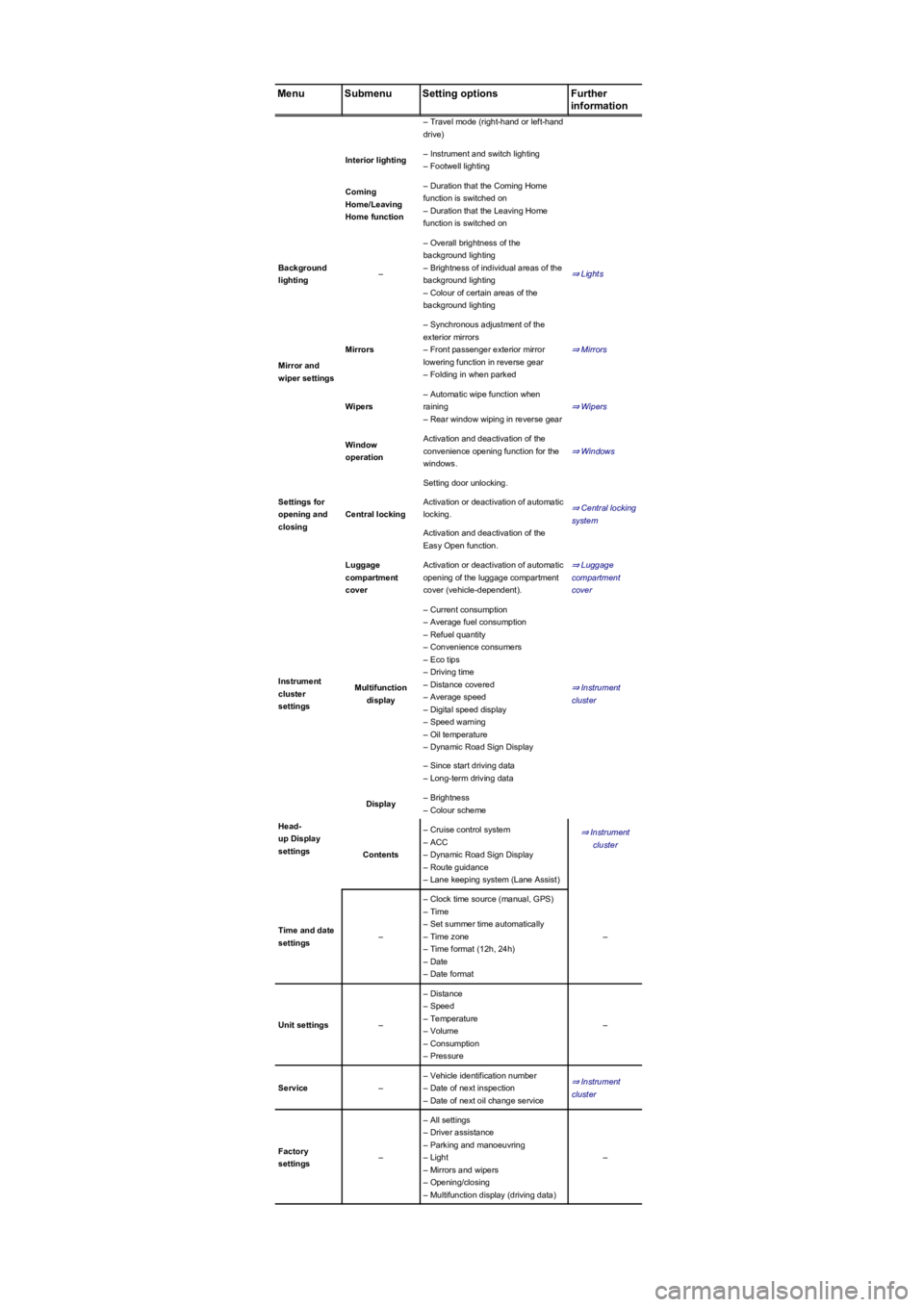
MenuSubmenuSetting optionsFurther
information
– Travel mode (right-hand or left-hand
drive)
Interior lighting– Instrument and switch lighting
– Footwell lighting
Coming
Home/Leaving
Home function
– Duration that the Coming Home
function is switched on
– Duration that the Leaving Home
function is switched on
Background
lighting–
– Overall brightness of the
background lighting
– Brightness of individual areas of the
background lighting
– Colour of certain areas of the
background lighting
⇒ Lights
Mirror and
wiper settings
Mirrors
– Synchronous adjustment of the
exterior mirrors
– Front passenger exterior mirror
lowering function in reverse gear
– Folding in when parked
⇒ Mirrors
Wipers
– Automatic wipe function when
raining
– Rear window wiping in reverse gear
⇒ Wipers
Settings for
opening and
closing
Window
operation
Activation and deactivation of the
convenience opening function for the
windows.
⇒ Windows
Central locking
Setting door unlocking.
⇒ Central locking
system
Activation or deactivation of automatic
locking.
Activation and deactivation of the
Easy Open function.
Luggage
compartment
cover
Activation or deactivation of automatic
opening of the luggage compartment
cover (vehicle-dependent).
⇒ Luggage
compartment
cover
Instrument
cluster
settings
Multifunction
display
– Current consumption
– Average fuel consumption
– Refuel quantity
– Convenience consumers
– Eco tips
– Driving time
– Distance covered
– Average speed
– Digital speed display
– Speed warning
– Oil temperature
– Dynamic Road Sign Display
⇒ Instrument
cluster
– Since start driving data
– Long-term driving data
Head-
up Display
settings
Display– Brightness
– Colour scheme
⇒ Instrument
cluster
Contents
– Cruise control system
– ACC
– Dynamic Road Sign Display
– Route guidance
– Lane keeping system (Lane Assist)
Time and date
settings–
– Clock time source (manual, GPS)
– Time
– Set summer time automatically
– Time zone
– Time format (12h, 24h)
– Date
– Date format
–
Unit settings–
– Distance
– Speed
– Temperature
– Volume
– Consumption
– Pressure
–
Service–
– Vehicle identification number
– Date of next inspection
– Date of next oil change service
⇒ Instrument
cluster
Factory
settings–
– All settings
– Driver assistance
– Parking and manoeuvring
– Light
– Mirrors and wipers
– Opening/closing
– Multifunction display (driving data)
–
Page 34 of 341
Personalisation
First read and observe the introductoryinformation and safety warnings⇒
Introduction
The personalisation function allows personalised vehicle settings, such as air conditioning system,
instrument cluster or lighting settings, to be saved in a user account. You have four user accounts
available. Users are identified using the vehicle key upon unlocking the vehicle. One user account
is assigned to each vehicle key.
Changes to the setup will be assigned to the active user account and saved upon locking the
vehicle or changing the user account.
Welcome and user account selection
When personalisation is activated, the name of the current user account appears on the instrument
cluster display for approximately ten seconds after you switch on the ignition.
During this time, you can select a user account using the buttons on the wiper lever or multifunction
steering wheel ⇒ Operation and display in the Infotainment system.
When you select a user account, the saved vehicle settings are activated.
User management and setup
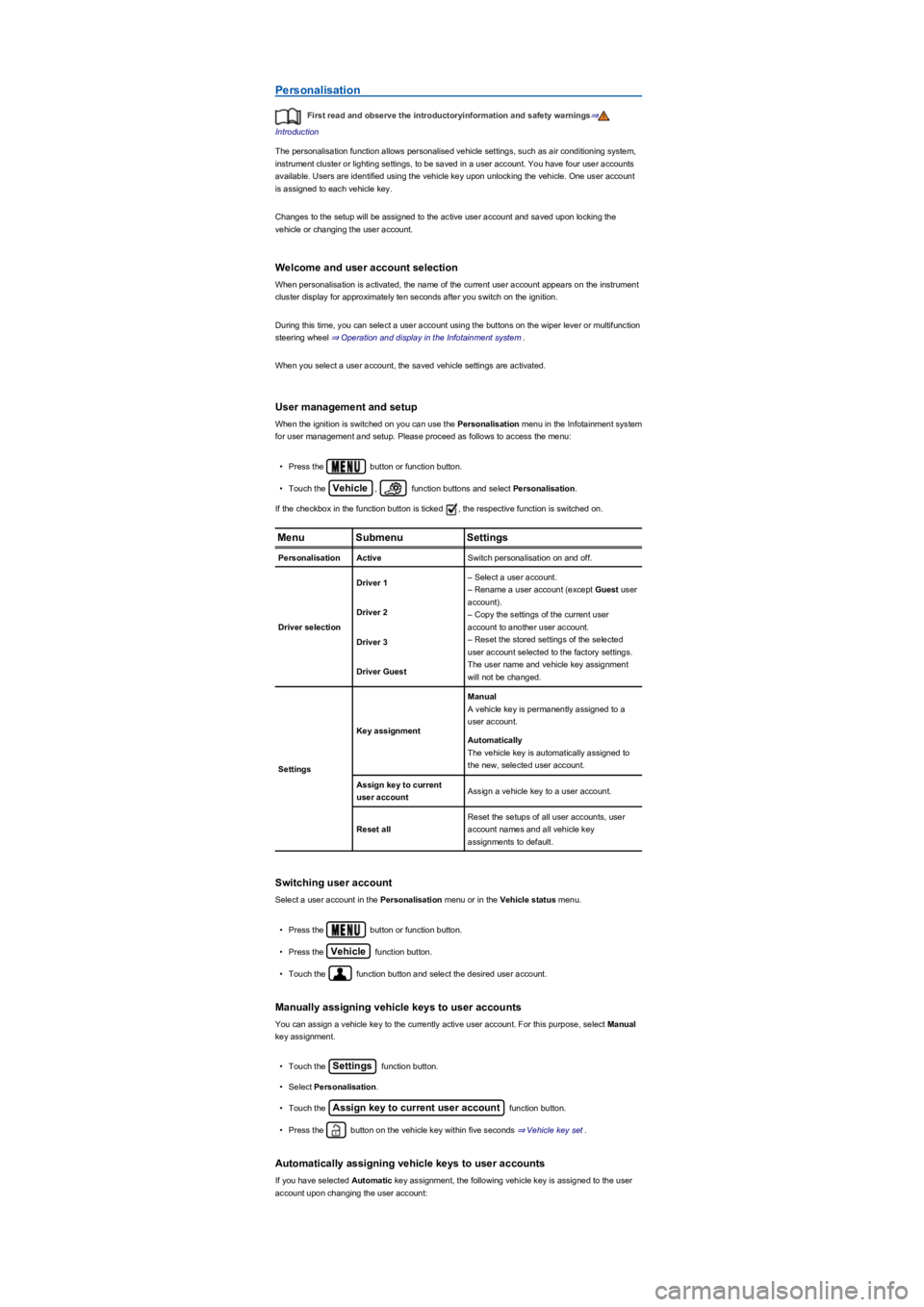
When the ignition is switched on you can use the Personalisation menu in the Infotainment system
for user management and setup. Please proceed as follows to access the menu:
•Press the button or function button.
•Touch the Vehicle, function buttons and select Personalisation.
If the checkbox in the function button is ticked , the respective function is switched on.
MenuSubmenuSettings
PersonalisationActiveSwitch personalisation on and off.
Driver selection
Driver 1– Select a user account.
– Rename a user account (except Guest user
account).
– Copy the settings of the current user
account to another user account.
– Reset the stored settings of the selected
user account selected to the factory settings.
The user name and vehicle key assignment
will not be changed.
Driver 2
Driver 3
Driver Guest
Settings
Key assignment
Manual
A vehicle key is permanently assigned to a
user account.
Automatically
The vehicle key is automatically assigned to
the new, selected user account.
Assign key to current
user accountAssign a vehicle key to a user account.
Reset all
Reset the setups of all user accounts, user
account names and all vehicle key
assignments to default.
Switching user account
Select a user account in the Personalisation menu or in the Vehicle status menu.
•Press the button or function button.
•Press the Vehicle function button.
•Touch the function button and select the desired user account.
Manually assigning vehicle keys to user accounts
You can assign a vehicle key to the currently active user account. For this purpose, select Manual
key assignment.
•Touch the Settings function button.
•Select Personalisation.
•Touch the Assign key to current user account function button.
•Press the button on the vehicle key within five seconds ⇒ Vehicle key set.
Automatically assigning vehicle keys to user accounts
If you have selected Automatic key assignment, the following vehicle key is assigned to the user
account upon changing the user account:
Page 35 of 341
Check that all lights and turn signals are working properly.
Check the tyre pressure and fuel level Wheels and tyres, Fuel types and refuelling.
Ensure that you have a good, clear view through all of the windows.
Air intake to the engine must not be obstructed, and the engine must not be covered with
any kind of insulating materials In the engine compartment.
Secure any objects and luggage in the stowage compartments, the luggage compartment
or on the roof Transporting.
Ensure that you are able to operate the pedals freely at all times.
Secure any children travelling in the vehicle in a restraint system suitable for their weight
and size Safe transport of children.
Adjust the front seats, head restraints and mirrors properly in accordance with the size of
the occupants Sitting position, Mirrors.
Wear shoes that provide good grip for your feet when using the pedals.
The floor mat in the footwell on the driver side must leave the pedal area free and must be
securely fastened.
Assume a correct sitting position before setting off and maintain this position while driving.
This also applies to all passengers Sitting position.
Fasten your seat belt correctly before setting off and keep it properly fastened throughout
the journey. This also applies to all passengers Seat belts.
Each vehicle occupant must sit in a seat of their own and must have their own seat belt.
Never drive if your driving ability is impaired, e.g. by medication, alcohol or drugs.
Do not allow yourself to be distracted from the traffic, e.g. by passengers, telephone calls,
opening menus and making adjustments to settings.
Always adapt your speed and driving style to suit visibility, weather, road and traffic
conditions.
Observe traffic regulations and speed limits.
Take regular breaks when travelling long distances – at least every two hours.
Secure animals in the vehicle using a system that is suitable for their weight and size.
Does the vehicle need any technical modifications for driving abroad, e.g. masking or
switching the headlights over?
Are the necessary tools, diagnostic equipment and spare parts available for service and
repair work?
Are there any Volkswagen dealerships in the destination country?
•Vehicles without Keyless Access: vehicle key used to unlock the vehicle.
•Vehicles with Keyless Access: vehicle key that is identified first by the personalisation function
upon opening the driver door.
Personalised vehicle setup
The vehicle equipment and functions that can be personalised include the following:
•Open and close (single door unlocking, window convenience opening etc.)
•Light and vision (daytime running lights, cornering light, convenience turn signal etc.)
•Air conditioning system (temperature settings, ventilation etc.)
•Assistance systems (Park Distance Control, ACC, Dynamic Road Sign Display etc.)
•Driver profile selection (driver profiles etc.)
•Multifunction display and instrument cluster (selection of displays)
•Infotainment system (brightness and saved stations)
•Seat setup (seat position)
A new vehicle key will be assigned to the current user account. To assign the vehicle key to
a different user account, select the user account you want and manually assign it to the vehicle key.
Safety
General notes
Checklist
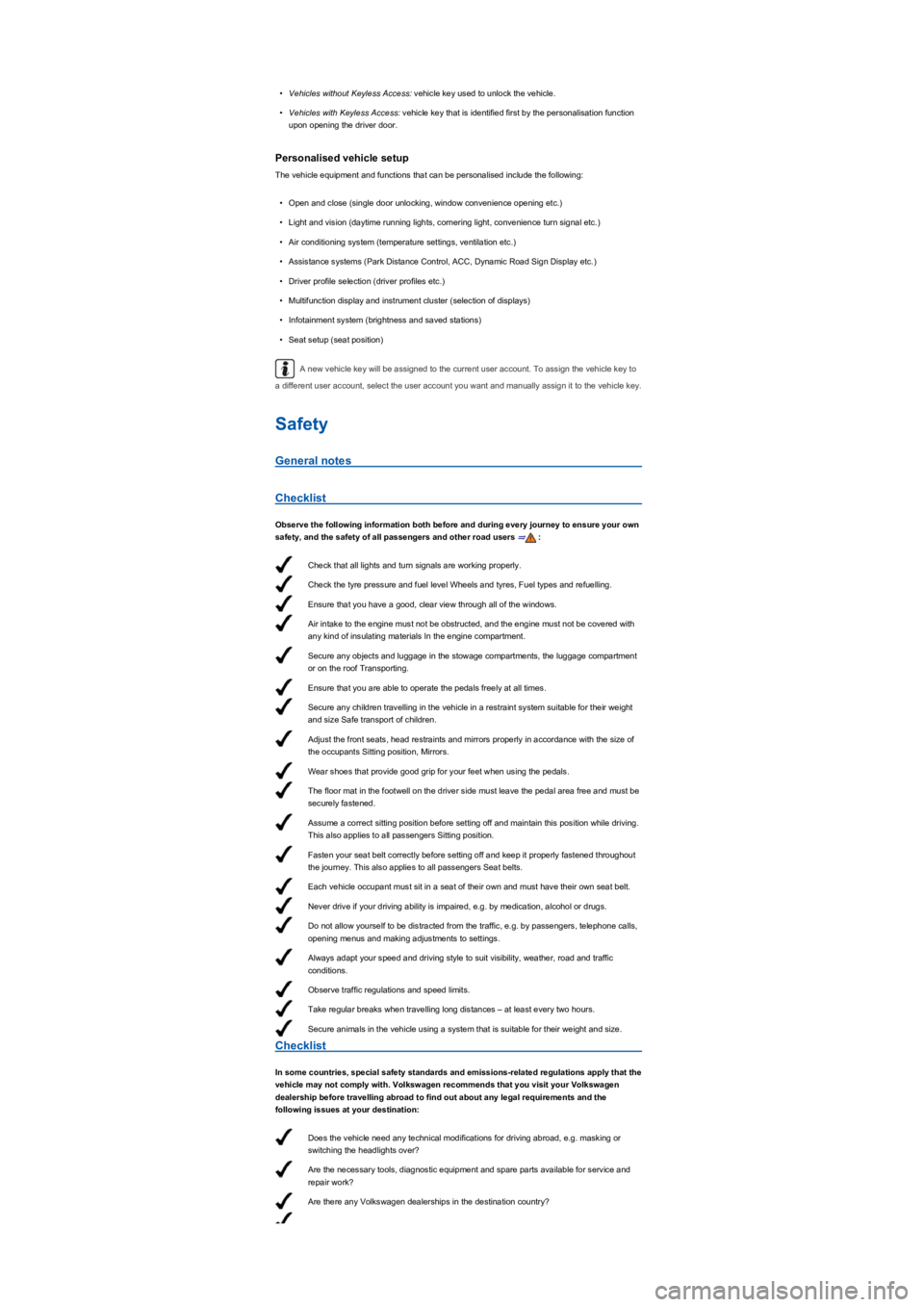
Observe the following information both before and during every journey to ensure your own
safety, and the safety of all passengers and other road users ⇒:
Checklist
In some countries, special safety standards and emissions-related regulations apply that the
vehicle may not comply with. Volkswagen recommends that you visit your Volkswagen
dealership before travelling abroad to find out about any legal requirements and the
following issues at your destination:
Page 36 of 341
If fuel in the adequate quality available Fuel and emission control?
Are the correct service fluids that comply with Volkswagen specifications available in the
destination country Service fluids and consumables?
Will the navigation function in the factory-fitted Infotainment system and the navigation
data available work in the destination country?
Are special tyres necessary for travelling in the destination country?
Is a fire extinguisher prescribed in your destination country?
Which requirements must be observed regarding reflective vests?
Windscreen washer fluid level Wipers.
Engine oil level Engine oil.
Engine coolant level Engine coolant.
Brake fluid level Brake fluid.
Tyre pressure Wheels and tyres.
Checklist
Therefore, do not do any work in the engine compartment unless you know exactly how to
carry out the jobs, are aware of the general safety procedures and have the correct
equipment, service fluids and suitable tools to hand ⇒ In the engine compartment! In any
other case all work must be carried out by a qualified workshop. Make sure that the
following are checked regularly:
Vehicle lighting Lights required for the vehicle to be roadworthy:
- Turn signals
- Side lights, dipped beam headlights and main beam headlights
- Tail light cluster
- Brake lights
- Rear fog light
- Number plate light.
Servicing the vehicle is not only about vehicle maintenance – it also ensures that your
vehicle remains roadworthy and in perfect working order. You should therefore have your vehicle
serviced according to Volkswagen guidelines. Some work may have to be carried out before the
due date of the next service if the vehicle is subjected to severe operating conditions. Severe
operating conditions are, for example, regular stop and go driving or driving in areas with high
levels of dust. Further information can be obtained from your Volkswagen dealership or a qualified
workshop.
Sitting position
Introduction
This chapter contains information on the followingsubjects:
⇒ Dangers of assuming an incorrect sitting position
⇒ Correct sitting position
Driving under the influence of alcohol, drugs, medication or narcotics can cause serious
accidents and fatal injuries.
•Alcohol, drugs, medication and narcotics can severely impair perception, reaction
times and driving safety. This could cause you to lose control of the vehicle.
WARNING
Always observe current traffic regulations and speed limits, and think ahead when driving.
Correct interpretation of a driving situation can make the difference between reaching
your destination safely and having an accident with serious injuries.
WARNING
Volkswagen is not responsible for any vehicle damage caused by low-quality fuel,
inadequate servicing work or lack of Genuine Parts.
NOTICE
Observe the instructions and information relating to vehicles with N1 approval
⇒ Information about vehicles with N1 approval (light commercial vehicle).
NOTICE
Page 38 of 341
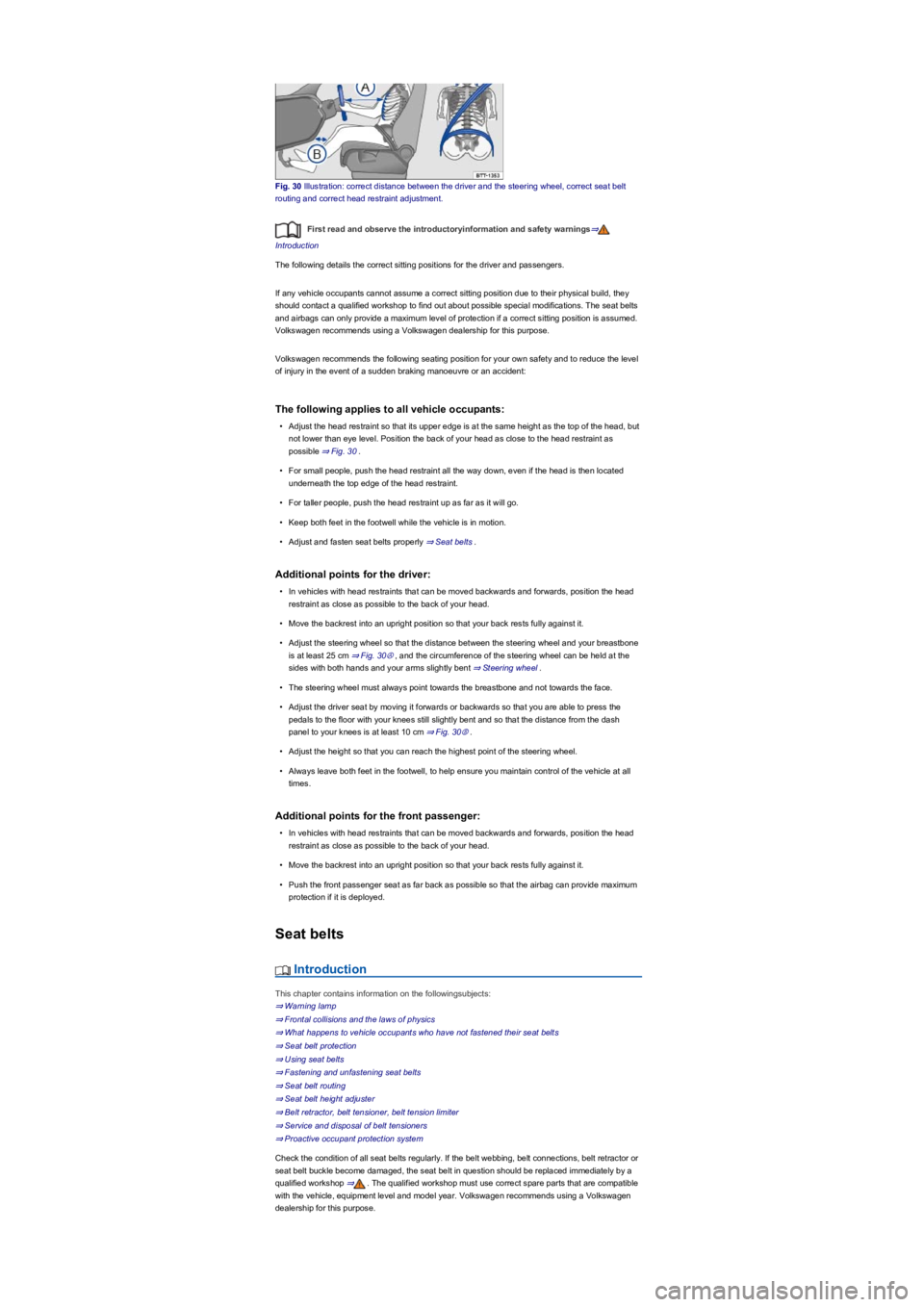
Fig. 30 Illustration: correct distance between the driver and the steering wheel, correct seat belt
routing and correct head restraint adjustment.
First read and observe the introductoryinformation and safety warnings⇒
Introduction
The following details the correct sitting positions for the driver and passengers.
If any vehicle occupants cannot assume a correct sitting position due to their physical build, they
should contact a qualified workshop to find out about possible special modifications. The seat belts
and airbags can only provide a maximum level of protection if a correct sitting position is assumed.
Volkswagen recommends using a Volkswagen dealership for this purpose.
Volkswagen recommends the following seating position for your own safety and to reduce the level
of injury in the event of a sudden braking manoeuvre or an accident:
The following applies to all vehicle occupants:
•Adjust the head restraint so that its upper edge is at the same height as the top of the head, but
not lower than eye level. Position the back of your head as close to the head restraint as
possible ⇒ Fig. 30.
•For small people, push the head restraint all the way down, even if the head is then located
underneath the top edge of the head restraint.
•For taller people, push the head restraint up as far as it will go.
•Keep both feet in the footwell while the vehicle is in motion.
•Adjust and fasten seat belts properly ⇒ Seat belts.
Additional points for the driver:
•In vehicles with head restraints that can be moved backwards and forwards, position the head
restraint as close as possible to the back of your head.
•Move the backrest into an upright position so that your back rests fully against it.
•Adjust the steering wheel so that the distance between the steering wheel and your breastbone
is at least 25 cm ⇒ Fig. 30Ⓐ, and the circumference of the steering wheel can be held at the
sides with both hands and your arms slightly bent ⇒ Steering wheel.
•The steering wheel must always point towards the breastbone and not towards the face.
•Adjust the driver seat by moving it forwards or backwards so that you are able to press the
pedals to the floor with your knees still slightly bent and so that the distance from the dash
panel to your knees is at least 10 cm ⇒ Fig. 30Ⓑ.
•Adjust the height so that you can reach the highest point of the steering wheel.
•Always leave both feet in the footwell, to help ensure you maintain control of the vehicle at all
times.
Additional points for the front passenger:
•In vehicles with head restraints that can be moved backwards and forwards, position the head
restraint as close as possible to the back of your head.
•Move the backrest into an upright position so that your back rests fully against it.
•Push the front passenger seat as far back as possible so that the airbag can provide maximum
protection if it is deployed.
Seat belts
Introduction
This chapter contains information on the followingsubjects:
⇒ Warning lamp
⇒ Frontal collisions and the laws of physics
⇒ What happens to vehicle occupants who have not fastened their seat belts
⇒ Seat belt protection
⇒ Using seat belts
⇒ Fastening and unfastening seat belts
⇒ Seat belt routing
⇒ Seat belt height adjuster
⇒ Belt retractor, belt tensioner, belt tension limiter
⇒ Service and disposal of belt tensioners
⇒ Proactive occupant protection system
Check the condition of all seat belts regularly. If the belt webbing, belt connections, belt retractor or
seat belt buckle become damaged, the seat belt in question should be replaced immediately by a
qualified workshop ⇒. The qualified workshop must use correct spare parts that are compatible
with the vehicle, equipment level and model year. Volkswagen recommends using a Volkswagen
dealership for this purpose.