spec VOLKSWAGEN TIGUAN 2017 Owner´s Manual
[x] Cancel search | Manufacturer: VOLKSWAGEN, Model Year: 2017, Model line: TIGUAN, Model: VOLKSWAGEN TIGUAN 2017Pages: 341, PDF Size: 9.14 MB
Page 62 of 341
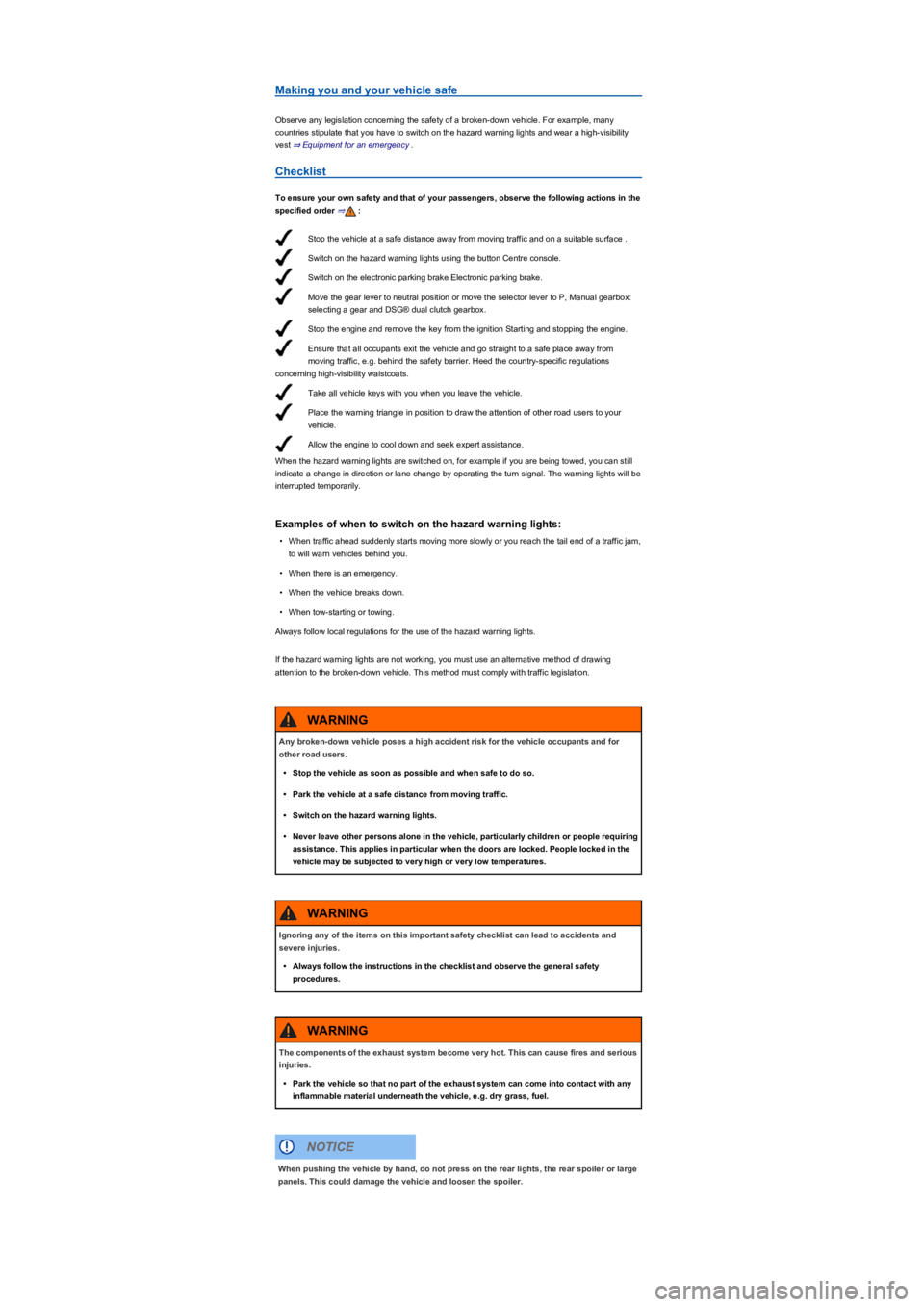
Stop the vehicle at a safe distance away from moving traffic and on a suitable surface .
Switch on the hazard warning lights using the button Centre console.
Switch on the electronic parking brake Electronic parking brake.
Move the gear lever to neutral position or move the selector lever to P, Manual gearbox:
selecting a gear and DSG® dual clutch gearbox.
Stop the engine and remove the key from the ignition Starting and stopping the engine.
Ensure that all occupants exit the vehicle and go straight to a safe place away from
moving traffic, e.g. behind the safety barrier. Heed the country-specific regulations
concerning high-visibility waistcoats.
Take all vehicle keys with you when you leave the vehicle.
Place the warning triangle in position to draw the attention of other road users to your
vehicle.
Allow the engine to cool down and seek expert assistance.
Making you and your vehicle safe
Observe any legislation concerning the safety of a broken-down vehicle. For example, many
countries stipulate that you have to switch on the hazard warning lights and wear a high-visibility
vest ⇒ Equipment for an emergency.
Checklist
To ensure your own safety and that of your passengers, observe the following actions in the
specified order ⇒:
When the hazard warning lights are switched on, for example if you are being towed, you can still
indicate a change in direction or lane change by operating the turn signal. The warning lights will be
interrupted temporarily.
Examples of when to switch on the hazard warning lights:
•When traffic ahead suddenly starts moving more slowly or you reach the tail end of a traffic jam,
to will warn vehicles behind you.
•When there is an emergency.
•When the vehicle breaks down.
•When tow-starting or towing.
Always follow local regulations for the use of the hazard warning lights.
If the hazard warning lights are not working, you must use an alternative method of drawing
attention to the broken-down vehicle. This method must comply with traffic legislation.
Any broken-down vehicle poses a high accident risk for the vehicle occupants and for
other road users.
•Stop the vehicle as soon as possible and when safe to do so.
•Park the vehicle at a safe distance from moving traffic.
•Switch on the hazard warning lights.
•Never leave other persons alone in the vehicle, particularly children or people requiring
assistance. This applies in particular when the doors are locked. People locked in the
vehicle may be subjected to very high or very low temperatures.
WARNING
Ignoring any of the items on this important safety checklist can lead to accidents and
severe injuries.
•Always follow the instructions in the checklist and observe the general safety
procedures.
WARNING
The components of the exhaust system become very hot. This can cause fires and serious
injuries.
•Park the vehicle so that no part of the exhaust system can come into contact with any
inflammable material underneath the vehicle, e.g. dry grass, fuel.
WARNING
When pushing the vehicle by hand, do not press on the rear lights, the rear spoiler or large
panels. This could damage the vehicle and loosen the spoiler.
NOTICE
Page 63 of 341
The 12-volt vehicle battery will discharge if the hazard warning lights are left on over a long
period of time – even when the ignition is switched off.
Depending on the vehicle equipment, the brake lights flash rapidly if you brake sharply or
initiate full braking at a speed of more than 80 km/h (50 mph). This is a particularly effective way of
attracting the attention of vehicles behind you. If you then continue to brake, the hazard warning
lights will be switched on automatically at speeds under approximately 10 km/h (6 mph). Once the
vehicle starts to accelerate, the hazard warning lights will switch off again.
Equipment for an emergency
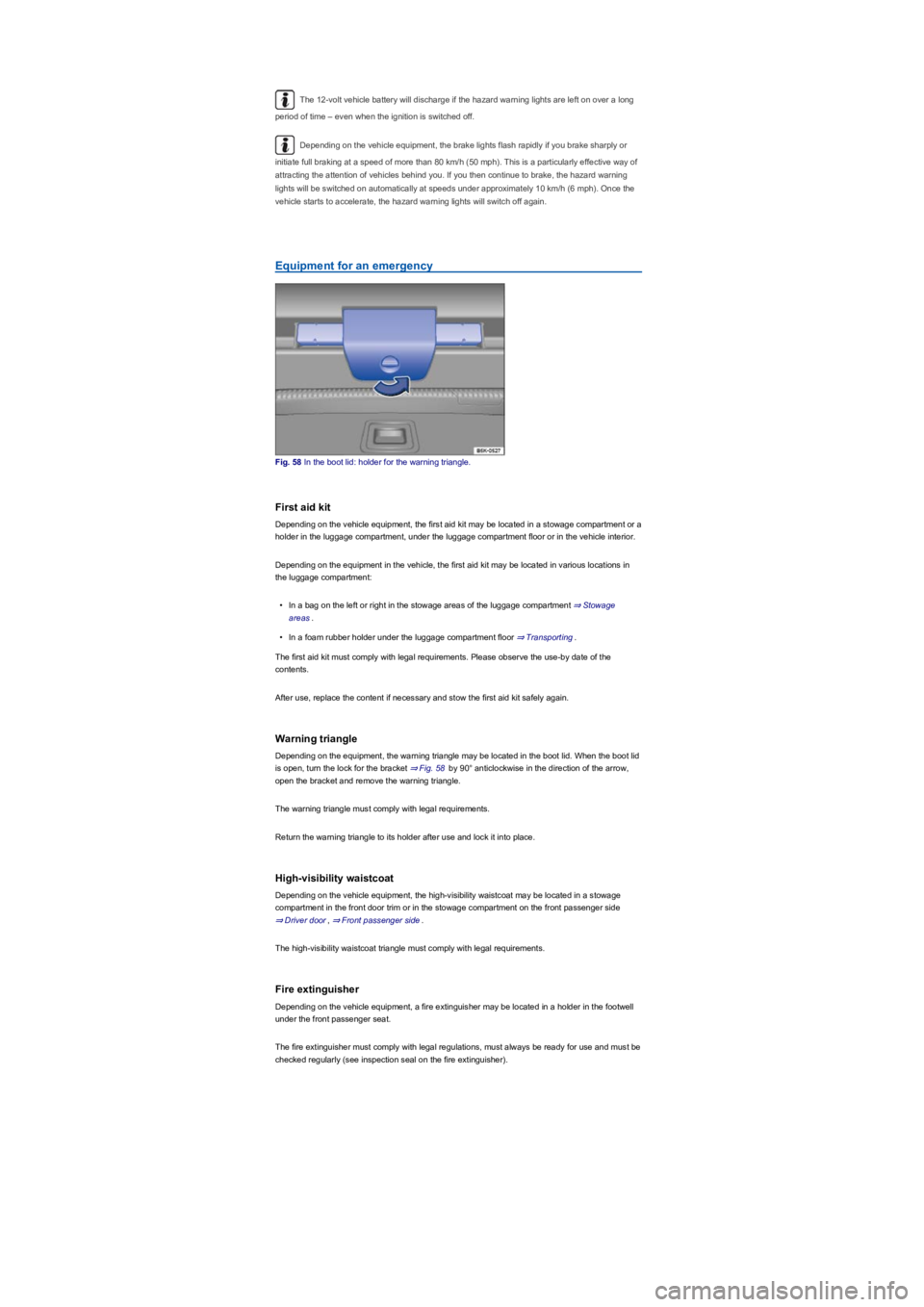
Fig. 58 In the boot lid: holder for the warning triangle.
First aid kit
Depending on the vehicle equipment, the first aid kit may be located in a stowage compartment or a
holder in the luggage compartment, under the luggage compartment floor or in the vehicle interior.
Depending on the equipment in the vehicle, the first aid kit may be located in various locations in
the luggage compartment:
•In a bag on the left or right in the stowage areas of the luggage compartment ⇒ Stowage
areas.
•In a foam rubber holder under the luggage compartment floor ⇒ Transporting.
The first aid kit must comply with legal requirements. Please observe the use-by date of the
contents.
After use, replace the content if necessary and stow the first aid kit safely again.
Warning triangle
Depending on the equipment, the warning triangle may be located in the boot lid. When the boot lid
is open, turn the lock for the bracket ⇒ Fig. 58 by 90° anticlockwise in the direction of the arrow,
open the bracket and remove the warning triangle.
The warning triangle must comply with legal requirements.
Return the warning triangle to its holder after use and lock it into place.
High-visibility waistcoat
Depending on the vehicle equipment, the high-visibility waistcoat may be located in a stowage
compartment in the front door trim or in the stowage compartment on the front passenger side
⇒ Driver door, ⇒ Front passenger side.
The high-visibility waistcoat triangle must comply with legal requirements.
Fire extinguisher
Depending on the vehicle equipment, a fire extinguisher may be located in a holder in the footwell
under the front passenger seat.
The fire extinguisher must comply with legal regulations, must always be ready for use and must be
checked regularly (see inspection seal on the fire extinguisher).
Page 64 of 341
Behaviour after a collision with active bonnet
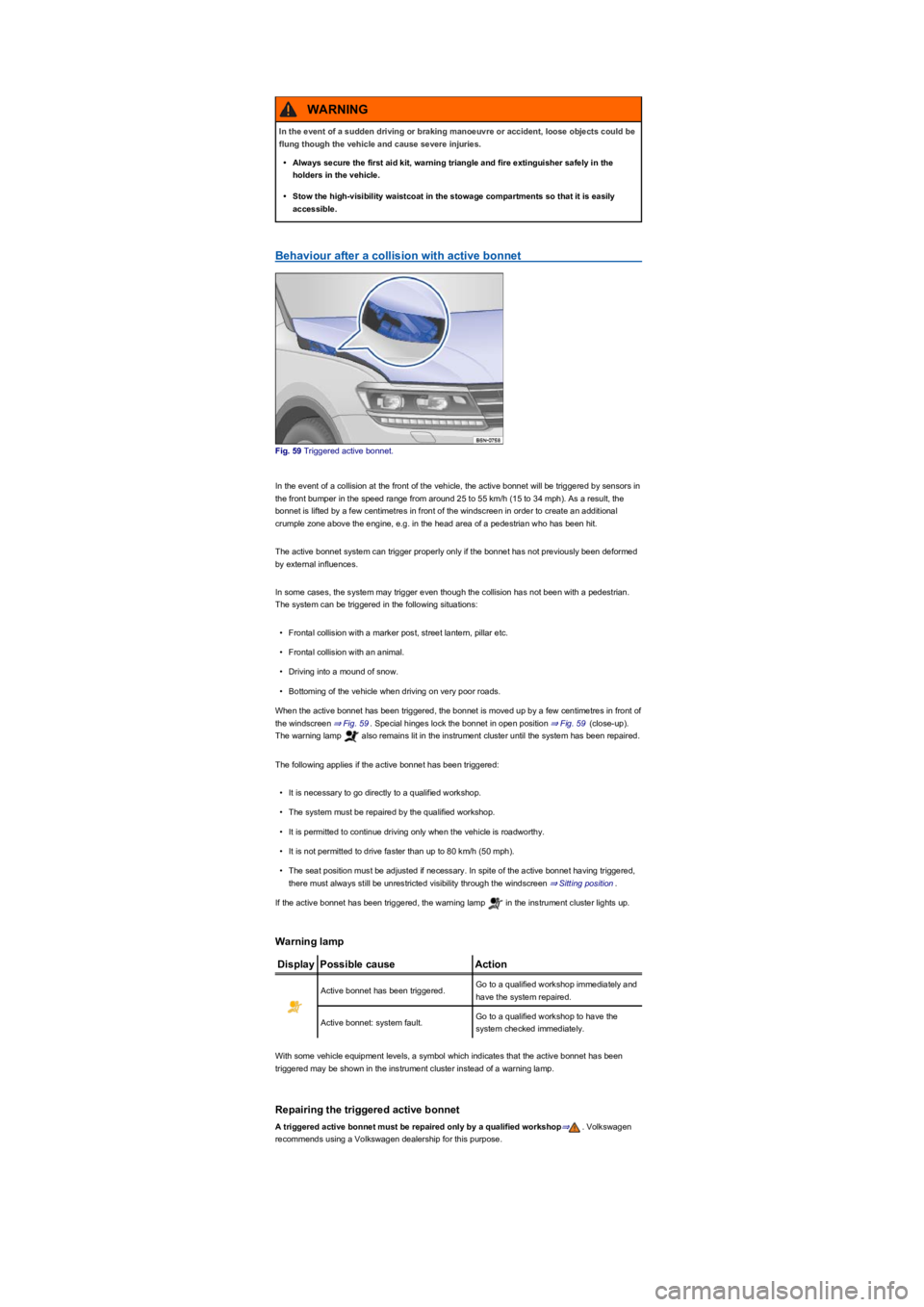
Fig. 59 Triggered active bonnet.
In the event of a collision at the front of the vehicle, the active bonnet will be triggered by sensors in
the front bumper in the speed range from around 25 to 55 km/h (15 to 34 mph). As a result, the
bonnet is lifted by a few centimetres in front of the windscreen in order to create an additional
crumple zone above the engine, e.g. in the head area of a pedestrian who has been hit.
The active bonnet system can trigger properly only if the bonnet has not previously been deformed
by external influences.
In some cases, the system may trigger even though the collision has not been with a pedestrian.
The system can be triggered in the following situations:
•Frontal collision with a marker post, street lantern, pillar etc.
•Frontal collision with an animal.
•Driving into a mound of snow.
•Bottoming of the vehicle when driving on very poor roads.
When the active bonnet has been triggered, the bonnet is moved up by a few centimetres in front of
the windscreen ⇒ Fig. 59. Special hinges lock the bonnet in open position ⇒ Fig. 59 (close-up).
The warning lamp also remains lit in the instrument cluster until the system has been repaired.
The following applies if the active bonnet has been triggered:
•It is necessary to go directly to a qualified workshop.
•The system must be repaired by the qualified workshop.
•It is permitted to continue driving only when the vehicle is roadworthy.
•It is not permitted to drive faster than up to 80 km/h (50 mph).
•The seat position must be adjusted if necessary. In spite of the active bonnet having triggered,
there must always still be unrestricted visibility through the windscreen ⇒ Sitting position.
If the active bonnet has been triggered, the warning lamp in the instrument cluster lights up.
Warning lamp
DisplayPossible causeAction
Active bonnet has been triggered.Go to a qualified workshop immediately and
have the system repaired.
Active bonnet: system fault.Go to a qualified workshop to have the
system checked immediately.
With some vehicle equipment levels, a symbol which indicates that the active bonnet has been
triggered may be shown in the instrument cluster instead of a warning lamp.
Repairing the triggered active bonnet
A triggered active bonnet must be repaired only by a qualified workshop⇒. Volkswagen
recommends using a Volkswagen dealership for this purpose.
In the event of a sudden driving or braking manoeuvre or accident, loose objects could be
flung though the vehicle and cause severe injuries.
•Always secure the first aid kit, warning triangle and fire extinguisher safely in the
holders in the vehicle.
•Stow the high-visibility waistcoat in the stowage compartments so that it is easily
accessible.
WARNING
Page 65 of 341
The symbol can differ depending on the version of the instrument cluster.
Information call, breakdown call and Emergency Call Service
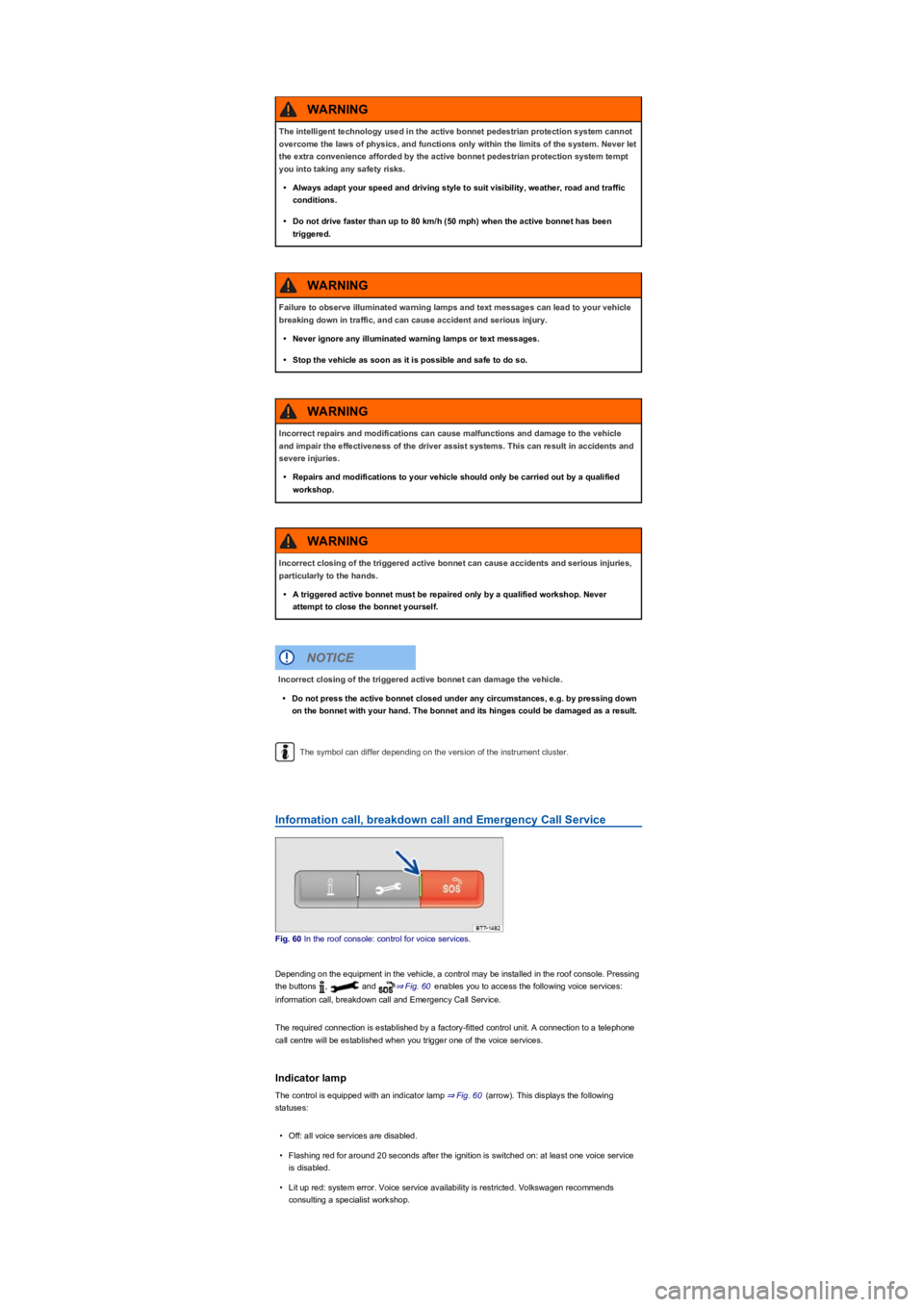
Fig. 60 In the roof console: control for voice services.
Depending on the equipment in the vehicle, a control may be installed in the roof console. Pressing
the buttons , and ⇒ Fig. 60 enables you to access the following voice services:
information call, breakdown call and Emergency Call Service.
The required connection is established by a factory-fitted control unit. A connection to a telephone
call centre will be established when you trigger one of the voice services.
Indicator lamp
The control is equipped with an indicator lamp ⇒ Fig. 60 (arrow). This displays the following
statuses:
•Off: all voice services are disabled.
•Flashing red for around 20 seconds after the ignition is switched on: at least one voice service
is disabled.
•Lit up red: system error. Voice service availability is restricted. Volkswagen recommends
consulting a specialist workshop.
The intelligent technology used in the active bonnet pedestrian protection system cannot
overcome the laws of physics, and functions only within the limits of the system. Never let
the extra convenience afforded by the active bonnet pedestrian protection system tempt
you into taking any safety risks.
•Always adapt your speed and driving style to suit visibility, weather, road and traffic
conditions.
•Do not drive faster than up to 80 km/h (50 mph) when the active bonnet has been
triggered.
WARNING
Failure to observe illuminated warning lamps and text messages can lead to your vehicle
breaking down in traffic, and can cause accident and serious injury.
•Never ignore any illuminated warning lamps or text messages.
•Stop the vehicle as soon as it is possible and safe to do so.
WARNING
Incorrect repairs and modifications can cause malfunctions and damage to the vehicle
and impair the effectiveness of the driver assist systems. This can result in accidents and
severe injuries.
•Repairs and modifications to your vehicle should only be carried out by a qualified
workshop.
WARNING
Incorrect closing of the triggered active bonnet can cause accidents and serious injuries,
particularly to the hands.
•A triggered active bonnet must be repaired only by a qualified workshop. Never
attempt to close the bonnet yourself.
WARNING
Incorrect closing of the triggered active bonnet can damage the vehicle.
•Do not press the active bonnet closed under any circumstances, e.g. by pressing down
on the bonnet with your hand. The bonnet and its hinges could be damaged as a result.
NOTICE
Page 67 of 341
Vehicle key
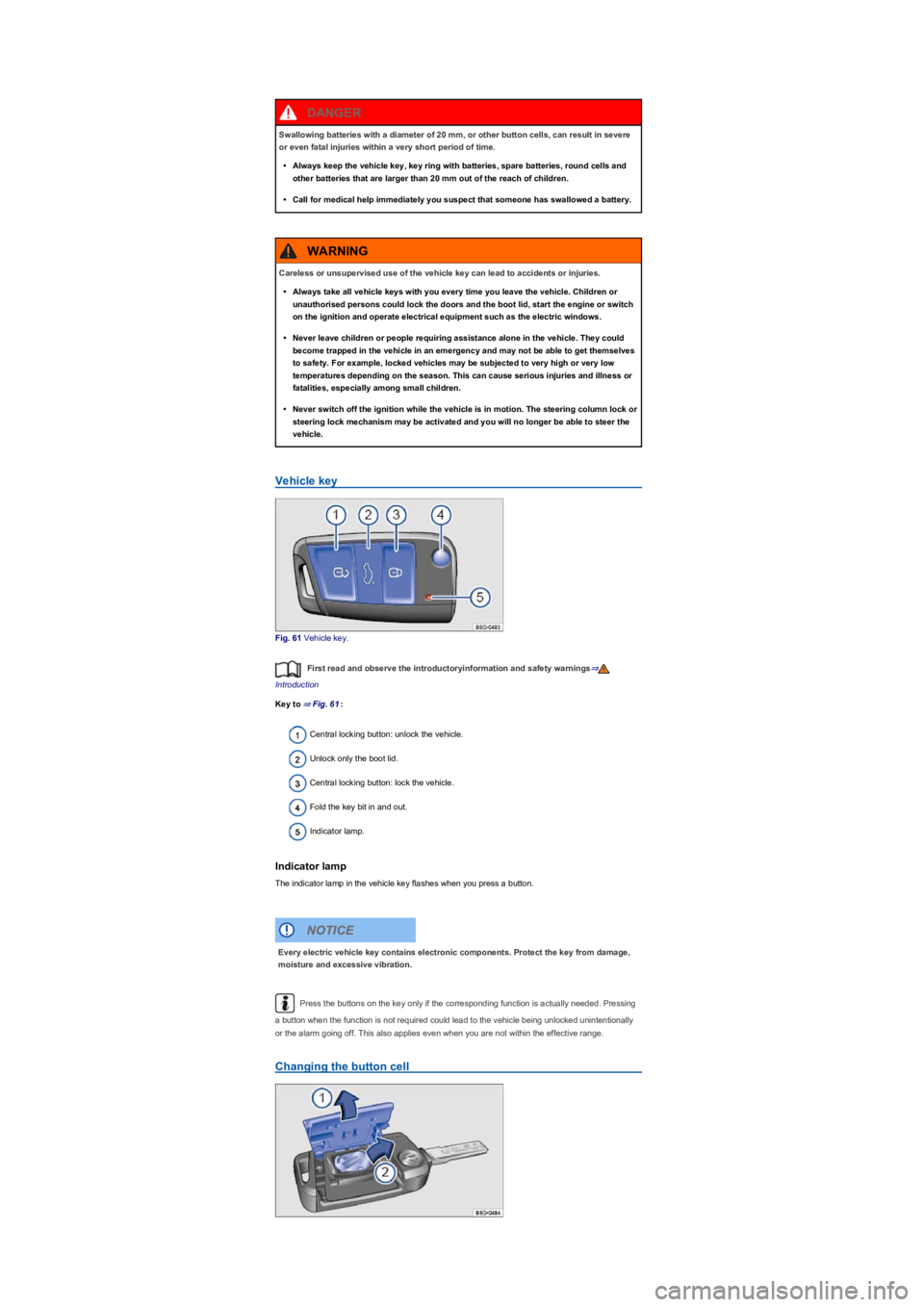
Fig. 61 Vehicle key.
First read and observe the introductoryinformation and safety warnings⇒
Introduction
Key to ⇒ Fig. 61:
Central locking button: unlock the vehicle.
Unlock only the boot lid.
Central locking button: lock the vehicle.
Fold the key bit in and out.
Indicator lamp.
Indicator lamp
The indicator lamp in the vehicle key flashes when you press a button.
Press the buttons on the key only if the corresponding function is actually needed. Pressing
a button when the function is not required could lead to the vehicle being unlocked unintentionally
or the alarm going off. This also applies even when you are not within the effective range.
Changing the button cell
Swallowing batteries with a diameter of 20 mm, or other button cells, can result in severe
or even fatal injuries within a very short period of time.
•Always keep the vehicle key, key ring with batteries, spare batteries, round cells and
other batteries that are larger than 20 mm out of the reach of children.
•Call for medical help immediately you suspect that someone has swallowed a battery.
DANGER
Careless or unsupervised use of the vehicle key can lead to accidents or injuries.
•Always take all vehicle keys with you every time you leave the vehicle. Children or
unauthorised persons could lock the doors and the boot lid, start the engine or switch
on the ignition and operate electrical equipment such as the electric windows.
•Never leave children or people requiring assistance alone in the vehicle. They could
become trapped in the vehicle in an emergency and may not be able to get themselves
to safety. For example, locked vehicles may be subjected to very high or very low
temperatures depending on the season. This can cause serious injuries and illness or
fatalities, especially among small children.
•Never switch off the ignition while the vehicle is in motion. The steering column lock or
steering lock mechanism may be activated and you will no longer be able to steer the
vehicle.
WARNING
Every electric vehicle key contains electronic components. Protect the key from damage,
moisture and excessive vibration.
NOTICE
Page 68 of 341
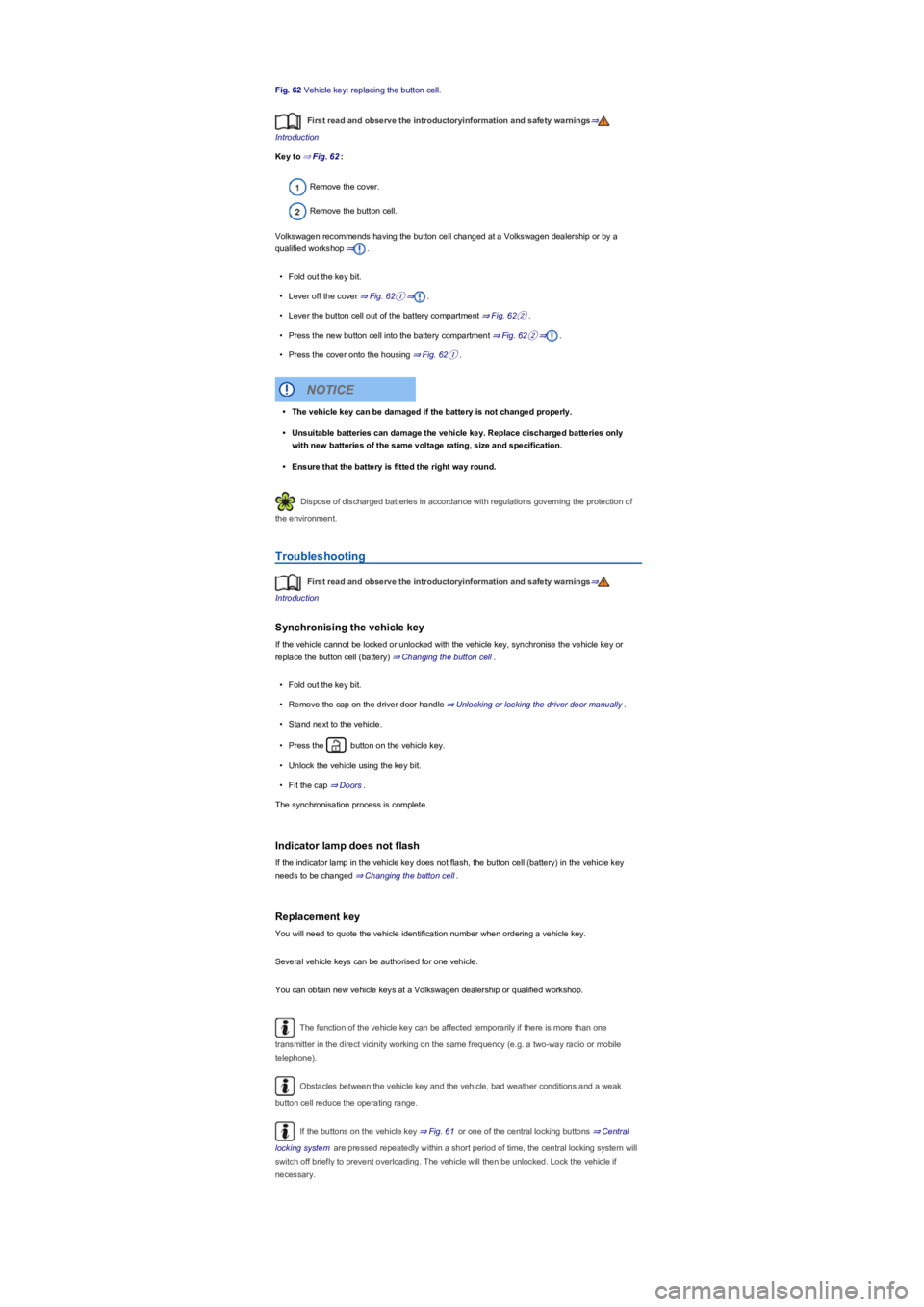
Fig. 62 Vehicle key: replacing the button cell.
First read and observe the introductoryinformation and safety warnings⇒
Introduction
Key to ⇒ Fig. 62:
Remove the cover.
Remove the button cell.
Volkswagen recommends having the button cell changed at a Volkswagen dealership or by a
qualified workshop ⇒.
•Fold out the key bit.
•Lever off the cover ⇒ Fig. 62①⇒.
•Lever the button cell out of the battery compartment ⇒ Fig. 62②.
•Press the new button cell into the battery compartment ⇒ Fig. 62②⇒.
•Press the cover onto the housing ⇒ Fig. 62①.
Dispose of discharged batteries in accordance with regulations governing the protection of
the environment.
Troubleshooting
First read and observe the introductoryinformation and safety warnings⇒
Introduction
Synchronising the vehicle key
If the vehicle cannot be locked or unlocked with the vehicle key, synchronise the vehicle key or
replace the button cell (battery) ⇒ Changing the button cell.
•Fold out the key bit.
•Remove the cap on the driver door handle ⇒ Unlocking or locking the driver door manually.
•Stand next to the vehicle.
•Press the button on the vehicle key.
•Unlock the vehicle using the key bit.
•Fit the cap ⇒ Doors.
The synchronisation process is complete.
Indicator lamp does not flash
If the indicator lamp in the vehicle key does not flash, the button cell (battery) in the vehicle key
needs to be changed ⇒ Changing the button cell.
Replacement key
You will need to quote the vehicle identification number when ordering a vehicle key.
Several vehicle keys can be authorised for one vehicle.
You can obtain new vehicle keys at a Volkswagen dealership or qualified workshop.
The function of the vehicle key can be affected temporarily if there is more than one
transmitter in the direct vicinity working on the same frequency (e.g. a two-way radio or mobile
telephone).
Obstacles between the vehicle key and the vehicle, bad weather conditions and a weak
button cell reduce the operating range.
If the buttons on the vehicle key ⇒ Fig. 61 or one of the central locking buttons ⇒ Central
locking system are pressed repeatedly within a short period of time, the central locking system will
switch off briefly to prevent overloading. The vehicle will then be unlocked. Lock the vehicle if
necessary.
•The vehicle key can be damaged if the battery is not changed properly.
•Unsuitable batteries can damage the vehicle key. Replace discharged batteries only
with new batteries of the same voltage rating, size and specification.
•Ensure that the battery is fitted the right way round.
NOTICE
Page 69 of 341
Central and manual locking
Introduction
This chapter contains information on the followingsubjects:
⇒ Indicator lamp
⇒ Central locking system
⇒ Locking and unlocking the vehicle from the outside
⇒ Locking and unlocking the vehicle from the inside
⇒ Locking and unlocking the vehicle with
⇒ SAFELOCK
⇒ Anti-theft alarm
⇒ Interior monitoring system and anti-tow alarm
⇒ Locking the vehicle after the airbag has been triggered
⇒ Troubleshooting
The central locking system locks all doors and the boot lid of the vehicle. The vehicle cannot be
locked if the driver door is open.
The vehicle can only be locked if the ignition has been switched off or the driver has switched off
the engine before leaving the vehicle.
Automatic locking (anti-theft protection)
The vehicle will lock itself again automatically after around 45 seconds if one of the following
conditions applies:
•The vehicle was unlocked but not opened.
•The ignition was not switched on.
•The boot lid was not opened.
•The vehicle has been unlocked using the lock cylinder.
•The vehicle was locked with the central locking button in the vehicle interior.
Indicator lamp
First read and observe the introductoryinformation and safety warnings⇒
Introduction
The central locking indicator lamp is located in the driver door ⇒ Driver door.
Vehicle locked: red LED flashes at short intervals for approximately two seconds, and then more
slowly. The indicator lamp does not flash if the vehicle was locked with the central locking button in
the driver door ⇒ Locking and unlocking the vehicle from the inside.
Central locking system
First read and observe the introductoryinformation and safety warnings⇒
Introduction
The central locking system enables you to lock or unlock all the doors, the boot lid and the tank flap
from one point.
Settings for the central locking system can be adjusted in the Infotainment system ⇒ Operation and
display in the Infotainment system.
Automatic locking (Auto Lock)
The vehicle may lock itself automatically at speeds of approximately 15 km/h (9 mph) and above
⇒ Operation and display in the Infotainment system. The indicator lamp in the central locking
button will light up yellow when the vehicle is locked.
Improper use of the central locking system could lead to serious injury.
•The central locking system locks all doors. Locking the vehicle from the inside can
prevent accidental opening of the doors and unauthorised persons from entering the
vehicle. However, locked doors can delay assistance to passengers inside the vehicle
in the event of an accident or emergency.
•Never leave children or people requiring assistance alone in the vehicle. All doors can
be locked from the inside using the central locking button. This may mean that people
lock themselves in the vehicle. People locked in the vehicle may be subjected to very
high or very low temperatures.
•Temperatures inside a locked vehicle may reach extremes of heat or cold, according to
season. This can cause serious injuries and illness or fatalities, especially to small
children.
•Never leave anyone inside a locked vehicle. People in the vehicle could become
trapped in an emergency and may not be able to get themselves to safety.
•Doors and the boot lid should therefore be opened or closed only when you are sure
that nobody is in their path.
WARNING
Page 77 of 341
Display
First read and observe the introductoryinformation and safety warnings⇒
Introduction
A symbol in the instrument cluster display ⇒ Driver information indicates if one or more doors are
not closed properly. Do not drive on! Open the relevant door and then close it again.
This symbol is also visible when the ignition is switched off and will go out a few seconds after the
vehicle has been locked when all doors are closed.
The symbol can differ depending on the version of the instrument cluster.
Childproof lock
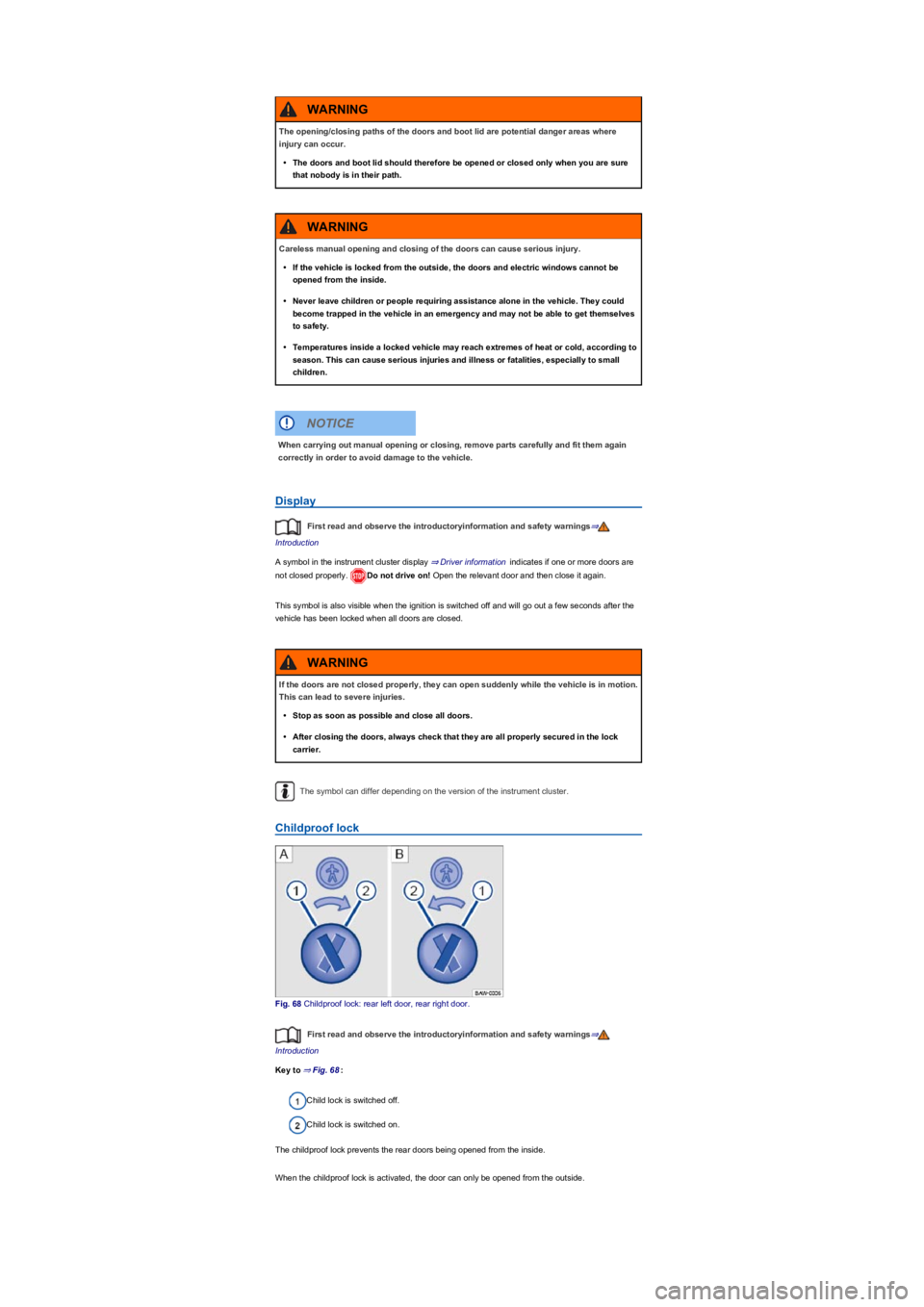
Fig. 68 Childproof lock: rear left door, rear right door.
First read and observe the introductoryinformation and safety warnings⇒
Introduction
Key to ⇒ Fig. 68:
Child lock is switched off.
Child lock is switched on.
The childproof lock prevents the rear doors being opened from the inside.
When the childproof lock is activated, the door can only be opened from the outside.
The opening/closing paths of the doors and boot lid are potential danger areas where
injury can occur.
•The doors and boot lid should therefore be opened or closed only when you are sure
that nobody is in their path.
WARNING
Careless manual opening and closing of the doors can cause serious injury.
•If the vehicle is locked from the outside, the doors and electric windows cannot be
opened from the inside.
•Never leave children or people requiring assistance alone in the vehicle. They could
become trapped in the vehicle in an emergency and may not be able to get themselves
to safety.
•Temperatures inside a locked vehicle may reach extremes of heat or cold, according to
season. This can cause serious injuries and illness or fatalities, especially to small
children.
WARNING
When carrying out manual opening or closing, remove parts carefully and fit them again
correctly in order to avoid damage to the vehicle.
NOTICE
If the doors are not closed properly, they can open suddenly while the vehicle is in motion.
This can lead to severe injuries.
•Stop as soon as possible and close all doors.
•After closing the doors, always check that they are all properly secured in the lock
carrier.
WARNING
Page 78 of 341
Switching the child lock on and off
•Unlock the vehicle and open the appropriate rear door.
•Move the slot to the corresponding position.
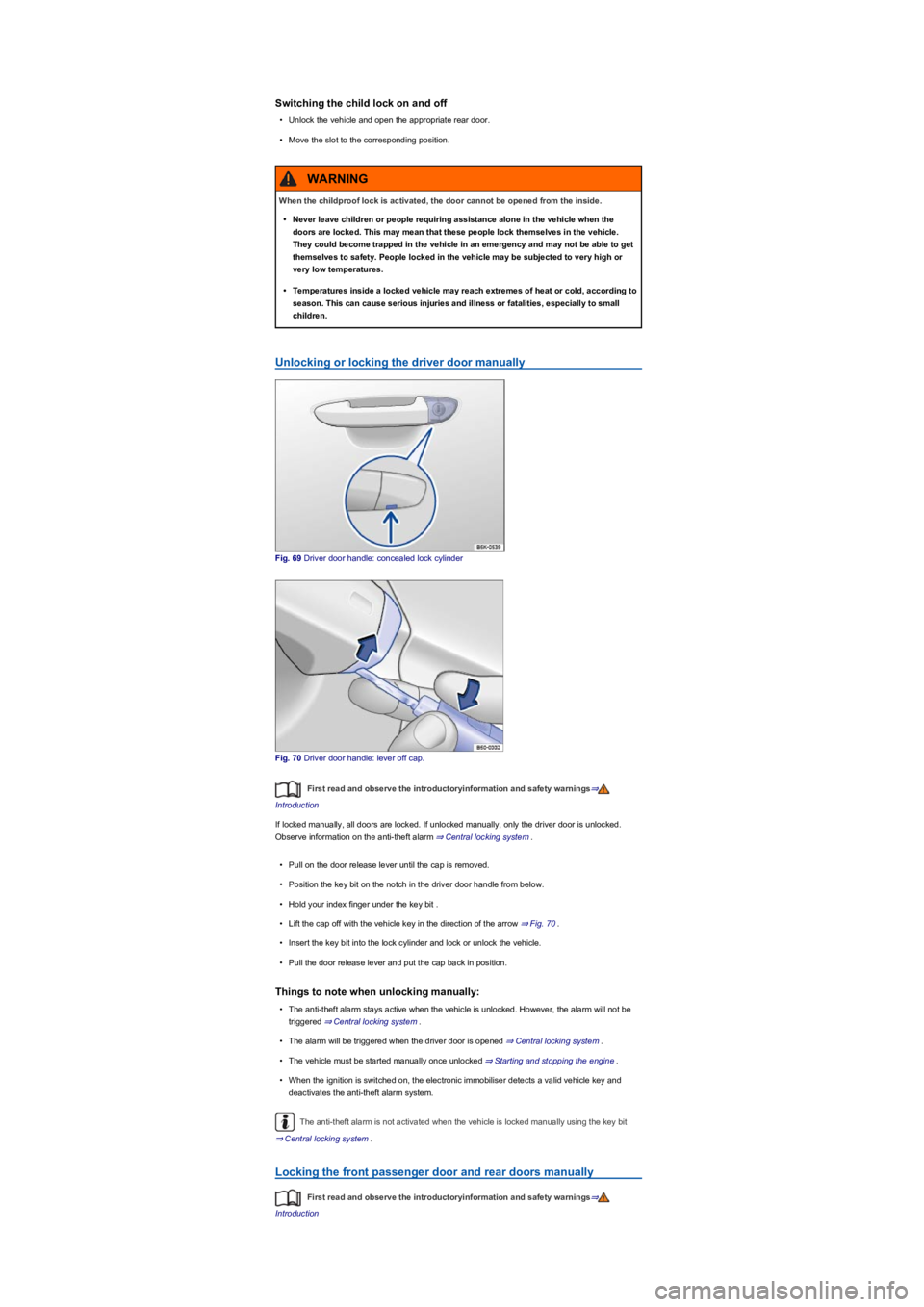
Unlocking or locking the driver door manually
Fig. 69 Driver door handle: concealed lock cylinder
Fig. 70 Driver door handle: lever off cap.
First read and observe the introductoryinformation and safety warnings⇒
Introduction
If locked manually, all doors are locked. If unlocked manually, only the driver door is unlocked.
Observe information on the anti-theft alarm ⇒ Central locking system.
•Pull on the door release lever until the cap is removed.
•Position the key bit on the notch in the driver door handle from below.
•Hold your index finger under the key bit .
•Lift the cap off with the vehicle key in the direction of the arrow ⇒ Fig. 70.
•Insert the key bit into the lock cylinder and lock or unlock the vehicle.
•Pull the door release lever and put the cap back in position.
Things to note when unlocking manually:
•The anti-theft alarm stays active when the vehicle is unlocked. However, the alarm will not be
triggered ⇒ Central locking system.
•The alarm will be triggered when the driver door is opened ⇒ Central locking system.
•The vehicle must be started manually once unlocked ⇒ Starting and stopping the engine.
•When the ignition is switched on, the electronic immobiliser detects a valid vehicle key and
deactivates the anti-theft alarm system.
The anti-theft alarm is not activated when the vehicle is locked manually using the key bit
⇒ Central locking system.
Locking the front passenger door and rear doors manually
First read and observe the introductoryinformation and safety warnings⇒
Introduction
When the childproof lock is activated, the door cannot be opened from the inside.
•Never leave children or people requiring assistance alone in the vehicle when the
doors are locked. This may mean that these people lock themselves in the vehicle.
They could become trapped in the vehicle in an emergency and may not be able to get
themselves to safety. People locked in the vehicle may be subjected to very high or
very low temperatures.
•Temperatures inside a locked vehicle may reach extremes of heat or cold, according to
season. This can cause serious injuries and illness or fatalities, especially to small
children.
WARNING
Page 79 of 341
The front passenger door and the rear doors can be locked manually. This does not activate the
anti-theft alarm.
•Open the door.
•Remove the rubber seal from the end face of the door.
•Insert the key bit into the slot and turn.
•Secure the rubber seal again.
•Ensure that the door is locked.
•The vehicle should be checked by a qualified workshop as soon as possible.
The manually locked door is unlocked again when the vehicle is unlocked or the door is opened
from the inside.
The doors can be unlocked and opened from the inside by pulling the door release handle.
Boot lid
Introduction
This chapter contains information on the followingsubjects:
⇒ Opening and closing the boot lid
⇒ Electrically opening and closing the boot lid
⇒ Boot lid with movement sensor ()
⇒ Automatically closing the boot lid ()
⇒ Unlocking the boot lid manually
⇒ Troubleshooting
The boot lid is unlocked and locked together with the doors.
On vehicles with the keyless locking and starting system Keyless Access, the boot lid is unlocked
automatically when it is opened ⇒ Locking and unlocking the vehicle with keyless access.
Incorrect and unsupervised unlocking, opening or closing of the boot lid can cause
accidents and serious injuries.
•The boot lid should only be opened or closed when you are sure that nobody is in its
path.
•Always check that the boot lid is properly closed after closing it. The closed boot lid
must be flush with the surrounding body panels.
•Always keep the boot lid closed while the vehicle is in motion.
•Never open the boot lid when loads, e.g. bicycles, are attached to it. The boot lid may
close under its own weight due to the additional load. Support the boot lid as
necessary or remove the load before opening.
•Close and lock the boot lid and all vehicle doors when the vehicle is not in use. Ensure
that no one remains in the vehicle.
•Never leave children playing unattended in or around the vehicle, especially when the
boot lid is open. Children could climb into the luggage compartment and shut the boot
lid, thereby trapping themselves inside. Temperatures inside a locked vehicle may
reach extremes of heat or cold, according to season. This can cause serious injuries
and illness or fatalities, especially to small children.
WARNING
Serious injuries could occur if the boot lid is unlocked or opened incorrectly or without
due care and attention.
•The boot lid may not always be detected as being unlocked if there is a carrier and
items attached to it. The boot lid may open suddenly while the vehicle is in motion if it
is unlocked.
WARNING
If there is a large amount of snow or a heavy load on the boot lid, the boot lid may lower
by itself and cause serious injuries due to the additional weight.
•Never open the boot lid if it is covered by a large amount of snow or a load is attached
to it, e.g. a rack or luggage carrier.
•Remove the snow or luggage before opening the boot lid.
WARNING