menu VOLKSWAGEN TIGUAN 2017 Owner´s Manual
[x] Cancel search | Manufacturer: VOLKSWAGEN, Model Year: 2017, Model line: TIGUAN, Model: VOLKSWAGEN TIGUAN 2017Pages: 341, PDF Size: 9.14 MB
Page 107 of 341
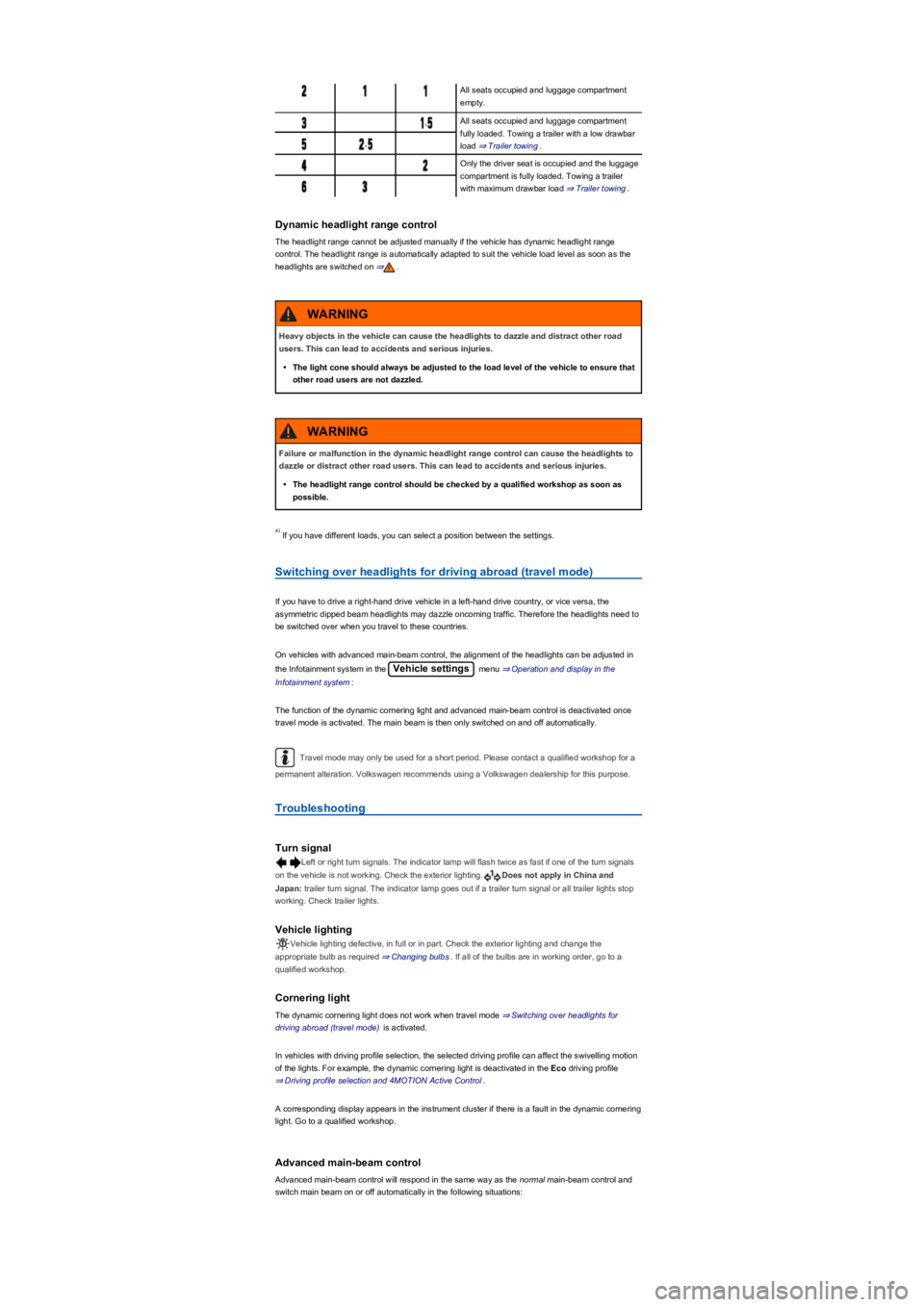
All seats occupied and luggage compartment
empty.
,All seats occupied and luggage compartment
fully loaded. Towing a trailer with a low drawbar
load ⇒ Trailer towing.,
Only the driver seat is occupied and the luggage
compartment is fully loaded. Towing a trailer
with maximum drawbar load ⇒ Trailer towing.
Dynamic headlight range control
The headlight range cannot be adjusted manually if the vehicle has dynamic headlight range
control. The headlight range is automatically adapted to suit the vehicle load level as soon as the
headlights are switched on ⇒.
If you have different loads, you can select a position between the settings.
Switching over headlights for driving abroad (travel mode)
If you have to drive a right-hand drive vehicle in a left-hand drive country, or vice versa, the
asymmetric dipped beam headlights may dazzle oncoming traffic. Therefore the headlights need to
be switched over when you travel to these countries.
On vehicles with advanced main-beam control, the alignment of the headlights can be adjusted in
the Infotainment system in the Vehicle settings menu ⇒ Operation and display in the
Infotainment system:
The function of the dynamic cornering light and advanced main-beam control is deactivated once
travel mode is activated. The main beam is then only switched on and off automatically.
Travel mode may only be used for a short period. Please contact a qualified workshop for a
permanent alteration. Volkswagen recommends using a Volkswagen dealership for this purpose.
Troubleshooting
Turn signal
Left or right turn signals. The indicator lamp will flash twice as fast if one of the turn signals
on the vehicle is not working. Check the exterior lighting.Does not apply in China and
Japan: trailer turn signal. The indicator lamp goes out if a trailer turn signal or all trailer lights stop
working. Check trailer lights.
Vehicle lighting
Vehicle lighting defective, in full or in part. Check the exterior lighting and change the
appropriate bulb as required ⇒ Changing bulbs. If all of the bulbs are in working order, go to a
qualified workshop.
Cornering light
The dynamic cornering light does not work when travel mode ⇒ Switching over headlights for
driving abroad (travel mode) is activated.
In vehicles with driving profile selection, the selected driving profile can affect the swivelling motion
of the lights. For example, the dynamic cornering light is deactivated in the Eco driving profile
⇒ Driving profile selection and 4MOTION Active Control.
A corresponding display appears in the instrument cluster if there is a fault in the dynamic cornering
light. Go to a qualified workshop.
Advanced main-beam control
Advanced main-beam control will respond in the same way as the normal main-beam control and
switch main beam on or off automatically in the following situations:
Heavy objects in the vehicle can cause the headlights to dazzle and distract other road
users. This can lead to accidents and serious injuries.
•The light cone should always be adjusted to the load level of the vehicle to ensure that
other road users are not dazzled.
WARNING
Failure or malfunction in the dynamic headlight range control can cause the headlights to
dazzle or distract other road users. This can lead to accidents and serious injuries.
•The headlight range control should be checked by a qualified workshop as soon as
possible.
WARNING
a)
Page 108 of 341
•If the dynamic cornering light has been deactivated.
•If travel mode is activated ⇒ Switching over headlights for driving abroad (travel mode).
•When the Eco driving profile is selected in vehicles with driving profile selection ⇒ Driving
profile selection and 4MOTION Active Control.
Interior lighting
Instrument and switch lighting
The brightness of the instrument and switch lighting and the basic brightness level of the Head-up
Display ⇒ Instrument cluster can be adjusted in the Infotainment system in
the Vehicle settings menu ⇒ Operation and display in the Infotainment system.
The brightness setting is automatically adjusted to the changing light conditions in the vehicle.
When the light switch is in position , a sensor will switch the dipped beam and the lighting
in the instruments and switches on and off automatically depending on the ambient brightness
level.
When the light is switched off and the ignition switched on, the dash panel lighting (indicators
and scales) is switched on. As the ambient light becomes lower, the lighting of these scales is
automatically reduced and may be switched off entirely. This function is intended to remind the
driver to switch on the dipped beam in good time, i.e. when driving through tunnels.
Interior lights, reading lights, background lighting
Press the corresponding button:
Switches the front interior lights on or off.Switches the rear interior lights on or off.
The interior lights are switched on automatically when the vehicle is unlocked, a door is
opened or the vehicle key is removed from the ignition lock.Switches the reading lights on or
off.
Stowage compartment and luggage compartment lights
A light will be switched on and off automatically when the stowage compartment on the front
passenger side, or the boot lid, is opened or closed.
Background lighting
Depending on the equipment level, the background lighting provides indirect light in the various
areas of the vehicle interior.
The footwell and, where applicable, the closed blind of the glass roof may also be illuminated.
The brightness of the background lighting can be adjusted in the Infotainment system in
the Vehicle settings menu ⇒ Operation and display in the Infotainment system.
The lights go out when the vehicle is locked or after a delay of a few minutes when the
vehicle key is removed from the ignition lock. This prevents the 12-volt battery from discharging.
Some settings can be stored in the user accounts of the personalisation function and
therefore change automatically when the user account changes ⇒ Personalisation.
Visibility
Wipers
Operating the wiper lever
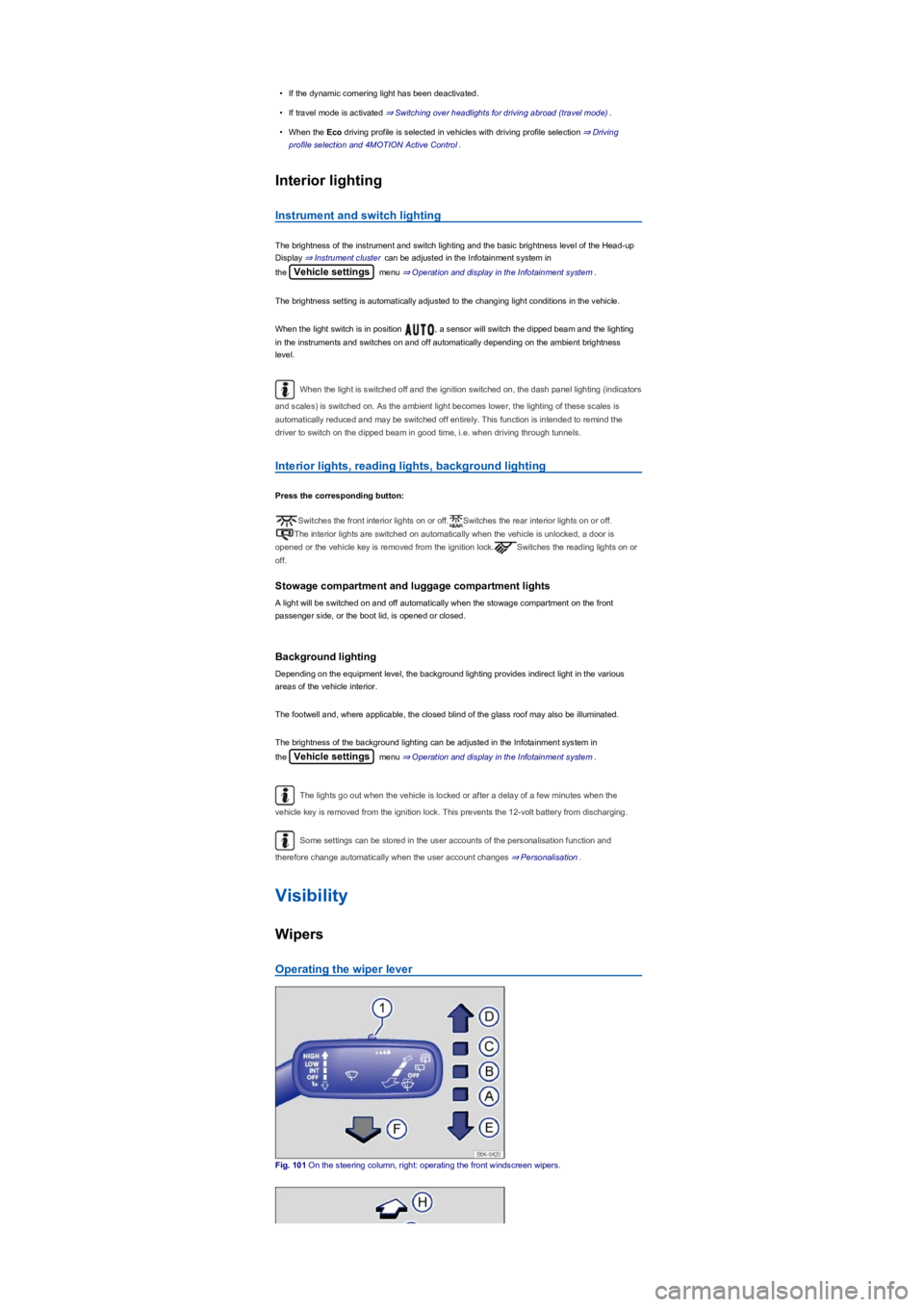
Fig. 101 On the steering column, right: operating the front windscreen wipers.
Page 110 of 341
When parking the vehicle in cold weather, it may be helpful to leave the windscreen wipers in
the service position to make it easier to loosen the wiper blades ⇒ Wiper blades.
Wiper functions
Automatic activation of the rear window wiper
The rear window wiper is switched on automatically if the front windscreen wipers are switched on
and reverse gear is engaged. The automatic wipe function can be activated and deactivated in the
Infotainment system in the Vehicle settings menu ⇒ Operation and display in the
Infotainment system:
Heated washer jets
The heating defrosts frozen washer jets. The heating output is regulated automatically when the
ignition is switched on depending on the ambient temperature. Only the jets are heated and not the
hoses carrying the washer fluid.
Headlight washer system
The headlight washer system cleans the headlight lenses and only works when the vehicle lighting
is switched on.
Once the ignition has been switched on, the headlights will also be washed the first time the wash
and wipe system for the windscreen is used, and every tenth time thereafter. Hardened dirt, such
as insect remains, should be removed from the headlight lens at regular intervals.
In winter, you should remove any snow from the headlight washer system covers in the bumper
prior to use to keep the system in working order. Remove any ice with a de-icer spray.
Rain/light sensor
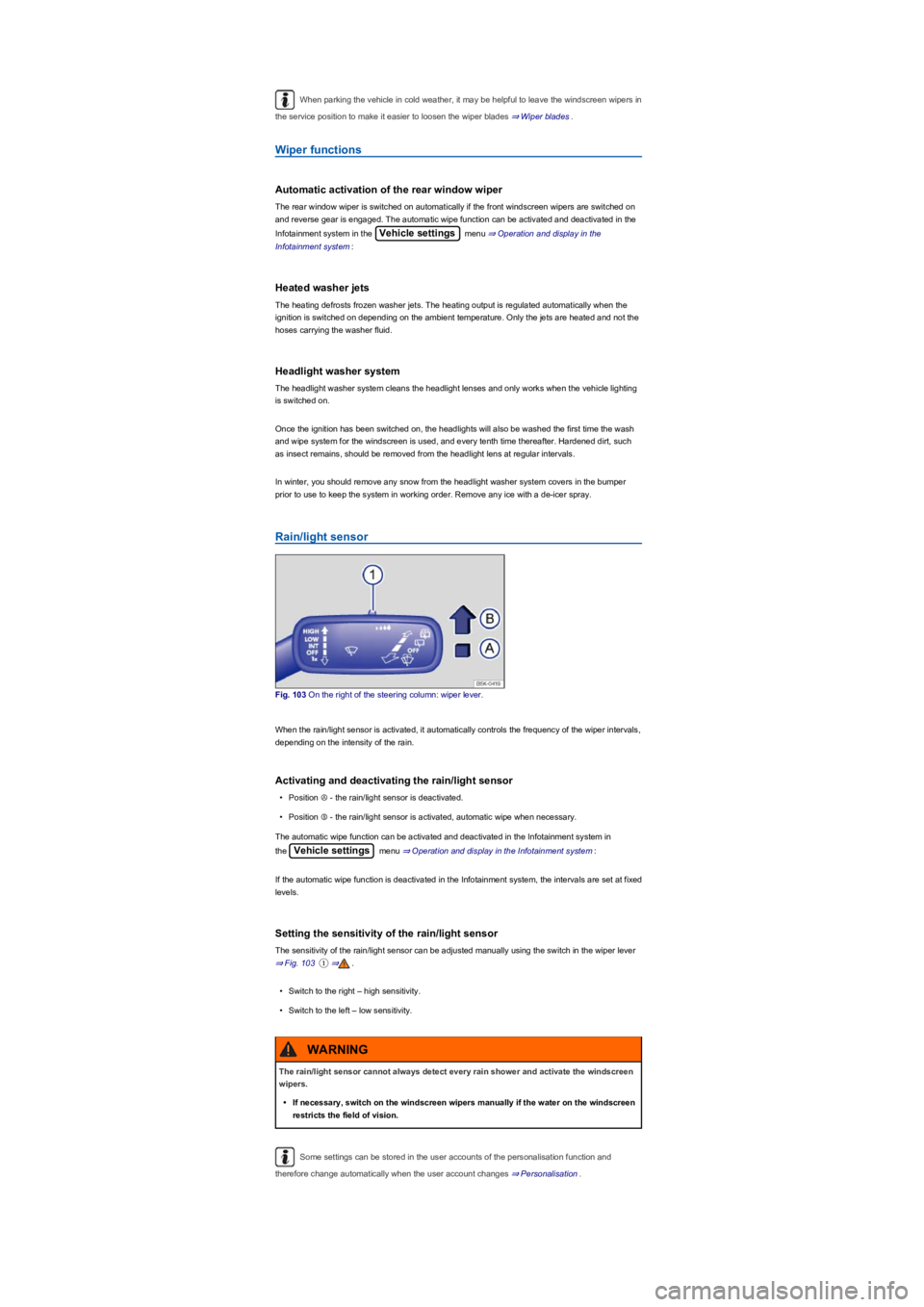
Fig. 103 On the right of the steering column: wiper lever.
When the rain/light sensor is activated, it automatically controls the frequency of the wiper intervals,
depending on the intensity of the rain.
Activating and deactivating the rain/light sensor
•Position Ⓐ - the rain/light sensor is deactivated.
•Position Ⓑ - the rain/light sensor is activated, automatic wipe when necessary.
The automatic wipe function can be activated and deactivated in the Infotainment system in
the Vehicle settings menu ⇒ Operation and display in the Infotainment system:
If the automatic wipe function is deactivated in the Infotainment system, the intervals are set at fixed
levels.
Setting the sensitivity of the rain/light sensor
The sensitivity of the rain/light sensor can be adjusted manually using the switch in the wiper lever
⇒ Fig. 103①⇒.
•Switch to the right – high sensitivity.
•Switch to the left – low sensitivity.
Some settings can be stored in the user accounts of the personalisation function and
therefore change automatically when the user account changes ⇒ Personalisation.
The rain/light sensor cannot always detect every rain shower and activate the windscreen
wipers.
•If necessary, switch on the windscreen wipers manually if the water on the windscreen
restricts the field of vision.
WARNING
Page 113 of 341
Manual anti-dazzle interior mirror
•Basic position: the lever on the lower part of the mirror is pointing towards the windscreen.
•Pull the lever to the back to select the anti-dazzle function ⇒ Fig. 105.
Exterior mirrors
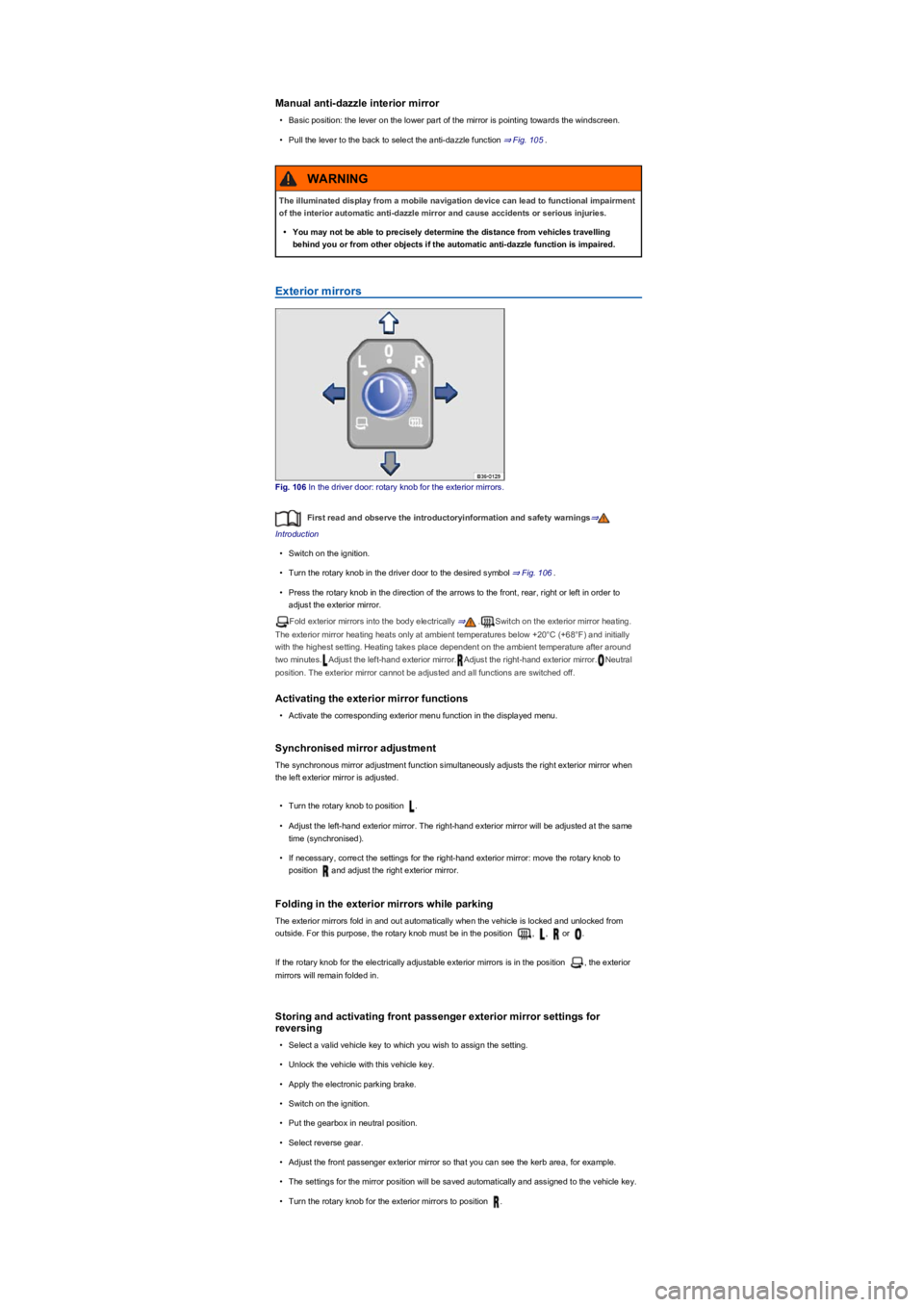
Fig. 106 In the driver door: rotary knob for the exterior mirrors.
First read and observe the introductoryinformation and safety warnings⇒
Introduction
•Switch on the ignition.
•Turn the rotary knob in the driver door to the desired symbol ⇒ Fig. 106.
•Press the rotary knob in the direction of the arrows to the front, rear, right or left in order to
adjust the exterior mirror.
Fold exterior mirrors into the body electrically ⇒.Switch on the exterior mirror heating.
The exterior mirror heating heats only at ambient temperatures below +20°C (+68°F) and initially
with the highest setting. Heating takes place dependent on the ambient temperature after around
two minutes.Adjust the left-hand exterior mirror.Adjust the right-hand exterior mirror.Neutral
position. The exterior mirror cannot be adjusted and all functions are switched off.
Activating the exterior mirror functions
•Activate the corresponding exterior menu function in the displayed menu.
Synchronised mirror adjustment
The synchronous mirror adjustment function simultaneously adjusts the right exterior mirror when
the left exterior mirror is adjusted.
•Turn the rotary knob to position .
•Adjust the left-hand exterior mirror. The right-hand exterior mirror will be adjusted at the same
time (synchronised).
•If necessary, correct the settings for the right-hand exterior mirror: move the rotary knob to
position and adjust the right exterior mirror.
Folding in the exterior mirrors while parking
The exterior mirrors fold in and out automatically when the vehicle is locked and unlocked from
outside. For this purpose, the rotary knob must be in the position , , or .
If the rotary knob for the electrically adjustable exterior mirrors is in the position , the exterior
mirrors will remain folded in.
Storing and activating front passenger exterior mirror settings for
reversing
•Select a valid vehicle key to which you wish to assign the setting.
•Unlock the vehicle with this vehicle key.
•Apply the electronic parking brake.
•Switch on the ignition.
•Put the gearbox in neutral position.
•Select reverse gear.
•Adjust the front passenger exterior mirror so that you can see the kerb area, for example.
•The settings for the mirror position will be saved automatically and assigned to the vehicle key.
•Turn the rotary knob for the exterior mirrors to position .
The illuminated display from a mobile navigation device can lead to functional impairment
of the interior automatic anti-dazzle mirror and cause accidents or serious injuries.
•You may not be able to precisely determine the distance from vehicles travelling
behind you or from other objects if the automatic anti-dazzle function is impaired.
WARNING
Page 117 of 341
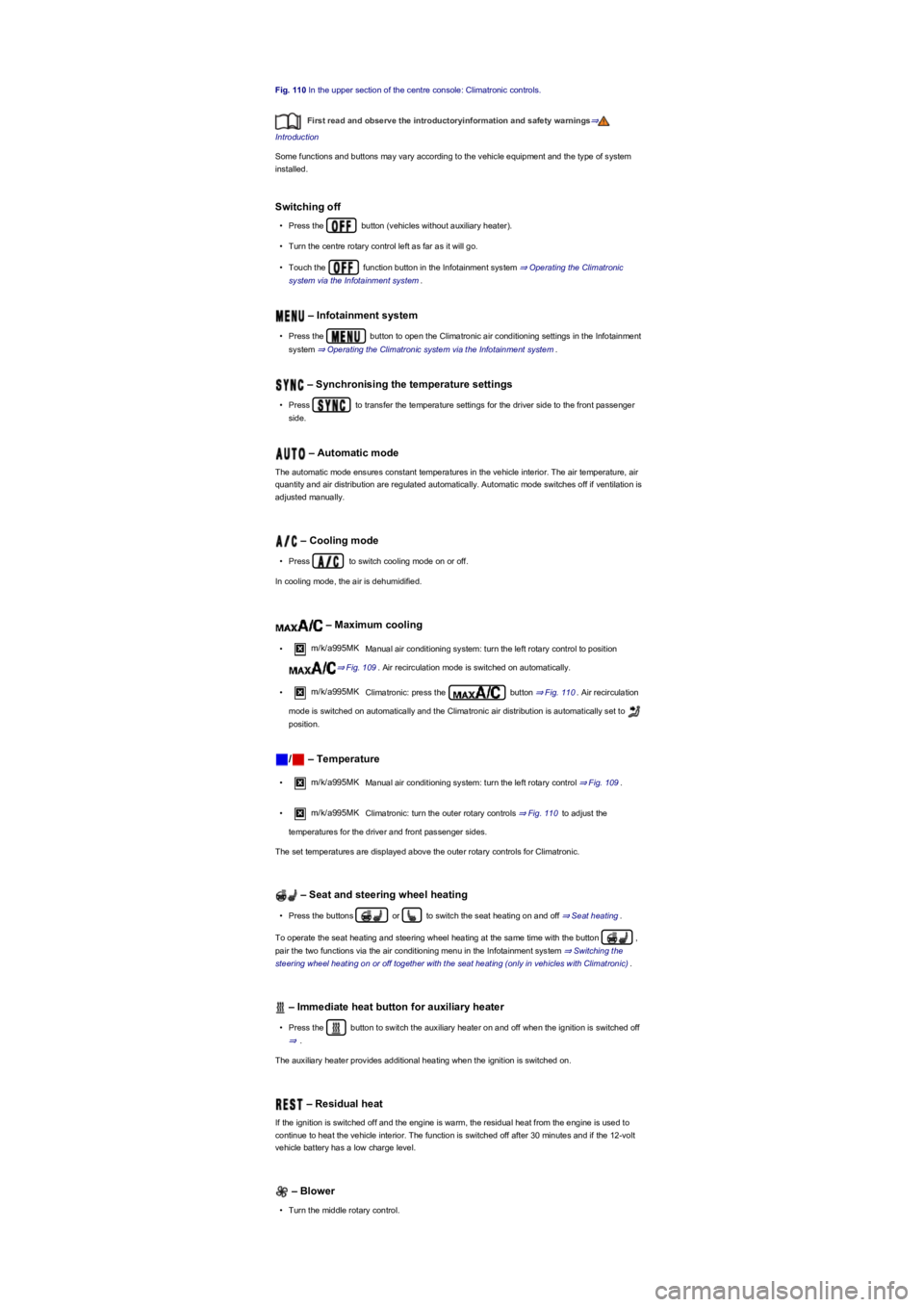
Fig. 110 In the upper section of the centre console: Climatronic controls.
First read and observe the introductoryinformation and safety warnings⇒
Introduction
Some functions and buttons may vary according to the vehicle equipment and the type of system
installed.
Switching off
•Press the button (vehicles without auxiliary heater).
•Turn the centre rotary control left as far as it will go.
•Touch the function button in the Infotainment system ⇒ Operating the Climatronic
system via the Infotainment system.
– Infotainment system
•Press the button to open the Climatronic air conditioning settings in the Infotainment
system ⇒ Operating the Climatronic system via the Infotainment system.
– Synchronising the temperature settings
•Press to transfer the temperature settings for the driver side to the front passenger
side.
– Automatic mode
The automatic mode ensures constant temperatures in the vehicle interior. The air temperature, air
quantity and air distribution are regulated automatically. Automatic mode switches off if ventilation is
adjusted manually.
– Cooling mode
•Press to switch cooling mode on or off.
In cooling mode, the air is dehumidified.
– Maximum cooling
•m/k/a995MK Manual air conditioning system: turn the left rotary control to position
⇒ Fig. 109. Air recirculation mode is switched on automatically.
•m/k/a995MK Climatronic: press the button ⇒ Fig. 110. Air recirculation
mode is switched on automatically and the Climatronic air distribution is automatically set to
position.
/ – Temperature
•m/k/a995MK Manual air conditioning system: turn the left rotary control ⇒ Fig. 109.
•m/k/a995MK Climatronic: turn the outer rotary controls ⇒ Fig. 110 to adjust the
temperatures for the driver and front passenger sides.
The set temperatures are displayed above the outer rotary controls for Climatronic.
– Seat and steering wheel heating
•Press the buttons or to switch the seat heating on and off ⇒ Seat heating.
To operate the seat heating and steering wheel heating at the same time with the button ,
pair the two functions via the air conditioning menu in the Infotainment system ⇒ Switching the
steering wheel heating on or off together with the seat heating (only in vehicles with Climatronic).
– Immediate heat button for auxiliary heater
•Press the button to switch the auxiliary heater on and off when the ignition is switched off
⇒.
The auxiliary heater provides additional heating when the ignition is switched on.
– Residual heat
If the ignition is switched off and the engine is warm, the residual heat from the engine is used to
continue to heat the vehicle interior. The function is switched off after 30 minutes and if the 12-volt
vehicle battery has a low charge level.
– Blower
•Turn the middle rotary control.
Page 118 of 341
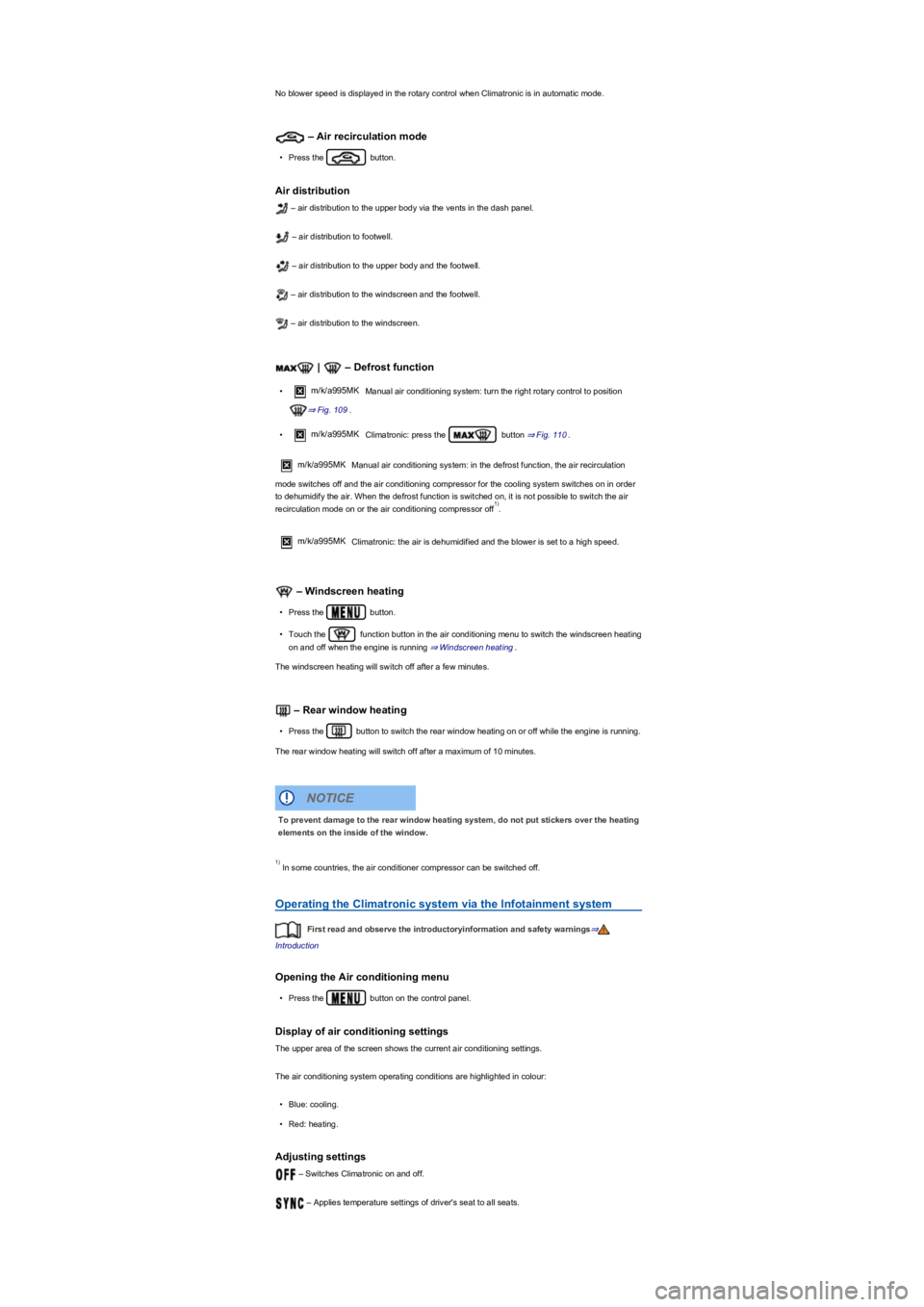
No blower speed is displayed in the rotary control when Climatronic is in automatic mode.
– Air recirculation mode
•Press the button.
Air distribution
– air distribution to the upper body via the vents in the dash panel.
– air distribution to footwell.
– air distribution to the upper body and the footwell.
– air distribution to the windscreen and the footwell.
– air distribution to the windscreen.
| – Defrost function
•m/k/a995MK Manual air conditioning system: turn the right rotary control to position
⇒ Fig. 109.
•m/k/a995MK Climatronic: press the button ⇒ Fig. 110.
m/k/a995MKManual air conditioning system: in the defrost function, the air recirculation
mode switches off and the air conditioning compressor for the cooling system switches on in order
to dehumidify the air. When the defrost function is switched on, it is not possible to switch the air
recirculation mode on or the air conditioning compressor off.
m/k/a995MK Climatronic: the air is dehumidified and the blower is set to a high speed.
– Windscreen heating
•Press the button.
•Touch the function button in the air conditioning menu to switch the windscreen heating
on and off when the engine is running ⇒ Windscreen heating.
The windscreen heating will switch off after a few minutes.
– Rear window heating
•Press the button to switch the rear window heating on or off while the engine is running.
The rear window heating will switch off after a maximum of 10 minutes.
In some countries, the air conditioner compressor can be switched off.
Operating the Climatronic system via the Infotainment system
First read and observe the introductoryinformation and safety warnings⇒
Introduction
Opening the Air conditioning menu
•Press the button on the control panel.
Display of air conditioning settings
The upper area of the screen shows the current air conditioning settings.
The air conditioning system operating conditions are highlighted in colour:
•Blue: cooling.
•Red: heating.
Adjusting settings
– Switches Climatronic on and off.
– Applies temperature settings of driver's seat to all seats.
1)
To prevent damage to the rear window heating system, do not put stickers over the heating
elements on the inside of the window.
NOTICE
1)
Page 119 of 341
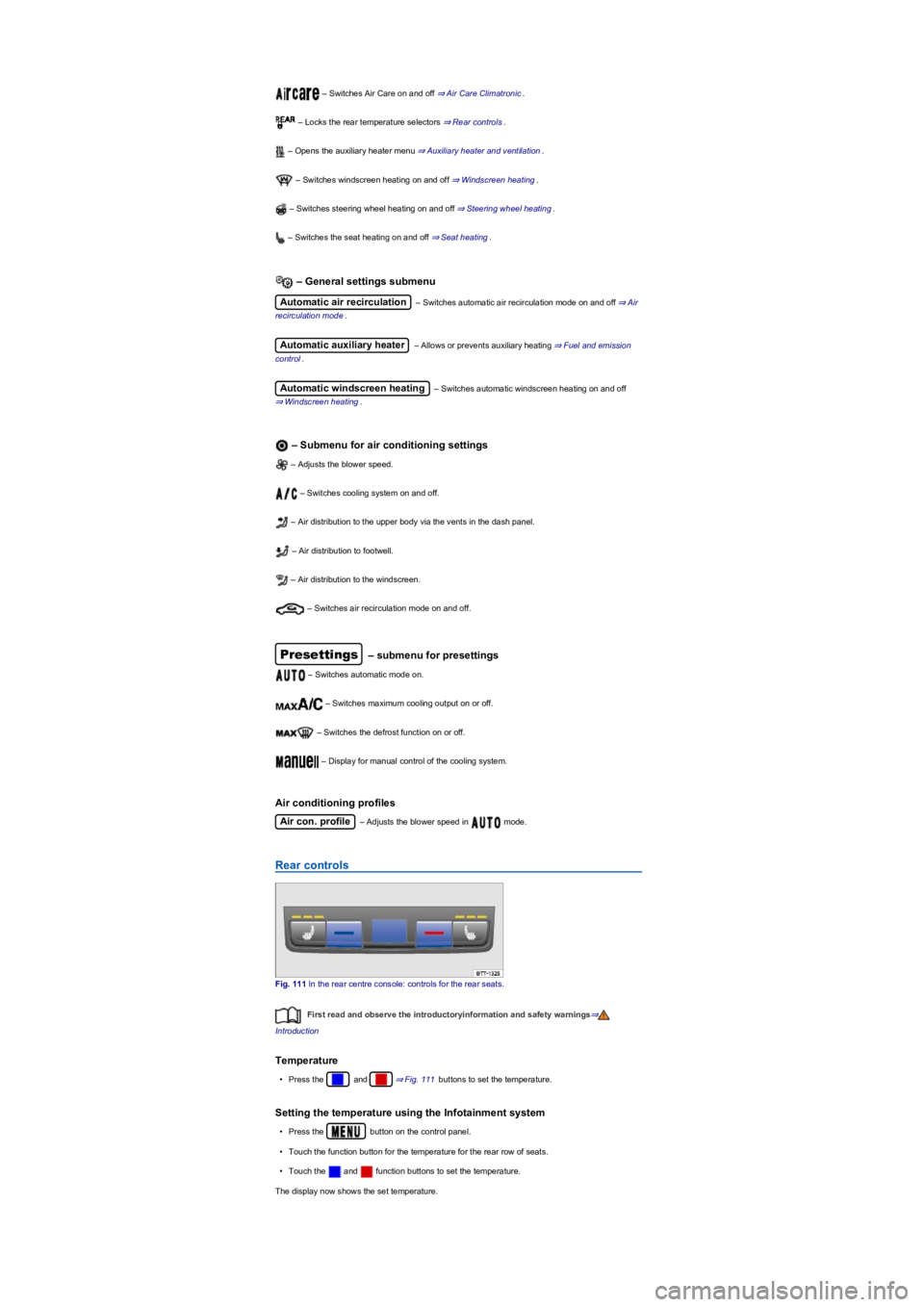
– Switches Air Care on and off ⇒ Air Care Climatronic.
– Locks the rear temperature selectors ⇒ Rear controls.
– Opens the auxiliary heater menu ⇒ Auxiliary heater and ventilation.
– Switches windscreen heating on and off ⇒ Windscreen heating.
– Switches steering wheel heating on and off ⇒ Steering wheel heating.
– Switches the seat heating on and off ⇒ Seat heating.
– General settings submenu
Automatic air recirculation – Switches automatic air recirculation mode on and off ⇒ Air
recirculation mode.
Automatic auxiliary heater – Allows or prevents auxiliary heating ⇒ Fuel and emission
control.
Automatic windscreen heating – Switches automatic windscreen heating on and off
⇒ Windscreen heating.
– Submenu for air conditioning settings
– Adjusts the blower speed.
– Switches cooling system on and off.
– Air distribution to the upper body via the vents in the dash panel.
– Air distribution to footwell.
– Air distribution to the windscreen.
– Switches air recirculation mode on and off.
Presettings – submenu for presettings
– Switches automatic mode on.
– Switches maximum cooling output on or off.
– Switches the defrost function on or off.
– Display for manual control of the cooling system.
Air conditioning profiles
Air con. profile – Adjusts the blower speed in mode.
Rear controls
Fig. 111 In the rear centre console: controls for the rear seats.
First read and observe the introductoryinformation and safety warnings⇒
Introduction
Temperature
•Press the and ⇒ Fig. 111 buttons to set the temperature.
Setting the temperature using the Infotainment system
•Press the button on the control panel.
•Touch the function button for the temperature for the rear row of seats.
•Touch the and function buttons to set the temperature.
The display now shows the set temperature.
Page 125 of 341
The auxiliary heater runs on for a short time after it is switched off manually or automatically so that
the remaining fuel in the system can be burnt off.
When the vehicle is at a standstill, the auxiliary heater can be activated up to three times in
succession for the maximum operating duration.
Operating noises can be heard if the auxiliary heater is switched on.
The 12-volt battery will discharge if the auxiliary heater or ventilation is run several times
over an extended period. Drive the vehicle for an appropriate distance in order to recharge the 12-
volt vehicle battery.
When parked on an incline, the fuel gauge indication (just above the reserve quantity) may
be inaccurate and lead to functional restrictions of the auxiliary heater.
The auxiliary heater may switch on automatically as a supplementary heating measure when
the engine is started at temperatures below +5°C (+41°F). The supplementary heating function is
switched off again automatically after a short time.
Programming the auxiliary heater and auxiliary ventilation
First read and observe the introductoryinformation and safety warnings⇒
Introduction
Opening the Auxiliary heater menu
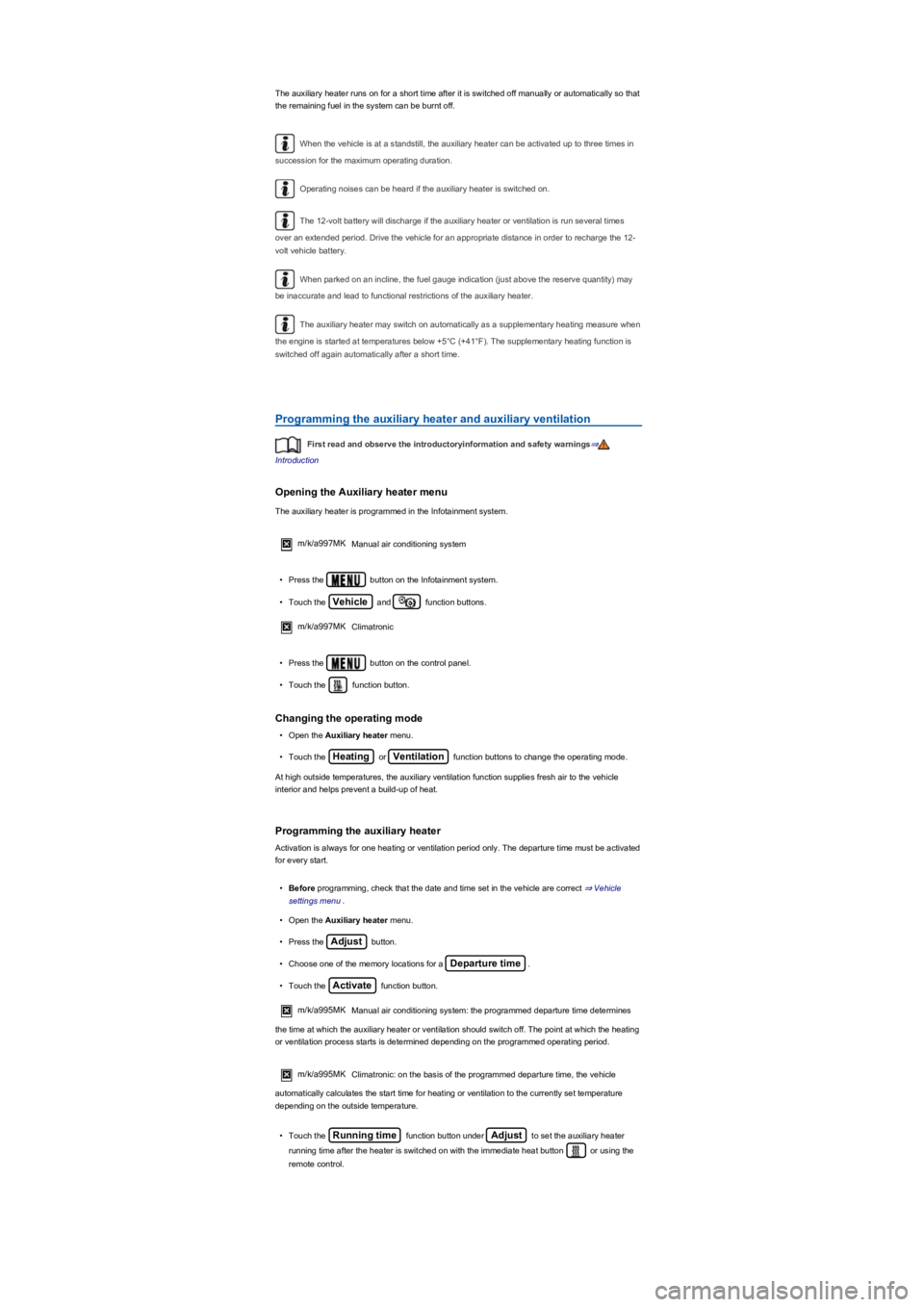
The auxiliary heater is programmed in the Infotainment system.
m/k/a997MK Manual air conditioning system
•Press the button on the Infotainment system.
•Touch the Vehicle and function buttons.
m/k/a997MK Climatronic
•Press the button on the control panel.
•Touch the function button.
Changing the operating mode
•Open the Auxiliary heater menu.
•Touch the Heating or Ventilation function buttons to change the operating mode.
At high outside temperatures, the auxiliary ventilation function supplies fresh air to the vehicle
interior and helps prevent a build-up of heat.
Programming the auxiliary heater
Activation is always for one heating or ventilation period only. The departure time must be activated
for every start.
•Before programming, check that the date and time set in the vehicle are correct ⇒ Vehicle
settings menu.
•Open the Auxiliary heater menu.
•Press the Adjust button.
•Choose one of the memory locations for a Departure time.
•Touch the Activate function button.
m/k/a995MKManual air conditioning system: the programmed departure time determines
the time at which the auxiliary heater or ventilation should switch off. The point at which the heating
or ventilation process starts is determined depending on the programmed operating period.
m/k/a995MK Climatronic: on the basis of the programmed departure time, the vehicle
automatically calculates the start time for heating or ventilation to the currently set temperature
depending on the outside temperature.
•Touch the Running time function button under Adjust to set the auxiliary heater
running time after the heater is switched on with the immediate heat button or using the
remote control.
Page 148 of 341
•Gently push the selector lever forwards ⊕ or back ㊀ to shift gear up or down ⇒ Fig. 124.
When moving the selector lever in the Tiptronic gate, do not press the lock button on the selector
lever.
Operating Tiptronic with the paddles
•Pull the right paddle ⇒ Fig. 125 towards the steering wheel to change up a gear.
•Pull the left paddle towards the steering wheel to change down a gear.
•To leave Tiptronic mode, pull the right paddle towards the steering wheel for approximately one
second.
Tiptronic is automatically deactivated if the selector paddles are not operated for some time and the
selector lever is not in the Tiptronic gate.
Driving with DSG dual clutch gearbox
The gearbox changes the forward gears up and down automatically.
Driving down hills
The steeper the gradient, the lower the gear you will need. Lower gears increase the braking effect
of the engine. Never allow the vehicle to roll down mountains or hills in the neutral position N.
•Reduce your speed.
•Push the selector lever from position D/S to the right into the Tiptronic gate ⇒ Changing gear
using Tiptronic.
•Gently push the selector lever to the rear to change down gear.
•OR: shift down using the paddles on the steering wheel ⇒ Changing gear using Tiptronic.
Stopping and pulling away on an uphill gradient
The steeper the uphill gradient, the lower the gear you will need.
If you wish to stop the vehicle or pull away when driving uphill you should use the Auto Hold
function ⇒ Electronic parking brake.
When you stop the vehicle on an incline and the vehicle remains in gear, the vehicle must always
be prevented from rolling by depressing the brake pedal or by applying the electronic parking brake.
The brake pedal or the electronic parking brake should not be released until you pull away ⇒.
Coasting with DSG dual clutch gearbox
In coasting mode, the momentum of the vehicle can be used to save fuel in conjunction with a
foresighted driving style. With the engine-off coasting function, the engine is not just disengaged,
but is also switched off. The engine no longer brakes the vehicle – the vehicle can roll for a longer
distance. The function is available only in the selector lever position D/S and at speeds of
approximately 30 – 130 km/h (18 mph – 80 mph).
An automatic engine start may take place in order to ensure reliable engine restarting and to
guarantee the power supply of the vehicle electrical system.
Triggering coasting
•Select the Eco driving profile from the driving profile selection menu ⇒ Driving profile selection
and 4MOTION Active Control.
•Remove your foot from accelerator pedal. The engine is disengaged and runs in coasting mode.
The vehicle rolls without the braking effect of the engine. The engine is automatically switched
off on vehicles with engine-off coasting function.
Cancelling coasting mode
•Depress the brake pedal briefly.
•OR: depress the accelerator or brake pedal briefly.
•OR: pull a paddle towards the steering wheel.
•OR: press the selector lever to the Tiptronic position.
Kickdown
The kick down function enables maximum acceleration in the selector lever position D/S or in the
Tiptronic position.
•When accelerating, the gearbox automatically shifts up to the next gear shortly before
the maximum permitted engine speed is reached.
•When shifting down a gear manually, the gearbox will not change gear until the engine
can no longer be overrevved.
NOTICE
®
®
Page 156 of 341
•Proactive occupant protection system
In vehicles with a DSG dual clutch gearbox, the system automatically changes to gear
position S when the Sport driving profile is selected. The system automatically switches to gear
position D when the Eco driving profile is selected. Since coasting is active in the Eco driving
profile, the gearbox programme E is additionally displayed on the instrument cluster display.
The driver can adjust certain vehicle functions irrespective of the selected driving profile. For
example, the driver can switch to gear position S when the Eco driving profile is selected.
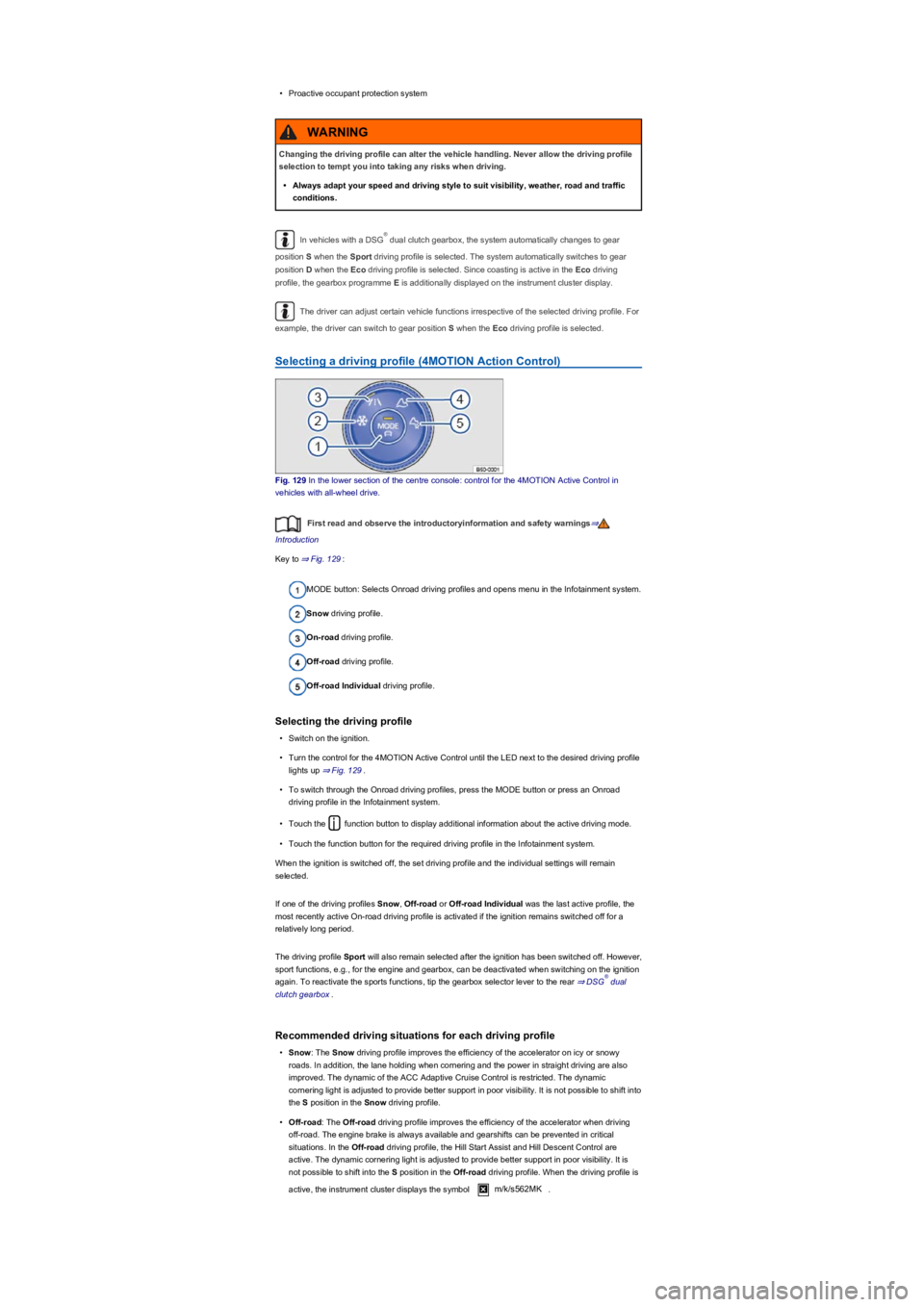
Selecting a driving profile (4MOTION Action Control)
Fig. 129 In the lower section of the centre console: control for the 4MOTION Active Control in
vehicles with all-wheel drive.
First read and observe the introductoryinformation and safety warnings⇒
Introduction
Key to ⇒ Fig. 129:
MODE button: Selects Onroad driving profiles and opens menu in the Infotainment system.
Snow driving profile.
On-road driving profile.
Off-road driving profile.
Off-road Individual driving profile.
Selecting the driving profile
•Switch on the ignition.
•Turn the control for the 4MOTION Active Control until the LED next to the desired driving profile
lights up ⇒ Fig. 129.
•To switch through the Onroad driving profiles, press the MODE button or press an Onroad
driving profile in the Infotainment system.
•Touch the function button to display additional information about the active driving mode.
•Touch the function button for the required driving profile in the Infotainment system.
When the ignition is switched off, the set driving profile and the individual settings will remain
selected.
If one of the driving profiles Snow, Off-road or Off-road Individual was the last active profile, the
most recently active On-road driving profile is activated if the ignition remains switched off for a
relatively long period.
The driving profile Sport will also remain selected after the ignition has been switched off. However,
sport functions, e.g., for the engine and gearbox, can be deactivated when switching on the ignition
again. To reactivate the sports functions, tip the gearbox selector lever to the rear ⇒ DSG dual
clutch gearbox.
Recommended driving situations for each driving profile
•Snow: The Snow driving profile improves the efficiency of the accelerator on icy or snowy
roads. In addition, the lane holding when cornering and the power in straight driving are also
improved. The dynamic of the ACC Adaptive Cruise Control is restricted. The dynamic
cornering light is adjusted to provide better support in poor visibility. It is not possible to shift into
the S position in the Snow driving profile.
•Off-road: The Off-road driving profile improves the efficiency of the accelerator when driving
off-road. The engine brake is always available and gearshifts can be prevented in critical
situations. In the Off-road driving profile, the Hill Start Assist and Hill Descent Control are
active. The dynamic cornering light is adjusted to provide better support in poor visibility. It is
not possible to shift into the S position in the Off-road driving profile. When the driving profile is
active, the instrument cluster displays the symbol m/k/s562MK.
Changing the driving profile can alter the vehicle handling. Never allow the driving profile
selection to tempt you into taking any risks when driving.
•Always adapt your speed and driving style to suit visibility, weather, road and traffic
conditions.
WARNING
®
®