menu VOLKSWAGEN TIGUAN 2017 Owner´s Manual
[x] Cancel search | Manufacturer: VOLKSWAGEN, Model Year: 2017, Model line: TIGUAN, Model: VOLKSWAGEN TIGUAN 2017Pages: 341, PDF Size: 9.14 MB
Page 34 of 341
Personalisation
First read and observe the introductoryinformation and safety warnings⇒
Introduction
The personalisation function allows personalised vehicle settings, such as air conditioning system,
instrument cluster or lighting settings, to be saved in a user account. You have four user accounts
available. Users are identified using the vehicle key upon unlocking the vehicle. One user account
is assigned to each vehicle key.
Changes to the setup will be assigned to the active user account and saved upon locking the
vehicle or changing the user account.
Welcome and user account selection
When personalisation is activated, the name of the current user account appears on the instrument
cluster display for approximately ten seconds after you switch on the ignition.
During this time, you can select a user account using the buttons on the wiper lever or multifunction
steering wheel ⇒ Operation and display in the Infotainment system.
When you select a user account, the saved vehicle settings are activated.
User management and setup
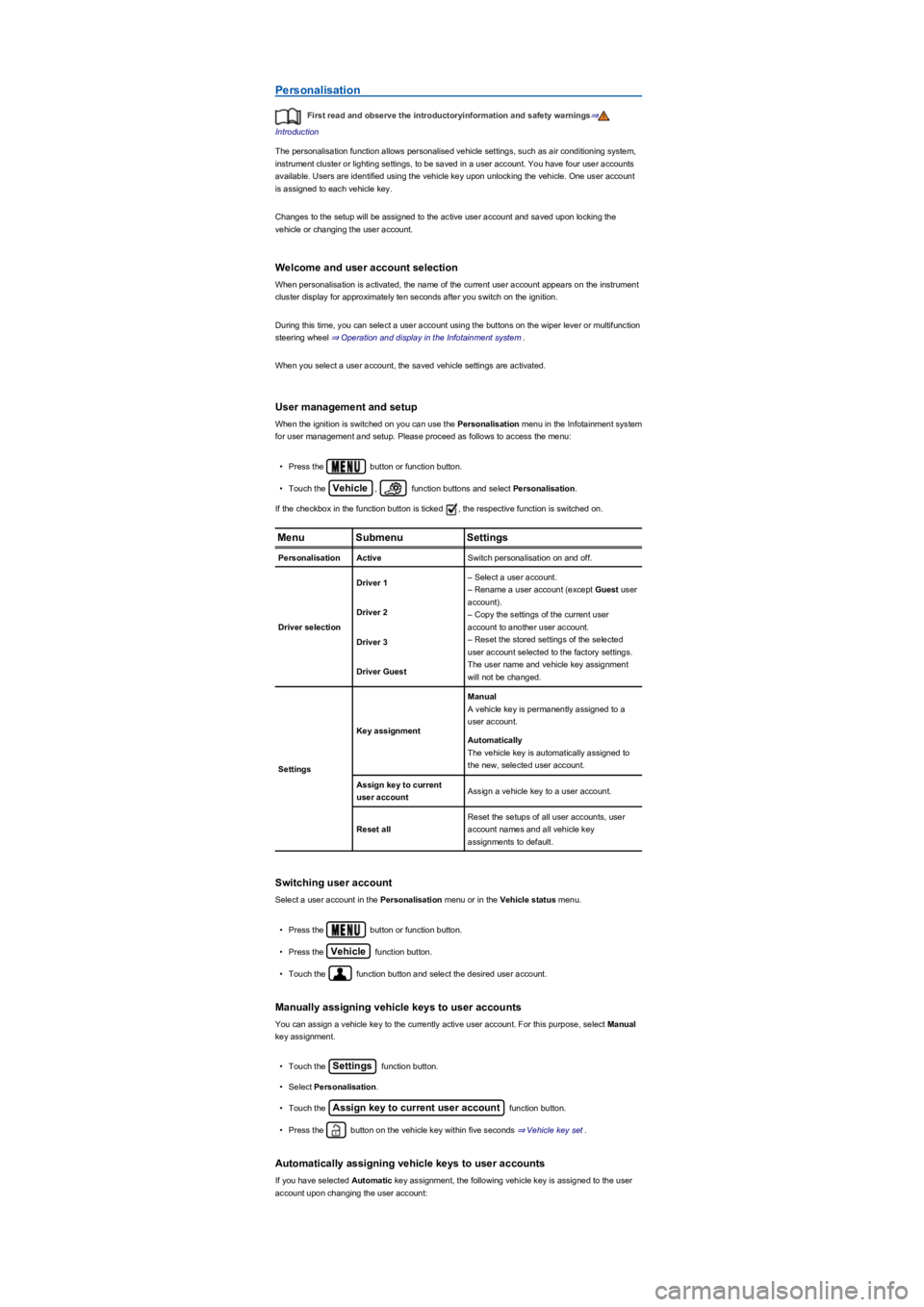
When the ignition is switched on you can use the Personalisation menu in the Infotainment system
for user management and setup. Please proceed as follows to access the menu:
•Press the button or function button.
•Touch the Vehicle, function buttons and select Personalisation.
If the checkbox in the function button is ticked , the respective function is switched on.
MenuSubmenuSettings
PersonalisationActiveSwitch personalisation on and off.
Driver selection
Driver 1– Select a user account.
– Rename a user account (except Guest user
account).
– Copy the settings of the current user
account to another user account.
– Reset the stored settings of the selected
user account selected to the factory settings.
The user name and vehicle key assignment
will not be changed.
Driver 2
Driver 3
Driver Guest
Settings
Key assignment
Manual
A vehicle key is permanently assigned to a
user account.
Automatically
The vehicle key is automatically assigned to
the new, selected user account.
Assign key to current
user accountAssign a vehicle key to a user account.
Reset all
Reset the setups of all user accounts, user
account names and all vehicle key
assignments to default.
Switching user account
Select a user account in the Personalisation menu or in the Vehicle status menu.
•Press the button or function button.
•Press the Vehicle function button.
•Touch the function button and select the desired user account.
Manually assigning vehicle keys to user accounts
You can assign a vehicle key to the currently active user account. For this purpose, select Manual
key assignment.
•Touch the Settings function button.
•Select Personalisation.
•Touch the Assign key to current user account function button.
•Press the button on the vehicle key within five seconds ⇒ Vehicle key set.
Automatically assigning vehicle keys to user accounts
If you have selected Automatic key assignment, the following vehicle key is assigned to the user
account upon changing the user account:
Page 35 of 341
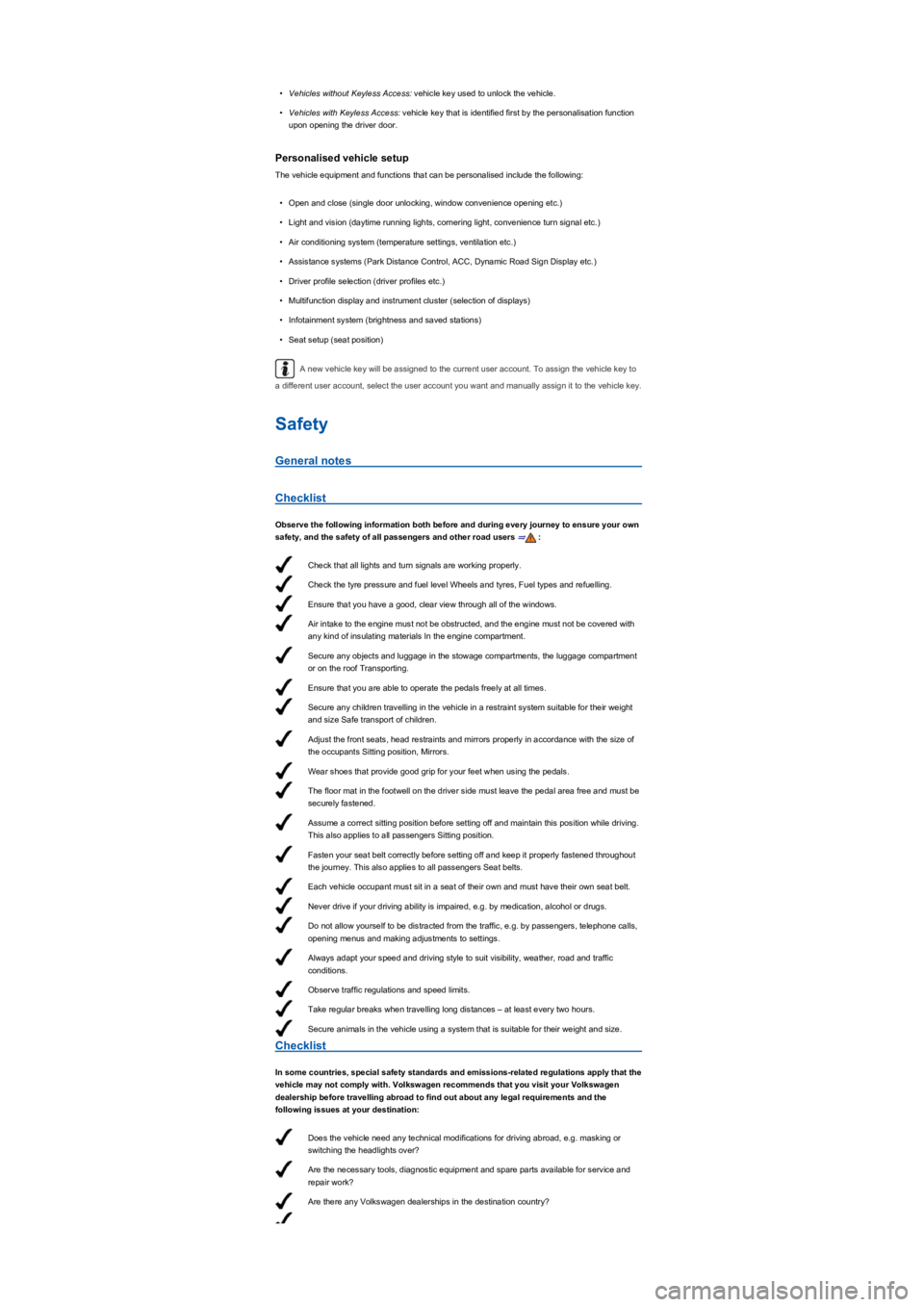
Check that all lights and turn signals are working properly.
Check the tyre pressure and fuel level Wheels and tyres, Fuel types and refuelling.
Ensure that you have a good, clear view through all of the windows.
Air intake to the engine must not be obstructed, and the engine must not be covered with
any kind of insulating materials In the engine compartment.
Secure any objects and luggage in the stowage compartments, the luggage compartment
or on the roof Transporting.
Ensure that you are able to operate the pedals freely at all times.
Secure any children travelling in the vehicle in a restraint system suitable for their weight
and size Safe transport of children.
Adjust the front seats, head restraints and mirrors properly in accordance with the size of
the occupants Sitting position, Mirrors.
Wear shoes that provide good grip for your feet when using the pedals.
The floor mat in the footwell on the driver side must leave the pedal area free and must be
securely fastened.
Assume a correct sitting position before setting off and maintain this position while driving.
This also applies to all passengers Sitting position.
Fasten your seat belt correctly before setting off and keep it properly fastened throughout
the journey. This also applies to all passengers Seat belts.
Each vehicle occupant must sit in a seat of their own and must have their own seat belt.
Never drive if your driving ability is impaired, e.g. by medication, alcohol or drugs.
Do not allow yourself to be distracted from the traffic, e.g. by passengers, telephone calls,
opening menus and making adjustments to settings.
Always adapt your speed and driving style to suit visibility, weather, road and traffic
conditions.
Observe traffic regulations and speed limits.
Take regular breaks when travelling long distances – at least every two hours.
Secure animals in the vehicle using a system that is suitable for their weight and size.
Does the vehicle need any technical modifications for driving abroad, e.g. masking or
switching the headlights over?
Are the necessary tools, diagnostic equipment and spare parts available for service and
repair work?
Are there any Volkswagen dealerships in the destination country?
•Vehicles without Keyless Access: vehicle key used to unlock the vehicle.
•Vehicles with Keyless Access: vehicle key that is identified first by the personalisation function
upon opening the driver door.
Personalised vehicle setup
The vehicle equipment and functions that can be personalised include the following:
•Open and close (single door unlocking, window convenience opening etc.)
•Light and vision (daytime running lights, cornering light, convenience turn signal etc.)
•Air conditioning system (temperature settings, ventilation etc.)
•Assistance systems (Park Distance Control, ACC, Dynamic Road Sign Display etc.)
•Driver profile selection (driver profiles etc.)
•Multifunction display and instrument cluster (selection of displays)
•Infotainment system (brightness and saved stations)
•Seat setup (seat position)
A new vehicle key will be assigned to the current user account. To assign the vehicle key to
a different user account, select the user account you want and manually assign it to the vehicle key.
Safety
General notes
Checklist
Observe the following information both before and during every journey to ensure your own
safety, and the safety of all passengers and other road users ⇒:
Checklist
In some countries, special safety standards and emissions-related regulations apply that the
vehicle may not comply with. Volkswagen recommends that you visit your Volkswagen
dealership before travelling abroad to find out about any legal requirements and the
following issues at your destination:
Page 72 of 341
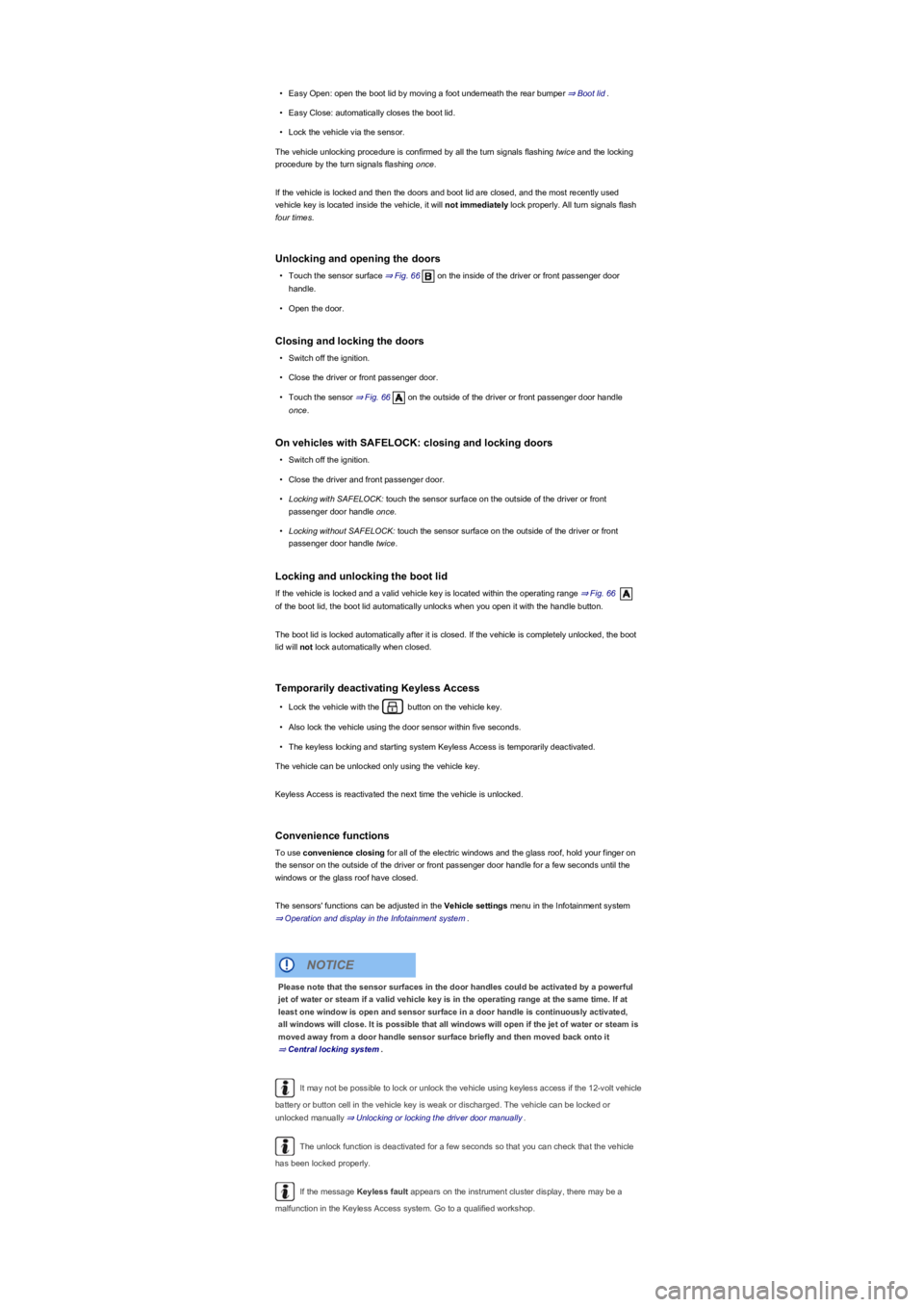
•Easy Open: open the boot lid by moving a foot underneath the rear bumper ⇒ Boot lid.
•Easy Close: automatically closes the boot lid.
•Lock the vehicle via the sensor.
The vehicle unlocking procedure is confirmed by all the turn signals flashing twice and the locking
procedure by the turn signals flashing once.
If the vehicle is locked and then the doors and boot lid are closed, and the most recently used
vehicle key is located inside the vehicle, it will not immediately lock properly. All turn signals flash
four times.
Unlocking and opening the doors
•Touch the sensor surface ⇒ Fig. 66 on the inside of the driver or front passenger door
handle.
•Open the door.
Closing and locking the doors
•Switch off the ignition.
•Close the driver or front passenger door.
•Touch the sensor ⇒ Fig. 66 on the outside of the driver or front passenger door handle
once.
On vehicles with SAFELOCK: closing and locking doors
•Switch off the ignition.
•Close the driver and front passenger door.
•Locking with SAFELOCK: touch the sensor surface on the outside of the driver or front
passenger door handle once.
•Locking without SAFELOCK: touch the sensor surface on the outside of the driver or front
passenger door handle twice.
Locking and unlocking the boot lid
If the vehicle is locked and a valid vehicle key is located within the operating range ⇒ Fig. 66
of the boot lid, the boot lid automatically unlocks when you open it with the handle button.
The boot lid is locked automatically after it is closed. If the vehicle is completely unlocked, the boot
lid will not lock automatically when closed.
Temporarily deactivating Keyless Access
•Lock the vehicle with the button on the vehicle key.
•Also lock the vehicle using the door sensor within five seconds.
•The keyless locking and starting system Keyless Access is temporarily deactivated.
The vehicle can be unlocked only using the vehicle key.
Keyless Access is reactivated the next time the vehicle is unlocked.
Convenience functions
To use convenience closing for all of the electric windows and the glass roof, hold your finger on
the sensor on the outside of the driver or front passenger door handle for a few seconds until the
windows or the glass roof have closed.
The sensors' functions can be adjusted in the Vehicle settings menu in the Infotainment system
⇒ Operation and display in the Infotainment system.
It may not be possible to lock or unlock the vehicle using keyless access if the 12-volt vehicle
battery or button cell in the vehicle key is weak or discharged. The vehicle can be locked or
unlocked manually ⇒ Unlocking or locking the driver door manually.
The unlock function is deactivated for a few seconds so that you can check that the vehicle
has been locked properly.
If the message Keyless fault appears on the instrument cluster display, there may be a
malfunction in the Keyless Access system. Go to a qualified workshop.
Please note that the sensor surfaces in the door handles could be activated by a powerful
jet of water or steam if a valid vehicle key is in the operating range at the same time. If at
least one window is open and sensor surface in a door handle is continuously activated,
all windows will close. It is possible that all windows will open if the jet of water or steam is
moved away from a door handle sensor surface briefly and then moved back onto it
⇒ Central locking system.
NOTICE
Page 82 of 341
•Stand behind the centre of the bumper.
•Move your foot and shin quickly towards the bumper. The shin must be placed in the upper area
of the sensor, and the foot in the lower area ⇒ Fig. 73.
•Then quickly move your foot and shin away from the sensor area again. The boot lid will then
open.
The boot lid will lock again automatically, provided that the vehicle was locked beforehand and as
long as there is no valid vehicle key inside the vehicle.
Activating or deactivating Easy Open
You can activate and deactivate Easy Open in the Vehicle settings menu in the Infotainment
system ⇒ Operation and display in the Infotainment system.
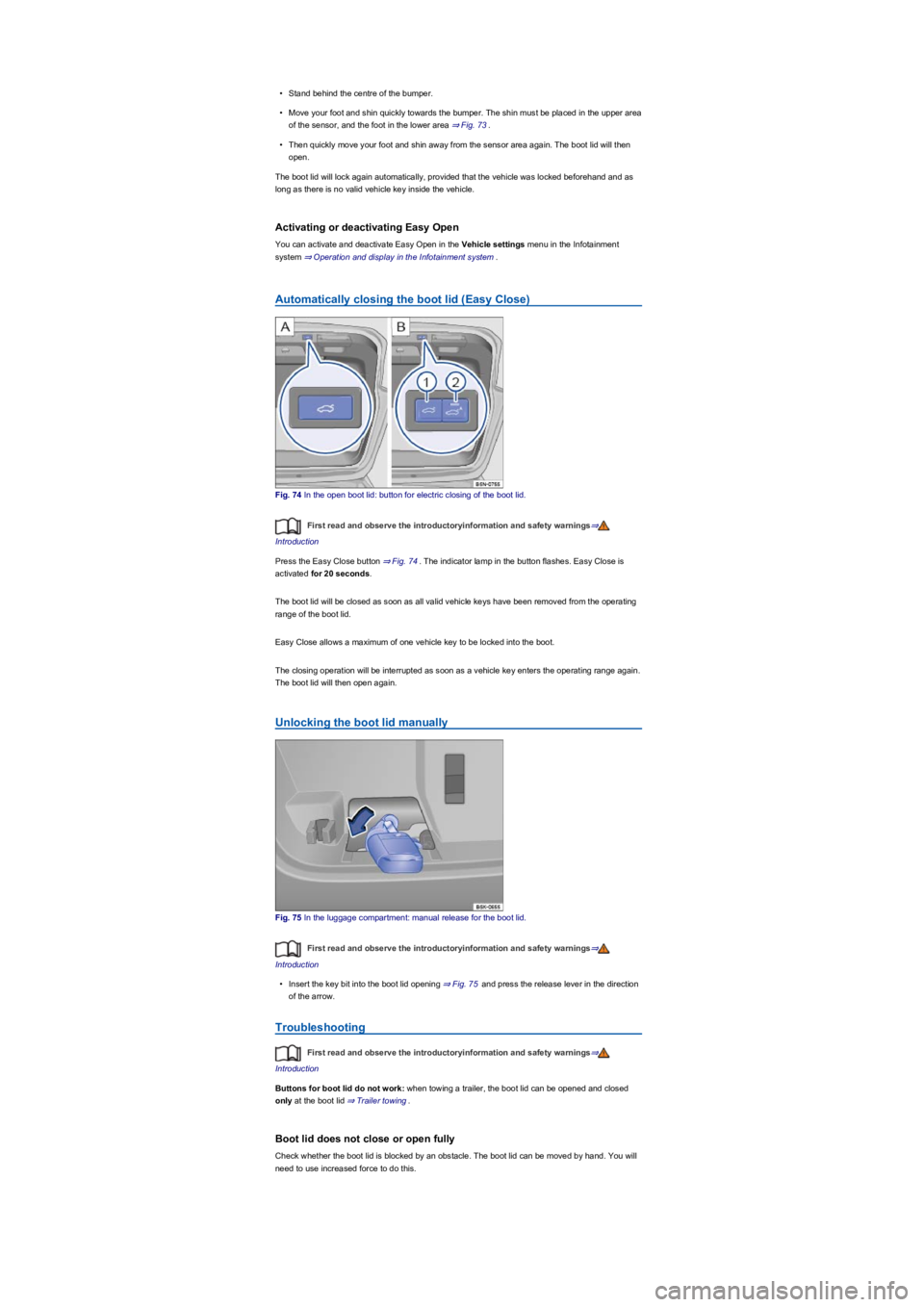
Automatically closing the boot lid (Easy Close)
Fig. 74 In the open boot lid: button for electric closing of the boot lid.
First read and observe the introductoryinformation and safety warnings⇒
Introduction
Press the Easy Close button ⇒ Fig. 74. The indicator lamp in the button flashes. Easy Close is
activated for 20 seconds.
The boot lid will be closed as soon as all valid vehicle keys have been removed from the operating
range of the boot lid.
Easy Close allows a maximum of one vehicle key to be locked into the boot.
The closing operation will be interrupted as soon as a vehicle key enters the operating range again.
The boot lid will then open again.
Unlocking the boot lid manually
Fig. 75 In the luggage compartment: manual release for the boot lid.
First read and observe the introductoryinformation and safety warnings⇒
Introduction
•Insert the key bit into the boot lid opening ⇒ Fig. 75 and press the release lever in the direction
of the arrow.
Troubleshooting
First read and observe the introductoryinformation and safety warnings⇒
Introduction
Buttons for boot lid do not work: when towing a trailer, the boot lid can be opened and closed
only at the boot lid ⇒ Trailer towing.
Boot lid does not close or open fully
Check whether the boot lid is blocked by an obstacle. The boot lid can be moved by hand. You will
need to use increased force to do this.
Page 101 of 341
Convenience turn signal
To operate the convenience turn signal, push the turn signal and main beam lever up or down to
the point where you meet resistance and then release the lever. The turn signal flashes 3 times.
To cancel the convenience turn signal, immediately move the lever in the opposite direction up to
the pressure point and then release it.
The convenience turn signal can be activated and deactivated in the Infotainment system in
the Vehicle settings menu ⇒ Operation and display in the Infotainment system:
The hazard warning lights also work when the ignition is switched off ⇒ In an emergency.
Some settings can be stored in the user accounts of the personalisation function and
therefore change automatically when the user account changes ⇒ Personalisation.
Vehicle lighting
Switching lights on and off
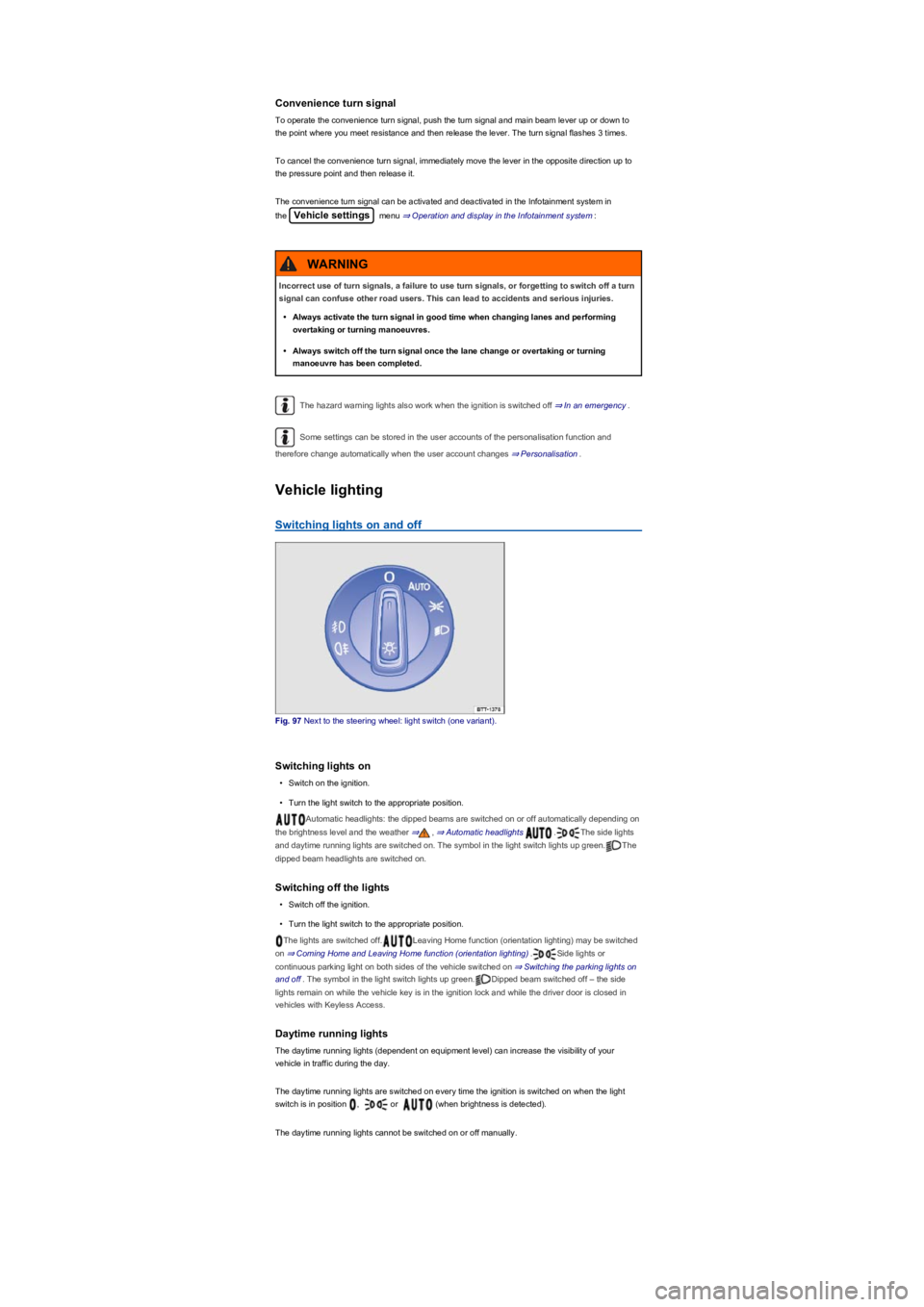
Fig. 97 Next to the steering wheel: light switch (one variant).
Switching lights on
•Switch on the ignition.
•Turn the light switch to the appropriate position.
Automatic headlights: the dipped beams are switched on or off automatically depending on
the brightness level and the weather ⇒, ⇒ Automatic headlights .The side lights
and daytime running lights are switched on. The symbol in the light switch lights up green.The
dipped beam headlights are switched on.
Switching off the lights
•Switch off the ignition.
•Turn the light switch to the appropriate position.
The lights are switched off.Leaving Home function (orientation lighting) may be switched
on ⇒ Coming Home and Leaving Home function (orientation lighting).Side lights or
continuous parking light on both sides of the vehicle switched on ⇒ Switching the parking lights on
and off. The symbol in the light switch lights up green.Dipped beam switched off – the side
lights remain on while the vehicle key is in the ignition lock and while the driver door is closed in
vehicles with Keyless Access.
Daytime running lights
The daytime running lights (dependent on equipment level) can increase the visibility of your
vehicle in traffic during the day.
The daytime running lights are switched on every time the ignition is switched on when the light
switch is in position , or (when brightness is detected).
The daytime running lights cannot be switched on or off manually.
Incorrect use of turn signals, a failure to use turn signals, or forgetting to switch off a turn
signal can confuse other road users. This can lead to accidents and serious injuries.
•Always activate the turn signal in good time when changing lanes and performing
overtaking or turning manoeuvres.
•Always switch off the turn signal once the lane change or overtaking or turning
manoeuvre has been completed.
WARNING
Page 102 of 341
When reverse gear is engaged, the cornering light on both sides of the vehicle switches on
to provide better illumination of the area when manoeuvring.
Switching the fog lights on and off
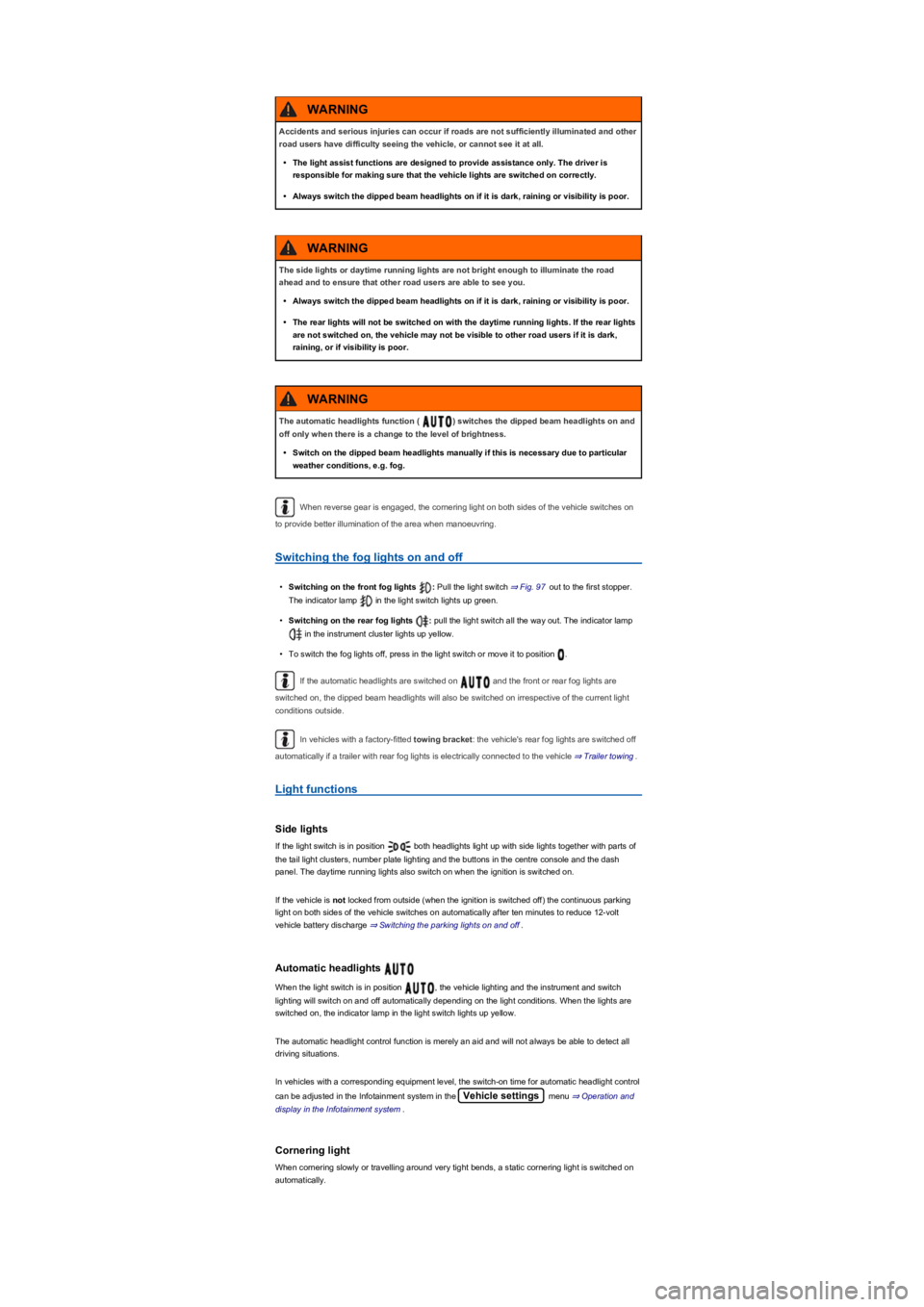
•Switching on the front fog lights : Pull the light switch ⇒ Fig. 97 out to the first stopper.
The indicator lamp in the light switch lights up green.
•Switching on the rear fog lights : pull the light switch all the way out. The indicator lamp
in the instrument cluster lights up yellow.
•To switch the fog lights off, press in the light switch or move it to position .
If the automatic headlights are switched on and the front or rear fog lights are
switched on, the dipped beam headlights will also be switched on irrespective of the current light
conditions outside.
In vehicles with a factory-fitted towing bracket: the vehicle's rear fog lights are switched off
automatically if a trailer with rear fog lights is electrically connected to the vehicle ⇒ Trailer towing.
Light functions
Side lights
If the light switch is in position both headlights light up with side lights together with parts of
the tail light clusters, number plate lighting and the buttons in the centre console and the dash
panel. The daytime running lights also switch on when the ignition is switched on.
If the vehicle is not locked from outside (when the ignition is switched off) the continuous parking
light on both sides of the vehicle switches on automatically after ten minutes to reduce 12-volt
vehicle battery discharge ⇒ Switching the parking lights on and off.
Automatic headlights
When the light switch is in position , the vehicle lighting and the instrument and switch
lighting will switch on and off automatically depending on the light conditions. When the lights are
switched on, the indicator lamp in the light switch lights up yellow.
The automatic headlight control function is merely an aid and will not always be able to detect all
driving situations.
In vehicles with a corresponding equipment level, the switch-on time for automatic headlight control
can be adjusted in the Infotainment system in the Vehicle settings menu ⇒ Operation and
display in the Infotainment system.
Cornering light
When cornering slowly or travelling around very tight bends, a static cornering light is switched on
automatically.
Accidents and serious injuries can occur if roads are not sufficiently illuminated and other
road users have difficulty seeing the vehicle, or cannot see it at all.
•The light assist functions are designed to provide assistance only. The driver is
responsible for making sure that the vehicle lights are switched on correctly.
•Always switch the dipped beam headlights on if it is dark, raining or visibility is poor.
WARNING
The side lights or daytime running lights are not bright enough to illuminate the road
ahead and to ensure that other road users are able to see you.
•Always switch the dipped beam headlights on if it is dark, raining or visibility is poor.
•The rear lights will not be switched on with the daytime running lights. If the rear lights
are not switched on, the vehicle may not be visible to other road users if it is dark,
raining, or if visibility is poor.
WARNING
The automatic headlights function ( ) switches the dipped beam headlights on and
off only when there is a change to the level of brightness.
•Switch on the dipped beam headlights manually if this is necessary due to particular
weather conditions, e.g. fog.
WARNING
Page 103 of 341
Dynamic cornering light (AFS)
Swivelling lamps automatically improve the lighting of the road when cornering, and even when you
are not driving round a corner. The dynamic cornering light only works at speeds above
approximately 10 km/h (6 mph) and when the dipped beam headlights are switched on.
In vehicles with a corresponding equipment level, the dynamic cornering light can be activated and
deactivated in the Infotainment system in the Vehicle settings menu ⇒ Operation and
display in the Infotainment system:
Signal tones if lights are not switched off
If the key is removed from the ignition lock and the driver door is opened, a signal tone will sound in
the following situations:
•If the parking light is switched on.
•The light switch is in position or .
When the Coming Home function is switched on, no signal tone will be given as a reminder that a
light is still switched on when leaving the vehicle.
Some settings can be stored in the user accounts of the personalisation function and
therefore change automatically when the user account changes ⇒ Personalisation.
Main beam
Switching main beam on and off
Fig. 98 On left of the steering column: turn signal and main beam lever.
•Switch on the ignition and dipped beam.
•Move the turn signal and main beam lever from the centre position to the following position:
Main beam switched on.
Operate the headlight flasher or switch off the main beam. The headlight flasher comes on
for as long as the lever is pulled.
When the main beam or headlight flasher are switched on, the blue indicator lamp in the
instrument cluster lights up.
Main-beam control
Depending on the vehicle equipment level, advanced main-beam control may also be available
⇒ Main-beam control.
Main-beam control
The main-beam control automatically dips the headlights when oncoming vehicles and/or vehicles
driving in front are detected. Main-beam control normally also recognises illuminated areas such as
towns and deactivates main beam while driving through them.
Within the limits of the system, main-beam control automatically switches the main beam on at
speeds of over approximately 60 km/h (37 mph), depending on ambient and traffic conditions, and
switches it off again at speeds under approximately 30 km/h (18 mph) ⇒.
There are two versions of the main-beam control system:
•Main-beam control (Light Assist). Main-beam control automatically switches main beam on and
off when other road users are detected.
•Advanced main-beam control (Dynamic Light Assist) ⇒ Advanced main-beam control (Dynamic
Light Assist).
Incorrect use of the main beam headlights can lead to accidents and serious injuries as
the main beam headlights can distract and dazzle other road users.
WARNING
Page 104 of 341
In vehicles with a corresponding equipment level, main-beam control can be activated and
deactivated in the Infotainment system in the Vehicle settings menu ⇒ Operation and
display in the Infotainment system:
Switching on main beam control
•Switch on the ignition and turn the light switch to position .
•Tap the turn signal and main beam lever forwards out of the basic position.
When the main-beam control is switched on, the indicator lamp is shown on the instrument
cluster display.
Switching off main beam control
•Pull back the turn signal and main beam lever.
•OR: turn the light switch to a position that is not .
•OR: switch off the ignition.
•OR: push the turn signal and main beam lever forwards to switch on the manual main beam.
Advanced main-beam control (Dynamic Light Assist)
Advanced main-beam control provides maximum illumination for the road and the surrounding area.
At the same time, it prevents vehicles in front or oncoming vehicles from being dazzled. The system
uses a camera to detect other road users and their distance from your vehicle and covers part of
the headlights appropriately. If the system can no longer prevent other road users from being
dazzled, the main beams are switched off automatically.
System limits
The main beam must be switched off manually under the following conditions because it is not
switched off in time or not switched off at all by the main beam control:
•In poorly lit streets where there are highly-reflective signs.
•Other road users with insufficient lighting facilities, such as pedestrians, cyclists.
•In tight bends, brows of hills or depressions in the land or half-hidden oncoming traffic.
•With oncoming traffic on streets with a central barrier where the driver can see clearly over the
central barrier e.g. truck drivers.
•In fog, snow or heavy rain.
•In dusty or sandy areas.
•Damage to the windscreen in the camera's vision field.
•If the viewing field of the camera is misted up, dirty, covered by a sticker, snow or ice.
•If the camera is broken or the power supply is interrupted.
Light-emitting objects in the camera's field of operation, e.g. mobile navigation devices, could
impair the functions of the main-beam control system (Light Assist).
Parking light
Switching the parking lights on and off
Do not let the extra convenience afforded by main beam control tempt you into taking any
risks when driving – this can cause accidents. The system is not a substitute for the full
concentration of the driver.
•Always check the lights yourself and adjust them to the prevailing conditions for lights,
vision and road traffic.
•The main beam control may not be able to recognise all driving situations correctly and
may not work properly in certain situations.
•If the camera's field of view is dirty, covered or damaged, the function of the main
beam control may be impaired. This also applies if changes are made to the vehicle's
lighting system, for example if additional headlights are fitted.
WARNING
Please observe the following points in order to avoid impairing the proper function of the
system:
•Regularly clean the camera's field of view, and keep it free from snow and ice.
•Do not cover the camera's field of view.
•Regularly check the area of the windscreen that is in the camera's field of view for
damage.
NOTICE
Page 105 of 341
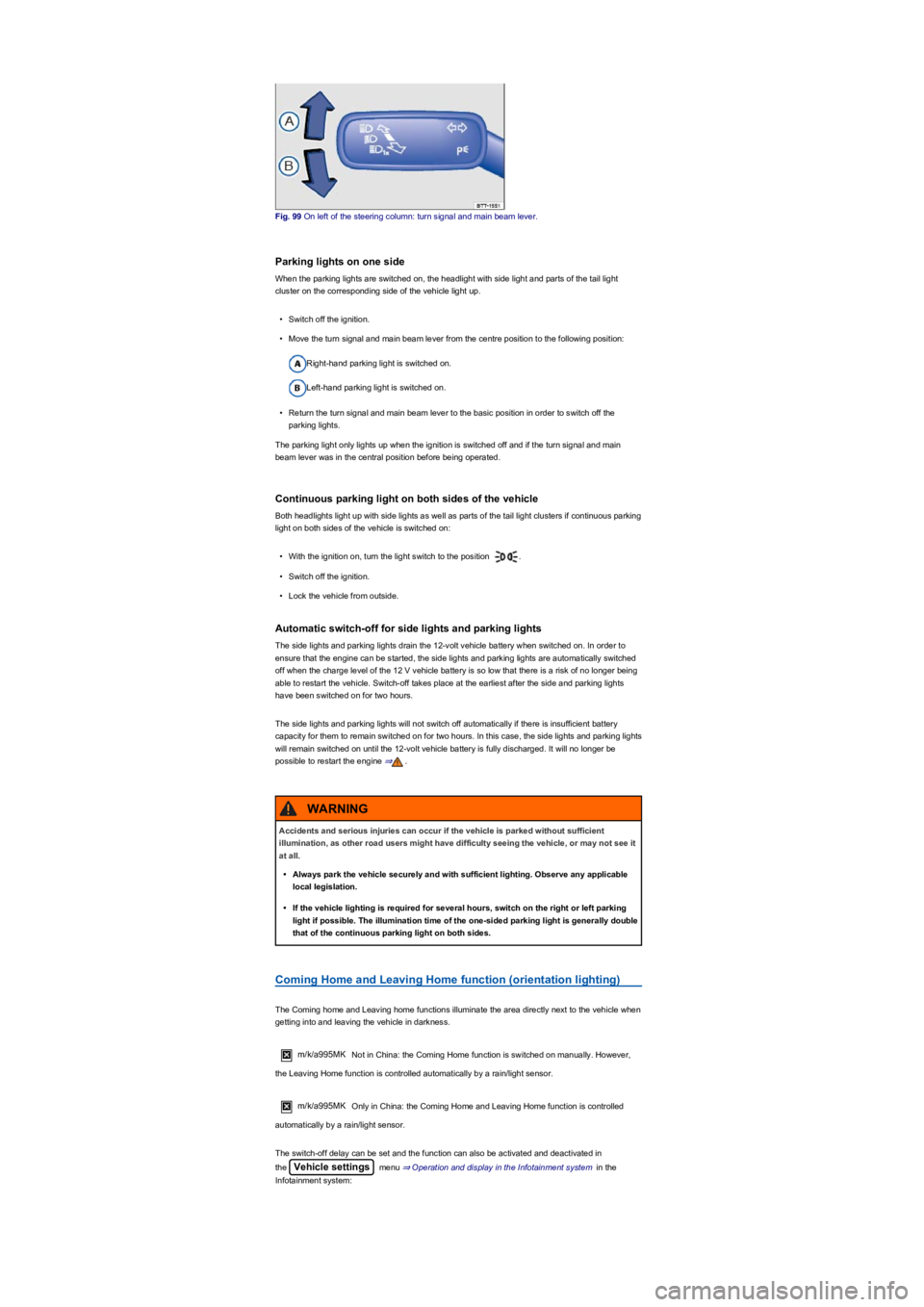
Fig. 99 On left of the steering column: turn signal and main beam lever.
Parking lights on one side
When the parking lights are switched on, the headlight with side light and parts of the tail light
cluster on the corresponding side of the vehicle light up.
•Switch off the ignition.
•Move the turn signal and main beam lever from the centre position to the following position:
Right-hand parking light is switched on.
Left-hand parking light is switched on.
•Return the turn signal and main beam lever to the basic position in order to switch off the
parking lights.
The parking light only lights up when the ignition is switched off and if the turn signal and main
beam lever was in the central position before being operated.
Continuous parking light on both sides of the vehicle
Both headlights light up with side lights as well as parts of the tail light clusters if continuous parking
light on both sides of the vehicle is switched on:
•With the ignition on, turn the light switch to the position .
•Switch off the ignition.
•Lock the vehicle from outside.
Automatic switch-off for side lights and parking lights
The side lights and parking lights drain the 12-volt vehicle battery when switched on. In order to
ensure that the engine can be started, the side lights and parking lights are automatically switched
off when the charge level of the 12 V vehicle battery is so low that there is a risk of no longer being
able to restart the vehicle. Switch-off takes place at the earliest after the side and parking lights
have been switched on for two hours.
The side lights and parking lights will not switch off automatically if there is insufficient battery
capacity for them to remain switched on for two hours. In this case, the side lights and parking lights
will remain switched on until the 12-volt vehicle battery is fully discharged. It will no longer be
possible to restart the engine ⇒.
Coming Home and Leaving Home function (orientation lighting)
The Coming home and Leaving home functions illuminate the area directly next to the vehicle when
getting into and leaving the vehicle in darkness.
m/k/a995MK Not in China: the Coming Home function is switched on manually. However,
the Leaving Home function is controlled automatically by a rain/light sensor.
m/k/a995MK Only in China: the Coming Home and Leaving Home function is controlled
automatically by a rain/light sensor.
The switch-off delay can be set and the function can also be activated and deactivated in
the Vehicle settings menu ⇒ Operation and display in the Infotainment system in the
Infotainment system:
Accidents and serious injuries can occur if the vehicle is parked without sufficient
illumination, as other road users might have difficulty seeing the vehicle, or may not see it
at all.
•Always park the vehicle securely and with sufficient lighting. Observe any applicable
local legislation.
•If the vehicle lighting is required for several hours, switch on the right or left parking
light if possible. The illumination time of the one-sided parking light is generally double
that of the continuous parking light on both sides.
WARNING
Page 106 of 341
Switching on the Coming Home function
m/k/a999MKNot in China
•Switch off the ignition.
•Operate the headlight flasher for approximately one second.
The Coming Home lighting is switched on when the driver door is opened. The switch-off delay
starts when the last vehicle door or the boot lid has been closed.
Switching on the Coming Home function
m/k/a999MKOnly in China
•Switch off the ignition.
The Coming Home lighting is switched on when the light switch is in position and the
rain/light sensor detects that it is dark.
The switch-off delay starts when the last vehicle door or the boot lid has been closed.
Switching off the Coming home function
•Automatically after the set switch-off delay has elapsed.
•OR: automatically if a vehicle door or the boot lid is still open approximately 30 seconds after
switching on.
•OR: turn light switch to position .
•OR: switch on the ignition.
Switching on the Leaving home function
•Unlock the vehicle when the light switch is in position and the rain/light sensor detects
that it is dark.
Switching off the Leaving home function
•Automatically after the switch-off delay.
•OR: lock the vehicle.
•OR: turn light switch to position .
•OR: switch on the ignition.
Some settings can be stored in the user accounts of the personalisation function and
therefore change automatically when the user account changes ⇒ Personalisation.
Headlights
Headlight range control
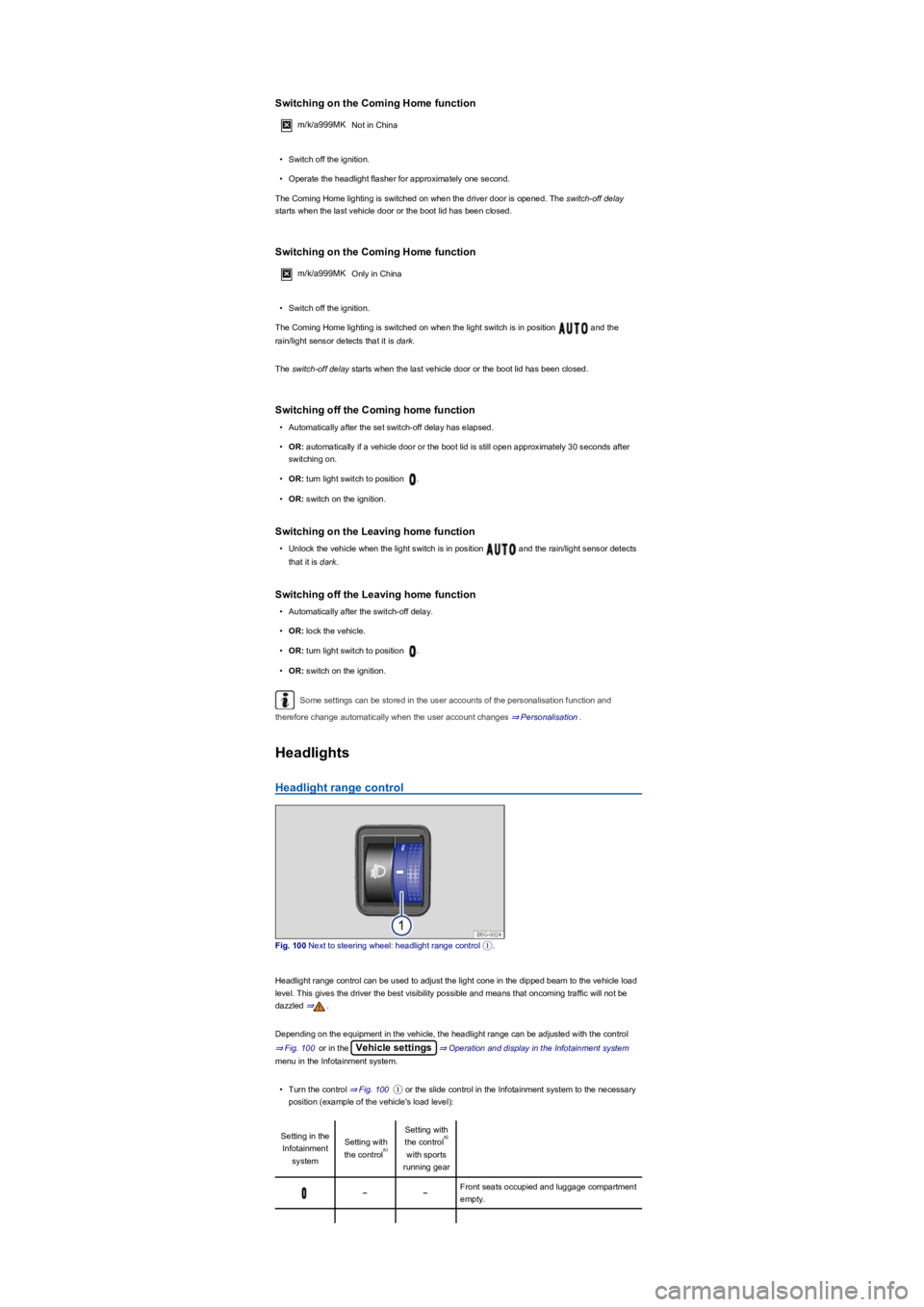
Fig. 100 Next to steering wheel: headlight range control ①.
Headlight range control can be used to adjust the light cone in the dipped beam to the vehicle load
level. This gives the driver the best visibility possible and means that oncoming traffic will not be
dazzled ⇒.
Depending on the equipment in the vehicle, the headlight range can be adjusted with the control
⇒ Fig. 100 or in the Vehicle settings⇒ Operation and display in the Infotainment system
menu in the Infotainment system.
•Turn the control ⇒ Fig. 100① or the slide control in the Infotainment system to the necessary
position (example of the vehicle's load level):
Setting in the
Infotainment
system
Setting with
the control
Setting with
the control
with sports
running gear
Front seats occupied and luggage compartment
empty.
a)
a)