Control unit VOLKSWAGEN TIGUAN 2017 Owner´s Manual
[x] Cancel search | Manufacturer: VOLKSWAGEN, Model Year: 2017, Model line: TIGUAN, Model: VOLKSWAGEN TIGUAN 2017Pages: 341, PDF Size: 9.14 MB
Page 28 of 341
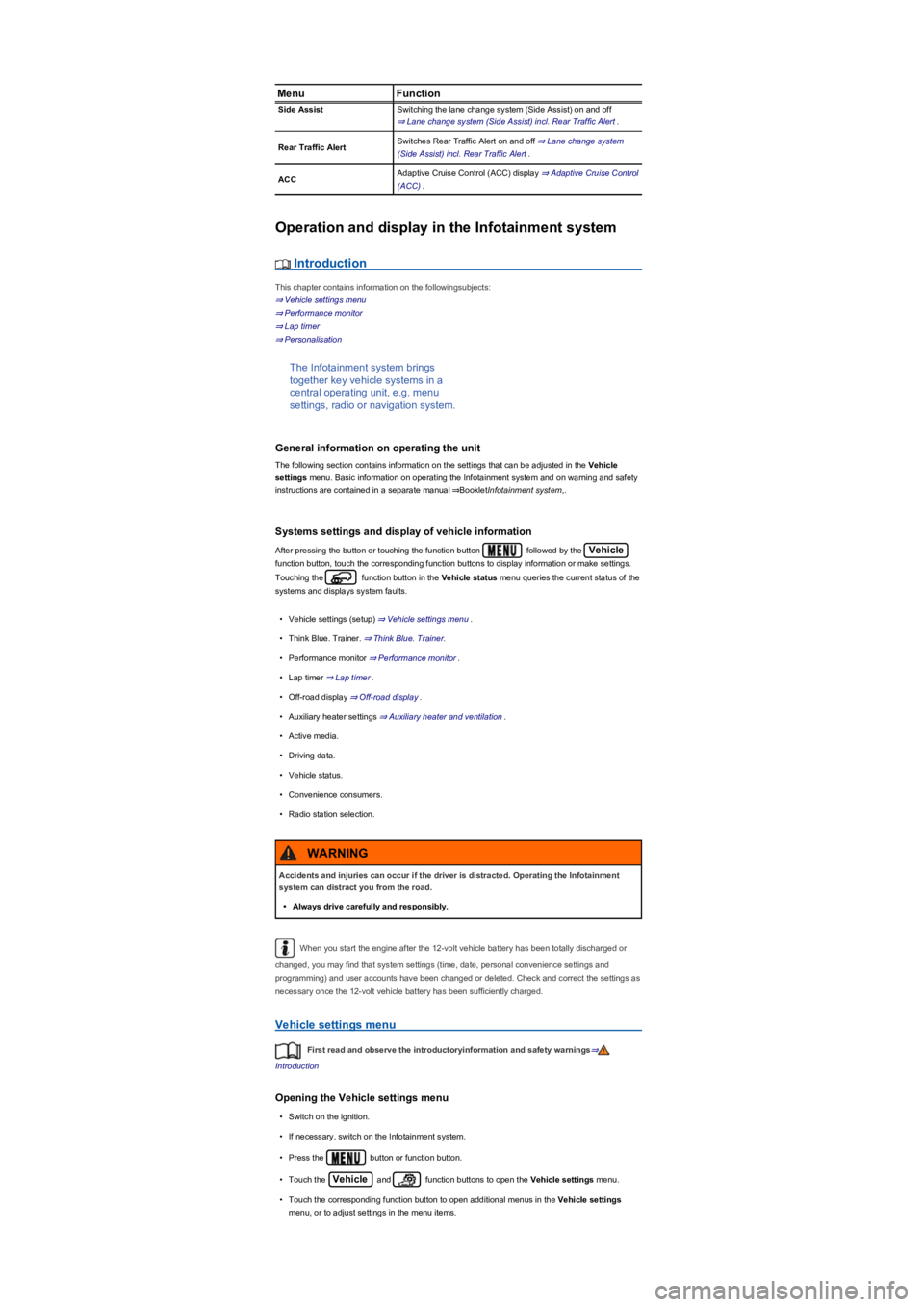
MenuFunction
Side AssistSwitching the lane change system (Side Assist) on and off
⇒ Lane change system (Side Assist) incl. Rear Traffic Alert.
Rear Traffic AlertSwitches Rear Traffic Alert on and off ⇒ Lane change system
(Side Assist) incl. Rear Traffic Alert.
ACCAdaptive Cruise Control (ACC) display ⇒ Adaptive Cruise Control
(ACC).
Operation and display in the Infotainment system
Introduction
This chapter contains information on the followingsubjects:
⇒ Vehicle settings menu
⇒ Performance monitor
⇒ Lap timer
⇒ Personalisation
The Infotainment system brings
together key vehicle systems in a
central operating unit, e.g. menu
settings, radio or navigation system.
General information on operating the unit
The following section contains information on the settings that can be adjusted in the Vehicle
settings menu. Basic information on operating the Infotainment system and on warning and safety
instructions are contained in a separate manual ⇒BookletInfotainment system,.
Systems settings and display of vehicle information
After pressing the button or touching the function button followed by the Vehicle
function button, touch the corresponding function buttons to display information or make settings.
Touching the function button in the Vehicle status menu queries the current status of the
systems and displays system faults.
•Vehicle settings (setup) ⇒ Vehicle settings menu.
•Think Blue. Trainer. ⇒ Think Blue. Trainer.
•Performance monitor ⇒ Performance monitor.
•Lap timer ⇒ Lap timer.
•Off-road display ⇒ Off-road display.
•Auxiliary heater settings ⇒ Auxiliary heater and ventilation.
•Active media.
•Driving data.
•Vehicle status.
•Convenience consumers.
•Radio station selection.
When you start the engine after the 12-volt vehicle battery has been totally discharged or
changed, you may find that system settings (time, date, personal convenience settings and
programming) and user accounts have been changed or deleted. Check and correct the settings as
necessary once the 12-volt vehicle battery has been sufficiently charged.
Vehicle settings menu
First read and observe the introductoryinformation and safety warnings⇒
Introduction
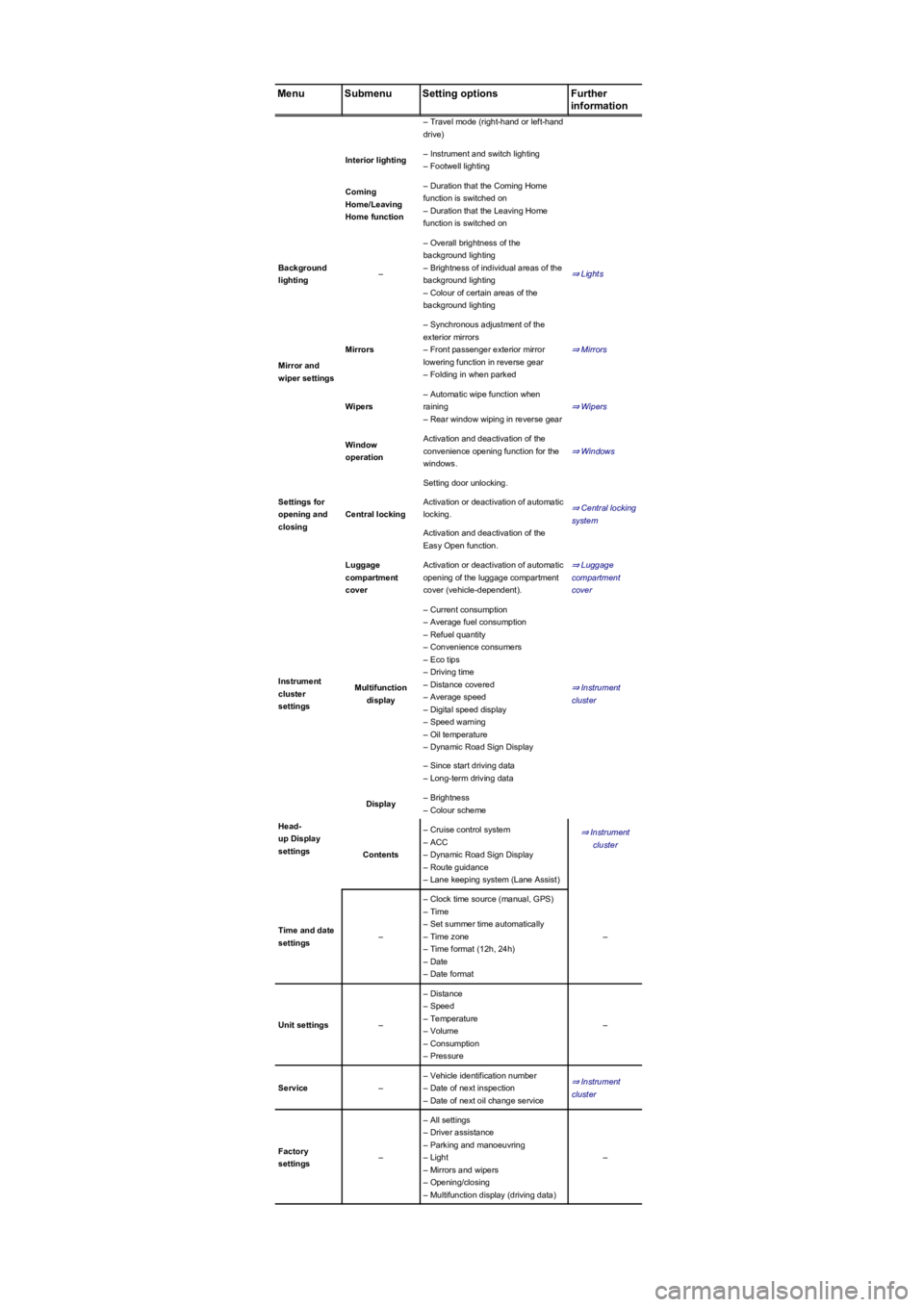
Opening the Vehicle settings menu
•Switch on the ignition.
•If necessary, switch on the Infotainment system.
•Press the button or function button.
•Touch the Vehicle and function buttons to open the Vehicle settings menu.
•Touch the corresponding function button to open additional menus in the Vehicle settings
menu, or to adjust settings in the menu items.
Accidents and injuries can occur if the driver is distracted. Operating the Infotainment
system can distract you from the road.
•Always drive carefully and responsibly.
WARNING
Page 30 of 341
MenuSubmenuSetting optionsFurther
information
– Travel mode (right-hand or left-hand
drive)
Interior lighting– Instrument and switch lighting
– Footwell lighting
Coming
Home/Leaving
Home function
– Duration that the Coming Home
function is switched on
– Duration that the Leaving Home
function is switched on
Background
lighting–
– Overall brightness of the
background lighting
– Brightness of individual areas of the
background lighting
– Colour of certain areas of the
background lighting
⇒ Lights
Mirror and
wiper settings
Mirrors
– Synchronous adjustment of the
exterior mirrors
– Front passenger exterior mirror
lowering function in reverse gear
– Folding in when parked
⇒ Mirrors
Wipers
– Automatic wipe function when
raining
– Rear window wiping in reverse gear
⇒ Wipers
Settings for
opening and
closing
Window
operation
Activation and deactivation of the
convenience opening function for the
windows.
⇒ Windows
Central locking
Setting door unlocking.
⇒ Central locking
system
Activation or deactivation of automatic
locking.
Activation and deactivation of the
Easy Open function.
Luggage
compartment
cover
Activation or deactivation of automatic
opening of the luggage compartment
cover (vehicle-dependent).
⇒ Luggage
compartment
cover
Instrument
cluster
settings
Multifunction
display
– Current consumption
– Average fuel consumption
– Refuel quantity
– Convenience consumers
– Eco tips
– Driving time
– Distance covered
– Average speed
– Digital speed display
– Speed warning
– Oil temperature
– Dynamic Road Sign Display
⇒ Instrument
cluster
– Since start driving data
– Long-term driving data
Head-
up Display
settings
Display– Brightness
– Colour scheme
⇒ Instrument
cluster
Contents
– Cruise control system
– ACC
– Dynamic Road Sign Display
– Route guidance
– Lane keeping system (Lane Assist)
Time and date
settings–
– Clock time source (manual, GPS)
– Time
– Set summer time automatically
– Time zone
– Time format (12h, 24h)
– Date
– Date format
–
Unit settings–
– Distance
– Speed
– Temperature
– Volume
– Consumption
– Pressure
–
Service–
– Vehicle identification number
– Date of next inspection
– Date of next oil change service
⇒ Instrument
cluster
Factory
settings–
– All settings
– Driver assistance
– Parking and manoeuvring
– Light
– Mirrors and wipers
– Opening/closing
– Multifunction display (driving data)
–
Page 42 of 341
Check the condition of all seat belts regularly.
Keep the seat belts clean.
Avoid allowing any foreign substances or liquids to get on to the seat belt or latch plate or
into the slot in the seat belt buckle.
Do not trap or damage the seat belt and latch plate, for example when closing the door.
Never remove, modify or repair the seat belt or any part of the belt fixture system.
Always fasten the seat belt correctly before every journey and keep it fastened while the
vehicle is in motion.
trip – even if you are only planning to drive a very short distance. Ensure that all passengers also
wear their seat belts properly.
Accident statistics have shown properly worn seat belts to be an effective means of substantially
reducing the risk of injury and improving the chances of survival in a serious accident. Furthermore,
properly worn seat belts improve the protection provided by airbags in the event of an accident.
This is why wearing a seat belt is a legal requirement in most countries.
Although the vehicle is equipped with airbags, the seat belts must be fastened and worn. For
example, the front airbags will be triggered only in certain types of frontal collision. The front airbags
will not be triggered during minor frontal collisions, minor side collisions, rear collisions, rolls or
accidents in which the airbag trigger threshold in the control unit is not exceeded.
Therefore, always wear your seat belt and ensure that your passengers have fastened their seat
belts properly before you drive off.
Using seat belts
First read and observe the introductoryinformation and safety warnings⇒
Introduction
Checklist
Using seat belts ⇒:
Twisted seat belt
If it is difficult to remove the seat belt from the belt guide, the seat belt may have become twisted if
it was returned too quickly into the side trim:
•Take hold of the latch plate then slowly and carefully pull out the seat belt.
•Untwist the seat belt and guide it back slowly by hand.
Fasten the seat belt even if you are unable to undo the twist. However, the twist should not be in
part of the seat belt that comes into direct contact with the body. The twist should be corrected
immediately by a qualified workshop.
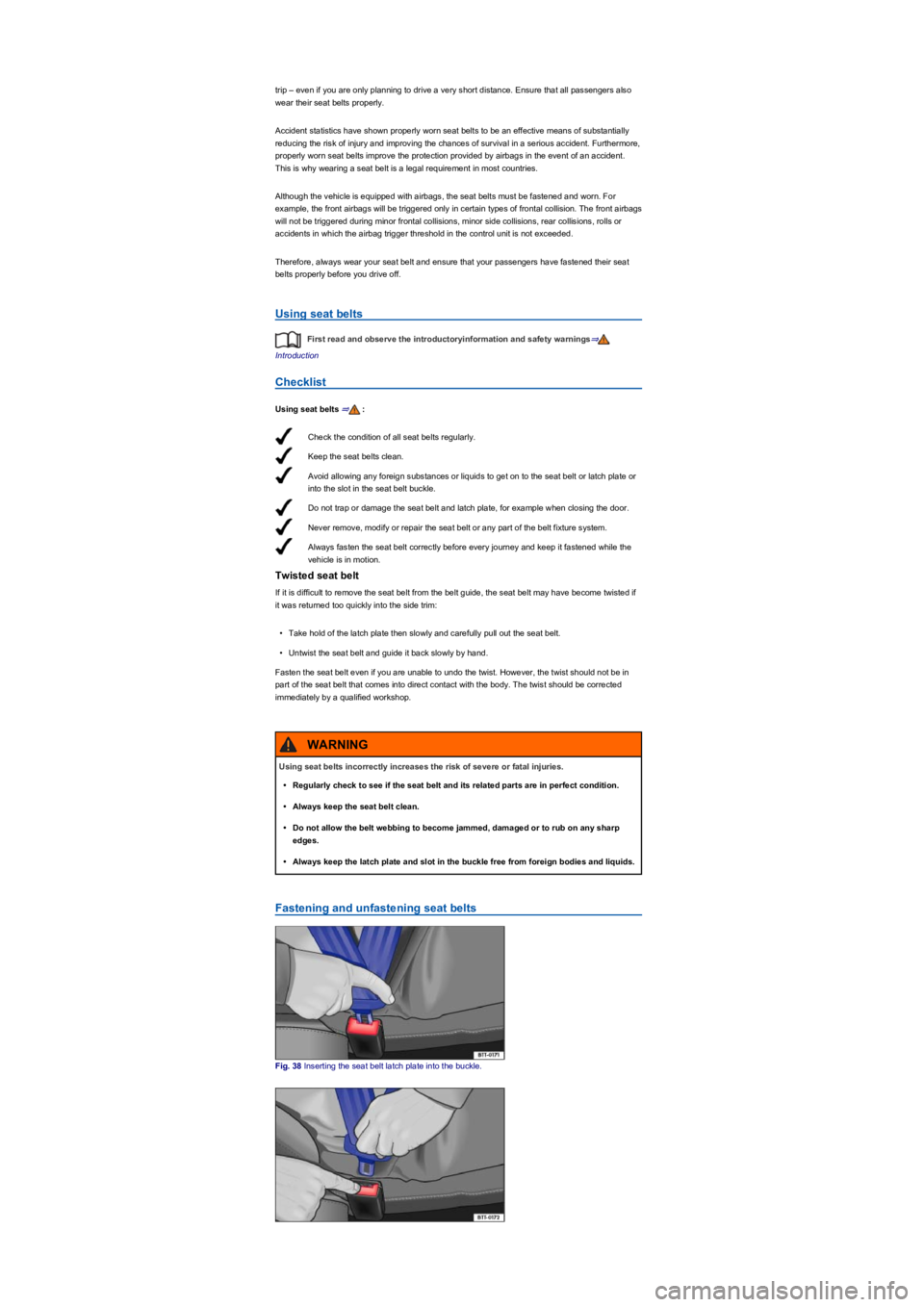
Fastening and unfastening seat belts
Fig. 38 Inserting the seat belt latch plate into the buckle.
Using seat belts incorrectly increases the risk of severe or fatal injuries.
•Regularly check to see if the seat belt and its related parts are in perfect condition.
•Always keep the seat belt clean.
•Do not allow the belt webbing to become jammed, damaged or to rub on any sharp
edges.
•Always keep the latch plate and slot in the buckle free from foreign bodies and liquids.
WARNING
Page 46 of 341
The airbag modules and belt tensioners may contain perchlorate. Please comply with
legislation regarding disposal.
Proactive occupant protection system
First read and observe the introductoryinformation and safety warnings⇒
Introduction
The proactive occupant protection system is an assistance system that initiates action to protect
vehicle occupants in dangerous situations. However, the system cannot prevent a collision.
The full range of functions of the proactive occupant protection system will be available only if the
function has been activated in the Infotainment system, no special driving profile has been selected
and there are no malfunctions ⇒ Driving profile selection and 4MOTION Active Control, ⇒ Function
limitations.
Basic functions
Depending on country-specific legal requirements and also on the vehicle equipment, the following
functions may be initiated, either individually or jointly, in critical situations (e.g. emergency braking
or in the case of oversteering or understeering) as of a speed of approximately 30 km/h (19 mph):
•Temporary tensioning of the fastened front seat belts.
•Automatic closing of the glass roof and side windows down to a gap, depending on the vehicle
equipment.
The belts may be tensioned individually or together depending on the respective critical driving
situations.
Additional information for vehicles with an area monitoring system (Front
Assist)
In vehicles fitted with the area monitoring system (Front Assist) ⇒ Area monitoring system (Front
Assist), the probability of a collision with the vehicle ahead is also calculated within the system
limits. The system can trigger the proactive occupant protection system if it detects a probable
collision or initiates strong braking.
Settings in the Infotainment system
The full range of functions of the proactive occupant protection system can be activated and
deactivated in the Infotainment system ⇒ Operation and display in the Infotainment system.
The proactive occupant protection system will be reactivated every time the ignition is switched on.
It may not be possible to operate the setting function if the proactive occupant protection system
has already been adapted to the specific vehicle setup.
Setting in driving profile selection
In vehicles with driving profile selection, the proactive occupant protection system is adapted to the
special vehicle setup of the respective driving profile ⇒ Driving profile selection and 4MOTION
Active Control.
Function limitations
The proactive occupant protection system will not be available, or will only be available to a limited
extent, in the following situations:
•If there is a fault in the ESC, belt tensioner or in the airbag control unit ⇒ Seat belts or ⇒ Airbag
system.
•When the TCS or ESC are switched off, and when the vehicle is reversing ⇒ Brake support
systems.
•The temporary tensioning for the front passenger seat is switched off if the front passenger front
airbag is deactivated.
•If there is a system fault in the area monitoring system (Front Assist) ⇒ Area monitoring system
(Front Assist).
The risk of severe or fatal injuries may be increased if the seat belts, automatic belt
retractors and belt tensioners are not used correctly, or if they are repaired by a non-
professional. As a result, the belt tensioners may not be triggered when they should, or
they may be triggered unexpectedly.
•Any repairs, adjustments or removal and refitting of parts in the belt tensioners or seat
belts should always be carried out by a qualified workshop and never by yourself
⇒ Accessories, modifications, repairs and renewal of parts.
•Belt tensioners and automatic belt retractors cannot be repaired. They must be
replaced.
WARNING
Page 50 of 341
Description and function of the airbags
First read and observe the introductoryinformation and safety warnings⇒
Introduction
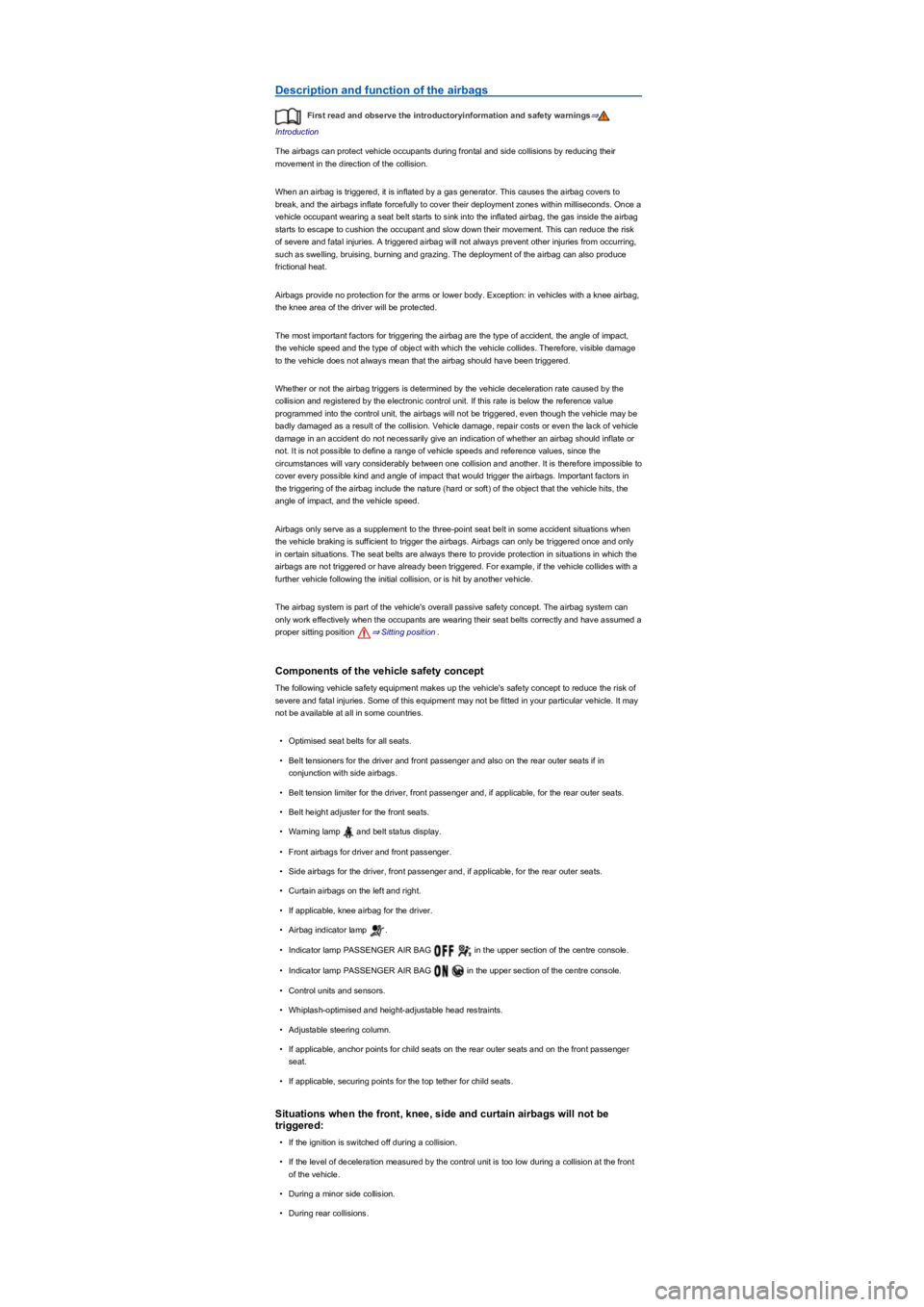
The airbags can protect vehicle occupants during frontal and side collisions by reducing their
movement in the direction of the collision.
When an airbag is triggered, it is inflated by a gas generator. This causes the airbag covers to
break, and the airbags inflate forcefully to cover their deployment zones within milliseconds. Once a
vehicle occupant wearing a seat belt starts to sink into the inflated airbag, the gas inside the airbag
starts to escape to cushion the occupant and slow down their movement. This can reduce the risk
of severe and fatal injuries. A triggered airbag will not always prevent other injuries from occurring,
such as swelling, bruising, burning and grazing. The deployment of the airbag can also produce
frictional heat.
Airbags provide no protection for the arms or lower body. Exception: in vehicles with a knee airbag,
the knee area of the driver will be protected.
The most important factors for triggering the airbag are the type of accident, the angle of impact,
the vehicle speed and the type of object with which the vehicle collides. Therefore, visible damage
to the vehicle does not always mean that the airbag should have been triggered.
Whether or not the airbag triggers is determined by the vehicle deceleration rate caused by the
collision and registered by the electronic control unit. If this rate is below the reference value
programmed into the control unit, the airbags will not be triggered, even though the vehicle may be
badly damaged as a result of the collision. Vehicle damage, repair costs or even the lack of vehicle
damage in an accident do not necessarily give an indication of whether an airbag should inflate or
not. It is not possible to define a range of vehicle speeds and reference values, since the
circumstances will vary considerably between one collision and another. It is therefore impossible to
cover every possible kind and angle of impact that would trigger the airbags. Important factors in
the triggering of the airbag include the nature (hard or soft) of the object that the vehicle hits, the
angle of impact, and the vehicle speed.
Airbags only serve as a supplement to the three-point seat belt in some accident situations when
the vehicle braking is sufficient to trigger the airbags. Airbags can only be triggered once and only
in certain situations. The seat belts are always there to provide protection in situations in which the
airbags are not triggered or have already been triggered. For example, if the vehicle collides with a
further vehicle following the initial collision, or is hit by another vehicle.
The airbag system is part of the vehicle's overall passive safety concept. The airbag system can
only work effectively when the occupants are wearing their seat belts correctly and have assumed a
proper sitting position ⇒ Sitting position.
Components of the vehicle safety concept
The following vehicle safety equipment makes up the vehicle's safety concept to reduce the risk of
severe and fatal injuries. Some of this equipment may not be fitted in your particular vehicle. It may
not be available at all in some countries.
•Optimised seat belts for all seats.
•Belt tensioners for the driver and front passenger and also on the rear outer seats if in
conjunction with side airbags.
•Belt tension limiter for the driver, front passenger and, if applicable, for the rear outer seats.
•Belt height adjuster for the front seats.
•Warning lamp and belt status display.
•Front airbags for driver and front passenger.
•Side airbags for the driver, front passenger and, if applicable, for the rear outer seats.
•Curtain airbags on the left and right.
•If applicable, knee airbag for the driver.
•Airbag indicator lamp .
•Indicator lamp PASSENGER AIR BAG in the upper section of the centre console.
•Indicator lamp PASSENGER AIR BAG in the upper section of the centre console.
•Control units and sensors.
•Whiplash-optimised and height-adjustable head restraints.
•Adjustable steering column.
•If applicable, anchor points for child seats on the rear outer seats and on the front passenger
seat.
•If applicable, securing points for the top tether for child seats.
Situations when the front, knee, side and curtain airbags will not be
triggered:
•If the ignition is switched off during a collision.
•If the level of deceleration measured by the control unit is too low during a collision at the front
of the vehicle.
•During a minor side collision.
•During rear collisions.
Page 51 of 341
•If the vehicle rolls over.
•If the speed in a collision is lower than the reference value specified in the control unit.
Front airbags
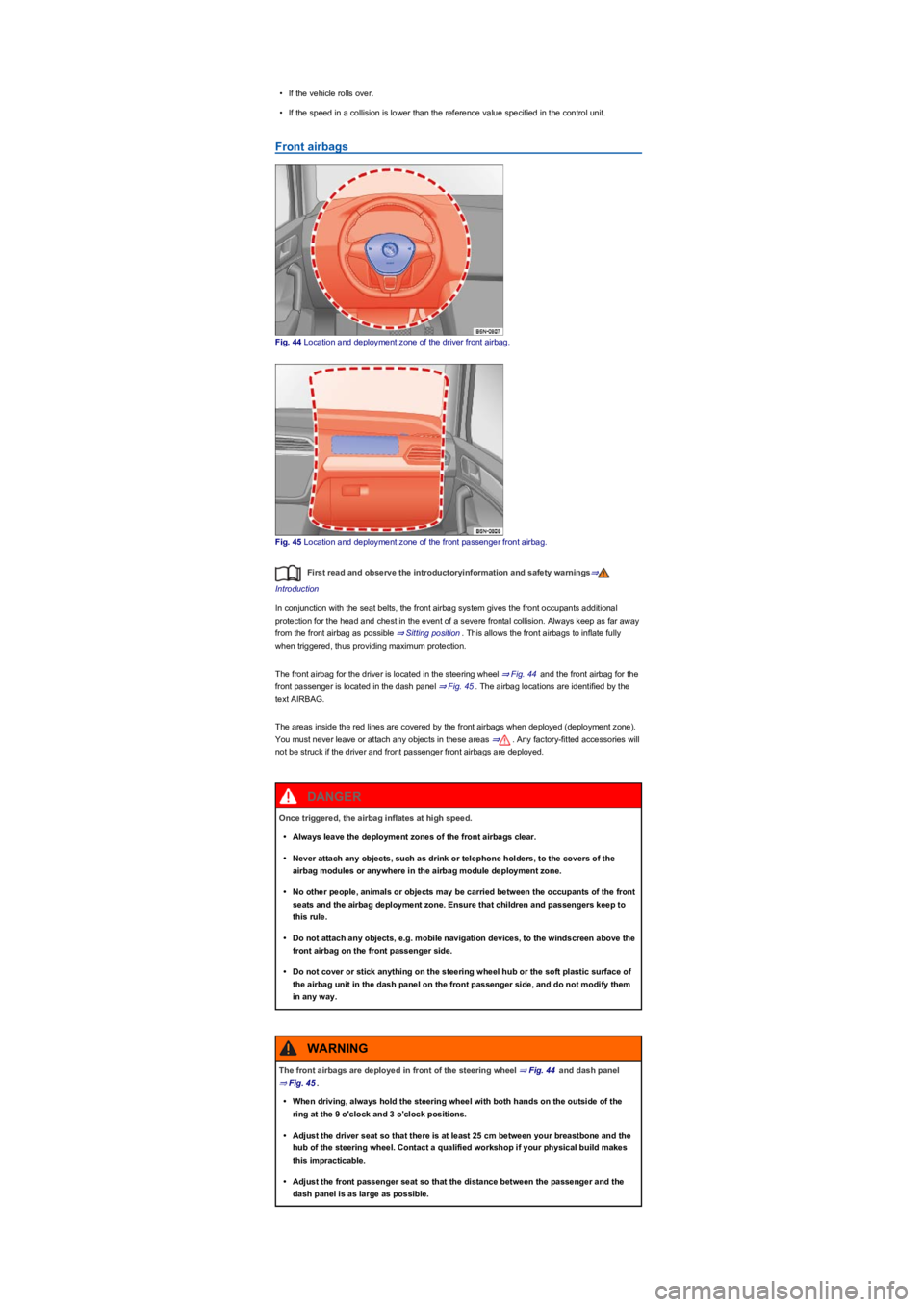
Fig. 44 Location and deployment zone of the driver front airbag.
Fig. 45 Location and deployment zone of the front passenger front airbag.
First read and observe the introductoryinformation and safety warnings⇒
Introduction
In conjunction with the seat belts, the front airbag system gives the front occupants additional
protection for the head and chest in the event of a severe frontal collision. Always keep as far away
from the front airbag as possible ⇒ Sitting position. This allows the front airbags to inflate fully
when triggered, thus providing maximum protection.
The front airbag for the driver is located in the steering wheel ⇒ Fig. 44 and the front airbag for the
front passenger is located in the dash panel ⇒ Fig. 45. The airbag locations are identified by the
text AIRBAG.
The areas inside the red lines are covered by the front airbags when deployed (deployment zone).
You must never leave or attach any objects in these areas ⇒. Any factory-fitted accessories will
not be struck if the driver and front passenger front airbags are deployed.
Once triggered, the airbag inflates at high speed.
•Always leave the deployment zones of the front airbags clear.
•Never attach any objects, such as drink or telephone holders, to the covers of the
airbag modules or anywhere in the airbag module deployment zone.
•No other people, animals or objects may be carried between the occupants of the front
seats and the airbag deployment zone. Ensure that children and passengers keep to
this rule.
•Do not attach any objects, e.g. mobile navigation devices, to the windscreen above the
front airbag on the front passenger side.
•Do not cover or stick anything on the steering wheel hub or the soft plastic surface of
the airbag unit in the dash panel on the front passenger side, and do not modify them
in any way.
DANGER
The front airbags are deployed in front of the steering wheel ⇒ Fig. 44 and dash panel
⇒ Fig. 45.
•When driving, always hold the steering wheel with both hands on the outside of the
ring at the 9 o'clock and 3 o'clock positions.
•Adjust the driver seat so that there is at least 25 cm between your breastbone and the
hub of the steering wheel. Contact a qualified workshop if your physical build makes
this impracticable.
•Adjust the front passenger seat so that the distance between the passenger and the
dash panel is as large as possible.
WARNING
Page 54 of 341
Curtain airbags
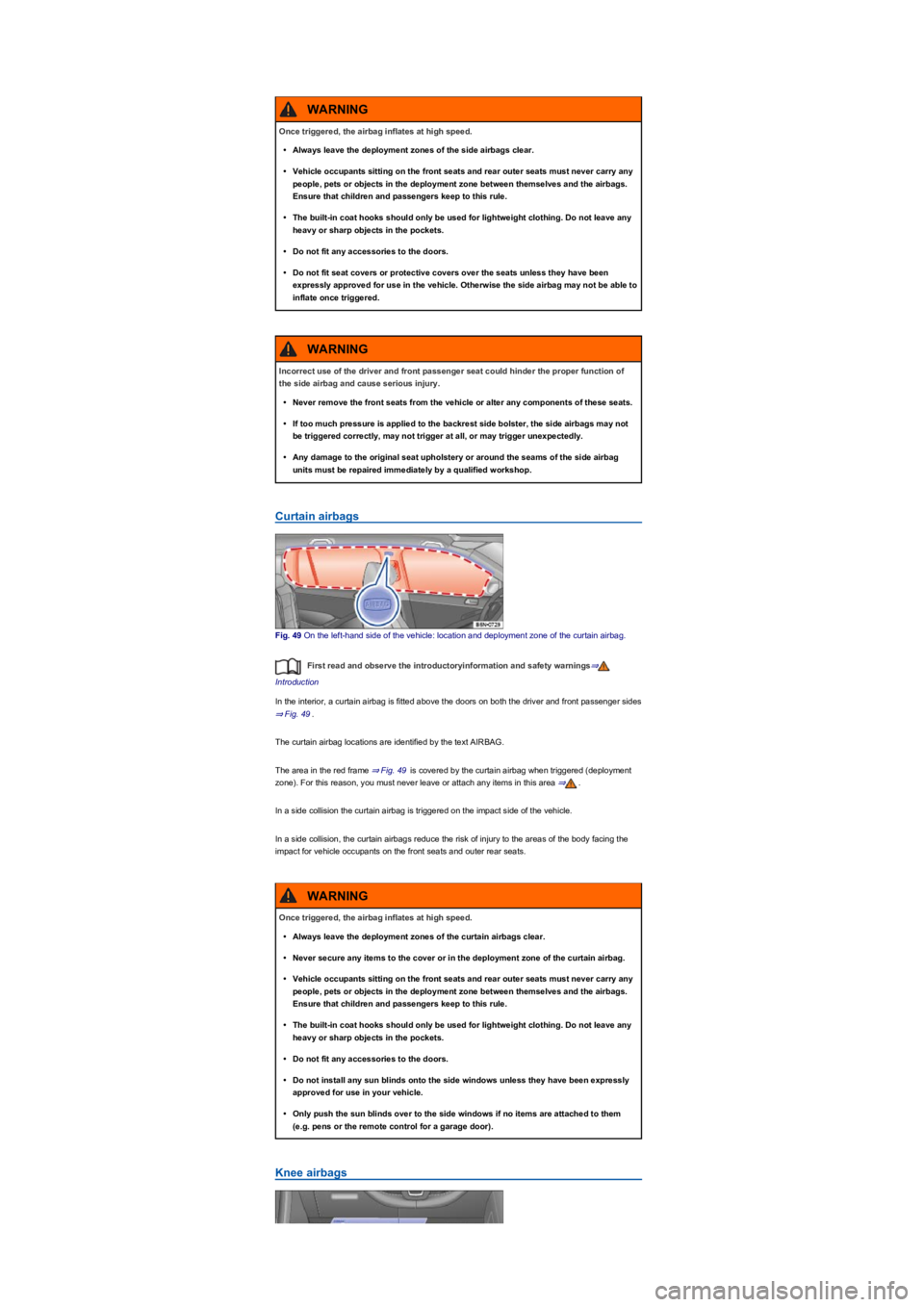
Fig. 49 On the left-hand side of the vehicle: location and deployment zone of the curtain airbag.
First read and observe the introductoryinformation and safety warnings⇒
Introduction
In the interior, a curtain airbag is fitted above the doors on both the driver and front passenger sides
⇒ Fig. 49.
The curtain airbag locations are identified by the text AIRBAG.
The area in the red frame ⇒ Fig. 49 is covered by the curtain airbag when triggered (deployment
zone). For this reason, you must never leave or attach any items in this area ⇒.
In a side collision the curtain airbag is triggered on the impact side of the vehicle.
In a side collision, the curtain airbags reduce the risk of injury to the areas of the body facing the
impact for vehicle occupants on the front seats and outer rear seats.
Knee airbags
Once triggered, the airbag inflates at high speed.
•Always leave the deployment zones of the side airbags clear.
•Vehicle occupants sitting on the front seats and rear outer seats must never carry any
people, pets or objects in the deployment zone between themselves and the airbags.
Ensure that children and passengers keep to this rule.
•The built-in coat hooks should only be used for lightweight clothing. Do not leave any
heavy or sharp objects in the pockets.
•Do not fit any accessories to the doors.
•Do not fit seat covers or protective covers over the seats unless they have been
expressly approved for use in the vehicle. Otherwise the side airbag may not be able to
inflate once triggered.
WARNING
Incorrect use of the driver and front passenger seat could hinder the proper function of
the side airbag and cause serious injury.
•Never remove the front seats from the vehicle or alter any components of these seats.
•If too much pressure is applied to the backrest side bolster, the side airbags may not
be triggered correctly, may not trigger at all, or may trigger unexpectedly.
•Any damage to the original seat upholstery or around the seams of the side airbag
units must be repaired immediately by a qualified workshop.
WARNING
Once triggered, the airbag inflates at high speed.
•Always leave the deployment zones of the curtain airbags clear.
•Never secure any items to the cover or in the deployment zone of the curtain airbag.
•Vehicle occupants sitting on the front seats and rear outer seats must never carry any
people, pets or objects in the deployment zone between themselves and the airbags.
Ensure that children and passengers keep to this rule.
•The built-in coat hooks should only be used for lightweight clothing. Do not leave any
heavy or sharp objects in the pockets.
•Do not fit any accessories to the doors.
•Do not install any sun blinds onto the side windows unless they have been expressly
approved for use in your vehicle.
•Only push the sun blinds over to the side windows if no items are attached to them
(e.g. pens or the remote control for a garage door).
WARNING
Page 65 of 341
The symbol can differ depending on the version of the instrument cluster.
Information call, breakdown call and Emergency Call Service
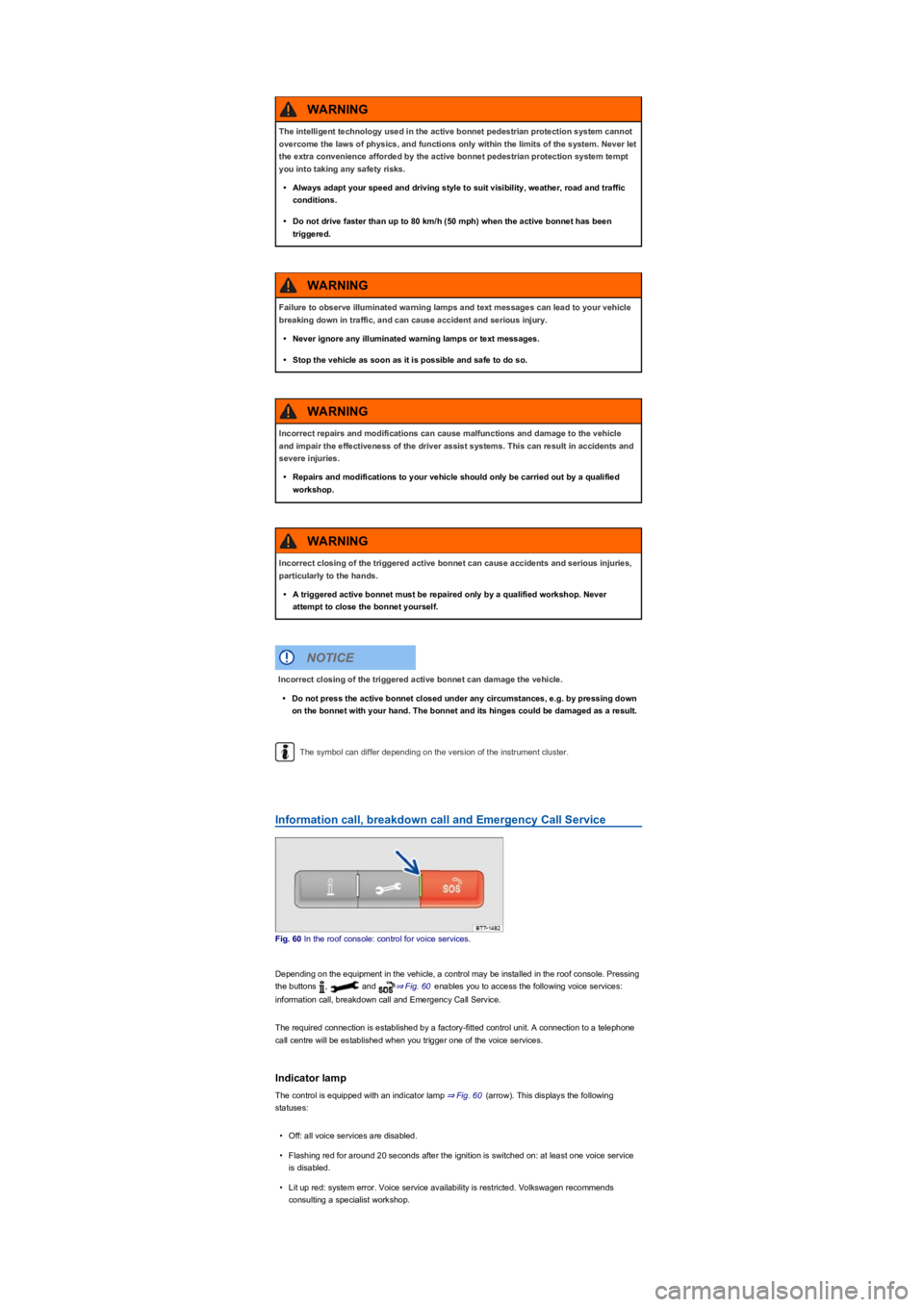
Fig. 60 In the roof console: control for voice services.
Depending on the equipment in the vehicle, a control may be installed in the roof console. Pressing
the buttons , and ⇒ Fig. 60 enables you to access the following voice services:
information call, breakdown call and Emergency Call Service.
The required connection is established by a factory-fitted control unit. A connection to a telephone
call centre will be established when you trigger one of the voice services.
Indicator lamp
The control is equipped with an indicator lamp ⇒ Fig. 60 (arrow). This displays the following
statuses:
•Off: all voice services are disabled.
•Flashing red for around 20 seconds after the ignition is switched on: at least one voice service
is disabled.
•Lit up red: system error. Voice service availability is restricted. Volkswagen recommends
consulting a specialist workshop.
The intelligent technology used in the active bonnet pedestrian protection system cannot
overcome the laws of physics, and functions only within the limits of the system. Never let
the extra convenience afforded by the active bonnet pedestrian protection system tempt
you into taking any safety risks.
•Always adapt your speed and driving style to suit visibility, weather, road and traffic
conditions.
•Do not drive faster than up to 80 km/h (50 mph) when the active bonnet has been
triggered.
WARNING
Failure to observe illuminated warning lamps and text messages can lead to your vehicle
breaking down in traffic, and can cause accident and serious injury.
•Never ignore any illuminated warning lamps or text messages.
•Stop the vehicle as soon as it is possible and safe to do so.
WARNING
Incorrect repairs and modifications can cause malfunctions and damage to the vehicle
and impair the effectiveness of the driver assist systems. This can result in accidents and
severe injuries.
•Repairs and modifications to your vehicle should only be carried out by a qualified
workshop.
WARNING
Incorrect closing of the triggered active bonnet can cause accidents and serious injuries,
particularly to the hands.
•A triggered active bonnet must be repaired only by a qualified workshop. Never
attempt to close the bonnet yourself.
WARNING
Incorrect closing of the triggered active bonnet can damage the vehicle.
•Do not press the active bonnet closed under any circumstances, e.g. by pressing down
on the bonnet with your hand. The bonnet and its hinges could be damaged as a result.
NOTICE
Page 209 of 341
Electronic Stability Control (ESC)
ESC helps to reduce the risk of skidding and to improve driving stability in certain driving situations
⇒.
Depending on the vehicle equipment, ESC can be switched to a Sport mode ⇒ Switching TCS on
and off.
When ESC is regulating, the yellow indicator lamp is shown on the instrument cluster display.
Traction control system (TCS)
The TCS reduces the drive output if wheelspin occurs and adapts the output to suit road surface
conditions. The TCS makes it easier to pull away, accelerate and drive up hills.
Depending on the vehicle equipment, the TCS can be switched off in exceptional circumstances
⇒ Switching TCS on and off.
When the TCS is regulating, the yellow indicator lamp is shown on the instrument cluster
display.
Anti-lock brake system
The anti-lock brake system can prevent the wheels from locking when the brakes are applied up
until the point where the vehicle is nearly stationary and assists the driver in steering the vehicle
and keeping it under control.
Brake assist system
The brake assist system can help to reduce the stopping distance. The brake assist system
reinforces brake pressure when the driver depresses the brake pedal quickly in an emergency
situation.
Do not reduce the pressure on the brake pedal when the brake assist system is regulating. If you
reduce the pressure on the brake pedal, the brake assist system will switch off the brake servo.
Electronic differential lock (EDL and XDS)
EDL brakes the wheel that has lost traction and distributes the driving force to the other drive
wheels.
The EDL switches off automatically under unusually heavy loads to prevent the disc brake from
overheating. The EDL switches back on again automatically as soon as the brake has cooled down.
XDS applies pressure to the brake of the wheel on the inside of the bend. This will improve traction,
helping the vehicle to remain in the required lane longer.
Automatic Post-Collision Braking System
In the event of an accident, the Automatic Post-Collision Braking System can help the driver to
reduce the risk of skidding, and the danger of secondary collisions, through automatic braking.
The Automatic Post-Collision Braking System functions only in front, side and rear collisions when
the airbag control unit detects a corresponding trigger threshold during the accident.
The ESC brakes the vehicle automatically, provided that the hydraulic braking system, the ESC and
the electrical system are undamaged in the accident and remain functional.
The following actions override automatic braking in the event of an accident:
•When the driver depresses the accelerator. No automatic braking occurs.
•When the brake pressure transmitted through the depressed brake pedal is greater than the
brake pressure provided by the system. The vehicle is braked manually.
Page 222 of 341
Legal requirements
Fig. 179 Symbol for vehicles that send tracking information
First read and observe the introductoryinformation and safety warnings⇒
Introduction
By concluding a Volkswagen Car-Net contract for your Car-Net-enabled vehicle, you as the
contracting party undertake within the meaning of data protection law to inform each driver that the
vehicle can transmit and receive data online. This also applies if you sell or lend your vehicle.
Failure to observe this obligation to inform can infringe certain rights of vehicle occupants.
GPS tracking: check with all occupants
Some Volkswagen Car-Net services require vehicle data to determine whether the vehicle is
complying with set speed limits, where the vehicle is parked, or whether the vehicle is located within
a selected area. This information can be displayed in the Car-Net portal and in the Volkswagen
Car-Net app.
Therefore, before driving, ask all vehicle occupants if they agree to use of the activated services. If
an occupant does not agree, deactivate the service (if possible) or exclude the occupant from use
of the vehicle. If you do not observe this, you may violate certain rights of the occupant.
GPS tracking: symbol
If a factory-fitted control unit is used to detect the vehicle's current location and speed, this symbol
⇒ Fig. 179 will be located in the vehicle (e.g. on the roof console). However, if this symbol
⇒ Fig. 179 is not present in the vehicle, this does not mean that the control unit is not tracking the
current position or speed of the vehicle.
Personal data
Volkswagen collects, processes and uses the user's personal data in accordance with statutory
requirements. You can access the current data protection policy on the Volkswagen homepage.
The following conditions can make it impossible to make a telephone call, run a
Volkswagen Car-Net service or transfer data:
•If your current location is in an area with no or insufficient mobile communications and
GPS reception. This can also include tunnels, streets with tall buildings, garages,
multi-storey car parks, underpasses, mountains and valleys.
•If you are in an area with sufficient mobile communications and GPS reception but the
telecommunications provider's mobile network is overloaded, out of order or
unavailable.
•If the components in the vehicle required for the services and data transmission are
damaged, not working or do not have sufficient electrical power.
•The battery for the mobile device is empty, does not have a sufficient charge level or
has no more call credit.
WARNING
Using computers and mobile devices in public or non-secured LAN and WLAN networks
can lead to a loss of control over your Volkswagen Car-Net services.
•In addition to the usual precautionary measures to be taken when using the Internet,
you should protect your computer and mobile device with suitable anti-virus software
and regularly update its signatures.
•Protect your login data for the Car-Net portal, your computer and mobile device against
misuse.
WARNING
Applications and Volkswagen Car-Net services which are unsuitable or faulty or that are
used incorrectly can cause damage to the vehicle, accidents or serious injury.
•Never make changes to applications or Volkswagen Car-Net services.
WARNING
Volkswagen is not responsible for damage to the vehicle caused by poor quality or faulty
applications, insufficient programming of applications, insufficient network strength, loss
of data during transmission or by misuse of your computers, tablets or mobile devices.
NOTICE