STARTING VOLKSWAGEN TIGUAN 2017 Owner´s Manual
[x] Cancel search | Manufacturer: VOLKSWAGEN, Model Year: 2017, Model line: TIGUAN, Model: VOLKSWAGEN TIGUAN 2017Pages: 341, PDF Size: 9.14 MB
Page 4 of 341
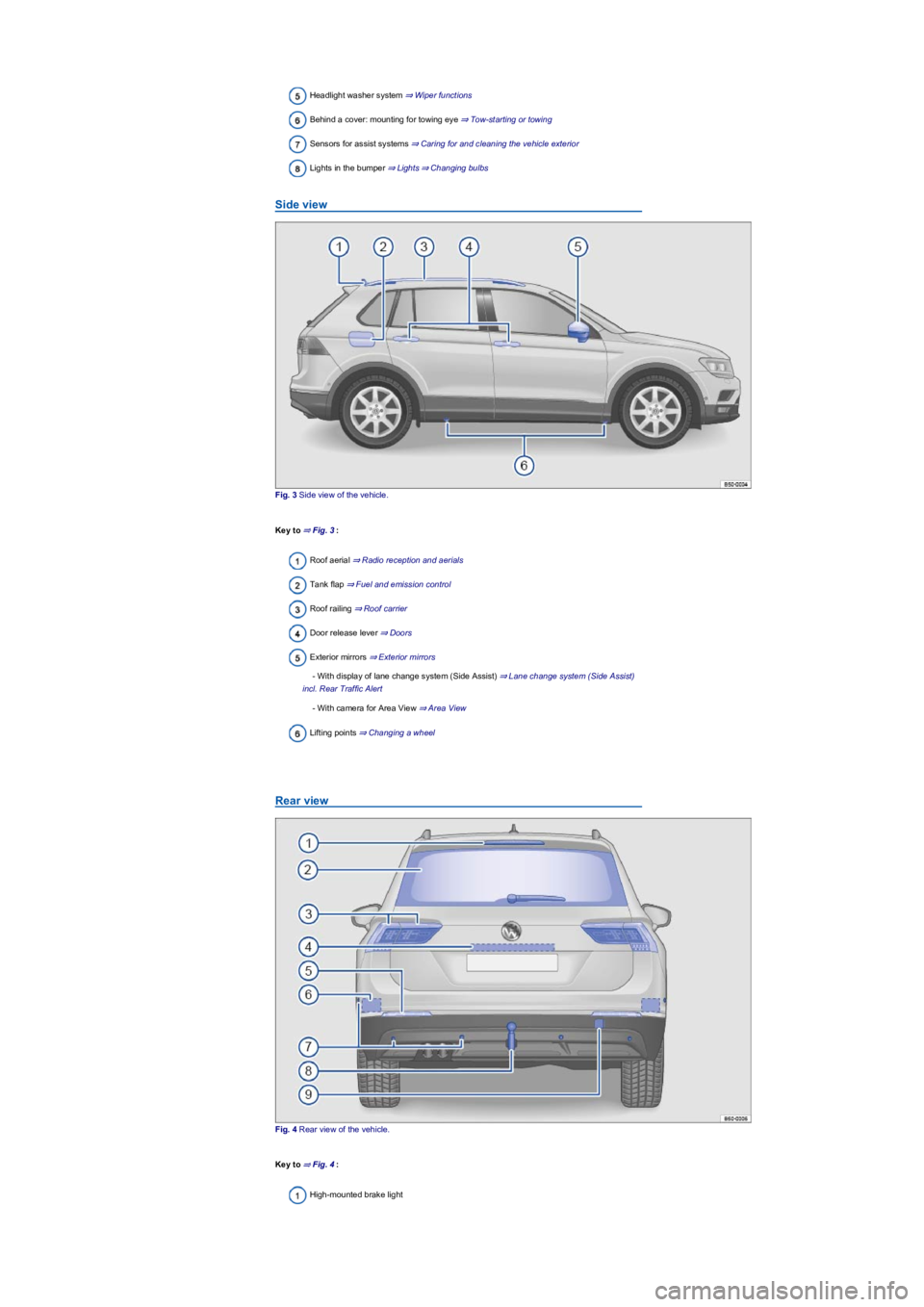
Headlight washer system ⇒ Wiper functions
Behind a cover: mounting for towing eye ⇒ Tow-starting or towing
Sensors for assist systems ⇒ Caring for and cleaning the vehicle exterior
Lights in the bumper ⇒ Lights⇒ Changing bulbs
Side view
Fig. 3 Side view of the vehicle.
Key to ⇒ Fig. 3:
Roof aerial ⇒ Radio reception and aerials
Tank flap ⇒ Fuel and emission control
Roof railing ⇒ Roof carrier
Door release lever ⇒ Doors
Exterior mirrors ⇒ Exterior mirrors
- With display of lane change system (Side Assist) ⇒ Lane change system (Side Assist)
incl. Rear Traffic Alert
- With camera for Area View ⇒ Area View
Lifting points ⇒ Changing a wheel
Rear view
Fig. 4 Rear view of the vehicle.
Key to ⇒ Fig. 4:
High-mounted brake light
Page 5 of 341
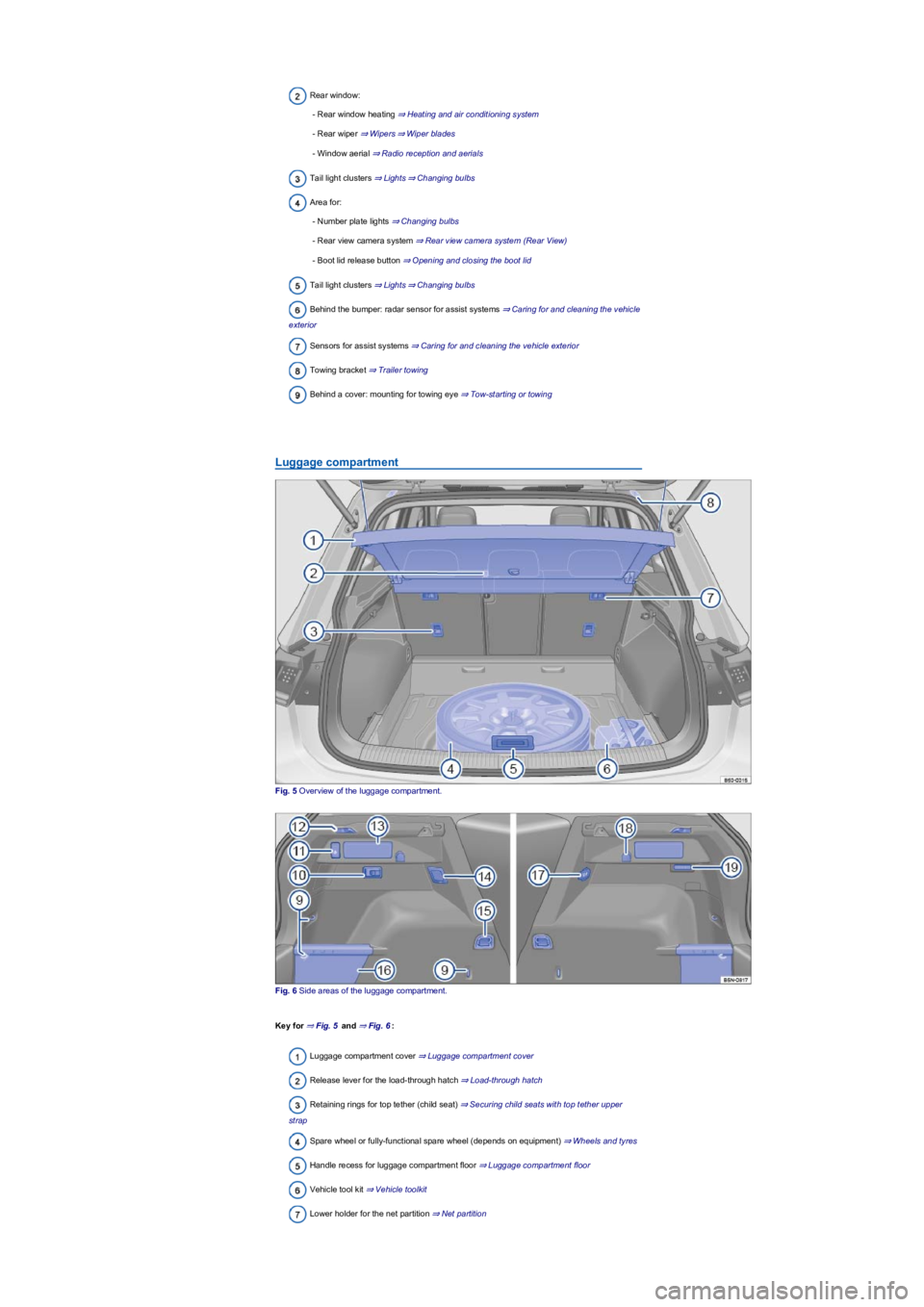
Rear window:
- Rear window heating ⇒ Heating and air conditioning system
- Rear wiper ⇒ Wipers⇒ Wiper blades
- Window aerial ⇒ Radio reception and aerials
Tail light clusters ⇒ Lights⇒ Changing bulbs
Area for:
- Number plate lights ⇒ Changing bulbs
- Rear view camera system ⇒ Rear view camera system (Rear View)
- Boot lid release button ⇒ Opening and closing the boot lid
Tail light clusters ⇒ Lights⇒ Changing bulbs
Behind the bumper: radar sensor for assist systems ⇒ Caring for and cleaning the vehicle
exterior
Sensors for assist systems ⇒ Caring for and cleaning the vehicle exterior
Towing bracket ⇒ Trailer towing
Behind a cover: mounting for towing eye ⇒ Tow-starting or towing
Luggage compartment
Fig. 5 Overview of the luggage compartment.
Fig. 6 Side areas of the luggage compartment.
Key for ⇒ Fig. 5 and ⇒ Fig. 6:
Luggage compartment cover ⇒ Luggage compartment cover
Release lever for the load-through hatch ⇒ Load-through hatch
Retaining rings for top tether (child seat) ⇒ Securing child seats with top tether upper
strap
Spare wheel or fully-functional spare wheel (depends on equipment) ⇒ Wheels and tyres
Handle recess for luggage compartment floor ⇒ Luggage compartment floor
Vehicle tool kit ⇒ Vehicle toolkit
Lower holder for the net partition ⇒ Net partition
Page 7 of 341
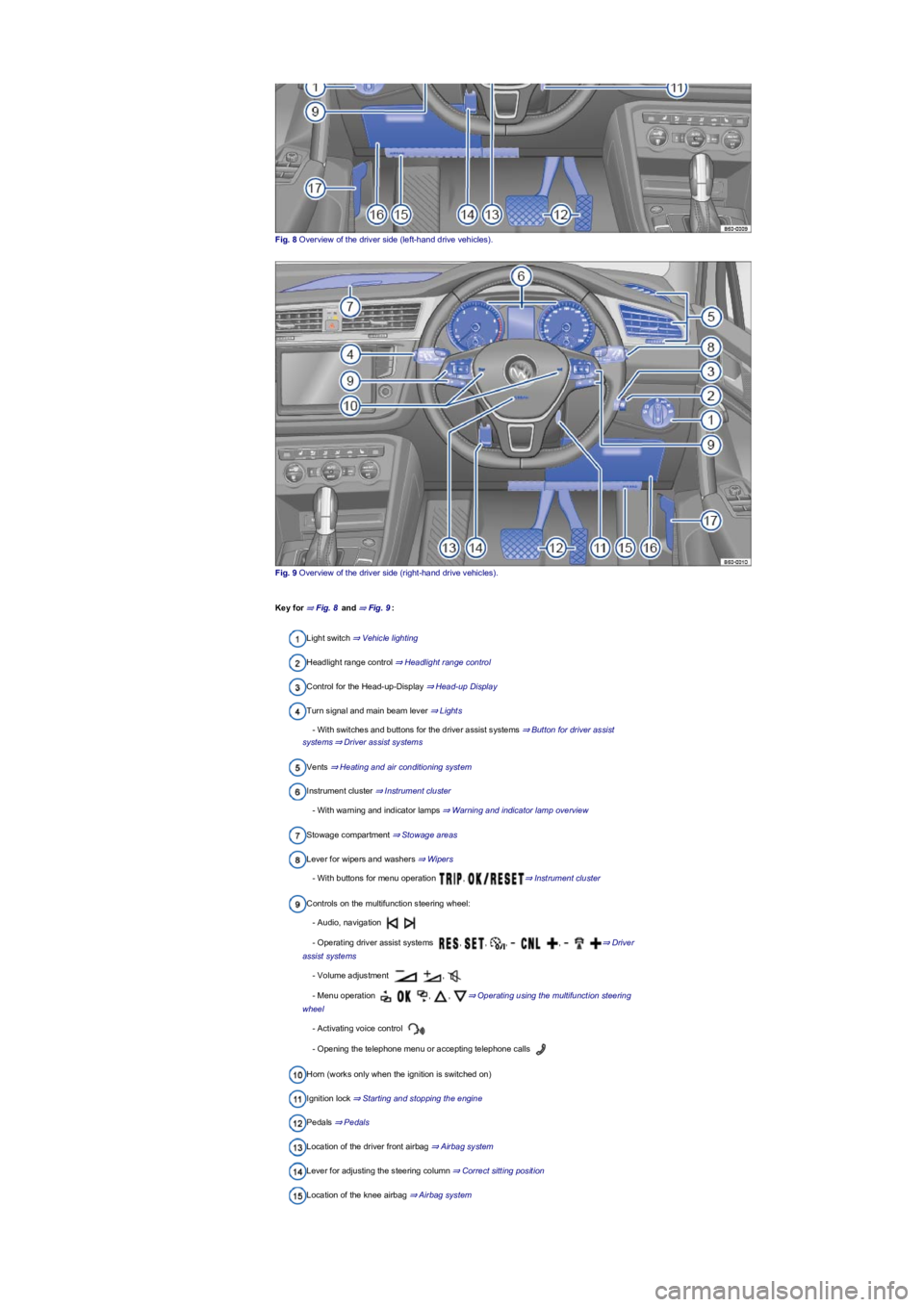
Fig. 8 Overview of the driver side (left-hand drive vehicles).
Fig. 9 Overview of the driver side (right-hand drive vehicles).
Key for ⇒ Fig. 8 and ⇒ Fig. 9:
Light switch ⇒ Vehicle lighting
Headlight range control ⇒ Headlight range control
Control for the Head-up-Display ⇒ Head-up Display
Turn signal and main beam lever ⇒ Lights
- With switches and buttons for the driver assist systems ⇒ Button for driver assist
systems⇒ Driver assist systems
Vents ⇒ Heating and air conditioning system
Instrument cluster ⇒ Instrument cluster
- With warning and indicator lamps ⇒ Warning and indicator lamp overview
Stowage compartment ⇒ Stowage areas
Lever for wipers and washers ⇒ Wipers
- With buttons for menu operation , ⇒ Instrument cluster
Controls on the multifunction steering wheel:
- Audio, navigation
- Operating driver assist systems , , , , ⇒ Driver
assist systems
- Volume adjustment ,
- Menu operation , , ⇒ Operating using the multifunction steering
wheel
- Activating voice control
- Opening the telephone menu or accepting telephone calls
Horn (works only when the ignition is switched on)
Ignition lock ⇒ Starting and stopping the engine
Pedals ⇒ Pedals
Location of the driver front airbag ⇒ Airbag system
Lever for adjusting the steering column ⇒ Correct sitting position
Location of the knee airbag ⇒ Airbag system
Page 9 of 341
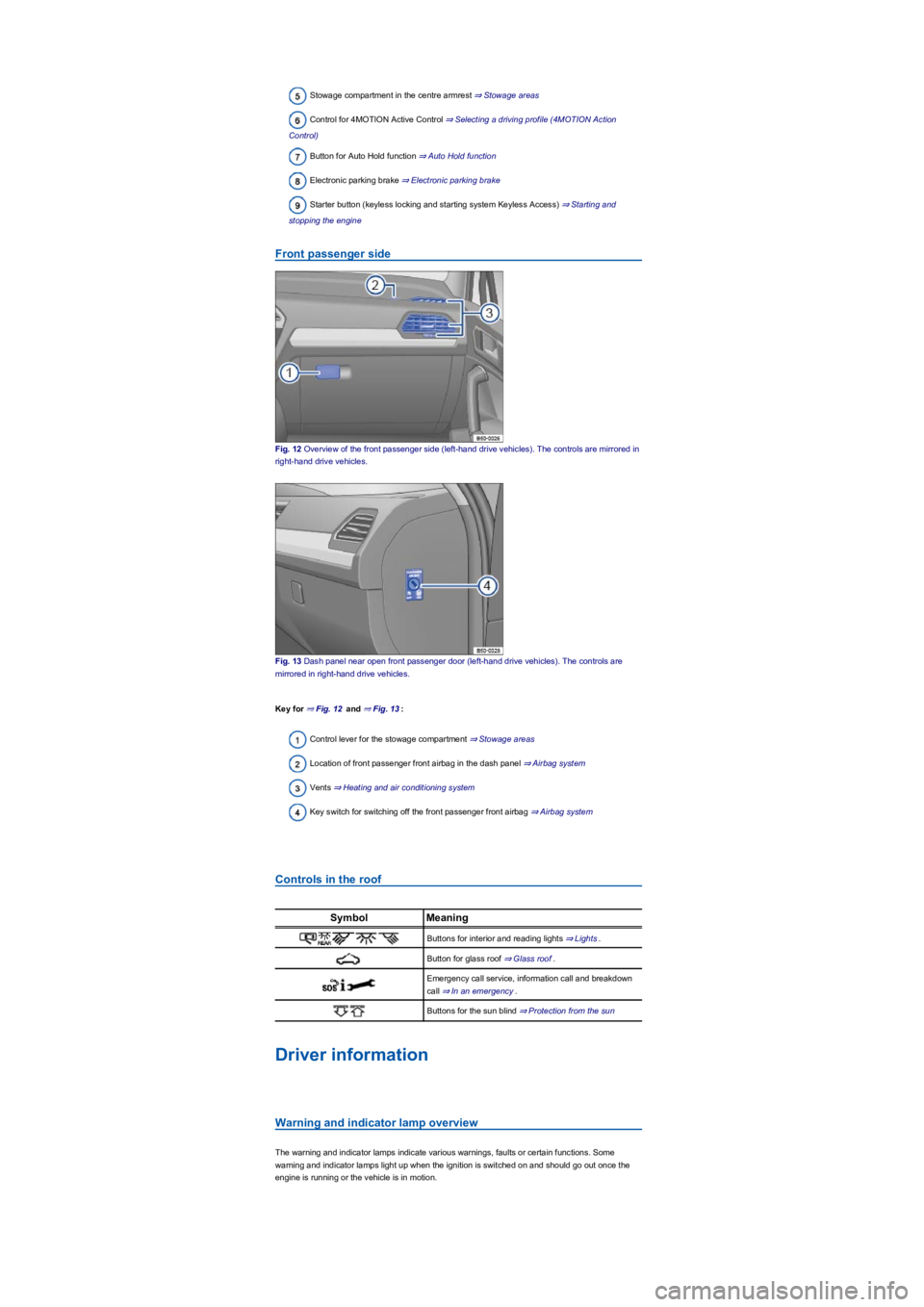
Stowage compartment in the centre armrest ⇒ Stowage areas
Control for 4MOTION Active Control ⇒ Selecting a driving profile (4MOTION Action
Control)
Button for Auto Hold function ⇒ Auto Hold function
Electronic parking brake ⇒ Electronic parking brake
Starter button (keyless locking and starting system Keyless Access) ⇒ Starting and
stopping the engine
Front passenger side
Fig. 12 Overview of the front passenger side (left-hand drive vehicles). The controls are mirrored in
right-hand drive vehicles.
Fig. 13 Dash panel near open front passenger door (left-hand drive vehicles). The controls are
mirrored in right-hand drive vehicles.
Key for ⇒ Fig. 12 and ⇒ Fig. 13:
Control lever for the stowage compartment ⇒ Stowage areas
Location of front passenger front airbag in the dash panel ⇒ Airbag system
Vents ⇒ Heating and air conditioning system
Key switch for switching off the front passenger front airbag ⇒ Airbag system
Controls in the roof
SymbolMeaning
Buttons for interior and reading lights ⇒ Lights.
Button for glass roof ⇒ Glass roof.
Emergency call service, information call and breakdown
call ⇒ In an emergency.
Buttons for the sun blind ⇒ Protection from the sun
Driver information
Warning and indicator lamp overview
The warning and indicator lamps indicate various warnings, faults or certain functions. Some
warning and indicator lamps light up when the ignition is switched on and should go out once the
engine is running or the vehicle is in motion.
Page 11 of 341
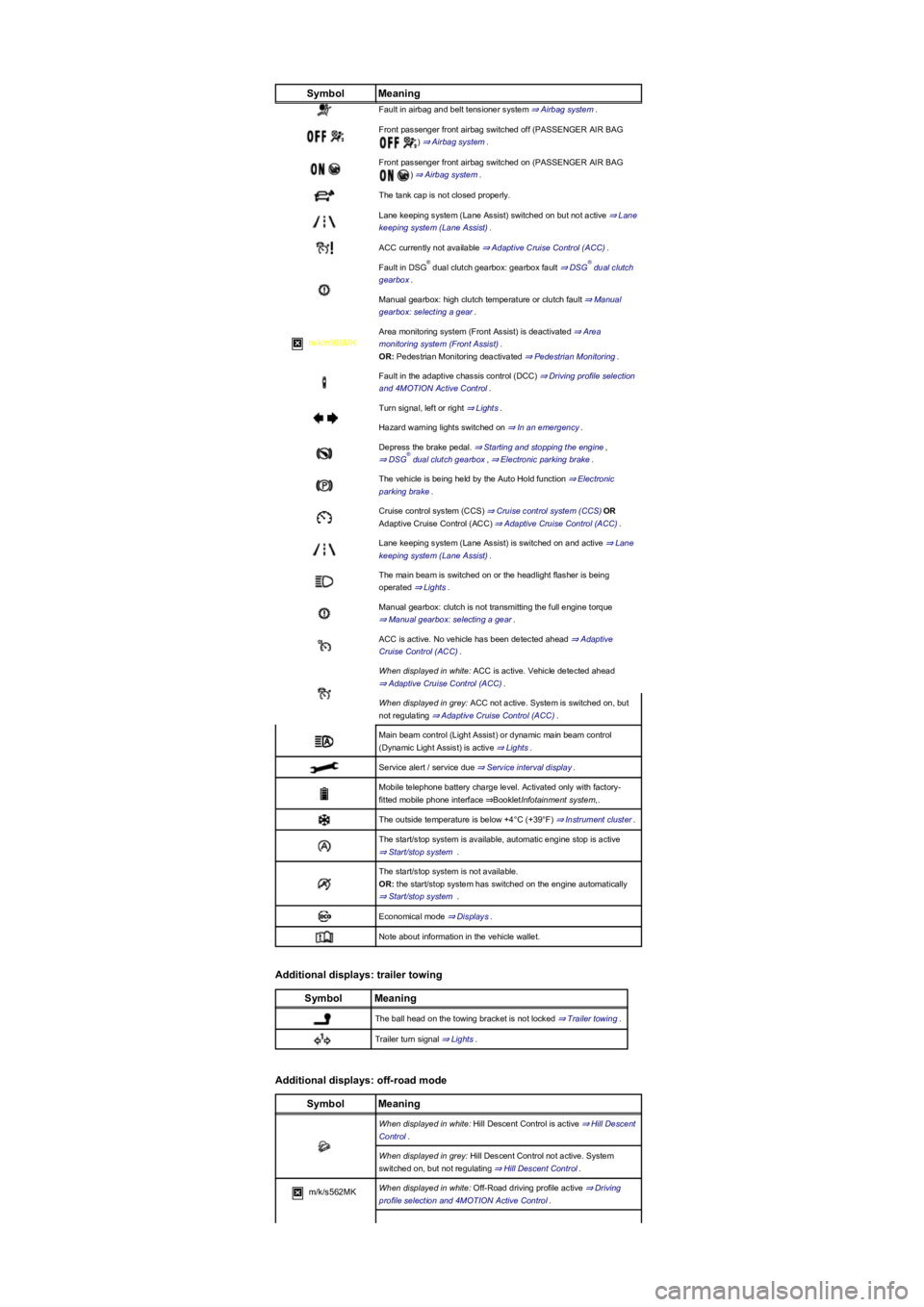
SymbolMeaning
Fault in airbag and belt tensioner system ⇒ Airbag system.
Front passenger front airbag switched off (PASSENGER AIR BAG
) ⇒ Airbag system.
Front passenger front airbag switched on (PASSENGER AIR BAG
) ⇒ Airbag system.
The tank cap is not closed properly.
Lane keeping system (Lane Assist) switched on but not active ⇒ Lane
keeping system (Lane Assist).
ACC currently not available ⇒ Adaptive Cruise Control (ACC).
Fault in DSG dual clutch gearbox: gearbox fault ⇒ DSG dual clutch
gearbox.
Manual gearbox: high clutch temperature or clutch fault ⇒ Manual
gearbox: selecting a gear.
m/k/n998MK
Area monitoring system (Front Assist) is deactivated ⇒ Area
monitoring system (Front Assist).
OR: Pedestrian Monitoring deactivated ⇒ Pedestrian Monitoring.
Fault in the adaptive chassis control (DCC) ⇒ Driving profile selection
and 4MOTION Active Control.
Turn signal, left or right ⇒ Lights.
Hazard warning lights switched on ⇒ In an emergency.
Depress the brake pedal. ⇒ Starting and stopping the engine,
⇒ DSG dual clutch gearbox, ⇒ Electronic parking brake.
The vehicle is being held by the Auto Hold function ⇒ Electronic
parking brake.
Cruise control system (CCS) ⇒ Cruise control system (CCS)OR
Adaptive Cruise Control (ACC) ⇒ Adaptive Cruise Control (ACC).
Lane keeping system (Lane Assist) is switched on and active ⇒ Lane
keeping system (Lane Assist).
The main beam is switched on or the headlight flasher is being
operated ⇒ Lights.
Manual gearbox: clutch is not transmitting the full engine torque
⇒ Manual gearbox: selecting a gear.
ACC is active. No vehicle has been detected ahead ⇒ Adaptive
Cruise Control (ACC).
When displayed in white: ACC is active. Vehicle detected ahead
⇒ Adaptive Cruise Control (ACC).
When displayed in grey: ACC not active. System is switched on, but
not regulating ⇒ Adaptive Cruise Control (ACC).
Main beam control (Light Assist) or dynamic main beam control
(Dynamic Light Assist) is active ⇒ Lights.
Service alert / service due ⇒ Service interval display.
Mobile telephone battery charge level. Activated only with factory-
fitted mobile phone interface ⇒BookletInfotainment system,.
The outside temperature is below +4°C (+39°F) ⇒ Instrument cluster.
The start/stop system is available, automatic engine stop is active
⇒ Start/stop system .
The start/stop system is not available.
OR: the start/stop system has switched on the engine automatically
⇒ Start/stop system .
Economical mode ⇒ Displays.
Note about information in the vehicle wallet.
Additional displays: trailer towing
SymbolMeaning
The ball head on the towing bracket is not locked ⇒ Trailer towing.
Trailer turn signal ⇒ Lights.
Additional displays: off-road mode
SymbolMeaning
When displayed in white: Hill Descent Control is active ⇒ Hill Descent
Control.
When displayed in grey: Hill Descent Control not active. System
switched on, but not regulating ⇒ Hill Descent Control.
m/k/s562MKWhen displayed in white: Off-Road driving profile active ⇒ Driving
profile selection and 4MOTION Active Control.
®®
®
Page 12 of 341
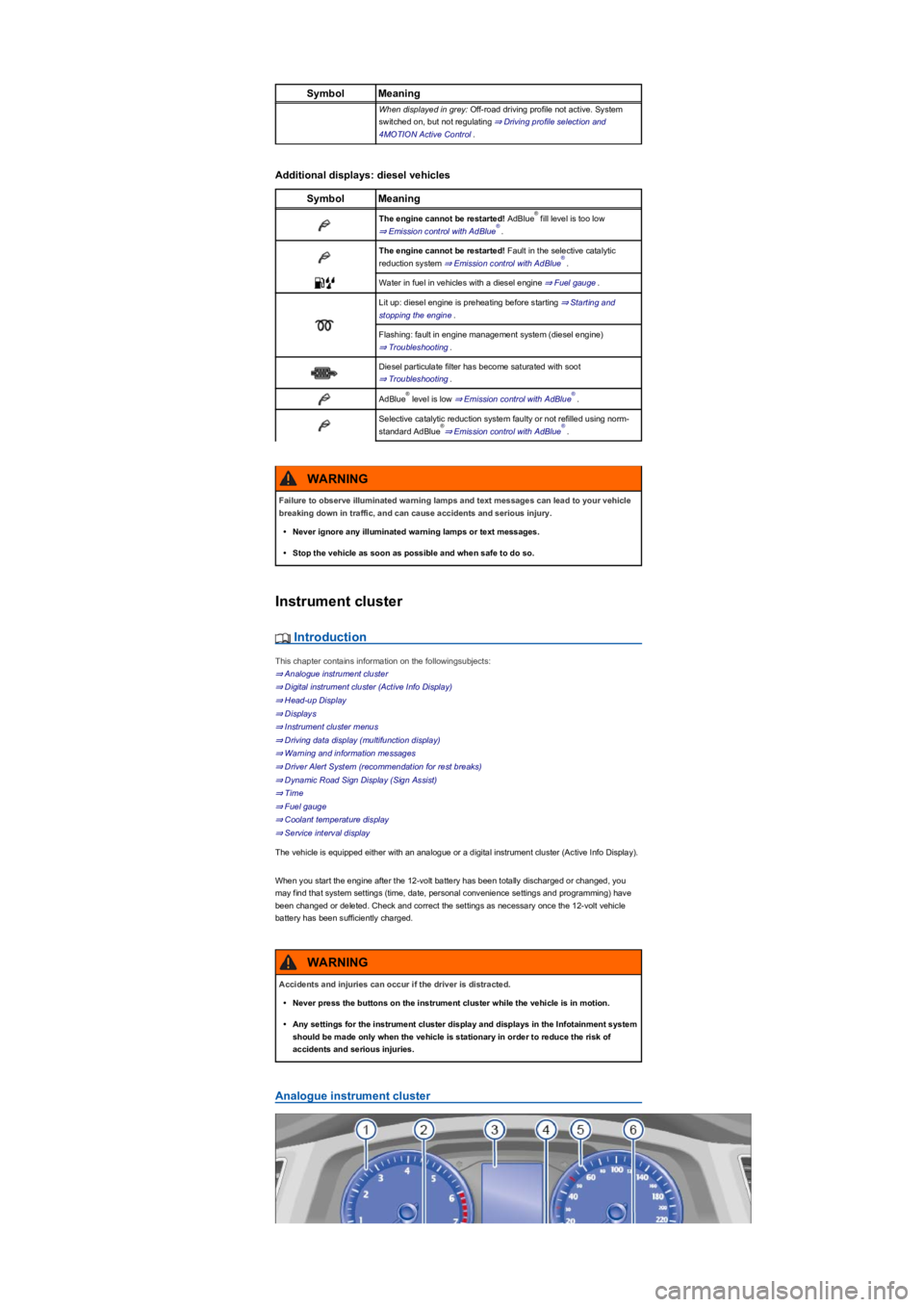
SymbolMeaning
When displayed in grey: Off-road driving profile not active. System
switched on, but not regulating ⇒ Driving profile selection and
4MOTION Active Control.
Additional displays: diesel vehicles
SymbolMeaning
The engine cannot be restarted! AdBlue fill level is too low
⇒ Emission control with AdBlue.
The engine cannot be restarted! Fault in the selective catalytic
reduction system ⇒ Emission control with AdBlue.
Water in fuel in vehicles with a diesel engine ⇒ Fuel gauge.
Lit up: diesel engine is preheating before starting ⇒ Starting and
stopping the engine.
Flashing: fault in engine management system (diesel engine)
⇒ Troubleshooting.
Diesel particulate filter has become saturated with soot
⇒ Troubleshooting.
AdBlue level is low ⇒ Emission control with AdBlue.
Selective catalytic reduction system faulty or not refilled using norm-
standard AdBlue⇒ Emission control with AdBlue.
Instrument cluster
Introduction
This chapter contains information on the followingsubjects:
⇒ Analogue instrument cluster
⇒ Digital instrument cluster (Active Info Display)
⇒ Head-up Display
⇒ Displays
⇒ Instrument cluster menus
⇒ Driving data display (multifunction display)
⇒ Warning and information messages
⇒ Driver Alert System (recommendation for rest breaks)
⇒ Dynamic Road Sign Display (Sign Assist)
⇒ Time
⇒ Fuel gauge
⇒ Coolant temperature display
⇒ Service interval display
The vehicle is equipped either with an analogue or a digital instrument cluster (Active Info Display).
When you start the engine after the 12-volt battery has been totally discharged or changed, you
may find that system settings (time, date, personal convenience settings and programming) have
been changed or deleted. Check and correct the settings as necessary once the 12-volt vehicle
battery has been sufficiently charged.
Analogue instrument cluster
®
®
®
®®
®®
Failure to observe illuminated warning lamps and text messages can lead to your vehicle
breaking down in traffic, and can cause accidents and serious injury.
•Never ignore any illuminated warning lamps or text messages.
•Stop the vehicle as soon as possible and when safe to do so.
WARNING
Accidents and injuries can occur if the driver is distracted.
•Never press the buttons on the instrument cluster while the vehicle is in motion.
•Any settings for the instrument cluster display and displays in the Infotainment system
should be made only when the vehicle is stationary in order to reduce the risk of
accidents and serious injuries.
WARNING
Page 32 of 341
Adapting the display areas to the driving situation
Choose the three possible instruments corresponding to your individual driving style and the driving
situation.
Due to the principle of performance determination available in the vehicle, the physical
accuracy of the displayed values is not guaranteed.
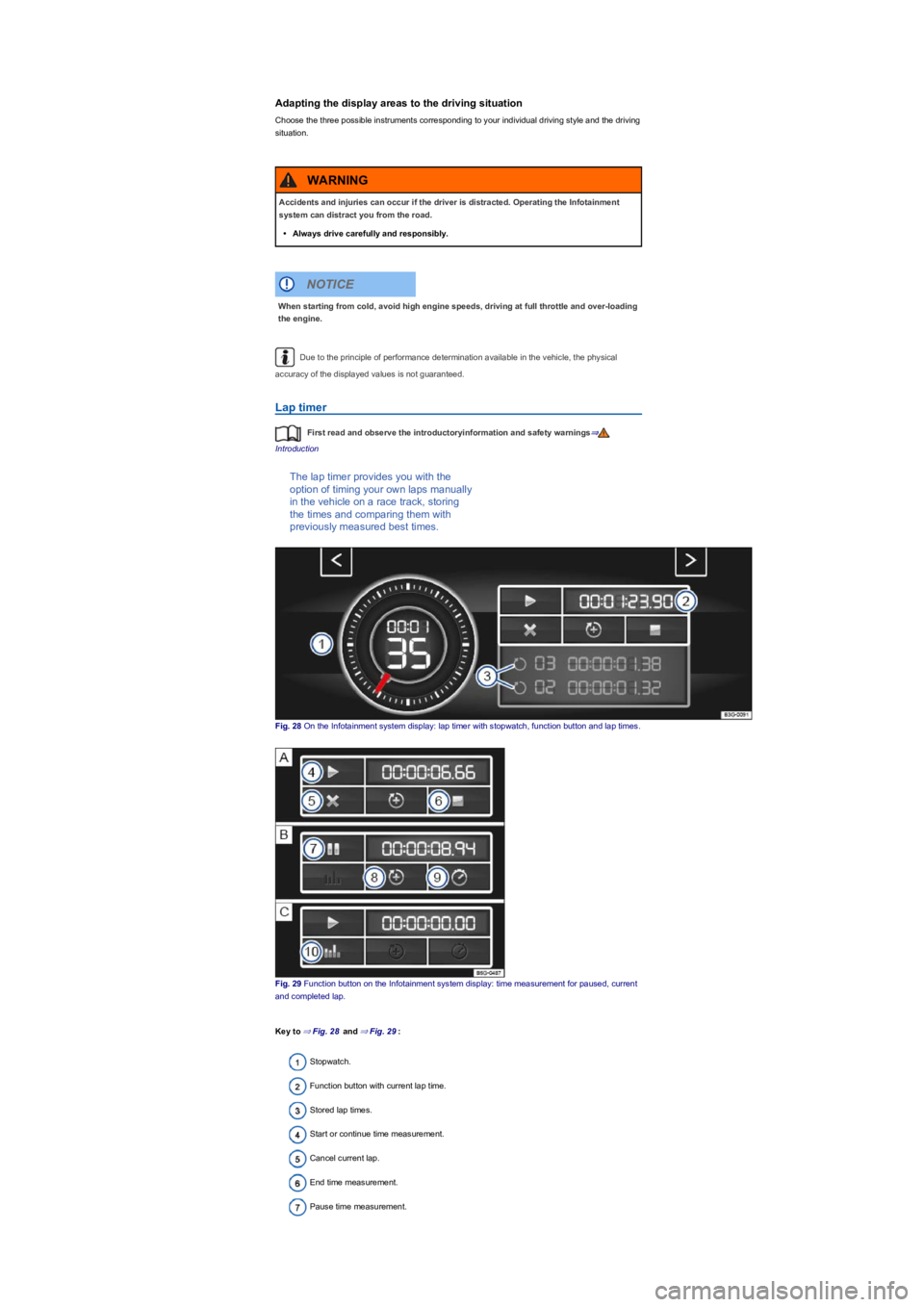
Lap timer
First read and observe the introductoryinformation and safety warnings⇒
Introduction
The lap timer provides you with the
option of timing your own laps manually
in the vehicle on a race track, storing
the times and comparing them with
previously measured best times.
Fig. 28 On the Infotainment system display: lap timer with stopwatch, function button and lap times.
Fig. 29 Function button on the Infotainment system display: time measurement for paused, current
and completed lap.
Key to ⇒ Fig. 28 and ⇒ Fig. 29:
Stopwatch.
Function button with current lap time.
Stored lap times.
Start or continue time measurement.
Cancel current lap.
End time measurement.
Pause time measurement.
Accidents and injuries can occur if the driver is distracted. Operating the Infotainment
system can distract you from the road.
•Always drive carefully and responsibly.
WARNING
When starting from cold, avoid high engine speeds, driving at full throttle and over-loading
the engine.
NOTICE
Page 62 of 341
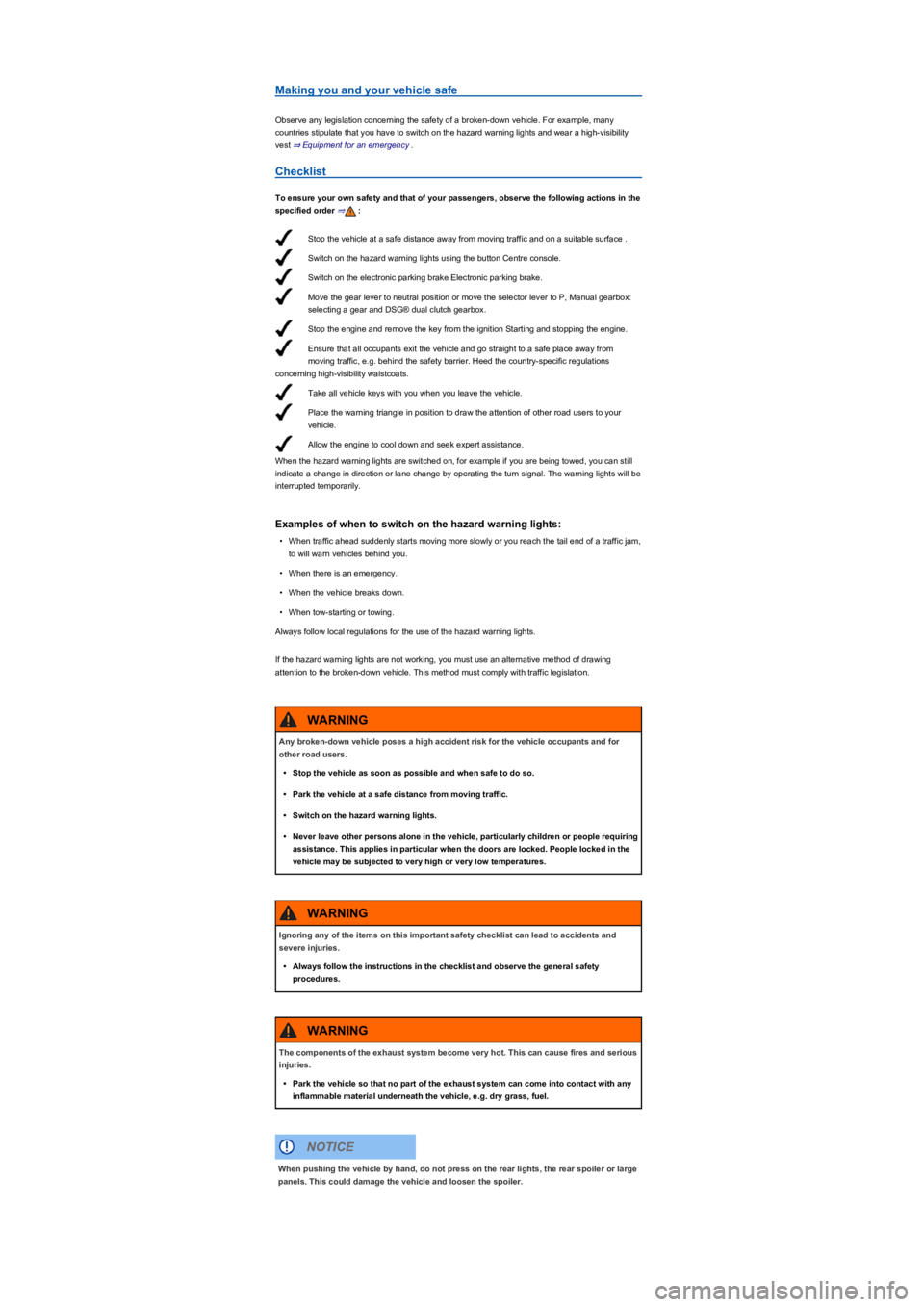
Stop the vehicle at a safe distance away from moving traffic and on a suitable surface .
Switch on the hazard warning lights using the button Centre console.
Switch on the electronic parking brake Electronic parking brake.
Move the gear lever to neutral position or move the selector lever to P, Manual gearbox:
selecting a gear and DSG® dual clutch gearbox.
Stop the engine and remove the key from the ignition Starting and stopping the engine.
Ensure that all occupants exit the vehicle and go straight to a safe place away from
moving traffic, e.g. behind the safety barrier. Heed the country-specific regulations
concerning high-visibility waistcoats.
Take all vehicle keys with you when you leave the vehicle.
Place the warning triangle in position to draw the attention of other road users to your
vehicle.
Allow the engine to cool down and seek expert assistance.
Making you and your vehicle safe
Observe any legislation concerning the safety of a broken-down vehicle. For example, many
countries stipulate that you have to switch on the hazard warning lights and wear a high-visibility
vest ⇒ Equipment for an emergency.
Checklist
To ensure your own safety and that of your passengers, observe the following actions in the
specified order ⇒:
When the hazard warning lights are switched on, for example if you are being towed, you can still
indicate a change in direction or lane change by operating the turn signal. The warning lights will be
interrupted temporarily.
Examples of when to switch on the hazard warning lights:
•When traffic ahead suddenly starts moving more slowly or you reach the tail end of a traffic jam,
to will warn vehicles behind you.
•When there is an emergency.
•When the vehicle breaks down.
•When tow-starting or towing.
Always follow local regulations for the use of the hazard warning lights.
If the hazard warning lights are not working, you must use an alternative method of drawing
attention to the broken-down vehicle. This method must comply with traffic legislation.
Any broken-down vehicle poses a high accident risk for the vehicle occupants and for
other road users.
•Stop the vehicle as soon as possible and when safe to do so.
•Park the vehicle at a safe distance from moving traffic.
•Switch on the hazard warning lights.
•Never leave other persons alone in the vehicle, particularly children or people requiring
assistance. This applies in particular when the doors are locked. People locked in the
vehicle may be subjected to very high or very low temperatures.
WARNING
Ignoring any of the items on this important safety checklist can lead to accidents and
severe injuries.
•Always follow the instructions in the checklist and observe the general safety
procedures.
WARNING
The components of the exhaust system become very hot. This can cause fires and serious
injuries.
•Park the vehicle so that no part of the exhaust system can come into contact with any
inflammable material underneath the vehicle, e.g. dry grass, fuel.
WARNING
When pushing the vehicle by hand, do not press on the rear lights, the rear spoiler or large
panels. This could damage the vehicle and loosen the spoiler.
NOTICE
Page 70 of 341
Automatic unlocking (Auto Unlock)
All doors and the boot lid are automatically unlocked if one of the following conditions applies:
•The vehicle is at a standstill and the vehicle key has been removed.
•m/k/a995MKIn vehicles with a DSG dual clutch gearbox: the selector lever is in
position P and the ignition has been switched off.
•OR: the vehicle is stationary and the button has been pressed.
•OR: the door release lever has been operated.
•OR: In an accident where the airbags have been triggered ⇒ Locking the vehicle after the
airbag has been triggered.
Automatic unlocking provides access to the vehicle if assistance is required.
Even if single door unlocking has already taken place, the entire vehicle will be unlocked
when the sensors are touched twice. The entire vehicle must be locked.
Locking and unlocking the vehicle from the outside
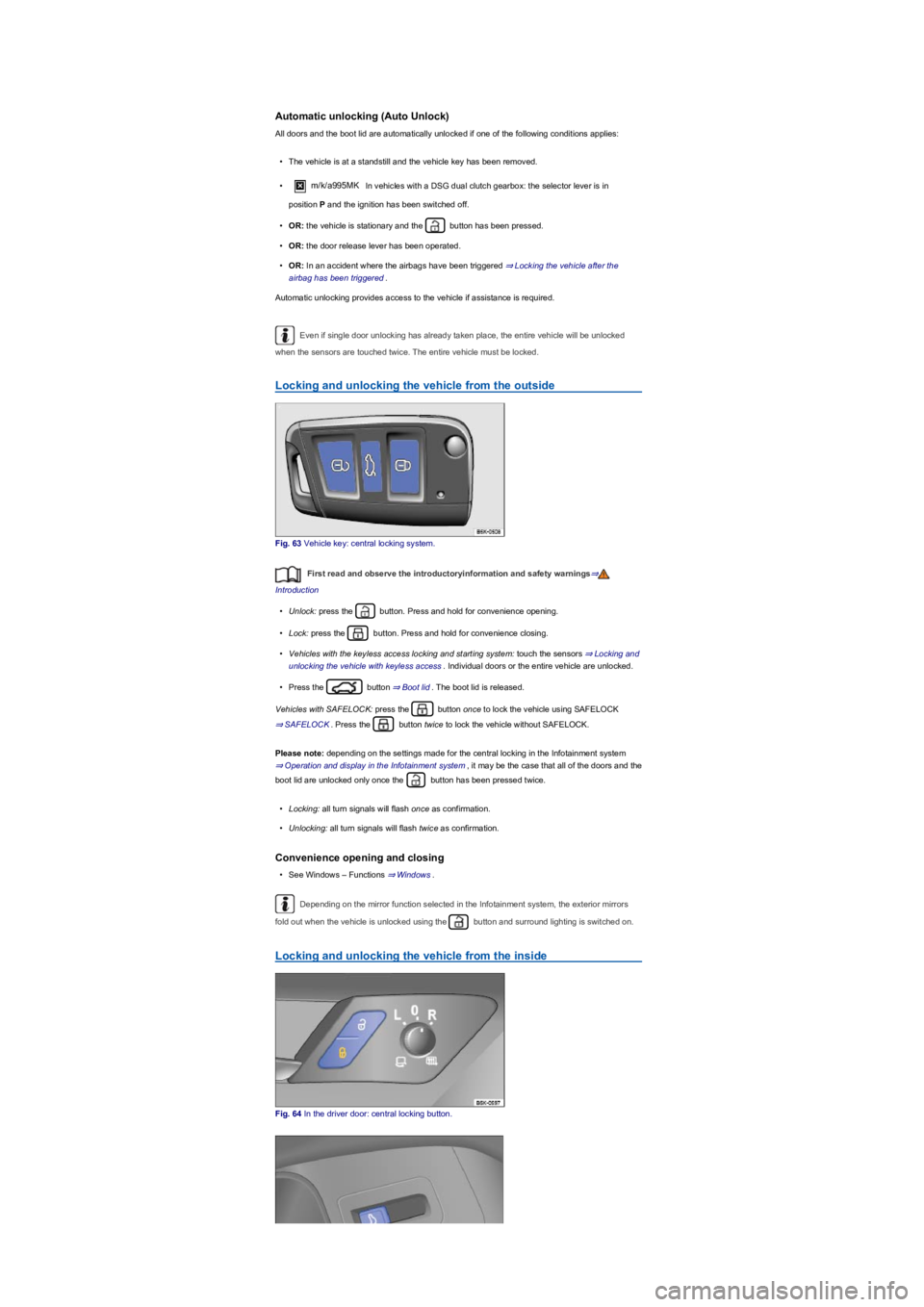
Fig. 63 Vehicle key: central locking system.
First read and observe the introductoryinformation and safety warnings⇒
Introduction
•Unlock: press the button. Press and hold for convenience opening.
•Lock: press the button. Press and hold for convenience closing.
•Vehicles with the keyless access locking and starting system: touch the sensors ⇒ Locking and
unlocking the vehicle with keyless access. Individual doors or the entire vehicle are unlocked.
•Press the button ⇒ Boot lid. The boot lid is released.
Vehicles with SAFELOCK: press the button once to lock the vehicle using SAFELOCK
⇒ SAFELOCK. Press the button twice to lock the vehicle without SAFELOCK.
Please note: depending on the settings made for the central locking in the Infotainment system
⇒ Operation and display in the Infotainment system, it may be the case that all of the doors and the
boot lid are unlocked only once the button has been pressed twice.
•Locking: all turn signals will flash once as confirmation.
•Unlocking: all turn signals will flash twice as confirmation.
Convenience opening and closing
•See Windows – Functions ⇒ Windows.
Depending on the mirror function selected in the Infotainment system, the exterior mirrors
fold out when the vehicle is unlocked using the button and surround lighting is switched on.
Locking and unlocking the vehicle from the inside
Fig. 64 In the driver door: central locking button.
Page 71 of 341
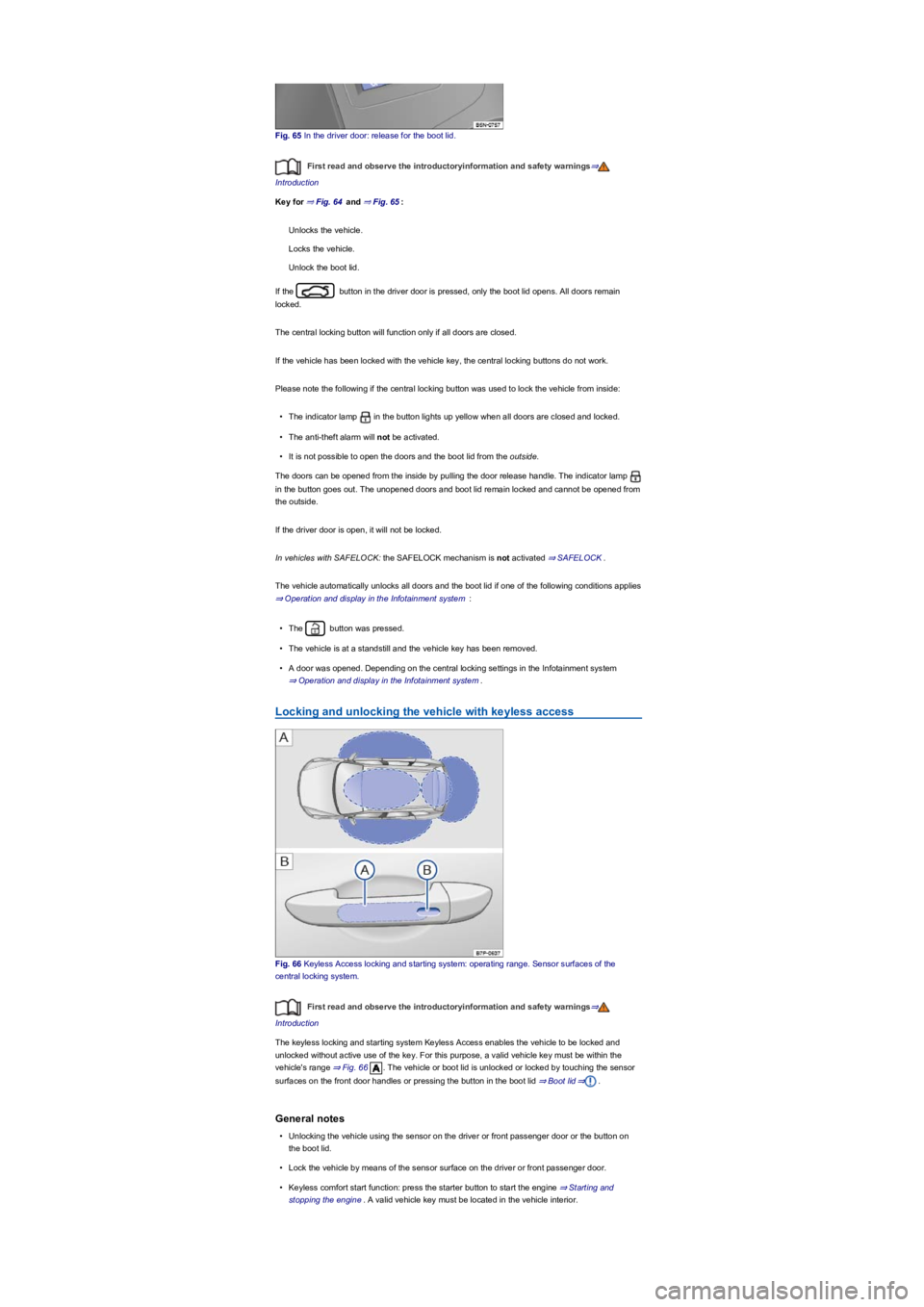
Fig. 65 In the driver door: release for the boot lid.
First read and observe the introductoryinformation and safety warnings⇒
Introduction
Key for ⇒ Fig. 64 and ⇒ Fig. 65:
Unlocks the vehicle.
Locks the vehicle.
Unlock the boot lid.
If the button in the driver door is pressed, only the boot lid opens. All doors remain
locked.
The central locking button will function only if all doors are closed.
If the vehicle has been locked with the vehicle key, the central locking buttons do not work.
Please note the following if the central locking button was used to lock the vehicle from inside:
•The indicator lamp in the button lights up yellow when all doors are closed and locked.
•The anti-theft alarm will not be activated.
•It is not possible to open the doors and the boot lid from the outside.
The doors can be opened from the inside by pulling the door release handle. The indicator lamp
in the button goes out. The unopened doors and boot lid remain locked and cannot be opened from
the outside.
If the driver door is open, it will not be locked.
In vehicles with SAFELOCK: the SAFELOCK mechanism is not activated ⇒ SAFELOCK.
The vehicle automatically unlocks all doors and the boot lid if one of the following conditions applies
⇒ Operation and display in the Infotainment system :
•The button was pressed.
•The vehicle is at a standstill and the vehicle key has been removed.
•A door was opened. Depending on the central locking settings in the Infotainment system
⇒ Operation and display in the Infotainment system.
Locking and unlocking the vehicle with keyless access
Fig. 66 Keyless Access locking and starting system: operating range. Sensor surfaces of the
central locking system.
First read and observe the introductoryinformation and safety warnings⇒
Introduction
The keyless locking and starting system Keyless Access enables the vehicle to be locked and
unlocked without active use of the key. For this purpose, a valid vehicle key must be within the
vehicle's range ⇒ Fig. 66. The vehicle or boot lid is unlocked or locked by touching the sensor
surfaces on the front door handles or pressing the button in the boot lid ⇒ Boot lid⇒.
General notes
•Unlocking the vehicle using the sensor on the driver or front passenger door or the button on
the boot lid.
•Lock the vehicle by means of the sensor surface on the driver or front passenger door.
•Keyless comfort start function: press the starter button to start the engine ⇒ Starting and
stopping the engine. A valid vehicle key must be located in the vehicle interior.