bonnet VOLKSWAGEN TIGUAN 2017 Owner´s Manual
[x] Cancel search | Manufacturer: VOLKSWAGEN, Model Year: 2017, Model line: TIGUAN, Model: VOLKSWAGEN TIGUAN 2017Pages: 341, PDF Size: 9.14 MB
Page 3 of 341
Texts with this symbol contain additional information on the protection of the environment.
Texts with this symbol contain additional information.
Vehicle overviews
Front view
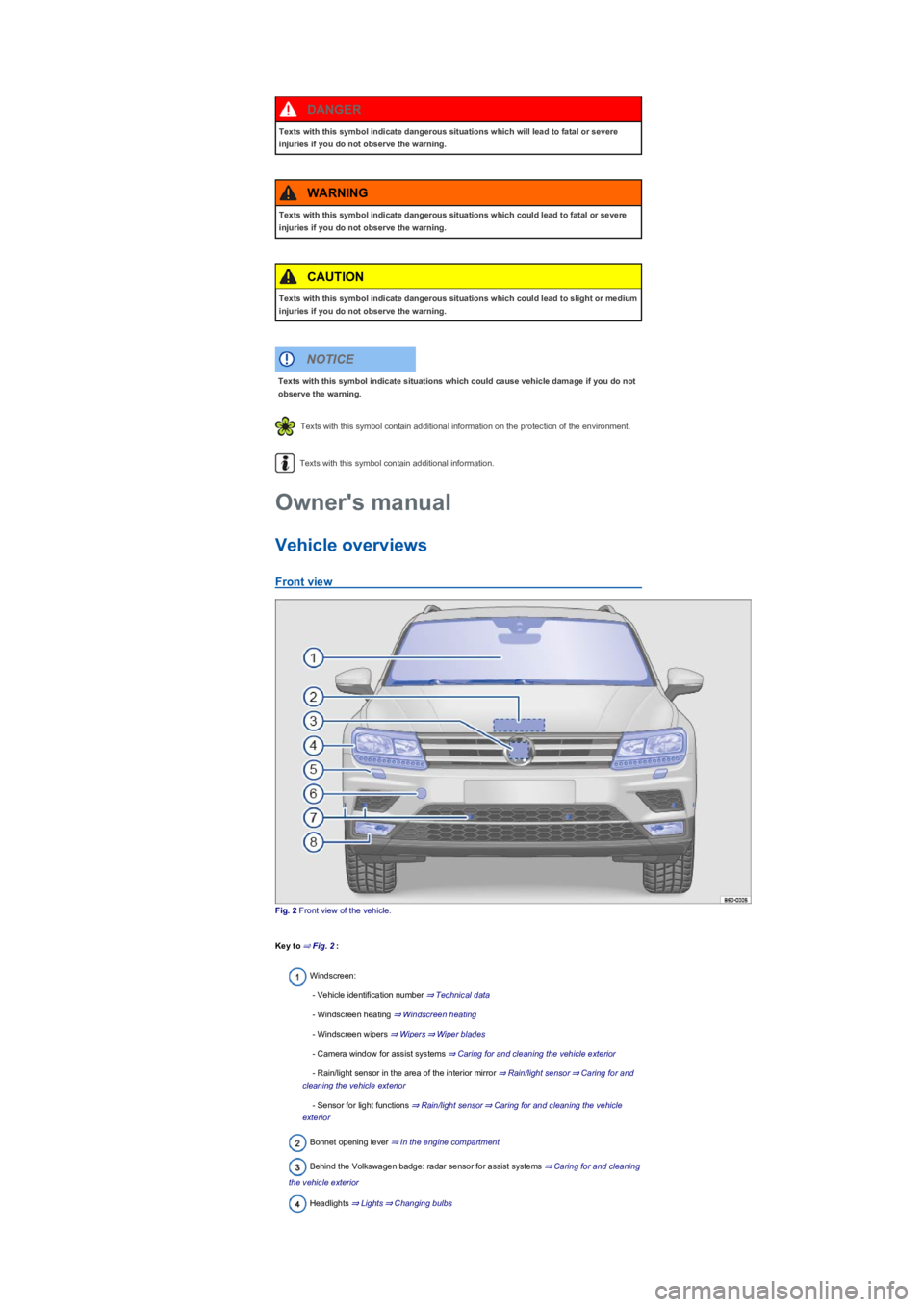
Fig. 2 Front view of the vehicle.
Key to ⇒ Fig. 2:
Windscreen:
- Vehicle identification number ⇒ Technical data
- Windscreen heating ⇒ Windscreen heating
- Windscreen wipers ⇒ Wipers⇒ Wiper blades
- Camera window for assist systems ⇒ Caring for and cleaning the vehicle exterior
- Rain/light sensor in the area of the interior mirror ⇒ Rain/light sensor⇒ Caring for and
cleaning the vehicle exterior
- Sensor for light functions ⇒ Rain/light sensor⇒ Caring for and cleaning the vehicle
exterior
Bonnet opening lever ⇒ In the engine compartment
Behind the Volkswagen badge: radar sensor for assist systems ⇒ Caring for and cleaning
the vehicle exterior
Headlights ⇒ Lights⇒ Changing bulbs
Texts with this symbol indicate dangerous situations which will lead to fatal or severe
injuries if you do not observe the warning.
DANGER
Texts with this symbol indicate dangerous situations which could lead to fatal or severe
injuries if you do not observe the warning.
WARNING
Texts with this symbol indicate dangerous situations which could lead to slight or medium
injuries if you do not observe the warning.
CAUTION
Texts with this symbol indicate situations which could cause vehicle damage if you do not
observe the warning.
NOTICE
Owner's manual
Page 8 of 341
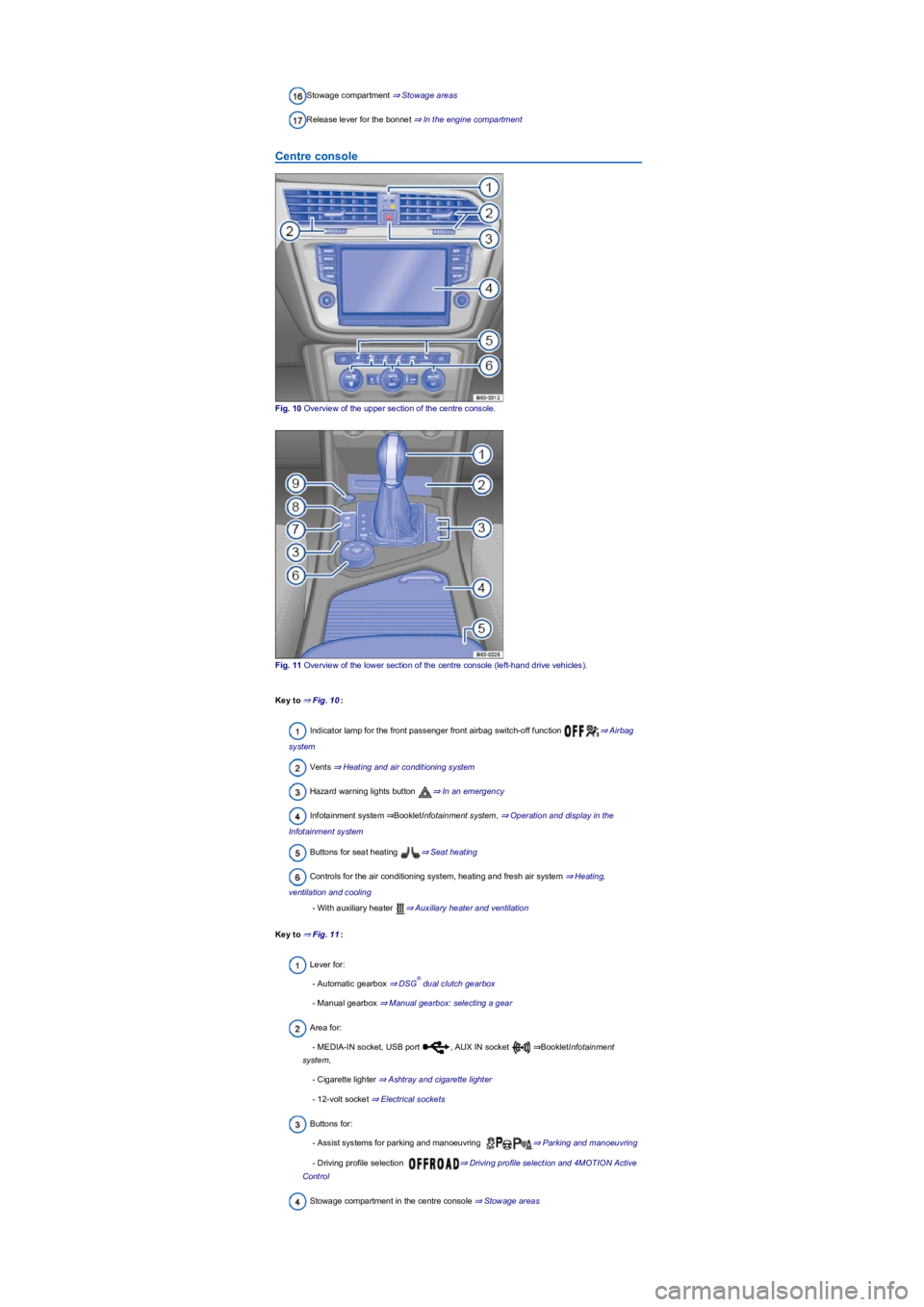
Stowage compartment ⇒ Stowage areas
Release lever for the bonnet ⇒ In the engine compartment
Centre console
Fig. 10 Overview of the upper section of the centre console.
Fig. 11 Overview of the lower section of the centre console (left-hand drive vehicles).
Key to ⇒ Fig. 10:
Indicator lamp for the front passenger front airbag switch-off function ⇒ Airbag
system
Vents ⇒ Heating and air conditioning system
Hazard warning lights button ⇒ In an emergency
Infotainment system ⇒BookletInfotainment system, ⇒ Operation and display in the
Infotainment system
Buttons for seat heating ⇒ Seat heating
Controls for the air conditioning system, heating and fresh air system ⇒ Heating,
ventilation and cooling
- With auxiliary heater ⇒ Auxiliary heater and ventilation
Key to ⇒ Fig. 11:
Lever for:
- Automatic gearbox ⇒ DSG dual clutch gearbox
- Manual gearbox ⇒ Manual gearbox: selecting a gear
Area for:
- MEDIA-IN socket, USB port , AUX IN socket ⇒BookletInfotainment
system,
- Cigarette lighter ⇒ Ashtray and cigarette lighter
- 12-volt socket ⇒ Electrical sockets
Buttons for:
- Assist systems for parking and manoeuvring ⇒ Parking and manoeuvring
- Driving profile selection ⇒ Driving profile selection and 4MOTION Active
Control
Stowage compartment in the centre console ⇒ Stowage areas
®
Page 15 of 341
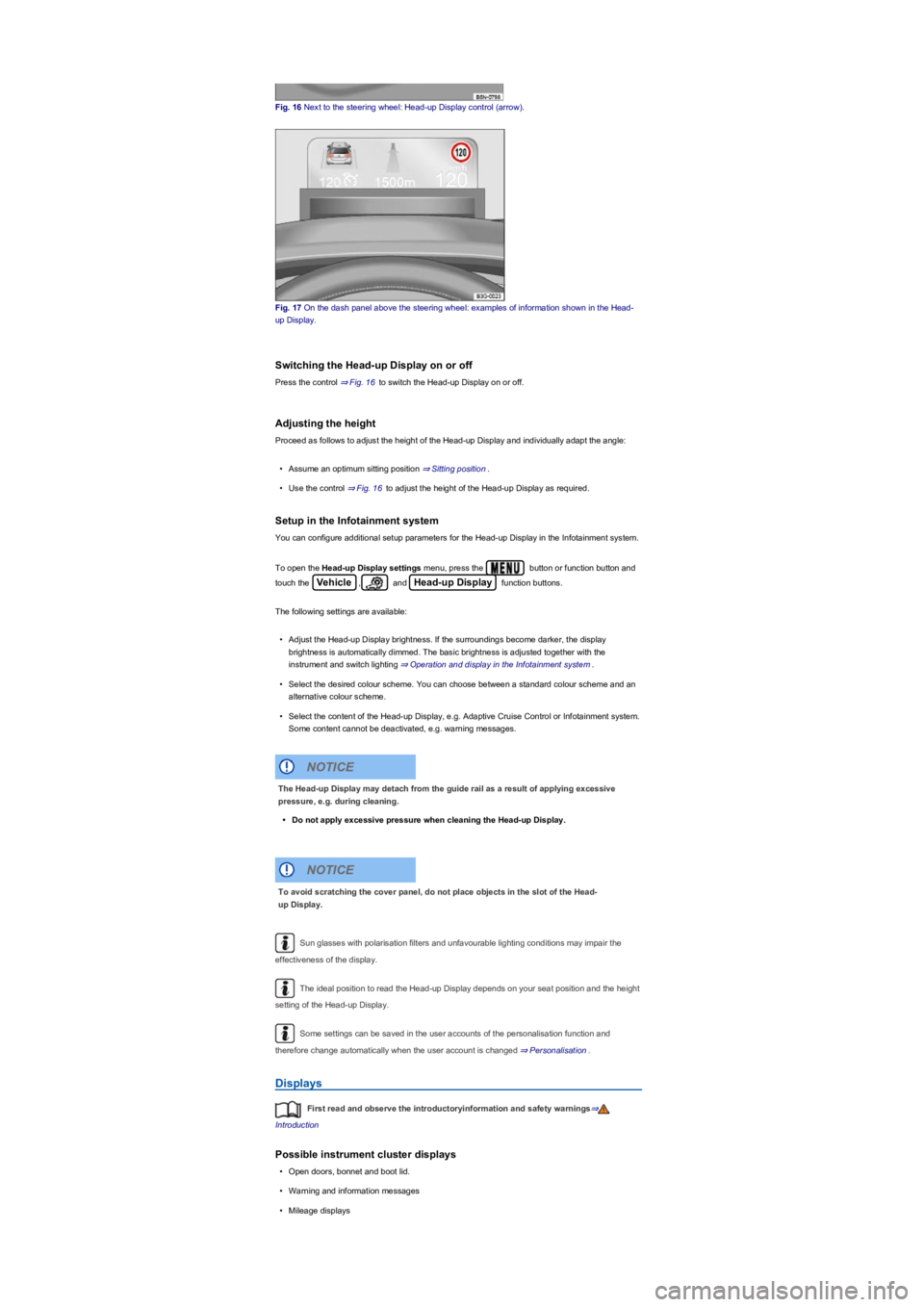
Fig. 16 Next to the steering wheel: Head-up Display control (arrow).
Fig. 17 On the dash panel above the steering wheel: examples of information shown in the Head-
up Display.
Switching the Head-up Display on or off
Press the control ⇒ Fig. 16 to switch the Head-up Display on or off.
Adjusting the height
Proceed as follows to adjust the height of the Head-up Display and individually adapt the angle:
•Assume an optimum sitting position ⇒ Sitting position.
•Use the control ⇒ Fig. 16 to adjust the height of the Head-up Display as required.
Setup in the Infotainment system
You can configure additional setup parameters for the Head-up Display in the Infotainment system.
To open the Head-up Display settings menu, press the button or function button and
touch the Vehicle, and Head-up Display function buttons.
The following settings are available:
•Adjust the Head-up Display brightness. If the surroundings become darker, the display
brightness is automatically dimmed. The basic brightness is adjusted together with the
instrument and switch lighting ⇒ Operation and display in the Infotainment system.
•Select the desired colour scheme. You can choose between a standard colour scheme and an
alternative colour scheme.
•Select the content of the Head-up Display, e.g. Adaptive Cruise Control or Infotainment system.
Some content cannot be deactivated, e.g. warning messages.
Sun glasses with polarisation filters and unfavourable lighting conditions may impair the
effectiveness of the display.
The ideal position to read the Head-up Display depends on your seat position and the height
setting of the Head-up Display.
Some settings can be saved in the user accounts of the personalisation function and
therefore change automatically when the user account is changed ⇒ Personalisation.
Displays
First read and observe the introductoryinformation and safety warnings⇒
Introduction
Possible instrument cluster displays
•Open doors, bonnet and boot lid.
•Warning and information messages
•Mileage displays
The Head-up Display may detach from the guide rail as a result of applying excessive
pressure, e.g. during cleaning.
•Do not apply excessive pressure when cleaning the Head-up Display.
NOTICE
To avoid scratching the cover panel, do not place objects in the slot of the Head-
up Display.
NOTICE
Page 16 of 341
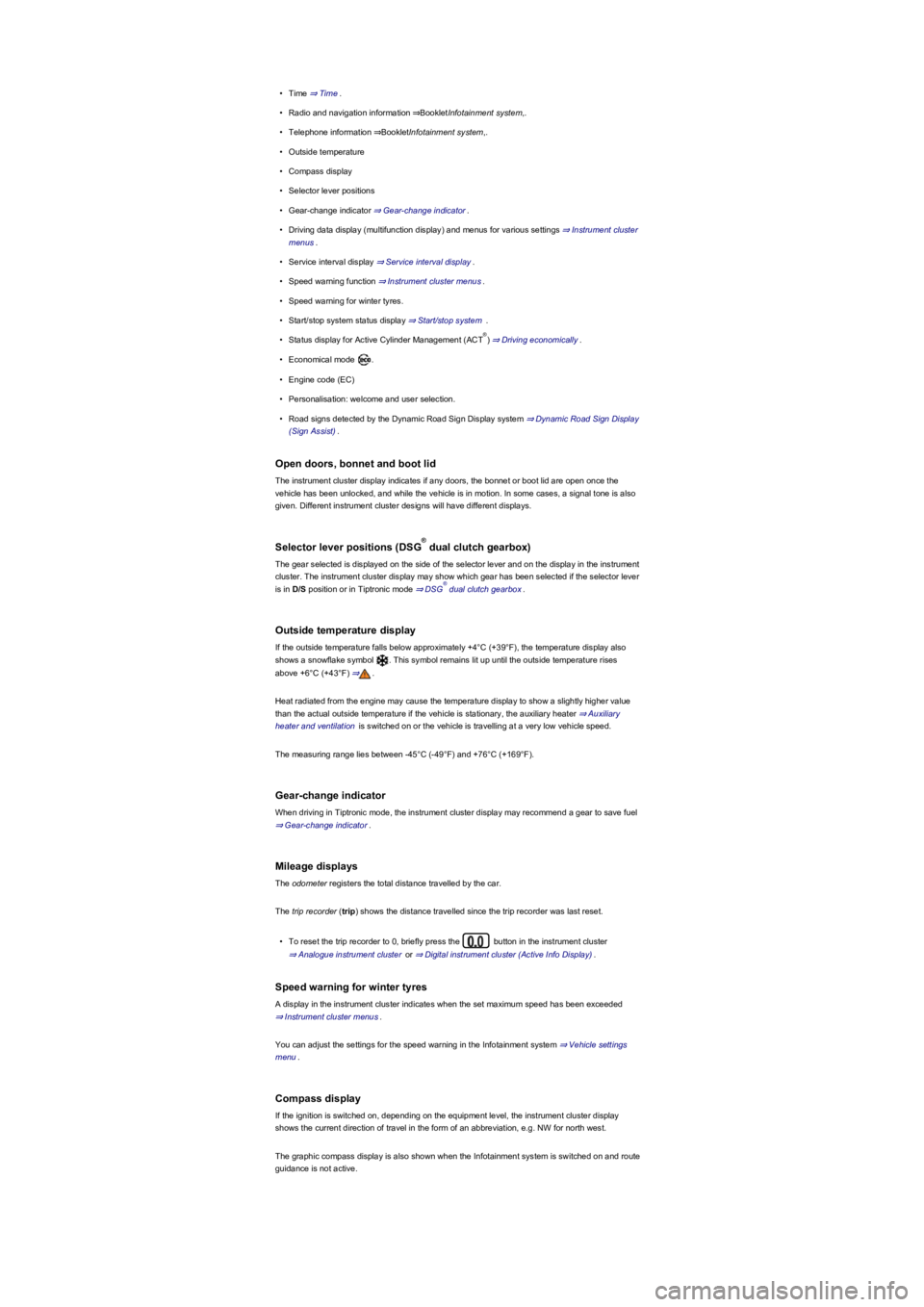
•Time ⇒ Time.
•Radio and navigation information ⇒BookletInfotainment system,.
•Telephone information ⇒BookletInfotainment system,.
•Outside temperature
•Compass display
•Selector lever positions
•Gear-change indicator ⇒ Gear-change indicator.
•Driving data display (multifunction display) and menus for various settings ⇒ Instrument cluster
menus.
•Service interval display ⇒ Service interval display.
•Speed warning function ⇒ Instrument cluster menus.
•Speed warning for winter tyres.
•Start/stop system status display ⇒ Start/stop system .
•Status display for Active Cylinder Management (ACT) ⇒ Driving economically.
•Economical mode .
•Engine code (EC)
•Personalisation: welcome and user selection.
•Road signs detected by the Dynamic Road Sign Display system ⇒ Dynamic Road Sign Display
(Sign Assist).
Open doors, bonnet and boot lid
The instrument cluster display indicates if any doors, the bonnet or boot lid are open once the
vehicle has been unlocked, and while the vehicle is in motion. In some cases, a signal tone is also
given. Different instrument cluster designs will have different displays.
Selector lever positions (DSG dual clutch gearbox)
The gear selected is displayed on the side of the selector lever and on the display in the instrument
cluster. The instrument cluster display may show which gear has been selected if the selector lever
is in D/S position or in Tiptronic mode ⇒ DSG dual clutch gearbox.
Outside temperature display
If the outside temperature falls below approximately +4°C (+39°F), the temperature display also
shows a snowflake symbol . This symbol remains lit up until the outside temperature rises
above +6°C (+43°F) ⇒.
Heat radiated from the engine may cause the temperature display to show a slightly higher value
than the actual outside temperature if the vehicle is stationary, the auxiliary heater ⇒ Auxiliary
heater and ventilation is switched on or the vehicle is travelling at a very low vehicle speed.
The measuring range lies between -45°C (-49°F) and +76°C (+169°F).
Gear-change indicator
When driving in Tiptronic mode, the instrument cluster display may recommend a gear to save fuel
⇒ Gear-change indicator.
Mileage displays
The odometer registers the total distance travelled by the car.
The trip recorder (trip) shows the distance travelled since the trip recorder was last reset.
•To reset the trip recorder to 0, briefly press the button in the instrument cluster
⇒ Analogue instrument cluster or ⇒ Digital instrument cluster (Active Info Display).
Speed warning for winter tyres
A display in the instrument cluster indicates when the set maximum speed has been exceeded
⇒ Instrument cluster menus.
You can adjust the settings for the speed warning in the Infotainment system ⇒ Vehicle settings
menu.
Compass display
If the ignition is switched on, depending on the equipment level, the instrument cluster display
shows the current direction of travel in the form of an abbreviation, e.g. NW for north west.
The graphic compass display is also shown when the Infotainment system is switched on and route
guidance is not active.
®
®
®
Page 64 of 341
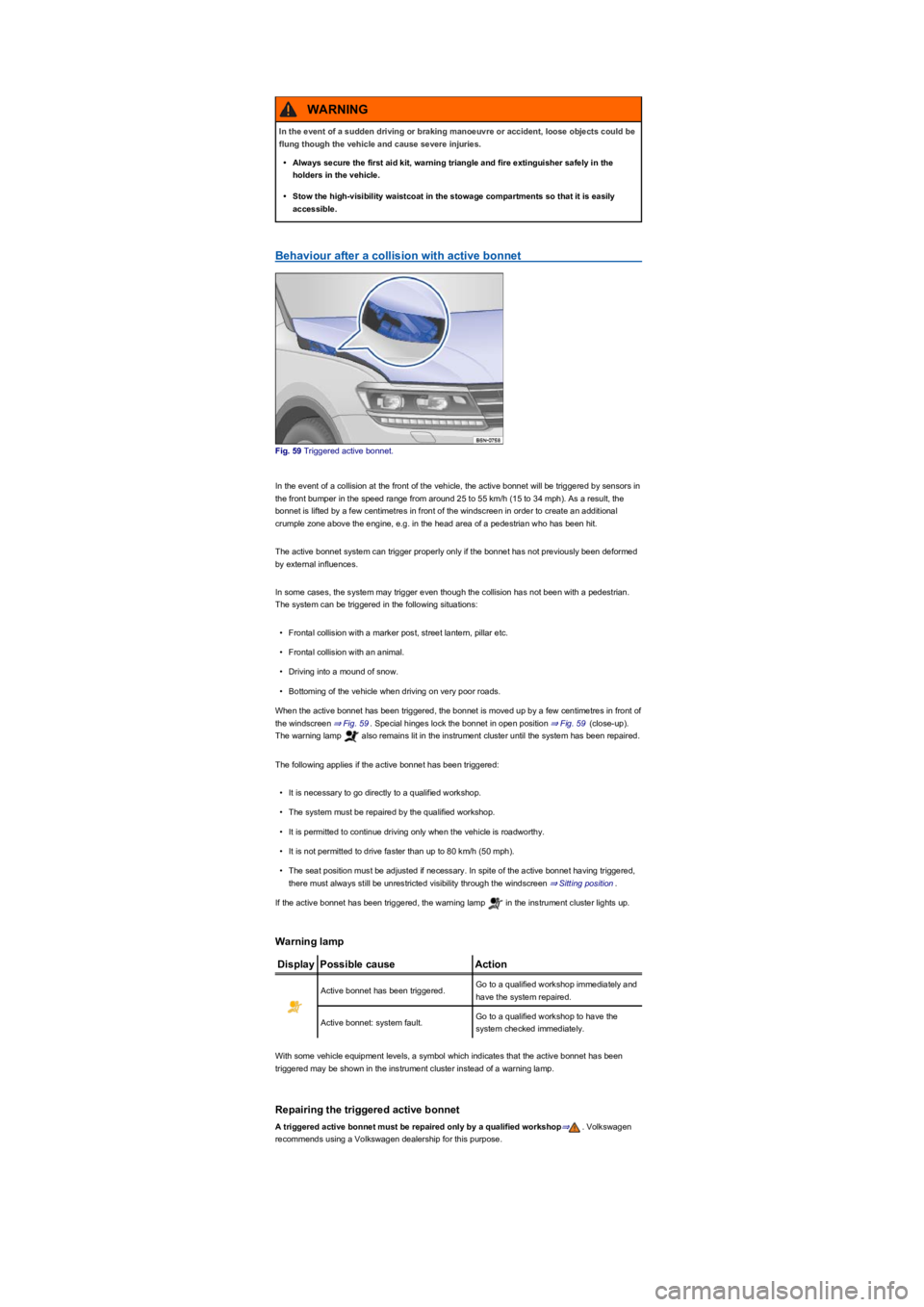
Behaviour after a collision with active bonnet
Fig. 59 Triggered active bonnet.
In the event of a collision at the front of the vehicle, the active bonnet will be triggered by sensors in
the front bumper in the speed range from around 25 to 55 km/h (15 to 34 mph). As a result, the
bonnet is lifted by a few centimetres in front of the windscreen in order to create an additional
crumple zone above the engine, e.g. in the head area of a pedestrian who has been hit.
The active bonnet system can trigger properly only if the bonnet has not previously been deformed
by external influences.
In some cases, the system may trigger even though the collision has not been with a pedestrian.
The system can be triggered in the following situations:
•Frontal collision with a marker post, street lantern, pillar etc.
•Frontal collision with an animal.
•Driving into a mound of snow.
•Bottoming of the vehicle when driving on very poor roads.
When the active bonnet has been triggered, the bonnet is moved up by a few centimetres in front of
the windscreen ⇒ Fig. 59. Special hinges lock the bonnet in open position ⇒ Fig. 59 (close-up).
The warning lamp also remains lit in the instrument cluster until the system has been repaired.
The following applies if the active bonnet has been triggered:
•It is necessary to go directly to a qualified workshop.
•The system must be repaired by the qualified workshop.
•It is permitted to continue driving only when the vehicle is roadworthy.
•It is not permitted to drive faster than up to 80 km/h (50 mph).
•The seat position must be adjusted if necessary. In spite of the active bonnet having triggered,
there must always still be unrestricted visibility through the windscreen ⇒ Sitting position.
If the active bonnet has been triggered, the warning lamp in the instrument cluster lights up.
Warning lamp
DisplayPossible causeAction
Active bonnet has been triggered.Go to a qualified workshop immediately and
have the system repaired.
Active bonnet: system fault.Go to a qualified workshop to have the
system checked immediately.
With some vehicle equipment levels, a symbol which indicates that the active bonnet has been
triggered may be shown in the instrument cluster instead of a warning lamp.
Repairing the triggered active bonnet
A triggered active bonnet must be repaired only by a qualified workshop⇒. Volkswagen
recommends using a Volkswagen dealership for this purpose.
In the event of a sudden driving or braking manoeuvre or accident, loose objects could be
flung though the vehicle and cause severe injuries.
•Always secure the first aid kit, warning triangle and fire extinguisher safely in the
holders in the vehicle.
•Stow the high-visibility waistcoat in the stowage compartments so that it is easily
accessible.
WARNING
Page 65 of 341
The symbol can differ depending on the version of the instrument cluster.
Information call, breakdown call and Emergency Call Service
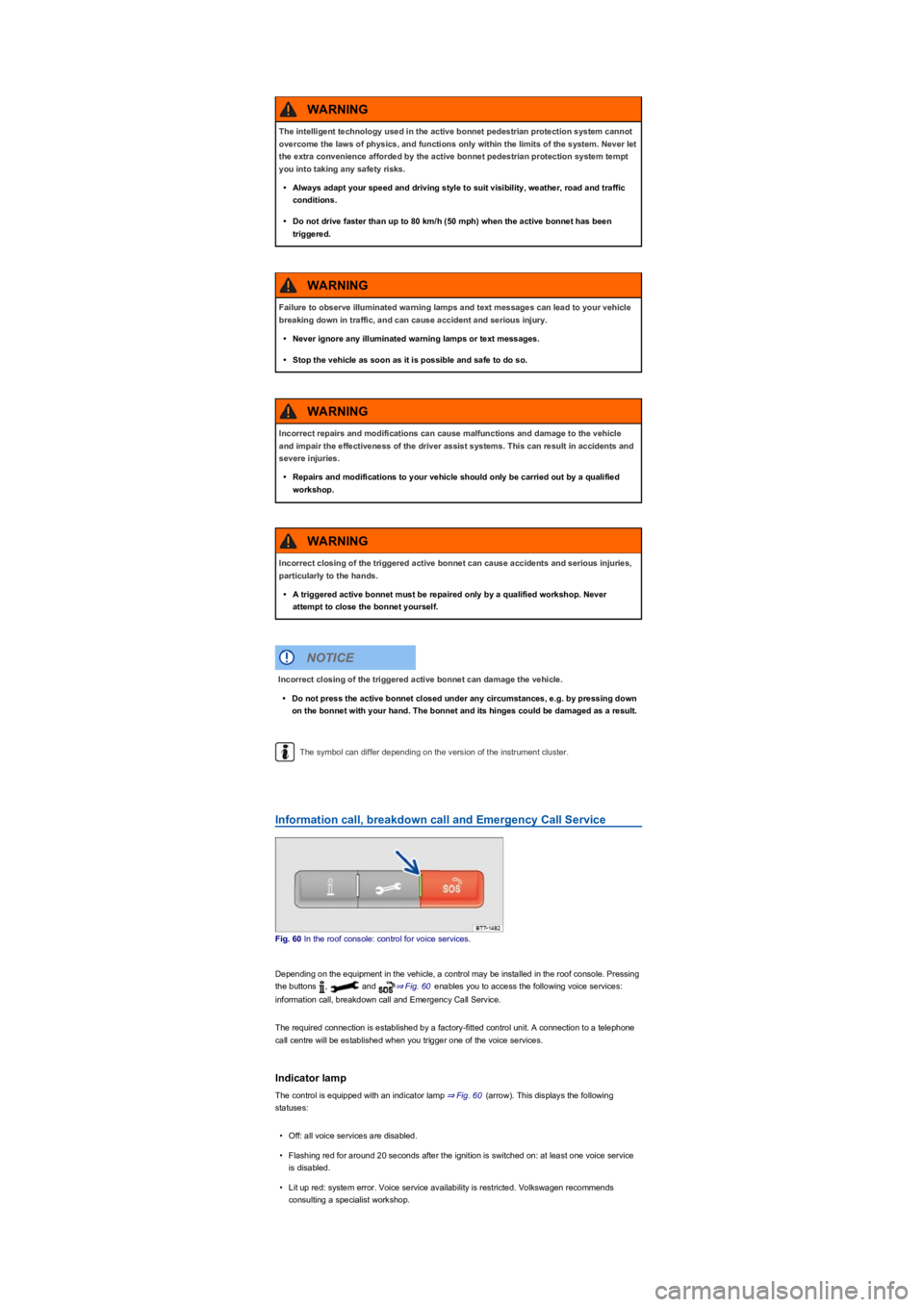
Fig. 60 In the roof console: control for voice services.
Depending on the equipment in the vehicle, a control may be installed in the roof console. Pressing
the buttons , and ⇒ Fig. 60 enables you to access the following voice services:
information call, breakdown call and Emergency Call Service.
The required connection is established by a factory-fitted control unit. A connection to a telephone
call centre will be established when you trigger one of the voice services.
Indicator lamp
The control is equipped with an indicator lamp ⇒ Fig. 60 (arrow). This displays the following
statuses:
•Off: all voice services are disabled.
•Flashing red for around 20 seconds after the ignition is switched on: at least one voice service
is disabled.
•Lit up red: system error. Voice service availability is restricted. Volkswagen recommends
consulting a specialist workshop.
The intelligent technology used in the active bonnet pedestrian protection system cannot
overcome the laws of physics, and functions only within the limits of the system. Never let
the extra convenience afforded by the active bonnet pedestrian protection system tempt
you into taking any safety risks.
•Always adapt your speed and driving style to suit visibility, weather, road and traffic
conditions.
•Do not drive faster than up to 80 km/h (50 mph) when the active bonnet has been
triggered.
WARNING
Failure to observe illuminated warning lamps and text messages can lead to your vehicle
breaking down in traffic, and can cause accident and serious injury.
•Never ignore any illuminated warning lamps or text messages.
•Stop the vehicle as soon as it is possible and safe to do so.
WARNING
Incorrect repairs and modifications can cause malfunctions and damage to the vehicle
and impair the effectiveness of the driver assist systems. This can result in accidents and
severe injuries.
•Repairs and modifications to your vehicle should only be carried out by a qualified
workshop.
WARNING
Incorrect closing of the triggered active bonnet can cause accidents and serious injuries,
particularly to the hands.
•A triggered active bonnet must be repaired only by a qualified workshop. Never
attempt to close the bonnet yourself.
WARNING
Incorrect closing of the triggered active bonnet can damage the vehicle.
•Do not press the active bonnet closed under any circumstances, e.g. by pressing down
on the bonnet with your hand. The bonnet and its hinges could be damaged as a result.
NOTICE
Page 74 of 341
The anti-theft alarm is activated automatically when the vehicle is locked using the vehicle key.
When does the system trigger an alarm?
The anti-theft alarm issues acoustic and visual alarm signals for up to five minutes if any of the
following unauthorised actions are performed while the vehicle is locked:
•A door that was unlocked mechanically with the vehicle key is opened.
•A door is opened.
•The bonnet is opened.
•The boot lid is opened.
•Switch on the ignition using an invalid vehicle key.
•If the 12-volt vehicle battery is disconnected.
•Movement inside the vehicle (in vehicles with interior monitoring ⇒ Interior monitoring system
and anti-tow alarm).
•The vehicle is towed (in vehicles with anti-tow alarm ⇒ Interior monitoring system and anti-tow
alarm).
•The vehicle is lifted (in vehicles with anti-tow alarm ⇒ Interior monitoring system and anti-tow
alarm).
•The vehicle is transported on a car ferry or by rail (in vehicles with anti-tow alarm or interior
monitoring ⇒ Interior monitoring system and anti-tow alarm).
•A trailer that is connected to the anti-theft alarm system is removed ⇒ Trailer towing.
Switching off the alarm
•Unlock the vehicle using the unlocking button on the vehicle key.
•OR: switch on the ignition using a valid vehicle key. A short alarm lasting around one second
may sound.
•In vehicles with keyless access, the alarm can also be switched off by gripping the door handle
⇒ Locking and unlocking the vehicle with keyless access.
The alarm will be triggered again if a person gains access to the same or a different secured
zone after the alarm has been switched off.
The anti-theft alarm will not be activated if the vehicle is locked from the inside using the
central locking button .
If you unlock the driver door mechanically using the vehicle key, only the driver door is
unlocked, and not the whole vehicle. The SAFELOCK mechanism on all doors is not deactivated
and the central locking button is not activated until you switch on the ignition (however the doors will
not be unlocked).
The anti-theft alarm will not function correctly if the 12-volt vehicle battery is weak or
discharged.
Interior monitoring system and anti-tow alarm
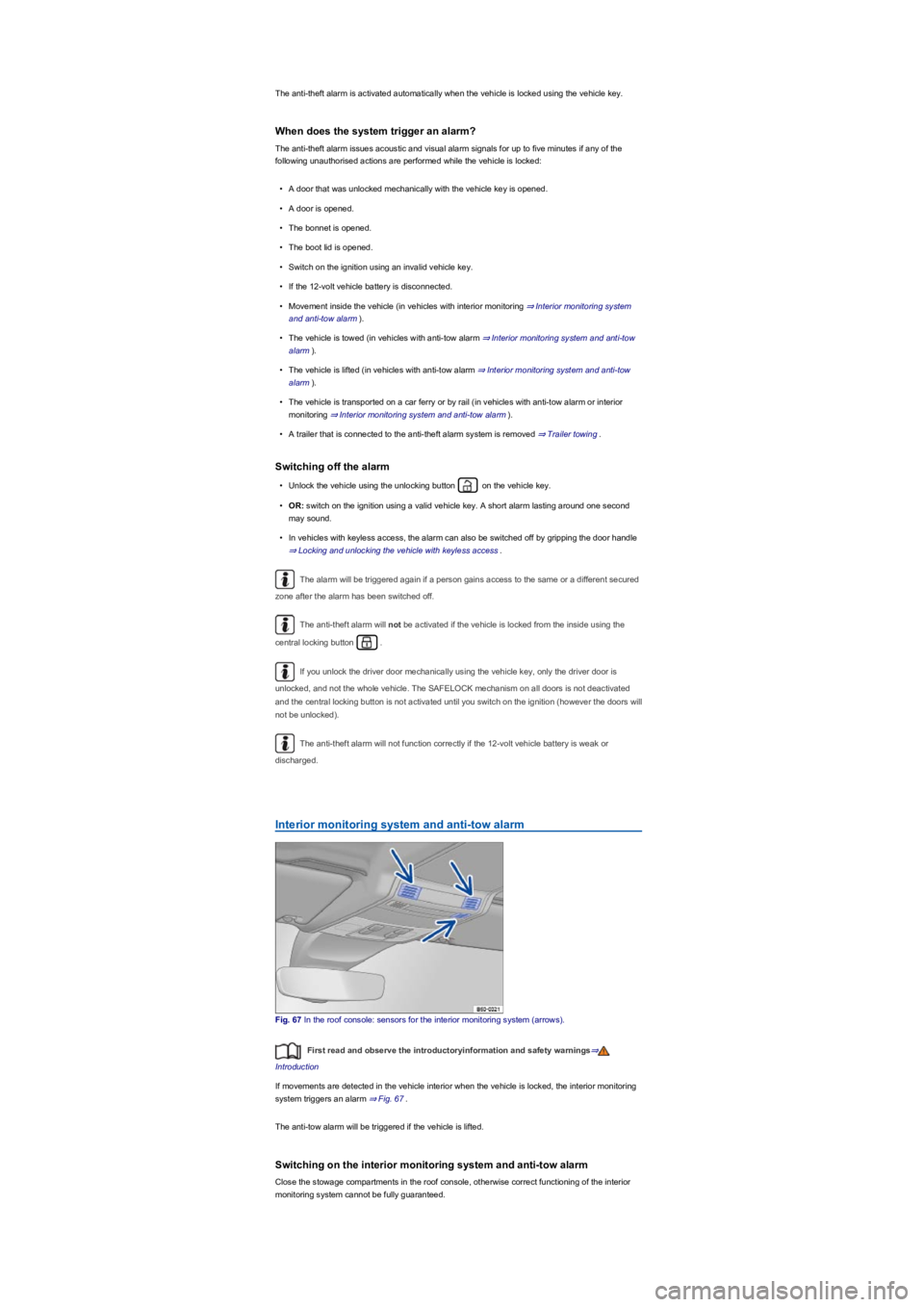
Fig. 67 In the roof console: sensors for the interior monitoring system (arrows).
First read and observe the introductoryinformation and safety warnings⇒
Introduction
If movements are detected in the vehicle interior when the vehicle is locked, the interior monitoring
system triggers an alarm ⇒ Fig. 67.
The anti-tow alarm will be triggered if the vehicle is lifted.
Switching on the interior monitoring system and anti-tow alarm
Close the stowage compartments in the roof console, otherwise correct functioning of the interior
monitoring system cannot be fully guaranteed.
Page 109 of 341
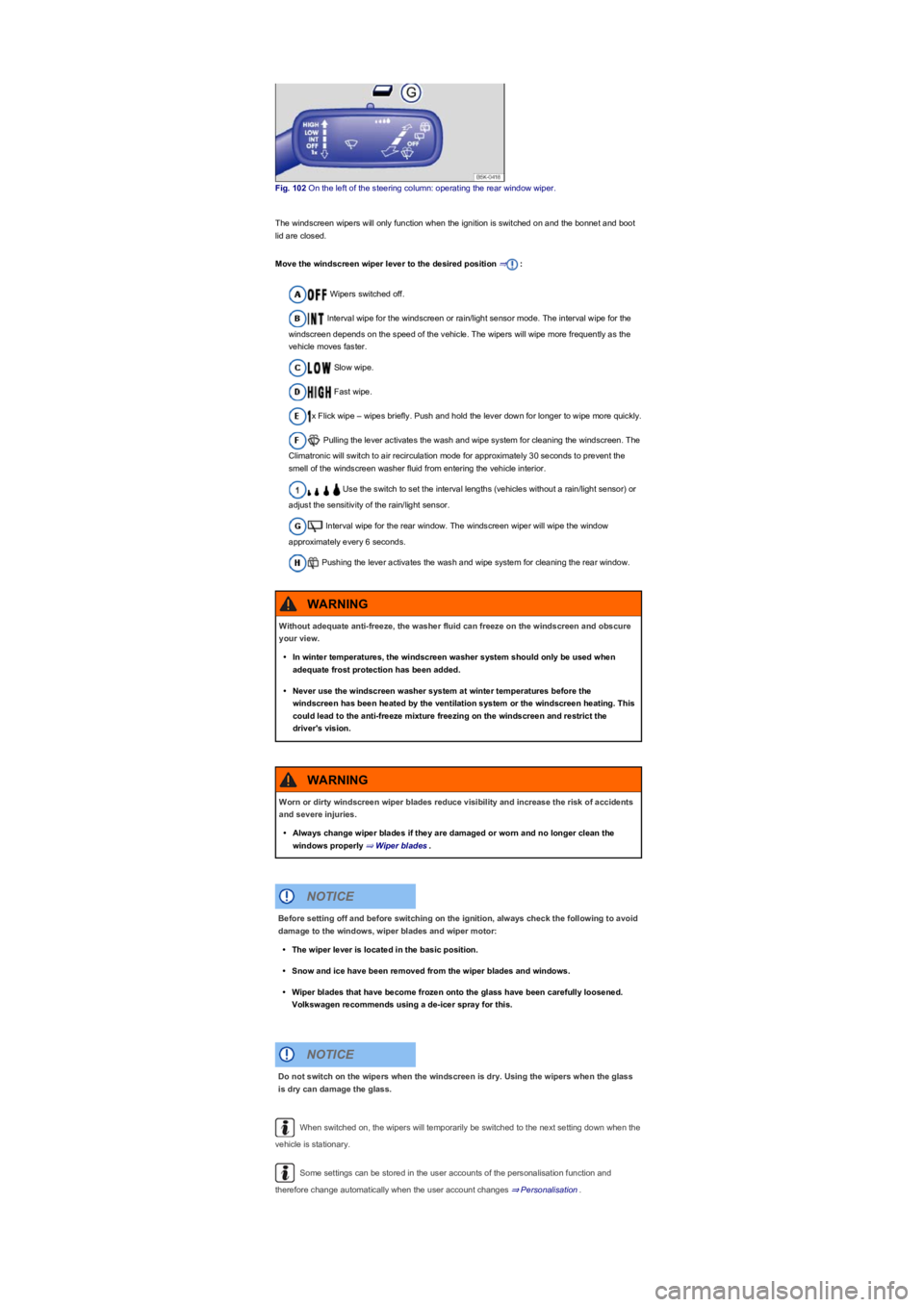
Fig. 102 On the left of the steering column: operating the rear window wiper.
The windscreen wipers will only function when the ignition is switched on and the bonnet and boot
lid are closed.
Move the windscreen wiper lever to the desired position ⇒:
Wipers switched off.
Interval wipe for the windscreen or rain/light sensor mode. The interval wipe for the
windscreen depends on the speed of the vehicle. The wipers will wipe more frequently as the
vehicle moves faster.
Slow wipe.
Fast wipe.
x Flick wipe – wipes briefly. Push and hold the lever down for longer to wipe more quickly.
Pulling the lever activates the wash and wipe system for cleaning the windscreen. The
Climatronic will switch to air recirculation mode for approximately 30 seconds to prevent the
smell of the windscreen washer fluid from entering the vehicle interior.
Use the switch to set the interval lengths (vehicles without a rain/light sensor) or
adjust the sensitivity of the rain/light sensor.
Interval wipe for the rear window. The windscreen wiper will wipe the window
approximately every 6 seconds.
Pushing the lever activates the wash and wipe system for cleaning the rear window.
When switched on, the wipers will temporarily be switched to the next setting down when the
vehicle is stationary.
Some settings can be stored in the user accounts of the personalisation function and
therefore change automatically when the user account changes ⇒ Personalisation.
Without adequate anti-freeze, the washer fluid can freeze on the windscreen and obscure
your view.
•In winter temperatures, the windscreen washer system should only be used when
adequate frost protection has been added.
•Never use the windscreen washer system at winter temperatures before the
windscreen has been heated by the ventilation system or the windscreen heating. This
could lead to the anti-freeze mixture freezing on the windscreen and restrict the
driver's vision.
WARNING
Worn or dirty windscreen wiper blades reduce visibility and increase the risk of accidents
and severe injuries.
•Always change wiper blades if they are damaged or worn and no longer clean the
windows properly ⇒ Wiper blades.
WARNING
Before setting off and before switching on the ignition, always check the following to avoid
damage to the windows, wiper blades and wiper motor:
•The wiper lever is located in the basic position.
•Snow and ice have been removed from the wiper blades and windows.
•Wiper blades that have become frozen onto the glass have been carefully loosened.
Volkswagen recommends using a de-icer spray for this.
NOTICE
Do not switch on the wipers when the windscreen is dry. Using the wipers when the glass
is dry can damage the glass.
NOTICE
Page 142 of 341
Switching on start/stop
The function is automatically activated every time the ignition is switched on. The instrument cluster
display will show information about the current status.
Vehicles with DSG dual clutch gearbox may be equipped with a start/stop system with engine-off
coasting function. The engine-off coasting function is deactivated and activated together with the
start/stop system.
Further information regarding start/stop mode is available in the Infotainment system ⇒ Operation
and display in the Infotainment system. This information also applies to coasting.
Indicator lamps
If the indicator lamp is lit, the start/stop system is available and automatic engine stop is active.
If the indicator lamp is lit, the start/stop system is not available or the start/stop system has
started the engine automatically. Check whether all technical requirements have been fulfilled. If
not, ensure that all technical requirements are met ⇒ Important preconditions for automatic engine
switch-off.
The display on the instrument cluster may show the status of the start/stop system.
In addition, start/stop information on the current status of the start/stop system can be displayed as
required in Infotainment systems with a navigation function. Touch the i in the start/stop
information to obtain further information on the status.
Vehicles with a manual gearbox
•Disengage the gear and release the clutch pedal when the vehicle is coming to a stop, or when
it is stationary. The engine is stopped.
•Depress the clutch pedal to restart the engine.
Vehicles with DSG dual clutch gearbox
•To stop, press and hold the brake pedal. The engine switches off shortly before the vehicle
reaches a complete standstill or when the vehicle is stationary.
•Take your foot off the brake pedal, or depress the accelerator, to restart the engine.
Important preconditions for automatic engine switch-off
•The driver is wearing their seat belt.
•The driver door is closed.
•The bonnet is closed.
•A minimum engine temperature has been reached.
•m/k/a995MKVehicles with Climatronic: the temperature of the vehicle interior is within
the preset temperature range, and the humidity level is not too high.
•The defrost function of the air conditioning system is not switched on.
•The charge level of the 12-volt vehicle battery is sufficient.
•The temperature of the 12-volt vehicle battery is not too low or too high.
•The vehicle is not on a steep incline.
•The windscreen heating is not switched on.
•m/k/a995MKVehicles with DSG dual clutch gearbox: the steering wheel is not turned
too sharply.
•Reverse gear is not engaged.
•The Park Assist system is not active.
•The Off-road or Off-road Individual driving profile is activated.
When the conditions for automatic engine switch-off are only fulfilled when the vehicle is stationary,
the engine can also switch off subsequently, e.g. by switching off the defrost function.
Conditions for an automatic restart
The engine can start automatically under the following conditions:
•If the temperature inside the vehicle substantially increases or decreases.
•If the vehicle rolls on.
•If the electric voltage of the 12-volt vehicle battery drops.
•If the steering wheel is moved.
As a general rule, the engine always starts again automatically when required by the detected
situation and the vehicle.
®
®
Page 143 of 341
Conditions that require a manual engine start
The engine must be started manually under the following conditions:
•If the driver door is opened.
•If the bonnet is opened.
Activating and deactivating the start/stop system manually
•Press the button in the centre console ⇒ Fig. 121 to deactivate the system. If the
start/stop system has been deactivated, the indicator lamp in the button lights up.
•Press the button in the centre console again ⇒ Fig. 121 to reactivate the system.
The instrument cluster shows the status of the start/stop system every time the button is
pressed.
If the start/stop system has switched the engine off, it will start again as soon as the system has
been deactivated manually with the button.
Always deactivate the start/stop system manually when driving through water.
Start/stop mode when Adaptive Cruise Control (ACC) is active
The engine will be switched off after the Adaptive Cruise Control (ACC) has brought the vehicle to a
standstill via an active braking intervention ⇒ Adaptive Cruise Control (ACC).
m/k/a995MKVehicles with DSG dual clutch gearbox: when the Adaptive Cruise Control
(ACC) is active, the DSG dual clutch gearbox can shift into coasting mode and the engine can be
switched off with the engine-off coasting function.
In the following instances, the engine will restart when the Adaptive Cruise Control (ACC) is active:
•If the accelerator is depressed.
•When the Adaptive Cruise Control (ACC) has resumed speed and automatic distance control.
•If the vehicle ahead has moved on.
•If the Adaptive Cruise Control (ACC) is deactivated and the vehicle driving in front moved away.
Troubleshooting
The engine stop function may be deactivated if the temperature is above around 38°C (100°F).
In some cases, it may be necessary to restart the engine manually. Follow any
corresponding messages on the instrument cluster display.
The start/stop function is activated automatically if the Eco driving profile is selected on
vehicles with driving profile selection ⇒ Driving profile selection and 4MOTION Active Control.
Always deactivate the start/stop system manually when driving through water.
Manual gearbox: selecting a gear
®
Never switch off the engine or the ignition while the vehicle is in motion. This can lead to a
loss of vehicle control, accidents and serious injuries.
•The airbags and belt tensioners will not work if the ignition is switched off.
•The brake servo will not work when the engine is switched off. That is why more
pressure on the brake pedal is needed to brake the vehicle when the engine is
switched off.
•The power steering will not work when the engine is not running. More power is
needed to steer the vehicle when the engine is switched off.
•When the ignition is switched off, the steering lock may activate and you will no longer
be able to steer the vehicle.
•The start/stop system must be deactivated if work is to be carried out in the engine
compartment.
WARNING
If the start/stop system is used in very high outside temperatures over a long period, the
12-volt vehicle battery can be damaged.
NOTICE