tow VOLKSWAGEN TIGUAN 2017 Owner´s Manual
[x] Cancel search | Manufacturer: VOLKSWAGEN, Model Year: 2017, Model line: TIGUAN, Model: VOLKSWAGEN TIGUAN 2017Pages: 341, PDF Size: 9.14 MB
Page 4 of 341
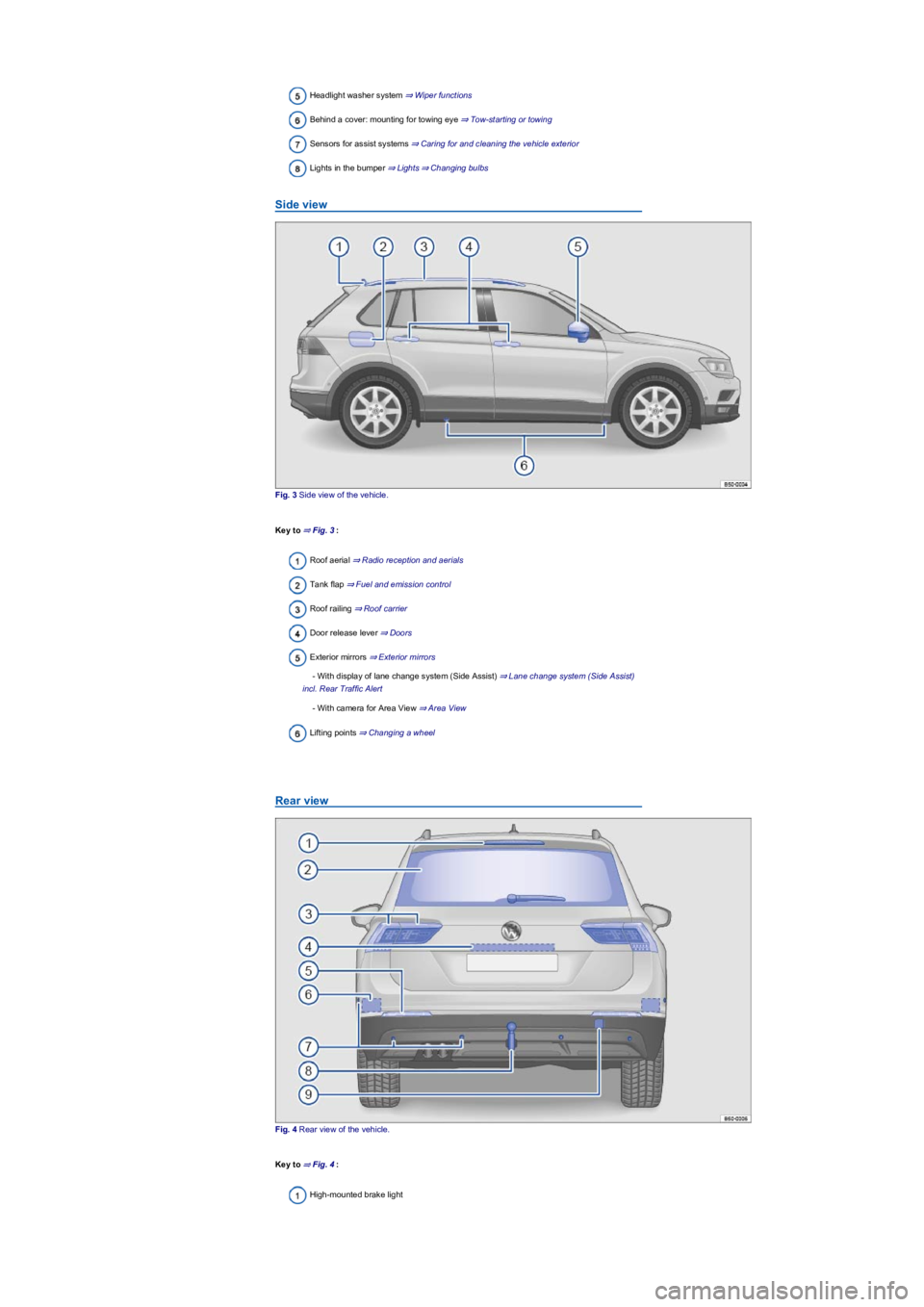
Headlight washer system ⇒ Wiper functions
Behind a cover: mounting for towing eye ⇒ Tow-starting or towing
Sensors for assist systems ⇒ Caring for and cleaning the vehicle exterior
Lights in the bumper ⇒ Lights⇒ Changing bulbs
Side view
Fig. 3 Side view of the vehicle.
Key to ⇒ Fig. 3:
Roof aerial ⇒ Radio reception and aerials
Tank flap ⇒ Fuel and emission control
Roof railing ⇒ Roof carrier
Door release lever ⇒ Doors
Exterior mirrors ⇒ Exterior mirrors
- With display of lane change system (Side Assist) ⇒ Lane change system (Side Assist)
incl. Rear Traffic Alert
- With camera for Area View ⇒ Area View
Lifting points ⇒ Changing a wheel
Rear view
Fig. 4 Rear view of the vehicle.
Key to ⇒ Fig. 4:
High-mounted brake light
Page 5 of 341
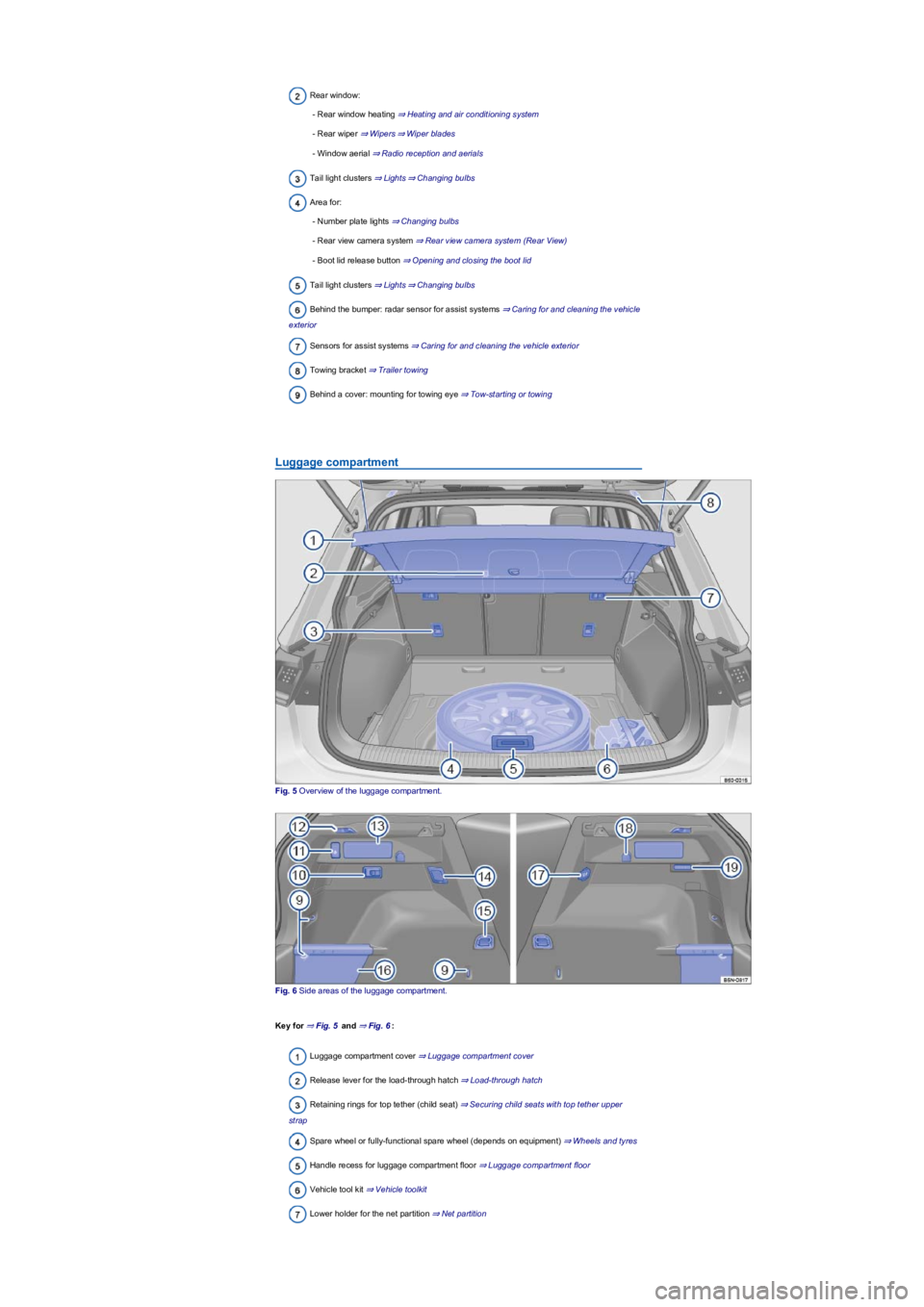
Rear window:
- Rear window heating ⇒ Heating and air conditioning system
- Rear wiper ⇒ Wipers⇒ Wiper blades
- Window aerial ⇒ Radio reception and aerials
Tail light clusters ⇒ Lights⇒ Changing bulbs
Area for:
- Number plate lights ⇒ Changing bulbs
- Rear view camera system ⇒ Rear view camera system (Rear View)
- Boot lid release button ⇒ Opening and closing the boot lid
Tail light clusters ⇒ Lights⇒ Changing bulbs
Behind the bumper: radar sensor for assist systems ⇒ Caring for and cleaning the vehicle
exterior
Sensors for assist systems ⇒ Caring for and cleaning the vehicle exterior
Towing bracket ⇒ Trailer towing
Behind a cover: mounting for towing eye ⇒ Tow-starting or towing
Luggage compartment
Fig. 5 Overview of the luggage compartment.
Fig. 6 Side areas of the luggage compartment.
Key for ⇒ Fig. 5 and ⇒ Fig. 6:
Luggage compartment cover ⇒ Luggage compartment cover
Release lever for the load-through hatch ⇒ Load-through hatch
Retaining rings for top tether (child seat) ⇒ Securing child seats with top tether upper
strap
Spare wheel or fully-functional spare wheel (depends on equipment) ⇒ Wheels and tyres
Handle recess for luggage compartment floor ⇒ Luggage compartment floor
Vehicle tool kit ⇒ Vehicle toolkit
Lower holder for the net partition ⇒ Net partition
Page 6 of 341
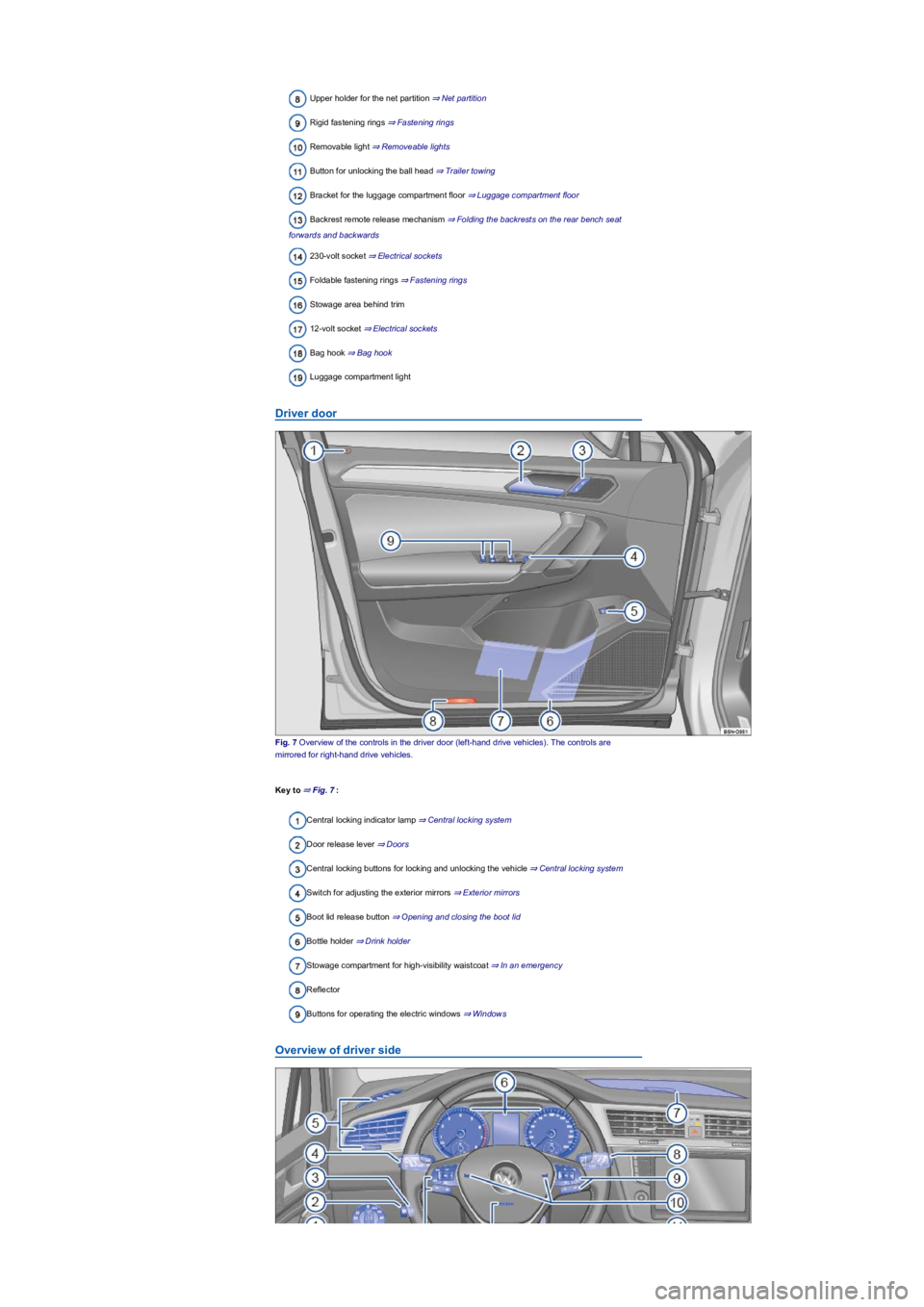
Upper holder for the net partition ⇒ Net partition
Rigid fastening rings ⇒ Fastening rings
Removable light ⇒ Removeable lights
Button for unlocking the ball head ⇒ Trailer towing
Bracket for the luggage compartment floor ⇒ Luggage compartment floor
Backrest remote release mechanism ⇒ Folding the backrests on the rear bench seat
forwards and backwards
230-volt socket ⇒ Electrical sockets
Foldable fastening rings ⇒ Fastening rings
Stowage area behind trim
12-volt socket ⇒ Electrical sockets
Bag hook ⇒ Bag hook
Luggage compartment light
Driver door
Fig. 7 Overview of the controls in the driver door (left-hand drive vehicles). The controls are
mirrored for right-hand drive vehicles.
Key to ⇒ Fig. 7:
Central locking indicator lamp ⇒ Central locking system
Door release lever ⇒ Doors
Central locking buttons for locking and unlocking the vehicle ⇒ Central locking system
Switch for adjusting the exterior mirrors ⇒ Exterior mirrors
Boot lid release button ⇒ Opening and closing the boot lid
Bottle holder ⇒ Drink holder
Stowage compartment for high-visibility waistcoat ⇒ In an emergency
Reflector
Buttons for operating the electric windows ⇒ Windows
Overview of driver side
Page 7 of 341
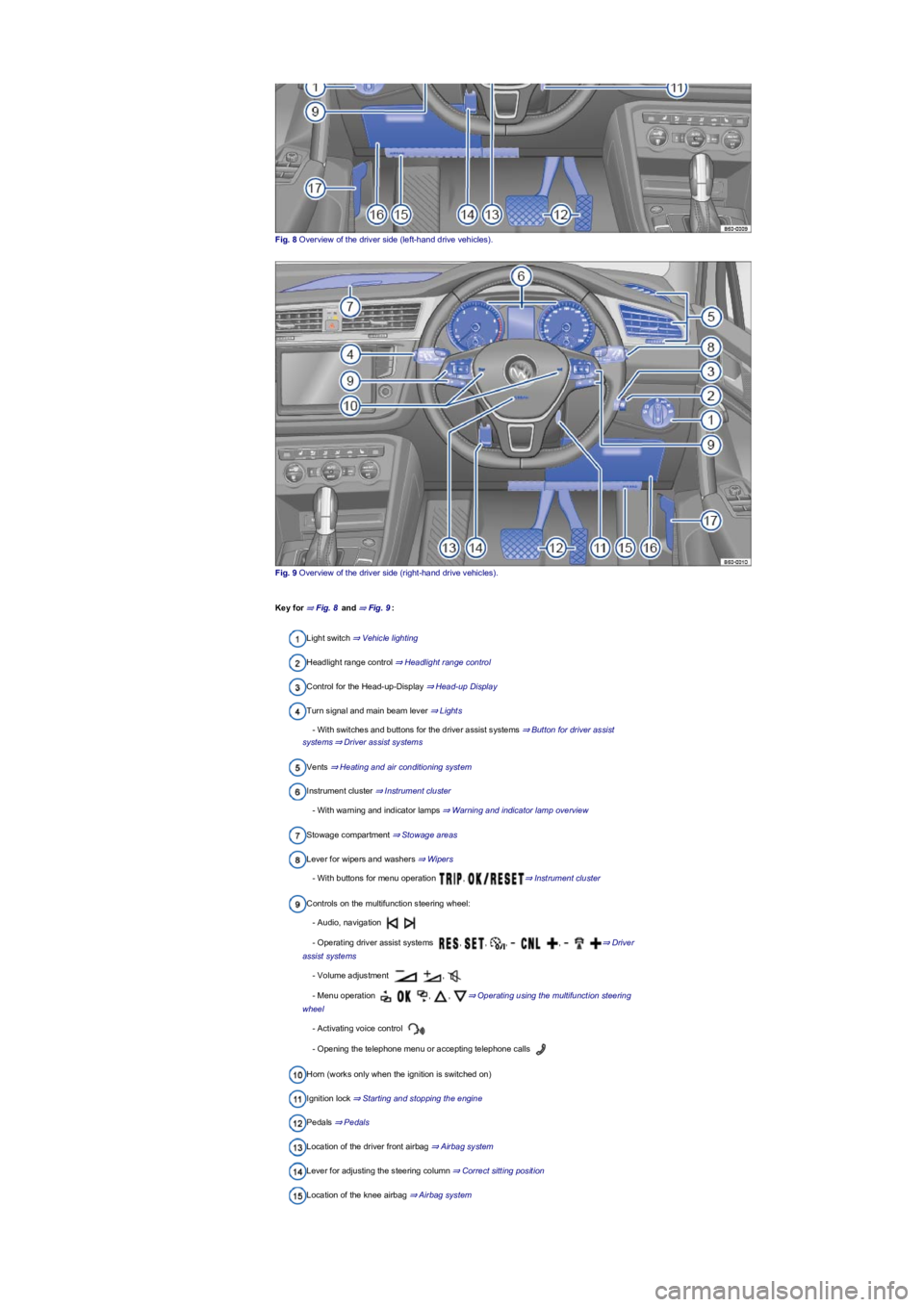
Fig. 8 Overview of the driver side (left-hand drive vehicles).
Fig. 9 Overview of the driver side (right-hand drive vehicles).
Key for ⇒ Fig. 8 and ⇒ Fig. 9:
Light switch ⇒ Vehicle lighting
Headlight range control ⇒ Headlight range control
Control for the Head-up-Display ⇒ Head-up Display
Turn signal and main beam lever ⇒ Lights
- With switches and buttons for the driver assist systems ⇒ Button for driver assist
systems⇒ Driver assist systems
Vents ⇒ Heating and air conditioning system
Instrument cluster ⇒ Instrument cluster
- With warning and indicator lamps ⇒ Warning and indicator lamp overview
Stowage compartment ⇒ Stowage areas
Lever for wipers and washers ⇒ Wipers
- With buttons for menu operation , ⇒ Instrument cluster
Controls on the multifunction steering wheel:
- Audio, navigation
- Operating driver assist systems , , , , ⇒ Driver
assist systems
- Volume adjustment ,
- Menu operation , , ⇒ Operating using the multifunction steering
wheel
- Activating voice control
- Opening the telephone menu or accepting telephone calls
Horn (works only when the ignition is switched on)
Ignition lock ⇒ Starting and stopping the engine
Pedals ⇒ Pedals
Location of the driver front airbag ⇒ Airbag system
Lever for adjusting the steering column ⇒ Correct sitting position
Location of the knee airbag ⇒ Airbag system
Page 8 of 341
Stowage compartment ⇒ Stowage areas
Release lever for the bonnet ⇒ In the engine compartment
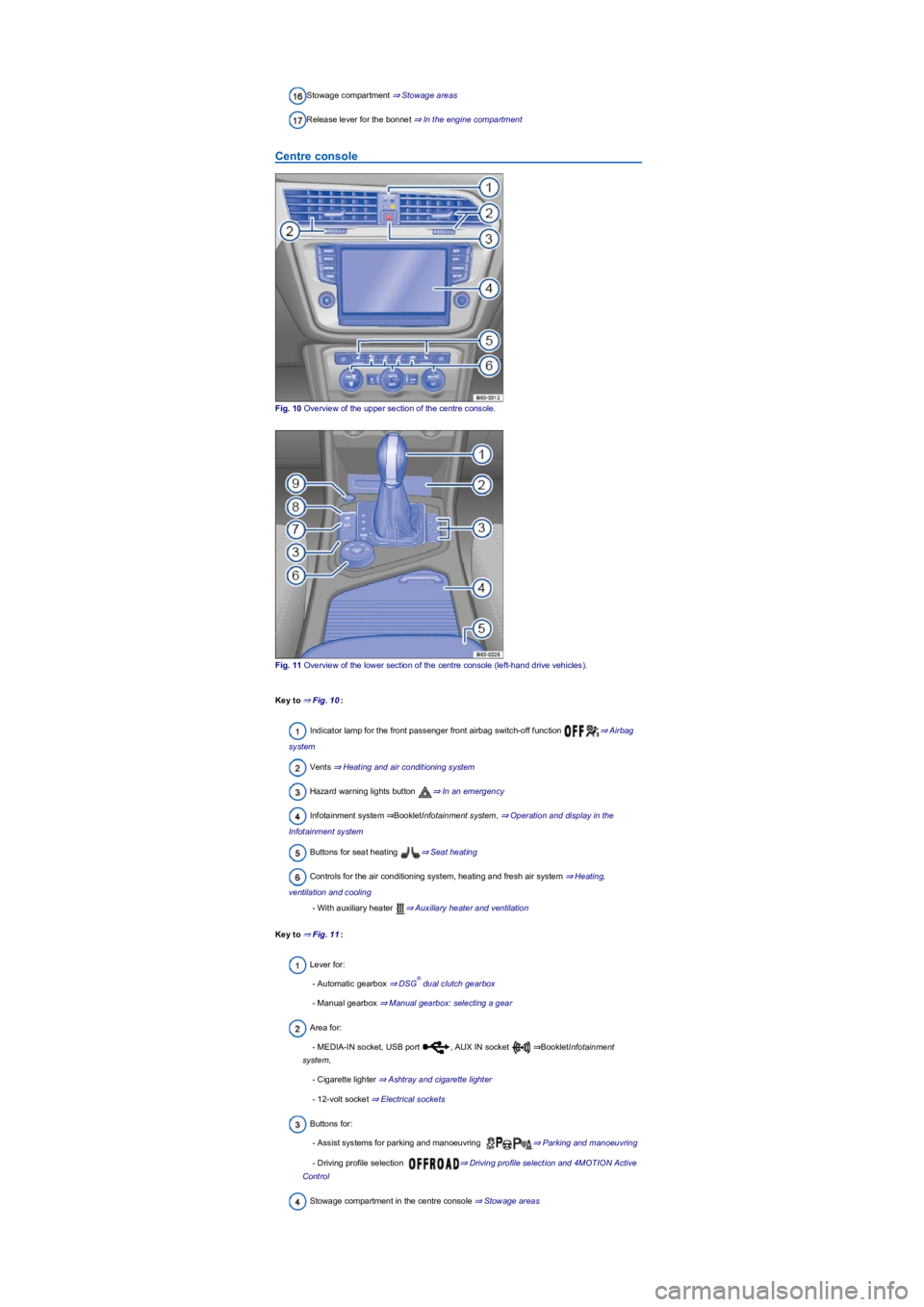
Centre console
Fig. 10 Overview of the upper section of the centre console.
Fig. 11 Overview of the lower section of the centre console (left-hand drive vehicles).
Key to ⇒ Fig. 10:
Indicator lamp for the front passenger front airbag switch-off function ⇒ Airbag
system
Vents ⇒ Heating and air conditioning system
Hazard warning lights button ⇒ In an emergency
Infotainment system ⇒BookletInfotainment system, ⇒ Operation and display in the
Infotainment system
Buttons for seat heating ⇒ Seat heating
Controls for the air conditioning system, heating and fresh air system ⇒ Heating,
ventilation and cooling
- With auxiliary heater ⇒ Auxiliary heater and ventilation
Key to ⇒ Fig. 11:
Lever for:
- Automatic gearbox ⇒ DSG dual clutch gearbox
- Manual gearbox ⇒ Manual gearbox: selecting a gear
Area for:
- MEDIA-IN socket, USB port , AUX IN socket ⇒BookletInfotainment
system,
- Cigarette lighter ⇒ Ashtray and cigarette lighter
- 12-volt socket ⇒ Electrical sockets
Buttons for:
- Assist systems for parking and manoeuvring ⇒ Parking and manoeuvring
- Driving profile selection ⇒ Driving profile selection and 4MOTION Active
Control
Stowage compartment in the centre console ⇒ Stowage areas
®
Page 9 of 341
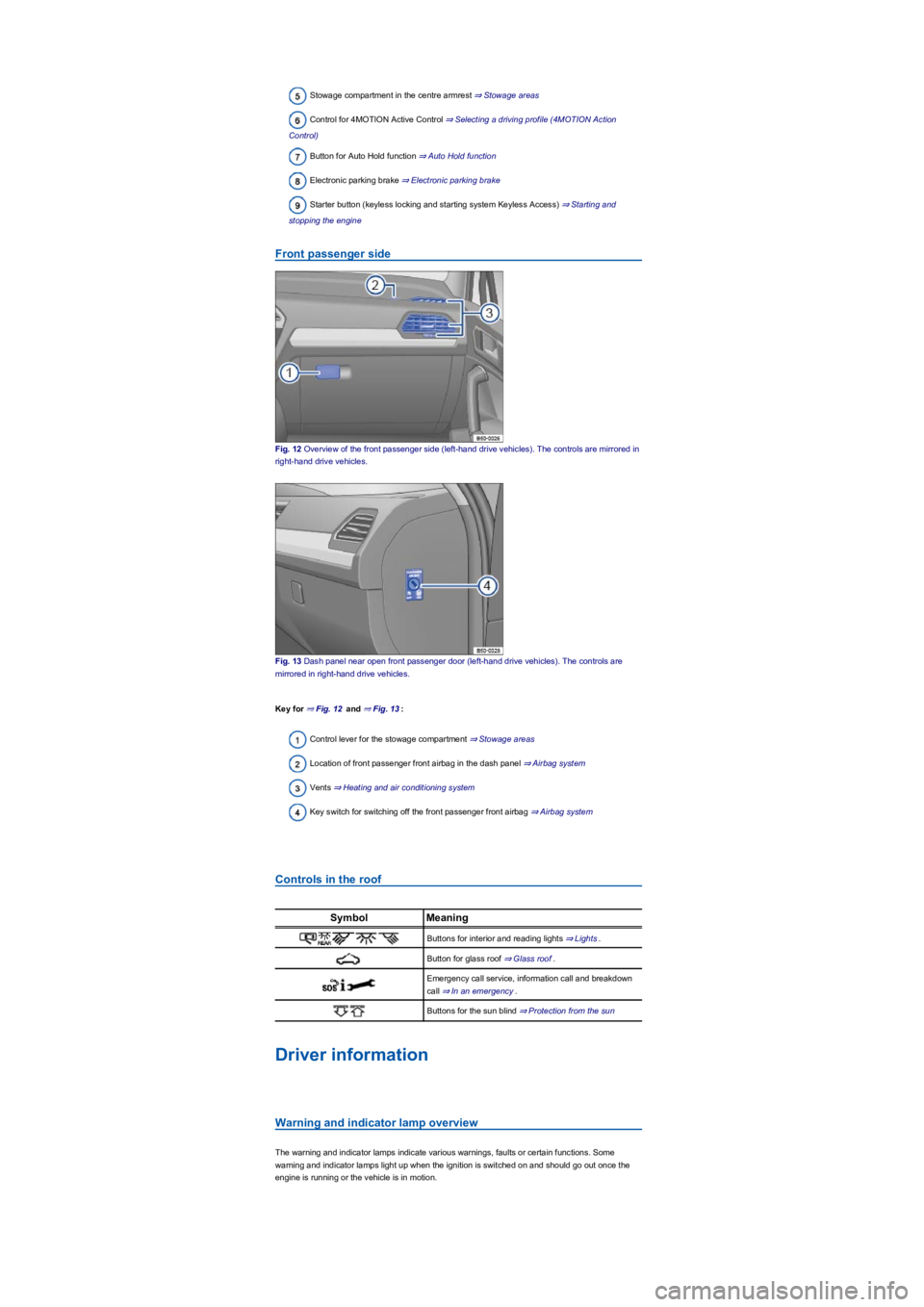
Stowage compartment in the centre armrest ⇒ Stowage areas
Control for 4MOTION Active Control ⇒ Selecting a driving profile (4MOTION Action
Control)
Button for Auto Hold function ⇒ Auto Hold function
Electronic parking brake ⇒ Electronic parking brake
Starter button (keyless locking and starting system Keyless Access) ⇒ Starting and
stopping the engine
Front passenger side
Fig. 12 Overview of the front passenger side (left-hand drive vehicles). The controls are mirrored in
right-hand drive vehicles.
Fig. 13 Dash panel near open front passenger door (left-hand drive vehicles). The controls are
mirrored in right-hand drive vehicles.
Key for ⇒ Fig. 12 and ⇒ Fig. 13:
Control lever for the stowage compartment ⇒ Stowage areas
Location of front passenger front airbag in the dash panel ⇒ Airbag system
Vents ⇒ Heating and air conditioning system
Key switch for switching off the front passenger front airbag ⇒ Airbag system
Controls in the roof
SymbolMeaning
Buttons for interior and reading lights ⇒ Lights.
Button for glass roof ⇒ Glass roof.
Emergency call service, information call and breakdown
call ⇒ In an emergency.
Buttons for the sun blind ⇒ Protection from the sun
Driver information
Warning and indicator lamp overview
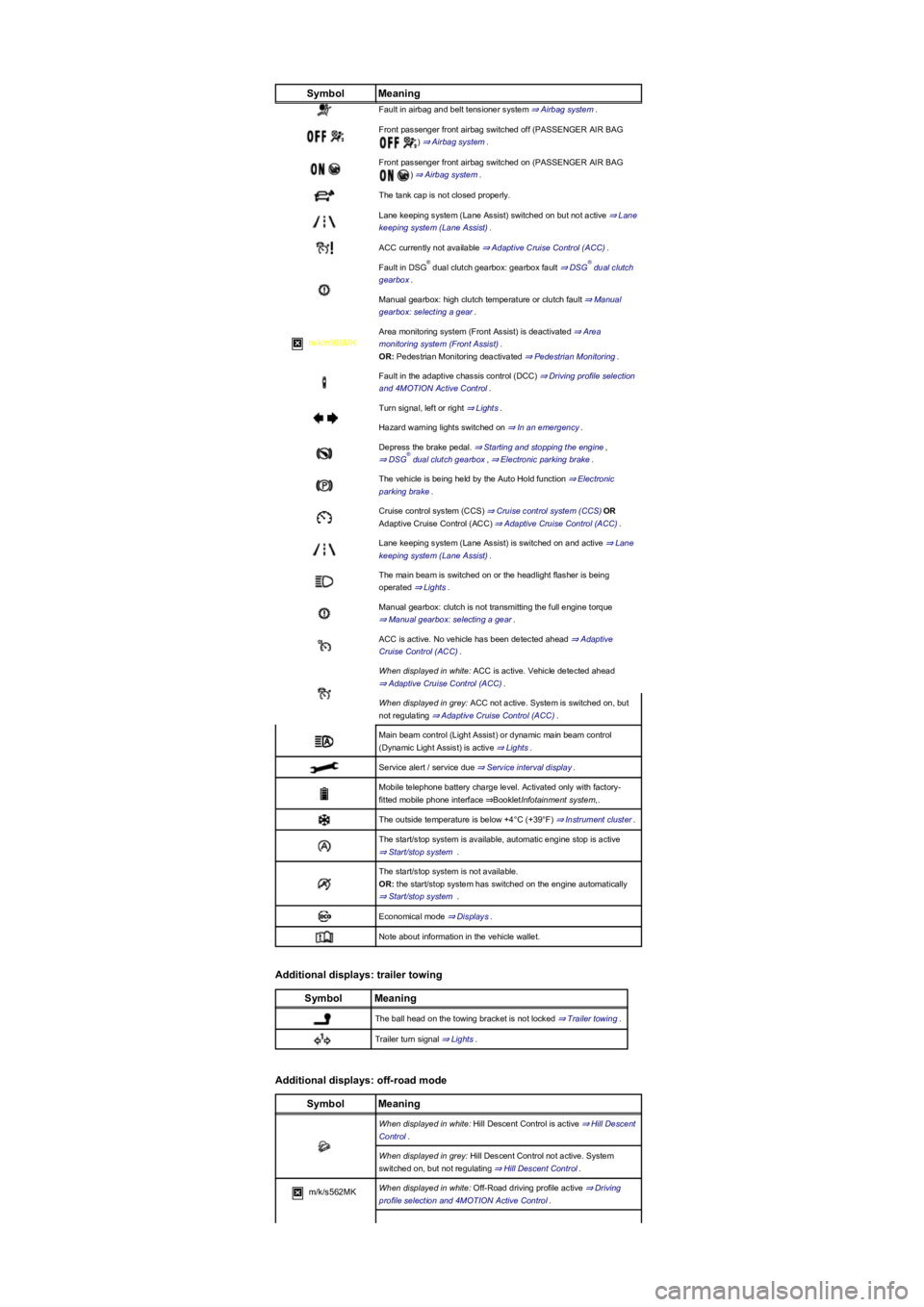
The warning and indicator lamps indicate various warnings, faults or certain functions. Some
warning and indicator lamps light up when the ignition is switched on and should go out once the
engine is running or the vehicle is in motion.
Page 11 of 341
SymbolMeaning
Fault in airbag and belt tensioner system ⇒ Airbag system.
Front passenger front airbag switched off (PASSENGER AIR BAG
) ⇒ Airbag system.
Front passenger front airbag switched on (PASSENGER AIR BAG
) ⇒ Airbag system.
The tank cap is not closed properly.
Lane keeping system (Lane Assist) switched on but not active ⇒ Lane
keeping system (Lane Assist).
ACC currently not available ⇒ Adaptive Cruise Control (ACC).
Fault in DSG dual clutch gearbox: gearbox fault ⇒ DSG dual clutch
gearbox.
Manual gearbox: high clutch temperature or clutch fault ⇒ Manual
gearbox: selecting a gear.
m/k/n998MK
Area monitoring system (Front Assist) is deactivated ⇒ Area
monitoring system (Front Assist).
OR: Pedestrian Monitoring deactivated ⇒ Pedestrian Monitoring.
Fault in the adaptive chassis control (DCC) ⇒ Driving profile selection
and 4MOTION Active Control.
Turn signal, left or right ⇒ Lights.
Hazard warning lights switched on ⇒ In an emergency.
Depress the brake pedal. ⇒ Starting and stopping the engine,
⇒ DSG dual clutch gearbox, ⇒ Electronic parking brake.
The vehicle is being held by the Auto Hold function ⇒ Electronic
parking brake.
Cruise control system (CCS) ⇒ Cruise control system (CCS)OR
Adaptive Cruise Control (ACC) ⇒ Adaptive Cruise Control (ACC).
Lane keeping system (Lane Assist) is switched on and active ⇒ Lane
keeping system (Lane Assist).
The main beam is switched on or the headlight flasher is being
operated ⇒ Lights.
Manual gearbox: clutch is not transmitting the full engine torque
⇒ Manual gearbox: selecting a gear.
ACC is active. No vehicle has been detected ahead ⇒ Adaptive
Cruise Control (ACC).
When displayed in white: ACC is active. Vehicle detected ahead
⇒ Adaptive Cruise Control (ACC).
When displayed in grey: ACC not active. System is switched on, but
not regulating ⇒ Adaptive Cruise Control (ACC).
Main beam control (Light Assist) or dynamic main beam control
(Dynamic Light Assist) is active ⇒ Lights.
Service alert / service due ⇒ Service interval display.
Mobile telephone battery charge level. Activated only with factory-
fitted mobile phone interface ⇒BookletInfotainment system,.
The outside temperature is below +4°C (+39°F) ⇒ Instrument cluster.
The start/stop system is available, automatic engine stop is active
⇒ Start/stop system .
The start/stop system is not available.
OR: the start/stop system has switched on the engine automatically
⇒ Start/stop system .
Economical mode ⇒ Displays.
Note about information in the vehicle wallet.
Additional displays: trailer towing
SymbolMeaning
The ball head on the towing bracket is not locked ⇒ Trailer towing.
Trailer turn signal ⇒ Lights.
Additional displays: off-road mode
SymbolMeaning
When displayed in white: Hill Descent Control is active ⇒ Hill Descent
Control.
When displayed in grey: Hill Descent Control not active. System
switched on, but not regulating ⇒ Hill Descent Control.
m/k/s562MKWhen displayed in white: Off-Road driving profile active ⇒ Driving
profile selection and 4MOTION Active Control.
®®
®
Page 20 of 341
Switching on and off
The Driver Alert System can be activated or deactivated using the button or function
button and the Vehicle, and Driver assistance function buttons in the
Infotainment system ⇒ Vehicle settings menu.
Function limitations
The Driver Alert System has system-related limitations. The following conditions can limit the
function of the Driver Alert System, or prevent it from working altogether:
•Speeds less than 60 km/h (37 mph).
•Speeds of more than 200 km/h (125 mph).
•Roads with bends.
•Poor roads.
•Adverse weather conditions.
•Sporty driving style.
•Towing a heavy/long trailer.
•The driver is distracted.
The Driver Alert System is reset in the following situations:
•The ignition is switched off.
•The driver seat belt is unfastened and the driver door is open.
•The vehicle has been stationary for longer than 15 minutes.
The Driver Alert System is automatically reset in case of long slow drives (speed less than 60 km/h
(37 mph)). If the speed is increased, the system evaluates the driving behaviour again.
The Driver Alert System has been developed for use only while driving on highways and
good roads.
If there is a system fault, proceed to a qualified workshop immediately to have the system
checked.
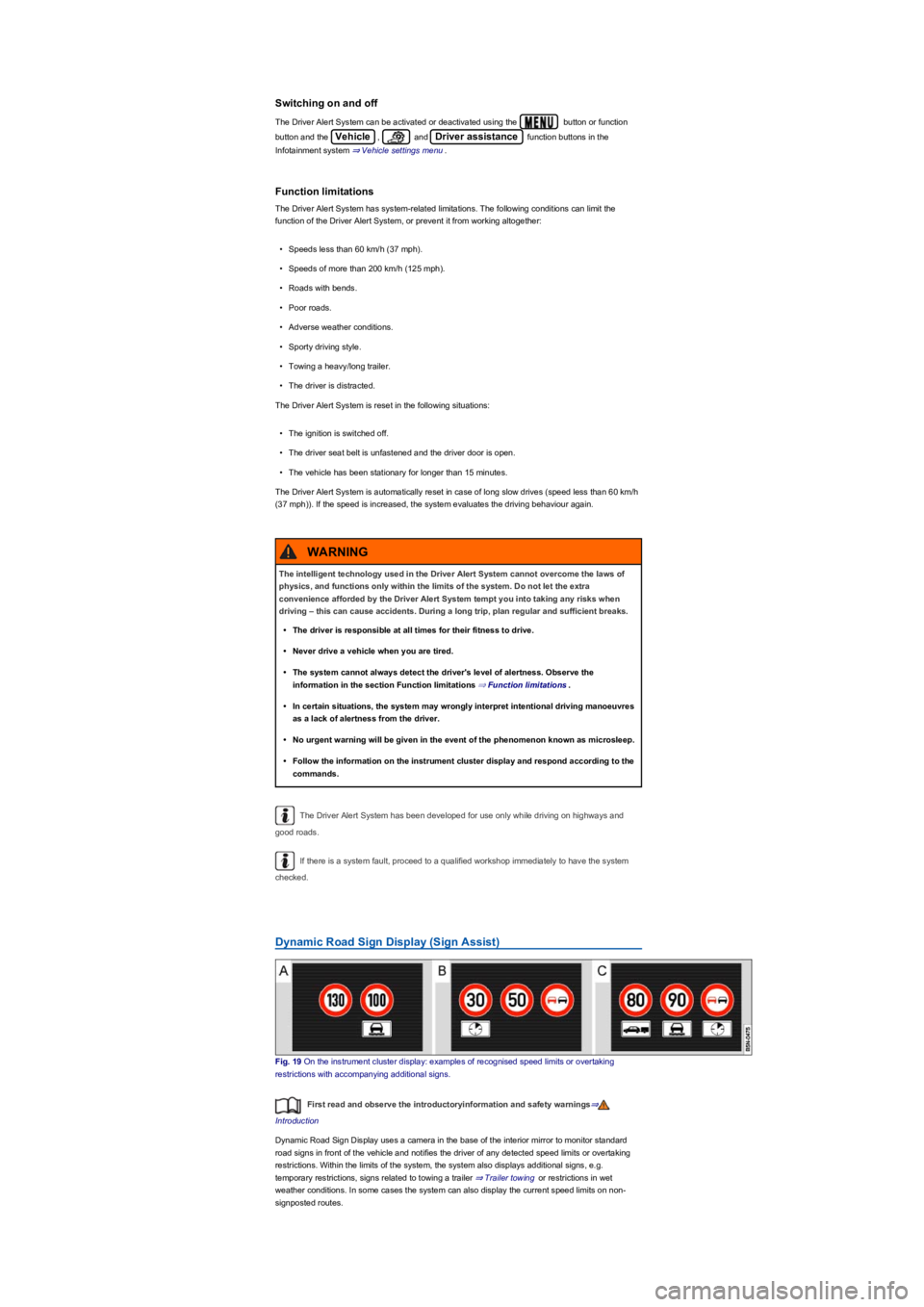
Dynamic Road Sign Display (Sign Assist)
Fig. 19 On the instrument cluster display: examples of recognised speed limits or overtaking
restrictions with accompanying additional signs.
First read and observe the introductoryinformation and safety warnings⇒
Introduction
Dynamic Road Sign Display uses a camera in the base of the interior mirror to monitor standard
road signs in front of the vehicle and notifies the driver of any detected speed limits or overtaking
restrictions. Within the limits of the system, the system also displays additional signs, e.g.
temporary restrictions, signs related to towing a trailer ⇒ Trailer towing or restrictions in wet
weather conditions. In some cases the system can also display the current speed limits on non-
signposted routes.
The intelligent technology used in the Driver Alert System cannot overcome the laws of
physics, and functions only within the limits of the system. Do not let the extra
convenience afforded by the Driver Alert System tempt you into taking any risks when
driving – this can cause accidents. During a long trip, plan regular and sufficient breaks.
•The driver is responsible at all times for their fitness to drive.
•Never drive a vehicle when you are tired.
•The system cannot always detect the driver's level of alertness. Observe the
information in the section Function limitations ⇒ Function limitations.
•In certain situations, the system may wrongly interpret intentional driving manoeuvres
as a lack of alertness from the driver.
•No urgent warning will be given in the event of the phenomenon known as microsleep.
•Follow the information on the instrument cluster display and respond according to the
commands.
WARNING
Page 21 of 341
Country availability
At the time that this owner's manual went to print, Dynamic Road Sign Display was available in the
following countries:
Andorra, Austria, Belgium, Bulgaria, Croatia, Cyprus, Czech Republic, Denmark, Estonia, Finland,
France, Germany, Greece, Hungary, Iceland, Ireland, Italy, Japan, Latvia, Liechtenstein, Lithuania,
Luxembourg, Malta, Monaco, Netherlands, Norway, Poland, Portugal, Romania, San Marino,
Slovakia, Slovenia, Spain, Sweden, Switzerland, United Kingdom, Vatican City.
Displays
in addition to speed limits and overtaking restrictions, Dynamic Road Sign Display also detects the
sign which indicates that all restrictions have been lifted on motorways and main roads in Germany.
In all other countries, the current speed limit is displayed instead.
The road signs detected by Dynamic Road Sign Display are displayed on the instrument cluster
⇒ Fig. 19 and, depending on the version installed in the vehicle, also on the Infotainment system
⇒ Vehicle settings menu. In some equipment levels a notification also appears on the Head-up
Display ⇒ Instrument cluster.
Dynamic Road Sign Display textsCause and solution
No road signs available
The system is in the initialisation phase.
OR: the camera has not detected any
regulatory or warning signs.
Error: Dynamic Road Sign Display
System fault.
Go to a qualified workshop and have the
system checked.
Speed warning currently not available.
Fault in the Dynamic Road Sign Display system
speed warning.
Go to a qualified workshop and have the
system checked.
Dynamic Road Sign Display: clean
windscreen!
The area around the camera on the windscreen
is dirty.
Clean the windscreen.
Dynamic Road Sign Display is currently
restricted.
No data transmission from the Infotainment
system.
Check whether valid map data is loaded on the
Infotainment system.
OR: the vehicle is located in an area that is not
covered by the map stored on the Infotainment
system.
No data availableDynamic Road Sign Display is not supported in
the country in which you are currently travelling.
Switching Dynamic Road Sign Display on and off in the instrument
cluster display
The continuous display of road signs in the instrument cluster can be activated and deactivated in
the Infotainment system using the button or function button and the Vehicle,
and Driver assistance function buttons.
Display of road signs
After validation and evaluation of the information from the camera, the Infotainment system and the
current vehicle data, the activated Dynamic Road Sign Display shows up to three valid road signs
⇒ Fig. 19 with the accompanying additional signs:
1st position:The road sign that currently applies for the driver is shown on the left-hand side of the
display, e.g. a speed limit of 130 km/h (80 mph) ⇒ Fig. 19.2. position:traffic signs that do not
always apply (e.g. 100 km/h (60 mph) in wet) are shown in second place.Additional sign:if the
windscreen wiper is active while the vehicle is in motion, any road sign, for example with the
additional In wet conditions sign that now applies will be moved left to the first position.3.
position:Further road signs that do not always apply will be displayed in the third position, e.g.
overtaking temporarily not permitted ⇒ Fig. 19.
Speed warning function
When the Dynamic Road Sign Display detects that an applicable speed limit has been exceeded, it
will issue an acoustic warning signal and display a message on the instrument cluster display.
The speed warning can be set or completely deactivated in the Infotainment system using the
button or function button and the Vehicle, and Driver assistance
function buttons ⇒ Vehicle settings menu. The settings can be adjusted in increments of 5 km/h (3
mph) within a range between 0 km/h (mph) and 15 km/h (9 mph) above the permitted maximum
speed.
Trailer mode
In vehicles with a factory-fitted towing bracket and a trailer with an electrical connection to the
vehicle, the display of road signs that may apply to the vehicle when towing a trailer, e.g. applicable
speed limits and no-overtaking signs, can be activated or deactivated in the Infotainment system
Page 35 of 341
Check that all lights and turn signals are working properly.
Check the tyre pressure and fuel level Wheels and tyres, Fuel types and refuelling.
Ensure that you have a good, clear view through all of the windows.
Air intake to the engine must not be obstructed, and the engine must not be covered with
any kind of insulating materials In the engine compartment.
Secure any objects and luggage in the stowage compartments, the luggage compartment
or on the roof Transporting.
Ensure that you are able to operate the pedals freely at all times.
Secure any children travelling in the vehicle in a restraint system suitable for their weight
and size Safe transport of children.
Adjust the front seats, head restraints and mirrors properly in accordance with the size of
the occupants Sitting position, Mirrors.
Wear shoes that provide good grip for your feet when using the pedals.
The floor mat in the footwell on the driver side must leave the pedal area free and must be
securely fastened.
Assume a correct sitting position before setting off and maintain this position while driving.
This also applies to all passengers Sitting position.
Fasten your seat belt correctly before setting off and keep it properly fastened throughout
the journey. This also applies to all passengers Seat belts.
Each vehicle occupant must sit in a seat of their own and must have their own seat belt.
Never drive if your driving ability is impaired, e.g. by medication, alcohol or drugs.
Do not allow yourself to be distracted from the traffic, e.g. by passengers, telephone calls,
opening menus and making adjustments to settings.
Always adapt your speed and driving style to suit visibility, weather, road and traffic
conditions.
Observe traffic regulations and speed limits.
Take regular breaks when travelling long distances – at least every two hours.
Secure animals in the vehicle using a system that is suitable for their weight and size.
Does the vehicle need any technical modifications for driving abroad, e.g. masking or
switching the headlights over?
Are the necessary tools, diagnostic equipment and spare parts available for service and
repair work?
Are there any Volkswagen dealerships in the destination country?
•Vehicles without Keyless Access: vehicle key used to unlock the vehicle.
•Vehicles with Keyless Access: vehicle key that is identified first by the personalisation function
upon opening the driver door.
Personalised vehicle setup
The vehicle equipment and functions that can be personalised include the following:
•Open and close (single door unlocking, window convenience opening etc.)
•Light and vision (daytime running lights, cornering light, convenience turn signal etc.)
•Air conditioning system (temperature settings, ventilation etc.)
•Assistance systems (Park Distance Control, ACC, Dynamic Road Sign Display etc.)
•Driver profile selection (driver profiles etc.)
•Multifunction display and instrument cluster (selection of displays)
•Infotainment system (brightness and saved stations)
•Seat setup (seat position)
A new vehicle key will be assigned to the current user account. To assign the vehicle key to
a different user account, select the user account you want and manually assign it to the vehicle key.
Safety
General notes
Checklist
Observe the following information both before and during every journey to ensure your own
safety, and the safety of all passengers and other road users ⇒:
Checklist
In some countries, special safety standards and emissions-related regulations apply that the
vehicle may not comply with. Volkswagen recommends that you visit your Volkswagen
dealership before travelling abroad to find out about any legal requirements and the
following issues at your destination: