wipers VOLKSWAGEN TIGUAN 2017 Owner´s Manual
[x] Cancel search | Manufacturer: VOLKSWAGEN, Model Year: 2017, Model line: TIGUAN, Model: VOLKSWAGEN TIGUAN 2017Pages: 341, PDF Size: 9.14 MB
Page 3 of 341
Texts with this symbol contain additional information on the protection of the environment.
Texts with this symbol contain additional information.
Vehicle overviews
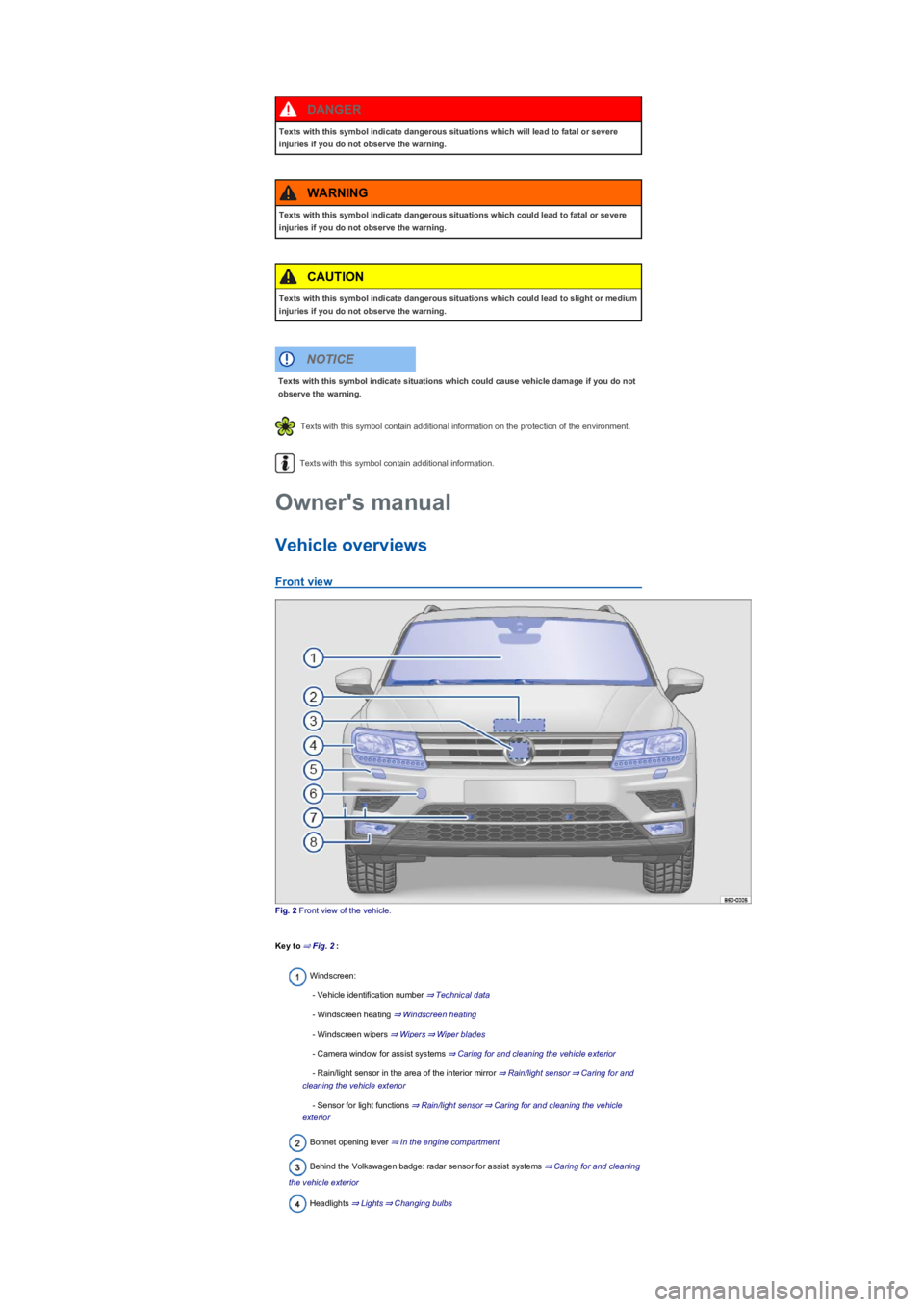
Front view
Fig. 2 Front view of the vehicle.
Key to ⇒ Fig. 2:
Windscreen:
- Vehicle identification number ⇒ Technical data
- Windscreen heating ⇒ Windscreen heating
- Windscreen wipers ⇒ Wipers⇒ Wiper blades
- Camera window for assist systems ⇒ Caring for and cleaning the vehicle exterior
- Rain/light sensor in the area of the interior mirror ⇒ Rain/light sensor⇒ Caring for and
cleaning the vehicle exterior
- Sensor for light functions ⇒ Rain/light sensor⇒ Caring for and cleaning the vehicle
exterior
Bonnet opening lever ⇒ In the engine compartment
Behind the Volkswagen badge: radar sensor for assist systems ⇒ Caring for and cleaning
the vehicle exterior
Headlights ⇒ Lights⇒ Changing bulbs
Texts with this symbol indicate dangerous situations which will lead to fatal or severe
injuries if you do not observe the warning.
DANGER
Texts with this symbol indicate dangerous situations which could lead to fatal or severe
injuries if you do not observe the warning.
WARNING
Texts with this symbol indicate dangerous situations which could lead to slight or medium
injuries if you do not observe the warning.
CAUTION
Texts with this symbol indicate situations which could cause vehicle damage if you do not
observe the warning.
NOTICE
Owner's manual
Page 5 of 341
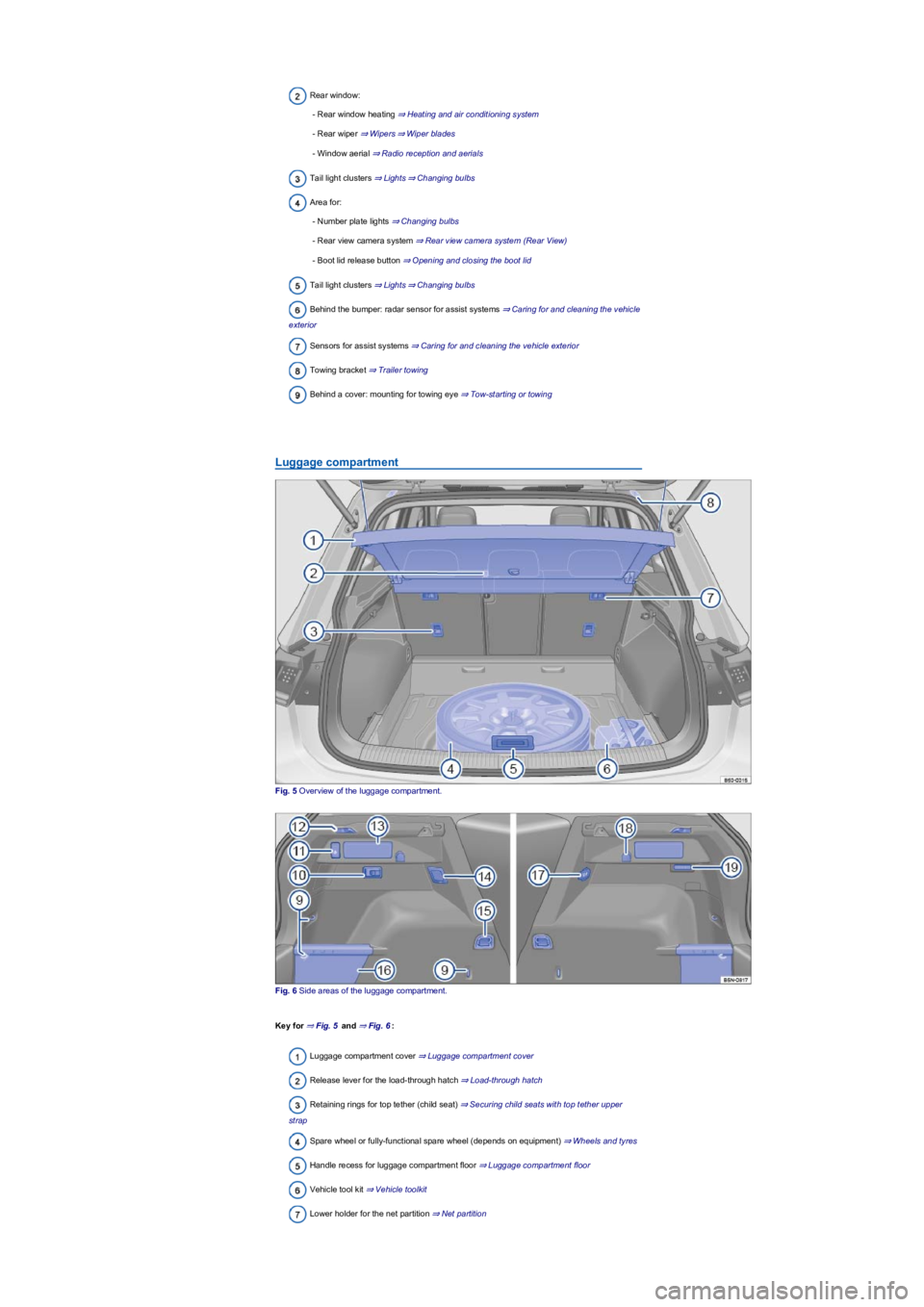
Rear window:
- Rear window heating ⇒ Heating and air conditioning system
- Rear wiper ⇒ Wipers⇒ Wiper blades
- Window aerial ⇒ Radio reception and aerials
Tail light clusters ⇒ Lights⇒ Changing bulbs
Area for:
- Number plate lights ⇒ Changing bulbs
- Rear view camera system ⇒ Rear view camera system (Rear View)
- Boot lid release button ⇒ Opening and closing the boot lid
Tail light clusters ⇒ Lights⇒ Changing bulbs
Behind the bumper: radar sensor for assist systems ⇒ Caring for and cleaning the vehicle
exterior
Sensors for assist systems ⇒ Caring for and cleaning the vehicle exterior
Towing bracket ⇒ Trailer towing
Behind a cover: mounting for towing eye ⇒ Tow-starting or towing
Luggage compartment
Fig. 5 Overview of the luggage compartment.
Fig. 6 Side areas of the luggage compartment.
Key for ⇒ Fig. 5 and ⇒ Fig. 6:
Luggage compartment cover ⇒ Luggage compartment cover
Release lever for the load-through hatch ⇒ Load-through hatch
Retaining rings for top tether (child seat) ⇒ Securing child seats with top tether upper
strap
Spare wheel or fully-functional spare wheel (depends on equipment) ⇒ Wheels and tyres
Handle recess for luggage compartment floor ⇒ Luggage compartment floor
Vehicle tool kit ⇒ Vehicle toolkit
Lower holder for the net partition ⇒ Net partition
Page 7 of 341
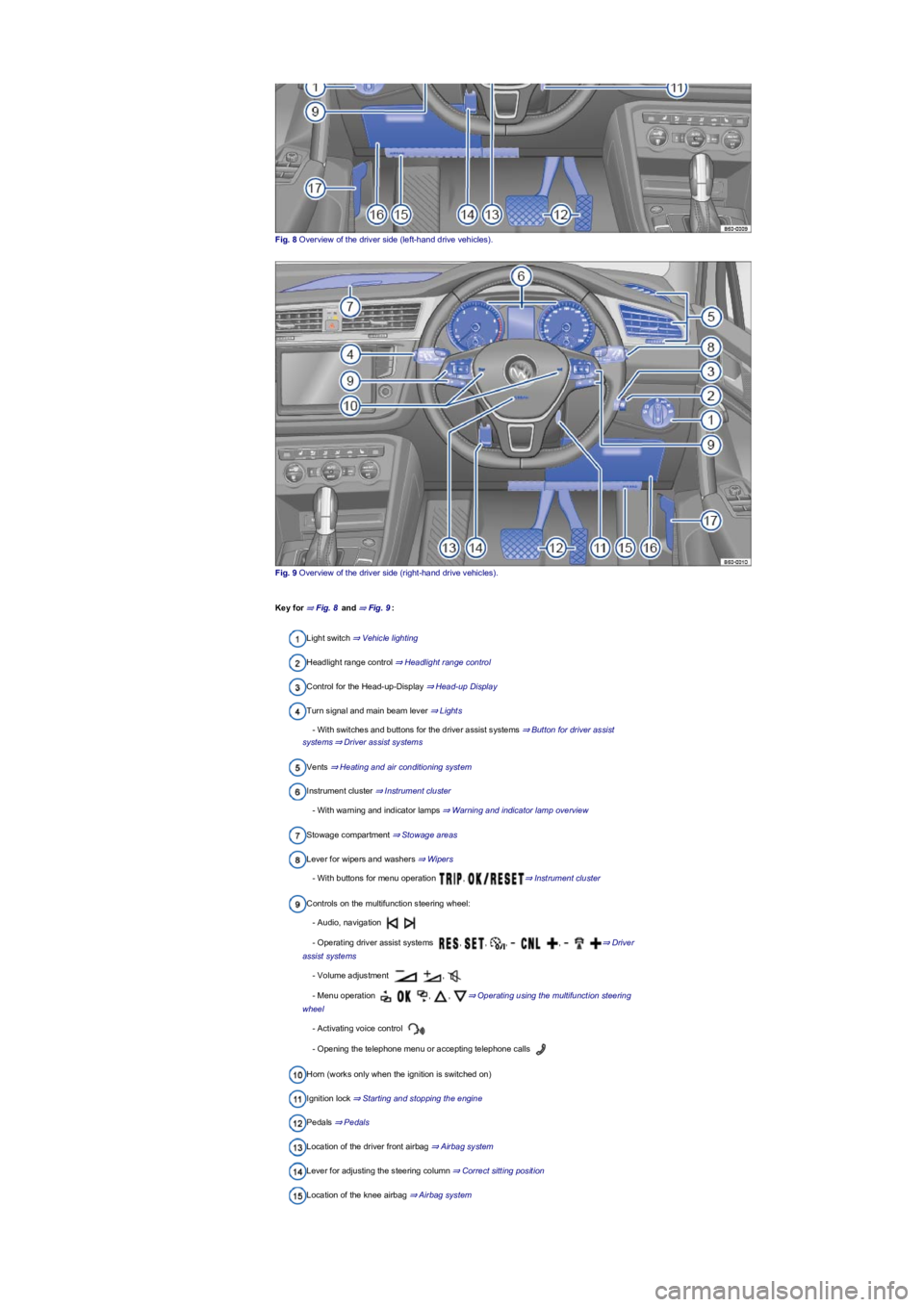
Fig. 8 Overview of the driver side (left-hand drive vehicles).
Fig. 9 Overview of the driver side (right-hand drive vehicles).
Key for ⇒ Fig. 8 and ⇒ Fig. 9:
Light switch ⇒ Vehicle lighting
Headlight range control ⇒ Headlight range control
Control for the Head-up-Display ⇒ Head-up Display
Turn signal and main beam lever ⇒ Lights
- With switches and buttons for the driver assist systems ⇒ Button for driver assist
systems⇒ Driver assist systems
Vents ⇒ Heating and air conditioning system
Instrument cluster ⇒ Instrument cluster
- With warning and indicator lamps ⇒ Warning and indicator lamp overview
Stowage compartment ⇒ Stowage areas
Lever for wipers and washers ⇒ Wipers
- With buttons for menu operation , ⇒ Instrument cluster
Controls on the multifunction steering wheel:
- Audio, navigation
- Operating driver assist systems , , , , ⇒ Driver
assist systems
- Volume adjustment ,
- Menu operation , , ⇒ Operating using the multifunction steering
wheel
- Activating voice control
- Opening the telephone menu or accepting telephone calls
Horn (works only when the ignition is switched on)
Ignition lock ⇒ Starting and stopping the engine
Pedals ⇒ Pedals
Location of the driver front airbag ⇒ Airbag system
Lever for adjusting the steering column ⇒ Correct sitting position
Location of the knee airbag ⇒ Airbag system
Page 10 of 341
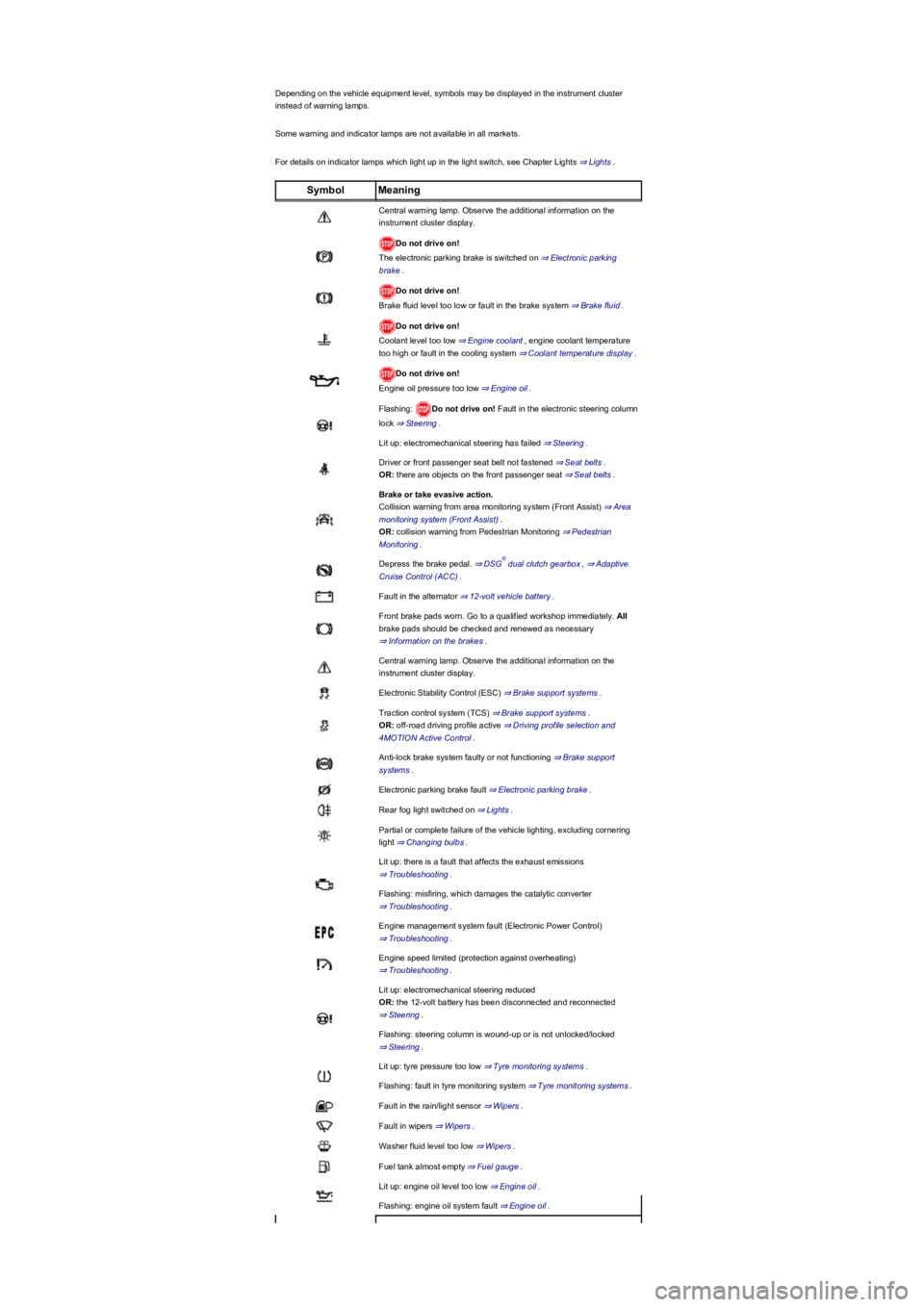
Depending on the vehicle equipment level, symbols may be displayed in the instrument cluster
instead of warning lamps.
Some warning and indicator lamps are not available in all markets.
For details on indicator lamps which light up in the light switch, see Chapter Lights ⇒ Lights.
SymbolMeaning
Central warning lamp. Observe the additional information on the
instrument cluster display.
Do not drive on!
The electronic parking brake is switched on ⇒ Electronic parking
brake.
Do not drive on!
Brake fluid level too low or fault in the brake system ⇒ Brake fluid.
Do not drive on!
Coolant level too low ⇒ Engine coolant, engine coolant temperature
too high or fault in the cooling system ⇒ Coolant temperature display.
Do not drive on!
Engine oil pressure too low ⇒ Engine oil.
Flashing: Do not drive on! Fault in the electronic steering column
lock ⇒ Steering.
Lit up: electromechanical steering has failed ⇒ Steering.
Driver or front passenger seat belt not fastened ⇒ Seat belts.
OR: there are objects on the front passenger seat ⇒ Seat belts.
Brake or take evasive action.
Collision warning from area monitoring system (Front Assist) ⇒ Area
monitoring system (Front Assist).
OR: collision warning from Pedestrian Monitoring ⇒ Pedestrian
Monitoring.
Depress the brake pedal. ⇒ DSG dual clutch gearbox, ⇒ Adaptive
Cruise Control (ACC).
Fault in the alternator ⇒ 12-volt vehicle battery.
Front brake pads worn. Go to a qualified workshop immediately. All
brake pads should be checked and renewed as necessary
⇒ Information on the brakes.
Central warning lamp. Observe the additional information on the
instrument cluster display.
Electronic Stability Control (ESC) ⇒ Brake support systems.
Traction control system (TCS) ⇒ Brake support systems.
OR: off-road driving profile active ⇒ Driving profile selection and
4MOTION Active Control.
Anti-lock brake system faulty or not functioning ⇒ Brake support
systems.
Electronic parking brake fault ⇒ Electronic parking brake.
Rear fog light switched on ⇒ Lights.
Partial or complete failure of the vehicle lighting, excluding cornering
light ⇒ Changing bulbs.
Lit up: there is a fault that affects the exhaust emissions
⇒ Troubleshooting.
Flashing: misfiring, which damages the catalytic converter
⇒ Troubleshooting.
Engine management system fault (Electronic Power Control)
⇒ Troubleshooting.
Engine speed limited (protection against overheating)
⇒ Troubleshooting.
Lit up: electromechanical steering reduced
OR: the 12-volt battery has been disconnected and reconnected
⇒ Steering.
Flashing: steering column is wound-up or is not unlocked/locked
⇒ Steering.
Lit up: tyre pressure too low ⇒ Tyre monitoring systems.
Flashing: fault in tyre monitoring system ⇒ Tyre monitoring systems.
Fault in the rain/light sensor ⇒ Wipers.
Fault in wipers ⇒ Wipers.
Washer fluid level too low ⇒ Wipers.
Fuel tank almost empty ⇒ Fuel gauge.
Lit up: engine oil level too low ⇒ Engine oil.
Flashing: engine oil system fault ⇒ Engine oil.
®
Page 30 of 341
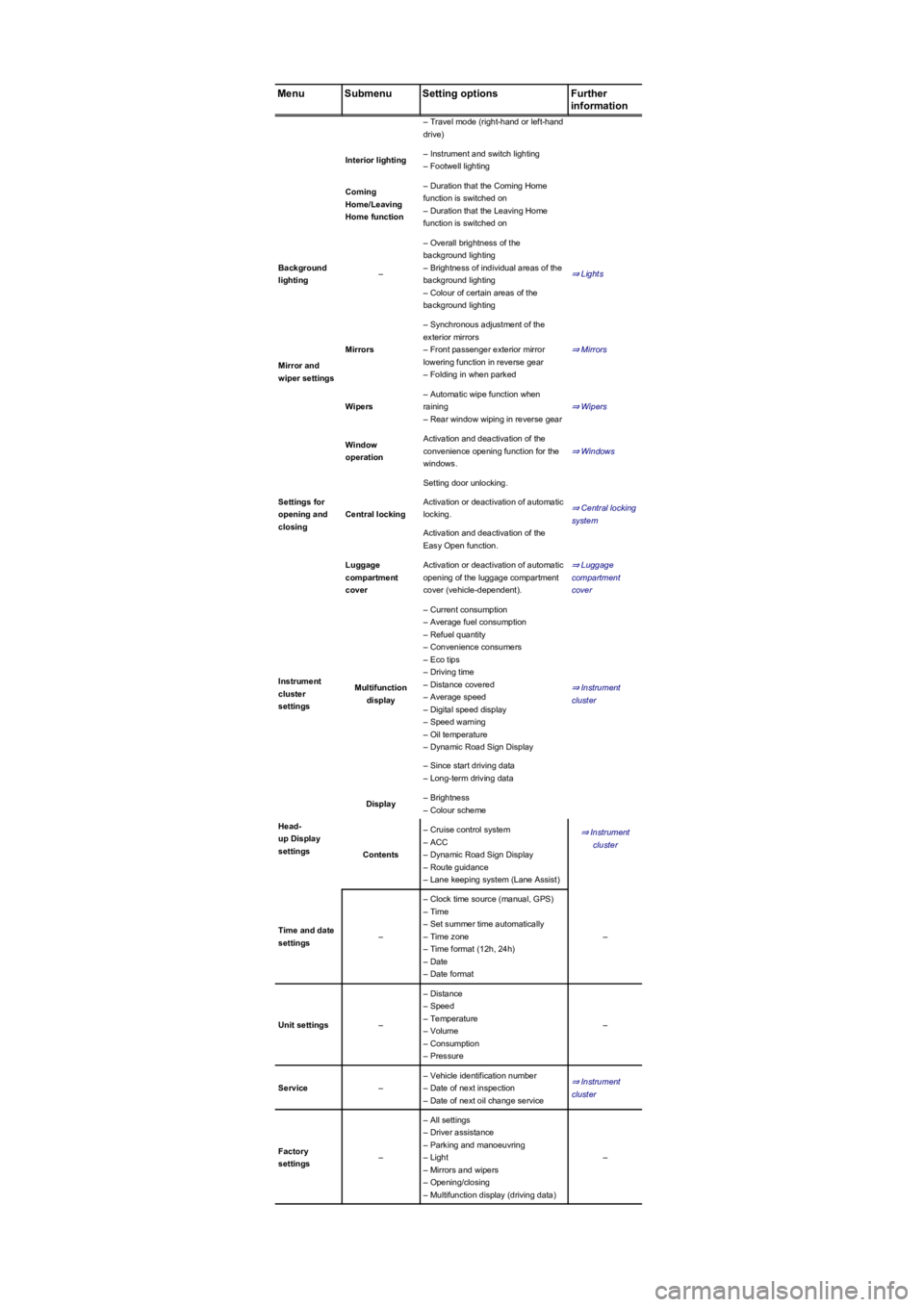
MenuSubmenuSetting optionsFurther
information
– Travel mode (right-hand or left-hand
drive)
Interior lighting– Instrument and switch lighting
– Footwell lighting
Coming
Home/Leaving
Home function
– Duration that the Coming Home
function is switched on
– Duration that the Leaving Home
function is switched on
Background
lighting–
– Overall brightness of the
background lighting
– Brightness of individual areas of the
background lighting
– Colour of certain areas of the
background lighting
⇒ Lights
Mirror and
wiper settings
Mirrors
– Synchronous adjustment of the
exterior mirrors
– Front passenger exterior mirror
lowering function in reverse gear
– Folding in when parked
⇒ Mirrors
Wipers
– Automatic wipe function when
raining
– Rear window wiping in reverse gear
⇒ Wipers
Settings for
opening and
closing
Window
operation
Activation and deactivation of the
convenience opening function for the
windows.
⇒ Windows
Central locking
Setting door unlocking.
⇒ Central locking
system
Activation or deactivation of automatic
locking.
Activation and deactivation of the
Easy Open function.
Luggage
compartment
cover
Activation or deactivation of automatic
opening of the luggage compartment
cover (vehicle-dependent).
⇒ Luggage
compartment
cover
Instrument
cluster
settings
Multifunction
display
– Current consumption
– Average fuel consumption
– Refuel quantity
– Convenience consumers
– Eco tips
– Driving time
– Distance covered
– Average speed
– Digital speed display
– Speed warning
– Oil temperature
– Dynamic Road Sign Display
⇒ Instrument
cluster
– Since start driving data
– Long-term driving data
Head-
up Display
settings
Display– Brightness
– Colour scheme
⇒ Instrument
cluster
Contents
– Cruise control system
– ACC
– Dynamic Road Sign Display
– Route guidance
– Lane keeping system (Lane Assist)
Time and date
settings–
– Clock time source (manual, GPS)
– Time
– Set summer time automatically
– Time zone
– Time format (12h, 24h)
– Date
– Date format
–
Unit settings–
– Distance
– Speed
– Temperature
– Volume
– Consumption
– Pressure
–
Service–
– Vehicle identification number
– Date of next inspection
– Date of next oil change service
⇒ Instrument
cluster
Factory
settings–
– All settings
– Driver assistance
– Parking and manoeuvring
– Light
– Mirrors and wipers
– Opening/closing
– Multifunction display (driving data)
–
Page 36 of 341
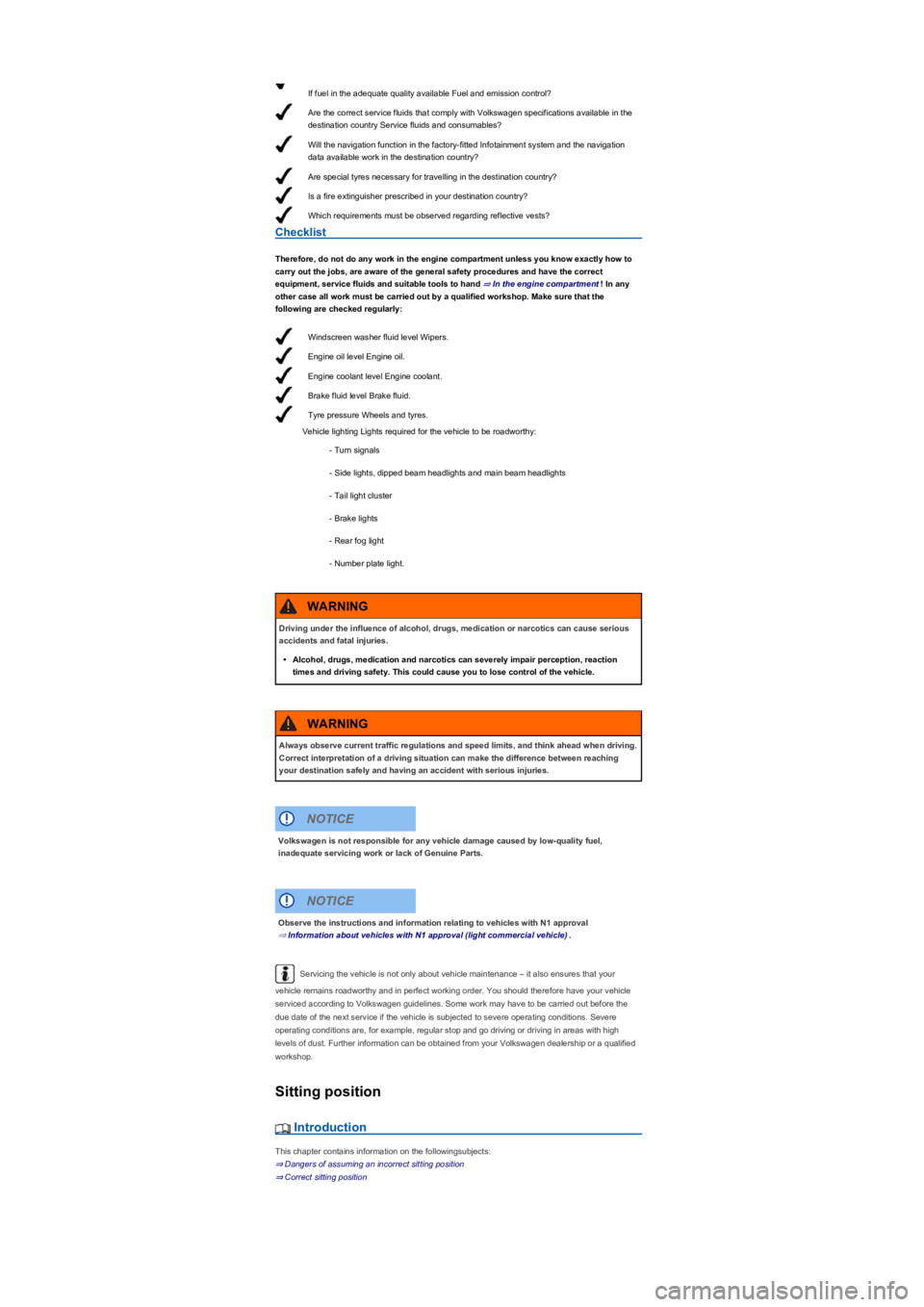
If fuel in the adequate quality available Fuel and emission control?
Are the correct service fluids that comply with Volkswagen specifications available in the
destination country Service fluids and consumables?
Will the navigation function in the factory-fitted Infotainment system and the navigation
data available work in the destination country?
Are special tyres necessary for travelling in the destination country?
Is a fire extinguisher prescribed in your destination country?
Which requirements must be observed regarding reflective vests?
Windscreen washer fluid level Wipers.
Engine oil level Engine oil.
Engine coolant level Engine coolant.
Brake fluid level Brake fluid.
Tyre pressure Wheels and tyres.
Checklist
Therefore, do not do any work in the engine compartment unless you know exactly how to
carry out the jobs, are aware of the general safety procedures and have the correct
equipment, service fluids and suitable tools to hand ⇒ In the engine compartment! In any
other case all work must be carried out by a qualified workshop. Make sure that the
following are checked regularly:
Vehicle lighting Lights required for the vehicle to be roadworthy:
- Turn signals
- Side lights, dipped beam headlights and main beam headlights
- Tail light cluster
- Brake lights
- Rear fog light
- Number plate light.
Servicing the vehicle is not only about vehicle maintenance – it also ensures that your
vehicle remains roadworthy and in perfect working order. You should therefore have your vehicle
serviced according to Volkswagen guidelines. Some work may have to be carried out before the
due date of the next service if the vehicle is subjected to severe operating conditions. Severe
operating conditions are, for example, regular stop and go driving or driving in areas with high
levels of dust. Further information can be obtained from your Volkswagen dealership or a qualified
workshop.
Sitting position
Introduction
This chapter contains information on the followingsubjects:
⇒ Dangers of assuming an incorrect sitting position
⇒ Correct sitting position
Driving under the influence of alcohol, drugs, medication or narcotics can cause serious
accidents and fatal injuries.
•Alcohol, drugs, medication and narcotics can severely impair perception, reaction
times and driving safety. This could cause you to lose control of the vehicle.
WARNING
Always observe current traffic regulations and speed limits, and think ahead when driving.
Correct interpretation of a driving situation can make the difference between reaching
your destination safely and having an accident with serious injuries.
WARNING
Volkswagen is not responsible for any vehicle damage caused by low-quality fuel,
inadequate servicing work or lack of Genuine Parts.
NOTICE
Observe the instructions and information relating to vehicles with N1 approval
⇒ Information about vehicles with N1 approval (light commercial vehicle).
NOTICE
Page 108 of 341
•If the dynamic cornering light has been deactivated.
•If travel mode is activated ⇒ Switching over headlights for driving abroad (travel mode).
•When the Eco driving profile is selected in vehicles with driving profile selection ⇒ Driving
profile selection and 4MOTION Active Control.
Interior lighting
Instrument and switch lighting
The brightness of the instrument and switch lighting and the basic brightness level of the Head-up
Display ⇒ Instrument cluster can be adjusted in the Infotainment system in
the Vehicle settings menu ⇒ Operation and display in the Infotainment system.
The brightness setting is automatically adjusted to the changing light conditions in the vehicle.
When the light switch is in position , a sensor will switch the dipped beam and the lighting
in the instruments and switches on and off automatically depending on the ambient brightness
level.
When the light is switched off and the ignition switched on, the dash panel lighting (indicators
and scales) is switched on. As the ambient light becomes lower, the lighting of these scales is
automatically reduced and may be switched off entirely. This function is intended to remind the
driver to switch on the dipped beam in good time, i.e. when driving through tunnels.
Interior lights, reading lights, background lighting
Press the corresponding button:
Switches the front interior lights on or off.Switches the rear interior lights on or off.
The interior lights are switched on automatically when the vehicle is unlocked, a door is
opened or the vehicle key is removed from the ignition lock.Switches the reading lights on or
off.
Stowage compartment and luggage compartment lights
A light will be switched on and off automatically when the stowage compartment on the front
passenger side, or the boot lid, is opened or closed.
Background lighting
Depending on the equipment level, the background lighting provides indirect light in the various
areas of the vehicle interior.
The footwell and, where applicable, the closed blind of the glass roof may also be illuminated.
The brightness of the background lighting can be adjusted in the Infotainment system in
the Vehicle settings menu ⇒ Operation and display in the Infotainment system.
The lights go out when the vehicle is locked or after a delay of a few minutes when the
vehicle key is removed from the ignition lock. This prevents the 12-volt battery from discharging.
Some settings can be stored in the user accounts of the personalisation function and
therefore change automatically when the user account changes ⇒ Personalisation.
Visibility
Wipers
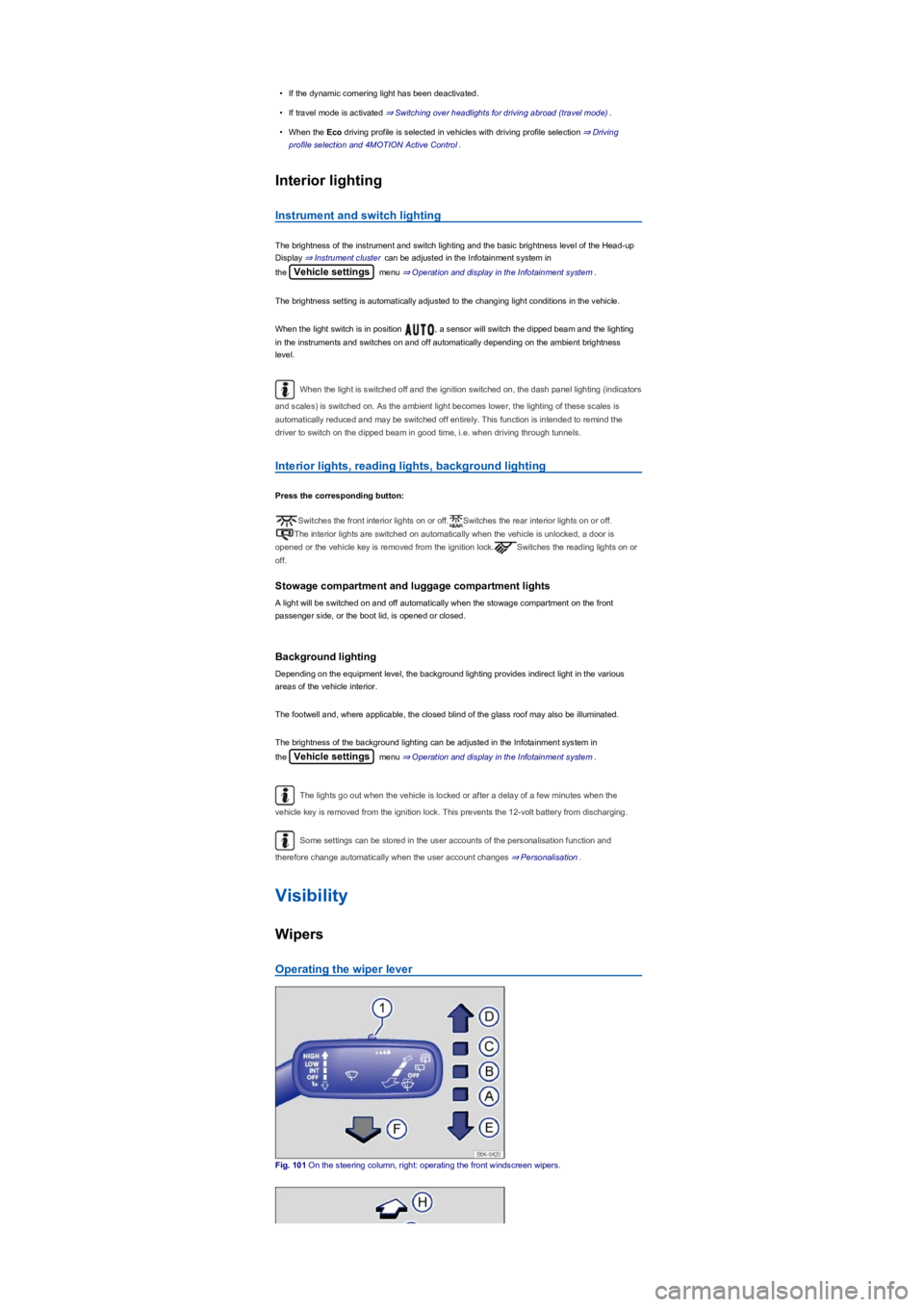
Operating the wiper lever
Fig. 101 On the steering column, right: operating the front windscreen wipers.
Page 109 of 341
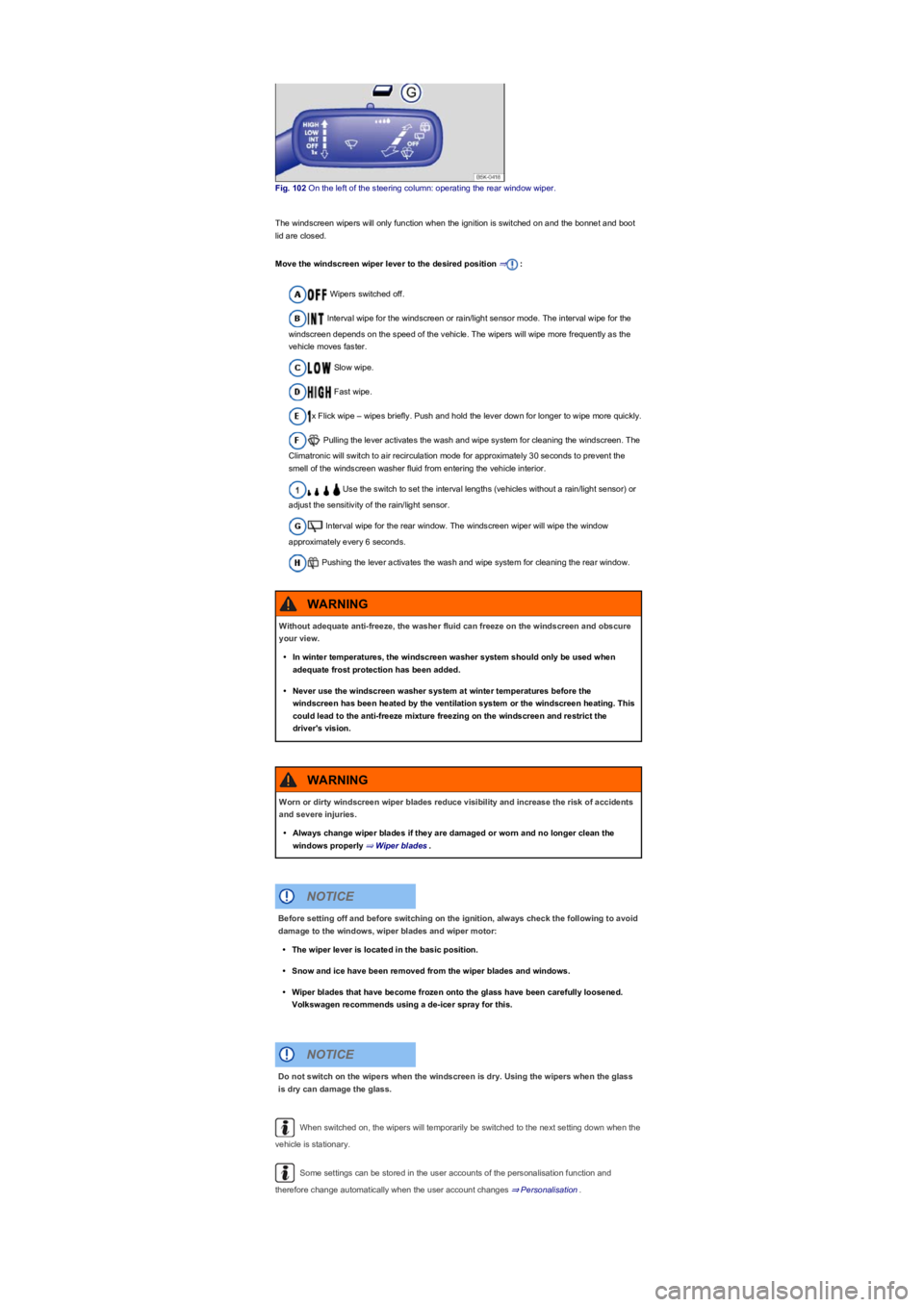
Fig. 102 On the left of the steering column: operating the rear window wiper.
The windscreen wipers will only function when the ignition is switched on and the bonnet and boot
lid are closed.
Move the windscreen wiper lever to the desired position ⇒:
Wipers switched off.
Interval wipe for the windscreen or rain/light sensor mode. The interval wipe for the
windscreen depends on the speed of the vehicle. The wipers will wipe more frequently as the
vehicle moves faster.
Slow wipe.
Fast wipe.
x Flick wipe – wipes briefly. Push and hold the lever down for longer to wipe more quickly.
Pulling the lever activates the wash and wipe system for cleaning the windscreen. The
Climatronic will switch to air recirculation mode for approximately 30 seconds to prevent the
smell of the windscreen washer fluid from entering the vehicle interior.
Use the switch to set the interval lengths (vehicles without a rain/light sensor) or
adjust the sensitivity of the rain/light sensor.
Interval wipe for the rear window. The windscreen wiper will wipe the window
approximately every 6 seconds.
Pushing the lever activates the wash and wipe system for cleaning the rear window.
When switched on, the wipers will temporarily be switched to the next setting down when the
vehicle is stationary.
Some settings can be stored in the user accounts of the personalisation function and
therefore change automatically when the user account changes ⇒ Personalisation.
Without adequate anti-freeze, the washer fluid can freeze on the windscreen and obscure
your view.
•In winter temperatures, the windscreen washer system should only be used when
adequate frost protection has been added.
•Never use the windscreen washer system at winter temperatures before the
windscreen has been heated by the ventilation system or the windscreen heating. This
could lead to the anti-freeze mixture freezing on the windscreen and restrict the
driver's vision.
WARNING
Worn or dirty windscreen wiper blades reduce visibility and increase the risk of accidents
and severe injuries.
•Always change wiper blades if they are damaged or worn and no longer clean the
windows properly ⇒ Wiper blades.
WARNING
Before setting off and before switching on the ignition, always check the following to avoid
damage to the windows, wiper blades and wiper motor:
•The wiper lever is located in the basic position.
•Snow and ice have been removed from the wiper blades and windows.
•Wiper blades that have become frozen onto the glass have been carefully loosened.
Volkswagen recommends using a de-icer spray for this.
NOTICE
Do not switch on the wipers when the windscreen is dry. Using the wipers when the glass
is dry can damage the glass.
NOTICE
Page 110 of 341
When parking the vehicle in cold weather, it may be helpful to leave the windscreen wipers in
the service position to make it easier to loosen the wiper blades ⇒ Wiper blades.
Wiper functions
Automatic activation of the rear window wiper
The rear window wiper is switched on automatically if the front windscreen wipers are switched on
and reverse gear is engaged. The automatic wipe function can be activated and deactivated in the
Infotainment system in the Vehicle settings menu ⇒ Operation and display in the
Infotainment system:
Heated washer jets
The heating defrosts frozen washer jets. The heating output is regulated automatically when the
ignition is switched on depending on the ambient temperature. Only the jets are heated and not the
hoses carrying the washer fluid.
Headlight washer system
The headlight washer system cleans the headlight lenses and only works when the vehicle lighting
is switched on.
Once the ignition has been switched on, the headlights will also be washed the first time the wash
and wipe system for the windscreen is used, and every tenth time thereafter. Hardened dirt, such
as insect remains, should be removed from the headlight lens at regular intervals.
In winter, you should remove any snow from the headlight washer system covers in the bumper
prior to use to keep the system in working order. Remove any ice with a de-icer spray.
Rain/light sensor
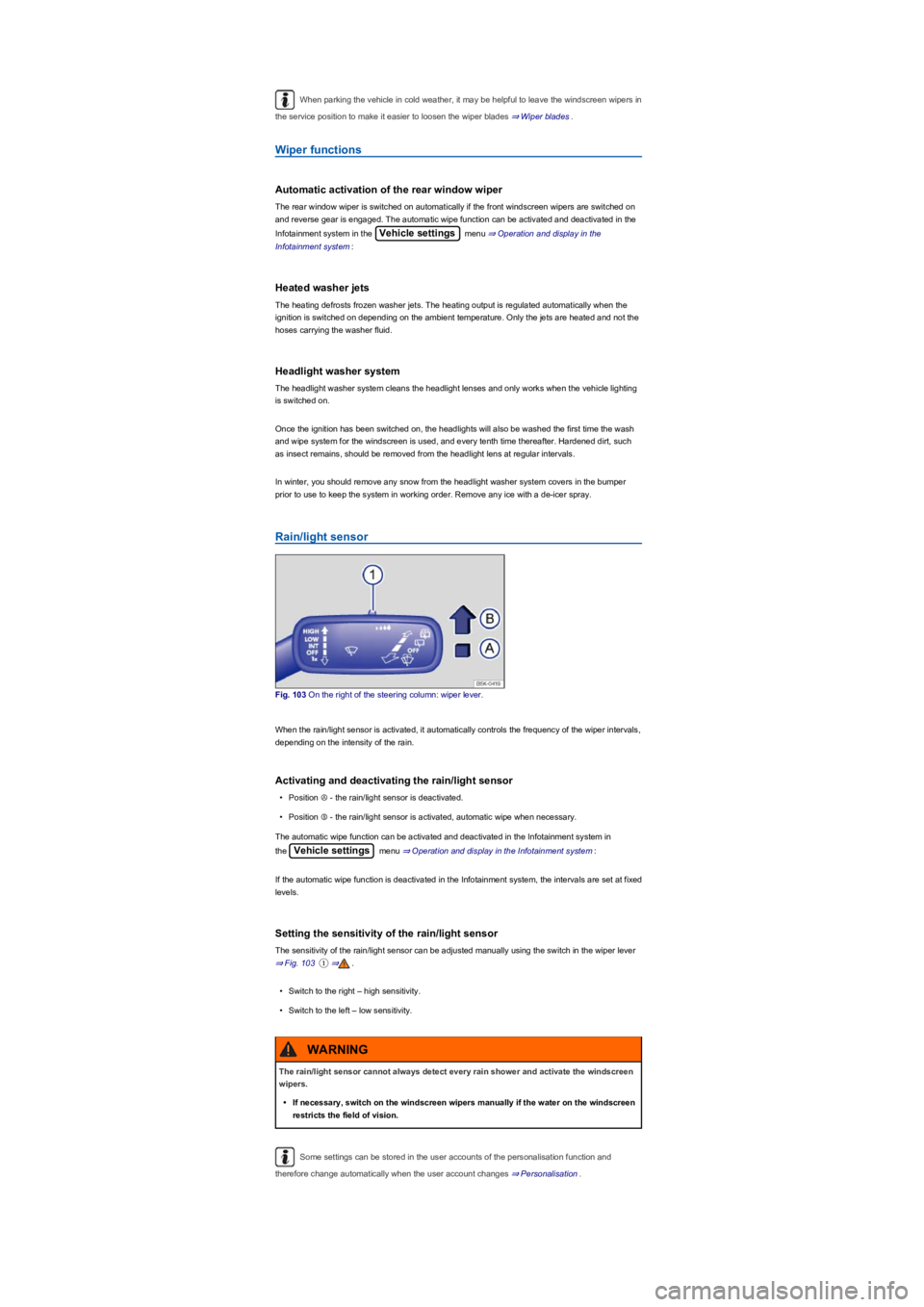
Fig. 103 On the right of the steering column: wiper lever.
When the rain/light sensor is activated, it automatically controls the frequency of the wiper intervals,
depending on the intensity of the rain.
Activating and deactivating the rain/light sensor
•Position Ⓐ - the rain/light sensor is deactivated.
•Position Ⓑ - the rain/light sensor is activated, automatic wipe when necessary.
The automatic wipe function can be activated and deactivated in the Infotainment system in
the Vehicle settings menu ⇒ Operation and display in the Infotainment system:
If the automatic wipe function is deactivated in the Infotainment system, the intervals are set at fixed
levels.
Setting the sensitivity of the rain/light sensor
The sensitivity of the rain/light sensor can be adjusted manually using the switch in the wiper lever
⇒ Fig. 103①⇒.
•Switch to the right – high sensitivity.
•Switch to the left – low sensitivity.
Some settings can be stored in the user accounts of the personalisation function and
therefore change automatically when the user account changes ⇒ Personalisation.
The rain/light sensor cannot always detect every rain shower and activate the windscreen
wipers.
•If necessary, switch on the windscreen wipers manually if the water on the windscreen
restricts the field of vision.
WARNING
Page 111 of 341
Troubleshooting
Washer fluid level too low. Fill up the washer fluid reservoir as soon as possible ⇒ Washer
fluid.Fault in the rain/light sensor. Switch the ignition on and off. If the indicator lamp still lights
up permanently after you switch the ignition back on, seek expert assistance.Fault in
windscreen wipers. Switch the ignition on and off. If the indicator lamp still lights up permanently
after you switch the ignition back on, seek expert assistance.
Changes in the response of the rain/light sensor
Possible causes for faults and misinterpretations relating to the sensitive surface of the rain/light
sensor ⇒ Vehicle overviews include:
•Damaged wiper blades: a film of water or smears caused by damaged wiper blades can
increase the time the wipers are switched on, can shorten the length of the intervals between
wipes or cause the wipers to run quickly and continuously.
•Insects: insects hitting the windscreen surface can cause the wipers to be activated.
•Salt deposits: in winter, salt deposits on the windscreen can cause the wipers to continue to
wipe the windscreen when it is almost dry.
•Soiling: dry dust, wax, windscreen coatings (lotus effect), or detergent deposits (from an
automatic car wash) can cause the rain/light sensor to become less sensitive and react too
slowly, or prevent it from reacting at all. Clean the sensitive surface of the rain/light sensor
⇒ Caring for and cleaning the vehicle exterior at regular intervals and inspect the wiper blades
for damage.
•Crack in the windscreen: a wipe cycle will be triggered if the rain/light sensor is on when the
windscreen is impacted by a stone. The rain/light sensor will then register the reduction in
sensitivity of the surfaces and adjust accordingly. The size of the crack can affect the way in
which the rain/light sensor activates the wipers.
We recommend that you use an alcohol-based glass cleaner to remove wax and polish.
The wipers will try to wipe away any obstacles that are on the windscreen. The wipers will
stop moving if the obstacle blocks their path. Remove the obstacle and switch the wipers back on
again.
Mirrors
Introduction
This chapter contains information on the followingsubjects:
⇒ Interior mirror
⇒ Exterior mirrors
You can use the exterior mirrors and the interior mirror to observe traffic behind you and adjust
driving style accordingly.
For safety reasons it is important that the driver positions the exterior and interior mirrors correctly
before starting a journey ⇒.
Looking in the exterior mirrors and the interior mirror does not allow the driver to see the entire side
and rear area of the vehicle. The area that cannot be seen is known as the blind spot. There may
be objects and other road users in the blind spot.
Adjusting the exterior and interior mirrors while driving may cause the driver to become
distracted. This can lead to accidents and serious injuries.
•Exterior and interior mirrors should only be adjusted when the vehicle is stationary.
•When parking, changing lane, or performing an overtaking or turning manoeuvre,
always pay careful attention to the area around the vehicle as objects and other road
users may be located in the blind spot.
•Always ensure that the mirrors are positioned correctly and that the rear view is not
restricted by ice, snow, condensation or any other objects.
WARNING
If you estimate the distance from traffic behind you incorrectly, you can cause accidents
and serious injuries.
•Curved mirrors (convex or aspheric) enlarge the field of vision and can make objects in
the mirror seem smaller and further away than they actually are.
•Using curved mirrors to estimate the distance from other vehicles behind you when
changing lanes can provide inaccurate results and can lead to accidents and severe
injuries.
•Whenever possible, use the interior mirror to check the exact distance between your
vehicle and following traffic or other objects.
•Ensure that you have a good view to the rear of the vehicle.
WARNING