instrument cluster VOLKSWAGEN TRANSPORTER 2015 Owner´s Manual
[x] Cancel search | Manufacturer: VOLKSWAGEN, Model Year: 2015, Model line: TRANSPORTER, Model: VOLKSWAGEN TRANSPORTER 2015Pages: 486, PDF Size: 72.17 MB
Page 89 of 486
A WARNING (Continued)
• If dust has entered your eyes, rinse them with water.
A WARNING
Cleaning agents that contain solvents cause the surface of the alrbag modules to become porous. In an accident that triggers the air-bag, loose plastic parts can cause serious In-jury.
• Never clean the dash panel or the airbag covers with cleansers that contain solvents.
CQI First read and observe the introductory information and safety warnings & on page 87.
Volkswagen offers two different front airbag systems for front passengers:
A 8
Features of the front passenger front airbag that Features of the front passenger front airbag that can only be switched off by a qualified work-can be switched off manually using the key-op-shop. erated switch =>page 93.
-Indicator lamp in the instrument cluster.
-Front passenger front airbag in the dash panel.
Name: airbag system.
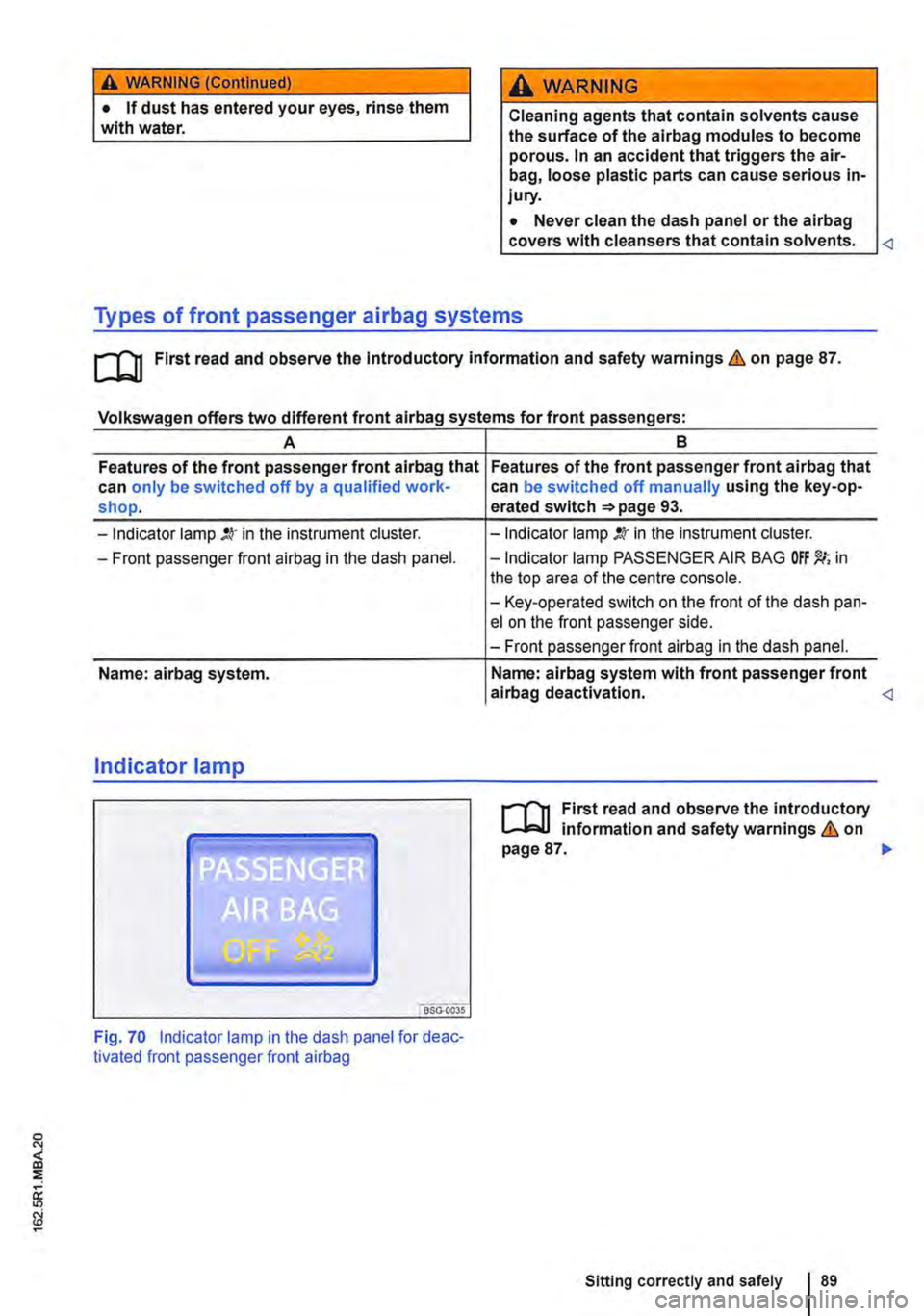
Indicator lamp
"'iSG."oo3s
Fig. 70 Indicator lamp in the dash panel for deac-tivated front passenger front airbag
-Indicator lamp !.lr in the instrument cluster.
-Indicator lamp PASSENGER AIR BAG in the top area of the centre console.
-Key-operated switch on the front of the dash pan-el on the front passenger side.
-Front passenger front airbag in the dash panel.
Name: airbag system with front passenger front alrbag deactivation. <1
r-f"'n First read and observe the introductory l.-.lo:-l.l information and safety warnings & on page 87. .,.
Sitting correctly and safely 89
Page 90 of 486
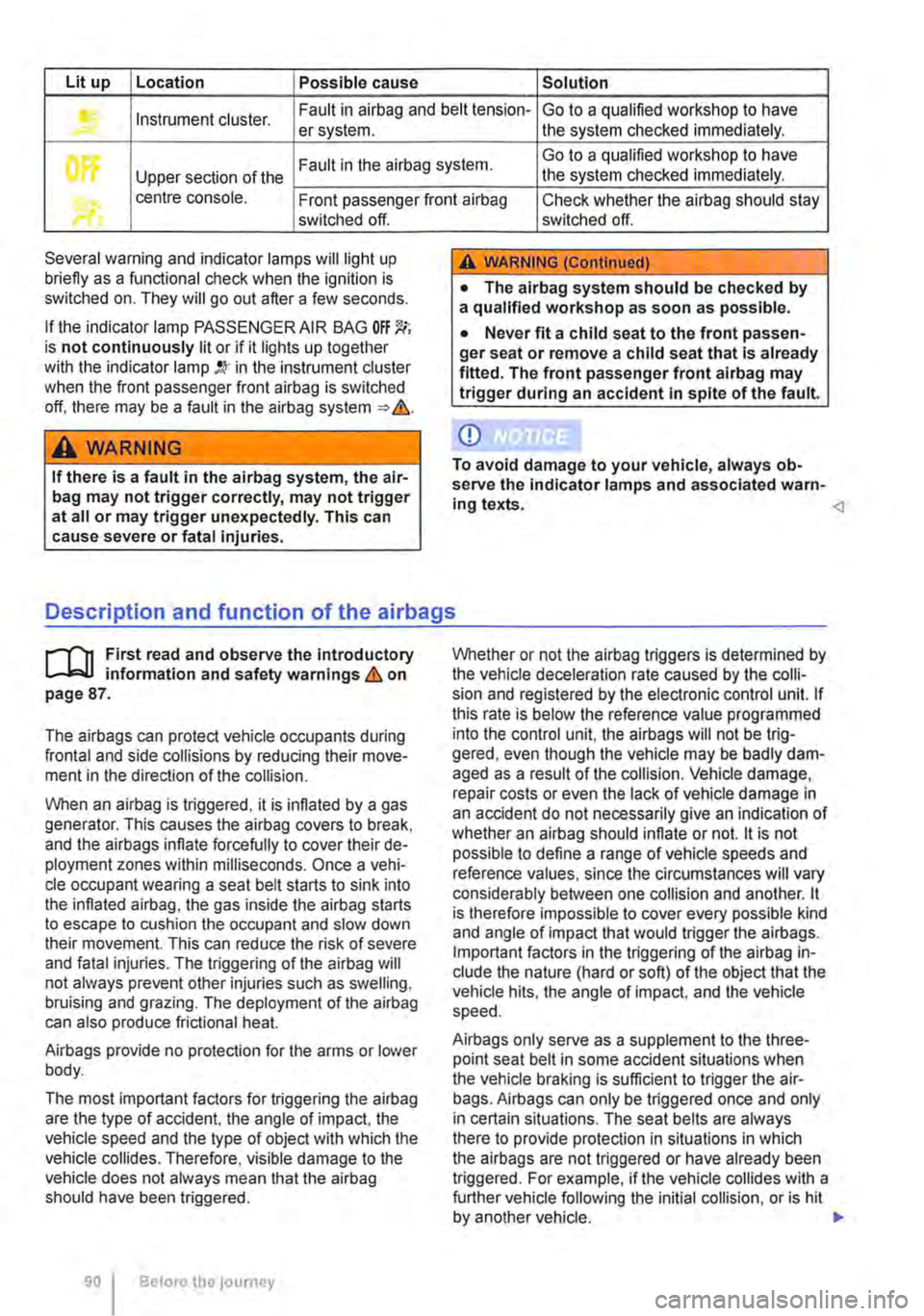
Lit up Location Possible cause Solution
Instrument cluster. Fault in airbag and belt tension-Go to a qualified workshop to have er system. the system checked immediately.
Fault in the airbag system. Go to a qualified workshop to have
Upper section of the the system checked immediately.
• centre console. Front passenger front airbag Check whether the airbag should stay switched off.
Several warning and indicator lamps will light up briefly as a functional check when the ignition is switched on. They will go out after a few seconds.
If the indicator lamp PASSENGER AIR BAG OFF 'J(; is not continuously lit or if it lights up together with the indicator lamp !Q' in the instrument cluster when the front passenger front airbag is switched off. there may be a fault in the airbag system => &.
A WARNING
If there is a fault in the airbag system, the air-bag may not trigger correctly, may not trigger at all or may trigger unexpectedly. This can cause severe or fatal injuries.
switched off.
A WARNING (Continued)
• The alrbag system should be checked by a qualified workshop as soon as possible.
• Never fit a child seat to the front passen-ger seat or remove a child seat that Is already fitted. The front passenger front alrbag may trigger during an accident In spite of the fault.
CD
To avoid damage to your vehicle, always ob-serve the indicator lamps and associated warn-ing texts. <1
Description and function of the airbags
r-('n First read and observe the introductory l..-lc:.l.l information and safety warnings & on page 87.
The airbags can protect vehicle occupants during frontal and side collisions by reducing their move-ment in the direction of the collision.
When an airbag is triggered, it is inflated by a gas generator. This causes the airbag covers to break, and the airbags inflate forcefully to cover their de-ployment zones within milliseconds. Once a vehi-cle occupant wearing a seat belt starts to sink into the inflated airbag, the gas inside the airbag starts to escape to cushion the occupant and slow down their movement. This can reduce the risk of severe and fatal injuries. The triggering of the airbag will not always prevent other injuries such as swelling, bruising and grazing. The deployment of the airbag can also produce frictional heat.
Airbags provide no protection for the arms or lower body.
The most important factors for triggering the airbag are the type of accident, the angle of impact, the vehicle speed and the type of object with which the vehicle collides. Therefore, visible damage to the vehicle does not always mean that the airbag should have been triggered.
90 Before the journey
Whether or not the airbag triggers is determined by the vehicle deceleration rate caused by the colli-sion and registered by the electronic control unit. If this rate is below the reference value programmed into the control unit, the airbags will not be trig-gered, even though the vehicle may be badly dam-aged as a result of the collision. Vehicle damage, repair costs or even the Jack of vehicle damage in an accident do not necessarily give an indication of whether an airbag should inflate or not. it is not possible to define a range of vehicle speeds and reference values, since the circumstances will vary considerably between one collision and another. it is therefore impossible to cover every possible kind and angle of impact that would trigger the airbags. Important factors in the triggering of the airbag in-clude the nature (hard or soft) of the object that the vehicle hits, the angle of impact, and the vehicle speed.
Airbags only serve as a supplement to the three-point seat belt in some accident situations when the vehicle braking is sufficient to trigger the air-bags. Airbags can only be triggered once and only in certain situations. The seat belts are always there to provide protection in situations in which the airbags are not triggered or have already been triggered. For example, if the vehicle collides with a further vehicle following the initial collision, or is hit by another vehicle. .,.
Page 93 of 486
A DANGE;R (Continued) --
• No other people, animals or objects may be carried between the occupants of the front seats and the alrbag deployment zone. Make sure that children and passengers also keep to this rule.
• Do not attach any objects, e.g. mobile nav-igation devices, to the windscreen above the front alrbag on the front passenger side.
• Do not cover or stick anything on the steering wheel hub or the soft plastic surface of the alrbag unit In the dash panel on the front passenger side, and do not modify them In any way.
A WARNING
The front alrbags are deployed In front of the steering wheel "*Fig. 71 and dash panel '*Fig. 72.
• When driving, always hold the steering wheel with both hands on the outside of the ring at the 9 o'clock and 3 o'clock positions.
• Adjust the driver seat so that there is at least 25 cm between your breastbone and the hub of the steering wheel. Contact a qualified workshop if your physical build makes this Impracticable.
• Adjust the front passenger seat so that the distance between the passenger and the
__ ____
Switching the front passenger front airbag on and off manually using the
key-operated switch
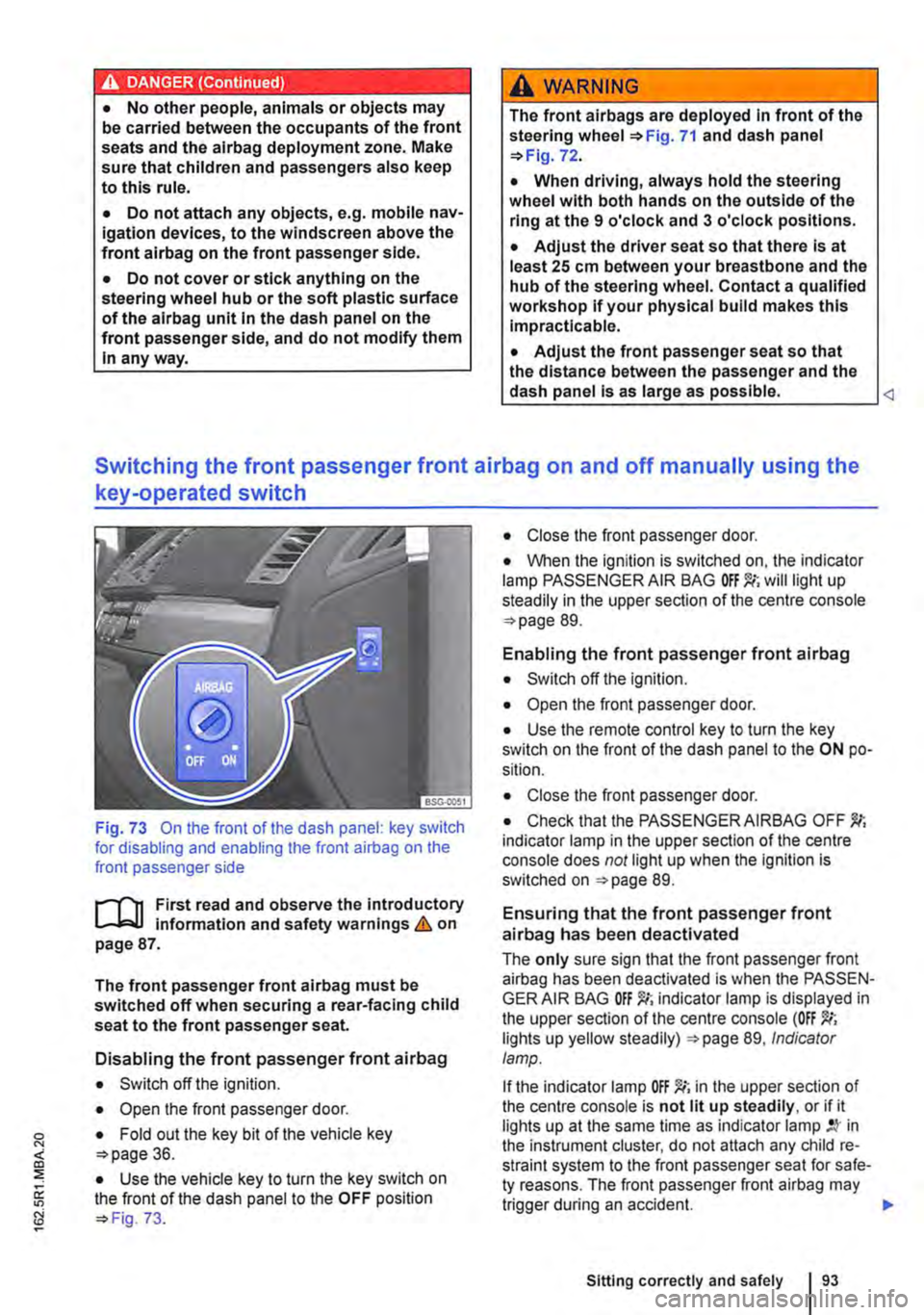
Fig. 73 On the front of the dash panel: key switch for disabling and enabling the front airbag on the front passenger side
l""'rn First read and observe the introductory L-J,::.U information and safety warnings&. on page 87.
The front passenger front airbag must be switched off when securing a rear-facing child seat to the front passenger seat.
Disabling the front passenger front airbag
• Switch off the ignition.
• Open the front passenger door.
• Fold out the key bit of the vehicle key o>page 36.
• Use the vehicle key to turn the key switch on the front of the dash panel to the OFF position o> Fig. 73.
• Close the front passenger door.
• When the ignition is switched on, the indicator lamp PASSENGER AIR BAG will light up steadily in the upper section of the centre console o> page 89.
Enabling the front passenger front airbag
• Switch off the ignition.
• Open the front passenger door.
• Use the remote control key to turn the key switch on the front of the dash panel to the ON po-sition.
• Close the front passenger door.
• Check that the PASSENGER AIRBAG OFF indicator lamp in the upper section of the centre console does not light up when the Ignition is switched on =>page 89.
Ensuring that the front passenger front airbag has been deactivated
The only sure sign that the front passenger front airbag has been deactivated is when the PASSEN-GER AIR BAG indicator lamp is displayed in the upper section of the centre console (OFF lights up yellow steadily) =>page 89, Indicator lamp.
If the indicator lamp OFF )!(; in the upper section of the centre console is not lit up steadily, or if it lights up at the same time as indicator lamp in the instrument cluster, do not attach any child re-straint system to the front passenger seat for safe-ty reasons. The front passenger front airbag may trigger during an accident.
Sitting correctly and safely
Page 106 of 486

Lights and vision
Lights
0::0 Introduction
This chapter contains information on the following subjects:
Indicator lamps . . . . . . . . . . . . . . . . . 106
Turn signal and main beam lever . . 107 Switching lights on and off . . . . . . . . 108
Lights and vision -functions . . . . . . . . . . . . . . 109
Main beam assist ....................... 110
Masking or switching over headlights for driving abroad . . . . . . . . . 111
Coming Home and Leaving Home functions (orientation lighting).............. 112
Headlight range control, instrument and switch lighting . . . . . 113 Interior and reading lights . . . . . . . . . 114
Observe any country-specific regulations when us-ing vehicle lighting.
The driver is responsible for the correct headlight position and the correct headlight setting.
Additional information and warnings:
• Exterior views ""page 5
• Volkswagen information system =oo page 24
• Changing bulbs =oo page 432
Indicator lamps
A WARNING
Accidents and serious injuries can occur if roads are not sufficiently Illuminated and oth-er road users have difficulty seeing the vehi-cle, or cannot see it at all.
• Always switch the dipped beam head-lights on if it is dark, raining or visibility is poor.
A WARNING
Setting headlights too high, and the incorrect use of the main beam, could distract and daz-zle other road users. This can lead to acci-dents and serious injuries.
• Always ensure that the headlights are ad-j usted correctly.
• Never use the main beam or the headlight flasher if other road users could be dazzled.
[Qj First read and observe the introductory information and safety warnings & on page 106.
Indicator lamps in the instrument cluster
Lit up Possible cause Solution
Vehicle lighting not working partially or corn-Change the appropriate bulb 432. If all of the bulbs are in working order. go to a pletely. qualified workshop.
' Rear fog light switched on. J", =oopage 109.
,( The fog light is switched on.
Turn signal, left or right.
r The indicator lamp will flash twice as fast if If necessary, check the vehicle lights and the one of the turn signals on the vehicle or trailer trailer lights. is not working.
'111 Trailer turn signals in operation. 139.
106 Before the journey
Page 108 of 486
@ Main beam headlights switched on &. The indicator lamp m in the instrument cluster lights up.
Pull the lever briefly in the direction of the ar-row @to switch off the main beam headlights.
@ Operate headlight flasher. The headlight flash-er comes on for as long as the lever is pulled. The indicator lamp ID lights up.
Lane change flash
To operate the lane change flash, push the lever up or down to the point where you incur resistance and then release the lever. The turn signal flashes three times.
This lane change flash function can be deactivated at a qualified workshop.
A WARNING
Incorrect use of turn signals, a failure to use turn signals, or forgetting to switch off a turn signal can confuse other road users. This can lead to accidents and serious Injuries.
Switching lights on and off
A WARNING (Continued)
• Always activate the turn signal In good time when changing lanes and performing overtaking or turning manoeuvres.
• Always switch off the turn signal once the lane change or overtaking or turning ma-noeuvre has been completed.
A WARNING
Incorrect use of the main beam headlights can lead to accidents and serious Injuries as the main beam headlights can distract and dazzle other road users.
m The turn signal will only work when the igni-m lion is switched on. The hazard warning lights also work when the ignition is switched off 411.
m If one turn signal fails on the vehicle or on the m trailer, the indicator lamp will start flashing twice as fast.
m The main beam headlights can only be m switched on if the dipped beam headlights are already on.
l"'""'rT1 First read and observe the Introductory L--J,::.,U information and safety warnings & on page 106.
Observe any country-specific regulations when us-ing vehicle lighting.
1081 Before the; journey
In vehicles with a factory-fitted towing bracket 139, the vehicle's rear fog lights are switched off automatically if a trailer with rear fog lights is electrically connected to the vehicle. .,.
Page 109 of 486
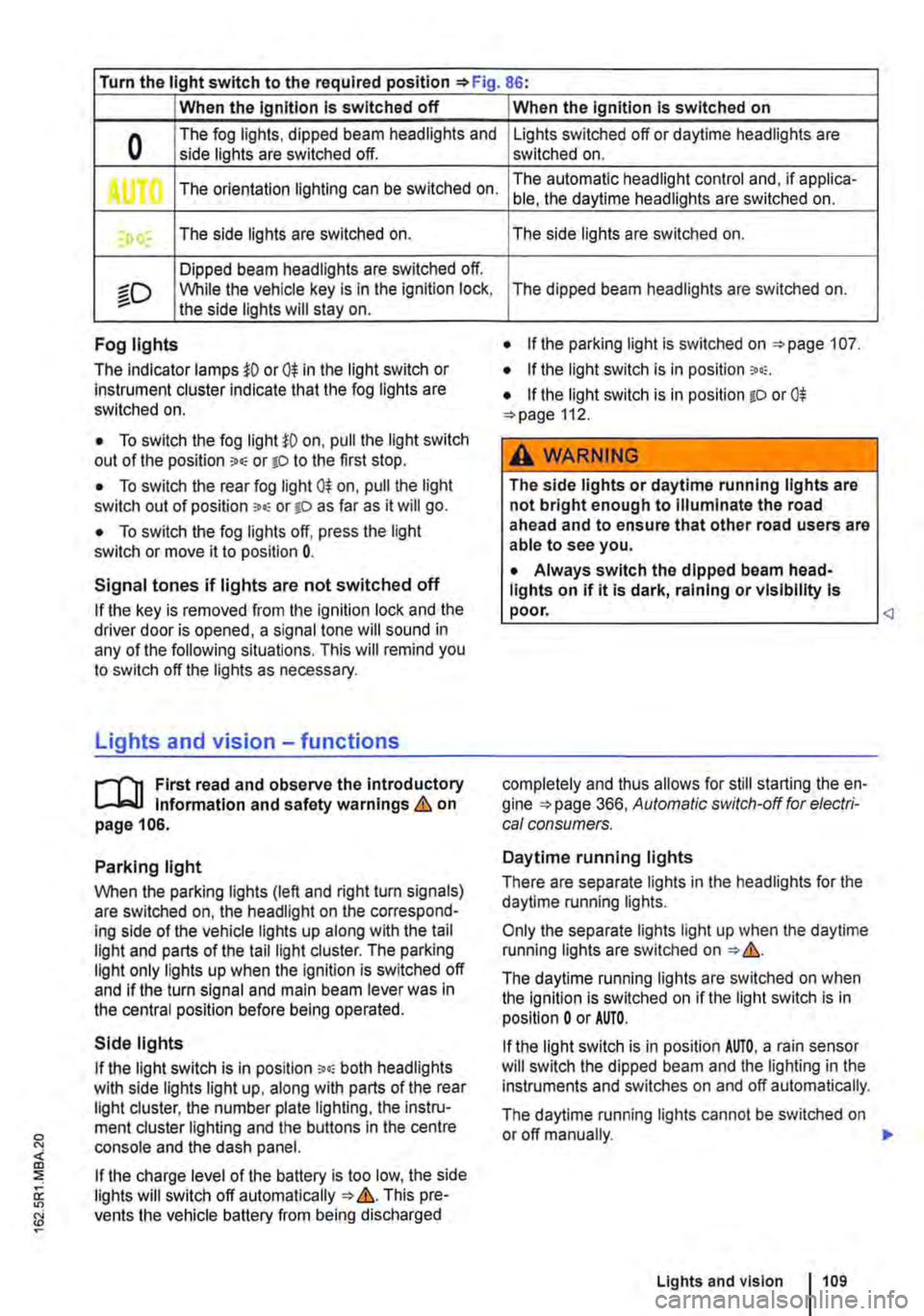
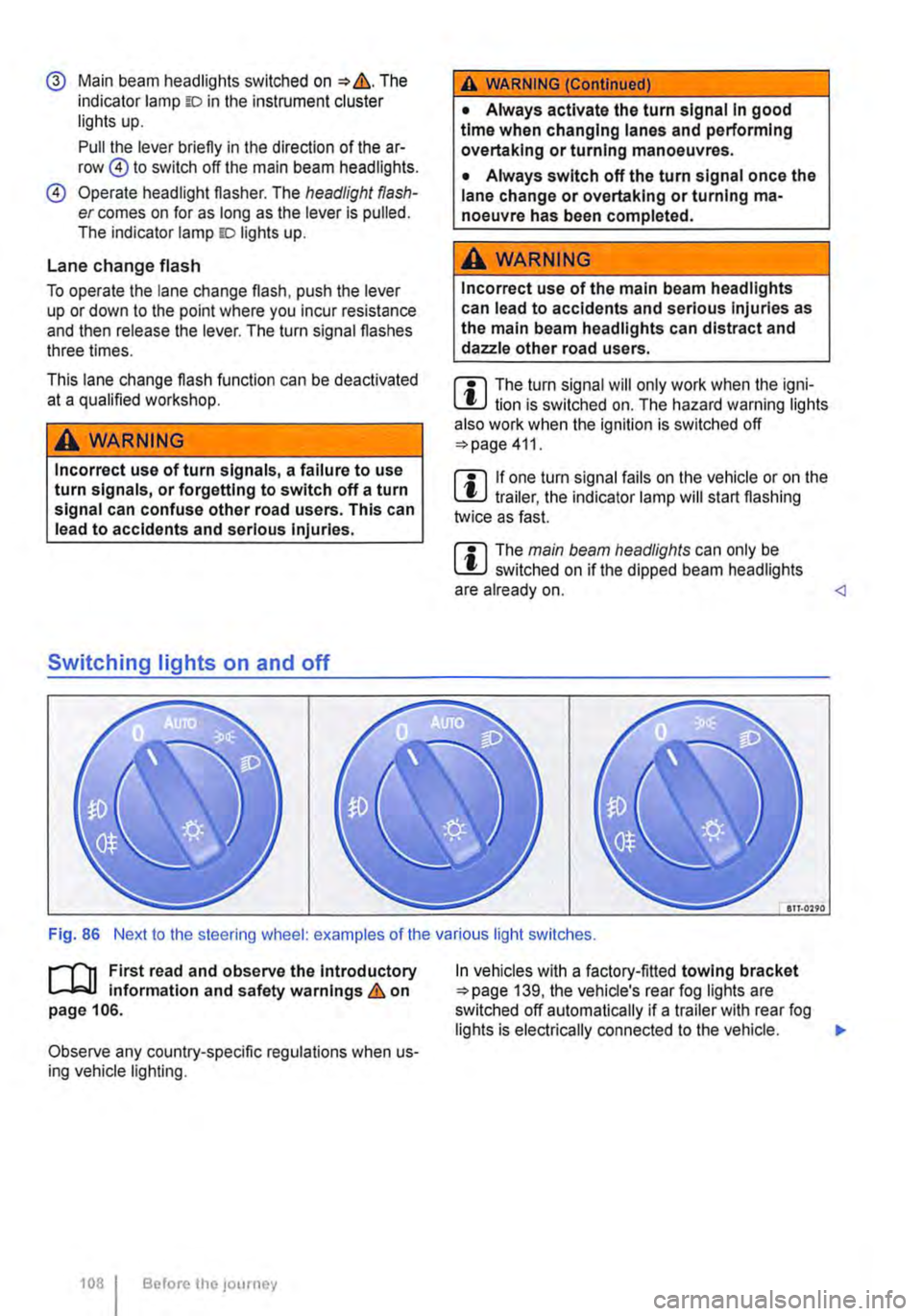
Turn the light switch to the required position 86:
When the Ignition Is switched off
0 The fog lights, dipped beam headlights and side lights are switched off.
,. The orientation lighting can be switched on.
) , The side lights are switched on.
Dipped beam headlights are switched off.
"'D While the vehicle key is in lhe ignition lock, the side lights will stay on.
Fog lights
The indicator lamps or 0$ in the light switch or Instrument cluster indicate that the fog lights are switched on.
• To switch the fog light on, pull the light switch out of the position "" or tD to the first stop.
• To switch the rear fog light 0$ on, pull the light switch out of position ,.,, or gD as far as it will go.
• To switch the fog lights off, press the light switch or move it to position 0.
Signal tones if lights are not switched off
If the key is removed from the ignition lock and the driver door is opened, a signal tone will sound in any of the following situations. This will remind you to switch off the lights as necessary.
Lights and vision -functions
1""1'11 First read and observe the introductory L-lo:.U Information and safety warnings & on page 106.
Parking light
When the parking lights (left and right turn signals) are switched on, the headlight on the correspond-ing side of the vehicle lights up along with the tail light and parts of the tail light cluster. The parking light only lights up when the Ignition is switched off and if the turn signal and main beam lever was in the central position before being operated.
Side lights
If the light switch is in position ;.o; both headlights with side lights light up, along with parts of the rear light cluster, the number plate lighting, the instru-ment cluster lighting and the buttons in the centre console and the dash panel.
If the charge level of the battery is too low, the side lights will switch off automatically &. This pre-vents the vehicle battery from being discharged
When the Ignition Is switched on
Lights switched off or daytime headlights are switched on.
The automatic headlight control and, if applica-ble, the daytime headlights are switched on.
The side lights are switched on.
The dipped beam headlights are switched on.
• If the parking light is switched on 107.
• If the light switch is in position '"'·
• If the light switch is in position iD or 0$ 112.
A WARNING
The side lights or daytime running lights are not bright enough to Illuminate the road ahead and to ensure that other road users are able to see you.
• Always switch the dipped beam head-lights on if it is dark, raining or visibility Is
completely and thus allows for still starting the en-gine 366, Automatic switch-off for electri-cal consumers.
Daytime running lights
There are separate lights in the headlights for the daytime running lights.
Only the separate lights light up when the daytime running lights are switched on &.
The daytime running lights are switched on when the ignition is switched on if the light switch is in position 0 or AUTO.
If the light switch is in position AUTO, a rain sensor will switch the dipped beam and the lighting in the instruments and switches on and off automatically.
The daytime running lights cannot be switched on or off manually. ,._
Lights and vision 1109
Page 188 of 486
menus provided by way of the instrument cluster nor the factory-installed radio or navigation system can be used to make rear-seat telephony settings.
lfv'hen pairing a mobile telephone with the rear-seat telephony system using the hands-free profile (HFP) and when the mobile telephone is not in the charging base, observe the information on use of a mobile telephone in the vehicle without connection to the external aerial =>page 399.
Follow the operating manual for your mobile tele· phone and the instructions provided by the acces-sory manufacturer.
You may experience poor reception or may be cut off in areas where the signal is weak.
Most electronic devices are shielded against high-frequency signals. In rare cases, however, it Is pos-sible that electronic devices will not be shielded against high-frequency signals emitted by the rear-seat telephony system. This can cause Interfer-ence.
Bluetooth
Bluetooth technology is used to connect a mobile telephone to the hands-free system fitted In a vehi· cle. Pairing needs to be carried out once only in or-der to use the rear-seat telephony system with a Bluetooth mobile telephone.
Use compatible Bluetooth devices only. Information on compatible Bluetooth products Is available from your Volkswagen Commercial Vehicles dealer or on the Internet.
Some Bluetooth mobile telephones are detected and connected automatically when the ignition is switched on. For this to happen, the mobile tele-phone and the Bluetooth function in the telephone must be switched on, and all active Bluetooth con-nections to other units must be disconnected.
The Bluetooth connection is free of charge.
Bluetooth® is a registered trademark of Blue-tooth® SIG, Inc.
Declaration of conformity
BURY Sp. z o.o. herewith declares that this system complies with the basic requirements and the rele· van! stipulations of directive 1999/5/EG. This sys-tem has been classified as belonging to Device Class 1. A manufacturer's declaration of conformity for this system can be requested from the following e-mail address: [email protected]. Please formulate all enquiries either In English or German.
((
166 I Before the journey
Additional information and warnings:
• Digital voice enhancement =>page 173
• Accessories, modifications, repairs and renewal of parts =>page 394
• Radio or navigation system =>Booklet Radio, provision for mobile telephone, infotainment sys-tem, navigation system
A wARNING
Accidents and Injuries can occur If the driver Is distracted. Using the telephone or the rear· seat telephony system can distract you from what Is happening on the road.
• Select volume settings that allow signals from outside the vehicle (such as emergency services sirens) to be easily heard at all times. Comply with legal regulations.
• Your call may be cut off or you may be un-able to make calls If you are In an area with no mobile telephone network coverage, an area where the network Is very weak or, In some cases, In a tunnel, garage or under-pass. This also means that no emergency calls can be made.
• In some countries, lt Is only possible to make an emergency call from the rear-seat telephony system if it is connected to a mo-bile telephone containing a SIM card that is "unlocked" and has sufficient credit.
A WARNING
Any mobile telephone that is not secured or Is incorrectly secured in the vehicle could be flung though the interior during a sudden driving or braking manoeuvre, or In the event of an accident. This could cause Injuries.
• You should never position or attach a mo-bile telephone on a door, on the windscreen or above or near to the areas marked "AIR-BAG" on the steering wheel, the dash panel and the seat backrests, or between these areas and the vehicle occupants. The mobile telephone could cause serious Injury In an accident, especially when the alrbags Inflate.
A WARNING
Always switch off the mobile telephone when filling the tank and in areas with a risk of ex-plosion. Electromagnetic radiation can gener-ate sparks which can In turn start a fire.
• The mobile telephone can automatically log Itself Into the mobile telephone network again If the Bluetooth connection to the rear-seat telephony system has been Interrupted. I>
Page 257 of 486
While driving
Starting the engine, changing gear and parking
Starting and stopping the engine
o::n Introduction
This chapter contains information on the following subjects:
Ignition lock . . ......•........ 258
Starting the engine . . . . . • . • . . . . . . . . 258
Stopping the engine . . . . . . . . . . . . . . . . . . . . . 259
Electronic immobilizer . . . . . . . . . • . . . . . . . . . . 260
Immobilizer display
When a vehicle key is not valid or there is a fault in the system, this will be displayed in the Instrument cluster. The engine cannot be started.
Push-starting or tow-starting
For technical reasons, your vehicle must not be push-started or tow-started. Use jump leads to start the engine instead.
Additional information and warnings:
• Vehicle key set =>page 36
• Changing gear =>page 260
• Braking, stopping and parking =>page 269
• Steering =>page 281
• Pull-away assist systems =>page 282
• Filling the tank =>page 340
• Fuel =>page 343
• Manual opening and dosing =>page 413
• Jump starting =>page 443
• Tow-starting and towing =>page 446
A WARNING
Switching the engine off while the vehicle Is moving makes it more difficult to stop the ve-hicle. This can lead to loss of control of the vehicle and to accidents and severe Injuries.
• Braking and steering support systems, the alrbag system, the belt tens loners and other items of safety equipment in the vehicle are only active when the engine is running.
A WARNING (Continued)
• The engine should only be switched off when the vehicle Is stationary.
A WARNING
The risk of serious Injury can be reduced with the engine running or when starting the en-glne.
• Never start or run the engine In unventlla-ted or closed spaces. The exhaust fumes contain carbon monoxide, an odourless and colourless toxic gas. Carbon monoxide can cause people to lose consciousness. it can also cause death.
• Never start or run the engine if oil, fuel or any other highly flammable fluids are under or near the vehicle, or are leaking out of the vehicle, e.g. as the result of damage.
• Never leave the vehicle unattended with the engine running, particularly if a gear or driving mode has been selected. The vehicle could move suddenly or something unexpec-ted may happen that may cause damage, fire and serious Injuries.
• Never use a start booster. Start boosters may explode and cause the engine to sud-denly run at high revs.
A WARNING
The components of the exhaust system be-come very hot. This can cause fires and sari-ous Injuries.
• Never park the vehicle where parts of the exhaust system can come Into contact with Inflammable material underneath the vehicle, e.g. undergrowth, leaves, dry grass, split fuel.
• Never apply additional undersea! or anti-corrosion coatings to the exhaust pipes, cat-a lytic converters or heat shields.
Starting the engine, changing gear and parking I 257
Page 259 of 486
0 "' <(
"' ::;
oc "' N
The steps should only be carried out In the specified order.
Step Vehicles with a manual gearbox I Vehicles with dual clutch gearbox DSG ®
2a. Shift the gear stick to a neutral position. I Shift the selector lever to position P or N.
3. Only vehicles with diesel engines: to preheat the engine, turn the vehicle key to position 217 G). The indicator lamp mr lights up in the instrument cluster.
4. Turn vehicle key to position 217 ®-do not depress accelerator.
5. Release the vehicle key once the engine has started.
6. If the engine does not start, stop the procedure and repeat it after approximately one minute.
7. Release the handbrake if you wish to pull away =>page 269.
A WARNING
Never leave the engine running if you leave the vehicle unattended, particularly not if a gear or driving mode has been selected. The vehicle could move suddenly or something unexpected may happen that may cause damage, fire or serious injuries.
A WARNING
Start boosters may explode or suddenly cause the engine to run at high revs.
• Never use a start booster.
CD
• The starter and the engine could be dam-aged if you attempt to start the engine while the vehicle Is In motion or if the engine is started again immediately after it has been switched off.
Stopping the engine
CD
• When the engine is cold, avoid high engine speeds, driving at full throttle and overloading the engine.
• Do not push-start or tow-start the vehicle. Unburnt fuel can damage the catalytic convert-er.
&-, Do not warm up the engine by running it W while the vehicle is stationary. Instead, pull off as soon as there is good visibility through the win· dows. This helps the engine to reach operating temperature more quickly and reduces emissions.
m Components with a high power consumption L!:J are switched off temporarily when the engine is started.
m When starting from cold, the engine may be a L!:J little noisy for the first few seconds. This is quite normal, and no cause for concern.
m At outside temperatures of less than L!:J +5oC (+41°F), fumes may be detected under a vehicle with a diesel engine if the fuel-powered supplementary heater is switched on.
The steps should only be carried out In the specified order.
1. The vehicle must be completely stationary => &.
2. Press the brake pedal. Keep it held down until step 4 has been completed.
3. In vehicles with a dual clutch gearbox DSG®, shift selector lever to position P.
4. Apply the handbrake =>page 269.
5. Turn the vehicle key to position =>Fig. 217 @.
6. In vehicles with a manual gearbox, select the first gear or the reverse gear =>page 263. .,.
Starting the engine, changing gear and parking I 259
Page 260 of 486
A WARNING
Never switch off the engine while the vehicle Is In motion. This can lead to a loss of vehicle control, accidents and serious injuries.
• The alrbags and belt tensioners will not work If the Ignition Is switched off.
• The brake servo will not work when the engine Is switched off. That is why more pressure on the brake pedal is needed to stop the vehicle when the engine Is switched off.
• The power assisted steering will not work when the engine is not running. More power is needed to steer the vehicle when the en-gine Is switched off.
Electronic immobilizer
r-T'n First read and observe the Introductory L-Wl information and safety warnings & on page 257.
The immobilizer helps to prevent the engine from being started and driven with an unauthorised ve-hicle key.
There is a chip in the key. lt automatically deacti-vates the immobilizer when the vehicle key is in-serted into the ignition lock.
The electronic immobilizer is automatically activa-ted when the vehicle key is removed from the igni-tion lock.
Changing gears
CO! Introduction
This chapter contains information on the following subjects:
Warning and indicator lamps ............. . Pedals ... Manual gearbox: selecting a gear ........ .
Dual clutch gearbox DSG® ...... .
DSG® dual clutch gearbox: selecting a gear Changing gear with llptronic ............. .
260 While driving
261 262 263
264
264
266
A WARNING (Continued)
• If the vehicle key is removed from the Igni-tion, the steering lock can activate and you will no longer be able to steer the vehicle.
CD
If the vehicle has been driven at high load for a long period, the engine could overheat when it Is switched off. In order to avoid damage to the engine, allow the engine to run In neutral for approximately two minutes before switching lt off.
m In vehicles with DSG® dual clutch gearbox, W the vehicle key can only be removed from the ignition lock if the selector lever is in position P.
m After the engine is switched off, the radiator W fan in the engine compartment may run on for some minutes, even if the ignition is switched off or the vehicle key has been removed. The radi· ator fan will switch itself off automatically.
If a non-authorised vehicle key has been used, the display in the instrument cluster will show SAFE, or Immobilizer active!. The vehicle cannot be used if this occurs.
m The vehicle cannot be operated properly if W you do not have a genuine Volkswagen key.
Gear-change indicator 268