audio VOLVO C70 2008 User Guide
[x] Cancel search | Manufacturer: VOLVO, Model Year: 2008, Model line: C70, Model: VOLVO C70 2008Pages: 246, PDF Size: 5.14 MB
Page 207 of 246

46. Lighting - glove compartment, instrument panel and footwells5A
47. Interior lighting5A
48. Windshield washers 15A
49. Supplemental Restrain System (SRS), Occupant Weight Sensor (OWS) 10A
50. Not in use
51. Fuel filter relay 10A
52. Transmission control module (TCM), ABS 5A
53. Power steering 10A
54. Park assist (option), Bi -Xenon® headlights (option) 10A
55. Not in use
56. Volvo Navigation System remote control (option), alarm siren control module 10A
230 09 Maintenance and servicing
Fuses
57. On-board diagnostic socket, brake light switch15A
58. Right high beam, auxiliary lights relay 7.5A
59. Left high beam 7.5A
60. Heated driver's seat (option) 15A
61. Heated passenger's seat (option) 15A
62. Not in use
63. Power window rear passenger's side 20A
64. Lock indicator lights door panels, Volvo Navigation system(option) 5A
65. Audio system 5A
66. Audio system control module (ICM), climate system 10A
67. Not in use
68. Cruise control 5A
69. Climate system, rain sensor (option), BLIS button (option) 5A
70. Not in use
71. Not in use
72. Not in use
73. Front ceiling lighting 5A
74. Fuel pump relay 15A
75. Not in use
76. Not in use
77. 12-volt socket in trunk, auxiliary equipment control module (AEM) 15A
78. Not in use
79. Back-up lights 5A
80. Not in use
81. Power window - rear driver's side 20A
82. Power window and door lock - front passenger's side door 25A
83. Power window and door lock - front driver's side door 25A
ProCarManuals.com
Page 209 of 246
2 0 0 8
VOLVO C70
232 10 Audio
Audio functions 234
Radio functions239
Sirius satellite radio (option)241
CD player/CD changer (option)245
Audio menu249
233 10 Audio
234 10 Audio
Audio functions
Audio system controls
1. VOLUME dial
2. AM/FM - select a radio band
ProCarManuals.com
Page 210 of 246
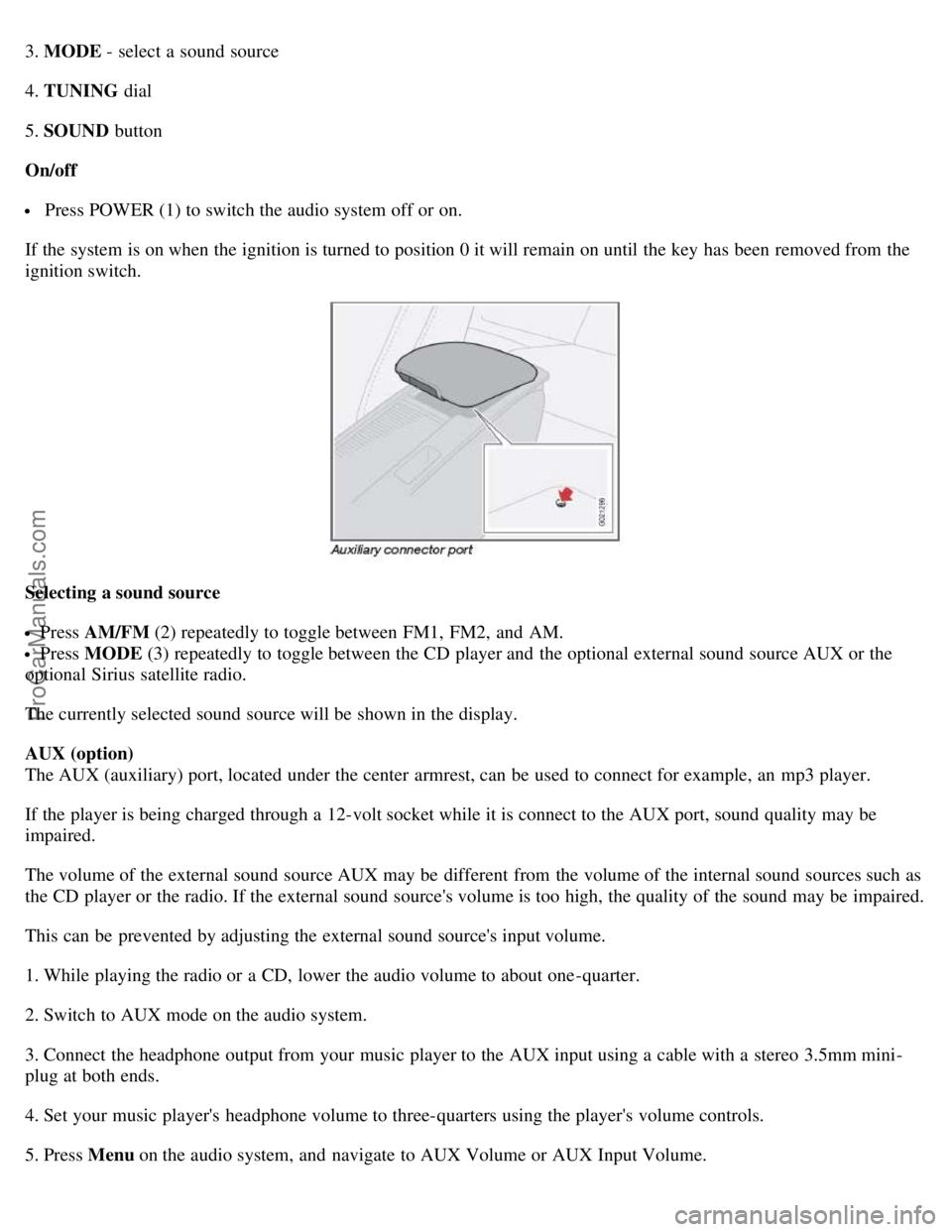
3. MODE - select a sound source
4. TUNING dial
5. SOUND button
On/off
Press POWER (1) to switch the audio system off or on.
If the system is on when the ignition is turned to position 0 it will remain on until the key has been removed from the
ignition switch.
Selecting a sound source
Press AM/FM (2) repeatedly to toggle between FM1, FM2, and AM.
Press MODE (3) repeatedly to toggle between the CD player and the optional external sound source AUX or the
optional Sirius satellite radio.
The currently selected sound source will be shown in the display.
AUX (option)
The AUX (auxiliary) port, located under the center armrest, can be used to connect for example, an mp3 player.
If the player is being charged through a 12-volt socket while it is connect to the AUX port, sound quality may be
impaired.
The volume of the external sound source AUX may be different from the volume of the internal sound sources such as
the CD player or the radio. If the external sound source's volume is too high, the quality of the sound may be impaired.
This can be prevented by adjusting the external sound source's input volume.
1. While playing the radio or a CD, lower the audio volume to about one -quarter.
2. Switch to AUX mode on the audio system.
3. Connect the headphone output from your music player to the AUX input using a cable with a stereo 3.5mm mini-
plug at both ends.
4. Set your music player's headphone volume to three-quarters using the player's volume controls.
5. Press Menu on the audio system, and navigate to AUX Volume or AUX Input Volume.
ProCarManuals.com
Page 211 of 246
6. Turn the volume knob to raise or lower the AUX Input Volume until you hear music at a comfortable level.
235 10 Audio
Audio functions
7. If there is distortion, lower your music player's headphone volume until the distortion goes away.
8. Finally, exit the menu and adjust the audio volume to a comfortable level.
Volume
Use the volume dial (1) or the buttons in the optional steering wheel keypad to adjust the volume level. The volume
level is also adjusted automatically according to the vehicle's speed, see page 239
for more information on this
function.
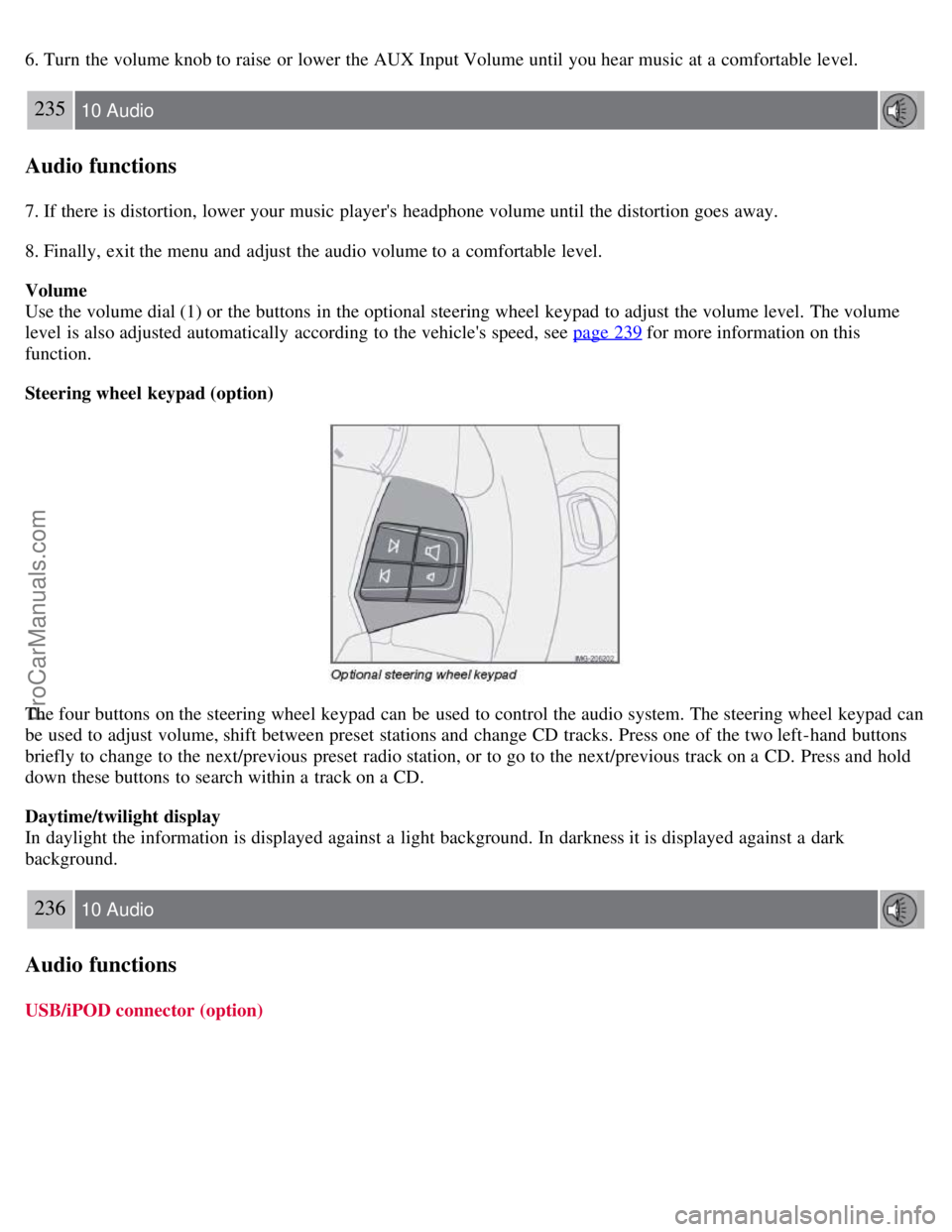
Steering wheel keypad (option)
The four buttons on the steering wheel keypad can be used to control the audio system. The steering wheel keypad can
be used to adjust volume, shift between preset stations and change CD tracks. Press one of the two left-hand buttons
briefly to change to the next/previous preset radio station, or to go to the next/previous track on a CD. Press and hold
down these buttons to search within a track on a CD.
Daytime/twilight display
In daylight the information is displayed against a light background. In darkness it is displayed against a dark
background.
236 10 Audio
Audio functions
USB/iPOD connector (option)
ProCarManuals.com
Page 212 of 246
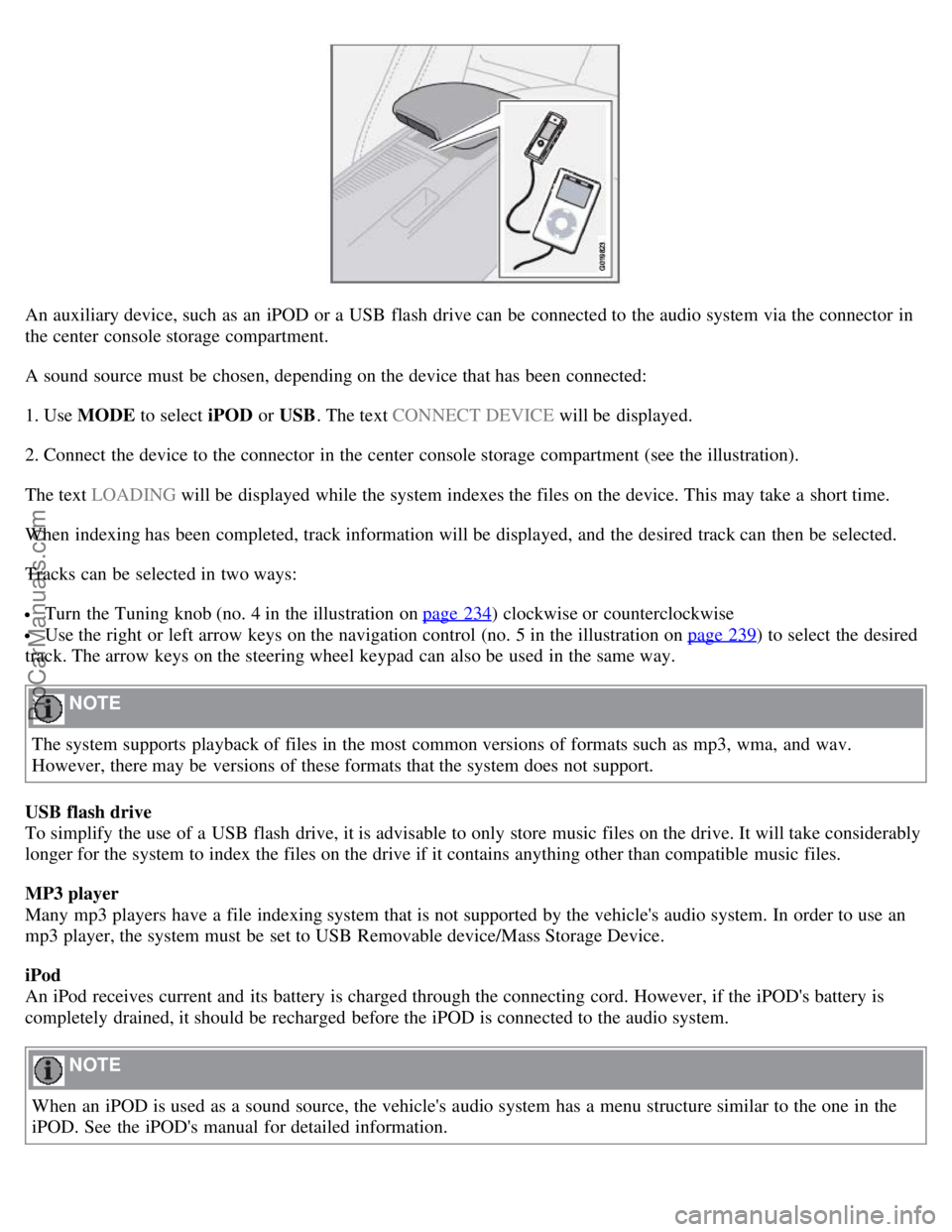
An auxiliary device, such as an iPOD or a USB flash drive can be connected to the audio system via the connector in
the center console storage compartment.
A sound source must be chosen, depending on the device that has been connected:
1. Use MODE to select iPOD or USB. The text CONNECT DEVICE will be displayed.
2. Connect the device to the connector in the center console storage compartment (see the illustration).
The text LOADING will be displayed while the system indexes the files on the device. This may take a short time.
When indexing has been completed, track information will be displayed, and the desired track can then be selected.
Tracks can be selected in two ways:
Turn the Tuning knob (no. 4 in the illustration on page 234) clockwise or counterclockwise
Use the right or left arrow keys on the navigation control (no. 5 in the illustration on page 239) to select the desired
track. The arrow keys on the steering wheel keypad can also be used in the same way.
NOTE
The system supports playback of files in the most common versions of formats such as mp3, wma, and wav.
However, there may be versions of these formats that the system does not support.
USB flash drive
To simplify the use of a USB flash drive, it is advisable to only store music files on the drive. It will take considerably
longer for the system to index the files on the drive if it contains anything other than compatible music files.
MP3 player
Many mp3 players have a file indexing system that is not supported by the vehicle's audio system. In order to use an
mp3 player, the system must be set to USB Removable device/Mass Storage Device.
iPod
An iPod receives current and its battery is charged through the connecting cord. However, if the iPOD's battery is
completely drained, it should be recharged before the iPOD is connected to the audio system.
NOTE
When an iPOD is used as a sound source, the vehicle's audio system has a menu structure similar to the one in the
iPOD. See the iPOD's manual for detailed information.
ProCarManuals.com
Page 213 of 246
For further information, refer to the accessory manual USB/iPOD Music Interface.
Sound settings
Optimal sound reproduction
The audio system is calibrated for optimal sound reproduction through the use of digital signal processing. This
calibration takes into account the speakers, amplifier, cabin
237 10 Audio
Audio functions
acoustics, the seating position of the listener, etc., for each combination of vehicle and audio system. There is also
dynamic calibration that takes into account the setting of the volume control, radio reception, and the vehicle's speed.
The sound settings described in this manual, such as BASS, TREBLE, and EQUALIZER are only intended to enable
the user to adapt sound reproduction to his/her personal preferences.
1. Press SOUND (5). Press this button repeatedly until you come to the setting that you wish to change.
2. Turn the TUNING dial (4) to make the desired setting.
The following settings can be made:
BASS - set the bass level
TREBLE - set the treble level
BALANCE - set the left/right sound balance
FADER - set the front/rear sound balance
SUBWOOFER (accessory) - set the level for the subwoofer (bass speaker)
CENTER - make settings for the center speaker
SURROUND1 - make settings for surround sound
Subwoofer (accessory)
To switch the subwoofer on or off:
1. Press MENU followed by ENTER .
2. Select AUDIO SETTINGS and press ENTER.
3. Select SUBWOOFER and press ENTER.
Surround sound
Surround sound settings are used to balance sound levels throughout the vehicle. Surround settings for the various
sound sources are made separately.
NOTE
Dolby Surround Pro Logic II is only available on the Premium Sound system.
ProCarManuals.com
Page 214 of 246

When listening to FM radio stations, Dolby Surround Pro Logic II functions best in areas with strong reception. If
reception is weak, selecting 2 or 3-channel stereo may provide better sound quality.
The Dolby symbol will be appear in the display when Dolby Pro Logic II is activated.
There are three alternative settings:
Pro Logic II
3-channel
Off (normal 2-channel stereo)
238 10 Audio
Audio functions
Activating/deactivating Surround sound
1. Press MENU followed by ENTER .
2. Select AUDIO SETTINGS in the menu and press ENTER .
3. Select Surround FM/AM/CD/AUX and press ENTER.
4. Select PRO LOGIC II , 3-channel stereo or OFF and press ENTER.
Equalizer Front/Rear
This function is used to fine-tune the sound level for different frequencies separately.
NOTE
This function is only available on certain sound systems.
To adjust the equalizer settings:
1. Press MENU followed by ENTER .
2. Select AUDIO SETTINGS in the menu and press ENTER .
3. Select EQUALIZER FRONT/REAR and press ENTER.
The column in the display indicates the sound level for the current frequency.
1. Adjust the level with the TUNING dial (4), or use the Up/Down arrows. Additional frequencies can be selected
with the Right/Left arrows.
2. Save the settings by pressing ENTER or exit without saving by pressing EXIT .
Automatic sound control
The audio system's volume is adjusted automatically according to the speed of the vehicle. There are three settings
available, which determine the level of volume compensation:
LOW
MEDIUM1
HIGH
ProCarManuals.com
Page 215 of 246

To set the automatic sound level:
1. Press MENU followed by ENTER .
2. Select AUDIO SETTINGS in the menu and press ENTER .
3. Select AUTO. VOLUME CONTROL in the menu and press ENTER.
4. Select LOW , MEDIUM, or HIGH and press ENTER .
1Default setting
239 10 Audio
Radio functions
Radio function controls
1. AM/FM1/FM2 selection
2. Station preset buttons
3. TUNING dial for selecting radio stations
4. SCAN
5. MENU NAVIGATION CONTROL -press the up or down arrow keys to scroll in a menu, or the keys on the
left/right sides of the control to search for or change radio stations/CD tracks
6. EXIT -press to cancel a menu selection or a selected function
7. AUTO -search for and store the strongest radio stations in the area in which you are driving
Searching for stations
There are two ways to manually tune a radio station:
1. Turn the TUNING dial (3) to the desired frequency.
2. Press the left or right arrow key on the MENU NAVIGATION CONTROL and hold it down. The radio scans
slowly in the selected direction and will increase the scanning speed after a few seconds. Release the button when the
ProCarManuals.com
Page 216 of 246

desired frequency appears in the display.
The frequency can be fine-tuned by short presses on the left/right arrow keys.
Storing preset stations
Manually storing a station
1. Tune to the desired station.
2. Press and hold the preset button under which the station is to be stored. The audio system sound will be interrupted
for a few seconds and STATION STORED will appear in the display.
NOTE
A total of 30 stations can be stored; 10 stations each in AM, FM1 and FM2.
Automatically storing a station
Pressing AUTO (7) automatically searches for and stores up to ten strong AM or FM stations in a separate memory. If
more than ten stations are found, the ten strongest ones are stored. This function is especially useful in areas in which
you are not familiar with radio stations or their frequencies.
To use the AUTO function:
1. Select a waveband using the AM/FM button (1).
2. Start the search by pressing AUTO until AUTO STORING appears in the display.
When the search is completed, AUTO STORING will no longer be displayed. If there are no stations with sufficient
signal strength, NO AST FOUND is displayed.
The auto-stored stations can be selected using the preset buttons (2).
Press EXIT (6) to terminate the automatic storing function.
When the radio is in auto-store mode, AUTO is shown in the display. AUTO disappears when you return to normal
radio mode, which can be done by briefly pressing AM/FM (1), EXIT (6), or AUTO (7).
240 10 Audio
Radio functions
To return to the Auto-store mode, press the AUTO button briefly and select a stored station by pressing one of the
preset buttons (2).
Saving auto-stored stations in the preset memory
An auto-stored station can be saved in the memory for manually preset stations.
1. Press AUTO (7) briefly.
2. Auto is displayed.
3. Press one of the preset buttons (2) under which the station is to be stored. Hold down the button until STATION
STORED is displayed.
ProCarManuals.com
Page 217 of 246

The radio will then exit auto-store mode and the stored station can be selected by pressing the preset button.
Scanning
SCAN (4) automatically searches through the selected waveband for strong AM or FM stations. When the radio finds a
station, that station will be played for approximately 8 seconds, after which scanning resumes.
Activating/deactivating SCAN
1. Select radio mode using the AM/FM button (2).
2. Press SCAN to activate the function. SCAN is shown in the display.
3. Press the SCAN or EXIT button to deactivate the scan function and listen to the selected station.
Storing a station found with SCAN
A station can be stored as a preset while the SCAN function is activated.
Press one of the preset buttons (2) under which the station is to be stored. Hold down the button until STATION
STORED is displayed.
The SCAN function will be deactivated and the station can be selected by pressing the preset button.
Radio text
Certain stations broadcast program information, which can be shown in the display.
To start this function:
1. Select FM1 or FM2 and press the MENU button.
2. Press ENTER .
3. Select RADIOTEXT in the menu and press ENTER .
To deactivate this function, select RADIOTEXT again and press ENTER.
241 10 Audio
Radio functions
Listening to satellite radio
The Sirius satellite system consists of a number of high elevation satellites in geosynchronous orbit.
NOTE
The digital signals from the Sirius satellites are line-of-sight, which means that physical obstructions such as
bridges, tunnels, etc, may temporarily interfere with signal reception.
Avoid any obstructions, such as metallic objects transported on roof racks or in a ski box, or other antennas that
may impede signals from the SIRIUS satellites.
Selecting Sirius radio mode
1. Press Power to switch on the audio system (see page 239
for information on the standard radio functions).
ProCarManuals.com