reset VOLVO C70 CONVERTIBLE 2007 Owner´s Manual
[x] Cancel search | Manufacturer: VOLVO, Model Year: 2007, Model line: C70 CONVERTIBLE, Model: VOLVO C70 CONVERTIBLE 2007Pages: 276, PDF Size: 9.81 MB
Page 236 of 276

2007 Volvo C70
The four buttons on the steering wheel keypad can be used to control the\
audio system. The steering
wheel keypad can be used to adjust volume, shift between preset stations\
and change CD tracks. Press one
of the two left-hand buttons briefly to change to the next/previous pres\
et radio station, or to go to the next/
previous track on a CD. Press and hold down these buttons to search with\
in a track on a CD.
Daytime/twilight display
In daylight the information is displayed against a light background. In \
darkness it is displayed against a
dark background.
Sound settings
1. Press SOUND (5). Press this button repeatedly until you come to the setting that y\
ou wish to change.
2. Turn the TUNING dial (4) to make the desired setting.
The following settings can be made:
BASS - set the bass level
TREBLE - set the treble level
BALANCE - set the left/right sound balance
FADER - set the front/rear sound balance
SUBWOOFER (accessory) - set the level for the subwoofer (bass speaker)
CENTER - make settings for the center speaker
file:///K|/delme/2007_C70/07c70_10.htm (4 of 23)12/22/2006 9:15:56 PM
Page 239 of 276
2007 Volvo C70
3. Select AUTO. VOLUME CONTROL in the menu and press ENTER.
4. Select LOW, MEDIUM, or HIGH and press ENTER.
1Default setting
221 10 Audio
Radio functions
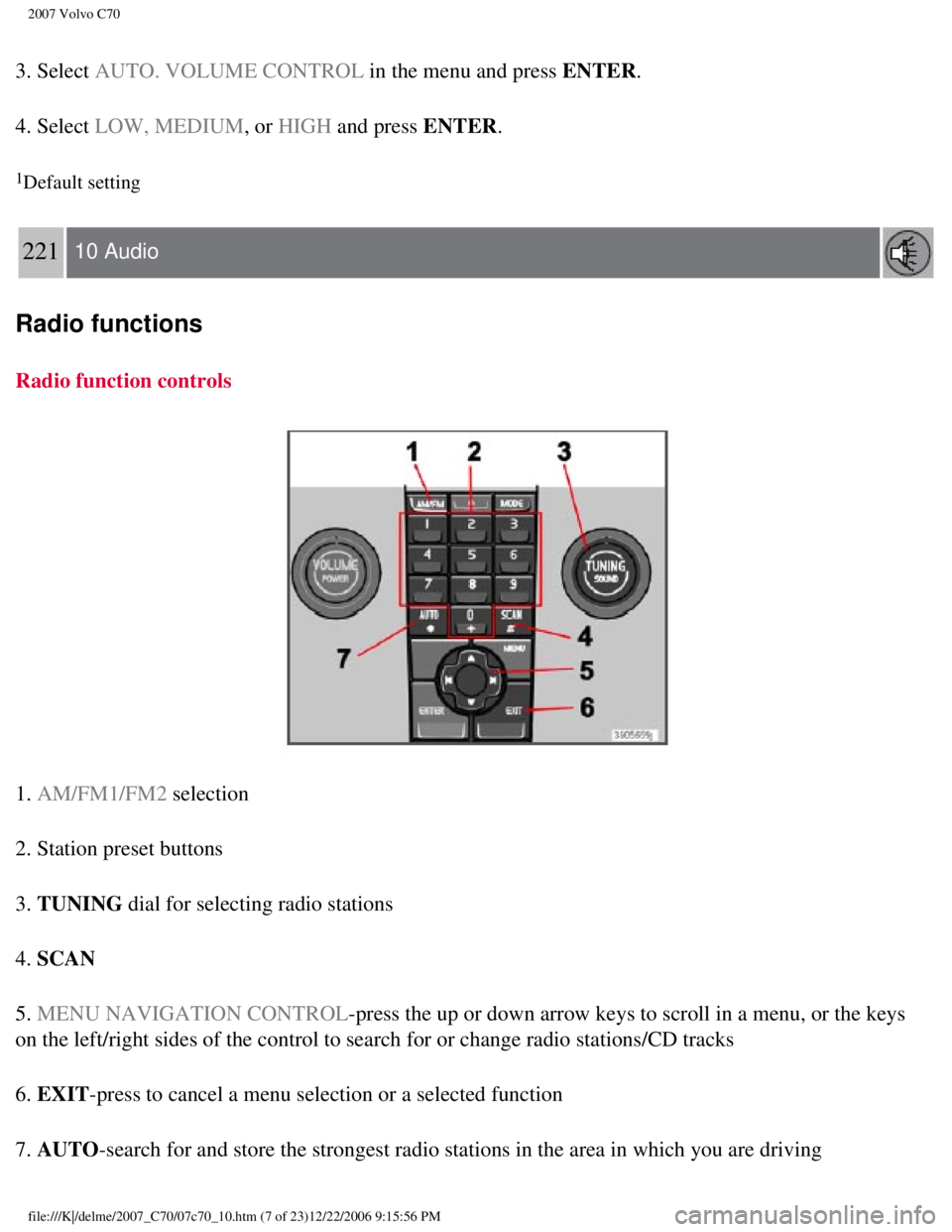
Radio function controls
1. AM/FM1/FM2 selection
2. Station preset buttons
3. TUNING dial for selecting radio stations
4. SCAN
5. MENU NAVIGATION CONTROL-press the up or down arrow keys to scroll in a menu, or the keys
on the left/right sides of the control to search for or change radio sta\
tions/CD tracks
6. EXIT-press to cancel a menu selection or a selected function
7. AUTO-search for and store the strongest radio stations in the area in which \
you are driving
file:///K|/delme/2007_C70/07c70_10.htm (7 of 23)12/22/2006 9:15:56 PM
Page 240 of 276

2007 Volvo C70
Searching for stations
There are two ways to manually tune a radio station:
1. Turn the TUNING dial (3) to the desired frequency.
2. Press the left or right arrow key on the MENU NAVIGATION CONTROL and hold it down. The radio
scans slowly in the selected direction and will increase the scanning sp\
eed after a few seconds. Release
the button when the desired frequency appears in the display.
The frequency can be fine-tuned by short presses on the left/right arrow\
keys.
Storing preset stations
Manually storing a station
1. Tune to the desired station.
2. Press and hold the preset button under which the station is to be sto\
red. The audio system sound will be
interrupted for a few seconds and STATION STORED will appear in the display.
NOTE
A total of 30 stations can be stored; 10 stations each in AM, FM1 and
FM2.
Automatically storing a station
Pressing AUTO (7) automatically searches for and stores up to ten strong AM or FM s\
tations in a
separate memory. If more than ten stations are found, the ten strongest \
ones are stored. This function is
especially useful in areas in which you are not familiar with radio stat\
ions or their frequencies.
To use the AUTO function:
1. Select a waveband using the AM/FM button (1).
2. Start the search by pressing AUTO until AUTO STORING appears in the display.
When the search is completed, AUTO STORING will no longer be displayed. If there are no stations with
sufficient signal strength, NO AST FOUND is displayed.
The auto-stored stations can be selected using the preset buttons (2).\
l Press EXIT (6) to terminate the automatic storing function.
file:///K|/delme/2007_C70/07c70_10.htm (8 of 23)12/22/2006 9:15:56 PM
Page 241 of 276
2007 Volvo C70
When the radio is in auto-store mode, AUTO is shown in the display. AUTO disappears when you return
to normal radio mode, which can be done by briefly pressing AM/FM (1), EXIT (6), or AUTO (7).
222 10 Audio
Radio functions
To return to the Auto-store mode, press the AUTO button briefly and select a stored station by pressing
one of the preset buttons (2).
Saving auto-stored stations in the preset memory
An auto-stored station can be saved in the memory for manually preset st\
ations.
1. Press AUTO (7) briefly.
2. Auto is displayed.
3. Press one of the preset buttons (2) under which the station is to b\
e stored. Hold down the button until
STATION STORED is displayed.
The radio will then exit auto-store mode and the stored station can be s\
elected by pressing the preset
button.
Scanning
SCAN (4) automatically searches through the selected waveband for strong A\
M or FM stations. When the
radio finds a station, that station will be played for approximately 8 s\
econds, after which scanning
resumes.
Activating/deactivating SCAN
1. Select radio mode using the AM/FM button (2).
2. Press SCAN to activate the function. SCAN is shown in the display.
3. Press the SCAN or EXIT button to deactivate the scan function and listen to the selected stati\
on.
Storing a station found with SCAN
A station can be stored as a preset while the SCAN function is activated\
.
l Press one of the preset buttons (2) under which the station is to be s\
tored. Hold down the button until
file:///K|/delme/2007_C70/07c70_10.htm (9 of 23)12/22/2006 9:15:56 PM
Page 242 of 276

2007 Volvo C70
STATION STORED is displayed.
The SCAN function will be deactivated and the station can be selected by\
pressing the preset button.
Radio text
Certain stations broadcast program information, which can be shown in th\
e display.
To start this function:
1. Select FM1 or FM2 and press the MENU button.
2. Press ENTER.
3. Select RADIOTEXT in the menu and press ENTER.
To deactivate this function, select RADIOTEXT again and press ENTER.
223 10 Audio
Radio functions
Listening to satellite radio
The Sirius satellite system consists of a number of high elevation satel\
lites in geosynchronous orbit.
NOTE
The digital signals from the Sirius satellites are line-of-sight, which \
means that physical obstructions
such as bridges, tunnels, etc, may temporarily interfere with signal rec\
eption.
Selecting Sirius radio mode
1. Press Power to switch on the audio system (see
page 221 for information on the standard radio
functions).
2. Press the MODE button repeatedly until Sirius 1 or 2 is displayed.
Activating Sirius radio
1. Tune to a satellite channel that has no audio, which means that the c\
hannel is unsubscribed and the text
"CALL 888- 539-SIRIUS TO SUBSCRIBE" is displayed (see also "Selecting a channel" in the right
file:///K|/delme/2007_C70/07c70_10.htm (10 of 23)12/22/2006 9:15:56 PM\
Page 244 of 276

2007 Volvo C70
Direct channel entry
The Sirius satellite channels are numbered consecutively throughout all \
of the categories. To access a
channel directly:
1. Press MENU and scroll to "Direct channel entry."
2. Use the numerical keypad to enter the channel's number.
224 10 Audio
Radio functions
3. Press ENTER. The radio will tune to this channel, even if it belongs to a category \
other than the
currently selected one.
NOTE
l The numbers of skipped or locked channels will not be displayed.
l If a channel is locked, the access code must be entered before the chann\
el can be selected. See
"Unlocking a channel" on
page 225.
Scanning
SCAN automatically searches through the list of satellite channels. See \
page 222 for more detailed
information.
Storing a channel
A total of 20 satellite channels can be stored; 10 stations each for Sir\
ius 1 and Sirius 2. See
page 221 for
detailed information on storing stations.
l A long press on one of the number keys stores the currently tuned channe\
l on that key.
l A short press on a number key while the radio is in Sirius 1or 2 mode wi\
ll tune to the preset satellite
channel stored on that button, regardless of the currently selected chan\
nel category.
Song Seek and Song Memory
The Song Seek and Song Memory functions provide both audio and visual no\
tification when Sirius is
broadcasting your favorite songs. Song Seek enables you to store the nam\
e of the song for future advance
notification when that song is being played. The Song Memory feature mak\
es it possible to view all of the
current songs that are stored in memory.
file:///K|/delme/2007_C70/07c70_10.htm (12 of 23)12/22/2006 9:15:56 PM\
Page 267 of 276

2007 Volvo C70
Child restraints 33-34
booster cushions
39
convertible seats
37-38
infant seats
35
ISOFIX lower anchors
40
Child safety
30-32
Climate system
air distribution
85
air vents
81
defroster
83
Electronic Climate Control
82-84
general information
80
recirculation
83
Clock, resetting
48
Cold weather driving
123
Collision mode (crash mode)
29
Color code, paint
182
Compass
69-70
Convertible seats
37-38
Convertible top
92-97
Coolant
193
Courtesy lighting
98
Crash mode
29
Cruise control
62, 63
Curb weight
161, 237
D
Defroster
83
Dimensions
236
Disabling the front passenger's airbag
21-23
Door mounted inflatable curtain
25
Door open warning
52
Driver distraction
8
file:///K|/delme/2007_C70/07c70_12.htm (3 of 12)12/22/2006 9:15:58 PM