ECU VOLVO S40 2009 Owner´s Manual
[x] Cancel search | Manufacturer: VOLVO, Model Year: 2009, Model line: S40, Model: VOLVO S40 2009Pages: 286, PDF Size: 7.08 MB
Page 44 of 286
01 SafetyISOFIX lower anchors
0144
WARNING
Be sure to fasten the attachment correctly
to the anchor (see the illustration). If the
attachment is not correctly fastened, the
child restraint may not be properly secured
in the event of a collision.
Page 45 of 286
01 Safety
Top tether anchors
0145 Top tether anchors
G029703
Top tether anchorage pointsVolvo vehicles are equipped with child restraint
top tether anchorages in the rear seating posi-
tions. They are located on the rear sides of the
backrests.Using the top tether anchorages1. Place the child restraint on the rear seat.
2. Release the backrest and tilt it forward to
access the anchorage. Attach the hook to
the anchorage. Return the seat back to the
upright position and make sure it locks in
place.
G026487
Route the strap under the head restraint
WARNING
Be sure to fasten the child tether attachment
correctly to the anchor. If it is not correctly
fastened, the child seat may not be properly
restrained in the event of a collision.3. Route the top tether strap under the head
restraint and fasten its attachment to the
anchorage.
4. Firmly tension the top tether strap accord-
ing to the child restraint manufacturer's
instructions. Tension the top tether strap
only after the lower anchor straps or the
seat belt have been firmly tensioned.See page 43 for information on securing the
child restraint to ISOFIX lower anchors.
WARNING
•
Never route a top tether strap over the
top or around the head restraint. It
should always be routed under the head
restraint.
•
Child restraint anchorages are designed
to withstand only those loads imposed
by correctly fitted child restraints. Under
no circumstances are they to be used
for adult seat belts or harnesses. The
anchorages are not able to withstand
excessive forces on them in the event of
collision if full harness seat belts or adult
seat belts are installed to them. An adult
who uses a belt anchored in a child
restraint anchorage runs a great risk of
suffering severe injuries should a colli-
sion occur.
•
Do not install rear speakers that require
the removal of the top tether anchors or
interfere with the proper use of the top
tether strap.
Page 86 of 286
02 Instruments and controlsHomeLink® Wireless Control System (option)
0286
Introduction
G030070
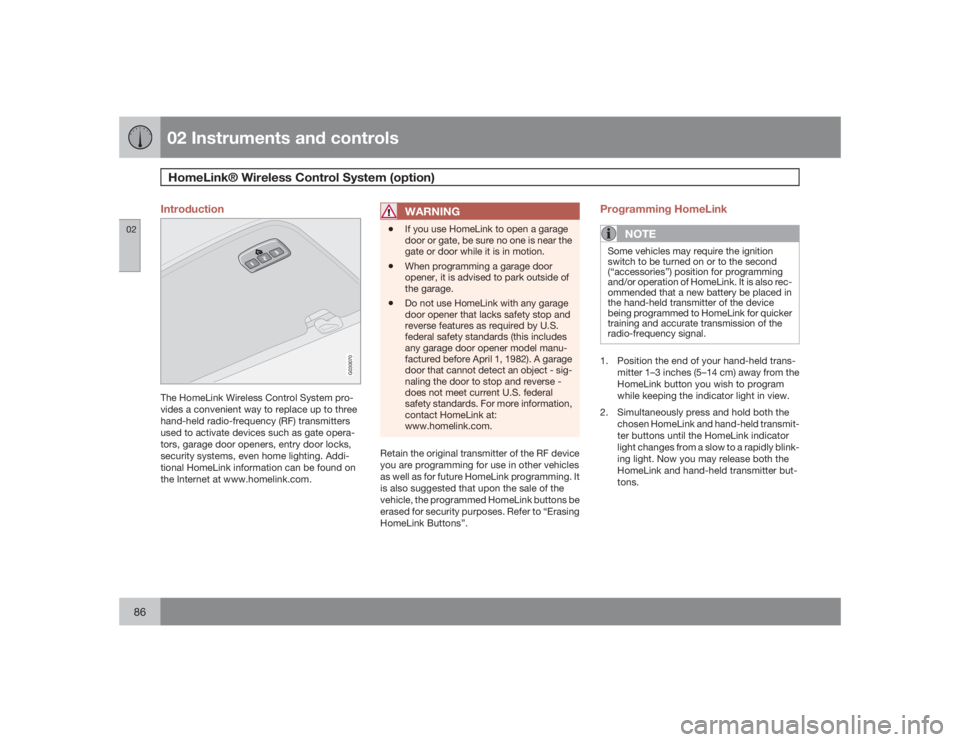
The HomeLink Wireless Control System pro-
vides a convenient way to replace up to three
hand-held radio-frequency (RF) transmitters
used to activate devices such as gate opera-
tors, garage door openers, entry door locks,
security systems, even home lighting. Addi-
tional HomeLink information can be found on
the Internet at www.homelink.com.
WARNING
•
If you use HomeLink to open a garage
door or gate, be sure no one is near the
gate or door while it is in motion.
•
When programming a garage door
opener, it is advised to park outside of
the garage.
•
Do not use HomeLink with any garage
door opener that lacks safety stop and
reverse features as required by U.S.
federal safety standards (this includes
any garage door opener model manu-
factured before April 1, 1982). A garage
door that cannot detect an object - sig-
naling the door to stop and reverse -
does not meet current U.S. federal
safety standards. For more information,
contact HomeLink at:
www.homelink.com.
Retain the original transmitter of the RF device
you are programming for use in other vehicles
as well as for future HomeLink programming. It
is also suggested that upon the sale of the
vehicle, the programmed HomeLink buttons be
erased for security purposes. Refer to “Erasing
HomeLink Buttons”.
Programming HomeLink
NOTE
Some vehicles may require the ignition
switch to be turned on or to the second
(“accessories”) position for programming
and/or operation of HomeLink. It is also rec-
ommended that a new battery be placed in
the hand-held transmitter of the device
being programmed to HomeLink for quicker
training and accurate transmission of the
radio-frequency signal.1. Position the end of your hand-held trans-
mitter 1–3 inches (5–14 cm) away from the
HomeLink button you wish to program
while keeping the indicator light in view.
2. Simultaneously press and hold both the
chosen HomeLink and hand-held transmit-
ter buttons until the HomeLink indicator
light changes from a slow to a rapidly blink-
ing light. Now you may release both the
HomeLink and hand-held transmitter but-
tons.
Page 87 of 286
02 Instruments and controls
HomeLink® Wireless Control System (option)
02``87
NOTE
Some devices may require you to replace
this Programming Step 2 with procedures
noted in the “Gate Operator / Canadian Pro-
gramming” section. If the HomeLink indica-
tor light does not change to a rapidly
blinking light after performing these steps,
contact HomeLink at www.homelink.com.3.
Firmlypress, hold for five seconds and
release the programmed HomeLink but-
ton up to two separate times to activate the
door. If the door does not activate, press
and hold the just-trained HomeLink button
and observe the indicator light.
•If the indicator light stays on con-
stantly, programming is complete
and your device should activate when
the HomeLink button is pressed and
released.•If the indicator light blinks rapidly for
two seconds and then turns to a con-
stant light continue with “Program-
ming” steps 4-6 to complete the pro-
gramming of a rolling code equipped
device (most commonly a garage door
opener).
4. At the garage door opener receiver (motor-
head unit) in the garage, locate the “learn”
or “smart” button. This can usually befound where the hanging antenna wire is
attached to the motor-head unit.
5. Firmly press and release the “learn” or
“smart” button. (The name and color of the
button may vary by manufacturer.) There
are 30 seconds to initiate step 6.
6. Return to the vehicle and firmly press, hold
for two seconds and release the pro-
grammed HomeLink button. Repeat the
“press/hold/release” sequence a second
time, and, depending on the brand of the
garage door opener (or other rolling code
equipped device), repeat this sequence a
third time to complete the programming
process.
HomeLink should now activate your rolling
code equipped device.
Gate Operator/Canadian ProgrammingCanadian radio-frequency laws require trans-
mitter signals to “time-out” (or quit) after sev-
eral seconds of transmission – which may not
be long enough for HomeLink to pick up the
signal during programming. Similar to this
Canadian law, some U.S. gate operators are
designed to “time-out” in the same manner.
If you live in Canada or you are having difficul-
ties programming a gate operator or garage
door opener by using the “Programming” pro-cedures,replace “Programming HomeLink”
step 2 with the following:
•
Continue to press and hold the HomeLink
button while you press and release -
every two seconds (“cycle”) your hand-
held transmitter until the HomeLink indica-
tor light changes from a slow to a rapidly
blinking light. Now you may release both
the HomeLink and hand-held transmitter
buttons.
Proceed with “Programming” step 3 to com-
plete.
Using HomeLinkTo operate, simply press and release the pro-
grammed HomeLink button. Activation will
now occur for the trained device (i.e., garage
door opener, gate operator, security system,
entry door lock, home/office lighting, etc.). For
convenience, the hand-held transmitter of the
device may also be used at any time. In the
event that there are still programming difficul-
ties or questions, contact HomeLink at:
www.homelink.com.
Page 105 of 286
04 Interior
Front seats
04``105
WARNING
Cover sharp edges on the load to help pre-
vent injury to occupants. Secure the load to
help prevent shifting during sudden stops.Power seats (option)The power driver's seat can be adjusted:•
If the ignition key is in position I or II.
•
During a 10 minute period after the doors
have been unlocked if the door remains
open.
•
If the door is closed and the ignition key is
not yet in the ignition, or if the key is in
position0, the seat can be adjusted or dur-
ing a period of 40 seconds. The power
passenger's seat can only be adjusted if
the ignition key is in position I or II, or if the
engine is running.
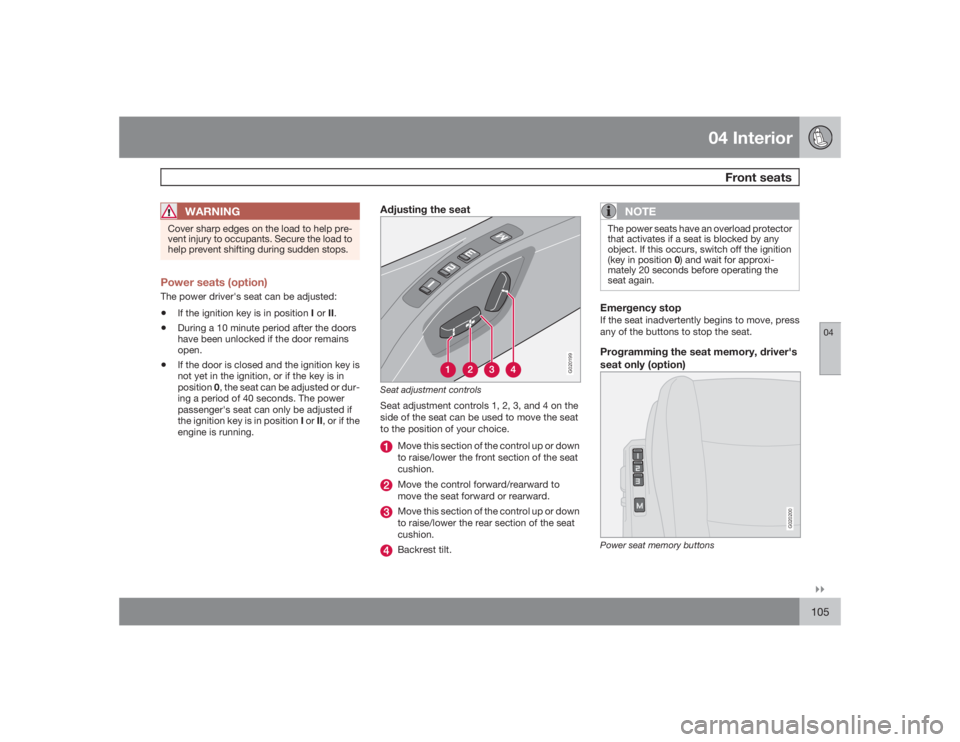
Adjusting the seat
G020199
Seat adjustment controlsSeat adjustment controls 1, 2, 3, and 4 on the
side of the seat can be used to move the seat
to the position of your choice.
Move this section of the control up or down
to raise/lower the front section of the seat
cushion.Move the control forward/rearward to
move the seat forward or rearward.Move this section of the control up or down
to raise/lower the rear section of the seat
cushion.Backrest tilt.
NOTE
The power seats have an overload protector
that activates if a seat is blocked by any
object. If this occurs, switch off the ignition
(key in position 0) and wait for approxi-
mately 20 seconds before operating the
seat again.Emergency stopIf the seat inadvertently begins to move, press
any of the buttons to stop the seat.Programming the seat memory, driver's
seat only (option)
G020200
Power seat memory buttons
Page 114 of 286
04 InteriorRear seat
04114
To fold down one or both sections:
1. Grasp the rear edge of the seat cushion
and pull it forward.
2. Pull the catch on the upper outboard edge
of the backrest upward and forward to
release the backrest lock. A red lock indi-
cator is visible when the backrest is not
locked in the upright position.
3. Fold the backrest down partially and
remove the outboard head restraints.
Press the center head restraint down com-
pletely or remove it.
4. Place the head restraints in the plastic
tubes, which are now accessible on the
under side of the seat cushions.
NOTE
When folding down the rear seat backrests,
remove the plug in the rear 12 volt socket to
help avoid marks in the upholstery.
WARNING
•
The red lock indicator is VISIBLE when
the backrest is NOT locked in position
and hidden when the backrest is cor-
rectly locked in place. When the back-
rest is in the upright position, it must
always be correctly locked in place.
•
When the rear seat is folded down, do
not place heavy objects against the
backs of the front seats. This places a
severe strain on the folded down back-
rest of the rear seat. Be sure to secure
cargo.
•
Cargo must not be stacked higher than
the top of seat backs. This will reduce
the possibility of luggage, etc. becom-
ing projectiles during sudden maneu-
vers, rapid braking or an accident.
Page 119 of 286
05 Locks and alarm
Remote control and key blade
05``119
NOTE
The car can also be locked if a door is open
(does not apply to vehicles with the optional
keyless drive).Unlock – Press the Unlock button on the
remote once to unlock the driver's door.
After a short pause, press the Unlock but-
ton a second time within 10 seconds to
unlock the other doors and the trunk. A
long press (at least several seconds) opens
all side windows.
NOTE
•
The turn signals flash to confirm that the
vehicle has been correctly locked/
unlocked with the remote control or the
optional keyless drive. When locking the
vehicle, the turn signals will flash a con-
firmation only if all the doors are
securely closed and locked. Flashing
confirmation for locking and unlocking
may be customized in the vehicle's Per-
sonal settings menu, see page 83 for
more information.
•
The two-step unlocking function can be
changed so that one press of the
Unlock button unlocks all of the doors
and the trunk. See Personal settings
page 83 for more information.
•
Automatic relocking: If the doors are
unlocked, the locks will automatically reen-
gage (re-lock) and the alarm will rearm after
2 minutes unless a door or the trunk has
been opened.
•
Automatic locking: When the car starts to
move, the doors and trunk can be locked
automatically. This feature can be turned
on or off, see Personal settings on page
83 for more information.
•
Airbag deployment will automatically
attempt to unlock the doors.
Approach lighting – As you approach the
car: Press the button on the remote control
to illuminate the area around the car in dark
conditions. Pressing the button once lights
up the interior lighting, parking lights, and
license plate lighting. These lights will
switch off automatically after 30, 60 or
90 seconds. See the Personal settings pa
ge 83 for information about adjusting the
time setting.Unlock trunk – Press the button once to
disarm the alarm system and unlock only
the trunk. After closing, the trunk will not
automatically relock. Press Lock to relock
it and rearm the alarm.NOTE
This function will unlock, but not pop open,
the trunk.Panic alarm – This button can be used to
attract attention during emergency situa-
tions. To activate the panic alarm, press
and hold the red button for at least 3 sec-
onds or press it twice within 3 seconds.
The turn signals and horn will be activated.
The panic alarm will stop automatically
after 30 seconds. To deactivate, wait
approximately 5 seconds and press the red
button again.
Page 145 of 286
06 Starting and driving
Starting the vehicle
06
145
WARNING
Volvo's floor mats are specially manufac-
tured for your car. They must be firmly
secured in the clips on the floor so that they
cannot slide and become trapped under the
pedals on the driver's side.•
Always place the gear selector in Park
(P) (manual transmission: first or reverse
gear) and apply the parking brake
before leaving the vehicle.and apply the
parking brake before leaving the vehi-
cle. Never leave the vehicle unattended
with the engine running.
•
Always open garage doors fully before
starting the engine inside a garage to
ensure adequate ventilation. The
exhaust gases contain carbon monox-
ide, which is invisible and odorless but
very poisonous.CAUTION
Automatic transmission: The engine
should be idling when you move the gear
selector. Never accelerate until after you
feel the transmission engage! Accelerating
immediately after selecting a gear will cause
harsh engagement and premature trans-
mission wear. Selecting P or N when idling
at a standstill for prolonged periods of time
will help prevent overheating of the auto-
matic transmission fluid.
Page 157 of 286
06 Starting and driving
Towing
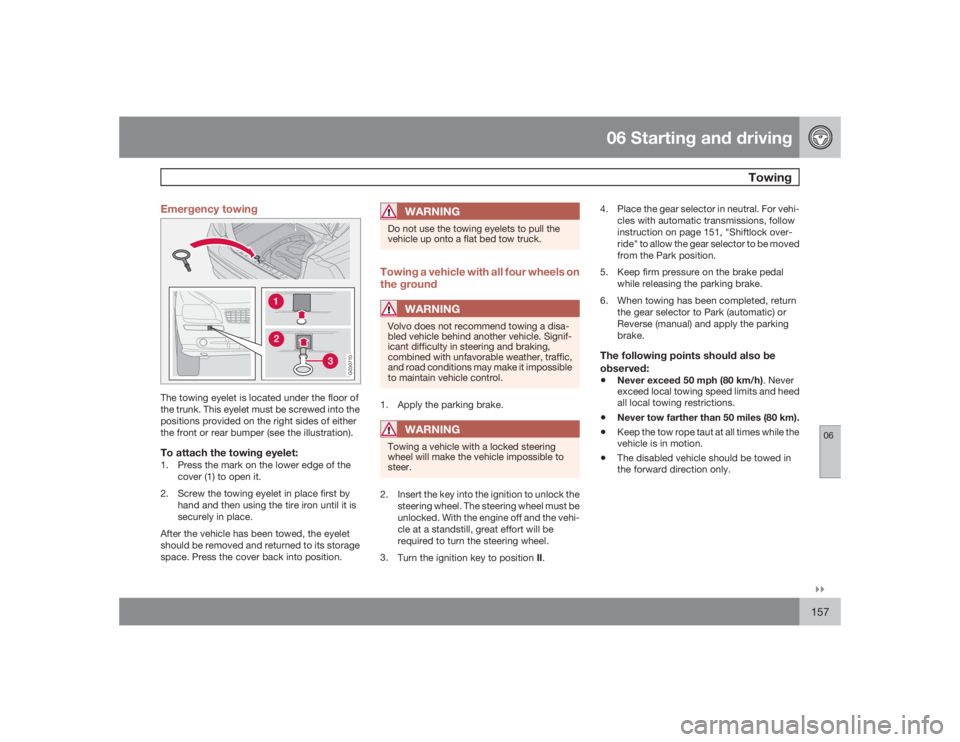
06``157 Emergency towing
G030710
The towing eyelet is located under the floor of
the trunk. This eyelet must be screwed into the
positions provided on the right sides of either
the front or rear bumper (see the illustration).To attach the towing eyelet:1. Press the mark on the lower edge of the
cover (1) to open it.
2. Screw the towing eyelet in place first by
hand and then using the tire iron until it is
securely in place.
After the vehicle has been towed, the eyelet
should be removed and returned to its storage
space. Press the cover back into position.
WARNING
Do not use the towing eyelets to pull the
vehicle up onto a flat bed tow truck.Towing a vehicle with all four wheels on
the ground
WARNING
Volvo does not recommend towing a disa-
bled vehicle behind another vehicle. Signif-
icant difficulty in steering and braking,
combined with unfavorable weather, traffic,
and road conditions may make it impossible
to maintain vehicle control.1. Apply the parking brake.
WARNING
Towing a vehicle with a locked steering
wheel will make the vehicle impossible to
steer.2. Insert the key into the ignition to unlock the
steering wheel. The steering wheel must be
unlocked. With the engine off and the vehi-
cle at a standstill, great effort will be
required to turn the steering wheel.
3.
Turn the ignition key to position II.4. Place the gear selector in neutral. For vehi-
cles with automatic transmissions, follow
instruction on page 151, "Shiftlock over-
ride" to allow the gear selector to be moved
from the Park position.
5. Keep firm pressure on the brake pedal
while releasing the parking brake.
6. When towing has been completed, return
the gear selector to Park (automatic) or
Reverse (manual) and apply the parking
brake.
The following points should also be
observed:•
Never exceed 50 mph (80 km/h). Never
exceed local towing speed limits and heed
all local towing restrictions.
•
Never tow farther than 50 miles (80 km).
•
Keep the tow rope taut at all times while the
vehicle is in motion.
•
The disabled vehicle should be towed in
the forward direction only.
Page 158 of 286
06 Starting and drivingTowing
06158
WARNING
•
Never allow a vehicle to be towed with-
out a driver behind the wheel of the
disabled vehicle.
•
Never remove the key from the ignition
while the vehicle is moving. The steering
wheel could lock, making it impossible
to steer the vehicle.
•
When the engine is not running, steering
resistance and the effort needed to
apply the brakes will be great.
•
Never attempt to tow a vehicle with a
dead battery at night.CAUTION
•
Check with state and local authorities
before attempting this type of towing,
as vehicles being towed are subject to
regulations regarding maximum towing
speed, length and type of towing
device, lighting, marker flags, etc.
•
Never attempt to push- or tow-start a
vehicle with a dead battery. This would
inject unburned fuel into the three-way
catalytic converter(s), causing over-
heating, backfiring, and damage, see
page 159 for instructions on jump star-
ting the vehicle.
Towing vehicles with front wheel driveVolvo recommends the use of flat bed equip-
ment for towing vehicles with front wheel drive.
If wheel lift equipment must be used, please
use extreme caution to help avoid damage to
the vehicle.
In this case, the vehicle should be towed with
the rear wheels on the ground if at all possible.
If it is absolutely necessary to tow the vehicle
with the front wheels on the ground, please
refer to the towing information on the previous
page.•
Sling-type equipment applied at the front
will damage radiator and air conditioning
lines.
•
It is equally important not to use sling-type
equipment at the rear or apply lifting equip-
ment inside the rear wheels; serious dam-
age to the rear axle may result.
•
If the vehicle is being towed on a flat bed
truck, the towing eyelets must not be used
to secure the vehicle on the flat bed. Con-
sult the tow truck operator.
WARNING
•
Remember that the power brakes and
power steering will not function when
engine is not running. The braking and
steering systems will function but the
brake pedal pressure required is
3 – 5 times above normal and greater
steering effort must be exerted.
•
The towing eyelets must not be used for
pulling the vehicle out of a ditch or for
any similar purpose involving severe
strain. Do not use the towing eyelets to
pull the vehicle up onto a flat bed tow
truck.