wheel VOLVO S60 2007 Repair Manual
[x] Cancel search | Manufacturer: VOLVO, Model Year: 2007, Model line: S60, Model: VOLVO S60 2007Pages: 200, PDF Size: 4.03 MB
Page 172 of 200
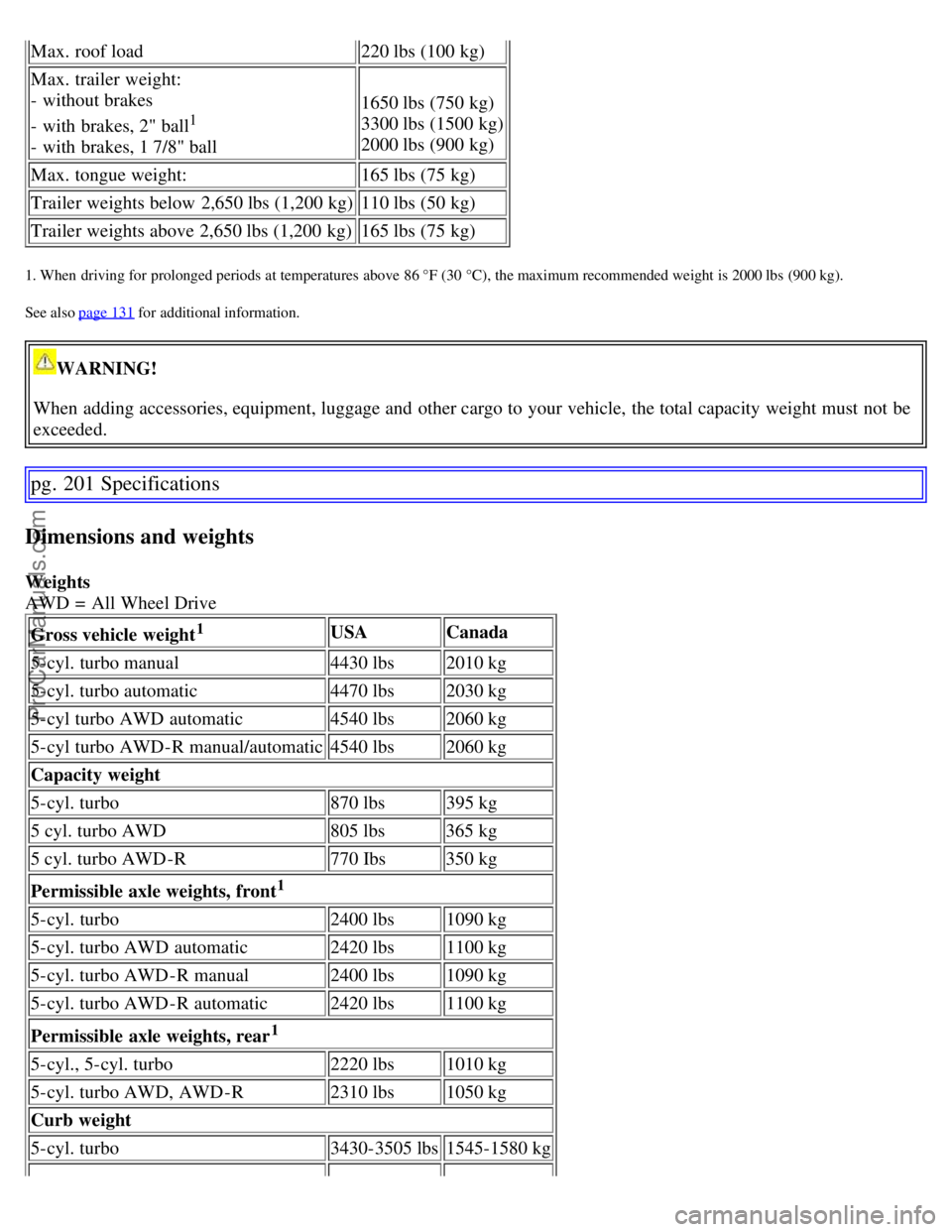
Max. roof load220 lbs (100 kg)
Max. trailer weight:
- without brakes
- with brakes, 2" ball
1
- with brakes, 1 7/8" ball1650 lbs (750 kg)
3300 lbs (1500 kg)
2000 lbs (900 kg)
Max. tongue weight: 165 lbs (75 kg)
Trailer weights below 2,650 lbs (1,200 kg) 110 lbs (50 kg)
Trailer weights above 2,650 lbs (1,200 kg) 165 lbs (75 kg)
1. When driving for prolonged periods at temperatures above 86 °F (30 °C), the maximum recommended weight is 2000 lbs (900 kg).
See also page 131
for additional information.
WARNING!
When adding accessories, equipment, luggage and other cargo to your vehicle, the total capacity weight must not be
exceeded.
pg. 201 Specifications
Dimensions and weights
Weights
AWD = All Wheel Drive Gross vehicle weight
1USA Canada
5-cyl. turbo manual 4430 lbs2010 kg
5-cyl. turbo automatic 4470 lbs2030 kg
5-cyl turbo AWD automatic 4540 lbs2060 kg
5-cyl turbo AWD-R manual/automatic 4540 lbs2060 kg
Capacity weight
5-cyl. turbo 870 lbs395 kg
5 cyl. turbo AWD 805 lbs365 kg
5 cyl. turbo AWD-R 770 Ibs350 kg
Permissible axle weights, front
1
5-cyl. turbo 2400 lbs1090 kg
5-cyl. turbo AWD automatic 2420 lbs1100 kg
5-cyl. turbo AWD-R manual 2400 lbs1090 kg
5-cyl. turbo AWD-R automatic 2420 lbs1100 kg
Permissible axle weights, rear
1
5-cyl., 5-cyl. turbo 2220 lbs1010 kg
5-cyl. turbo AWD, AWD-R 2310 lbs1050 kg
Curb weight
5-cyl. turbo 3430-3505 lbs1545-1580 kg
ProCarManuals.com
Page 175 of 200
Suspension
Rear suspension
Individual rear wheel suspension with longitudinal support arms, double link arms and track rods.
Front suspension
Spring strut suspension with integrated shock absorbers and control arms linked to the support frame. Power-assisted
rack and pinion steering. Safety type steering column.
pg. 207 Specifications
Electrical system
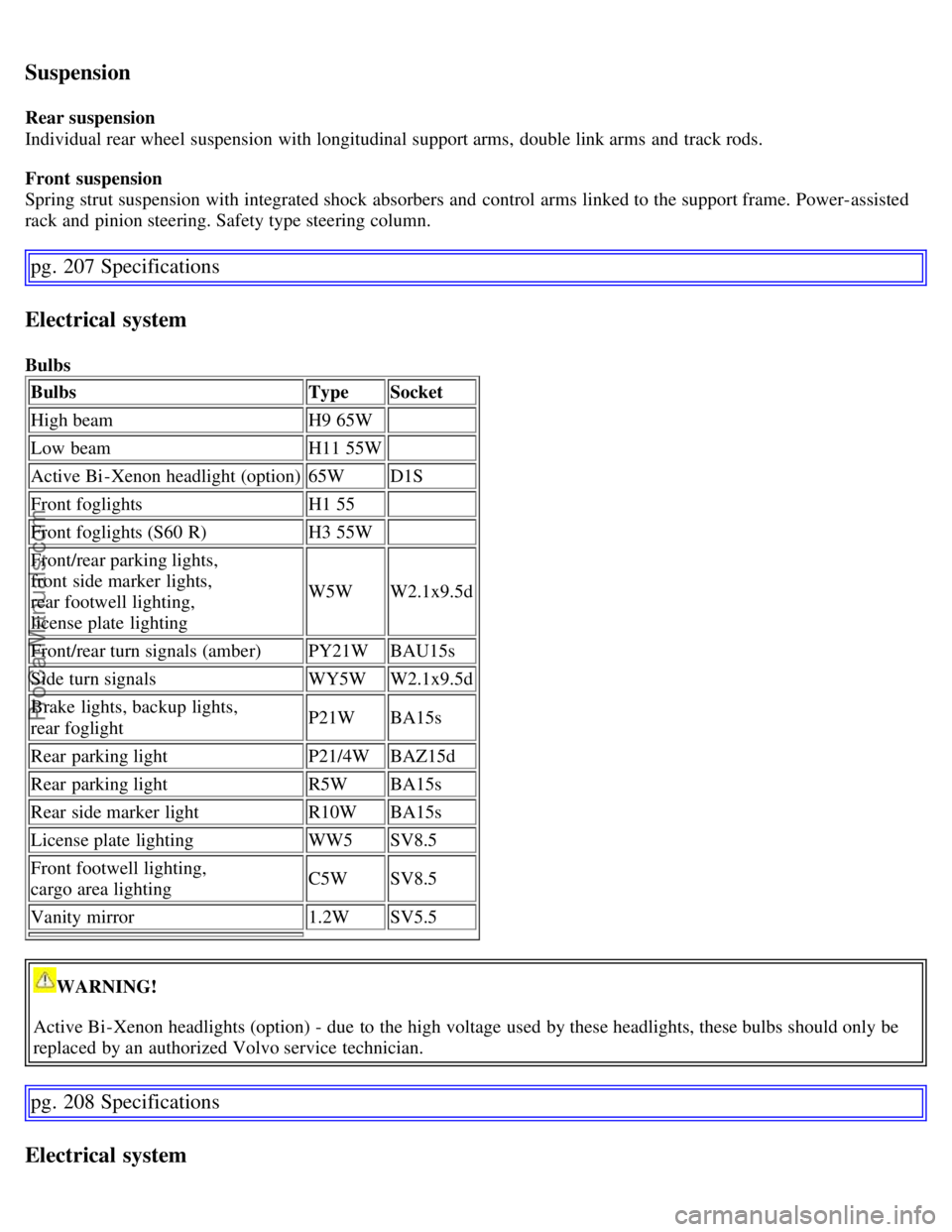
BulbsBulbs TypeSocket
High beam H9 65W
Low beam H11 55W
Active Bi -Xenon headlight (option) 65WD1S
Front foglights H1 55
Front foglights (S60 R) H3 55W
Front/rear parking lights,
front side marker lights,
rear footwell lighting,
license plate lighting W5W
W2.1x9.5d
Front/rear turn signals (amber) PY21WBAU15s
Side turn signals WY5WW2.1x9.5d
Brake lights, backup lights,
rear foglight P21W
BA15s
Rear parking light P21/4WBAZ15d
Rear parking light R5WBA15s
Rear side marker light R10WBA15s
License plate lighting WW5SV8.5
Front footwell lighting,
cargo area lighting C5W
SV8.5
Vanity mirror 1.2WSV5.5
WARNING!
Active Bi -Xenon headlights (option) - due to the high voltage used by these headlights, these bulbs should only be
replaced by an authorized Volvo service technician.
pg. 208 Specifications
Electrical system
ProCarManuals.com
Page 178 of 200
2 0 0 7
VOLVO S60
Audio
pg. 211 Audio
Introduction 212
Audio system HU -650 - overview213
Audio system HU -850 - overview214
Radio functions HU -650/HU-850215
RBDS functions HU -650/HU-850220
HU -650 - CD player223
HU -850 - internal CD changer224
External CD changer (option)225
Dolby Surround Pro Logic II - HU -850 only226
Audio systems - specifications228
HomeLink® Universal Transceiver (option)229
pg. 212 Specifications
Introduction
The audio system in your vehicle is operated with the buttons and knobs in the system's front panel. Certain functions,
such as adjusting the volume, changing radio stations or tracks on a CD, etc, can also be controlled with the optional
steering wheel-mounted keypad.
The audio system is available in two versions:
HU-650
Features: AM/FM radio, single-disc CD player, 4x25W output, four
1 speakers.
HU-850
Features: AM/FM radio, integrated 6-disc CD changer, 4x50W or 4x70W output plus 25W Dolby Pro Logic II, eleven
speakers.
A subwoofer mounted under the floor in the cargo area is available as an option. Consult your Volvo retailer.
Compact disc care
Keep the discs clean. Wipe them with a soft, clean, lint-free cloth, working from the center outwards. If necessary,
dampen the cloth with a neutral soap solution. Dry thoroughly before using.
Never use cleaning spray or antistatic liquid. Use only cleaners specifically made for CDs.
Use discs of the correct size only (3.5" discs should never be used).
The discs should conform to the norms EN60908 (IEC60908). CDR discs can cause listening problems due to the
quality of the disc or recording equipment used.
ProCarManuals.com
Page 181 of 200
Turn the knob clockwise to increase volume. Volume control is electronic and does not have an end stop. If you have
a key pad in the steering wheel, increase or decrease the volume with the + or - buttons.
Volume control - ALARM
If a CD is playing when the radio receives an alarm bulletin (available in certain areas only), the CD player enters
pause mode. The bulletin is broadcast at the volume selected for this type of message.
After the bulletin has been completed, the audio system reverts to the originally selected sound.
pg. 216 Specifications
Radio functions HU-650/HU-850
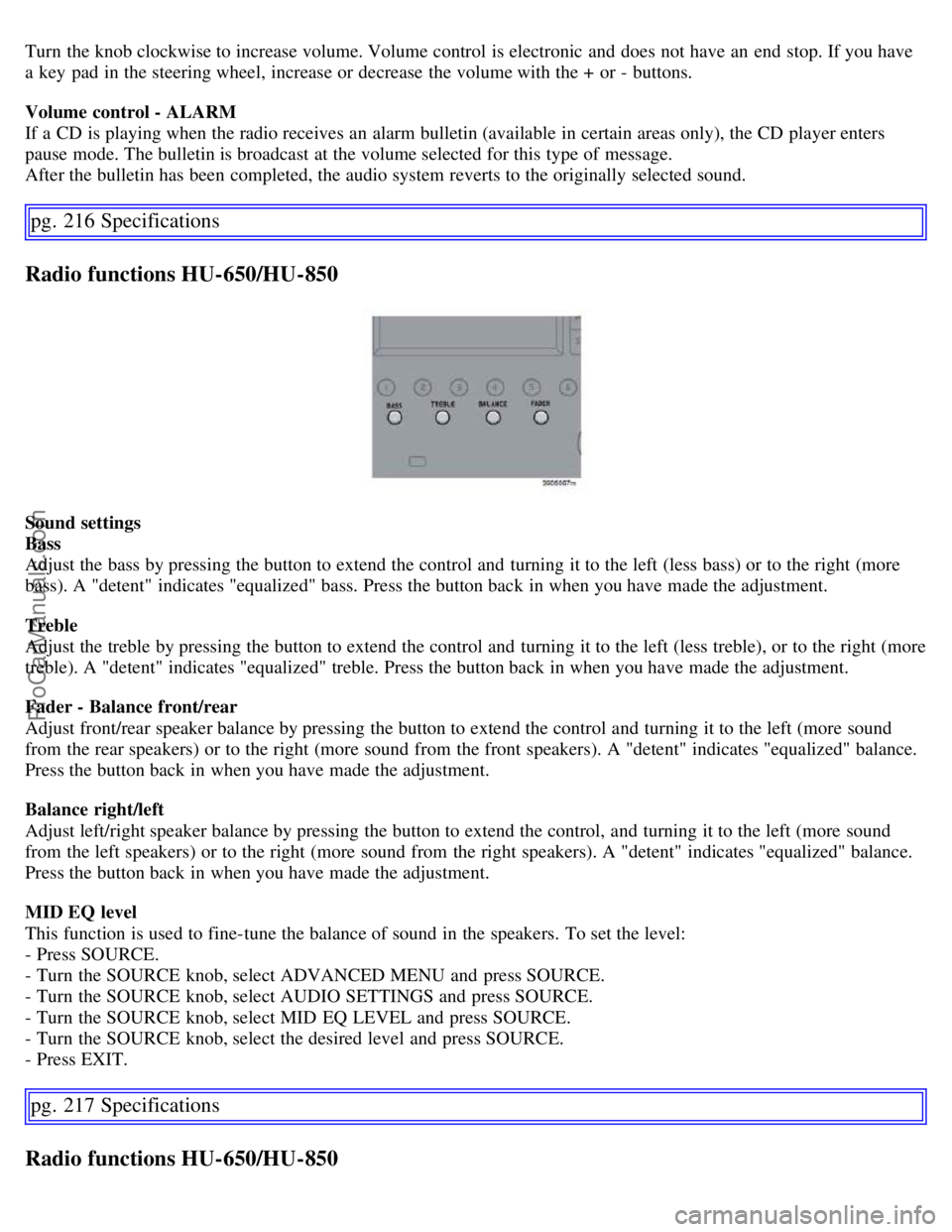
Sound settings
Bass
Adjust the bass by pressing the button to extend the control and turning it to the left (less bass) or to the right (more
bass). A "detent" indicates "equalized" bass. Press the button back in when you have made the adjustment.
Treble
Adjust the treble by pressing the button to extend the control and turning it to the left (less treble), or to the right (more
treble). A "detent" indicates "equalized" treble. Press the button back in when you have made the adjustment.
Fader - Balance front/rear
Adjust front/rear speaker balance by pressing the button to extend the control and turning it to the left (more sound
from the rear speakers) or to the right (more sound from the front speakers). A "detent" indicates "equalized" balance.
Press the button back in when you have made the adjustment.
Balance right/left
Adjust left/right speaker balance by pressing the button to extend the control, and turning it to the left (more sound
from the left speakers) or to the right (more sound from the right speakers). A "detent" indicates "equalized" balance.
Press the button back in when you have made the adjustment.
MID EQ level
This function is used to fine-tune the balance of sound in the speakers. To set the level:
- Press SOURCE.
- Turn the SOURCE knob, select ADVANCED MENU and press SOURCE.
- Turn the SOURCE knob, select AUDIO SETTINGS and press SOURCE.
- Turn the SOURCE knob, select MID EQ LEVEL and press SOURCE.
- Turn the SOURCE knob, select the desired level and press SOURCE.
- Press EXIT.
pg. 217 Specifications
Radio functions HU-650/HU-850
ProCarManuals.com
Page 183 of 200
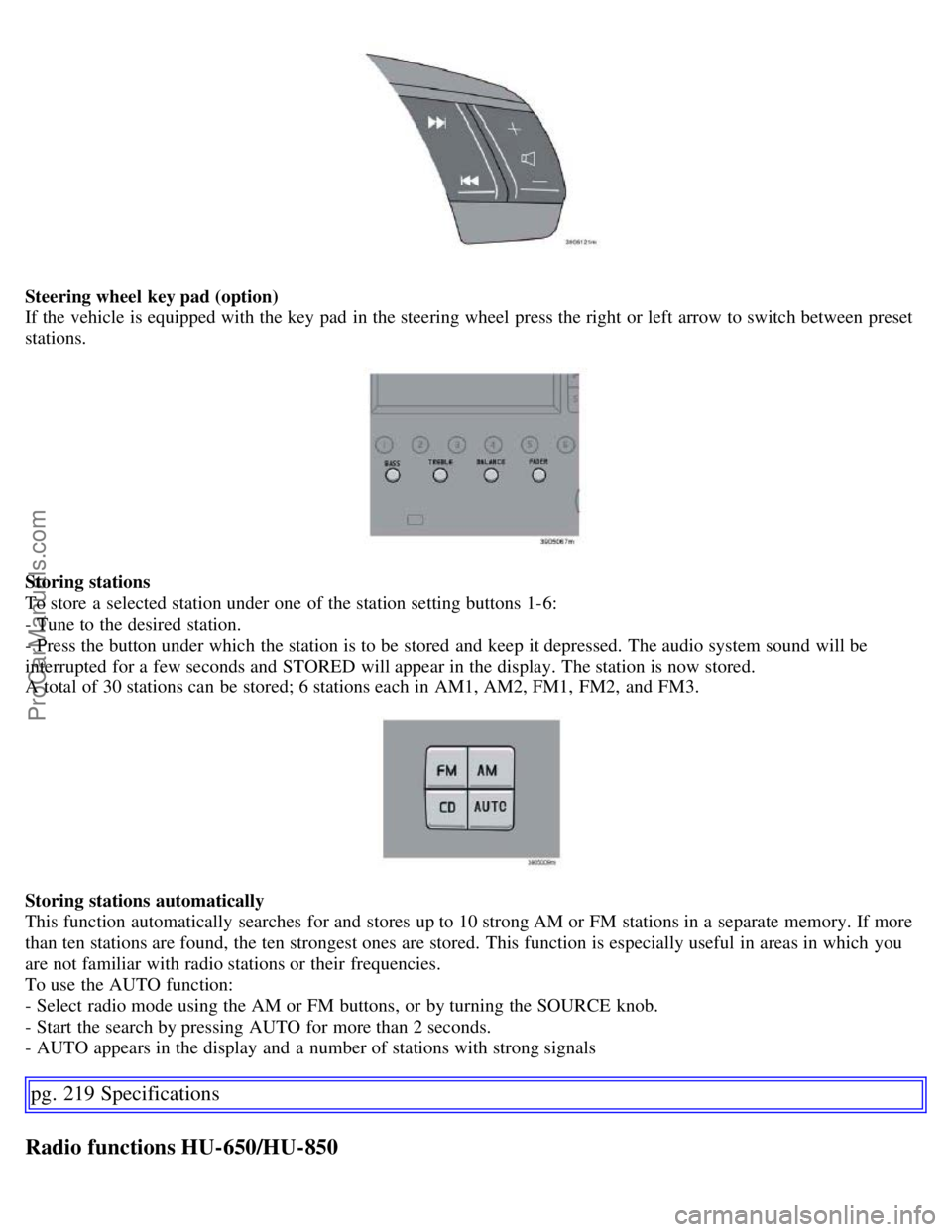
Steering wheel key pad (option)
If the vehicle is equipped with the key pad in the steering wheel press the right or left arrow to switch between preset
stations.
Storing stations
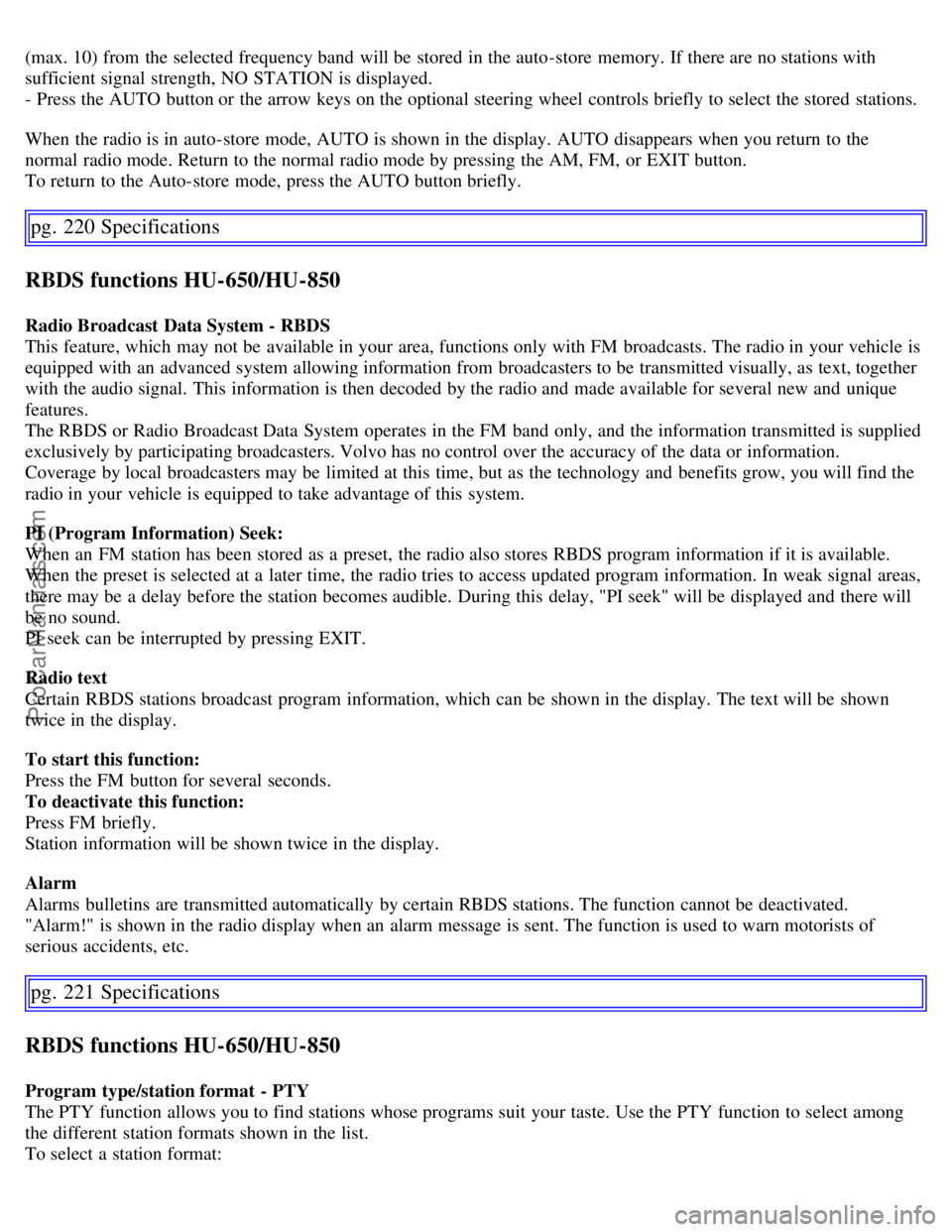
To store a selected station under one of the station setting buttons 1-6:
- Tune to the desired station.
- Press the button under which the station is to be stored and keep it depressed. The audio system sound will be
interrupted for a few seconds and STORED will appear in the display. The station is now stored.
A total of 30 stations can be stored; 6 stations each in AM1, AM2, FM1, FM2, and FM3.
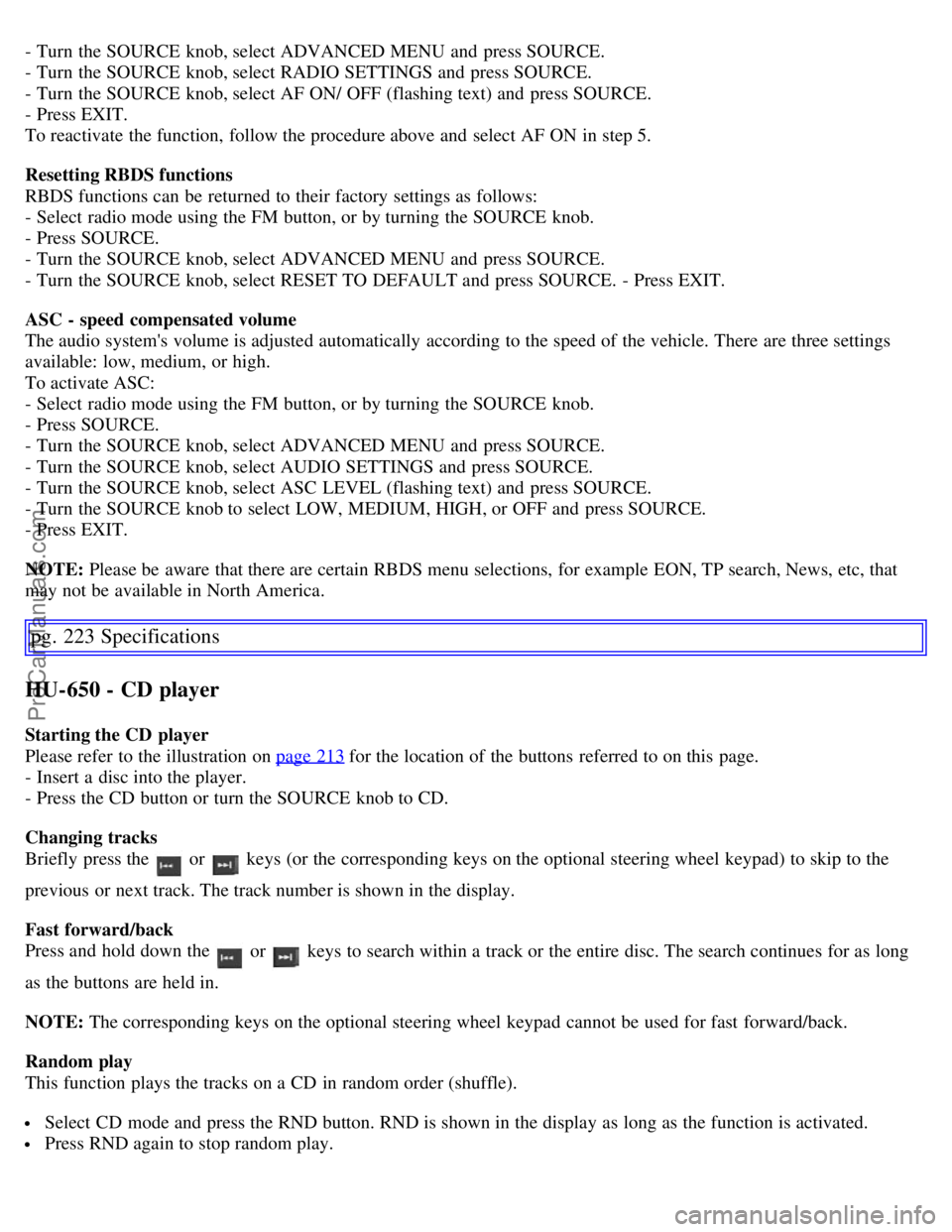
Storing stations automatically
This function automatically searches for and stores up to 10 strong AM or FM stations in a separate memory. If more
than ten stations are found, the ten strongest ones are stored. This function is especially useful in areas in which you
are not familiar with radio stations or their frequencies.
To use the AUTO function:
- Select radio mode using the AM or FM buttons, or by turning the SOURCE knob.
- Start the search by pressing AUTO for more than 2 seconds.
- AUTO appears in the display and a number of stations with strong signals
pg. 219 Specifications
Radio functions HU-650/HU-850
ProCarManuals.com
Page 184 of 200
(max. 10) from the selected frequency band will be stored in the auto-store memory. If there are no stations with
sufficient signal strength, NO STATION is displayed.
- Press the AUTO button or the arrow keys on the optional steering wheel controls briefly to select the stored stations.
When the radio is in auto-store mode, AUTO is shown in the display. AUTO disappears when you return to the
normal radio mode. Return to the normal radio mode by pressing the AM, FM, or EXIT button.
To return to the Auto-store mode, press the AUTO button briefly.
pg. 220 Specifications
RBDS functions HU-650/HU-850
Radio Broadcast Data System - RBDS
This feature, which may not be available in your area, functions only with FM broadcasts. The radio in your vehicle is
equipped with an advanced system allowing information from broadcasters to be transmitted visually, as text, together
with the audio signal. This information is then decoded by the radio and made available for several new and unique
features.
The RBDS or Radio Broadcast Data System operates in the FM band only, and the information transmitted is supplied
exclusively by participating broadcasters. Volvo has no control over the accuracy of the data or information.
Coverage by local broadcasters may be limited at this time, but as the technology and benefits grow, you will find the
radio in your vehicle is equipped to take advantage of this system.
PI (Program Information) Seek:
When an FM station has been stored as a preset, the radio also stores RBDS program information if it is available.
When the preset is selected at a later time, the radio tries to access updated program information. In weak signal areas,
there may be a delay before the station becomes audible. During this delay, "PI seek" will be displayed and there will
be no sound.
PI seek can be interrupted by pressing EXIT.
Radio text
Certain RBDS stations broadcast program information, which can be shown in the display. The text will be shown
twice in the display.
To start this function:
Press the FM button for several seconds.
To deactivate this function:
Press FM briefly.
Station information will be shown twice in the display.
Alarm
Alarms bulletins are transmitted automatically by certain RBDS stations. The function cannot be deactivated.
"Alarm!" is shown in the radio display when an alarm message is sent. The function is used to warn motorists of
serious accidents, etc.
pg. 221 Specifications
RBDS functions HU-650/HU-850
Program type/station format - PTY
The PTY function allows you to find stations whose programs suit your taste. Use the PTY function to select among
the different station formats shown in the list.
To select a station format:
ProCarManuals.com
Page 186 of 200
- Turn the SOURCE knob, select ADVANCED MENU and press SOURCE.
- Turn the SOURCE knob, select RADIO SETTINGS and press SOURCE.
- Turn the SOURCE knob, select AF ON/ OFF (flashing text) and press SOURCE.
- Press EXIT.
To reactivate the function, follow the procedure above and select AF ON in step 5.
Resetting RBDS functions
RBDS functions can be returned to their factory settings as follows:
- Select radio mode using the FM button, or by turning the SOURCE knob.
- Press SOURCE.
- Turn the SOURCE knob, select ADVANCED MENU and press SOURCE.
- Turn the SOURCE knob, select RESET TO DEFAULT and press SOURCE. - Press EXIT.
ASC - speed compensated volume
The audio system's volume is adjusted automatically according to the speed of the vehicle. There are three settings
available: low, medium, or high.
To activate ASC:
- Select radio mode using the FM button, or by turning the SOURCE knob.
- Press SOURCE.
- Turn the SOURCE knob, select ADVANCED MENU and press SOURCE.
- Turn the SOURCE knob, select AUDIO SETTINGS and press SOURCE.
- Turn the SOURCE knob, select ASC LEVEL (flashing text) and press SOURCE.
- Turn the SOURCE knob to select LOW, MEDIUM, HIGH, or OFF and press SOURCE.
- Press EXIT.
NOTE: Please be aware that there are certain RBDS menu selections, for example EON, TP search, News, etc, that
may not be available in North America.
pg. 223 Specifications
HU-650 - CD player
Starting the CD player
Please refer to the illustration on page 213
for the location of the buttons referred to on this page.
- Insert a disc into the player.
- Press the CD button or turn the SOURCE knob to CD.
Changing tracks
Briefly press the
or keys (or the corresponding keys on the optional steering wheel keypad) to skip to the
previous or next track. The track number is shown in the display.
Fast forward/back
Press and hold down the
or keys to search within a track or the entire disc. The search continues for as long
as the buttons are held in.
NOTE: The corresponding keys on the optional steering wheel keypad cannot be used for fast forward/back.
Random play
This function plays the tracks on a CD in random order (shuffle).
Select CD mode and press the RND button. RND is shown in the display as long as the function is activated.
Press RND again to stop random play.
ProCarManuals.com
Page 187 of 200
Scan
This function plays the first 10 seconds of each track on the CD.
Press SCAN to start the function.
Press SCAN again or EXIT to stop the scan function and listen to an entire track.
CD eject
Press the button (no. 11 in the illustration on page 213
) to eject the disc.
NOTE:
For reasons of traffic safety, the ejected CD must be removed within 12 seconds or it will be automatically drawn
back into the slot and the CD player will resume playing the most recently selected track.
See page 212 for information on caring for compact discs.
pg. 224 Specifications
HU-850 - internal CD changer
Starting the CD changer
The HU -850 is equipped with an internal, 6- disc CD changer.
Please refer to the illustration on page 214
for the location of the buttons referred to on this page.
To load discs into the changer:
- Press the CD button or turn the SOURCE knob to CD.
- Select an empty position by pressing one of the preset buttons. The display shows which positions are empty. LOAD
DISC must be displayed before a disc is inserted into the player.
- Insert a disc.
If there are discs in the player when CD mode is selected, the changer will resume playing the disc and track that were
most recently played.
Selecting a disc position (number)
Use the station setting buttons 1-6 to select the disc to be played. The number of the disc and the track being played
are shown in the display.
Changing tracks
Briefly press the for compact discs.
or keys (or the corresponding keys on the optional steering wheel
keypad) to skip to the previous or next track. The track number is shown in the display.
Fast forward/back
Press and hold down the
or keys to search within a track or the entire disc. The search continues for as long
as the buttons are held in.
The corresponding keys on the optional steering wheel keypad cannot be used for fast forward/back.
Random play
This function plays the tracks on a CD in random order (shuffle).
Select CD mode and press the RND button. RND is shown in the display as long as the function is activated.
Random tracks from randomly selected discs will be played.
Press RND again to stop random play.
Scan
This function plays the first 10 seconds of each track on the CD.
ProCarManuals.com
Page 188 of 200
Press SCAN to start the function.
Press SCAN again or EXIT to stop the scan function and listen to an entire track. Scan only works on the selected
disc.
CD eject
This function makes it possible to eject a single disc, or to eject all of the discs in the changer.
Press the eject button briefly to eject the disc that is currently playing.
A longer press (more than two seconds) starts the process of ejecting all of the discs in the changer.
NOTE:
The EJECT ALL function can only be used while the vehicle is at a standstill and will be cancelled if the vehicle
begins to move.
For reasons of traffic safety, you have 12 seconds in which to remove the ejected disc. After that, the disc
automatically reinserts into the player, and the CD player will resume playing the most recently selected track.
See page 212 for information on caring for compact discs.
pg. 225 Specifications
External CD changer (option)
External CD changer
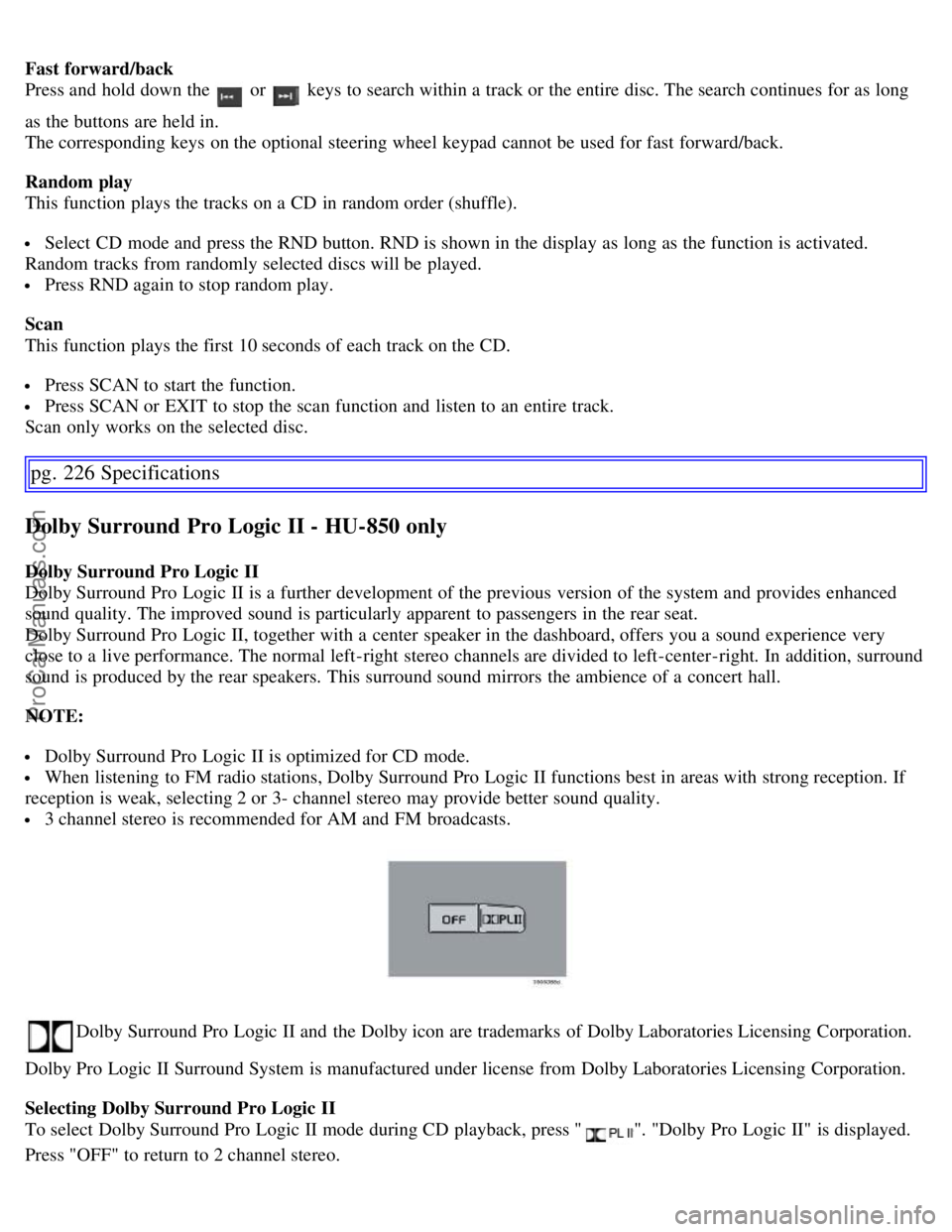
The optional 10-CD changer is mounted in the cargo compartment.
Please refer to the illustration on pages 214
and 218 for the location of the buttons referred to on this page.
Turn the SOURCE knob to select the external CD changer.
To load discs into the changer:
- Slide the cover on the CD change open.
- Press the eject button on the CD changer.
- Pull the magazine out of the changer and insert the disc(s).
- Press the magazine back into the changer and slide the cover back into place.
If there are discs in the player when CD mode is selected, the changer will resume playing the disc and track that were
most recently played.
Selecting a disc position (number)
Use the station setting buttons 1-6 to select the disc to be played. Continue to press button 6 to select discs 7-10.
The number of the disc and the track being played are shown in the display.
Changing tracks
Briefly press the
or keys (or the corresponding keys on the optional steering wheel keypad) to skip to the
previous or next track. The track number is shown in the display.
ProCarManuals.com
Page 189 of 200
Fast forward/back
Press and hold down the
or keys to search within a track or the entire disc. The search continues for as long
as the buttons are held in.
The corresponding keys on the optional steering wheel keypad cannot be used for fast forward/back.
Random play
This function plays the tracks on a CD in random order (shuffle).
Select CD mode and press the RND button. RND is shown in the display as long as the function is activated.
Random tracks from randomly selected discs will be played.
Press RND again to stop random play.
Scan
This function plays the first 10 seconds of each track on the CD.
Press SCAN to start the function.
Press SCAN or EXIT to stop the scan function and listen to an entire track.
Scan only works on the selected disc.
pg. 226 Specifications
Dolby Surround Pro Logic II - HU-850 only
Dolby Surround Pro Logic II
Dolby Surround Pro Logic II is a further development of the previous version of the system and provides enhanced
sound quality. The improved sound is particularly apparent to passengers in the rear seat.
Dolby Surround Pro Logic II, together with a center speaker in the dashboard, offers you a sound experience very
close to a live performance. The normal left-right stereo channels are divided to left-center -right. In addition, surround
sound is produced by the rear speakers. This surround sound mirrors the ambience of a concert hall.
NOTE:
Dolby Surround Pro Logic II is optimized for CD mode.
When listening to FM radio stations, Dolby Surround Pro Logic II functions best in areas with strong reception. If
reception is weak, selecting 2 or 3- channel stereo may provide better sound quality.
3 channel stereo is recommended for AM and FM broadcasts.
Dolby Surround Pro Logic II and the Dolby icon are trademarks of Dolby Laboratories Licensing Corporation.
Dolby Pro Logic II Surround System is manufactured under license from Dolby Laboratories Licensing Corporation.
Selecting Dolby Surround Pro Logic II
To select Dolby Surround Pro Logic II mode during CD playback, press "
". "Dolby Pro Logic II" is displayed.
Press "OFF" to return to 2 channel stereo.
ProCarManuals.com