steering wheel VOLVO S60 2008 User Guide
[x] Cancel search | Manufacturer: VOLVO, Model Year: 2008, Model line: S60, Model: VOLVO S60 2008Pages: 230, PDF Size: 5.33 MB
Page 56 of 230
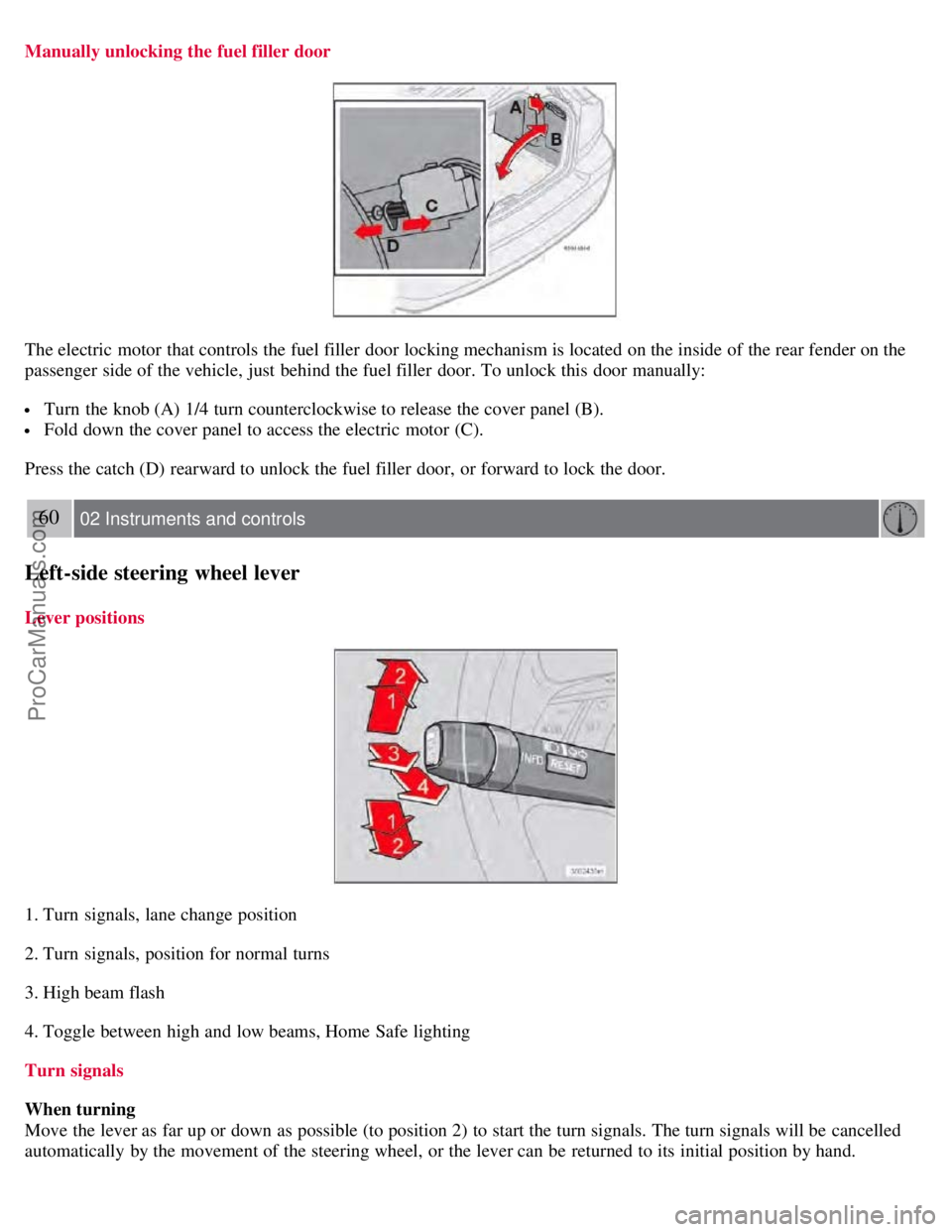
Manually unlocking the fuel filler door
The electric motor that controls the fuel filler door locking mechanism is located on the inside of the rear fender on the
passenger side of the vehicle, just behind the fuel filler door. To unlock this door manually:
Turn the knob (A) 1/4 turn counterclockwise to release the cover panel (B).
Fold down the cover panel to access the electric motor (C).
Press the catch (D) rearward to unlock the fuel filler door, or forward to lock the door.
60 02 Instruments and controls
Left-side steering wheel lever
Lever positions
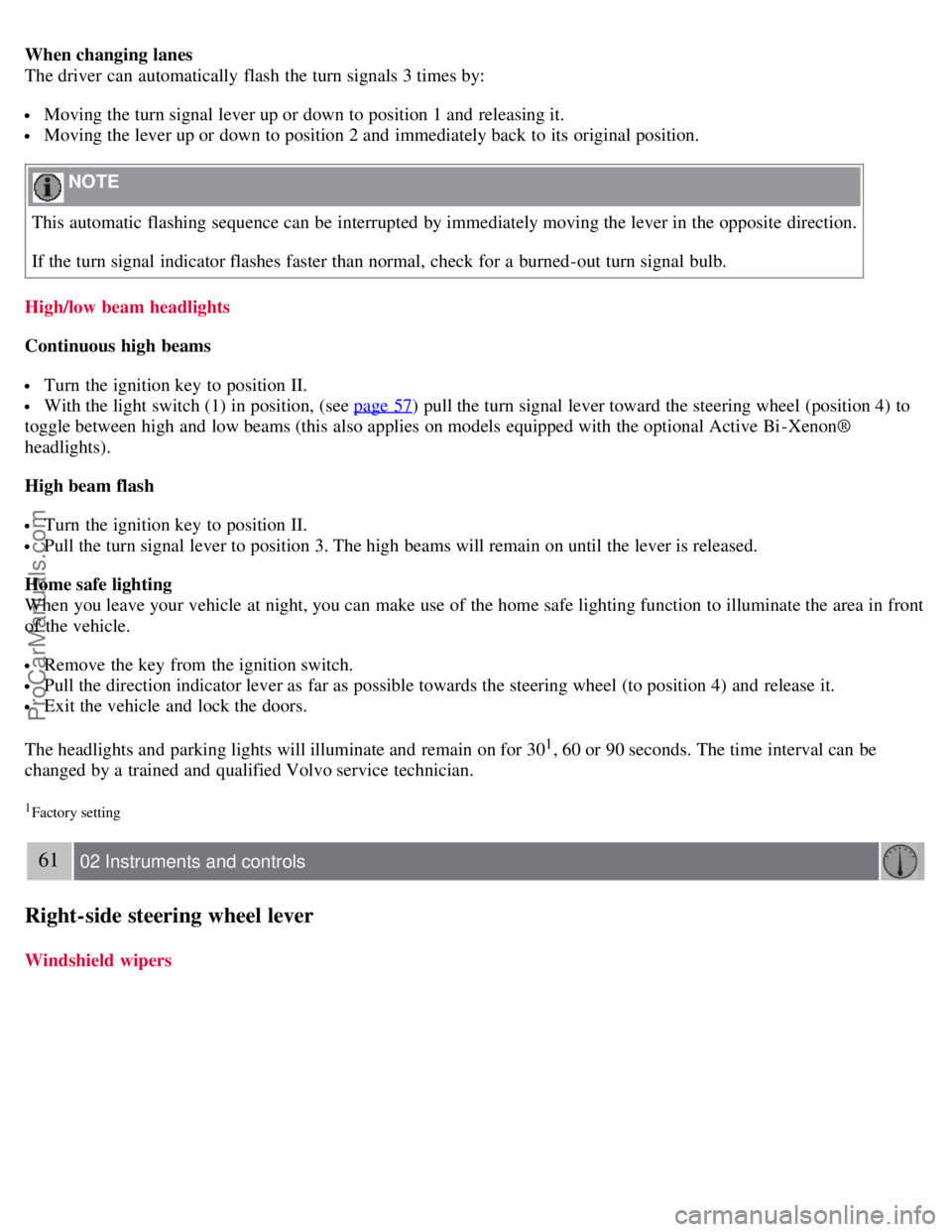
1. Turn signals, lane change position
2. Turn signals, position for normal turns
3. High beam flash
4. Toggle between high and low beams, Home Safe lighting
Turn signals
When turning
Move the lever as far up or down as possible (to position 2) to start the turn signals. The turn signals will be cancelled
automatically by the movement of the steering wheel, or the lever can be returned to its initial position by hand.
ProCarManuals.com
Page 57 of 230
When changing lanes
The driver can automatically flash the turn signals 3 times by:
Moving the turn signal lever up or down to position 1 and releasing it.
Moving the lever up or down to position 2 and immediately back to its original position.
NOTE
This automatic flashing sequence can be interrupted by immediately moving the lever in the opposite direction.
If the turn signal indicator flashes faster than normal, check for a burned-out turn signal bulb.
High/low beam headlights
Continuous high beams
Turn the ignition key to position II.
With the light switch (1) in position, (see page 57) pull the turn signal lever toward the steering wheel (position 4) to
toggle between high and low beams (this also applies on models equipped with the optional Active Bi -Xenon®
headlights).
High beam flash
Turn the ignition key to position II.
Pull the turn signal lever to position 3. The high beams will remain on until the lever is released.
Home safe lighting
When you leave your vehicle at night, you can make use of the home safe lighting function to illuminate the area in front
of the vehicle.
Remove the key from the ignition switch.
Pull the direction indicator lever as far as possible towards the steering wheel (to position 4) and release it.
Exit the vehicle and lock the doors.
The headlights and parking lights will illuminate and remain on for 30
1, 60 or 90 seconds. The time interval can be
changed by a trained and qualified Volvo service technician.
1Factory setting
61 02 Instruments and controls
Right-side steering wheel lever
Windshield wipers
ProCarManuals.com
Page 59 of 230
or
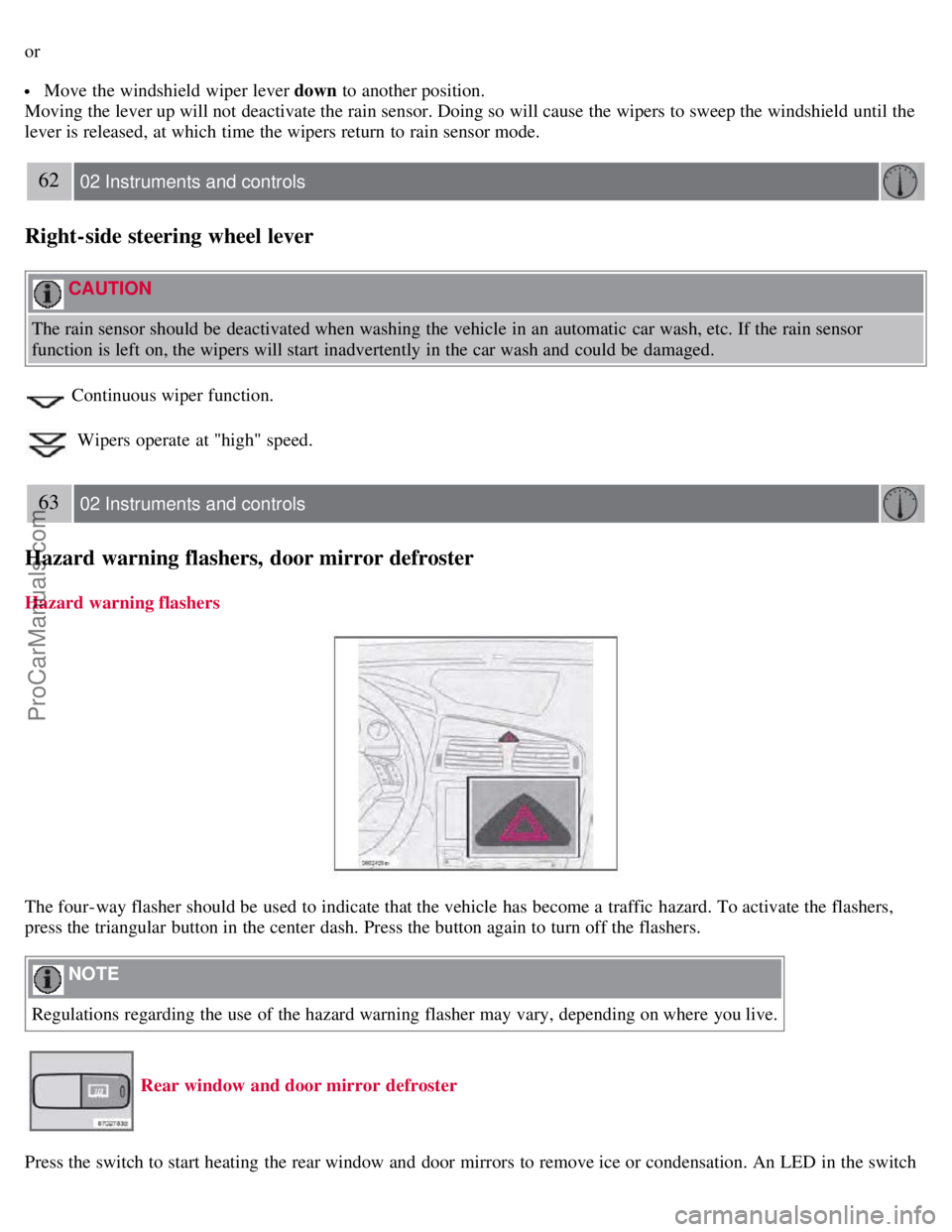
Move the windshield wiper lever down to another position.
Moving the lever up will not deactivate the rain sensor. Doing so will cause the wipers to sweep the windshield until the
lever is released, at which time the wipers return to rain sensor mode.
62 02 Instruments and controls
Right-side steering wheel lever
CAUTION
The rain sensor should be deactivated when washing the vehicle in an automatic car wash, etc. If the rain sensor
function is left on, the wipers will start inadvertently in the car wash and could be damaged.
Continuous wiper function.
Wipers operate at "high" speed.
63 02 Instruments and controls
Hazard warning flashers, door mirror defroster
Hazard warning flashers
The four-way flasher should be used to indicate that the vehicle has become a traffic hazard. To activate the flashers,
press the triangular button in the center dash. Press the button again to turn off the flashers.
NOTE
Regulations regarding the use of the hazard warning flasher may vary, depending on where you live.
Rear window and door mirror defroster
Press the switch to start heating the rear window and door mirrors to remove ice or condensation. An LED in the switch
ProCarManuals.com
Page 61 of 230
5. Current speed in miles per hour (Canadian models only)
This function provides the driver with an instantaneous conversion of the vehicle's current speed from km/h to mph.
65 02 Instruments and controls
Trip computer
NOTE
Trip computer readings may vary slightly depending on the circumference of the tires on the vehicle and driving style.
66 02 Instruments and controls
Cruise control
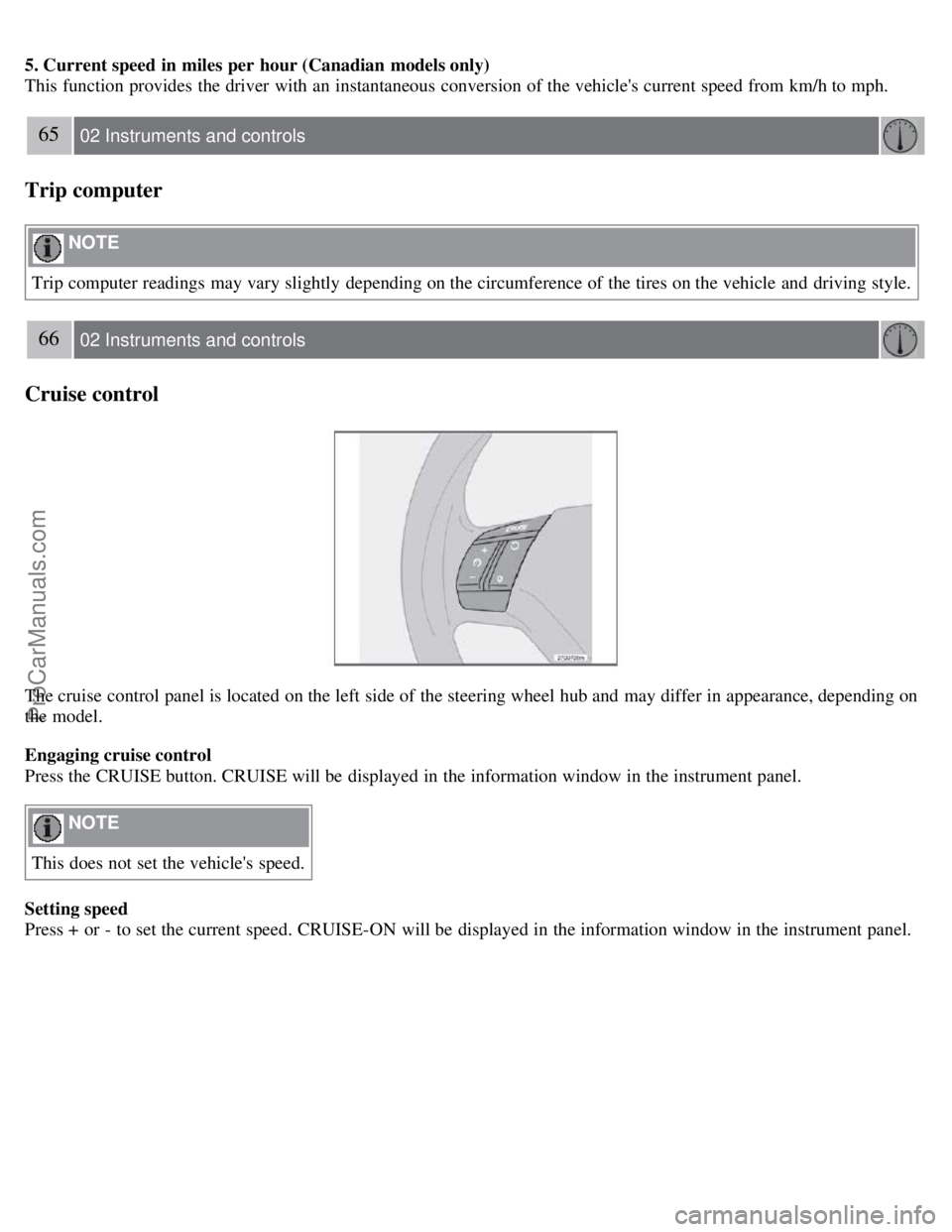
The cruise control panel is located on the left side of the steering wheel hub and may differ in appearance, depending on
the model.
Engaging cruise control
Press the CRUISE button. CRUISE will be displayed in the information window in the instrument panel.
NOTE
This does not set the vehicle's speed.
Setting speed
Press + or - to set the current speed. CRUISE-ON will be displayed in the information window in the instrument panel.
ProCarManuals.com
Page 105 of 230
will then remain locked until a door in opened from the inside or if all of the doors are unlocked from the control
panel in the driver's door.
This function can be activated/deactivated from the control panel in the driver's door.
Activating/deactivating automatic locking
1. Turn the ignition key to position I or II.
2. Press the READ button on the left-side steering wheel lever to erase any messages that may be displayed in the
information display.
3. Depress the central locking button on the control panel until a new message about the locking status is displayed.
The message AUTOLOCK ON (the doors will be locked when the vehicle begins to move) or AUTOLOCK OFF will
be displayed.
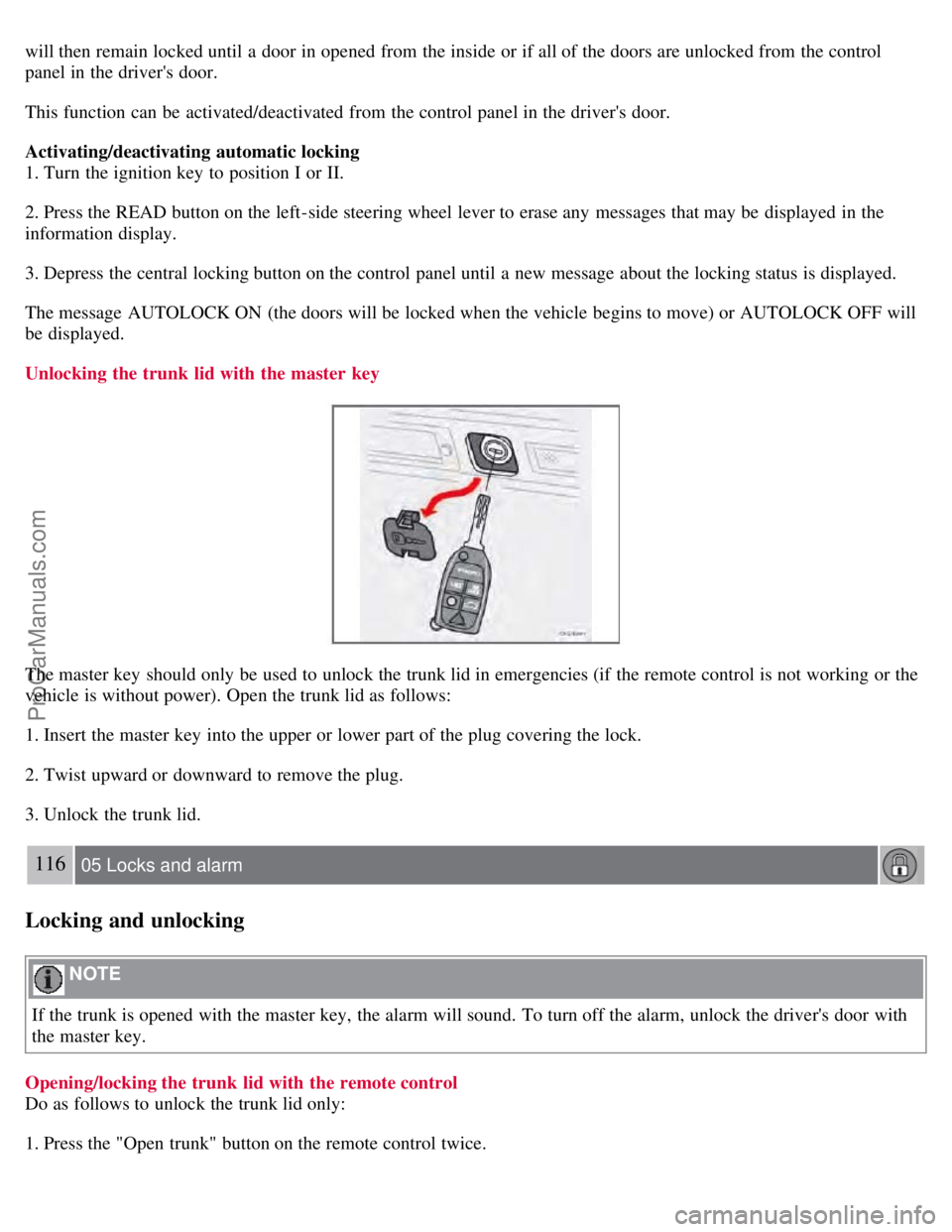
Unlocking the trunk lid with the master key
The master key should only be used to unlock the trunk lid in emergencies (if the remote control is not working or the
vehicle is without power). Open the trunk lid as follows:
1. Insert the master key into the upper or lower part of the plug covering the lock.
2. Twist upward or downward to remove the plug.
3. Unlock the trunk lid.
116 05 Locks and alarm
Locking and unlocking
NOTE
If the trunk is opened with the master key, the alarm will sound. To turn off the alarm, unlock the driver's door with
the master key.
Opening/locking the trunk lid with the remote control
Do as follows to unlock the trunk lid only:
1. Press the "Open trunk" button on the remote control twice.
ProCarManuals.com
Page 116 of 230
Before starting, check that the seat, steering wheel and mirrors are adjusted properly. Make sure the brake pedal can
be depressed completely. Adjust the seat if necessary. See pages 92 and 94
.
2. Apply the parking brake (hand brake) if not already set. The gear selector (automatic transmission) is locked in the
( P )ark position ( SHIFTLOCK ). Manual transmission: the clutch must be fully depressed.
3. Without touching the accelerator pedal, turn the ignition key
1 to the starting position. Allow the starter to operate for
up to 10 seconds. Release the key as soon as the engine starts. If the engine fails to start, repeat this step.
1If two of the keys to your vehicle are close together, e.g. on the same key ring, when you try to start the vehicle, this could cause interference in
the immobilizer system and result in the vehicle not starting. If this should occur, remove one of the keys from the key ring before trying to start
the vehicle again.
NOTE
If the key blade section of the remote is not fully folded out when starting the vehicle, the immobilizer function
may make it impossible to start the engine.
After a cold start, idle speed may be noticeably higher than normal for a short period. This is done to help bring
components in the emission control system to their normal operating temperature as quickly as possible, which
enables them to control emissions and help reduce the vehicle's impact on the environment.
To release the gear selector from the P position, the engine must be running (or the ignition key must be in
position II) and the brake pedal must be depressed.
Select the desired gear. The gear engages after a very slight delay which is especially noticeable when selecting R.
NOTE
Your vehicle is equipped with a KEYLOCK system (automatic transmission). When the engine is switched off, the
gear selector must be in the P position before the key can be removed from the ignition switch.
When starting in cold weather, the transmission may shift up at slightly higher engine speeds than normal until the
automatic transmission fluid reaches normal operating temperature.
WARNING
An extra mat on the driver's floor can cause the accelerator pedal to catch. Check that the movement of the
accelerator pedal is not impeded. No more than one protective floor covering may be used at one time.
WARNING
Always place the gear selector in Park or in reverse on models with a manual transmission, and apply the parking
brake before leaving the vehicle. Never leave the vehicle unattended with the engine running.
Always open garage doors fully before starting the engine inside a garage to ensure adequate ventilation. The exhaust
gases contain carbon monoxide, which is invisible and odorless but very poisonous
128 06 Starting and driving
Starting the vehicle
CAUTION
ProCarManuals.com
Page 117 of 230
Automatic transmission
The engine should be idling when you move the gear selector. Never accelerate until after you feel the transmission
engage! Accelerating immediately after selecting a gear will cause harsh engagement and premature transmission
wear.
Selecting P or N when idling at a standstill for prolonged periods of time will help prevent overheating of the
automatic transmission fluid.
Do not race a cold engine immediately after starting.
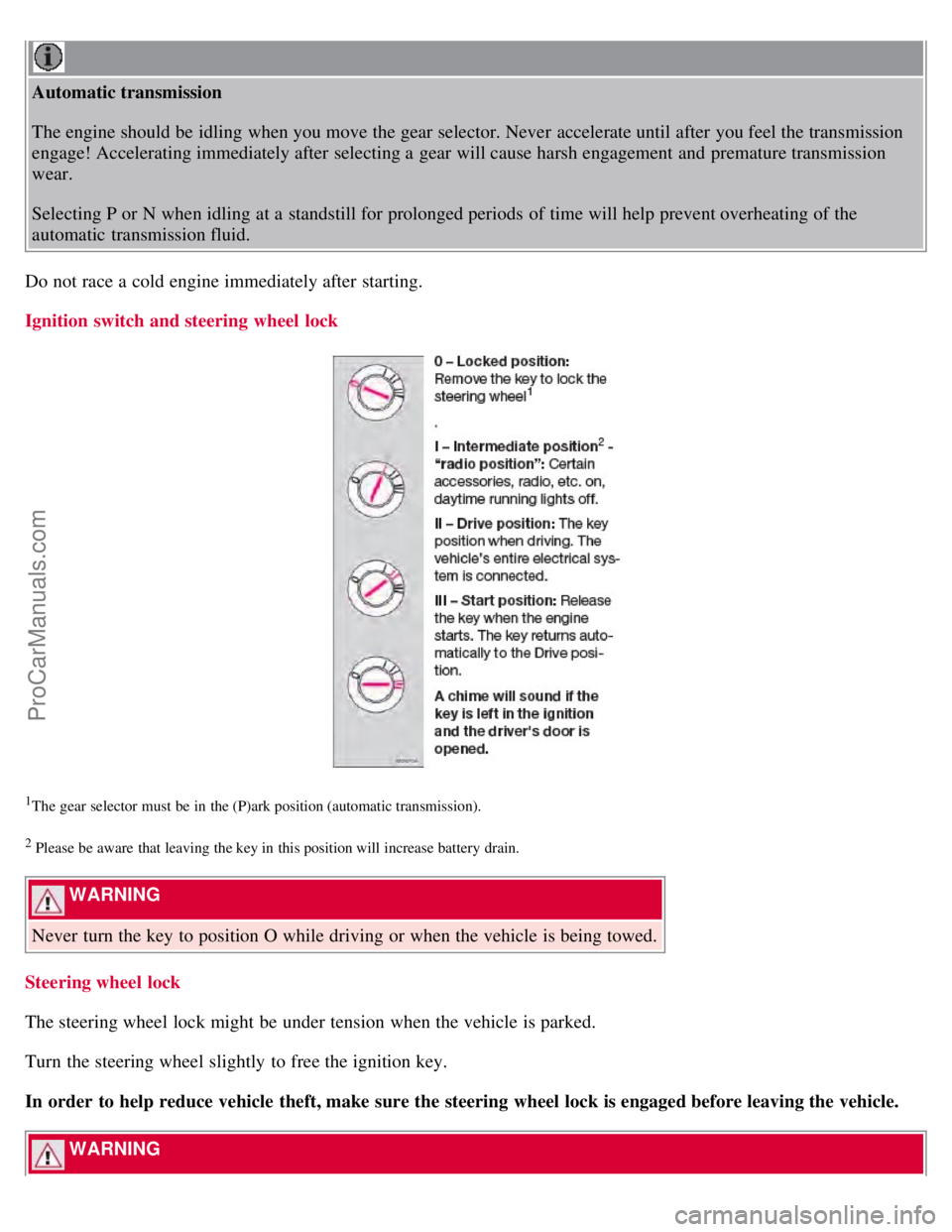
Ignition switch and steering wheel lock
1The gear selector must be in the (P)ark position (automatic transmission).
2 Please be aware that leaving the key in this position will increase battery drain.
WARNING
Never turn the key to position O while driving or when the vehicle is being towed.
Steering wheel lock
The steering wheel lock might be under tension when the vehicle is parked.
Turn the steering wheel slightly to free the ignition key.
In order to help reduce vehicle theft, make sure the steering wheel lock is engaged before leaving the vehicle.
WARNING
ProCarManuals.com
Page 118 of 230
Never switch off the ignition (turn the ignition key to position 0) or remove the key from the ignition switch while
the vehicle is in motion. This could cause the steering wheel to lock, which would make the vehicle impossible to
steer.
129 06 Starting and driving
Economical driving
Economical driving conserves natural resources
Better driving economy may be obtained by thinking ahead, avoiding rapid starts and stops and adjusting the speed of
your vehicle to immediate traffic conditions. Observe the following rules:
Bring the engine to normal operating temperature as soon as possible by driving with a light foot on the accelerator
pedal for the first few minutes of operation. A cold engine uses more fuel and is subject to increased wear.
Whenever possible, avoid using the vehicle for driving short distances. This does not allow the engine to reach
normal operating temperature.
Drive carefully and avoid rapid acceleration and hard braking.
Do not exceed posted speed limits.
Avoid carrying unnecessary items (extra load) in the vehicle.
Maintain correct tire pressure. Check tire pressure regularly (when tires are cold).
Remove snow tires when threat of snow or ice has ended.
Note that roof racks, ski racks, etc, increase air resistance and also fuel consumption.
Avoid using automatic transmission kickdown feature unless necessary.
However, at higher driving speeds, fuel consumption will be lower with the air conditioning on and the windows
closed than with the air conditioning off and the windows open.
Using the onboard trip computer's fuel consumption modes can help you learn how to drive more economically.
Other factors that decrease gas mileage are:
Dirty air cleaner
Dirty engine oil and clogged oil filter
Dragging brakes
Incorrect front end alignment. Some of the above mentioned items and others are checked at the standard
Maintenance Service intervals.
NOTE
Vehicles equipped with automatic transmissions should use (D)rive as often as possible and avoid using "kickdown"
to help improve fuel economy.
CAUTION
Drive slowly and carefully if going through standing water (i.e. flooded roadways, etc.). Damage to the engine could
result if excess water is drawn in through the air intake system. Never drive the vehicle in water deeper than 1 foot
(300 mm).
130 06 Starting and driving
Handling and road holding
ProCarManuals.com
Page 119 of 230
Weight distribution affects handling
At the specified curb weight your vehicle has a tendency to understeer, which means that the steering wheel has to be
turned more than might seem appropriate for the curvature of a bend.
This ensures good stability and reduces the risk of rear wheel skid. Remember that these properties can alter with the
vehicle load.
The heavier the load in the trunk (max. 220 lbs, 100 kg), the less the tendency to understeer.
Handling, roadholding
Vehicle load, tire design and inflation pressure all affect vehicle handling. Therefore, check that the tires are inflated to
the recommended pressure according to the vehicle load. See "Tire pressure" section.
Loads should be distributed so that capacity weight or maximum permissible axle loads are not exceeded.
Speed-sensitive power steering (Option on certain models)
With this feature, the steering is most responsive at lower speeds to make parking, driving in city traffic, etc., easier.
The effect of the power steering diminishes as you accelerate for greater stability at highway speeds.
Driving through water
The vehicle can be driven through water up to a depth of approximately 9 in. (25 cm), at a maximum speed of 6 mph
(10 km/h).
Take particular care when driving through flowing water.
Clean the electrical connections for trailer wiring after driving in mud or water.
When driving through water, maintain low speed and do not stop in the water.
WARNING
After driving through water, press lightly on the brake pedal to ensure that the brakes are functioning normally.
Water or mud can make the brake linings slippery, resulting in delayed braking effect.
CAUTION
Engine damage will occur if water is drawn into the air cleaner.
If the vehicle is driven through water deeper than 9 in (25 cm), water may enter the differential and the
transmission. This reduces the oil's lubricating capacity and may shorten the service life of these components.
Do not allow the vehicle to stand in water up to the door sills longer than absolutely necessary. This could result
in electrical malfunctions.
If the engine has been stopped while the car is in water, do not attempt to restart the engine. Have the car towed
out of the water.
131 06 Starting and driving
Manual transmission
ProCarManuals.com
Page 128 of 230
The EBA function is designed to provide full brake effect immediately in the event of sudden, hard braking. The
system is activated by the speed with which you depress the brake pedal.
NOTE
When the EBA system is activated, the brake pedal will go down and pressure in the brake system immediately
increases to the maximum level. You must maintain full pressure on the brake pedal in order to utilize the system
completely. There will be no braking effect if the pedal is released. EBA is automatically deactivated when the brake
pedal is released.
When the vehicle has been parked for some time, the brake pedal may sink more than usual when the engine is
started. This is normal and the pedal will return to its usual position when it is released.
139 06 Starting and driving
Stability system
Dynamic Stability Traction Control (DSTC)
The stability system consists of a number of functions designed help reduce wheel spin, counteract skidding, and to
generally help improve directional stability.
NOTE
A pulsating sound will be audible when the system is actively operating and is normal.
Traction control (TC)
This function is designed to help reduce wheel spin by transferring power from a drive wheel that begins to lose
traction to the wheel on the opposite side of the vehicle (on the same axle).
TC is most active at low speeds.
This is one of the DSTC's permanent functions and cannot be switched off.
Spin control (SC)
The spin control function is designed to help prevent the drive wheels from spinning while the vehicle is accelerating.
Under certain circumstances, such as when driving with snow chains, or driving in deep snow or loose sand, it may be
advisable to temporarily switch off this function for maximum tractive force.
Temporarily switching off Spin control
1. Turn the thumb wheel (1) on the left-side steering wheel lever until the DSTC menu is displayed.
2. Hold down the RESET button (2) to toggle between DSTC SPIN CONTROL ON or OFF.
Active Yaw Control (AYC)
This function helps maintain directional stability, for example when cornering, by braking one or more of the wheels if
the vehicle shows a tendency to skid or slide laterally.)
WARNING
The car's handling and stability characteristics will be altered if the DSTC system functions have been disabled.
ProCarManuals.com