light VOLVO S60 2009 Owner´s Manual
[x] Cancel search | Manufacturer: VOLVO, Model Year: 2009, Model line: S60, Model: VOLVO S60 2009Pages: 254, PDF Size: 6.17 MB
Page 76 of 254
02 Instruments and controlsMirrors
0276
To do so:
1.
Switch the ignition to position II.
2. Press the button on the rear side of the
mirror with straightened paperclip or simi-
lar object for approximately 3 seconds until
ZONE
is displayed.
> The number of the current magnetic
zone will also be displayed.
3. Press the button repeatedly until the num-
ber for the desired zone (1-15) is displayed.
After several seconds, the compass heading
will again be displayed, and the change of
magnetic zones is complete.
C
A
LZ
O
N
E
C
A
L
Z
O
N
E
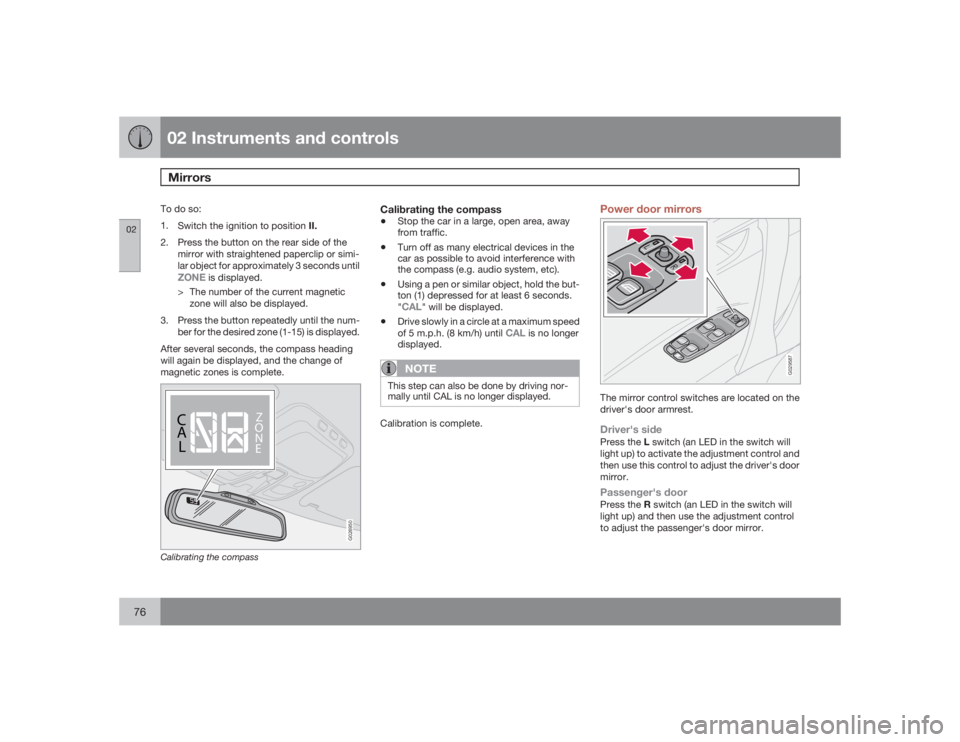
G026950
Calibrating the compass
Calibrating the compass•
Stop the car in a large, open area, away
from traffic.
•
Turn off as many electrical devices in the
car as possible to avoid interference with
the compass (e.g. audio system, etc).
•
Using a pen or similar object, hold the but-
ton (1) depressed for at least 6 seconds.
"CAL
" will be displayed.
•
Drive slowly in a circle at a maximum speed
of 5 m.p.h. (8 km/h) until
CAL
is no longer
displayed.
NOTE
This step can also be done by driving nor-
mally until CAL is no longer displayed.Calibration is complete.
Power door mirrors
G029587
The mirror control switches are located on the
driver's door armrest.Driver's sidePress the L switch (an LED in the switch will
light up) to activate the adjustment control and
then use this control to adjust the driver's door
mirror.Passenger's doorPress the R switch (an LED in the switch will
light up) and then use the adjustment control
to adjust the passenger's door mirror.
Page 80 of 254
02 Instruments and controlsHomeLink® Wireless Control System (option)
0280
Introduction
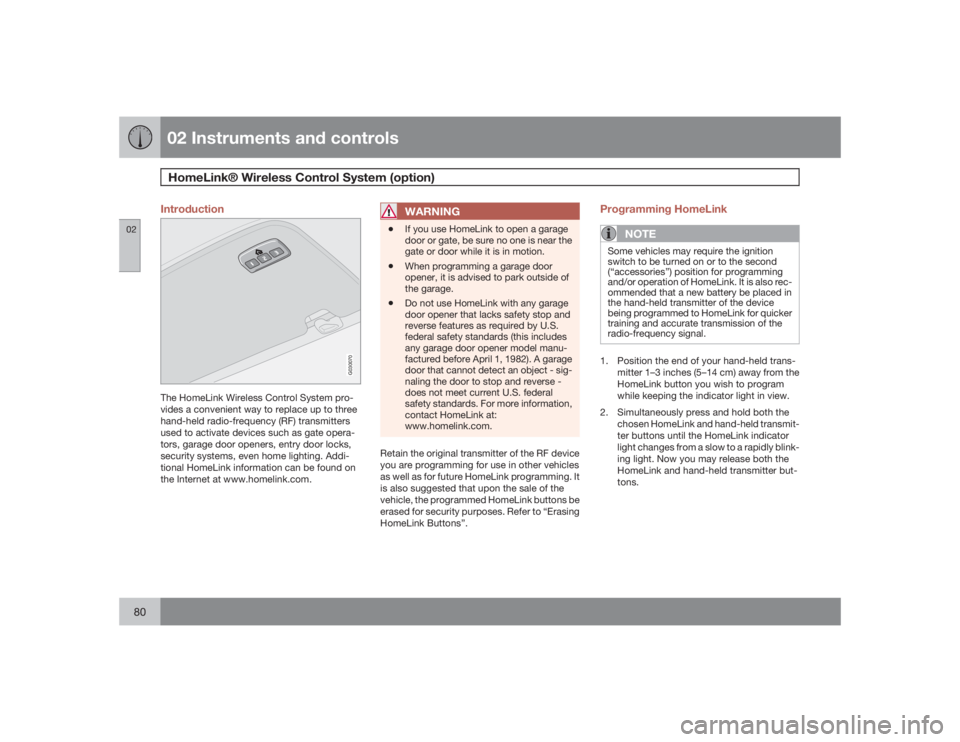
G030070
The HomeLink Wireless Control System pro-
vides a convenient way to replace up to three
hand-held radio-frequency (RF) transmitters
used to activate devices such as gate opera-
tors, garage door openers, entry door locks,
security systems, even home lighting. Addi-
tional HomeLink information can be found on
the Internet at www.homelink.com.
WARNING
•
If you use HomeLink to open a garage
door or gate, be sure no one is near the
gate or door while it is in motion.
•
When programming a garage door
opener, it is advised to park outside of
the garage.
•
Do not use HomeLink with any garage
door opener that lacks safety stop and
reverse features as required by U.S.
federal safety standards (this includes
any garage door opener model manu-
factured before April 1, 1982). A garage
door that cannot detect an object - sig-
naling the door to stop and reverse -
does not meet current U.S. federal
safety standards. For more information,
contact HomeLink at:
www.homelink.com.
Retain the original transmitter of the RF device
you are programming for use in other vehicles
as well as for future HomeLink programming. It
is also suggested that upon the sale of the
vehicle, the programmed HomeLink buttons be
erased for security purposes. Refer to “Erasing
HomeLink Buttons”.
Programming HomeLink
NOTE
Some vehicles may require the ignition
switch to be turned on or to the second
(“accessories”) position for programming
and/or operation of HomeLink. It is also rec-
ommended that a new battery be placed in
the hand-held transmitter of the device
being programmed to HomeLink for quicker
training and accurate transmission of the
radio-frequency signal.1. Position the end of your hand-held trans-
mitter 1–3 inches (5–14 cm) away from the
HomeLink button you wish to program
while keeping the indicator light in view.
2. Simultaneously press and hold both the
chosen HomeLink and hand-held transmit-
ter buttons until the HomeLink indicator
light changes from a slow to a rapidly blink-
ing light. Now you may release both the
HomeLink and hand-held transmitter but-
tons.
Page 81 of 254
02 Instruments and controls
HomeLink® Wireless Control System (option)
02``81
NOTE
Some devices may require you to replace
this Programming Step 2 with procedures
noted in the “Gate Operator / Canadian Pro-
gramming” section. If the HomeLink indica-
tor light does not change to a rapidly
blinking light after performing these steps,
contact HomeLink at www.homelink.com.3.
Firmlypress, hold for five seconds and
release the programmed HomeLink but-
ton up to two separate times to activate the
door. If the door does not activate, press
and hold the just-trained HomeLink button
and observe the indicator light.
•If the indicator light stays on con-
stantly, programming is complete
and your device should activate when
the HomeLink button is pressed and
released.•If the indicator light blinks rapidly for
two seconds and then turns to a con-
stant light continue with “Program-
ming” steps 4-6 to complete the pro-
gramming of a rolling code equipped
device (most commonly a garage door
opener).
4. At the garage door opener receiver (motor-
head unit) in the garage, locate the “learn”
or “smart” button. This can usually befound where the hanging antenna wire is
attached to the motor-head unit.
5. Firmly press and release the “learn” or
“smart” button. (The name and color of the
button may vary by manufacturer.) There
are 30 seconds to initiate step 6.
6. Return to the vehicle and firmly press, hold
for two seconds and release the pro-
grammed HomeLink button. Repeat the
“press/hold/release” sequence a second
time, and, depending on the brand of the
garage door opener (or other rolling code
equipped device), repeat this sequence a
third time to complete the programming
process.
HomeLink should now activate your rolling
code equipped device.
Gate Operator/Canadian ProgrammingCanadian radio-frequency laws require trans-
mitter signals to “time-out” (or quit) after sev-
eral seconds of transmission – which may not
be long enough for HomeLink to pick up the
signal during programming. Similar to this
Canadian law, some U.S. gate operators are
designed to “time-out” in the same manner.
If you live in Canada or you are having difficul-
ties programming a gate operator or garage
door opener by using the “Programming” pro-cedures,replace “Programming HomeLink”
step 2 with the following:
•
Continue to press and hold the HomeLink
button while you press and release -
every two seconds (“cycle”) your hand-
held transmitter until the HomeLink indica-
tor light changes from a slow to a rapidly
blinking light. Now you may release both
the HomeLink and hand-held transmitter
buttons.
Proceed with “Programming” step 3 to com-
plete.
Using HomeLinkTo operate, simply press and release the pro-
grammed HomeLink button. Activation will
now occur for the trained device (i.e., garage
door opener, gate operator, security system,
entry door lock, home/office lighting, etc.). For
convenience, the hand-held transmitter of the
device may also be used at any time. In the
event that there are still programming difficul-
ties or questions, contact HomeLink at:
www.homelink.com.
Page 82 of 254
02 Instruments and controlsHomeLink® Wireless Control System (option)
0282
Erasing HomeLink ButtonsTo erase programming from the three Home-
Link buttons (individual buttons cannot be
erased but can be “reprogrammed” as outlined
below), follow the step noted:•
Press and hold the two outer HomeLink
buttons until the indicator light begins to
flash-after 10 seconds. Release both but-
tons. Do not hold for longer that 20 sec-
onds. HomeLink is now in the train (or
learning) mode and can be programmed at
any time beginning with “Programming” -
step 1.
Reprogramming a Single HomeLink
ButtonTo program a device to HomeLink using a
HomeLink button previously trained, follow
these steps:
1. Press and hold the desired HomeLink but-
ton.DO NOT release the button.
2. The indicator light will begin to flash after
20 seconds. Without releasing the Home-
Link button, proceed with “Programming”
- step 1.
For questions or comments, contact HomeLink
at: www.homelink.com or 1–800–355–3515.This device complies with FCC rules part 15
and Industry Canada (IC) RSS-210. Operation
is subject to the following two conditions: (1)
This device may not cause harmful interfer-
ence, and (2) This device must accept any
interference that may be received including
interference that may cause undesired opera-
tion.
NOTE
The transmitter has been tested and com-
plies with FCC and IC rules. Changes or
modifications not expressly approved by
the party responsible for compliance could
void the user’s authority to operate the
device.
1
HomeLink and the HomeLink house are regis-
tered trademarks of Johnson Controls, Inc.
1The term “IC:” before the certification/registration number only signifies that Industry Canada technical specifications were met.
Page 86 of 254

03 ClimateClimate control systems - general information
0386
Condensation on the inside of the
windowsThe defroster function should be used to
remove fog or mist from the inside of the win-
dows. Keeping the windows clean with a com-
mercially available window washing spray will
also help prevent fogging or misting.Ice and snowAlways keep the air intake grille at the base of
the windshield free of snow.Cabin air filterReplace the cabin air filter with a new one at
the recommended intervals. Please refer to
your Warranty and Service Records Informa-
tion booklet, or consult a trained and qualified
Volvo service technician for these intervals.
The filter should be replaced more often when
driving under dirty and dusty conditions. The
filter cannot be cleaned and therefore should
always be replaced with a new one.
SensorsThe sunlight sensor on the dashboard and pas-
senger compartment temperature sensor in
the ECC control panel should not be covered
in any way as this could cause incorrect infor-
mation to be sent to the ECC system.Parking the vehicle in warm weatherIf your vehicle has been parked in the sun in
warm weather, opening the windows and
moonroof (option) for several minutes before
driving will help release the warm air from the
passenger compartment. When the engine is
running, close the windows and moonroof and
use the recirculation function for several
minutes to enable the air conditioning to cool
the compartment as quickly as possible.Windows and optional moonroofThe ECC system will function best if the win-
dows and optional moonroof are closed. If you
drive with the moonroof open, we recommend
that you manually adjust the temperature and
blower control (the LED in the AUTO switch
should be off).
AccelerationThe air conditioning is momentarily disen-
gaged during full-throttle acceleration.Climate control maintenanceSpecial tools and equipment are required to
maintain and carry out repairs on the climate
system. Work of this type should only be done
by a trained and qualified Volvo service tech-
nician.RefrigerantVolvo cares about the environment. The air
conditioning system in your vehicle contains a
CFC-free refrigerant - R134a (HFC134a). This
substance will not deplete the ozone layer. The
system contains 1.5 lbs (700 g) R134a and
uses PAG oil.Climate system blowerThe climate system blower will be automati-
cally switched off when the engine is not run-
ning (even if the ignition key is in position Ior
II) to avoid unnecessary battery drain. To acti-
vate the blower, turn the control to the desired
setting.
Page 89 of 254
03 Climate
Electronic climate control, ECC
03``89
G031044
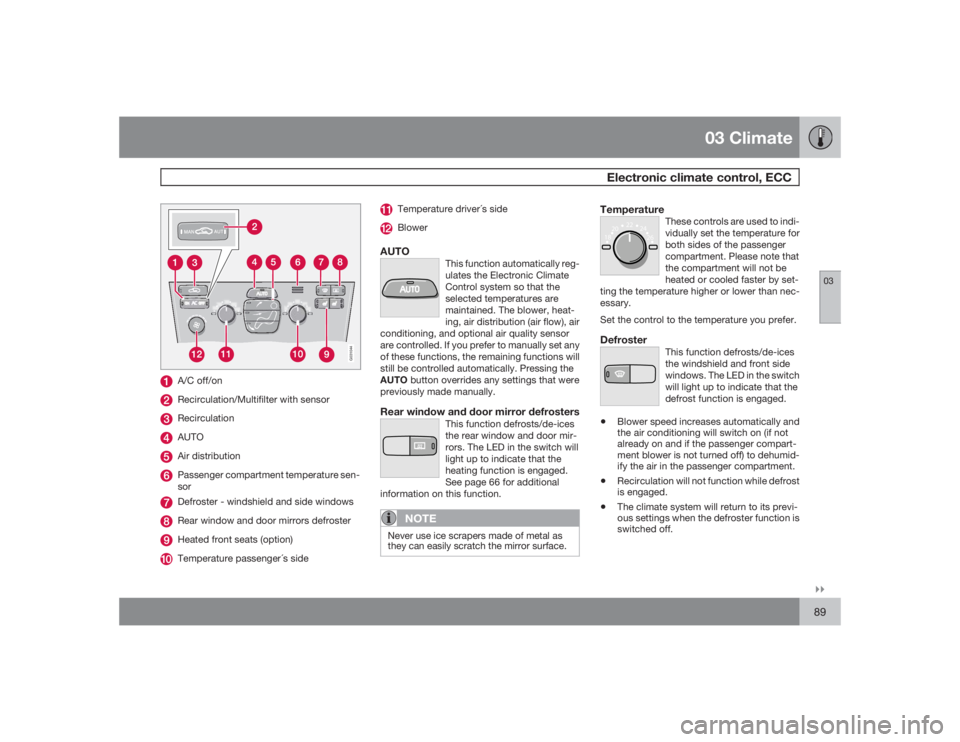
A/C off/onRecirculation/Multifilter with sensorRecirculationAUTOAir distributionPassenger compartment temperature sen-
sorDefroster - windshield and side windowsRear window and door mirrors defrosterHeated front seats (option)Temperature passenger´s side
Temperature driver´s sideBlower
AUTO
This function automatically reg-
ulates the Electronic Climate
Control system so that the
selected temperatures are
maintained. The blower, heat-
ing, air distribution (air flow), air
conditioning, and optional air quality sensor
are controlled. If you prefer to manually set any
of these functions, the remaining functions will
still be controlled automatically. Pressing the
AUTObutton overrides any settings that were
previously made manually.
Rear window and door mirror defrosters
This function defrosts/de-ices
the rear window and door mir-
rors. The LED in the switch will
light up to indicate that the
heating function is engaged.
See page 66 for additional
information on this function.
NOTE
Never use ice scrapers made of metal as
they can easily scratch the mirror surface.
Temperature
These controls are used to indi-
vidually set the temperature for
both sides of the passenger
compartment. Please note that
the compartment will not be
heated or cooled faster by set-
ting the temperature higher or lower than nec-
essary.
22
20
18
2624
Set the control to the temperature you prefer.Defroster
This function defrosts/de-ices
the windshield and front side
windows. The LED in the switch
will light up to indicate that the
defrost function is engaged.
•
Blower speed increases automatically and
the air conditioning will switch on (if not
already on and if the passenger compart-
ment blower is not turned off) to dehumid-
ify the air in the passenger compartment.
•
Recirculation will not function while defrost
is engaged.
•
The climate system will return to its previ-
ous settings when the defroster function is
switched off.
Page 90 of 254
03 ClimateElectronic climate control, ECC
0390
Blower control
Turn the control clockwise to
increase or counterclockwise
to decrease the blower
speed. Pressing the AUTO
switch will automatically reg-
ulate blower speed and over-
ride manual adjustment.
Turning the blower control counterclockwise
until an orange LED comes on will turn both the
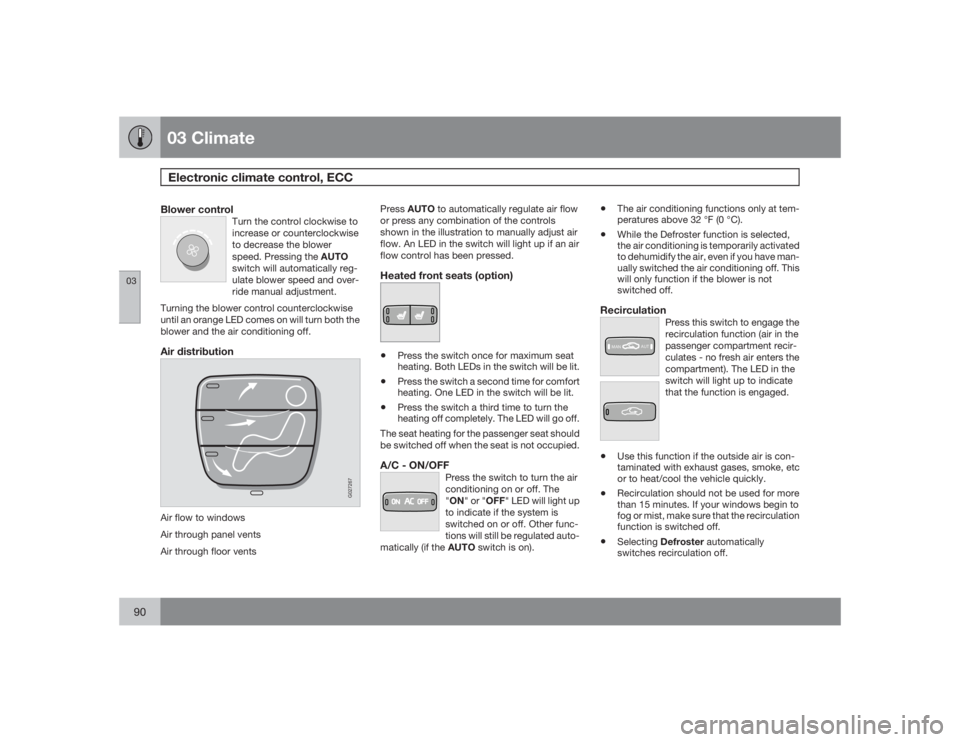
blower and the air conditioning off.Air distributionAir flow to windows
Air through panel vents
Air through floor vents
G027267
PressAUTO to automatically regulate air flow
or press any combination of the controls
shown in the illustration to manually adjust air
flow. An LED in the switch will light up if an air
flow control has been pressed.Heated front seats (option)•
Press the switch once for maximum seat
heating. Both LEDs in the switch will be lit.
•
Press the switch a second time for comfort
heating. One LED in the switch will be lit.
•
Press the switch a third time to turn the
heating off completely. The LED will go off.
The seat heating for the passenger seat should
be switched off when the seat is not occupied.
A/C - ON/OFF
Press the switch to turn the air
conditioning on or off. The
"ON" or "OFF" LED will light up
to indicate if the system is
switched on or off. Other func-
tions will still be regulated auto-
matically (if the AUTO switch is on).
•
The air conditioning functions only at tem-
peratures above 32 °F (0 °C).
•
While the Defroster function is selected,
the air conditioning is temporarily activated
to dehumidify the air, even if you have man-
ually switched the air conditioning off. This
will only function if the blower is not
switched off.
Recirculation
Press this switch to engage the
recirculation function (air in the
passenger compartment recir-
culates - no fresh air enters the
compartment). The LED in the
switch will light up to indicate
that the function is engaged.
MANAUT€
Use this function if the outside air is con-
taminated with exhaust gases, smoke, etc
or to heat/cool the vehicle quickly.
€
Recirculation should not be used for more
than 15 minutes. If your windows begin to
fog or mist, make sure that the recirculation
function is switched off.
€
SelectingDefroster automatically
switches recirculation off.
Page 91 of 254
03 Climate
Electronic climate control, ECC
0391
•
Timer mode activation: (vehicles with the
Interior Air Quality system have no timer
mode) Press and hold the recirculation but-
ton for at least 3 seconds to activate a
recirculation timer mode. The amber LED
in the recirculation button will flash 5 times
to show that the timer mode is being acti-
vated. In timer mode, each time the recir-
culation button is pressed, the climate
control system will recirculate the air in the
passenger compartment for 5-12 minutes,
depending on the outside air temperature,
and then revert back to fresh air.
•
Timer mode deactivation: Press and hold
the recirculation button for 3 seconds. The
amber LED in the recirculation button will
illuminate steadily for 5 seconds to show a
return to "normal" mode.
•
In normal mode, when the recirculation
button is pressed, the climate control sys-
tem will recirculate the air in the passenger
compartment until the recirculation button
is pressed again.
•
Timer mode memory: If the vehicle is
turned off while timer mode is active, timer
mode will still be active when the vehicle is
restarted.
Interior air quality sensor (option)
Some vehicles are equipped
with a multifilter and air quality
sensor. The filter separates
gases and particles, thereby
reducing the amounts of odors
and contaminants entering the
vehicle. The air quality sensor detects
increased levels of contaminants in the outside
air. When the air quality sensor detects conta-
minated outside air, the air intake closes and
the air inside the passenger compartment is
recirculated, i.e. no outside air enters the vehi-
cle. The filter also cleans recirculated passen-
ger compartment air.
MANAUTWhen the ECC system is in the AUTO mode,
the green LED in the button will be on.Operation±
PressAUTO to operate the air quality sen-
sor (normal setting).
or
±
Select one of the following three functions
by pressing the recirculation button 1, 2 or
3 times.
1.
The AUT LED lights. The air quality sensor
is now activated.2. No LED lights. Recirculation is not acti-
vated unless needed to cool the passenger
compartment in a warm climate.
3.
TheMAN LED lights. Recirculation is now
activated.
Keep in mind the following•
Make it a rule to have the air quality sensor
activated at all times.
•
Recirculation is limited in cold climates to
avoid fogging.
•
If window fogging occurs, you should
deactivate the air quality sensor.
•
If fogging occurs, use the defroster func-
tions for the windshield, side windows and
rear window, see page 66.
The filter should be changed at the intervals
recommended in the service schedule. How-
ever, if the vehicle is used in a severely conta-
minated environment, it may be necessary to
change the filter more frequently.
Page 92 of 254
G020908
92
Front seats.............................................................................................. 94
Interior lighting........................................................................................ 97
Storage compartments........................................................................... 99
Rear seat and trunk............................................................................... 102
Spare wheel, tools and jack.................................................................. 105
Page 97 of 254

04 InteriorInterior lighting
04``97 Reading lights and courtesy lights
G026960
Driver's side front reading lightCourtesy lightsFront passenger's side reading light
The reading lights can be switched on or off by
pressing buttons (1) or (3).
The courtesy lighting (including footwell light-
ing) can be turned on or off by pressing button
(2). This also activates the automatic function.
Rear seat reading lights
G027153
Rear reading lights
Left rear reading lightRight rear reading light
The rear reading lights can be switched on and
off by pressing buttons (4) or (5).
Automatic functionThe reading lights and courtesy lights will
switch off automatically approximately
10 minutes after the engine has been turned
off. The lights can be turned off sooner by
pressing the respective buttons.The courtesy lights come on automatically
1
and remain on for approximately 30 seconds
when:•
The vehicle has been unlocked from the
outside with the remote control or key
•
If the engine has been switched off and the
ignition key has been turned to position 0
The courtesy lights will come on and remain on
for approximately 10 minutes when:
•
One of the doors is opened (assuming the
courtesy lighting has not previously been
switched off)
The courtesy lighting will go off when:
•
The engine is started
•
The vehicle is locked from the outside with
the remote control or key
The automatic function can be disconnected
by pressing button 2 for more than 3 seconds.
Briefly pressing the button again automatically
reconnects the function.
The courtesy light timer periods can be
changed. Contact a trained and qualified Volvo
service technician.
1This function is light dependent and is only activated in dark conditions.