display VOLVO S60 2018 Owner´s Manual
[x] Cancel search | Manufacturer: VOLVO, Model Year: 2018, Model line: S60, Model: VOLVO S60 2018Pages: 396, PDF Size: 9.4 MB
Page 172 of 396
DRIVER SUPPORT
* Option/accessory.
170
Adjustable steering force *
Steering force increases with the speed of the vehicle to give the driver enhanced sense ofcontrol and stability. At low speed the vehicle iseasy to steer in order to facilitate parking, etc.
Adjustable steering force *Steering force can be changed under MY CAR
Car settingsSteering wheel force.
Select Low, Medium or High. For a description
of the menu system, My Car – introduction (p. 71).
NOTE
This steering force level menu function can- not be accessed when the vehicle is inmotion.
NOTE
In certain situations, the power steering may become too warm and will have to be tempo-rarily cooled down. While this is happening,the power steering effect will be reducedslightly and somewhat more effort may berequired to turn the steering wheel. If this occurs, a message will be displayed in the instrument panel.
Road Sign Information (RSI) * –
introduction
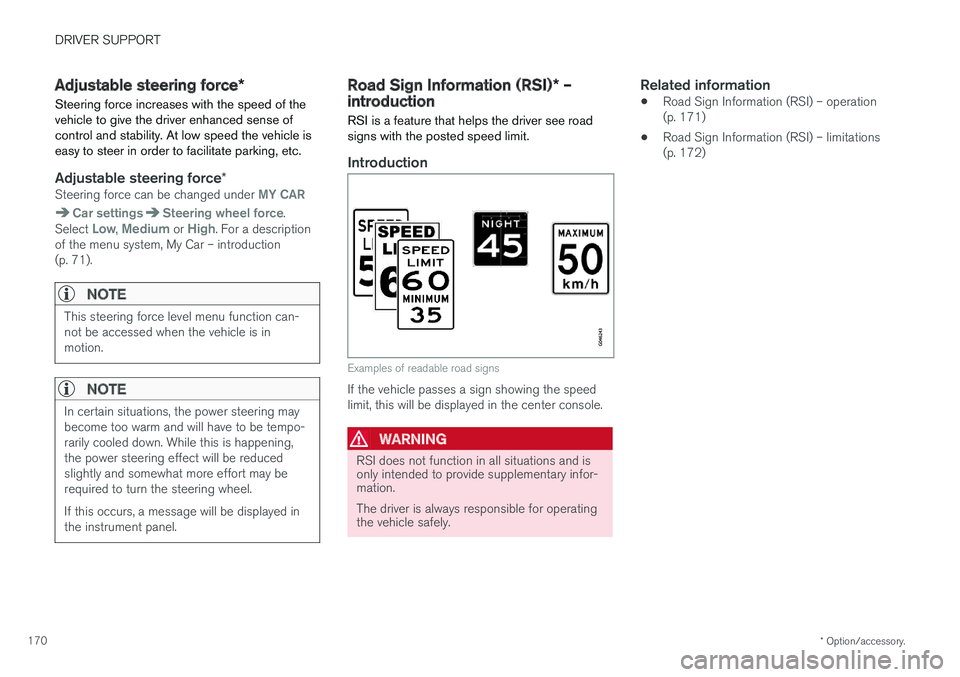
RSI is a feature that helps the driver see road signs with the posted speed limit.
Introduction
Examples of readable road signs
If the vehicle passes a sign showing the speed limit, this will be displayed in the center console.
WARNING
RSI does not function in all situations and is only intended to provide supplementary infor-mation. The driver is always responsible for operating the vehicle safely.
Related information
• Road Sign Information (RSI) – operation (p. 171)
• Road Sign Information (RSI) – limitations(p. 172)
Page 173 of 396
DRIVER SUPPORT
* Option/accessory.171
Road Sign Information (RSI) – operation
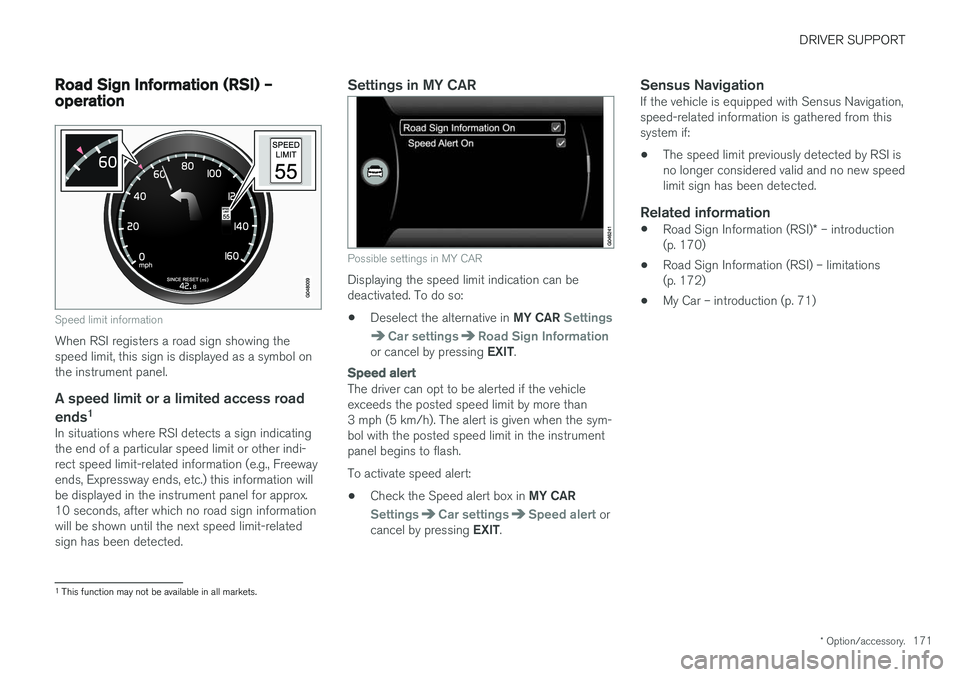
Speed limit information
When RSI registers a road sign showing the speed limit, this sign is displayed as a symbol onthe instrument panel.
A speed limit or a limited access road
ends 1
In situations where RSI detects a sign indicatingthe end of a particular speed limit or other indi-rect speed limit-related information (e.g., Freewayends, Expressway ends, etc.) this information willbe displayed in the instrument panel for approx.10 seconds, after which no road sign informationwill be shown until the next speed limit-relatedsign has been detected.
Settings in MY CAR
Possible settings in MY CAR
Displaying the speed limit indication can be deactivated. To do so: •
Deselect the alternative in
MY CAR
Settings
Car settingsRoad Sign Informationor cancel by pressing EXIT.
Speed alert
The driver can opt to be alerted if the vehicle exceeds the posted speed limit by more than3 mph (5 km/h). The alert is given when the sym-bol with the posted speed limit in the instrumentpanel begins to flash. To activate speed alert:
• Check the Speed alert box in
MY CAR
SettingsCar settingsSpeed alert or
cancel by pressing EXIT.
Sensus NavigationIf the vehicle is equipped with Sensus Navigation, speed-related information is gathered from thissystem if: •The speed limit previously detected by RSI is no longer considered valid and no new speedlimit sign has been detected.
Related information
•
Road Sign Information (RSI)
* – introduction
(p. 170)
• Road Sign Information (RSI) – limitations(p. 172)
• My Car – introduction (p. 71)
1
This function may not be available in all markets.
Page 175 of 396
DRIVER SUPPORT
}}
173
Related information
•Cruise control (CC) – engaging and setting speed (p. 173)
• Cruise control (CC) – deactivating (p. 175)
Cruise control (CC) – engaging and setting speed
Cruise control is designed to assist the driver by maintaining a set speed. It is primarily intendedfor use on long straight roads in steady traffic,such as on highways and other main roads.
Engaging the cruise control function
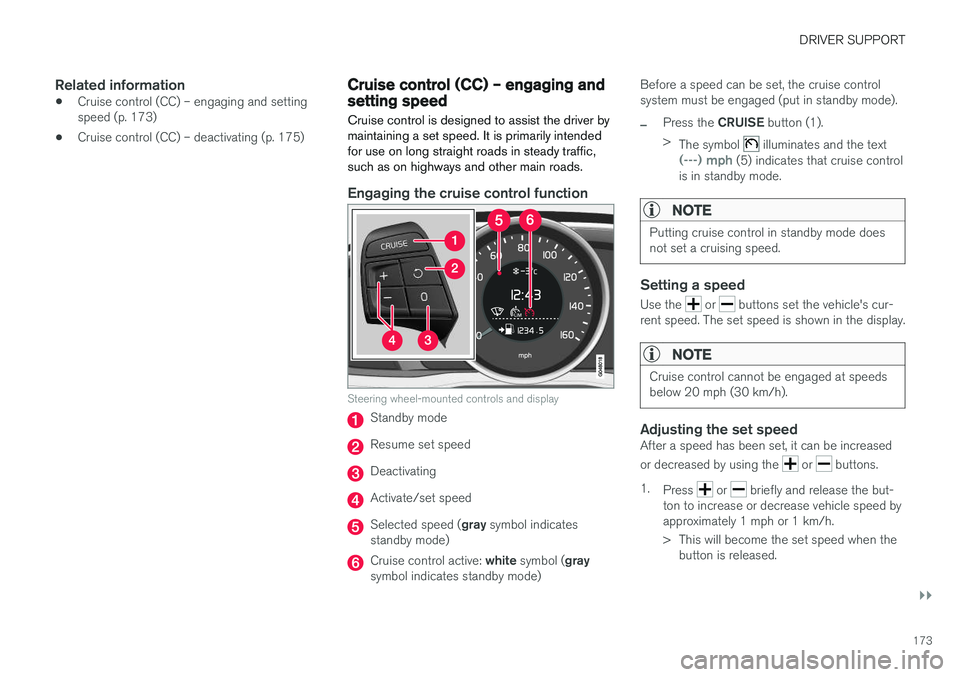
Steering wheel-mounted controls and display
Standby mode
Resume set speed
Deactivating
Activate/set speed
Selected speed ( gray symbol indicates
standby mode)
Cruise control active: white symbol ( gray
symbol indicates standby mode) Before a speed can be set, the cruise control system must be engaged (put in standby mode).
–Press the
CRUISE button (1).
> The symbol
illuminates and the text(---) mph (5) indicates that cruise control
is in standby mode.
NOTE
Putting cruise control in standby mode does not set a cruising speed.
Setting a speed
Use the or buttons set the vehicle's cur-
rent speed. The set speed is shown in the display.
NOTE
Cruise control cannot be engaged at speeds below 20 mph (30 km/h).
Adjusting the set speedAfter a speed has been set, it can be increased or decreased by using the
or buttons.
1. Press
or briefly and release the but-
ton to increase or decrease vehicle speed by approximately 1 mph or 1 km/h.
> This will become the set speed when the button is released.
Page 177 of 396
DRIVER SUPPORT
}}
175
Cruise control (CC) – deactivating Cruise control is designed to assist the driver by maintaining a set speed. It is primarily intendedfor use on long straight roads in steady traffic,such as on highways and other main roads.
Automatic deactivationThe cruise control is automatically deactivated temporarily if one of the following occurs:
• If the speed drops below approximately 20 mph (30 km/h).
• When the brake pedal is depressed.
• If the gear selector is moved to position
N.
• During wheel spin or wheel lock-up.
• If the vehicle's speed is increased by usingthe accelerator pedal for more than 1 minute.
• Engine speed (rpm) is too high or too low.
The currently set speed will be saved in the sys-tem's memory.
Temporary deactivationThe driver can temporarily deactivate the cruise control by pressing 0. The saved speed is shown
in brackets in the information display.
Resume set speedIf the cruise control has been deactivated tempo- rarily, it can be reactivated by pressing
. The
vehicle's speed returns to the most recently set speed.
WARNING
There may be a significant increase in speed after the
button has been pressed.
Deactivation
The Cruise control is disengaged by pressing or by switching off the engine. The set speed is cleared.
WARNING
Cruise control should not be used in heavy traffic or when driving on wet or slipperyroads. Cruise control may not maintain setspeed on steep downgrades.
Related information
• Cruise control (CC) – introduction (p. 172)
• Cruise control (CC) – engaging and setting speed (p. 173)
Adaptive Cruise Control – introduction
ACC is an optional system designed to assist the driver by maintaining a set speed or a settime interval to the vehicle ahead. It is primarilyintended for use on long straight roads in steadytraffic, such as on highways and other mainroads.
When the driver has set the desired speed and the time interval to the vehicle ahead, ACC func-tions as follows:
• If there are no other vehicles in the laneahead of you, your vehicle will travel at theset speed.
• If ACC's radar sensor detects a slower mov-ing vehicle in the lane ahead, the system willadapt your vehicle's speed to help maintainthe set time interval to the vehicle ahead.When there are no longer slower movingvehicles ahead, your vehicle will accelerate toresume the set speed.
If ACC is switched off completely or in standbymode and your vehicle comes too close toanother vehicle ahead, the driver will be warnedby the Distance Alert system (see Distance Alert– introduction (p. 190)).
Page 178 of 396
||
DRIVER SUPPORT
176
WARNING
•Adaptive Cruise Control cannot cover all driving situations and traffic, weather androad conditions. The "Function" sectionprovides information about limitations thatthe driver must be aware of before usingthis feature.
• This system is designed to be a supple-mentary driving aid. It is not, however,intended to replace the driver's attentionand judgement. The driver is responsiblefor maintaining a safe distance and speedand must intervene if Adaptive CruiseControl does not maintain a suitablespeed or suitable distance to the vehicleahead.
• Maintenance of ACC components mayonly be performed by a trained and quali-fied Volvo technician.
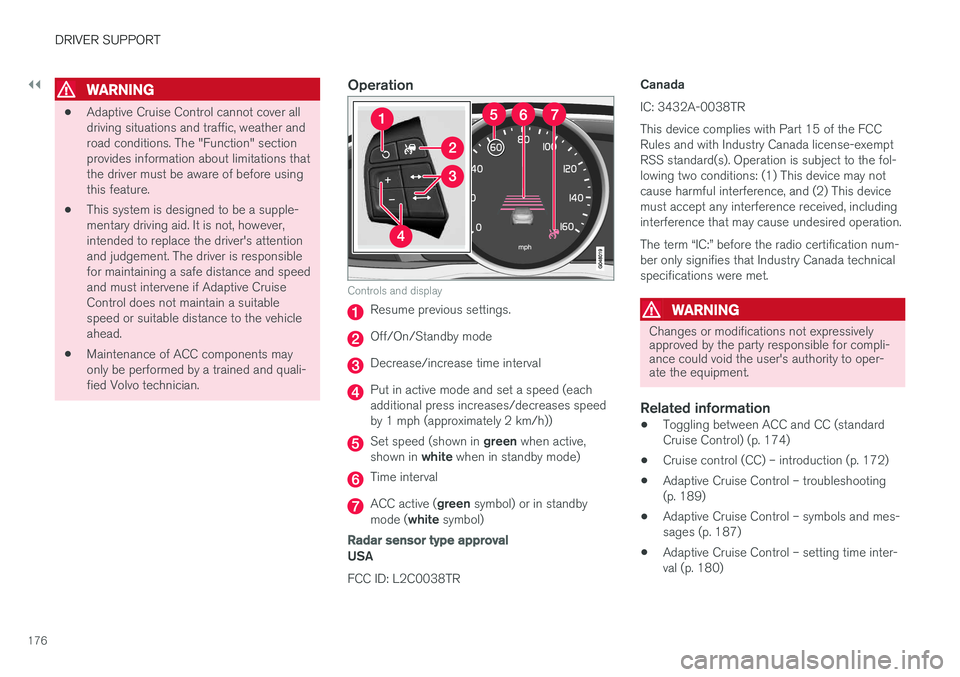
Operation
Controls and display
Resume previous settings.
Off/On/Standby mode
Decrease/increase time interval
Put in active mode and set a speed (each additional press increases/decreases speedby 1 mph (approximately 2 km/h))
Set speed (shown in
green when active,
shown in white when in standby mode)
Time interval
ACC active ( green symbol) or in standby
mode ( white symbol)
Radar sensor type approval
USA FCC ID: L2C0038TR CanadaIC: 3432A-0038TR This device complies with Part 15 of the FCC Rules and with Industry Canada license-exemptRSS standard(s). Operation is subject to the fol-lowing two conditions: (1) This device may notcause harmful interference, and (2) This devicemust accept any interference received, includinginterference that may cause undesired operation. The term “IC:” before the radio certification num- ber only signifies that Industry Canada technicalspecifications were met.
WARNING
Changes or modifications not expressively approved by the party responsible for compli-ance could void the user's authority to oper-ate the equipment.
Related information
•
Toggling between ACC and CC (standard Cruise Control) (p. 174)
• Cruise control (CC) – introduction (p. 172)
• Adaptive Cruise Control – troubleshooting(p. 189)
• Adaptive Cruise Control – symbols and mes-sages (p. 187)
• Adaptive Cruise Control – setting time inter-val (p. 180)
Page 181 of 396
DRIVER SUPPORT
}}
179
Adaptive Cruise Control – engaging
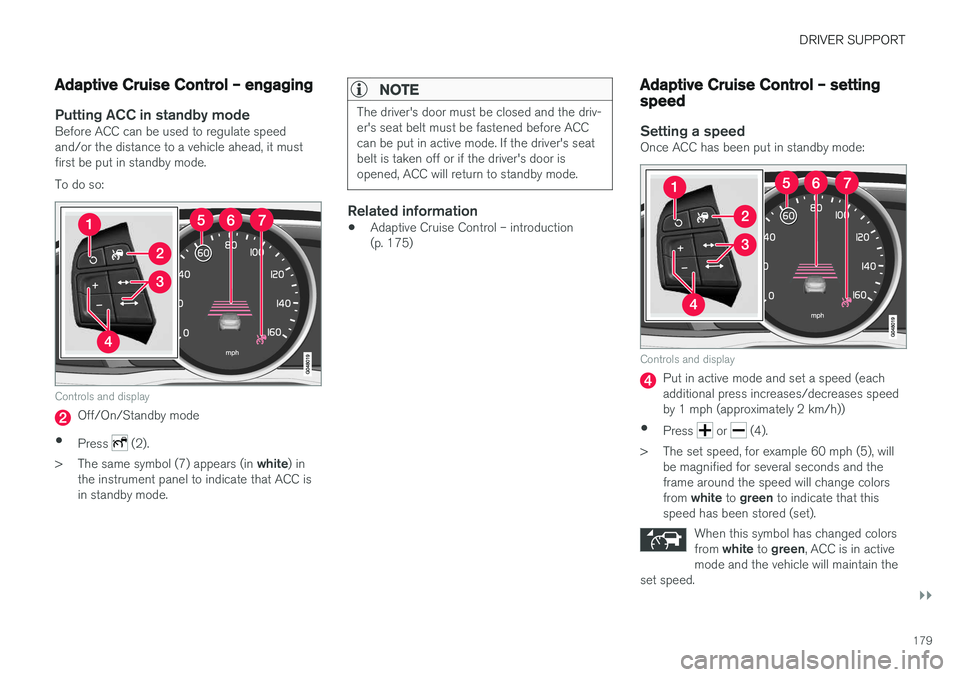
Putting ACC in standby modeBefore ACC can be used to regulate speed and/or the distance to a vehicle ahead, it mustfirst be put in standby mode. To do so:
Controls and display
Off/On/Standby mode
• Press
(2).
> The same symbol (7) appears (in white) in
the instrument panel to indicate that ACC is in standby mode.
NOTE
The driver's door must be closed and the driv- er's seat belt must be fastened before ACCcan be put in active mode. If the driver's seatbelt is taken off or if the driver's door isopened, ACC will return to standby mode.
Related information
• Adaptive Cruise Control – introduction (p. 175)
Adaptive Cruise Control – setting speed
Setting a speedOnce ACC has been put in standby mode:
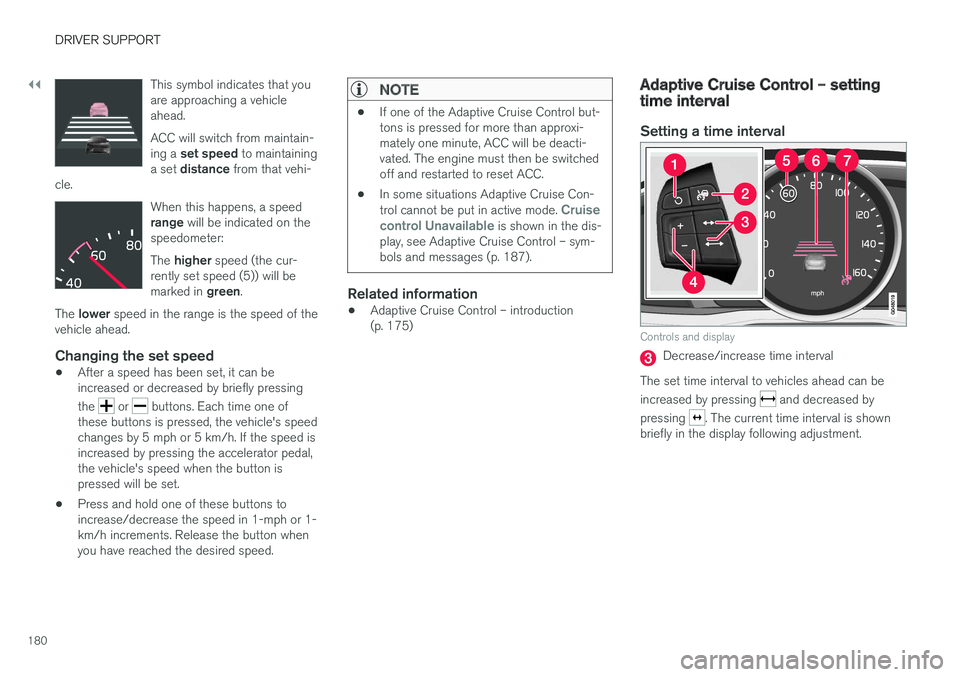
Controls and display
Put in active mode and set a speed (each additional press increases/decreases speedby 1 mph (approximately 2 km/h))
• Press
or (4).
> The set speed, for example 60 mph (5), will be magnified for several seconds and the frame around the speed will change colors from white to green to indicate that this
speed has been stored (set).
When this symbol has changed colorsfrom white to green , ACC is in active
mode and the vehicle will maintain the
set speed.
Page 182 of 396
||
DRIVER SUPPORT
180This symbol indicates that you are approaching a vehicleahead. ACC will switch from maintain- ing a
set speed to maintaining
a set distance from that vehi-
cle.
When this happens, a speed range will be indicated on the
speedometer: The higher speed (the cur-
rently set speed (5)) will be marked in green.
The lower speed in the range is the speed of the
vehicle ahead.
Changing the set speed
• After a speed has been set, it can be increased or decreased by briefly pressing the
or buttons. Each time one of
these buttons is pressed, the vehicle's speed changes by 5 mph or 5 km/h. If the speed isincreased by pressing the accelerator pedal,the vehicle's speed when the button ispressed will be set.
• Press and hold one of these buttons toincrease/decrease the speed in 1-mph or 1-km/h increments. Release the button whenyou have reached the desired speed.
NOTE
•
If one of the Adaptive Cruise Control but- tons is pressed for more than approxi-mately one minute, ACC will be deacti-vated. The engine must then be switchedoff and restarted to reset ACC.
• In some situations Adaptive Cruise Con- trol cannot be put in active mode.
Cruise
control Unavailable is shown in the dis-
play, see Adaptive Cruise Control – sym- bols and messages (p. 187).
Related information
• Adaptive Cruise Control – introduction (p. 175)
Adaptive Cruise Control – setting time interval
Setting a time interval
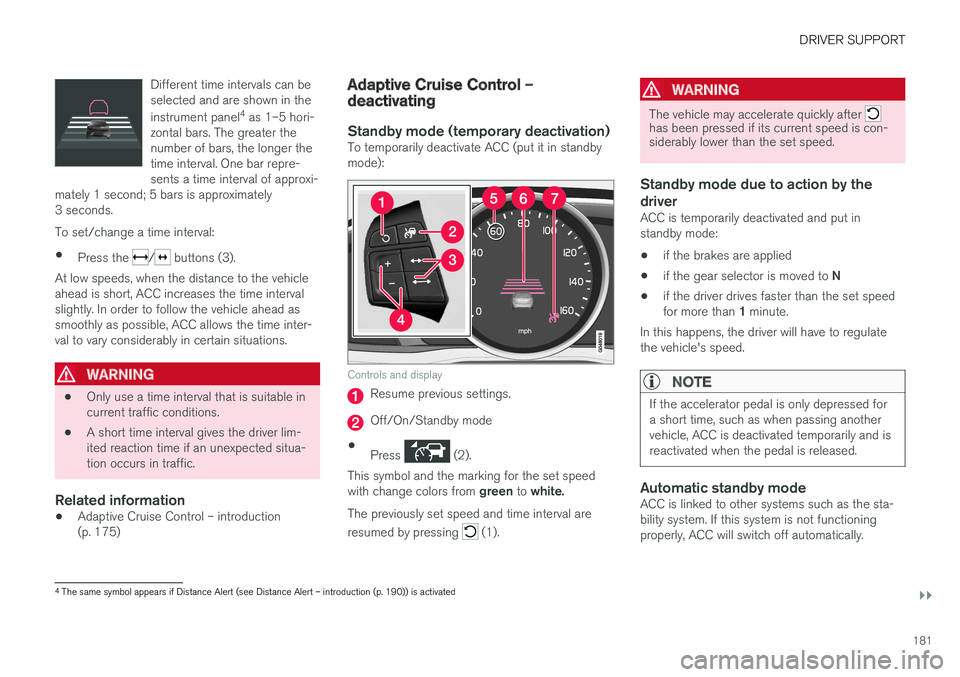
Controls and display
Decrease/increase time interval
The set time interval to vehicles ahead can be increased by pressing
and decreased by
pressing
. The current time interval is shown
briefly in the display following adjustment.
Page 183 of 396
DRIVER SUPPORT
}}
181
Different time intervals can be selected and are shown in the instrument panel
4
as 1–5 hori-
zontal bars. The greater the number of bars, the longer thetime interval. One bar repre-sents a time interval of approxi-
mately 1 second; 5 bars is approximately3 seconds.
To set/change a time interval:
• Press the
/ buttons (3).
At low speeds, when the distance to the vehicle ahead is short, ACC increases the time intervalslightly. In order to follow the vehicle ahead assmoothly as possible, ACC allows the time inter-val to vary considerably in certain situations.
WARNING
• Only use a time interval that is suitable in current traffic conditions.
• A short time interval gives the driver lim-ited reaction time if an unexpected situa-tion occurs in traffic.
Related information
• Adaptive Cruise Control – introduction(p. 175)
Adaptive Cruise Control – deactivating
Standby mode (temporary deactivation)To temporarily deactivate ACC (put it in standby mode):
Controls and display
Resume previous settings.
Off/On/Standby mode
• Press
(2).
This symbol and the marking for the set speed with change colors from green to white.
The previously set speed and time interval are resumed by pressing
(1).
WARNING
The vehicle may accelerate quickly after has been pressed if its current speed is con- siderably lower than the set speed.
Standby mode due to action by the driver
ACC is temporarily deactivated and put in standby mode:
• if the brakes are applied
• if the gear selector is moved to
N
• if the driver drives faster than the set speed for more than
1 minute.
In this happens, the driver will have to regulate
the vehicle's speed.
NOTE
If the accelerator pedal is only depressed for a short time, such as when passing anothervehicle, ACC is deactivated temporarily and isreactivated when the pedal is released.
Automatic standby modeACC is linked to other systems such as the sta- bility system. If this system is not functioningproperly, ACC will switch off automatically.
4 The same symbol appears if Distance Alert (see Distance Alert – introduction (p. 190)) is activated
Page 184 of 396
||
DRIVER SUPPORT
182In the event of automatic deactivation, an audible signal will sound and the message
Cruise
control Cancelled is shown in the instrument
panel. The driver must then intervene and adapt the vehicle's speed to the surrounding traffic andregulate the distance to the vehicle ahead. An automatic switch to standby mode may be caused if:
• engine speed (rpm) is too high/low
• The driver's door is opened
• The driver unbuckles his/her seat belt
• the vehicle's speed goes below 18 mph(30 km/h)
• the wheels lose traction
• brake temperature is high
• the radar sensor is obstructed by, for exam-ple, wet snow or rain.
Resuming the set speedIf ACC is in standby mode, it can be reactivated by pressing the
button on the steering wheel
keypad. The vehicle will return to the most recently set speed.
WARNING
The vehicle may accelerate quickly after has been pressed if its current speed is con- siderably lower than the set speed.
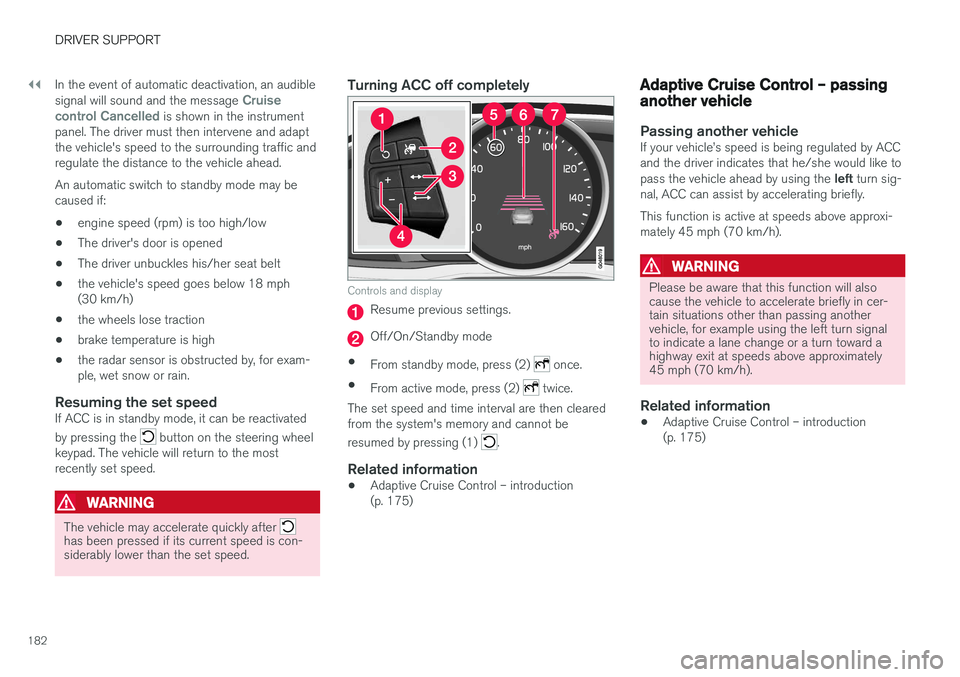
Turning ACC off completely
Controls and display
Resume previous settings.
Off/On/Standby mode
• From standby mode, press (2)
once.
• From active mode, press (2)
twice.
The set speed and time interval are then cleared from the system's memory and cannot be resumed by pressing (1)
.
Related information
• Adaptive Cruise Control – introduction (p. 175)
Adaptive Cruise Control – passing another vehicle
Passing another vehicleIf your vehicle
Page 189 of 396
DRIVER SUPPORT
}}
187
Adaptive Cruise Control – symbols and messages
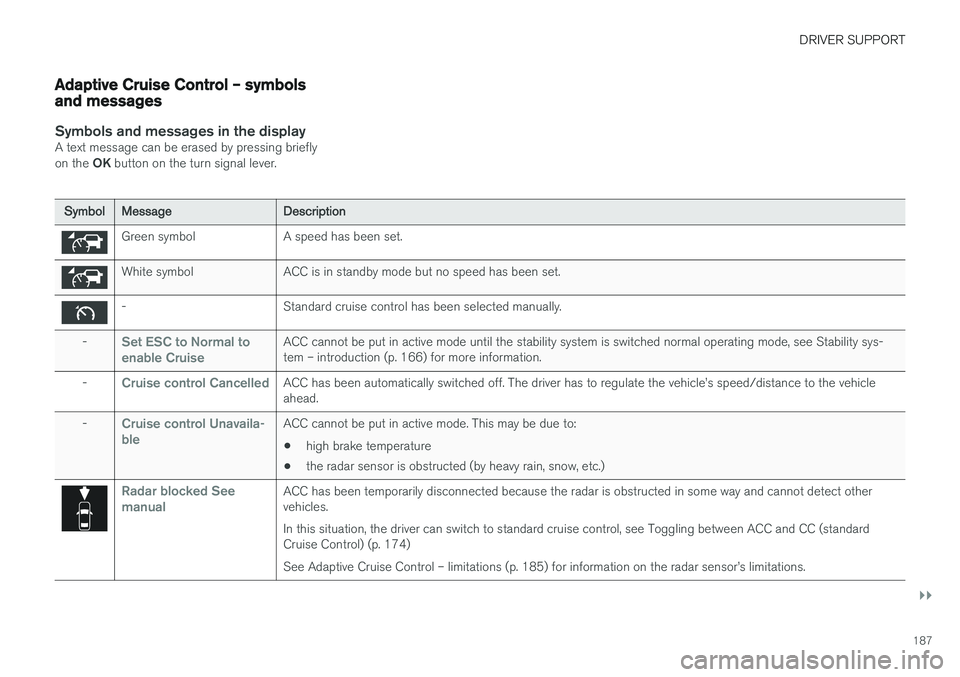
Symbols and messages in the displayA text message can be erased by pressing briefly on the OK button on the turn signal lever.
Symbol Message Description
Green symbol A speed has been set.
White symbol ACC is in standby mode but no speed has been set.
- Standard cruise control has been selected manually.
-
Set ESC to Normal to enable CruiseACC cannot be put in active mode until the stability system is switched normal operating mode, see Stability sys- tem – introduction (p. 166) for more information.
-
Cruise control CancelledACC has been automatically switched off. The driver has to regulate the vehicle