display VOLVO S60 INSCRIPTION 2016 Owner´s Manual
[x] Cancel search | Manufacturer: VOLVO, Model Year: 2016, Model line: S60 INSCRIPTION, Model: VOLVO S60 INSCRIPTION 2016Pages: 344, PDF Size: 7.24 MB
Page 286 of 344
||
10 Maintenance and servicing
10
284
accessed in MY CAR by pressing OK/MENU
and then selecting Maintenance & repair.
Booking information and data from the vehicle
If you request an appointment from your vehi- cle, with your consent, booking information and data about your vehicle 1
will be transmit-
ted to your preferred retailer.
Using the serviceOnce the prerequisites have been estab- lished, all CSB-related menus can beaccessed in MY CAR by pressing OK/MENU
and then selecting
Maintenance & repair.
If the time for the next regularly scheduled service is approaching, if the vehicle requirescertain types of repairs or if a system needsto be checked, a message will be displayed.You will then by guided through the stepsrequired to book service or repairs.
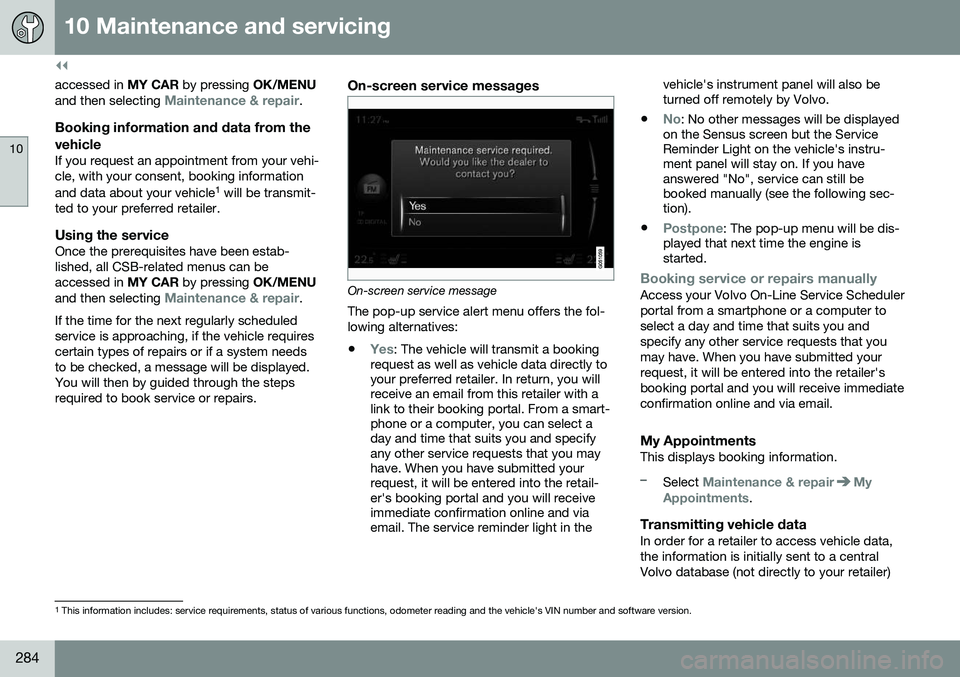
On-screen service messages
On-screen service message The pop-up service alert menu offers the fol- lowing alternatives:
•
Yes: The vehicle will transmit a booking
request as well as vehicle data directly to your preferred retailer. In return, you willreceive an email from this retailer with alink to their booking portal. From a smart-phone or a computer, you can select aday and time that suits you and specifyany other service requests that you mayhave. When you have submitted yourrequest, it will be entered into the retail-er's booking portal and you will receiveimmediate confirmation online and viaemail. The service reminder light in the vehicle's instrument panel will also beturned off remotely by Volvo.
•
No: No other messages will be displayed
on the Sensus screen but the Service Reminder Light on the vehicle's instru-ment panel will stay on. If you haveanswered "No", service can still bebooked manually (see the following sec-tion).
•
Postpone: The pop-up menu will be dis-
played that next time the engine is started.
Booking service or repairs manuallyAccess your Volvo On-Line Service Scheduler portal from a smartphone or a computer toselect a day and time that suits you andspecify any other service requests that youmay have. When you have submitted yourrequest, it will be entered into the retailer'sbooking portal and you will receive immediateconfirmation online and via email.
My AppointmentsThis displays booking information.
–Select Maintenance & repairMy
Appointments.
Transmitting vehicle dataIn order for a retailer to access vehicle data, the information is initially sent to a centralVolvo database (not directly to your retailer)
1 This information includes: service requirements, status of various functions, odometer reading and the vehicle's VIN number and software version.
Page 289 of 344
10 Maintenance and servicing
10
}}
* Option/accessory, for more information, see Introduction.287
Checking and adding oil
NOTE
Before checking the oil: • The car should be parked on a level surface.
• If the engine is warm
, wait for at least
10 – 15 minutes after the engine hasbeen switched off.
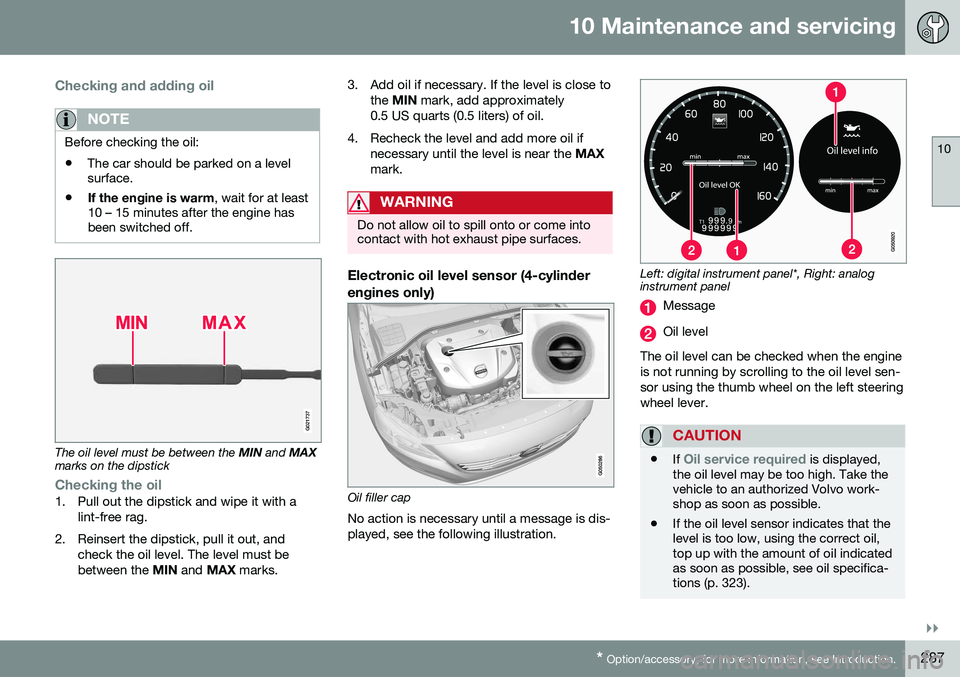
G021737
The oil level must be between the MIN and MAX
marks on the dipstick
Checking the oil1. Pull out the dipstick and wipe it with a
lint-free rag.
2. Reinsert the dipstick, pull it out, and check the oil level. The level must be between the MIN and MAX marks. 3. Add oil if necessary. If the level is close to
the MIN mark, add approximately
0.5 US quarts (0.5 liters) of oil.
4. Recheck the level and add more oil if necessary until the level is near the MAX
mark.
WARNING
Do not allow oil to spill onto or come into contact with hot exhaust pipe surfaces.
Electronic oil level sensor (4-cylinder engines only)
Oil filler cap
No action is necessary until a message is dis- played, see the following illustration.
Left: digital instrument panel*, Right: analog instrument panel
Message
Oil level
The oil level can be checked when the engine is not running by scrolling to the oil level sen-sor using the thumb wheel on the left steeringwheel lever.
CAUTION
• If Oil service required is displayed,
the oil level may be too high. Take the vehicle to an authorized Volvo work-shop as soon as possible.
• If the oil level sensor indicates that thelevel is too low, using the correct oil,top up with the amount of oil indicatedas soon as possible, see oil specifica-tions (p. 323).
Page 290 of 344
||
10 Maintenance and servicing
10
288
WARNING
Do not allow oil to spill onto or come into contact with hot exhaust pipe surfaces.
Electronically checking the oil levelThe oil level should be checked at regular intervals, particularly during the period up tothe first scheduled maintenance service. To check the oil level:
1. Activate ignition mode II, see Ignition
modes (p. 69).
2. Turn the thumb wheel on the left steering wheel lever until
Oil level is displayed.
> The oil level will be displayed.
NOTE
• The system cannot detect changes in the oil level immediately. The vehiclemust be driven approximately 20 miles(30 km) or have been parked on levelground with the engine off for5 minutes before the oil level readingwill be correct.
• If the necessary conditions are not metfor checking the oil level electronically(time interval after the engine wasswitched off, if the vehicle is parked on an incline, etc.),
No values availablewill be displayed. This does
not indi-
cate a problem with the oil level sen- sor.
Engine compartment – coolant
Normally, the coolant does not need to be changed. If the system must be drained, con-sult a trained and qualified Volvo service tech-nician.
Level check and fillingSee Fuel tank volume – specification and vol-ume (p. 325) for information on cooling sys-tem capacities.
CAUTION
• If necessary, top up the cooling sys- tem with Volvo Genuine Coolant/Anti-freeze only (a 50/50 mix of water andantifreeze).
• Different types of antifreeze/coolantmay not be mixed.
• If the cooling system is drained, itshould be flushed with clean water orpremixed anti-freeze before it is refilledwith the correct mixture of water/anti-freeze.
• The cooling system must always bekept filled to the correct level, and thelevel must be between the
MIN and
MAX marks. If it is not kept filled, there
can be high local temperatures in theengine which could result in damage.Check coolant regularly!
• Do not top up with water only. Thisreduces the rust-protective and anti-freeze qualities of the coolant and hasa lower boiling point. It can also causedamage to the cooling system if itshould freeze.
• Do not use chlorinated tap water in thevehicle's cooling system.
Page 298 of 344
||
10 Maintenance and servicing
10
296
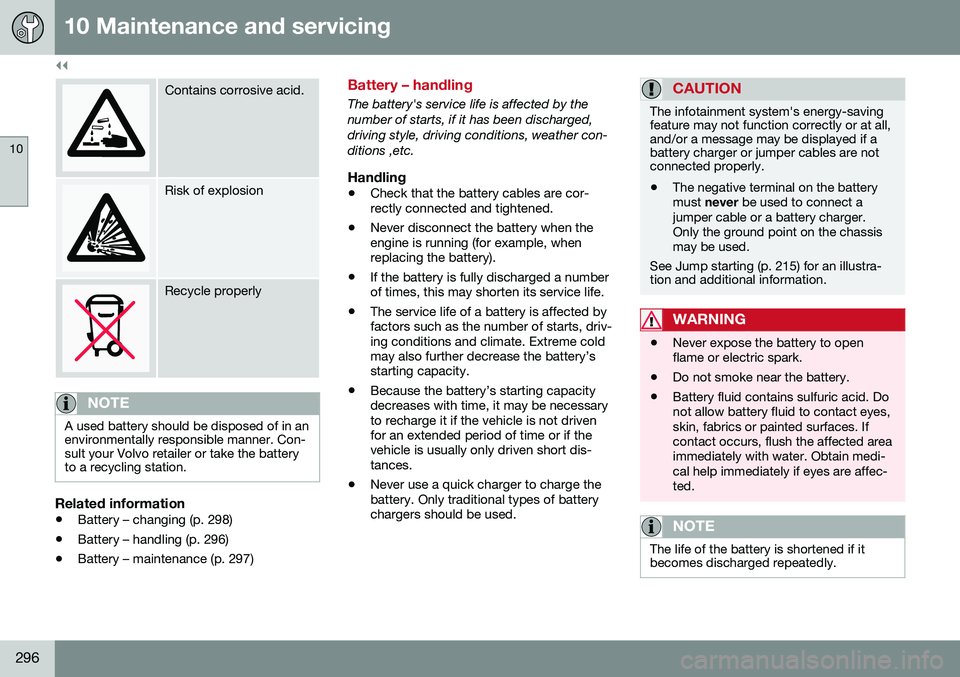
Contains corrosive acid.
Risk of explosion
Recycle properly
NOTE
A used battery should be disposed of in an environmentally responsible manner. Con-sult your Volvo retailer or take the batteryto a recycling station.
Related information
•Battery – changing (p. 298)
• Battery – handling (p. 296)
• Battery – maintenance (p. 297)
Battery – handling
The battery's service life is affected by the number of starts, if it has been discharged,driving style, driving conditions, weather con-ditions ,etc.
Handling
• Check that the battery cables are cor- rectly connected and tightened.
• Never disconnect the battery when theengine is running (for example, whenreplacing the battery).
• If the battery is fully discharged a numberof times, this may shorten its service life.
• The service life of a battery is affected byfactors such as the number of starts, driv-ing conditions and climate. Extreme coldmay also further decrease the battery’sstarting capacity.
• Because the battery’s starting capacitydecreases with time, it may be necessaryto recharge it if the vehicle is not drivenfor an extended period of time or if thevehicle is usually only driven short dis-tances.
• Never use a quick charger to charge thebattery. Only traditional types of batterychargers should be used.
CAUTION
The infotainment system's energy-saving feature may not function correctly or at all,and/or a message may be displayed if abattery charger or jumper cables are notconnected properly.
• The negative terminal on the battery must
never be used to connect a
jumper cable or a battery charger.Only the ground point on the chassismay be used.
See Jump starting (p. 215) for an illustra- tion and additional information.
WARNING
• Never expose the battery to open flame or electric spark.
• Do not smoke near the battery.
• Battery fluid contains sulfuric acid. Donot allow battery fluid to contact eyes,skin, fabrics or painted surfaces. Ifcontact occurs, flush the affected areaimmediately with water. Obtain medi-cal help immediately if eyes are affec-ted.
NOTE
The life of the battery is shortened if it becomes discharged repeatedly.
Page 305 of 344
10 Maintenance and servicing
10
}}
* Option/accessory, for more information, see Introduction.303
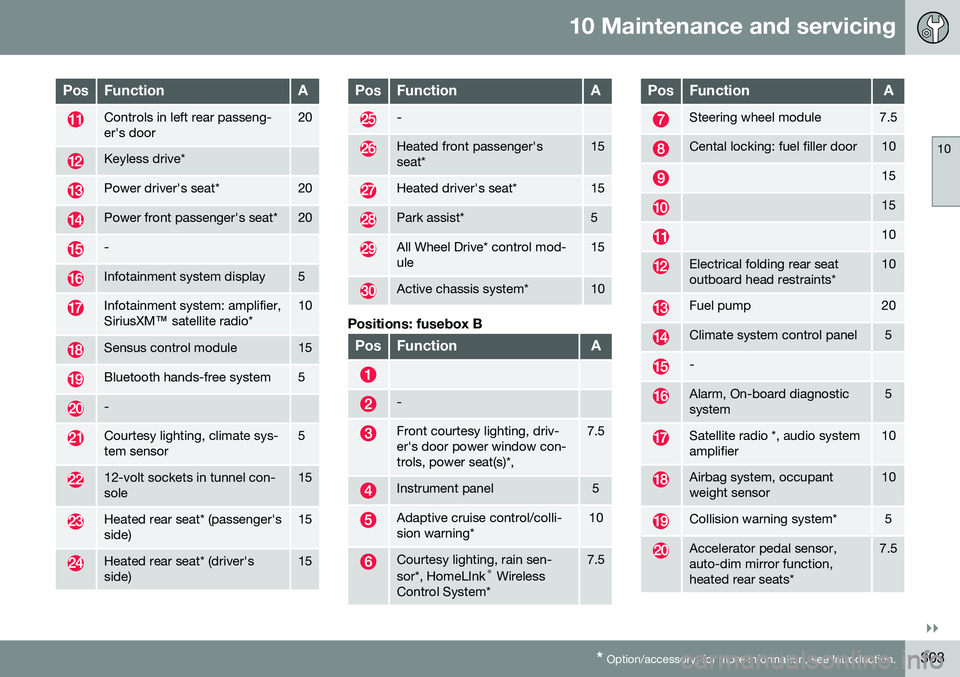
PosFunctionA
Controls in left rear passeng- er's door20
Keyless drive*
Power driver's seat*20
Power front passenger's seat*20
-
Infotainment system display5
Infotainment system: amplifier, SiriusXM ™ satellite radio*10
Sensus control module15
Bluetooth hands-free system5
-
Courtesy lighting, climate sys- tem sensor5
12-volt sockets in tunnel con- sole15
Heated rear seat* (passenger's side)15
Heated rear seat* (driver's side)15
PosFunctionA
-
Heated front passenger's seat*15
Heated driver's seat*15
Park assist*5
All Wheel Drive* control mod- ule15
Active chassis system*10
Positions: fusebox B
PosFunctionA
-
Front courtesy lighting, driv- er's door power window con-trols, power seat(s)*,7.5
Instrument panel5
Adaptive cruise control/colli- sion warning*10
Courtesy lighting, rain sen- sor*, HomeLInk ®
Wireless
Control System*7.5
PosFunctionA
Steering wheel module7.5
Cental locking: fuel filler door10
15
15
10
Electrical folding rear seat outboard head restraints*10
Fuel pump20
Climate system control panel5
-
Alarm, On-board diagnostic system5
Satellite radio *, audio system amplifier10
Airbag system, occupant weight sensor10
Collision warning system*5
Accelerator pedal sensor, auto-dim mirror function,heated rear seats*7.5
Page 329 of 344
11 Specifications
11
}}
327
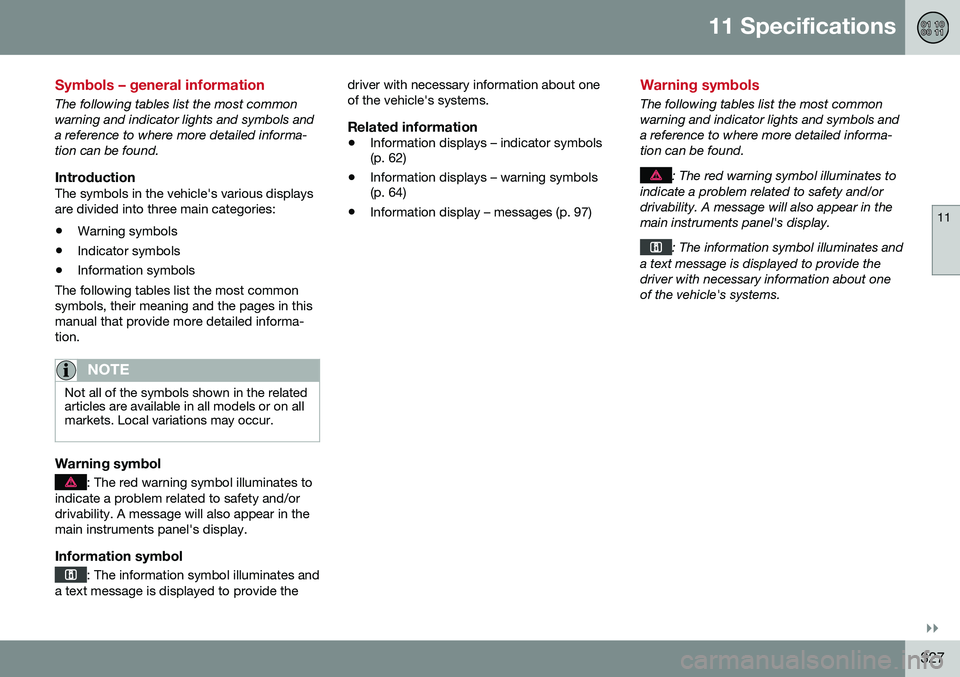
Symbols – general information
The following tables list the most common warning and indicator lights and symbols anda reference to where more detailed informa-tion can be found.
IntroductionThe symbols in the vehicle's various displaysare divided into three main categories:• Warning symbols
• Indicator symbols
• Information symbols
The following tables list the most commonsymbols, their meaning and the pages in thismanual that provide more detailed informa-tion.
NOTE
Not all of the symbols shown in the related articles are available in all models or on allmarkets. Local variations may occur.
Warning symbol
: The red warning symbol illuminates to
indicate a problem related to safety and/or drivability. A message will also appear in themain instruments panel's display.
Information symbol
: The information symbol illuminates and
a text message is displayed to provide the driver with necessary information about one of the vehicle's systems.
Related information
•
Information displays – indicator symbols (p. 62)
• Information displays – warning symbols(p. 64)
• Information display – messages (p. 97)
Warning symbols
The following tables list the most common warning and indicator lights and symbols anda reference to where more detailed informa-tion can be found.
: The red warning symbol illuminates to
indicate a problem related to safety and/or drivability. A message will also appear in themain instruments panel's display.
: The information symbol illuminates and
a text message is displayed to provide the driver with necessary information about oneof the vehicle's systems.
Page 330 of 344
||
11 Specifications
11
328* Option/accessory, for more information, see Introduction.
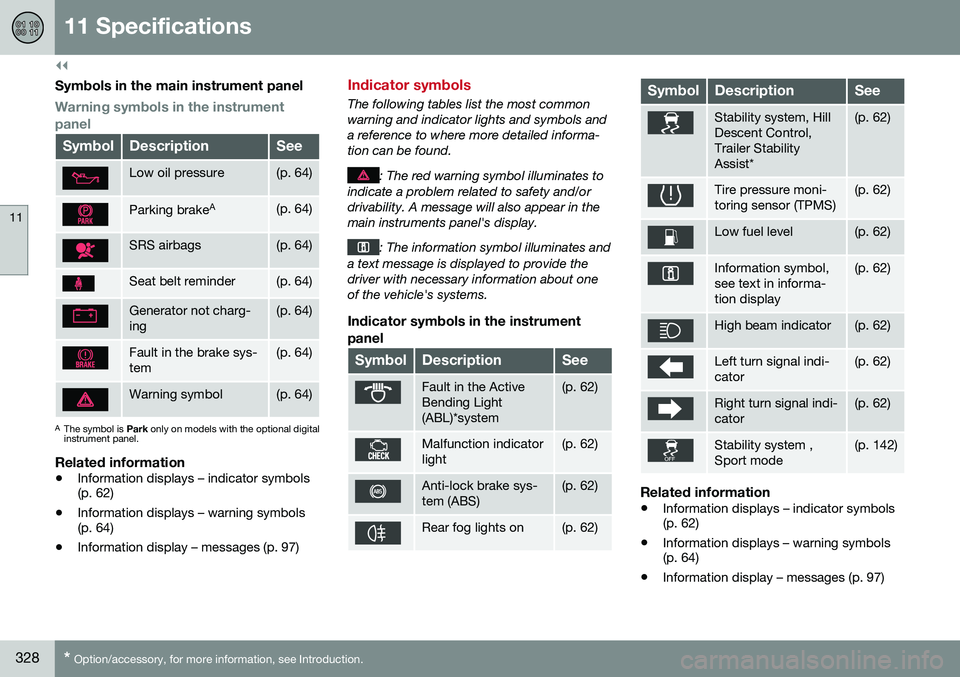
Symbols in the main instrument panel
Warning symbols in the instrument panel
SymbolDescriptionSee
Low oil pressure(p. 64)
Parking brake A(p. 64)
SRS airbags(p. 64)
Seat belt reminder(p. 64)
Generator not charg- ing(p. 64)
Fault in the brake sys- tem(p. 64)
Warning symbol(p. 64)
A
The symbol is Park only on models with the optional digital
instrument panel.
Related information
• Information displays – indicator symbols (p. 62)
• Information displays – warning symbols(p. 64)
• Information display – messages (p. 97)
Indicator symbols
The following tables list the most common warning and indicator lights and symbols anda reference to where more detailed informa-tion can be found.
: The red warning symbol illuminates to
indicate a problem related to safety and/or drivability. A message will also appear in themain instruments panel's display.
: The information symbol illuminates and
a text message is displayed to provide the driver with necessary information about oneof the vehicle's systems.
Indicator symbols in the instrument
panel
SymbolDescriptionSee
Fault in the Active Bending Light(ABL)*system(p. 62)
Malfunction indicator light(p. 62)
Anti-lock brake sys- tem (ABS)(p. 62)
Rear fog lights on(p. 62)
SymbolDescriptionSee
Stability system, Hill Descent Control,Trailer StabilityAssist*(p. 62)
Tire pressure moni- toring sensor (TPMS)(p. 62)
Low fuel level(p. 62)
Information symbol, see text in informa-tion display(p. 62)
High beam indicator(p. 62)
Left turn signal indi- cator(p. 62)
Right turn signal indi- cator(p. 62)
Stability system , Sport mode(p. 142)
Related information
• Information displays – indicator symbols (p. 62)
• Information displays – warning symbols(p. 64)
• Information display – messages (p. 97)
Page 331 of 344
11 Specifications
11
* Option/accessory, for more information, see Introduction.329
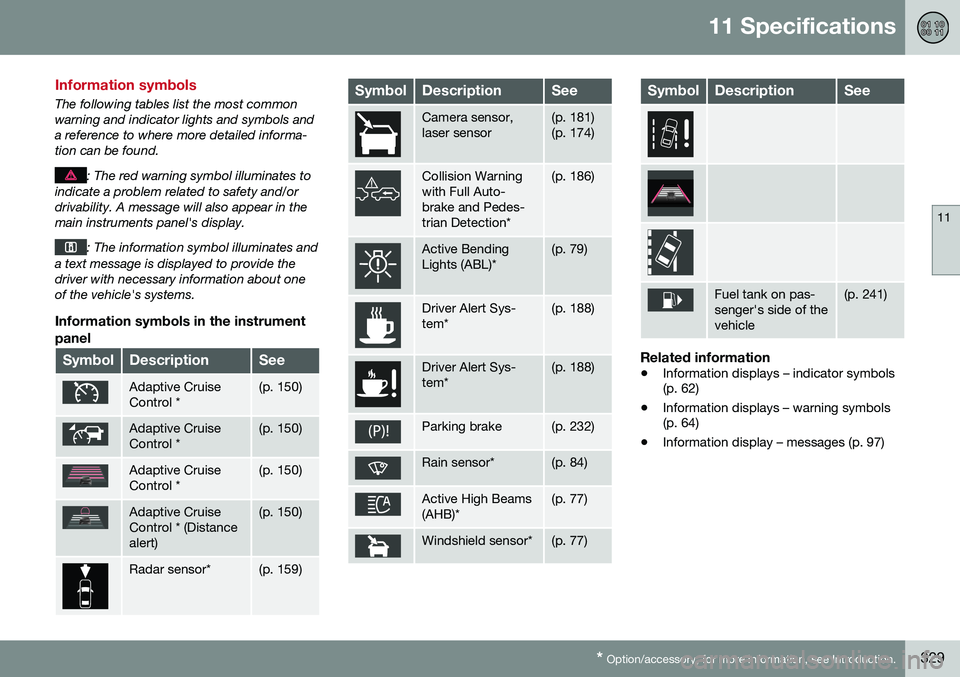
Information symbols
The following tables list the most common warning and indicator lights and symbols anda reference to where more detailed informa-tion can be found.
: The red warning symbol illuminates to
indicate a problem related to safety and/or drivability. A message will also appear in themain instruments panel's display.
: The information symbol illuminates and
a text message is displayed to provide the driver with necessary information about oneof the vehicle's systems.
Information symbols in the instrument
panel
SymbolDescriptionSee
Adaptive Cruise Control *(p. 150)
Adaptive Cruise Control *(p. 150)
Adaptive Cruise Control *(p. 150)
Adaptive Cruise Control * (Distancealert)(p. 150)
Radar sensor*(p. 159)
SymbolDescriptionSee
Camera sensor, laser sensor(p. 181) (p. 174)
Collision Warning with Full Auto-brake and Pedes-trian Detection*(p. 186)
Active Bending Lights (ABL)*(p. 79)
Driver Alert Sys- tem*(p. 188)
Driver Alert Sys- tem*(p. 188)
Parking brake(p. 232)
Rain sensor*(p. 84)
Active High Beams (AHB)*(p. 77)
Windshield sensor*(p. 77)
SymbolDescriptionSee
Fuel tank on pas- senger's side of thevehicle(p. 241)
Related information
• Information displays – indicator symbols (p. 62)
• Information displays – warning symbols(p. 64)
• Information display – messages (p. 97)
Page 332 of 344
11 Specifications
11
330* Option/accessory, for more information, see Introduction.
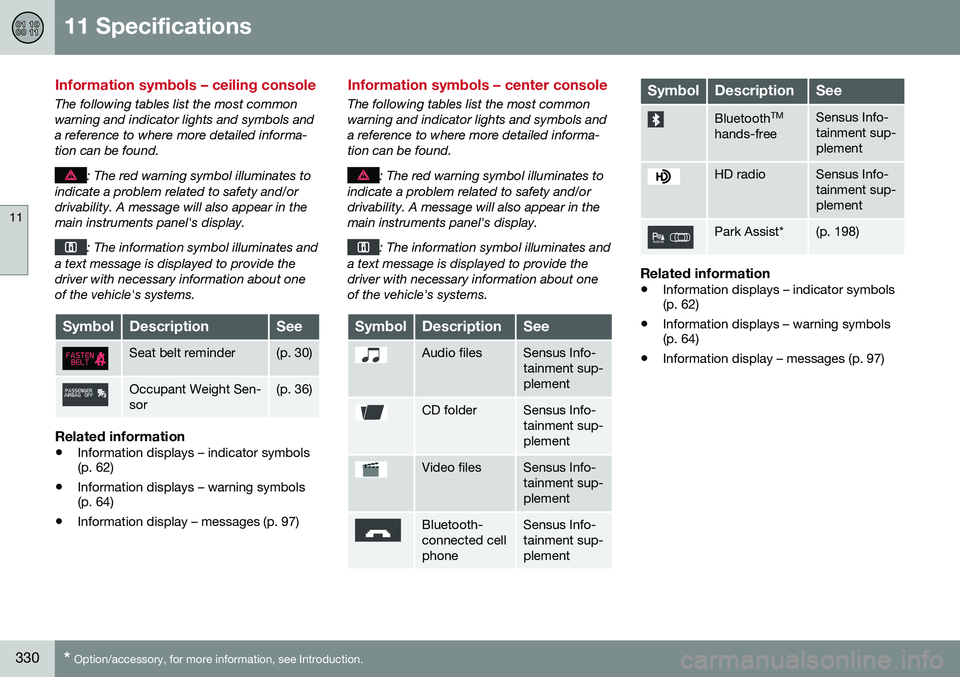
Information symbols – ceiling console
The following tables list the most common warning and indicator lights and symbols anda reference to where more detailed informa-tion can be found.
: The red warning symbol illuminates to
indicate a problem related to safety and/or drivability. A message will also appear in themain instruments panel's display.
: The information symbol illuminates and
a text message is displayed to provide the driver with necessary information about oneof the vehicle's systems.
SymbolDescriptionSee
Seat belt reminder(p. 30)
Occupant Weight Sen- sor(p. 36)
Related information
• Information displays – indicator symbols (p. 62)
• Information displays – warning symbols(p. 64)
• Information display – messages (p. 97)
Information symbols – center console
The following tables list the most common warning and indicator lights and symbols anda reference to where more detailed informa-tion can be found.
: The red warning symbol illuminates to
indicate a problem related to safety and/or drivability. A message will also appear in themain instruments panel's display.
: The information symbol illuminates and
a text message is displayed to provide the driver with necessary information about oneof the vehicle's systems.
SymbolDescriptionSee
Audio filesSensus Info- tainment sup-plement
CD folderSensus Info- tainment sup-plement
Video filesSensus Info- tainment sup-plement
Bluetooth- connected cellphoneSensus Info- tainment sup-plement
SymbolDescriptionSee
Bluetooth TM
hands-freeSensus Info- tainment sup-plement
HD radioSensus Info- tainment sup-plement
Park Assist*(p. 198)
Related information
• Information displays – indicator symbols (p. 62)
• Information displays – warning symbols(p. 64)
• Information display – messages (p. 97)