battery VOLVO S60 INSCRIPTION 2016 Owner´s Manual
[x] Cancel search | Manufacturer: VOLVO, Model Year: 2016, Model line: S60 INSCRIPTION, Model: VOLVO S60 INSCRIPTION 2016Pages: 344, PDF Size: 7.24 MB
Page 133 of 344
06 Locks and alarm
06
}}
* Option/accessory, for more information, see Introduction.131
Keyless drive*– locking/unlocking
This system makes it possible to unlock and lock the vehicle without having to press anybuttons on the remote key. It is only neces-sary to have a keyless drive remote key inyour possession to operate the central lockingsystem.
NOTE
• The gear selector must in the
P posi-
tion before the vehicle can be locked and the alarm can be armed.
• The buttons on the keyless driveremote key can also be used to lockand unlock the vehicle. For more infor-mation, see Remote key and key blade(p. 124).
Both of the remote keys provided with the vehicle have the keyless function, and addi-tional ones can be ordered. The system canaccommodate up to six remote keys. The red rings in the illustration indicate the area around the vehicle that is within range ofthe keyless drive antennas.
Locking the vehicle
NOTE
Unlocking the vehicleThe number of doors that are unlocked at the same time can be set in the vehicle's menusystem. Press
MY CAR and go to
Car
settings
Lock settingsKeyless entry.
For a description of the menu system, see My Car – introduction (p. 66).
Related information
• Alarm indicator (p. 137)
Keyless drive* – unlocking with key blade
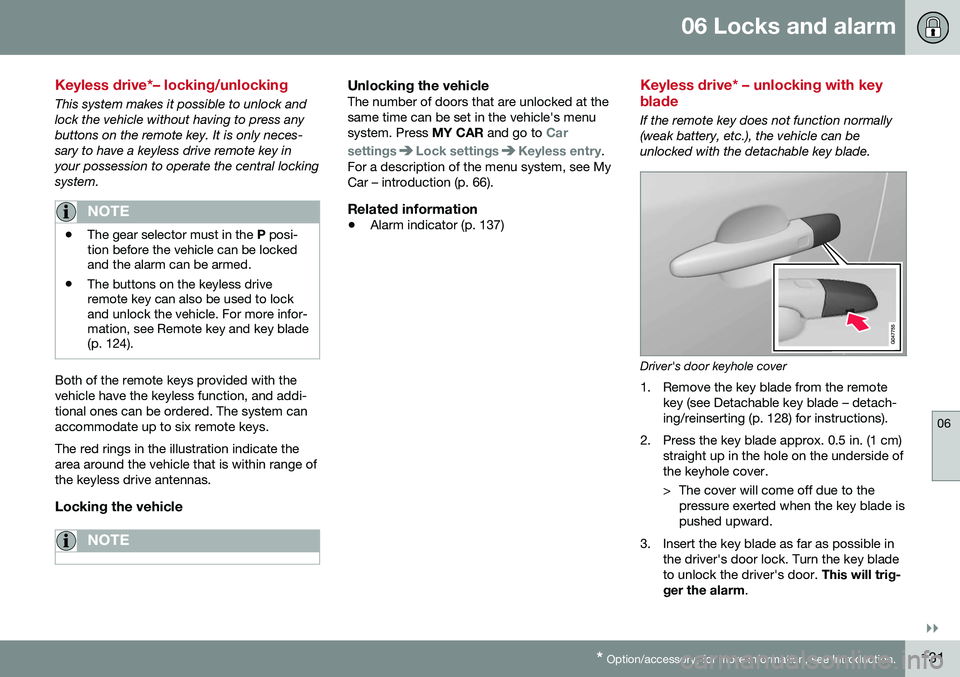
If the remote key does not function normally (weak battery, etc.), the vehicle can beunlocked with the detachable key blade.
Driver's door keyhole cover
1. Remove the key blade from the remote
key (see Detachable key blade – detach- ing/reinserting (p. 128) for instructions).
2. Press the key blade approx. 0.5 in. (1 cm) straight up in the hole on the underside ofthe keyhole cover.
> The cover will come off due to thepressure exerted when the key blade is pushed upward.
3. Insert the key blade as far as possible in the driver's door lock. Turn the key bladeto unlock the driver's door. This will trig-
ger the alarm .
Page 137 of 344
06 Locks and alarm
06
135
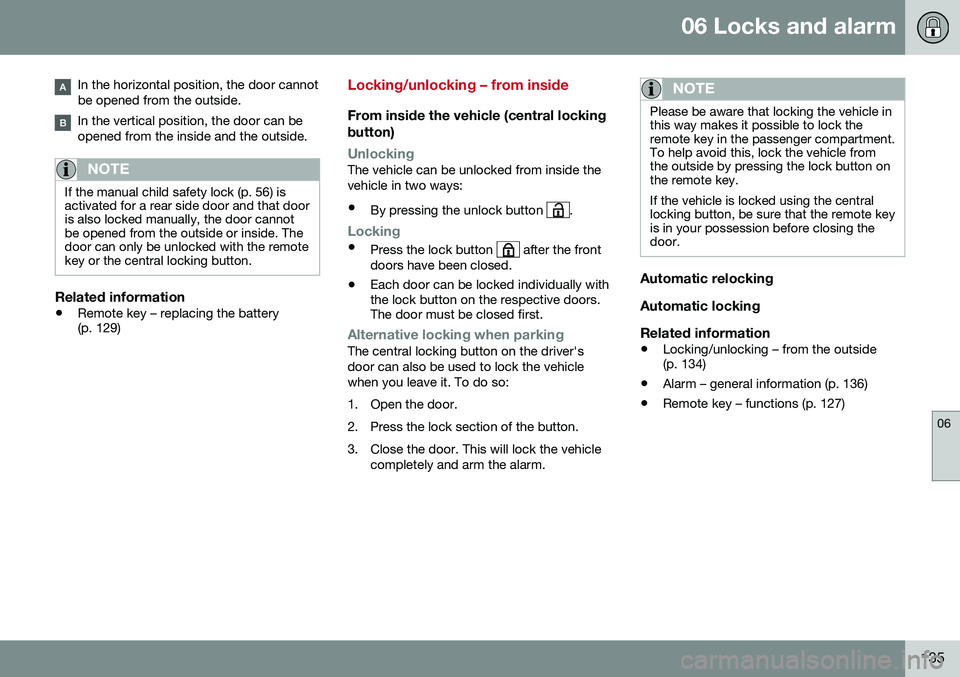
In the horizontal position, the door cannot be opened from the outside.
In the vertical position, the door can be opened from the inside and the outside.
NOTE
If the manual child safety lock (p. 56) is activated for a rear side door and that dooris also locked manually, the door cannotbe opened from the outside or inside. Thedoor can only be unlocked with the remotekey or the central locking button.
Related information
•Remote key – replacing the battery (p. 129)
Locking/unlocking – from inside
From inside the vehicle (central locking
button)
UnlockingThe vehicle can be unlocked from inside the vehicle in two ways:
• By pressing the unlock button
.
Locking
• Press the lock button after the front
doors have been closed.
• Each door can be locked individually with the lock button on the respective doors.The door must be closed first.
Alternative locking when parkingThe central locking button on the driver's door can also be used to lock the vehiclewhen you leave it. To do so:
1. Open the door.
2. Press the lock section of the button.
3. Close the door. This will lock the vehicle
completely and arm the alarm.
NOTE
Please be aware that locking the vehicle in this way makes it possible to lock theremote key in the passenger compartment.To help avoid this, lock the vehicle fromthe outside by pressing the lock button onthe remote key. If the vehicle is locked using the central locking button, be sure that the remote keyis in your possession before closing thedoor.
Automatic relocking Automatic lockingRelated information
• Locking/unlocking – from the outside (p. 134)
• Alarm – general information (p. 136)
• Remote key – functions (p. 127)
Page 138 of 344
06 Locks and alarm
06
136
Locking/unlocking – glove compartment
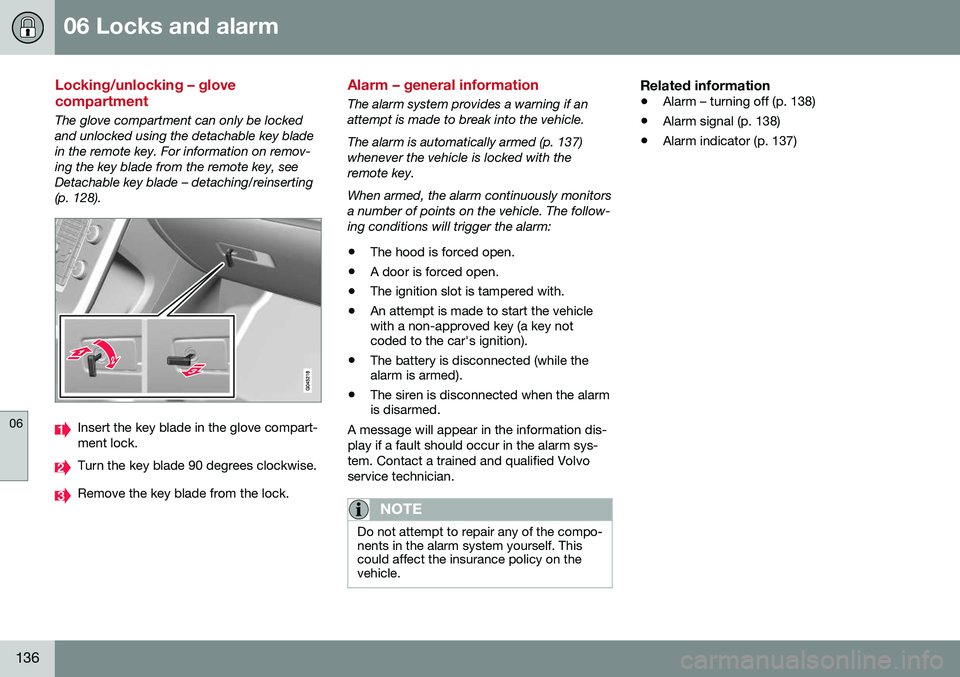
The glove compartment can only be locked and unlocked using the detachable key bladein the remote key. For information on remov-ing the key blade from the remote key, seeDetachable key blade – detaching/reinserting(p. 128).
Insert the key blade in the glove compart- ment lock.
Turn the key blade 90 degrees clockwise.
Remove the key blade from the lock.
Alarm – general information
The alarm system provides a warning if an attempt is made to break into the vehicle. The alarm is automatically armed (p. 137) whenever the vehicle is locked with theremote key. When armed, the alarm continuously monitors a number of points on the vehicle. The follow-ing conditions will trigger the alarm:• The hood is forced open.
• A door is forced open.
• The ignition slot is tampered with.
• An attempt is made to start the vehicle with a non-approved key (a key notcoded to the car's ignition).
• The battery is disconnected (while thealarm is armed).
• The siren is disconnected when the alarmis disarmed.
A message will appear in the information dis- play if a fault should occur in the alarm sys-tem. Contact a trained and qualified Volvoservice technician.
NOTE
Do not attempt to repair any of the compo- nents in the alarm system yourself. Thiscould affect the insurance policy on thevehicle.
Related information
• Alarm – turning off (p. 138)
• Alarm signal (p. 138)
• Alarm indicator (p. 137)
Page 140 of 344
06 Locks and alarm
06
138
Alarm signal
An audible (p. 136) signal is given by a battery powered siren. The alarm cycle lasts for30 seconds. The visual alarm signal is given by flashing all turn signals for approximately 5 minutes oruntil the alarm is turned off.
Related information
•Alarm indicator (p. 137)
• Alarm – arming/disarming (p. 137)
• Alarm – turning off (p. 138)
Alarm – turning off
The alarm system provides a warning if an attempt is made to break into the vehicle. If the alarm is sounding, it can be stopped by pressing the Unlock button on the remote keyor by inserting the remote key in the ignitionslot. Two short flashes from the car's turn sig-nals confirm that the alarm has been turnedoff.
Related information
•Alarm indicator (p. 137)
• Alarm – arming/disarming (p. 137)
• Remote key – replacing the battery (p. 129)
Alarm-related functions
The following is general information regarding the alarm system in your vehicle.
Automatic re-arming
Remote key not functioning
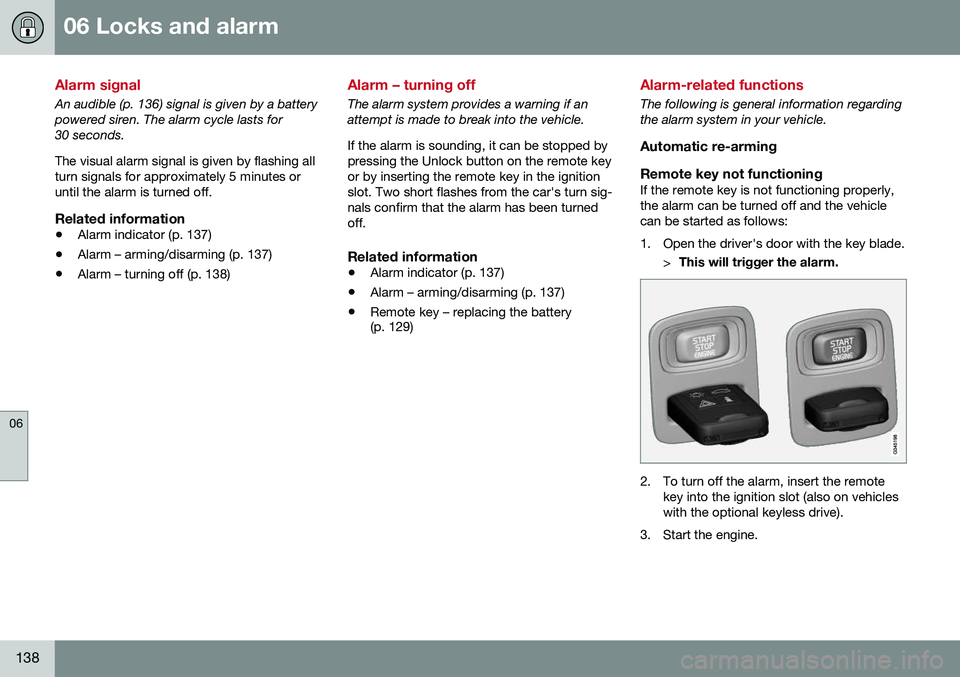
If the remote key is not functioning properly,the alarm can be turned off and the vehiclecan be started as follows:
1. Open the driver's door with the key blade. >This will trigger the alarm.
2. To turn off the alarm, insert the remote
key into the ignition slot (also on vehicles with the optional keyless drive).
3. Start the engine.
Page 213 of 344
08 Starting and driving
08
}}
* Option/accessory, for more information, see Introduction.211
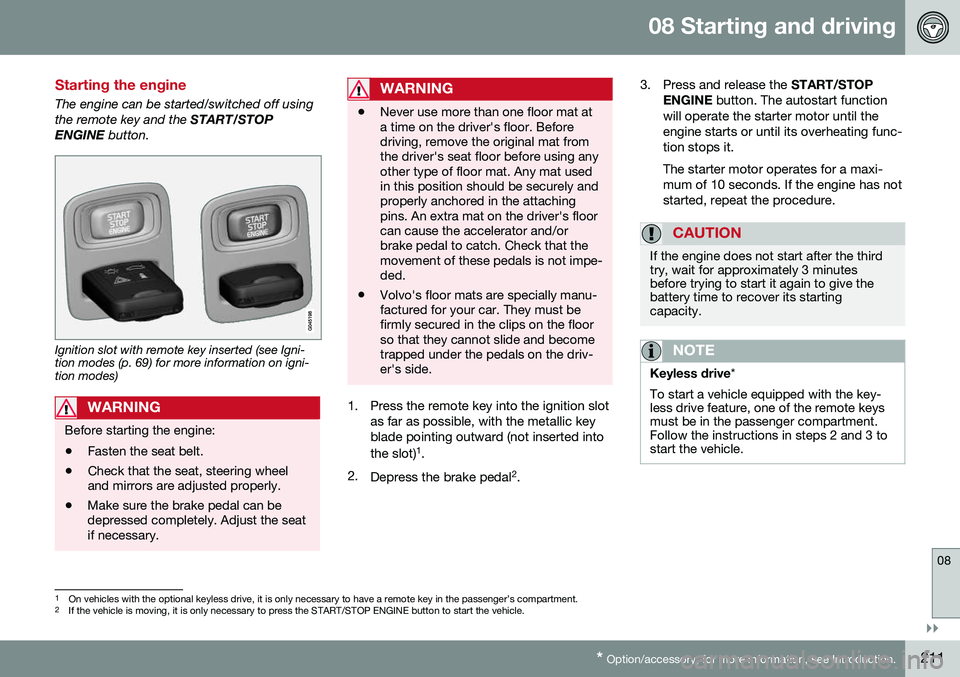
Starting the engine
The engine can be started/switched off using the remote key and the START/STOP
ENGINE button.
Ignition slot with remote key inserted (see Igni- tion modes (p. 69) for more information on igni-tion modes)
WARNING
Before starting the engine:
• Fasten the seat belt.
• Check that the seat, steering wheel and mirrors are adjusted properly.
• Make sure the brake pedal can bedepressed completely. Adjust the seatif necessary.
WARNING
•Never use more than one floor mat at a time on the driver's floor. Beforedriving, remove the original mat fromthe driver's seat floor before using anyother type of floor mat. Any mat usedin this position should be securely andproperly anchored in the attachingpins. An extra mat on the driver's floorcan cause the accelerator and/orbrake pedal to catch. Check that themovement of these pedals is not impe-ded.
• Volvo's floor mats are specially manu-factured for your car. They must befirmly secured in the clips on the floorso that they cannot slide and becometrapped under the pedals on the driv-er's side.
1. Press the remote key into the ignition slot
as far as possible, with the metallic key blade pointing outward (not inserted into the slot) 1
.
2. Depress the brake pedal 2
. 3. Press and release the
START/STOP
ENGINE button. The autostart function
will operate the starter motor until the engine starts or until its overheating func-tion stops it. The starter motor operates for a maxi- mum of 10 seconds. If the engine has notstarted, repeat the procedure.
CAUTION
If the engine does not start after the third try, wait for approximately 3 minutesbefore trying to start it again to give thebattery time to recover its startingcapacity.
NOTE
Keyless drive *
To start a vehicle equipped with the key- less drive feature, one of the remote keysmust be in the passenger compartment.Follow the instructions in steps 2 and 3 tostart the vehicle.
1 On vehicles with the optional keyless drive, it is only necessary to have a remote key in the passenger’s compartment.
2 If the vehicle is moving, it is only necessary to press the START/STOP ENGINE button to start the vehicle.
Page 215 of 344
08 Starting and driving
08
* Option/accessory, for more information, see Introduction.213
Switching off the engine
Switch off the engine by pressing the START/
STOP ENGINE button.
If the gear selector is not in the P position or
if the vehicle is moving, press the START/
STOP ENGINE button twice or press and
hold it in until the engine switches off.
Related information
• Ignition modes (p. 69)
Engine Remote Start (ERS)* – introduction
ERS is a feature that makes it possible to remotely start the engine using the remotekey to cool or heat the passenger compart-ment before driving. The climate/ and infotainment systems will start using the same settings as when theengine was switched off. When the engine is started using ERS, it will run for a maximum of 15 minutes beforeautomatically switching off again. After 2 ERSstarts, the engine must be started in the nor-mal way before ERS can be used again.
NOTE
•Always adhere to applicable State, Province and/or Local laws regardingengine idling when using ERS.
• The service life of the remote key'sbattery is affected by ERS use. If thisfeature is used frequently, the batteryshould be replaced once a year, seeRemote key – replacing the battery(p. 129).
WARNING
Keep the following in mind before using ERS:
• The vehicle should be in view.
• The vehicle should be unoccupied.
• The vehicle must not be parked indoors or in an enclosed area.Exhaust fumes are harmful to thehealth.
Related information
•
Engine Remote Start (ERS)* – starting the engine (p. 214)
• Engine Remote Start (ERS)* – switchingoff the engine (p. 214)
Page 217 of 344
08 Starting and driving
08
215
Jump starting
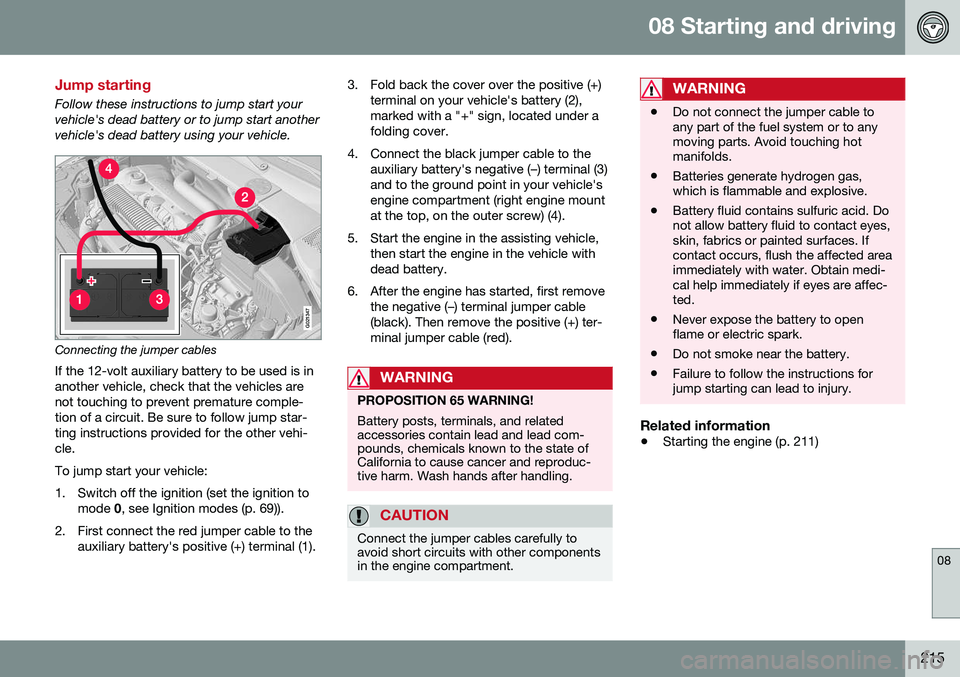
Follow these instructions to jump start your vehicle's dead battery or to jump start anothervehicle's dead battery using your vehicle.
G021347
Connecting the jumper cablesIf the 12-volt auxiliary battery to be used is in another vehicle, check that the vehicles arenot touching to prevent premature comple-tion of a circuit. Be sure to follow jump star-ting instructions provided for the other vehi-cle. To jump start your vehicle:
1. Switch off the ignition (set the ignition to mode 0, see Ignition modes (p. 69)).
2. First connect the red jumper cable to the auxiliary battery's positive (+) terminal (1). 3. Fold back the cover over the positive (+)
terminal on your vehicle's battery (2), marked with a "+" sign, located under afolding cover.
4. Connect the black jumper cable to the auxiliary battery's negative (–) terminal (3)and to the ground point in your vehicle'sengine compartment (right engine mountat the top, on the outer screw) (4).
5. Start the engine in the assisting vehicle, then start the engine in the vehicle withdead battery.
6. After the engine has started, first remove the negative (–) terminal jumper cable(black). Then remove the positive (+) ter-minal jumper cable (red).
WARNING
PROPOSITION 65 WARNING! Battery posts, terminals, and related accessories contain lead and lead com-pounds, chemicals known to the state ofCalifornia to cause cancer and reproduc-tive harm. Wash hands after handling.
CAUTION
Connect the jumper cables carefully to avoid short circuits with other componentsin the engine compartment.
WARNING
•Do not connect the jumper cable to any part of the fuel system or to anymoving parts. Avoid touching hotmanifolds.
• Batteries generate hydrogen gas,which is flammable and explosive.
• Battery fluid contains sulfuric acid. Donot allow battery fluid to contact eyes,skin, fabrics or painted surfaces. Ifcontact occurs, flush the affected areaimmediately with water. Obtain medi-cal help immediately if eyes are affec-ted.
• Never expose the battery to openflame or electric spark.
• Do not smoke near the battery.
• Failure to follow the instructions forjump starting can lead to injury.
Related information
•
Starting the engine (p. 211)
Page 222 of 344
||
08 Starting and driving
08
220
Geartronic: starting on slippery
surfaces
Selecting 3rd gear in Geartronic’s manual shifting mode can help provide better tractionwhen starting off on slippery surfaces. To doso:
1. Depress the brake pedal and move the gear selector to the side from D toward
+S– .
2. Press the gear selector forward and release it (this selects 2nd gear). Press the selector forward again and release itto select 3rd gear. The optional steeringwheel paddles can also be used; see theprevious section "Geartronic: steeringwheel paddles."
3. Release the brake pedal and press gently on the accelerator pedal.
Related information
• Transmission – general information (p. 216)
• Transmission – positions (p. 216)
• Transmission – shiftlock override (p. 220)
• Fuel tank volume – specification and vol-ume (p. 325)
Transmission – shiftlock override
If the vehicle cannot be driven, for example because of a dead battery, the gear selectormust be moved from the
P position before the
vehicle can be moved 8
.
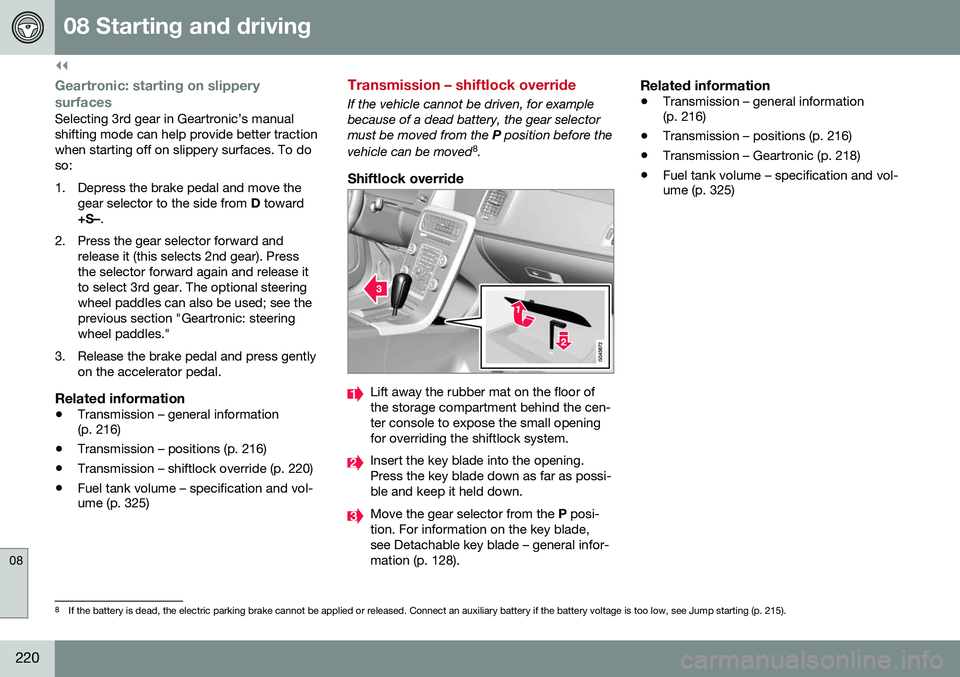
Shiftlock override
Lift away the rubber mat on the floor of the storage compartment behind the cen-ter console to expose the small openingfor overriding the shiftlock system.
Insert the key blade into the opening. Press the key blade down as far as possi-ble and keep it held down.
Move the gear selector from the P posi-
tion. For information on the key blade, see Detachable key blade – general infor-mation (p. 128).
Related information
• Transmission – general information (p. 216)
• Transmission – positions (p. 216)
• Transmission – Geartronic (p. 218)
• Fuel tank volume – specification and vol-ume (p. 325)
8
If the battery is dead, the electric parking brake cannot be applied or released. Connect an auxiliary battery if the battery voltage is too low, see Jump starting (p. 215).
Page 223 of 344
08 Starting and driving
08
}}
221
Start/Stop – Hill Start Assist (HSA)
When starting on steep hills, HSA (see Trans- mission – general information (p. 216)) retainspressure on the brake pedal for several sec-onds after the pedal has been released inorder to keep the vehicle at a standstill. Thebrakes will be released after several secondsor when the driver presses the acceleratorpedal. The pedal will return to its normal posi-tion somewhat slower than normal.
Related information
•Start/Stop – introduction (p. 221)
• Start/Stop – function (p. 221)
• Start/Stop – settings (p. 224)
• Start/Stop – Auto-stop exceptions (p. 222)
• Start/Stop – Auto-start exceptions(p. 223)
• Start/Stop – symbols and messages(p. 225)
Start/Stop – introduction
Start/Stop is a function that temporarily switches off the engine when the vehicle isnot moving, for instance in heavy traffic or at atraffic light to help reduce fuel consumption. Start/Stop is available with certain engines/ transmissions.
Related information
•Start/Stop – function (p. 221)
• Start/Stop – settings (p. 224)
• Start/Stop – Auto-stop exceptions (p. 222)
• Start/Stop – Auto-start exceptions(p. 223)
• Start/Stop – Hill Start Assist (HSA)(p. 221)
• Start/Stop – symbols and messages(p. 225)
Start/Stop – function
Function and use
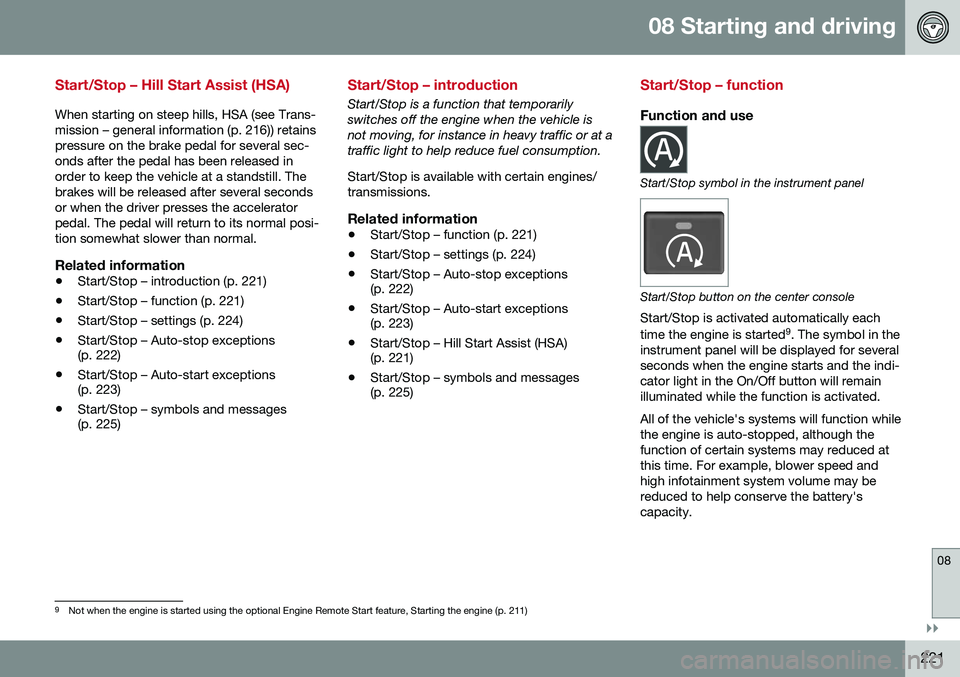
Start/Stop symbol in the instrument panel
Start/Stop button on the center console
Start/Stop is activated automatically each time the engine is started 9
. The symbol in the
instrument panel will be displayed for several seconds when the engine starts and the indi-cator light in the On/Off button will remainilluminated while the function is activated. All of the vehicle's systems will function while the engine is auto-stopped, although thefunction of certain systems may reduced atthis time. For example, blower speed andhigh infotainment system volume may bereduced to help conserve the battery'scapacity.
9 Not when the engine is started using the optional Engine Remote Start feature, Starting the engine (p. 211)
Page 224 of 344
||
08 Starting and driving
08
222* Option/accessory, for more information, see Introduction.
Auto-stopping the engineNormally, when Start/Stop is activated and the brakes are applied until the vehicle comesto a standstill, the engine will auto-stop auto-matically if the driver keeps the brake pedal
depressed .
To remind the driver that the enginehas been auto-stopped, theStart/Stop symbol will illuminate inthe instrument panel and remain on
until the engine restarts.
If the ECO function* (ECO* (p. 226)) is activated, theengine may auto-stop beforethe vehicle comes to a com-plete standstill.
Auto-starting the engineThe engine restarts as soon as the driver releases the brake pedal.
Deactivating Start/StopIn certain situations (e.g., driving in heavy, stop-and-gotraffic), it may be preferableto deactivate Start/Stop. This is done by pressing the button in the center console.
The indicator light in the button will go out. Start/Stop will remain deactivated until the button is pressed again or until the engine isswitched off and restarted by the driver.
Related information
• Start/Stop – introduction (p. 221)
• Start/Stop – settings (p. 224)
• Start/Stop – Auto-stop exceptions (p. 222)
• Start/Stop – Auto-start exceptions(p. 223)
• Start/Stop – Hill Start Assist (HSA)(p. 221)
• Start/Stop – symbols and messages(p. 225)
Start/Stop – Auto-stop exceptions
In certain situations or conditions, the engine may not auto-stop
when the vehicle comes
to a standstill, such as if:
Condition/situation
The vehicle's speed has not reached a speed of approx. 5 mph (8 km/h) after themost recent auto-start or after the driverhas started the engine.
The driver unbuckles his/her seat belt.
The main battery's charge is below the minimum level.
The engine has not reached its normal operating temperature.
The ambient temperature is below approx. 25°F (-4°C) or above approx. 85°F (30°C).
The windshield's heating function* is acti- vated.
The climate system cannot keep the desired settings in the passenger compart-ment; the blower will operate at highspeed.
The vehicle is backing up.
The main battery's temperature is below freezing or too high.