infotainment VOLVO S60 INSCRIPTION 2016 Owner´s Manual
[x] Cancel search | Manufacturer: VOLVO, Model Year: 2016, Model line: S60 INSCRIPTION, Model: VOLVO S60 INSCRIPTION 2016Pages: 344, PDF Size: 7.24 MB
Page 285 of 344
10 Maintenance and servicing
10
}}
* Option/accessory, for more information, see Introduction.283
Onboard Diagnostic System
OBD II is part of your vehicle's computerized engine management system. It stores diag-nostic information about your vehicle's emis-sion controls. It can light the Check Enginelight (MIL) if it detects an emission control"fault." A "fault" is a component or systemthat is not performing within an expectedrange. A fault may be permanent or tempo-rary. OBD II will store a message about anyfault.
Emission inspection readiness
How do states use OBD II for emission inspections?
Many states connect a computer directly to a vehicle's OBD II system. The inspector canthen read "faults." In some states, this type ofinspection has replaced the tailpipe emissiontest.
How can my vehicle fail OBD II emission
inspection?
Your vehicle can fail OBD II emission inspec- tion for any of the following reasons.
• If your Check Engine (MIL) light is lit, your vehicle may fail inspection.
• If your vehicle's Check Engine light waslit, but went out without any action onyour part, OBD II will still have a recordedfault. Your vehicle may pass or fail,depending on the inspection practices inyour area. •
If you had recent service that requireddisconnecting the battery, OBD II diag-nostic information may be incompleteand "not ready" for inspection. A vehiclethat is not ready may fail inspection.
How can I prepare for my next OBD II
emission inspection?
• If your Check Engine (MIL) light is lit – or was lit but went out without service, haveyour vehicle diagnosed and, if necessary,serviced by a qualified Volvo technician.
• If you recently had service for a lit CheckEngine light, or if you had service thatrequired disconnecting the battery, aperiod of driving is necessary to bring theOBD II system to "ready" for inspection.Two half-hour trips of mixed stop-and-go/highway driving are typically neededto allow OBD II to reach readiness. YourVolvo retailer can provide you with moreinformation on planning a trip.
• Maintain your vehicle in accordance withyour vehicle's maintenance schedule.
Booking service and repairs
Connected Service Booking (CSB) makes set- ting up a time for service, maintenance and/orrepairs directly from the vehicle quick andconvenient.
Prerequisites
• The owner (primary driver) must have a valid Volvo ID. See Volvo ID (p. 21) foradditional information.
• The vehicle must be connected to the Internet using a paired Bluetooth ®
cell
phone. See your Sensus Infotainment supplement for information on pairing acell phone. On models equipped withVolvo On Call (VOC)*, you can connect tothe Internet using your separate VOCdata plan. Refer to your separate VolvoOn Call manual.
• By default, the retailer where you pur-chased your vehicle will be your preferred(primary) retailer/Volvo authorized work-shop who will perform service and repairson your vehicle. To change the preferredretailer, go to Dealer Locator atvolvocars.com and select a retailer, clickon Service Scheduler and book anappointment at the new preferred retailer.
• In order to be guided through the on-screen steps, the menu alternative
Display notifications must be activated.
CSB menu accessOnce the prerequisites have been estab- lished, all CSB-related menus can be
Page 298 of 344
||
10 Maintenance and servicing
10
296
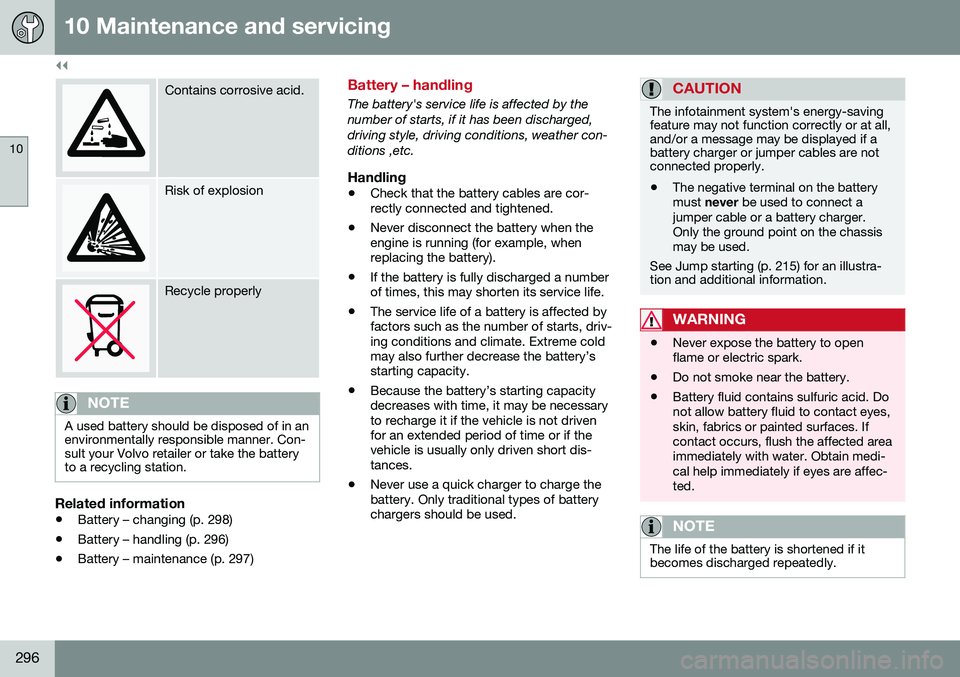
Contains corrosive acid.
Risk of explosion
Recycle properly
NOTE
A used battery should be disposed of in an environmentally responsible manner. Con-sult your Volvo retailer or take the batteryto a recycling station.
Related information
•Battery – changing (p. 298)
• Battery – handling (p. 296)
• Battery – maintenance (p. 297)
Battery – handling
The battery's service life is affected by the number of starts, if it has been discharged,driving style, driving conditions, weather con-ditions ,etc.
Handling
• Check that the battery cables are cor- rectly connected and tightened.
• Never disconnect the battery when theengine is running (for example, whenreplacing the battery).
• If the battery is fully discharged a numberof times, this may shorten its service life.
• The service life of a battery is affected byfactors such as the number of starts, driv-ing conditions and climate. Extreme coldmay also further decrease the battery’sstarting capacity.
• Because the battery’s starting capacitydecreases with time, it may be necessaryto recharge it if the vehicle is not drivenfor an extended period of time or if thevehicle is usually only driven short dis-tances.
• Never use a quick charger to charge thebattery. Only traditional types of batterychargers should be used.
CAUTION
The infotainment system's energy-saving feature may not function correctly or at all,and/or a message may be displayed if abattery charger or jumper cables are notconnected properly.
• The negative terminal on the battery must
never be used to connect a
jumper cable or a battery charger.Only the ground point on the chassismay be used.
See Jump starting (p. 215) for an illustra- tion and additional information.
WARNING
• Never expose the battery to open flame or electric spark.
• Do not smoke near the battery.
• Battery fluid contains sulfuric acid. Donot allow battery fluid to contact eyes,skin, fabrics or painted surfaces. Ifcontact occurs, flush the affected areaimmediately with water. Obtain medi-cal help immediately if eyes are affec-ted.
NOTE
The life of the battery is shortened if it becomes discharged repeatedly.
Page 304 of 344
10 Maintenance and servicing
10
302
Fuses – glove compartment
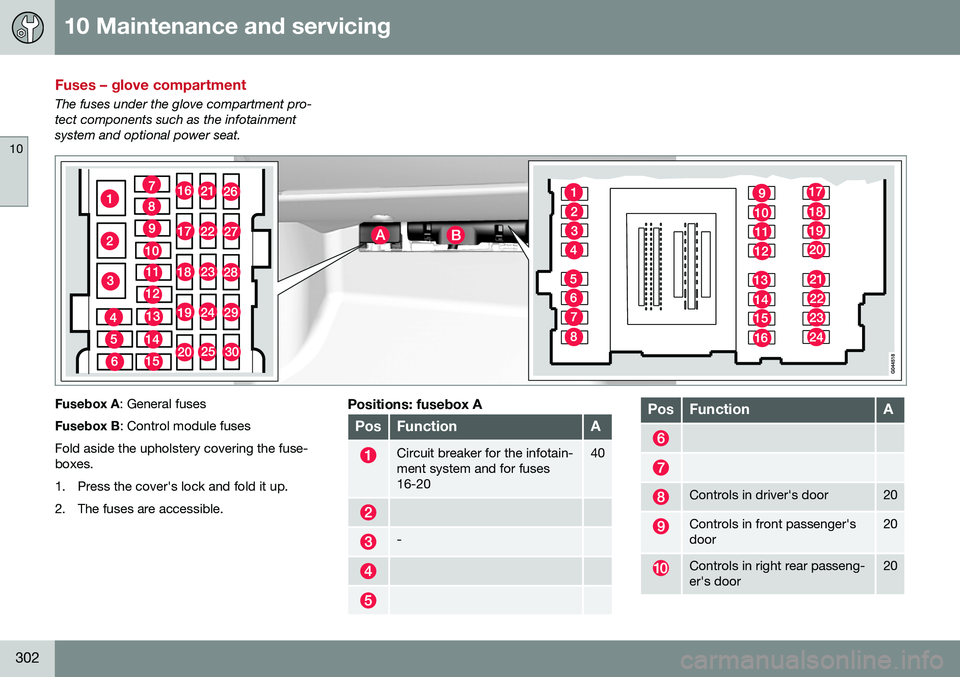
The fuses under the glove compartment pro- tect components such as the infotainmentsystem and optional power seat.
Fusebox A: General fuses
Fusebox B : Control module fuses
Fold aside the upholstery covering the fuse- boxes.
1. Press the cover's lock and fold it up.
2. The fuses are accessible.Positions: fusebox A
PosFunctionA
Circuit breaker for the infotain- ment system and for fuses16-2040
-
PosFunctionA
Controls in driver's door20
Controls in front passenger's door20
Controls in right rear passeng- er's door20
Page 305 of 344
10 Maintenance and servicing
10
}}
* Option/accessory, for more information, see Introduction.303
PosFunctionA
Controls in left rear passeng- er's door20
Keyless drive*
Power driver's seat*20
Power front passenger's seat*20
-
Infotainment system display5
Infotainment system: amplifier, SiriusXM ™ satellite radio*10
Sensus control module15
Bluetooth hands-free system5
-
Courtesy lighting, climate sys- tem sensor5
12-volt sockets in tunnel con- sole15
Heated rear seat* (passenger's side)15
Heated rear seat* (driver's side)15
PosFunctionA
-
Heated front passenger's seat*15
Heated driver's seat*15
Park assist*5
All Wheel Drive* control mod- ule15
Active chassis system*10
Positions: fusebox B
PosFunctionA
-
Front courtesy lighting, driv- er's door power window con-trols, power seat(s)*,7.5
Instrument panel5
Adaptive cruise control/colli- sion warning*10
Courtesy lighting, rain sen- sor*, HomeLInk ®
Wireless
Control System*7.5
PosFunctionA
Steering wheel module7.5
Cental locking: fuel filler door10
15
15
10
Electrical folding rear seat outboard head restraints*10
Fuel pump20
Climate system control panel5
-
Alarm, On-board diagnostic system5
Satellite radio *, audio system amplifier10
Airbag system, occupant weight sensor10
Collision warning system*5
Accelerator pedal sensor, auto-dim mirror function,heated rear seats*7.5