low beam VOLVO S60 INSCRIPTION 2016 Owner´s Manual
[x] Cancel search | Manufacturer: VOLVO, Model Year: 2016, Model line: S60 INSCRIPTION, Model: VOLVO S60 INSCRIPTION 2016Pages: 344, PDF Size: 7.24 MB
Page 172 of 344
07 Driver support
07
170
City Safety – operation
Using City Safety™
NOTE
The City Safety™ function is activated automatically each time the engine hasbeen switched off and restarted.
On and OffIn certain situations, it may be desirable to switch City Safety™ off, such as when drivingin close quarters where leaves, branches, etc.may obscure the hood and windshield. When the engine is running, City Safety™ can be switched off as follows: Press My Car in the center console control
panel and go to
SettingsCar settings
Driver support systemsCity Safety.
Select
Off.
If the engine is switched off, City Safety™ will reactivate when the engine is restarted.
WARNING
The laser sensor emits light when the igni- tion is in mode II or higher, even if City
Safety™ has been switched off.
To switch City Safety™ on again:
• Follow the same procedure as for switch- ing City Safety™ off but select
On.
Related information
•City Safety – introduction (p. 168)
• City Safety – function (p. 169)
• City Safety – limitations (p. 170)
• City Safety – troubleshooting (p. 171)
• City Safety – symbols and messages (p. 173)
• City Safety – Laser sensor (p. 174)
• My Car – introduction (p. 66)
City Safety – limitations
Limitations
WARNING
The laser sensor has certain limitations and its function may be reduced (or it maynot function at all) in conditions such asheavy rain or snowfall, or by dense fog orthick, blowing dust or snow. Condensa-tion, dirt, ice or snow on the windshieldmay also interfere with the sensor’s func-tion.
The sensor used by City Safety™ is designed to detect cars and other larger motor vehiclesahead of your vehicle in both daylight anddarkness. Objects such as warning flags hanging from long objects on the roof or accessories suchas auxiliary lights or protective arches on thefront of the vehicle that are higher than thehood may also impede the sensor’s function. Braking distance to the vehicle ahead increa- ses on slippery road surfaces, which mayreduce City Safety’s capacity to avoid a colli-sion. In situations like this, the stability sys-tem (see Stability system – introduction(p. 141)) will help provide the best possiblebraking capacity and stability. City Safety™ emits a laser beam and meas- ures the way in which the light is reflected.
Page 176 of 344
07 Driver support
07
174
City Safety – Laser sensor
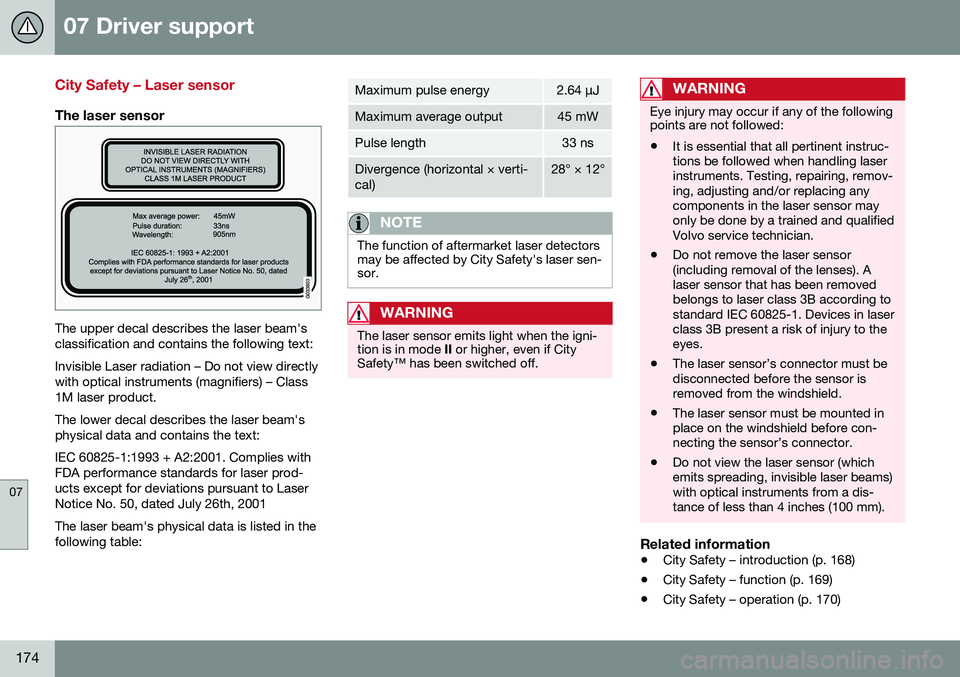
The laser sensor
The upper decal describes the laser beam's classification and contains the following text: Invisible Laser radiation – Do not view directly with optical instruments (magnifiers) – Class1M laser product. The lower decal describes the laser beam's physical data and contains the text: IEC 60825-1:1993 + A2:2001. Complies with FDA performance standards for laser prod-ucts except for deviations pursuant to LaserNotice No. 50, dated July 26th, 2001 The laser beam's physical data is listed in the following table:
Maximum pulse energy2.64 μJ
Maximum average output45 mW
Pulse length33 ns
Divergence (horizontal × verti- cal)28° × 12°
NOTE
The function of aftermarket laser detectors may be affected by City Safety's laser sen-sor.
WARNING
The laser sensor emits light when the igni- tion is in mode II or higher, even if City
Safety™ has been switched off.
WARNING
Eye injury may occur if any of the following points are not followed: • It is essential that all pertinent instruc- tions be followed when handling laserinstruments. Testing, repairing, remov-ing, adjusting and/or replacing anycomponents in the laser sensor mayonly be done by a trained and qualifiedVolvo service technician.
• Do not remove the laser sensor(including removal of the lenses). Alaser sensor that has been removedbelongs to laser class 3B according tostandard IEC 60825-1. Devices in laserclass 3B present a risk of injury to theeyes.
• The laser sensor’s connector must bedisconnected before the sensor isremoved from the windshield.
• The laser sensor must be mounted inplace on the windshield before con-necting the sensor’s connector.
• Do not view the laser sensor (whichemits spreading, invisible laser beams)with optical instruments from a dis-tance of less than 4 inches (100 mm).
Related information
•
City Safety – introduction (p. 168)
• City Safety – function (p. 169)
• City Safety – operation (p. 170)
Page 185 of 344

07 Driver support
07
* Option/accessory, for more information, see Introduction.183
The camera’s limitations
The camera has the same limitations as the human eye. The camera is used by Pedestrian and Cyclist Detection with Full Auto Brake Collision warn-ing – introduction (p. 175), Active High Beams(Active high beams (AHB)* (p. 77)), Road SignInformation (Road Sign Information (RSI)* –introduction (p. 145)) and Driver Alert System(Driver Alert System (p. 188)) with LaneDeparture Warning or Lane Keeping Aid.
NOTE
• To help protect the camera in very hot conditions, it may be temporarilyswitched off for approximately 15minutes after the engine has beenstarted.
• Keep the section of the windshield infront of the camera clean and free ofice, snow, or condensation.
WARNING
•
The camera has the same type of limi- tations as the human eye, i.e., it can-not see as well in heavy snowfall orrain, thick fog or in heavy blowing dustor snow. In such conditions, systemsdepending on the camera may experi-ence greatly reduced functionality ormay be temporarily deactivated.
• Never place any objects, decals, etc.,on the windshield in front of the cam-era. This could reduce or block thecamera’s function, and could causeone or more of the systems that utilizethe camera to stop functioning.
• Strong sunlight, reflections from theroad surface, ice or snow covering theroad, a dirty road surface, or unclearlane marker lines may drasticallyreduce the camera’s capacity todetect the side of a lane, a pedestrian,a cyclist or another vehicle.
Related information
•
Collision warning – introduction (p. 175)
• Collision warning* – function (p. 177)
• Collision warning* – operation (p. 178)
• Collision warning* – Pedestrian detection (p. 180)
• Collision warning* – Cyclist detection(p. 179)
• Collision warning* – limitations (p. 181) •
Collision warning – troubleshooting(p. 184)
• Collision warning – symbols and mes-sages (p. 186)
• Road Sign Information (RSI)* – introduc-tion (p. 145)
• Driver Alert System (p. 188)
• Active high beams (AHB)* (p. 77)
Page 239 of 344
08 Starting and driving
08
}}
237
Engine and cooling system
Under special conditions, for example when driving in hilly terrain, extreme heat or withheavy loads, there is a risk that the engine andcooling system will overheat. Proceed as follows to avoid overheating the engine. •Maintain a low speed when driving with a trailer up long, steep hills. For informa-tion, see Towing a trailer (p. 243)
• Do not turn the engine off immediatelywhen stopping after a hard drive.
WARNING
The cooling fan may start or continue to operate (for up to 6 minutes) after theengine has been switched off.
•
Remove any auxiliary lights from in front of the grille when driving in hot weatherconditions.
• Do not exceed engine speeds of4500 rpm if driving with a trailer in hillyterrain. The oil temperature could becometoo high.
Conserving electrical current
Keep the following in mind to help minimize battery drain:
• When the engine is not running, avoid using ignition mode
II. Many electrical
systems (the audio system, the optionalnavigation system, power windows, etc)will function in ignition modes 0 and I.
These modes reduce drain on the battery.
• Please keep in mind that using systems,accessories, etc., that consume a greatdeal of current when the engine is notrunning could result in the battery beingcompletely drained. Driving or having theengine running for approximately15 minutes will help keep the batterycharged.
• The optional area provides electrical cur-rent even with the ignition switched off,which drains the battery.
Before a long distance trip
It is always worthwhile to have your vehicle checked by a trained and qualified Volvo serv-ice technician before driving long distances.Your retailer will also be able to supply youwith bulbs, fuses, spark plugs and wiperblades for your use in the event that problemsoccur. As a minimum, the following items should be checked before any long trip:
• Check that engine runs smoothly and that fuel consumption is normal.
• Check for fuel, oil, and fluid leakage.
• Have the transmission oil level (p. 325)checked.
• Check condition of drive belts.
• Check state of the battery's charge.
• Examine tires carefully (the spare tire aswell), and replace those that areworn (p. 251). Check tire pres-sure (p. 256).
• The brakes, front wheel alignment, andsteering gear should be checked by atrained and qualified Volvo service techni-cian only.
• Check all lights, including high beams.
• Reflective warning triangles are legallyrequired in some states/provinces.
• Have a word with a trained and qualifiedVolvo service technician if you intend to
Page 293 of 344
10 Maintenance and servicing
10
291
Bulbs – cover
The larger cover has to be removed in order to change the high/low beam headlight bulbs.
Removing the cover to access the bulbs
NOTE
Before starting to replace a bulb, see Bulbs – introduction (p. 290).
Reinstall the cover in the reverse order.
Related information
•Bulbs – headlight housing (p. 290)
• Bulbs – low beam, Halogen (p. 291)
• Bulbs – high beam, Halogen (p. 291)
• Bulbs – extra high beam (p. 292)
Bulbs – low beam, Halogen
The low beam bulb is concealed by the larger cover.
1. Remove the headlight housing from the
vehicle (see Bulbs – headlight housing (p. 290)).
2. Remove the cover over the bulbs (see Bulbs – cover (p. 291)).
3. Unplug the connector from the bulb. 4.
5. Put the cover back into position and rein- stall the headlight housing.
Related information
• Bulbs – specifications (p. 293)
Bulbs – high beam, Halogen
The high beam bulb is concealed behind the larger cover.
1. Remove the headlight housing from the
vehicle (see Bulbs – headlight housing (p. 290)).
2. Remove the cover over the bulbs (see Bulbs – cover (p. 291)).
3. Remove the bulb by turning it counter- clockwise and pulling it straight out.
4. Remove the connector from the bulb.
5. Press the new bulb into the socket and turn it clockwise to put it in place. It can only be secured in one position.
6. Reinsert the bulb holder into the headlight housing.
7. Put the cover back into position and rein- stall the headlight housing.
Related information
• Bulbs – specifications (p. 293)
Page 330 of 344
||
11 Specifications
11
328* Option/accessory, for more information, see Introduction.
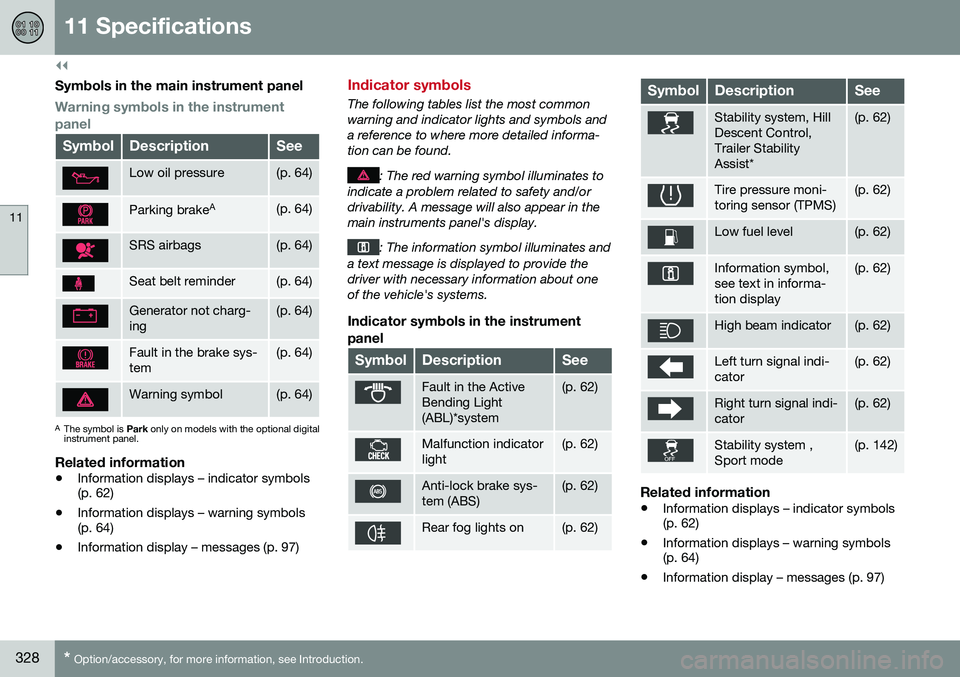
Symbols in the main instrument panel
Warning symbols in the instrument panel
SymbolDescriptionSee
Low oil pressure(p. 64)
Parking brake A(p. 64)
SRS airbags(p. 64)
Seat belt reminder(p. 64)
Generator not charg- ing(p. 64)
Fault in the brake sys- tem(p. 64)
Warning symbol(p. 64)
A
The symbol is Park only on models with the optional digital
instrument panel.
Related information
• Information displays – indicator symbols (p. 62)
• Information displays – warning symbols(p. 64)
• Information display – messages (p. 97)
Indicator symbols
The following tables list the most common warning and indicator lights and symbols anda reference to where more detailed informa-tion can be found.
: The red warning symbol illuminates to
indicate a problem related to safety and/or drivability. A message will also appear in themain instruments panel's display.
: The information symbol illuminates and
a text message is displayed to provide the driver with necessary information about oneof the vehicle's systems.
Indicator symbols in the instrument
panel
SymbolDescriptionSee
Fault in the Active Bending Light(ABL)*system(p. 62)
Malfunction indicator light(p. 62)
Anti-lock brake sys- tem (ABS)(p. 62)
Rear fog lights on(p. 62)
SymbolDescriptionSee
Stability system, Hill Descent Control,Trailer StabilityAssist*(p. 62)
Tire pressure moni- toring sensor (TPMS)(p. 62)
Low fuel level(p. 62)
Information symbol, see text in informa-tion display(p. 62)
High beam indicator(p. 62)
Left turn signal indi- cator(p. 62)
Right turn signal indi- cator(p. 62)
Stability system , Sport mode(p. 142)
Related information
• Information displays – indicator symbols (p. 62)
• Information displays – warning symbols(p. 64)
• Information display – messages (p. 97)
Page 331 of 344
11 Specifications
11
* Option/accessory, for more information, see Introduction.329
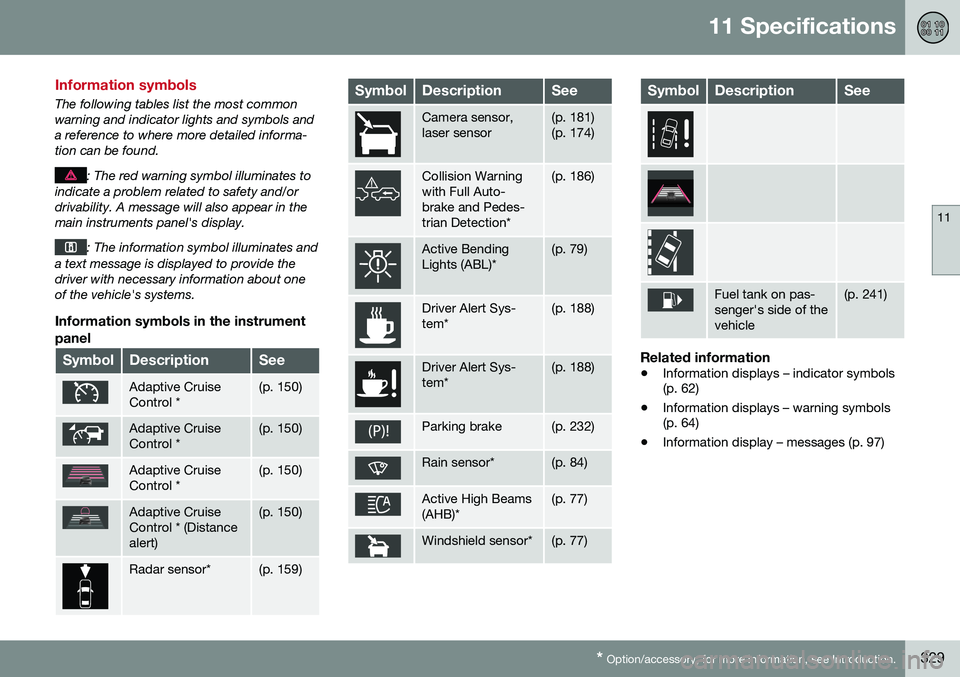
Information symbols
The following tables list the most common warning and indicator lights and symbols anda reference to where more detailed informa-tion can be found.
: The red warning symbol illuminates to
indicate a problem related to safety and/or drivability. A message will also appear in themain instruments panel's display.
: The information symbol illuminates and
a text message is displayed to provide the driver with necessary information about oneof the vehicle's systems.
Information symbols in the instrument
panel
SymbolDescriptionSee
Adaptive Cruise Control *(p. 150)
Adaptive Cruise Control *(p. 150)
Adaptive Cruise Control *(p. 150)
Adaptive Cruise Control * (Distancealert)(p. 150)
Radar sensor*(p. 159)
SymbolDescriptionSee
Camera sensor, laser sensor(p. 181) (p. 174)
Collision Warning with Full Auto-brake and Pedes-trian Detection*(p. 186)
Active Bending Lights (ABL)*(p. 79)
Driver Alert Sys- tem*(p. 188)
Driver Alert Sys- tem*(p. 188)
Parking brake(p. 232)
Rain sensor*(p. 84)
Active High Beams (AHB)*(p. 77)
Windshield sensor*(p. 77)
SymbolDescriptionSee
Fuel tank on pas- senger's side of thevehicle(p. 241)
Related information
• Information displays – indicator symbols (p. 62)
• Information displays – warning symbols(p. 64)
• Information display – messages (p. 97)
Page 336 of 344
12 Index
12
334
Engine oil................................................. 323checking............................................. 286
low pressure warning light.................... 64
volumes.............................................. 323
Engine remote start (ERS)........................ 213
Environment............................................... 22
F
Federal Clean Air Act............................... 281 Flat tires repairing with tire sealing system....... 273
Floor mats cleaning.............................................. 311
placing correctly................................. 211
Fluid specifications.......................... 324, 325
Fog lights................................................... 63 rear........................................................ 80
Four C (active chassis system)................ 141
Front airbags.............................................. 32 disconnecting passenger’s side airbag 36
Front park assist.............................. 198, 201
Front seats................................................. 70 heated................................................. 110
Fuel filler cap........................................... 242
Fuel filler door, opening................... 241, 242 Fuel level warning light.............................. 63
Fuel requirements............................ 239, 240
Fuel tank volume..................................... 325
Fuses............................................... 299, 305
G
Garage door opener
HomeLink ®
Wireless Control
System............................................ 91, 92
Gasoline requirements............................. 240
Gas tank volume...................................... 325
Gauges...................................................... 58
Geartronic................................................ 218
Geartronic automatic transmission.......... 218
Generator warning light............................. 65
Glossary of tire terminology..................... 262
Grocery bag holder.................................. 122
Gross vehicle weight............................... 261
H
Hazard warning flashers............................ 81 Headlights Active Bending Lights........................... 79
active high beams................................. 77
changing bulbs................... 290, 291, 292
daytime running lights.......................... 76
high/low beams.................................... 77
high beam flash.................................... 77
tunnel detection.................................... 78
Headlight washers..................................... 85
Heated front seats................................... 110
Heated oxygen sensors........................... 242
Heated rear seats.................................... 110
Heated steering wheel............................... 75
Heated windshield............................. 89, 112
High beams................................................ 77 active.................................................... 77
Hill Start Assist (HSA).............................. 216
Hoisting the vehicle................................. 282 HomeLink ®
Wireless Control System.. 91, 92
Home safe lighting..................................... 83
Hood, opening/closing............................ 285
Horn........................................................... 75
Page 337 of 344
12 Index
12
335
I
ID, Volvo.................................................... 21Ignition modes..................................... 68, 69
Immobilizer.............................................. 126
Important information.......................... 13, 14
Indicator lights............................... 58, 60, 64
Infant seats................................................ 49
Inflatable Curtain........................................ 41
Inflation pressure............................. 255, 256
Inflation pressure table............................ 260Information and warning symbols, table
of.............................................................. 327
Information lights........................... 58, 60, 64
Inspection readiness................................ 283
Instrument lighting..................................... 80 "theater" lighting................................... 80
Instrument overview.................................. 58
Instrument panel............................ 58, 96, 97
Interior Air Quality System....................... 108
Interior lighting........................................... 82Internet connection booking service.................................. 283
ISOFIX/LATCH anchors............................. 54
J
Jack attaching............................................. 252
location of........................................... 252
Jump starting........................................... 215
K
Key blade................. 124, 125, 128, 129, 131
Keyless drive............................................ 131 general description............. 132, 133, 134
starting the vehicle............................. 211
Keyless locking/unlocking....................... 131
L
Labels list of................................................... 317
location of........................................... 316
Lane Departure Warning (LDW) 193, 195, 196
LATCH anchors......................................... 54
Leather care............................................. 310
Lighting panel............................................ 76 Loading the vehicle.................. 120, 121, 261
roof loads............................................ 121
Locking.................................... 134, 135, 136
Locking the vehicle.................................. 127
Locks, child safety..................................... 56
Low beams................................................ 77
Low oil pressure warning light................... 64
M
Main instrument panel......................... 96, 97
Maintenance............................................ 281 hoisting the vehicle............................. 282
performed by the owner..................... 282
Malfunction indicator light......................... 63
Messages in the instrument panel....... 96, 97Mirrors defroster............................................... 89
power door..................................... 87, 88
rearview, auto-dim function.................. 89
retractable....................................... 87, 88
vanity.................................................. 120
Motor oil checking............................................. 286
volumes.............................................. 323