change wheel VOLVO S60 TWIN ENGINE 2019 User Guide
[x] Cancel search | Manufacturer: VOLVO, Model Year: 2019, Model line: S60 TWIN ENGINE, Model: VOLVO S60 TWIN ENGINE 2019Pages: 645, PDF Size: 13.96 MB
Page 191 of 645

SEATS AND STEERING WHEEL
}}
* Option/accessory.189
Move the passenger seat forward/rearwardby moving the control forward/rearward.
Change the backrest tilt of the passengerseat by moving the control forward/back-ward.
Related information
Manual front seats (p. 180)
Power* front seats (p. 181)
Adjusting the power* front seats (p. 181)
Storing positions for seats, mirrors and head-up display* (p. 182)
Using stored positions for seats, mirrors andhead-up display* (p. 183)
Adjusting front seat massage settings*(p. 185)
Adjusting* front seat cushion length (p. 185)
Front seat massage* settings (p. 184)
Adjusting front seat side bolster settings*(p. 186)
Adjusting front seat lumbar support* (p. 187)
Folding down the rear seat
backrests*
The rear seat backrest is split into two sections.The two sections can be folded forward individu-ally.
WARNING
Adjust the seat and ensure it locks intoposition before driving. Use caution whenadjusting the seat. Uncontrolled or care-less adjustments could lead to injury.
Long objects must always be securelytied down to help prevent injury or dam-age in the event of sudden braking.
Always turn off the engine and apply theparking brake when loading or unloadingthe vehicle.
Put the gear selector in P to help preventthe gear selector from being inadvertentlymoved.
CAUTION
When the backrest is folded down, make surethere are no objects in the rear seat, and theseat belts are not buckled. Otherwise there isa risk of damage to the upholstery.
Page 210 of 645

||
CLIMATE CONTROL
* Option/accessory.208
Blower control.
AUTO - Automatic climate control.
Parking climate
Parking climate functions can be controlled fromthe Parking climate tab.
Climate controls on the rear side of the
tunnel console *
If the vehicle is equipped with heated rear seats*,there are physical buttons on the rear side of thetunnel console to control this function.
Related information
Climate (p. 196)
Activating and deactivating power frontseats* (p. 208)
Activating and deactivating the heated rearseats* (p. 209)
Activating and deactivating front seat ventila-tion* (p. 209)
Activating and deactivating the heated steer-ing wheel* (p. 210)
Activating auto climate control (p. 211)
Activating and deactivating recirculation(p. 211)
Activating and deactivating max defroster(p. 212)
Activating and deactivating the heated rearwindow and door mirrors (p. 213)
Setting the blower speed for the front seats(p. 214)
Synchronize temperature (p. 216)
Activating and deactivating air conditioning(p. 216)
Activating and deactivating power
front seats*
The seats can be heated for added comfort forthe driver and passengers in cold weather.
1. Tap the left- or right-side steering wheel andseat button in the center display's climatebar to open the controls for steering wheeland seat heating.
If the vehicle is not equipped with ventilatedseats or heated steering wheel (for the driv-er's side), the button for seat heating isdirectly accessible in the climate bar.
2. Tap the seat heating button repeatedly toselect one of the four levels: Off, High,Medium or Low.
>The level is changed and the set level isdisplayed in the button.
Related information
Climate system controls (p. 207)
Activating and deactivating the heated frontseat* (p. 209)
Page 211 of 645

CLIMATE CONTROL
}}
* Option/accessory.209
Activating and deactivating the
heated front seat*
The seats can be heated for added comfort forthe driver and passengers in cold weather.
Seat heating can be set to automatically activatewhen the engine is started. When set to automat-ically activate, heating will be turned on at lowambient temperatures.
1.Tap Settings in the Top view in the centerdisplay.
2.Tap Climate.
3.Select Auto Driver Seat Heating Leveland Auto Passenger Seat Heating Levelto activate/deactivate automatic start ofheated driver's and passenger seat.
>An "A" will be displayed next to the rele-vant seat heating button in the climate barwhen auto start has been activated.
4.Select Low, Medium or High to select levelafter the function has been activated.
Related information
Climate system controls (p. 207)
Activating and deactivating power frontseats* (p. 208)
Activating and deactivating the
heated rear seats*
The seats can be heated for added comfort forthe driver and passengers in cold weather.
Activating and deactivating the heated
rear seats from the rear seat
Buttons for seat heating on the rear side of the tunnelconsole.
–Press repeatedly on the left or right seatheating buttons on the rear side of the tun-nel console to select one of four levels: Off,High, Medium or Low.
>The level is changed and the indicatorlights in the button display the level.
Related information
Climate system controls (p. 207)
Activating and deactivating front
seat ventilation*
The seats can be ventilated to provide increasedcomfort in warm weather.
The ventilation system consists of fans in theseats and backrest that draw air through the seatupholstery. The cooler the passenger compart-ment is, the greater the cooling effect of the ven-tilation. The system can be activated when theengine is running.
1. Tap the left- or right-side steering wheel andseat button in the center display's climatebar to open the controls for steering wheeland seat heating.
If the vehicle is not equipped with heatedseats or heated steering wheel (for the driv-er's side), the button for seat ventilation isdirectly accessible in the climate bar.
2. Tap the seat ventilation button repeatedly toselect one of the four levels: Off, High,Medium or Low.
>The level is changed and the set level isdisplayed in the button.
Page 212 of 645

||
CLIMATE CONTROL
* Option/accessory.210
Related information
Climate system controls (p. 207)Activating and deactivating the
heated steering wheel*
The steering wheel can be heated for addedcomfort in cold weather.
1. Tap the driver's side steering wheel and seatbutton in the climate bar in the center displayto open the controls for steering wheel andseat heating.
If the vehicle is not equipped with heated orventilated seats, the button for steeringwheel heating is directly accessible in the cli-mate bar.
2. Tap the steering wheel heating buttonrepeatedly to select one of the four levels:Off, High, Medium or Low.
>The level is changed and the set level isdisplayed in the button.
Related information
Climate system controls (p. 207)
Activating and deactivating automatic steer-ing wheel heating* (p. 210)
Activating and deactivating
automatic steering wheel heating*
The steering wheel can be heated for addedcomfort in cold weather.
Steering wheel heating can be set to automati-cally activate when the engine is started. Whenset to automatically activate, heating will beturned on at low ambient temperatures.
1.Tap Settings in the Top view in the centerdisplay.
2.Tap Climate.
3.Select Auto Steering Wheel HeatingLevel to activate/deactivate automatic startof heated steering wheel.
>An "A" will be displayed next to theheated steering wheel button in the cli-mate bar when auto start has been acti-vated.
4.Select Low, Medium or High to select levelafter the function has been activated.
Related information
Activating and deactivating the heated steer-ing wheel* (p. 210)
Page 270 of 645

DRIVER SUPPORT
268
Deactivating and putting CruiseControl in standby mode
Cruise Control (CC13) can be temporarily putinto standby mode and then reactivated.
To put Cruise Control in standby mode:
–Press the button on the steering wheel(2).
>The Cruise Control markings and symbolswill change from WHITE to GRAY, indicat-ing that Cruise Control is temporarilydeactivated and the driver needs to con-trol the vehicle's speed.
Standby mode due to action by the driver
Cruise Control will be temporarily deactivated andput in standby mode if:
the brakes are applied
the gear selector is moved to N
the vehicle is driven faster than the setspeed for more than 1 minute
The driver must then control the vehicle's speed.
Temporarily increasing speed using the accelera-tor pedal, e.g. when passing another vehicle, willnot affect the setting. The vehicle will return tothe set speed when the accelerator pedal isreleased.
Automatic standby mode
Cruise Control will be temporarily deactivated andput in standby mode if:
the wheels lose traction
the engine speed (rpm) is too low/high
the temperature in the brake systembecomes too high
the vehicle's speed goes below 30 km/h(20 mph).
The driver must then control the vehicle's speed.
Related information
Cruise control (p. 266)
Reactivating Cruise Control from standbymode (p. 269)
Activating and starting Cruise Control(p. 267)
Switching off Cruise Control (p. 269)
13Cruise Control
Page 271 of 645
DRIVER SUPPORT
}}
269
Reactivating Cruise Control fromstandby mode
Cruise Control (CC14) can be temporarily putinto standby mode and then reactivated.
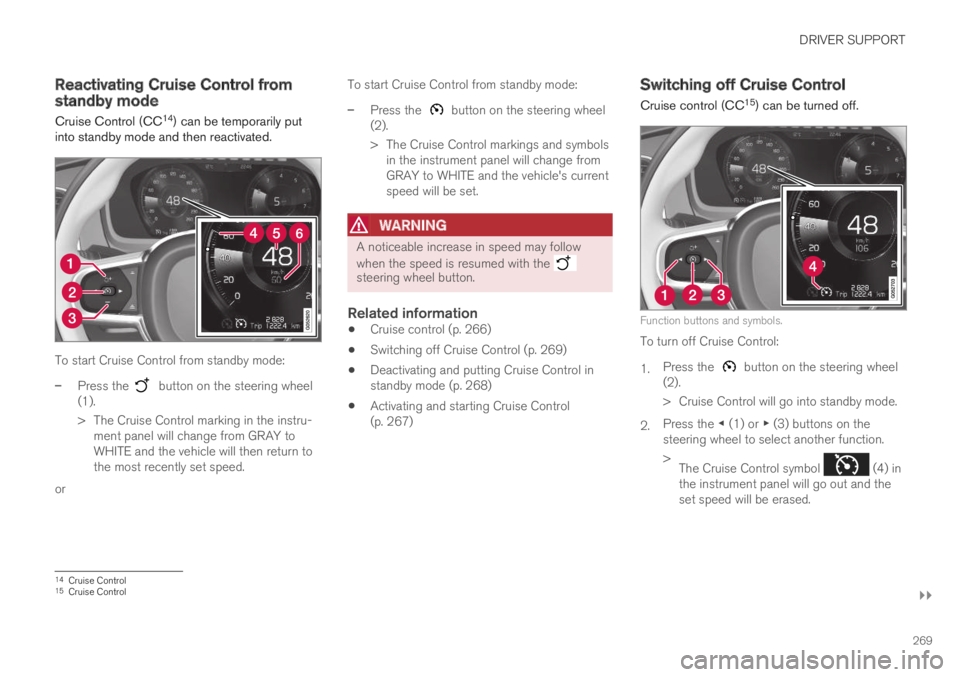
To start Cruise Control from standby mode:
–Press the button on the steering wheel(1).
>The Cruise Control marking in the instru-ment panel will change from GRAY toWHITE and the vehicle will then return tothe most recently set speed.
or
To start Cruise Control from standby mode:
–Press the button on the steering wheel(2).
>The Cruise Control markings and symbolsin the instrument panel will change fromGRAY to WHITE and the vehicle's currentspeed will be set.
WARNING
A noticeable increase in speed may follow
when the speed is resumed with the steering wheel button.
Related information
Cruise control (p. 266)
Switching off Cruise Control (p. 269)
Deactivating and putting Cruise Control instandby mode (p. 268)
Activating and starting Cruise Control(p. 267)
Switching off Cruise Control
Cruise control (CC15) can be turned off.
Function buttons and symbols.
To turn off Cruise Control:
1.Press the button on the steering wheel(2).
>Cruise Control will go into standby mode.
2.Press the ◀ (1) or ▶ (3) buttons on thesteering wheel to select another function.
>The Cruise Control symbol (4) inthe instrument panel will go out and theset speed will be erased.
14Cruise Control15Cruise Control
Page 278 of 645

||
DRIVER SUPPORT
* Option/accessory.276
To temporarily deactivate Adaptive Cruise Controland put it in standby mode:
–Press the button on the steering wheel(2).
>The symbol in the instrument panelchanges color from WHITE to GRAY andthe set speed in the center of the speed-ometer will change from BEIGE to GRAY.
WARNING
If Adaptive Cruise Control is in standbymode, the driver must intervene and regu-late both speed and distance to the vehicleahead.
If the vehicle comes too close to a vehicleahead when Adaptive Cruise Control is instandby mode, the driver can be warned ofthe short distance by the Distance Alert*function.
Standby mode due to action by the driver
Adaptive Cruise Control will be temporarily deac-tivated and put in standby mode if:
the brakes are applied
the gear selector is moved to N
the vehicle is driven faster than the setspeed for more than 1 minute
Temporarily increasing speed using the accelera-tor pedal, e.g. when passing another vehicle, willnot affect the setting. The vehicle will return tothe set speed when the accelerator pedal isreleased.
Automatic standby mode
Adaptive Cruise Control is dependent on othersystems, such as Electronic Stability Control
(ESC25). If any of these other systems stopsworking, Adaptive Cruise Control will automati-cally switch off.
WARNING
With automatic standby mode, the driver iswarned by an acoustic signal and a messageon the instrument panel.
The driver must then regulate vehiclespeed, apply the brakes if necessary, andmaintain a safe distance to other vehicles.
Adaptive Cruise Control may go into standbymode if:
your vehicle's speed goes below 5 km/h(3 mph) and ACC cannot determine if thevehicle ahead is stationary or if it is anotherobject, e.g. a speed bump.
your vehicle's speed goes under 5 km/h(3 mph) and the vehicle ahead turns so thatACC no longer has a vehicle to follow.
the driver opens the door.
the driver unbuckles the seat belt.
the engine speed (rpm) is too low/high.
one or more of the wheels lose traction.
the brake temperature is high.
the parking brake is applied.
the camera/radar sensor is covered by snowor heavy rain (the camera lens/radar wavesare blocked).
Reactivating Adaptive Cruise Control
from standby mode
25Electronic Stability Control
Page 280 of 645

||
DRIVER SUPPORT
* Option/accessory.278
2.Tap the Cruise Control button in the centerdisplay's Function view. The button's indica-tor will change from GRAY to GREEN.
>The symbol in the instrument panel will
change from ACC to CC, indicating that Adaptive Cruise Con-trol is off and Cruise Control is in standbymode.
3.Pressing the button on the steeringwheel keypad.
>Cruise Control will start and the vehicle'scurrent speed will be set.
WARNING
Switching from ACC to CC means that thevehicle:
will no longer maintain a preset timeinterval to the vehicle ahead.
will only follow the stored speed and thedriver must therefore apply the brakeswhen necessary.
If CC is active when the engine is turned off, ACCwill be automatically activated the next time theengine is started.
Switching from CC to ACC
To do so:
1.Press the button on the steering wheelkeypad to put Cruise Control in standbymode.
2.Tap the Cruise Control button in Functionview. The button's indicator will change fromGREEN to GRAY.
>The symbols in the instrument panel will
switch from CC to ACCto indicate that Adaptive Cruise Control isin standby mode.
3.Pressing the button on the steeringwheel keypad.
>Adaptive Cruise Control will go into activemode and set the vehicle's current speedand the selected time interval to the vehi-cle ahead.
Related information
Adaptive Cruise Control* (p. 272)
Cruise control (p. 266)
Page 283 of 645

DRIVER SUPPORT
}}
281
Pilot Assist30
Pilot Assist helps the driver keep the vehicle inthe current traffic lane by providing steeringassistance and maintaining an even speed and aset time interval to the vehicle ahead.
How Pilot Assist works
The Pilot Assist function is primarily intended foruse on highways and other major roads where itcan help provide a more comfortable and relaxingdriving experience.
The camera/radar sensor monitors the distance to thevehicle ahead and detects lane markings.
Camera and radar sensor
Distance monitor
Lane marker line monitors
The driver sets the desired speed and distance tothe vehicle ahead. Pilot Assist monitors the dis-tance to the vehicle ahead and the traffic lane'sside markers using the camera and radar sensor.The system maintains the set time interval to thevehicle ahead by automatically adjusting yourvehicle's speed and keeps your vehicle in its laneby providing steering assistance.
Pilot Assist's steering assistance is based onmonitoring the direction of the vehicle ahead andthe traffic lane's side marker lines. The driver canoverride Pilot Assist's steering recommendationsat any time and steer in another direction, e.g. tochange lanes or avoid obstacles on the road.
If the camera/radar sensor cannot detect thelane's side marker lines or if Pilot Assist is unablefor some other reason to clearly interpret thelane, Pilot Assist will temporarily deactivate steer-ing assistance until it can once again interpretthe lane markings. However, the speed and dis-tance warnings will remain active.
WARNING
Pilot Assist is deactivated automatically andresumes working without prior notice.
The color of the steering wheelsymbol indicates the currentstatus of steering assistance:
• GREEN indicates that steer-ing assistance is active.
• GRAY (as shown in illustra-tion) indicates that steering assistance is deacti-vated.
WARNING
Pilot Assist should only be used if there areclear lane lines painted on each side of thelane. All other use will increase the risk ofcontact with nearby obstacles that cannot bedetected by the functions.
30Depending on market, this function can be either standard or optional.
Page 286 of 645
||
DRIVER SUPPORT
284
Instrument panel
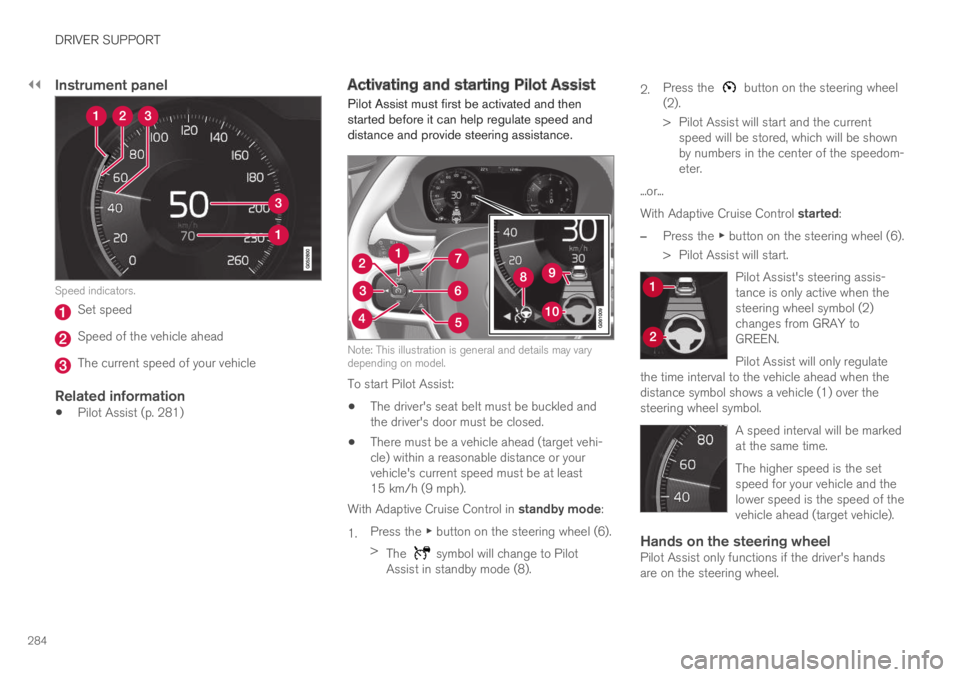
Speed indicators.
Set speed
Speed of the vehicle ahead
The current speed of your vehicle
Related information
Pilot Assist (p. 281)
Activating and starting Pilot Assist
Pilot Assist must first be activated and thenstarted before it can help regulate speed anddistance and provide steering assistance.
Note: This illustration is general and details may varydepending on model.
To start Pilot Assist:
The driver's seat belt must be buckled andthe driver's door must be closed.
There must be a vehicle ahead (target vehi-cle) within a reasonable distance or yourvehicle's current speed must be at least15 km/h (9 mph).
With Adaptive Cruise Control in standby mode:
1.Press the ▶ button on the steering wheel (6).
>The symbol will change to PilotAssist in standby mode (8).
2.Press the button on the steering wheel(2).
>Pilot Assist will start and the currentspeed will be stored, which will be shownby numbers in the center of the speedom-eter.
...or...
With Adaptive Cruise Control started:
–Press the ▶ button on the steering wheel (6).
>Pilot Assist will start.
Pilot Assist's steering assis-tance is only active when thesteering wheel symbol (2)changes from GRAY toGREEN.
Pilot Assist will only regulatethe time interval to the vehicle ahead when thedistance symbol shows a vehicle (1) over thesteering wheel symbol.
A speed interval will be markedat the same time.
The higher speed is the setspeed for your vehicle and thelower speed is the speed of thevehicle ahead (target vehicle).
Hands on the steering wheel
Pilot Assist only functions if the driver's handsare on the steering wheel.