change wheel VOLVO S60 TWIN ENGINE 2019 Owner's Manual
[x] Cancel search | Manufacturer: VOLVO, Model Year: 2019, Model line: S60 TWIN ENGINE, Model: VOLVO S60 TWIN ENGINE 2019Pages: 645, PDF Size: 13.96 MB
Page 287 of 645
DRIVER SUPPORT
}}
* Option/accessory.285
If Pilot Assist detects that thedriver's hands are not on thesteering wheel, a symbol andtext message will appear toinstruct the driver to activelysteer the vehicle.
If the driver's hands are still detected on thesteering wheel after a few seconds have passed,the instructions to actively steer the vehicle willbe repeated, accompanied by an audible signal.
If Pilot Assist still does not detect the driver'shands on the steering wheel after a few moreseconds have passed, the audible signal willbecome intense and the steering function willswitch off. Pilot Assist must then be reactivated
by pressing the button on the steeringwheel.
NOTE
Note that the Pilot Assist function only workswhen the driver's hands are on the steeringwheel.
Related information
Pilot Assist (p. 281)
Deactivating/reactivating Pilot Assist(p. 285)
Deactivating/reactivating PilotAssist
Pilot Assist can be temporarily put into standbymode and then reactivated.
Deactivating and putting Pilot Assist in
standby mode
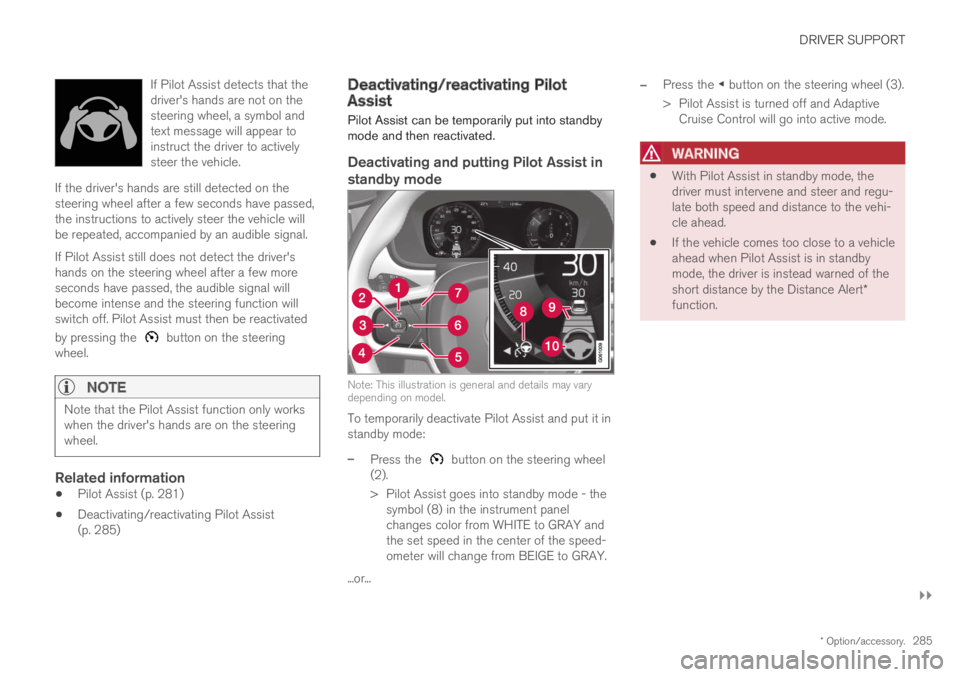
Note: This illustration is general and details may varydepending on model.
To temporarily deactivate Pilot Assist and put it instandby mode:
–Press the button on the steering wheel(2).
>Pilot Assist goes into standby mode - thesymbol (8) in the instrument panelchanges color from WHITE to GRAY andthe set speed in the center of the speed-ometer will change from BEIGE to GRAY.
...or...
–Press the ◀ button on the steering wheel (3).
>Pilot Assist is turned off and AdaptiveCruise Control will go into active mode.
WARNING
With Pilot Assist in standby mode, thedriver must intervene and steer and regu-late both speed and distance to the vehi-cle ahead.
If the vehicle comes too close to a vehicleahead when Pilot Assist is in standbymode, the driver is instead warned of theshort distance by the Distance Alert*function.
Page 296 of 645

||
DRIVER SUPPORT
* Option/accessory.294
–Change a set speed by pressing the (1)
or (2) buttons briefly or by pressing andholding them:
Brief press: Each press changes thespeed in +/- 5 km/h (+/- 5 mph) incre-ments.
Press and hold: Release the button whenthe set speed indicator (3) has moved tothe desired speed.
NOTE
For vehicles without Adaptive Cruise Control*,speed instead increases by +/- 1km/h(+/- 1 mph) each time the button is pressed.
The most recently set speed will be stored.
If speed is increased by depressing the accelera-
tor pedal while pressing the (1) button onthe steering wheel, the vehicle's speed when thebutton is pressed will be stored as the set speed.
Temporarily increasing speed using the accelera-tor pedal, e.g. when passing another vehicle, willnot affect the setting. The vehicle will return tothe set speed when the accelerator pedal isreleased.
Automatic transmission
The driver support functions can follow anothervehicle at speeds from a standstill up to200 km/h (125 mph).
Pilot Assist can provide steering assistance fromnear-stationary speeds up to 140 km/h(87 mph).
The lowest speed that can be set is 30 km/h(20 mph). When following another vehicle, ACCcan monitor that vehicle's speed and slow yourown vehicle down to a standstill, but it is not pos-sible to set speeds lower than 30 km/h(20 mph).
Related information
Driver support systems (p. 260)
Cruise control (p. 266)
Adaptive Cruise Control* (p. 272)
Pilot Assist (p. 281)
Auto-hold braking with driversupport
Pilot Assist and Adaptive Cruise Control*
(ACC39) have a special brake function in slowtraffic and while stationary.
Braking function in slow traffic and at a
standstill
In slow-moving, stop-and-go traffic or when stop-ped at a traffic light, driving will resume automati-cally if the vehicle is stopped for less thanapprox. 3 seconds. If it takes more than 3 sec-onds for the vehicle ahead to begin moving again,the driver support function will go into standbymode and the auto-hold brake function will acti-vate.
–The function can be reactivated by:
Pressing the button on the steeringwheel keypad.
Pressing the accelerator pedal.
>The function will resume following thevehicle ahead if it begins to move withinapprox. 6 seconds.
Page 363 of 645

DRIVER SUPPORT
}}
* Option/accessory.361
Side sensor fields
Warning signals vary depending on the vehicle'sintended direction of travel. Depending on thesteering wheel position, warnings may be givenfor obstacles diagonally in front of or behind thevehicle, not only directly behind the vehicle.
Parking sensor sectors where obstacles can bedetected.
Left-side front sensor field
Obstacle sector in the vehicle's intendeddirection of travel forward – varies accordingto steering wheel position
Sector with RED field color and rapidly puls-ing tone
Right-side rear sensor field
Obstacle sector in the vehicle's intendeddirection of travel rearward – varies accordingto steering wheel position.
The color of the side field changes as the vehiclemoves closer to the object – from YELLOW toRED.
Side field colorDistance in meters (feet)
Yellow0,25–0,9 (0,8–3,0)
Red0–0,25 (0–0,8)
When the sensor field is RED, the audible pulsingsignal will become more rapid.
Related information
Park Assist Camera* (p. 355)
Starting the Park Assist Camera
The Park Assist Camera starts automaticallywhen reverse gear is engaged or can be startedmanually using one of the center display's func-tion buttons.
Page 373 of 645

DRIVER SUPPORT
* Option/accessory.371
Perpendicular parking spaces may not bedetected or may be suggested unnecessarilyif a parked vehicle is sticking out more thanother parked vehicles.
The function is intended to provide parkingassistance on straight streets, not sections ofstreet with sharp curves or bends. Alwaysmake sure that your vehicle is parallel to rel-evant parking spaces when the function ismeasuring the parking space.
CAUTION
Switching to another approved wheel and/ortire dimension could change the tire circum-ference, which would then require the systemto be updated. Consult a workshop – anauthorized Volvo workshop is recommended.
Related information
Park Assist Pilot* (p. 364)
Speed-dependent steering wheel resistance(p. 260)
Camera/radar sensor limitations (p. 300)
Page 404 of 645

STARTING AND DRIVING
402
Settings for automatically activatingthe parking brake
Choose whether the parking brake should beactivated automatically when the vehicle isswitched off.
To change this setting:
1.Tap Settings in the center display's Topview.
2.Tap My CarParking Brake andSuspension and select or deselect theAuto Activate Parking Brake function.
Related information
Activating and deactivating the parking brake(p. 400)
Parking brake (p. 400)
Parking on a hill
Always use the parking brake when parking on ahill.
WARNING
Always apply the parking brake when parkingon an incline. Selecting a gear or putting theautomatic transmission in P may not be suffi-cient to keep the vehicle stationary in all sit-uations.
If the vehicle is pointing uphill:
Turn the front wheels so they are pointingaway from the curb.
If the vehicle is pointing downhill:
Turn the front wheels so they are pointingtoward the curb.
Heavy load uphill
Heavy loads, such as a trailer, could cause thevehicle to roll backward when the parking brakeis released automatically on steep uphill gradi-ents. To help avoid this, pull the control upwardwhile you are driving away. Release the controlwhen the vehicle gains traction.
Related information
Activating and deactivating the parking brake(p. 400)
Parking brake malfunction
If you are unable to deactivate or activate theparking brake after several attempts, contact anauthorized Volvo workshop.
A audible warning signal will sound if the parkingbrake is activated while the vehicle is beingdriven.
If the vehicle must be parked before the problemis rectified, turn the wheels as when parking onan incline and put the gear selector in P.
Low battery charge level
If the battery charge level is too low, it will not bepossible to activate or deactivate the parkingbrake. Connect an auxiliary battery to the vehicleif the battery is discharged.
Replacing brake pads
Due to the design of the electric parking brake,the rear brake pads must be replaced by a work-shop. An authorized Volvo workshop is recom-mended.
Page 408 of 645

STARTING AND DRIVING
* Option/accessory.406
Transmission
The transmission is part of the vehicle's driveline(power transmission) between the engine andthe drive wheels. The function of the transmis-sion is to change gears depending on speedand power needs.
The vehicle has an 8-speed automatic transmis-sion and an electric motor for rear-wheel drive.The number of gears allows the engine's torqueand power band to be effectively utilized. Two ofthe gears are overdrive gears that save fuel whendriving at a constant engine speed. The steeringwheel paddles* can be used to shift up or downmanually. The instrument panel shows the gearcurrently in use.
CAUTION
Check the operating temperature of thetransmission to help avoid damage to any ofthe drive system components. If there is a riskof overheating, a warning symbol will appearin the instrument panel and a text messagewill be displayed. Follow the recommenda-tions given.
Symbols in the instrument panel
If a problem should occur with the transmission, asymbol and a message will appear in the instru-ment panel.
SymbolMeaning
Information and messages relatedto the transmission. Follow the rec-ommendations provided.
Hot or overheated transmission.Follow the recommendations provi-ded.
Reduced performance/Acceler-ation performance reduced
In the event of a temporary fault inthe driveline, the vehicle may gointo a "limp home" mode withreduced power output to help avoiddamage to the driveline.
Related information
Gear selector positions for automatic trans-missions (p. 406)
Gear selector positions forautomatic transmissions
In vehicles with an automatic transmission, thesystem selects the optimal gear for the currentdriving conditions. The transmission also has amanual mode.
The instrument panel shows which gear is cur-rently in use:
P, R, N, D or B.
For manual shifting, the gear indicator in theinstrument panel displays the gear currentlybeing used.
Selecting gears
The gear selector is a shift-by-wire selector,where shifting is done electronically instead ofmechanically. This makes shifting easier and thegear positions more distinct.
Page 411 of 645
STARTING AND DRIVING
409
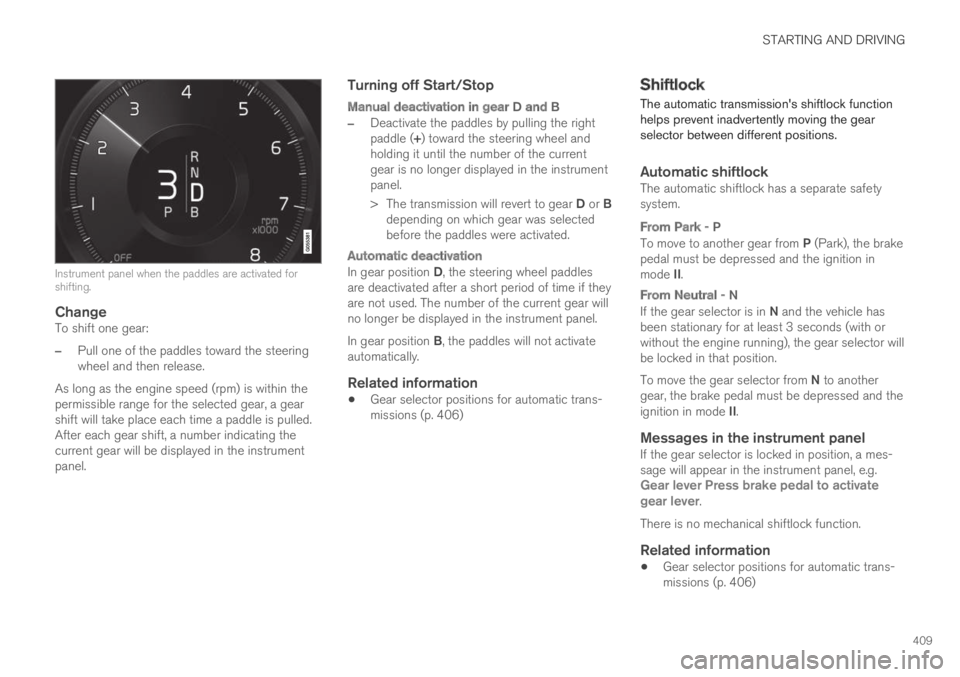
Instrument panel when the paddles are activated forshifting.
Change
To shift one gear:
–Pull one of the paddles toward the steeringwheel and then release.
As long as the engine speed (rpm) is within thepermissible range for the selected gear, a gearshift will take place each time a paddle is pulled.After each gear shift, a number indicating thecurrent gear will be displayed in the instrumentpanel.
Turning off Start/Stop
Manual deactivation in gear D and B
–Deactivate the paddles by pulling the rightpaddle (+) toward the steering wheel andholding it until the number of the currentgear is no longer displayed in the instrumentpanel.
>The transmission will revert to gear D or Bdepending on which gear was selectedbefore the paddles were activated.
Automatic deactivation
In gear position D, the steering wheel paddlesare deactivated after a short period of time if theyare not used. The number of the current gear willno longer be displayed in the instrument panel.
In gear position B, the paddles will not activateautomatically.
Related information
Gear selector positions for automatic trans-missions (p. 406)
Shiftlock
The automatic transmission's shiftlock functionhelps prevent inadvertently moving the gearselector between different positions.
Automatic shiftlock
The automatic shiftlock has a separate safetysystem.
From Park - P
To move to another gear from P (Park), the brakepedal must be depressed and the ignition inmode II.
From Neutral - N
If the gear selector is in N and the vehicle hasbeen stationary for at least 3 seconds (with orwithout the engine running), the gear selector willbe locked in that position.
To move the gear selector from N to anothergear, the brake pedal must be depressed and theignition in mode II.
Messages in the instrument panel
If the gear selector is locked in position, a mes-sage will appear in the instrument panel, e.g.Gear lever Press brake pedal to activategear lever.
There is no mechanical shiftlock function.
Related information
Gear selector positions for automatic trans-missions (p. 406)
Page 416 of 645

||
STARTING AND DRIVING
414
This drive mode is optimized for maximum drivingdistance with electric propulsion and is primarilyintended for use in city driving. Pure helps pro-vide the lowest possible consumption even whenthe hybrid battery is fully discharged. ECO climateis activated to control the climate in the passen-ger compartment, and in slippery road conditionsslightly more wheel spin may be permitted beforeall-wheel drive is automatically activated.
ECO Climate
In Pure mode, ECO climate is automatically acti-vated in the passenger compartment to helpreduce energy consumption.
NOTE
When the Pure drive mode is activated, set-tings for certain climate system and electricityconsuming functions are reduced. Some ofthese settings can be reset manually, but fullfunctionality will only be restored by leavingPure mode or adapting the Individual drivemode to full climate system functionality.
If condensation forms on the windows, tap themax defroster button, which will function normally.
Constant AWD
Improves the vehicle's traction and handlingby increasing all-wheel drive.
This drive mode locks the vehicle in all-wheeldrive. An optimal distribution between front andrear axle torque helps provide the best possible
control, stability and traction, e.g. on slipperyroads or when towing a heavy trailer or anothervehicle. The Constant AWD drive mode isalways available regardless of the hybrid battery'scharge status.
Both the combustion engine and the electricmotor are engaged to enable all-wheel drive,which results in higher fuel consumption.
In the other drive modes, the vehicle automati-cally adapts the need for all-wheel drive accord-ing to the road surface, and can activate the elec-tric motor or start the combustion engine as nee-ded.
Power
The vehicle gets sportier driving characteris-tics and a faster acceleration response.
This drive mode maximizes the combined powerfrom the combustion engine and the electricmotor by providing power to both the front andrear wheels. Gear shifting will be faster and moredistinct and the transmission will prioritize gearswith a higher traction force. Steering response isfaster and suspension is stiffer.
Both the combustion engine and the electricmotor are engaged to enable all-wheel drive,which results in higher fuel consumption.
This drive mode is optimized for maximum per-formance and throttle response. It changes thethrottle response, gear shifting program andturbo boost system. Chassis settings and steer-ing and brake response are also optimized. The
Power drive mode is always available regardlessof the hybrid battery's charge status.
Page 418 of 645

||
STARTING AND DRIVING
* Option/accessory.416
Related information
Changing drive mode (p. 416)
Economical driving (p. 420)
Energy distribution in hybrid mode using mapdata* (p. 417)
Hybrid gauge (p. 85)
General information about Twin Engine(p. 374)
Changing drive mode
Select the drive mode that is best suited to thecurrent driving conditions.
The drive mode is changed using the control inthe tunnel console.
Keep in mind that not all drive modes are availa-ble in all situations.
To change drive mode:
1.Press the DRIVE MODE control.
>A pop-up menu will appear in the centerdisplay.
2. Roll the wheel upward or downward to thedesired drive mode.
3. Press the drive mode control or tap its buttonin the center display to confirm the selection.
> The selected drive mode is shown in theinstrument panel.
Related information
Drive modes (p. 412)
Page 426 of 645
STARTING AND DRIVING
424
Preparing for a long trip
It is important to have the vehicle's systems andequipment checked carefully before driving longdistances.
Check that
the engine is running properly and that fuelconsumption is normal
there are no leaks (fuel, oil or other fluid)
the brake pedal is functioning optimally
all lights are working ‒ adjust the headlightheight if the vehicle is carrying a heavy load
tire tread depth and air pressure are at cor-rect levels. Change to snow tires when driv-ing in areas where there is a risk of snowy oricy roads
the start battery is sufficiently charged
the wiper blades are in good condition
Related information
Checking tire pressure (p. 519)
Filling washer fluid (p. 609)
Winter driving (p. 424)
Economical driving (p. 420)
Vehicle modem settings (p. 497)
Loading recommendations (p. 551)
Driving with a trailer (p. 434)
Pilot Assist (p. 281)
Tire sealing system (p. 534)
Winter driving
It is important to check the vehicle before drivingin cold/snowy conditions to make sure it can bedriven safely.
Before the cold season arrives:
Make sure the engine coolant contains 50%antifreeze. This mixture helps protect theengine from frost erosion down toapprox. -35 °C (-31 °F). Do not mix differenttypes of antifreeze as this could pose ahealth risk.
Keep the fuel tank well filled to prevent con-densation from forming.
Check the viscosity of the engine oil. Oil withlow viscosity (thinner oil) improves cold-weather starting and reduces fuel consump-tion when driving with a cold engine.
CAUTION
Low-viscosity oil should not be used with harddriving or in hot weather.
Check the condition and charge level of thestart battery. Cold weather places greaterdemands on the start battery and reduces itscapacity.
Use washer fluid containing antifreeze tohelp prevent ice from forming in the washerfluid reservoir.
Slippery driving conditions
For optimal traction and roadholding, Volvo rec-ommends using snow tires on all wheels when-ever there is a risk of snow or ice on the road.
NOTE
Certain countries require use of winter tiresby law. Not all countries permit the use ofstudded tires.
Practice driving on slippery surfaces under con-trolled conditions to learn how the vehicle reacts.
Related information
Snow tires (p. 533)
Snow chains (p. 533)
Braking on salted roads (p. 399)
Braking on wet roads (p. 399)
Filling washer fluid (p. 609)
Start battery (p. 574)
Replacing windshield wiper blades (p. 607)
Refilling coolant (p. 571)