heating VOLVO S60 TWIN ENGINE 2019 User Guide
[x] Cancel search | Manufacturer: VOLVO, Model Year: 2019, Model line: S60 TWIN ENGINE, Model: VOLVO S60 TWIN ENGINE 2019Pages: 645, PDF Size: 13.96 MB
Page 211 of 645

CLIMATE CONTROL
}}
* Option/accessory.209
Activating and deactivating the
heated front seat*
The seats can be heated for added comfort forthe driver and passengers in cold weather.
Seat heating can be set to automatically activatewhen the engine is started. When set to automat-ically activate, heating will be turned on at lowambient temperatures.
1.Tap Settings in the Top view in the centerdisplay.
2.Tap Climate.
3.Select Auto Driver Seat Heating Leveland Auto Passenger Seat Heating Levelto activate/deactivate automatic start ofheated driver's and passenger seat.
>An "A" will be displayed next to the rele-vant seat heating button in the climate barwhen auto start has been activated.
4.Select Low, Medium or High to select levelafter the function has been activated.
Related information
Climate system controls (p. 207)
Activating and deactivating power frontseats* (p. 208)
Activating and deactivating the
heated rear seats*
The seats can be heated for added comfort forthe driver and passengers in cold weather.
Activating and deactivating the heated
rear seats from the rear seat
Buttons for seat heating on the rear side of the tunnelconsole.
–Press repeatedly on the left or right seatheating buttons on the rear side of the tun-nel console to select one of four levels: Off,High, Medium or Low.
>The level is changed and the indicatorlights in the button display the level.
Related information
Climate system controls (p. 207)
Activating and deactivating front
seat ventilation*
The seats can be ventilated to provide increasedcomfort in warm weather.
The ventilation system consists of fans in theseats and backrest that draw air through the seatupholstery. The cooler the passenger compart-ment is, the greater the cooling effect of the ven-tilation. The system can be activated when theengine is running.
1. Tap the left- or right-side steering wheel andseat button in the center display's climatebar to open the controls for steering wheeland seat heating.
If the vehicle is not equipped with heatedseats or heated steering wheel (for the driv-er's side), the button for seat ventilation isdirectly accessible in the climate bar.
2. Tap the seat ventilation button repeatedly toselect one of the four levels: Off, High,Medium or Low.
>The level is changed and the set level isdisplayed in the button.
Page 212 of 645

||
CLIMATE CONTROL
* Option/accessory.210
Related information
Climate system controls (p. 207)Activating and deactivating the
heated steering wheel*
The steering wheel can be heated for addedcomfort in cold weather.
1. Tap the driver's side steering wheel and seatbutton in the climate bar in the center displayto open the controls for steering wheel andseat heating.
If the vehicle is not equipped with heated orventilated seats, the button for steeringwheel heating is directly accessible in the cli-mate bar.
2. Tap the steering wheel heating buttonrepeatedly to select one of the four levels:Off, High, Medium or Low.
>The level is changed and the set level isdisplayed in the button.
Related information
Climate system controls (p. 207)
Activating and deactivating automatic steer-ing wheel heating* (p. 210)
Activating and deactivating
automatic steering wheel heating*
The steering wheel can be heated for addedcomfort in cold weather.
Steering wheel heating can be set to automati-cally activate when the engine is started. Whenset to automatically activate, heating will beturned on at low ambient temperatures.
1.Tap Settings in the Top view in the centerdisplay.
2.Tap Climate.
3.Select Auto Steering Wheel HeatingLevel to activate/deactivate automatic startof heated steering wheel.
>An "A" will be displayed next to theheated steering wheel button in the cli-mate bar when auto start has been acti-vated.
4.Select Low, Medium or High to select levelafter the function has been activated.
Related information
Activating and deactivating the heated steer-ing wheel* (p. 210)
Page 216 of 645

||
CLIMATE CONTROL
214
Activating and deactivating the heated
rear window and door mirrors from the
center display
1. Tap the symbol in the center of the climatebar to open Climate view in the center dis-play.
2.Tap Rear.
>Heated windows and door mirrors areactivated and the button lights up/goesout.
Related information
Climate system controls (p. 207)
Automatically activating and deactivating theheated rear window and door mirrors(p. 214)
Automatically activating anddeactivating the heated rear windowand door mirrors
The heated rear window and door mirrors areused to quickly remove condensation and icefrom the glass.
It is possible to select whether rear window anddoor mirror heating should be automatically acti-vated or deactivated when the engine is started.With automatic start activated, heating will beactivated when there is a risk of ice or condensa-tion on the windows or mirrors. Heating is auto-matically switched off when the window or doormirror is sufficiently warm and the condensationor ice is gone.
1.Tap Settings in the Top view in the centerdisplay.
2.Tap Climate.
3.Select Auto Rear Defroster to activate/deactivate automatic rear window and doorheating.
Related information
Activating and deactivating the heated rearwindow and door mirrors (p. 213)
Setting the blower speed for the
front seats2
The blower can be set to several different auto-matically controlled speeds for the front seat.
1. Tap the symbol in the center of the climatebar to open Climate view in the center dis-play.
Blower control buttons in Climate view.
2.Tap the desired blower speed: Off, 1-5 orMax.
>The blower speed will be changed and thebuttons for the set speed will light up.
2The same setting applies to the rear seats with the 2-zone climate system.
Page 217 of 645

CLIMATE CONTROL
215
CAUTION
The air conditioning will not engage if theblower is turned off completely, which maycause fogging on the inside of the windows.
NOTE
The climate system automatically adapts air-flow as needed within the set blower speed,which means that airflow speed may varyslightly within the same blower speed.
Related information
Climate system controls (p. 207)
Setting the temperature for the
front seats3
The temperature can be set to the desired num-ber of degrees for the front seat climate zones.
Temperature buttons in the climate bar.
1. Tap the left- or right-side temperature but-tons in the center display's climate bar toopen the control.
Temperature control.
2. Set the temperature by doing one of the fol-lowing:
dragging the control to the desired tem-perature, or
tapping +− to raise/lower the tempera-ture.
> The temperature will be set and the but-ton will display the new temperature.
NOTE
Heating/cooling cannot be accelerated bychoosing a higher/lower temperature thanthe desired temperature.
Related information
Climate system controls (p. 207)
3The same setting applies to the rear seats with the 2-zone climate system.
Page 219 of 645
CLIMATE CONTROL
}}
* Option/accessory.217
NOTE
The air conditioning cannot be activated whenthe fan speed is set to Off.
Related information
Climate system controls (p. 207)
Parking climate
Parking climate is an umbrella term for variousfunctions that improve the passenger compart-ment climate when the vehicle is parked, e.g.preconditioning.
Parking climate functions are con-trolled from the Parking climate tabin the center display's Climate view.Tap the symbol in the center of the cli-mate bar to open Climate view.
Related information
Climate (p. 196)
Preconditioning (p. 217)
Climate comfort retaining function (p. 222)
Parking climate symbols and messages(p. 223)
Preconditioning
Preconditioning is a climate function that, if pos-sible, attempts to achieve a comfortable tem-perature in the passenger compartment beforedriving.
Preconditioning can be started immediately orstarted at a preset time using a timer.
The function utilizes several of the vehicle's sys-tems:
In cold weather, the parking heater heats thepassenger compartment to a comfortabletemperature.
In warm weather, air conditioning cools thepassenger compartment to a comfortabletemperature.
The electrically heated steering wheel* andseats* can be activated.
Heating for the windshield, rear window anddoor mirrors are automatically activated asneeded.
During preconditioning in a hot climate, conden-sation from the air conditions may drip under thevehicle. This is normal.
Page 220 of 645

||
CLIMATE CONTROL
* Option/accessory.218
NOTE
Preconditioning is only available when the caris connected to an electrical outlet. A charg-ing post that is not always active, for examplebecause of a timer, can cause loss of functionfor preconditioning.
If the vehicle is not connected to an electricalsocket it is still possible in a warm climate toachieve brief cooling of the passenger com-partment by direct starting preconditioning.
NOTE
During preconditioning of the passengercompartment, the vehicle works to reach acomfortable temperature and not the tem-perature set in the climate system.
Related information
Parking climate (p. 217)
Starting and stopping preconditioning(p. 218)
Preconditioning timer (p. 219)
Starting and stoppingpreconditioning
Preconditioning heats or cools the passengercompartment, if possible, before driving. Thefunction can be started in the center display orfrom a cellular phone.
Starting and stopping from the vehicle
1. Tap the symbol in the center of the climatebar to open Climate view in the center dis-play.
2.Select the Parking climate tab.
3.Tap the boxes to select if seat/steeringwheel heating should be activated along withpreconditioning for each function.
4.Tap Preconditioning.
>Preconditioning starts/stops and the but-ton lights up/goes out.
NOTE
Preconditioning is only available when the caris connected to an electrical outlet. A charg-ing post that is not always active, for examplebecause of a timer, can cause loss of functionfor preconditioning.
If the vehicle is not connected to an electricalsocket it is still possible in a warm climate toachieve brief cooling of the passenger com-partment by direct starting preconditioning.
NOTE
The vehicle doors and windows should beclosed during preconditioning of the passen-ger compartment.
Starting from app *
A device with the Volvo On Call* app can be usedto start preconditioning or check settings. Pre-conditioning heats or cools the passenger com-partment (using the vehicle's air conditioning) toa comfortable temperature.
The passenger compartment can also be precon-
ditioned using the Engine Remote Start (ERS)4
function using the Volvo On Call* app.
4Certain markets only.
Page 290 of 645

||
DRIVER SUPPORT
* Option/accessory.288
The driver is responsible for ensuring thatthe vehicle maintains a suitable distancefrom such obstacles.
The camera and radar sensors do nothave the capacity to detect all oncomingobjects and obstacles in traffic environ-ments, e.g. potholes, stationary obstaclesor objects that completely or partiallyblock the route.
Pilot Assist does not "see" pedestrians,animals, etc.
The recommended steering input is lim-ited in force, which means that it cannotalways help the driver to steer and keepthe vehicle within the lane.
In vehicles equipped with SensusNavigation*, the function is able to useinformation from map data, which couldcause variations in performance.
Pilot Assist will be switched off if thespeed-dependent power steering wheelresistance is working at reduced power,e.g. during cooling due to overheating.
The driver can always correct or adjust steeringassistance provided by Pilot Assist by turning thesteering wheel to the desired position.
Steep roads and/or heavy loads
Pilot Assist is primarily intended to be driven onflat roads. The function may not be able to main-
tain the correct time interval to the vehicle aheadwhen driving down steep hills. The driver shouldbe extra attentive and prepared to apply thebrakes.
Do not use Pilot Assist if the vehicle is carry-ing a heavy load or towing a trailer.
NOTE
Pilot Assist cannot be activated if a trailer,bike carrier or similar is connected to thevehicle electrical system.
Other limitations
The Off Road drive mode cannot beselected when Pilot Assist is activated.
NOTE
The function uses the vehicle's camera andradar sensor, which has certain general limita-tions.
Related information
Pilot Assist (p. 281)
Camera/radar sensor limitations (p. 300)
Speed-dependent steering wheel resistance(p. 260)
Drive modes (p. 412)
Pilot Assist* symbols and messages
A number of symbols and messages relating toPilot Assist may be displayed in the instrumentpanel and/or the head-up display*.
Page 316 of 645

||
DRIVER SUPPORT
314
Related information
City Safety™ (p. 305)
City Safety steering assistance limitationsduring evasive maneuvers (p. 314)
City Safety steering assistancelimitations during evasivemaneuvers
City Safety steering assistance may have limitedfunctionality in certain situations and not inter-vene, e.g.:
at speeds outside the range of 50-100 km/h(30-62 mph)
if the driver does not take evasive action
if speed-dependent power steering wheelresistance is working at reduced power – e.g.during cooling due to overheating.
NOTE
The function uses the vehicle's camera andradar sensor, which has certain general limita-tions.
Related information
City Safety steering assistance for evasivemaneuver (p. 313)
City Safety limitations (p. 316)
Speed-dependent steering wheel resistance(p. 260)
Camera/radar sensor limitations (p. 300)
City Safety and delayed evasivemaneuvers
City Safety can assist the driver by automaticallybraking the vehicle when it is not possible toavoid a collision by steering alone.
City Safety assists the driver by periodicallyattempting to predict possible "escape routes" tothe sides of the vehicle in the event a slow-mov-ing or stationary vehicle were to be detected at alate stage.
Your vehicle (1) cannot detect any potential escaperoutes for veering away from the vehicle ahead (2) andmay therefore apply the brakes at an earlier stage.
Own vehicle
Slow-moving/stationary vehicles
City Safety will not intervene to automaticallyapply the brakes if it is possible for the driver toavoid a collision by steering the vehicle.
Page 377 of 645

HYBRID INFORMATION
}}
375
Gear selector positions for automatic trans-missions (p. 406)
Towing using a towline (p. 438)
Charging the hybrid battery
In addition to the conventional fuel tank, yourvehicle is also equipped with a rechargeablelithium-ion hybrid battery.
WARNING
California Proposition 65
Operating, servicing and maintaining a pas-senger vehicle can expose you to chemicalsincluding engine exhaust, carbon monoxide,phthalates, and lead, which are known to theState of California to cause cancer and birthdefects or other reproductive harm. To mini-mize exposure, avoid breathing exhaust, donot idle the engine except as necessary, serv-ice your vehicle in a well ventilated area andwear gloves or wash your hands frequentlywhen servicing your vehicle. For more infor-mation go to www.P65Warnings.ca.gov/passenger-vehicle.
The hybrid battery can be recharged using thecharging cable stored in a storage space in thetrunk.
WARNING
The hybrid electrical system in your vehicleuses high voltage electrical current. Any dam-age to this system or to the hybrid batterymay result in the danger of overheating, fire,or serious injury. If the vehicle is involved in acollision or subjected to flooding, fire, etc.,have it inspected by a trained and qualifiedVolvo service technician. Prior to this inspec-tion, the vehicle should be parked outdoors ata safe distance from any building or poten-tially flammable materials.
The hybrid battery's charging time depends onthe charging current used.
NOTE
The capacity of the hybrid battery diminishessomewhat with age and use, which couldresult in increased use of the gasoline engineand consequently, slightly higher fuel con-sumption.
WARNING
If the hybrid battery needs to be replaced, thismay only be done by a Volvo retailer orauthorized Volvo workshop.
Page 380 of 645
||
HYBRID INFORMATION
378
WARNING
The charging cable must be groundedwhen in use. It is equipped with a cordwith a grounding conductor and agrounding plug. The plug must beinserted into an appropriate outlet that isproperly installed and grounded inaccordance with all local codes and ordi-nances and is not damaged in any way.
Children should be supervised when inthe vicinity of the charging cable when itis plugged in.
High voltage is present in your electricmeter housing and power distributionservice panel. Contact with high voltagecan cause death or serious personalinjury.
Do not use the charging cable if it isdamaged in any way. A damaged or mal-functioning charging cable may only berepaired by a workshop – an authorizedVolvo workshop is recommended.
Always position the charging cable sothat it will not be driven over, stepped on,tripped over or otherwise damaged, orcause personal injury.
Disconnect the charger from the wall out-let before cleaning it.
Never connect the charging cable to anextension cord or a multiple plug socket.
Also, refer to the manufacturer's instructionsfor using the charging cable and its compo-nents.
CAUTION
Power strips, extension cords, surge protec-tors or similar devices must not be usedtogether with the charging cable since thismay involve a risk of fire, electric shocks, etc.
An adapter may not be used between the120/240 V outlet (AC, alternating current)and the charging cable.
CAUTION
Never detach the charging cable from the120/240 V outlet (AC, alternating current)while charging is in progress – the120/240 V outlet could be damaged in suchcircumstances. Always interrupt charging firstand then disconnect the charging cable – firstfrom the vehicle's charging socket and thenfrom the 120/240 V outlet.
CAUTION
Wipe the charging cable with a clean clothlightly moistened with water or a mild deter-gent. Do not use chemicals or solvents.
WARNING
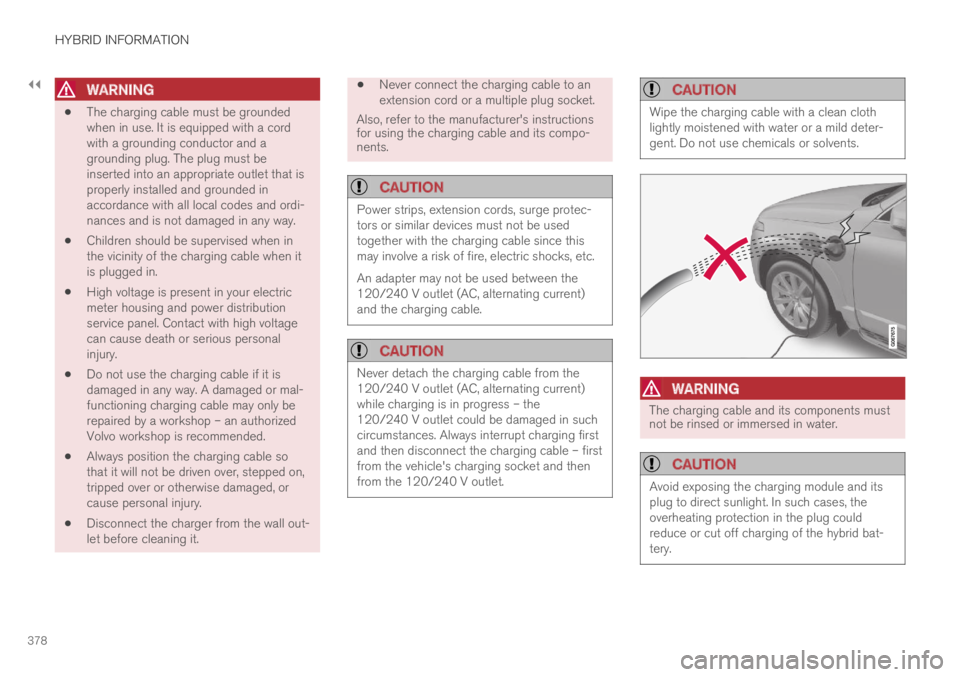
The charging cable and its components mustnot be rinsed or immersed in water.
CAUTION
Avoid exposing the charging module and itsplug to direct sunlight. In such cases, theoverheating protection in the plug couldreduce or cut off charging of the hybrid bat-tery.