heating VOLVO S60 TWIN ENGINE 2019 Owners Manual
[x] Cancel search | Manufacturer: VOLVO, Model Year: 2019, Model line: S60 TWIN ENGINE, Model: VOLVO S60 TWIN ENGINE 2019Pages: 645, PDF Size: 13.96 MB
Page 7 of 645

5
SEATS AND STEERING WHEEL
Manual front seats180
Power* front seats181
Adjusting the power* front seats181
Storing positions for seats, mirrorsand head-up display*182
Using stored positions for seats, mir-rors and head-up display*183
Front seat massage* settings184
Adjusting front seat massage settings*185
Adjusting* front seat cushion length185
Adjusting front seat side bolster settings*186
Adjusting front seat lumbar support*187
Adjusting the passenger seat fromthe driver's seat*188
Folding down the rear seat backrests*189
Adjusting the rear seat head restraints191
Steering wheel controls and horn192
Adjusting the steering wheel193
CLIMATE CONTROL
Climate196
Climate zones196
Climate control sensors196
Perceived temperature197
Climate control system voice commands197
Air quality198
Clean Zone*199
Clean Zone Interior Package*199
Interior Air Quality System*200
Activating and deactivating the airquality sensor*200
Passenger compartment air filter201
Air distribution201
Adjusting air distribution202
Opening, closing and directing air vents202
Air distribution options204
Climate system controls207
Activating and deactivating powerfront seats*208
Activating and deactivating theheated front seat*209
Activating and deactivating theheated rear seats*209
Activating and deactivating front seatventilation*209
Activating and deactivating theheated steering wheel*210
Activating and deactivating automaticsteering wheel heating*210
Activating auto climate control211
Activating and deactivating recirculation211
Activating and deactivating the recir-culation timer setting212
Activating and deactivating max defroster212
Activating and deactivating theheated rear window and door mirrors213
Automatically activating and deacti-vating the heated rear window anddoor mirrors
214
Setting the blower speed for thefront seats214
Setting the temperature for the frontseats215
Synchronize temperature216
Activating and deactivating air condi-tioning216
Parking climate217
Preconditioning217
Starting and stopping preconditioning218
Preconditioning timer219
Adding and editing timer settings forpreconditioning219
Page 12 of 645

10
Overheating of engine and transmission431
Battery drain432
Jump starting using another battery432
Driving with a trailer434
Trailer Stability Assist*436
Checking trailer lights437
Towing using a towline438
Attaching and removing the towing eyelet439
Recovery440
HomeLink®*440
Programming HomeLink®*441
Using HomeLink®*442
Type approval for HomeLink®*443
Compass*443
Activating and deactivating the compass*444
Calibrating the compass*444
AUDIO, MEDIA AND INTERNET
Audio, media and Internet448
Sound settings448
Sound experience*449
Apps450
Download apps451
Updating apps452
Deleting apps452
Radio453
Starting the radio453
Changing waveband and radio station454
Searching for a radio station455
Storing radio favorites455
Radio settings456
RBDS457
HD Radio™457
Activating and deactivating the HDRadio™458
HD Radio™ sub-channels459
HD Radio™ limitations460
SiriusXM® Satellite radio*460
Using SiriusXM® Satellite radio*461
Settings for SiriusXM® Satellite radio*463
SiriusXM Travel Link®*464
SiriusXM Travel Link®* - Weather466
SiriusXM Travel Link®* - Notifications467
SiriusXM Travel Link®* - Fuel468
SiriusXM Travel Link®* - Sports469
Media player470
Playing media470
Controlling and changing media472
Media searches473
Gracenote®473
CD player*474
Video474
Playing video475
Playing DivX® 475
Video settings475
Streaming media via Bluetooth®476
Connecting a device via Bluetooth®476
Playing media via the USB port476
Connecting a device via the USB port477
Technical specifications for USB devices477
Compatible file formats for media478
Apple® CarPlay®*479
Using Apple® CarPlay®*479
Settings for Apple® CarPlay®*480
Tips for using Apple® CarPlay®*481
Page 30 of 645

||
YOUR VOLVO
* Option/accessory.28
goal. In addition to continuous environmentalrefinement of conventional gasoline-poweredinternal combustion engines, Volvo is activelylooking at advanced technology alternative-fuelvehicles.
When you drive a Volvo, you become our partnerin the work to lessen the vehicle's impact on theenvironment. To reduce your vehicle's environ-mental impact, you can:
Maintain proper air pressure in your tires.Tests have shown decreased fuel economywith improperly inflated tires.
Follow the recommended maintenanceschedule in your Warranty and ServiceRecords Information booklet.
Drive at a constant speed whenever possible.
See a trained and qualified Volvo servicetechnician as soon as possible for inspectionif the check engine (malfunction indicator)light illuminates, or stays on after the vehiclehas started.
Properly dispose of any vehicle-related wastesuch as used motor oil, used batteries, brakepads, etc.
When cleaning your vehicle, please use gen-uine Volvo car care products. All Volvo carcare products are formulated to be environ-mentally friendly.
Twin Engine vehicles
If possible, precondition the vehicle with thecharging cable before driving.
If preconditioning is not possible in coldweather, use the seat and steering wheelheating primarily. Avoid heating the entirepassenger compartment, which reduces thehybrid battery's charge level.
Choose the Pure drive mode to help mini-mize electric power consumption.
In hilly terrain, put the gear selector in modeB to utilize the electric motor's braking func-tion when the accelerator pedal is released.This helps charge the hybrid battery.
Related information
Economical driving (p. 420)
Starting and stopping preconditioning(p. 218)
The Owner's Manual and the environment(p. 23)
Air quality (p. 198)
IntelliSafe – driver support andsafety
IntelliSafe is Volvo Cars' philosophy regardingvehicle safety. IntelliSafe consists of a number of
systems2 that are designed to help make drivingsafer, prevent accidents and protect passengersand other road users.
WARNING
The functions are supplementary aids – theycannot manage all situations in all conditions.
The driver is always responsible for ensuringthat the vehicle is driven in a safe manner andin accordance with applicable traffic rules andregulations.
Support
IntelliSafe has the following functions designedto help the driver operate the vehicle more safely.
Active high beam
Tunnel detection
Pilot Assist
Cross Traffic Alert
Blind Spot Information
Park Assist*
Park Assist Pilot*
Park Assist Camera*
2Some of these systems are standard, while others are options. This may vary depending on market, vehicle model and model year.
Page 111 of 645
DISPLAYS AND VOICE CONTROL
* Option/accessory.109
adjusted using the right-side steering wheelkeypad.
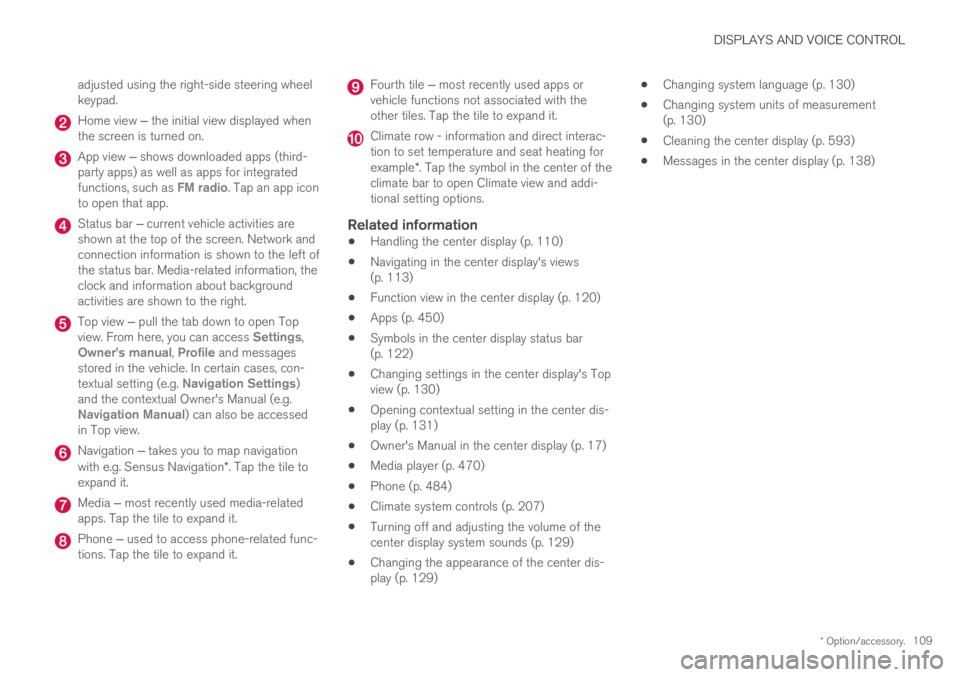
Home view ‒ the initial view displayed whenthe screen is turned on.
App view ‒ shows downloaded apps (third-party apps) as well as apps for integratedfunctions, such as FM radio. Tap an app iconto open that app.
Status bar ‒ current vehicle activities areshown at the top of the screen. Network andconnection information is shown to the left ofthe status bar. Media-related information, theclock and information about backgroundactivities are shown to the right.
Top view ‒ pull the tab down to open Topview. From here, you can access Settings,Owner's manual, Profile and messagesstored in the vehicle. In certain cases, con-textual setting (e.g. Navigation Settings)and the contextual Owner's Manual (e.g.Navigation Manual) can also be accessedin Top view.
Navigation ‒ takes you to map navigationwith e.g. Sensus Navigation*. Tap the tile toexpand it.
Media ‒ most recently used media-relatedapps. Tap the tile to expand it.
Phone ‒ used to access phone-related func-tions. Tap the tile to expand it.
Fourth tile ‒ most recently used apps orvehicle functions not associated with theother tiles. Tap the tile to expand it.
Climate row - information and direct interac-tion to set temperature and seat heating forexample*. Tap the symbol in the center of theclimate bar to open Climate view and addi-tional setting options.
Related information
Handling the center display (p. 110)
Navigating in the center display's views(p. 113)
Function view in the center display (p. 120)
Apps (p. 450)
Symbols in the center display status bar(p. 122)
Changing settings in the center display's Topview (p. 130)
Opening contextual setting in the center dis-play (p. 131)
Owner's Manual in the center display (p. 17)
Media player (p. 470)
Phone (p. 484)
Climate system controls (p. 207)
Turning off and adjusting the volume of thecenter display system sounds (p. 129)
Changing the appearance of the center dis-play (p. 129)
Changing system language (p. 130)
Changing system units of measurement(p. 130)
Cleaning the center display (p. 593)
Messages in the center display (p. 138)
Page 116 of 645
||
DISPLAYS AND VOICE CONTROL
* Option/accessory.114
NOTE
In Home view's standard mode – short presson the Home button. An animation describingaccess to the various views is shown on thescreen.
NOTE
When the vehicle is moving:
Certain functions (e.g. using the centerdisplay's keyboard) may be deactivated.
Certain texts (e.g. those generated byapps) will be shortened to three rows.Tap the Read out button to have theentire message read aloud.
Text messages will be shortened to onerow. Tap the Read out button to havethe entire message read aloud.
Status bar
Current vehicle activities are shown at the top ofthe screen in the status bar. Network and con-nection information is shown to the left of thestatus bar. Media-related information, the clockand information about background activities areshown to the right.
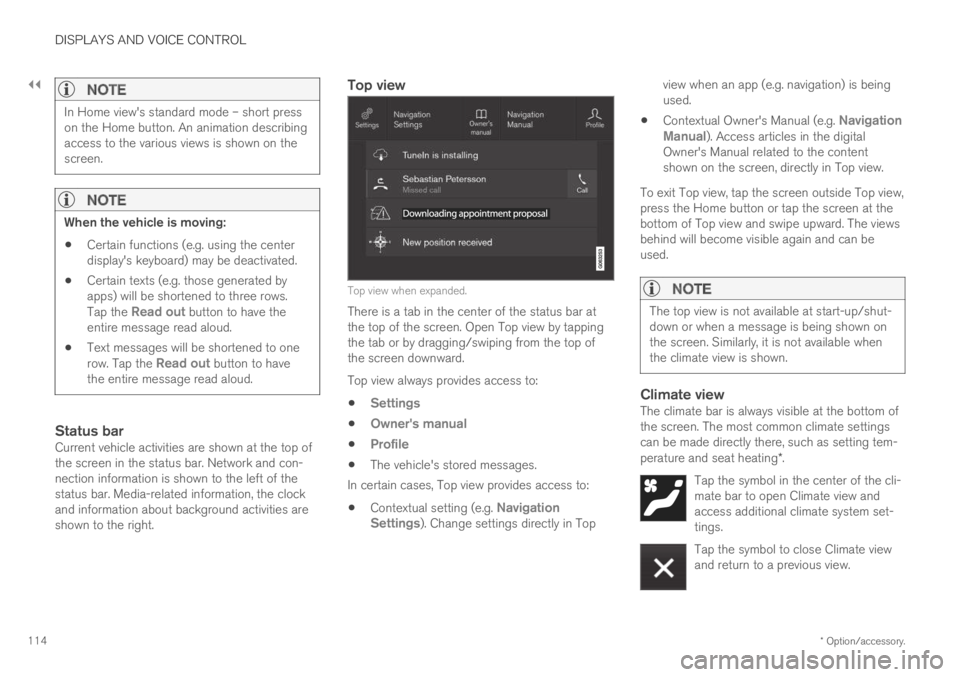
Top view
Top view when expanded.
There is a tab in the center of the status bar atthe top of the screen. Open Top view by tappingthe tab or by dragging/swiping from the top ofthe screen downward.
Top view always provides access to:
Settings
Owner's manual
Profile
The vehicle's stored messages.
In certain cases, Top view provides access to:
Contextual setting (e.g. NavigationSettings). Change settings directly in Top
view when an app (e.g. navigation) is beingused.
Contextual Owner's Manual (e.g. NavigationManual). Access articles in the digitalOwner's Manual related to the contentshown on the screen, directly in Top view.
To exit Top view, tap the screen outside Top view,press the Home button or tap the screen at thebottom of Top view and swipe upward. The viewsbehind will become visible again and can beused.
NOTE
The top view is not available at start-up/shut-down or when a message is being shown onthe screen. Similarly, it is not available whenthe climate view is shown.
Climate view
The climate bar is always visible at the bottom ofthe screen. The most common climate settingscan be made directly there, such as setting tem-perature and seat heating*.
Tap the symbol in the center of the cli-mate bar to open Climate view andaccess additional climate system set-tings.
Tap the symbol to close Climate viewand return to a previous view.
Page 176 of 645

WINDOWS, GLASS AND MIRRORS
* Option/accessory.174
Auto closing the panoramic roof*sun curtain
With this function, the sun curtain closes auto-matically 15 minutes after the vehicle has beenlocked if it is parked in hot weather. This is doneto lower the passenger compartment tempera-ture and protect the upholstery against beingbleached by the sun.
The function is deactivated as the default factorysetting and can be activated or deactivated usingthe center display.
1.Tap Settings in the Top view in the centerdisplay.
2.Tap My CarLocking.
Select Auto Close Sunroof Curtain toactivate/deactivate.
NOTE
The sun curtain also closes when all windowsare closed with keyless closing*.
Related information
Panoramic roof* (p. 170)
Operating the panoramic roof* (p. 171)
Pinch protection for windows and sun cur-tains (p. 164)
Keyless locking and unlocking* (p. 245)
Locking and unlocking using the remote key(p. 232)Wiper blades and washer fluid
The wipers and the washer fluid are used toimprove visibility and the headlight pattern.
Washer fluid direct from the wiper blades andheating* of the wiper blades gives improvedvision.
When there is approximately 1 liter (1 qt) ofwasher fluid remaining, a message to refill willappear in the instrument panel.
Related information
Using the rain sensor (p. 175)
Using the windshield and headlight washers(p. 177)
Using the rain sensor's memory function(p. 176)
Filling washer fluid (p. 609)
Windshield wipers in the service position(p. 608)
Replacing windshield wiper blades (p. 607)
Using the windshield wipers (p. 175)
Page 199 of 645

CLIMATE CONTROL
}}
* Option/accessory.197
On vehicles equipped with the Interior Air QualitySystem*, there is also an air quality sensor in theclimate system's air intake.
Related information
Climate (p. 196)
Interior Air Quality System* (p. 200)
Perceived temperature
The climate control system regulates the climatein the passenger compartment based on per-ceived temperature, not actual temperature.
The selected passenger compartment tempera-ture is based on the physical perception of thecurrent ambient temperature, airflow speed,humidity, sunlight in the passenger compartment,etc.
The system has a sunlight sensor that detectswhich side of the vehicle the sunlight is shiningon and adjusts the temperature accordingly. Thismeans that the temperature of the air coming outof the vents may be different for the left and rightsides, even if the temperature setting is the samefor both sides.
Related information
Climate (p. 196)
Climate control system voice
commands1
Voice commands can be used for the climatecontrol system to e.g. change temperature, acti-vate seat heating* or change blower speed.
Tap and say one of the following commands:
"Climate" - starts a command dialog for cli-mate controls and provides examples ofcommands that can be used.
"Set temperature to X degrees" - setsdesired temperature.
"Raise temperature"/"Lowertemperature" - raises/lowers the set tem-perature.
"Sync temperature" – synchronizes thetemperature for all climate zones in the vehi-cle with the temperature set for the driver'sside.
"Air on feet"/"Air on body" - opens thedesired air vent.
"Air on feet off"/"Air on body off" - closesthe desired air vent.
"Set fan to max"/"Turn off fan" - changesblower speed to Max/Off.
"Raise fan speed"/"Lower fan speed" -raises/lowers the set blower speed.
1Certain markets only.
Page 200 of 645
||
CLIMATE CONTROL
* Option/accessory.198
"Turn on auto" – activates automatic cli-mate control.
"Air condition on"/"Air condition off" -activates/deactivates air conditioning.
"Recirculation on"/"Recirculation off" -activates/deactivates air recirculation.
"Turn on defroster "/"Turn off defroster"- activates/deactivates window and door mir-ror defrosting.
"Turn on max defroster"/"Turn off maxdefroster" - activates/deactivates maxdefroster.
"Turn on rear defroster"/"Turn off reardefroster" - Activates/deactivates heatedrear window and door mirrors.
"Turn steering wheel heat on"/"Turnsteering wheel heat off" - activates/deac-tivates heated steering wheel*.
"Raise steering wheel heat"/"Lowersteering wheel heat" - raises/lowers thelevel of steering wheel heating*.
"Turn on seat heat"/"Turn off seat heat"- activates/deactivates seat heating*.
"Raise seat heat"/"Lower seat heat" -raises/lowers the level of seat heating*.
"Turn on seat ventilation"/"Turn off seatventilation" - activates/deactivates seatventilation*.
"Raise seat ventilation"/"Lower seatventilation" - raises/lowers the level of seatventilation*.
Related information
Climate (p. 196)
Voice control (p. 143)
Using voice commands (p. 144)
Voice control settings (p. 147)
Air quality
The materials used in the passenger compart-ment and air filtering system have been selectedto ensure a high level of air quality in the passen-ger compartment.
Materials used in the passenger
compartment
The materials in the passenger compartment aredesigned to be pleasant and comfortable, evenfor people with asthma or allergies.
The materials have been developed and tested tominimize dust in the passenger compartment andmake it easier to keep clean.
The mats in both the passenger compartmentand trunk can be easily removed for cleaning.
Use Volvo-recommended cleaning agents andcar care products to clean the interior.
Air filtering systems
In addition to the passenger compartment filter,the Clean Zone Interior Package* and Interior AirQuality System* also help maintain high air qual-ity in the passenger compartment.
Related information
Climate (p. 196)
Clean Zone* (p. 199)
Clean Zone Interior Package* (p. 199)
Interior Air Quality System* (p. 200)
Passenger compartment air filter (p. 201)
Page 206 of 645

CLIMATE CONTROL
204
Air distribution options
Air distribution can be adjusted manually if nee-ded. The following options are available.
Air distributionPurpose
If all air distribution buttons are deselected in manual mode, the climate control system will revert to automatic mode.
Main airflow from defroster vents. Some airflow from other vents. Helps remove ice and condensation in cold and humid weather(blower speed should not be set too low).
Main airflow from dashboard vents. Some airflow from other vents. Provides effective cooling in warm weather.
Main airflow from floor vents. Some airflow from other vents. Provides heating or cooling in footwell areas.
Page 210 of 645

||
CLIMATE CONTROL
* Option/accessory.208
Blower control.
AUTO - Automatic climate control.
Parking climate
Parking climate functions can be controlled fromthe Parking climate tab.
Climate controls on the rear side of the
tunnel console *
If the vehicle is equipped with heated rear seats*,there are physical buttons on the rear side of thetunnel console to control this function.
Related information
Climate (p. 196)
Activating and deactivating power frontseats* (p. 208)
Activating and deactivating the heated rearseats* (p. 209)
Activating and deactivating front seat ventila-tion* (p. 209)
Activating and deactivating the heated steer-ing wheel* (p. 210)
Activating auto climate control (p. 211)
Activating and deactivating recirculation(p. 211)
Activating and deactivating max defroster(p. 212)
Activating and deactivating the heated rearwindow and door mirrors (p. 213)
Setting the blower speed for the front seats(p. 214)
Synchronize temperature (p. 216)
Activating and deactivating air conditioning(p. 216)
Activating and deactivating power
front seats*
The seats can be heated for added comfort forthe driver and passengers in cold weather.
1. Tap the left- or right-side steering wheel andseat button in the center display's climatebar to open the controls for steering wheeland seat heating.
If the vehicle is not equipped with ventilatedseats or heated steering wheel (for the driv-er's side), the button for seat heating isdirectly accessible in the climate bar.
2. Tap the seat heating button repeatedly toselect one of the four levels: Off, High,Medium or Low.
>The level is changed and the set level isdisplayed in the button.
Related information
Climate system controls (p. 207)
Activating and deactivating the heated frontseat* (p. 209)