warning lights VOLVO S60 TWIN ENGINE 2019 User Guide
[x] Cancel search | Manufacturer: VOLVO, Model Year: 2019, Model line: S60 TWIN ENGINE, Model: VOLVO S60 TWIN ENGINE 2019Pages: 645, PDF Size: 13.96 MB
Page 312 of 645

||
DRIVER SUPPORT
310
and lower body in combination with normalhuman movements.
If large portions of the cyclist's body or the bicy-cle itself are not visible to the function's camera,it will not be able to detect a cyclist.
The system can only detect adult cyclists ridingon bicycles intended for adults.
WARNING
City Safety is supplementary driver support,but it cannot detect all cyclists in all situationsand, for example, cannot see:
partially obscured cyclists.
cyclists if the background contrast of thecyclist is poor - warning and brake inter-ventions may then be late or not occur atall.
cyclists in clothing that hides their bodycontour.
bikes loaded with large objects.
The driver is always responsible for ensuringthat the vehicle is driven correctly and with asafety distance suitable for the speed.
Pedestrians
Optimal examples of what the system considers to be apedestrian: clear body contours.
For optimal performance, the system's functionfor pedestrian detection needs the clearest pos-sible information about body and bicycle con-tours. This entails being able to detect the con-tours of the pedestrian's head, arm, shoulders,legs, torso and lower body in combination withnormal human movements.
In order to detect a pedestrian, there must be acontrast to the background, which could dependon clothing, weather conditions, etc. If there is lit-tle contrast, the person may be detected late ornot at all, which may result in a delayed reactionfrom the system or no reaction at all.
City Safety can detect pedestrians even in darkconditions if they are illuminated by the vehicle'sheadlights.
WARNING
City Safety is supplementary driver support,but it cannot detect all pedestrians in all sit-uations and, for example, cannot see:
partially obscured pedestrians, people inclothing that hides their body contour orpedestrians shorter than 80 cm (32 in.).
pedestrians if the background contrast ofthe pedestrians is poor - warning andbrake interventions may then be late ornot occur at all.
pedestrians who are carrying largeobjects.
The driver is always responsible for ensuringthat the vehicle is driven correctly and with asafety distance suitable for the speed.
Page 313 of 645

DRIVER SUPPORT
}}
311
Large animals
Optimal examples of what City Safety would interpret asa large animal: stationary or moving slowly and with clearbody contours.
If a large animal appears in front of the vehicle,Large Animal Detection, which is part of CitySafety, can in some cases alert the driver of theanimal and provide braking assistance.
For optimal performance, the system's functionfor detecting large animals (e.g. moose, horses,etc.) needs the clearest possible informationabout body contours. This entails being able todetect the animal straight from the side in combi-nation with normal movements for that animal.
If parts of the animal's body are not visible to thefunction's camera, the system will not be able todetect the animal.
City Safety can detect large animals even in darkconditions if they are illuminated by the vehicle'sheadlights.
WARNING
City Safety is supplementary driver support,but it cannot detect all large animals in all sit-uations and, for example, cannot see:
partially obscured larger animals.
larger animals seen from the front or frombehind.
running or fast moving larger animals.
larger animals if the contrast of the ani-mal's background is poor - warning andbrake interventions may then occur lateor not at all.
smaller animals such as cats and dogs.
The driver is always responsible for ensuringthat the vehicle is driven correctly and with asafety distance suitable for the speed.
Related information
City Safety™ (p. 305)
City Safety limitations (p. 316)
Limitations of City Safety in crossing traffic(p. 312)
City Safety steering assistance limitationsduring evasive maneuvers (p. 314)
City Safety in crossing traffic
City Safety can assist the driver when turning inthe path of an oncoming vehicle in an intersec-tion.
: Sector in which City Safety can detect an oncomingvehicle in crossing traffic.
In order for City Safety to detect an oncomingvehicle in situations where there is a risk of a col-lision, that vehicle must be within the sector inwhich City Safety can analyze the situation.
The following criteria must also be met:
your vehicle's speed must be at least 4 km/h(3 mph)
your vehicle must be making a left turn
the oncoming vehicle's headlights must beon
Page 314 of 645

||
DRIVER SUPPORT
312
WARNING
The driver support system only issues a warn-ing for obstacles detected by its radar sensor– thus, a warning may come after a delay ornot at all.
Never wait for a warning or assistance.Apply the brakes when necessary.
WARNING
The function is supplementary driver sup-port intended to facilitate driving and helpmake it safer – it cannot handle all situa-tions in all traffic, weather and road condi-tions.
The driver is advised to read all sectionsin the Owner's Manual about this functionto learn of its limitations, which the drivermust be aware of before using the func-tion.
Driver support functions are not a substi-tute for the driver's attention and judg-ment. The driver is always responsible forensuring the vehicle is driven in a safemanner, at the appropriate speed, with anappropriate distance to other vehicles,and in accordance with current trafficrules and regulations.
Related information
City Safety™ (p. 305)
Limitations of City Safety in crossing traffic(p. 312)
Limitations of City Safety incrossing traffic
In certain situations, it may be difficult for CitySafety to help the driver avoid a collision withcrossing traffic.
For example:
on slippery roads when Electronic StabilityControl (ESC) is actively operating
if an approaching vehicle is detected at a latestage
if the oncoming vehicle is partially obstructedby another vehicle or object
if the oncoming vehicle's headlights are off
if the oncoming vehicle is moving erraticallyand e.g. suddenly changes lanes at a latestage.
Page 318 of 645

||
DRIVER SUPPORT
316
your lane must have clear side lane markings
your vehicle must be positioned straight inyour lane
the oncoming vehicle must be positionedwithin your vehicle's lane markings
the oncoming vehicle's headlights must beon
the function can only handle “front-to-front”collisions
the function can only detect vehicles withfour wheels.
NOTE
The function uses the vehicle's camera andradar sensor, which has certain general limita-tions.
WARNING
The driver support system only issues a warn-ing for obstacles detected by its radar sensor– thus, a warning may come after a delay ornot at all.
Never wait for a warning or assistance.Apply the brakes when necessary.
WARNING
The function is supplementary driver sup-port intended to facilitate driving and helpmake it safer – it cannot handle all situa-tions in all traffic, weather and road condi-tions.
The driver is advised to read all sectionsin the Owner's Manual about this functionto learn of its limitations, which the drivermust be aware of before using the func-tion.
Driver support functions are not a substi-tute for the driver's attention and judg-ment. The driver is always responsible forensuring the vehicle is driven in a safemanner, at the appropriate speed, with anappropriate distance to other vehicles,and in accordance with current trafficrules and regulations.
Related information
City Safety™ (p. 305)
City Safety limitations (p. 316)
Camera/radar sensor limitations (p. 300)
City Safety limitations
City Safety48 functionality may be reduced incertain situations.
Surroundings
Low objects
Hanging objects, such as flags for overhangingloads or accessories such as auxiliary lights orfront protective grids that extend beyond theheight of the hood, may limit City Safety function-ality.
Slippery road conditions
The extended braking distance on slippery roadsmay reduce City Safety's capacity to help avoid acollision. In these types of situations, the Anti-lock Braking System and Electronic Stability Con-
trol (ESC49) will help provide optimal brakingpower with maintained stability.
Backlighting
The visual warning signal in the windshield maybe difficult to detect in bright sunlight, if there arereflections, or if the driver is wearing sunglassesor not looking straight ahead.
Heat
If the temperature in the passenger compartmentis high due to e.g. bright sunlight, the visual warn-ing signal in the windshield may be temporarilydisabled.
48This function is not available on all markets.49Electronic Stability Control
Page 319 of 645

DRIVER SUPPORT
}}}}
317
Camera and radar sensor's field of vision
The camera's field of vision is limited and in cer-tain situations, it may be unable to detect pedes-trians, large animals, cyclists or vehicles, or it maydetect them later than expected.
Vehicles that are dirty may be detected later thanclean vehicles, and in dark conditions, motorcy-cles may be detected late or not at all.
If a text message displayed in the instrumentpanel indicates that the camera/radar sensor isobstructed, it may be difficult for City Safety todetect pedestrians, large animals, cyclists, vehi-cles or lane markings in front of the vehicle. CitySafety functionality may therefore be reduced.
Text messages may not be displayed for all situa-tions in which the windshield sensors areblocked. The driver must therefore always keepthe windshield in front of the camera/radar sen-sor clean.
CAUTION
Maintenance of driver support components
may only performed by a workshop50.
Driver intervention
Backing up
City Safety is temporarily deactivated when thevehicle is backing up.
Low speed
City Safety is not activated at very low speedsunder 4 km/h (3 mph). The system will thereforenot intervene in situations in which your vehicle isapproaching another vehicle very slowly, such aswhen parking.
Active driver
Action by the driver always has priority. CitySafety will therefore not react or will react at alater stage with a warning or intervention in situa-tions in which the driver is clearly steering andoperating the accelerator pedal, even if a collisionis unavoidable.
An active and aware driving style may thereforedelay collision warnings and intervention in orderto minimize unnecessary warnings.
Other limitations
WARNING
Warnings and brake interventions can betriggered late or not at all if the traffic sit-uation or external influences prevent thecamera and radar unit from properlydetecting pedestrians, cyclists, large ani-mals or vehicles ahead of the vehicle.
To be able to detect vehicles at night, itsfront and rear lights must work and illumi-nate clearly.
The camera and radar unit have a limitedrange for pedestrians and cyclists – thesystem can provide effective warningsand brake interventions if the relativespeed is lower than 50 km/h (30 mph).For stationary or slow-moving vehicles,warnings and brake interventions areeffective at vehicle speeds of up to70 km/h (43 mph). Speed reduction forlarge animals is less than 15 km/h(9 mph) and can be achieved at vehiclespeeds over 70 km/h (43 mph). At lowerspeeds, the warning and brake interven-tion for large animals is less effective.
Warnings for stationary or slow-movingvehicles and large animals can be disen-gaged due to darkness or poor visibility.
50An authorized Volvo workshop is recommended.
Page 324 of 645

||
DRIVER SUPPORT
322
given, the indicator light will become brighter andbegin flashing.
NOTE
The light illuminates on the side of the vehiclewhere the system has detected the vehicle. Ifthe vehicle is passed on both sides simulta-neously, both lights come on.
WARNING
The function is supplementary driver sup-port intended to facilitate driving and helpmake it safer – it cannot handle all situa-tions in all traffic, weather and road condi-tions.
The driver is advised to read all sectionsin the Owner's Manual about this functionto learn of its limitations, which the drivermust be aware of before using the func-tion.
Driver support functions are not a substi-tute for the driver's attention and judg-ment. The driver is always responsible forensuring the vehicle is driven in a safemanner, at the appropriate speed, with anappropriate distance to other vehicles,and in accordance with current trafficrules and regulations.
NOTE
The function uses the vehicle's camera andradar sensor, which has certain general limita-tions.
Related information
Driver support systems (p. 260)
Activating or deactivating BLIS (p. 322)
BLIS limitations (p. 323)
BLIS messages (p. 324)
Activating or deactivating BLIS
The BLIS56 function can be activated or deacti-vated.
Location of BLIS indicator light.
Indicator light
Activate or deactivate the function using thisbutton in the center display's Function view.
GREEN button indicator light – the functionis activated.
GRAY button indicator light – the function isdeactivated.
If BLIS is activated when the engine is started,the indicator lights in the rearview mirrors willflash once.
56Blind Spot Information Systems
Page 325 of 645

DRIVER SUPPORT
* Option/accessory.323
If BLIS is deactivated when the engine is turnedoff, it will remain off the next time the engine isstarted and the indicator lights will not illuminate.
Related information
BLIS* (p. 321)
BLIS limitations
BLIS57 functionality may be reduced in certainsituations.
Keep the marked area clean (on both the left and rightsides of the vehicle)58.
Examples of limitations:
Dirt, ice and snow covering the sensors mayreduce functionality and prevent the systemfrom providing warnings.
The BLIS function is automatically deacti-vated if a trailer, bicycle holder or similar isconnected to the vehicle's electrical system.
For BLIS to function optimally, bicycle hold-ers, luggage racks or similar should not bemounted on the vehicle's towbar.
WARNING
BLIS does not work in sharp curves.
BLIS does not work when the vehicle isbeing reversed.
NOTE
The function uses the vehicle's camera andradar sensor, which has certain general limita-tions.
Related information
BLIS* (p. 321)
Camera/radar sensor limitations (p. 300)
57Blind Spot Information Systems58Note: This illustration is general and details may vary depending on model.
Page 353 of 645

DRIVER SUPPORT
}}
* Option/accessory.351
Related information
Driver support systems (p. 260)
Park Assist front, rear and sides* (p. 351)
Activating/deactivating Park Assist* (p. 352)
Park Assist symbols and messages (p. 354)
Camera/radar sensor limitations (p. 300)
Park Assist front, rear and sides*
Park Assist behaves differently depending onwhich part of the vehicle is approaching anobstacle.
Front camera
The warning signal has a continuous tone when theobstacle is less than approx. 30 cm (1 ft) from the vehi-cle.
The Parking Assist system's front sensors areautomatically activated when the engine isstarted. They are active at speeds below 10 km/h(6 mph).
The distance monitored extends approx. 80 cm(2.5 ft) in front of the vehicle.
NOTE
The Parking Assist system is deactivatedwhen the parking brake is used or when P isselected on vehicles with automatic transmis-sion.
CAUTION
When installing auxiliary lights: Make surethese do not obscure the sensors – the auxili-ary lights could be perceived as an obstacle.
Back
The warning signal has a continuous tone when theobstacle is less than approx. 30 cm (1 ft) from the vehi-cle.
The rear sensors will be activated if the vehiclebegins rolling backward or if reverse gear isengaged.
Page 385 of 645

HYBRID INFORMATION
383
LED indicatorlight's colorMeaning
WhiteCourtesy light.
YellowWait modeA – waiting forcharging to start.
Flashing greenCharging is in progressB.
GreenCharging completedC.
RedMalfunction.
AE.g. after a door has been opened or if the charging cable han-dle is not locked in place.BThe more slowly the light flashes, the closer the battery is tobeing fully charged.CThe light will go out after a short time.
Related information
Charging the hybrid battery (p. 375)
Charging status in the instrument panel(p. 384)
Charging status in the charging cable'scharging module (p. 383)
Stopping hybrid battery charging (p. 386)
Charging status in the chargingcable's charging module
The red and blue lights in the charging moduleindicate the status of ongoing and completedcharging.
Charge module: 1. Red warning light, 2. Blue status indi-cator
When the charge module is initially plugged intoa wall outlet, the red warning light will flash onceto indicate that a startup safety check has beenperformed. When the safety check has beencompleted, the blue status indicator will glowsteadily and the red warning light will be off. Thecharger is now ready to be used. If the red warn-ing light continues to flash or glows steadily, afault has been detected and the charger will notdeliver power to the vehicle. Contact a Volvoretailer or a certified Volvo service technician.
When the charging cable is connected to thevehicle's charging socket, the blue light will flashonce.
Charging cable connected to the vehicle's charg-ing socket:
Indicatorlight's colorMeaning
FlashingblueCharging is in progress. Thelight flashes about once everyother second
Solid blueCharging completed. This willalso be indicated in the instru-ment panel
Related information
Charging the hybrid battery (p. 375)
Charging status in the vehicle's chargingsocket (p. 382)
Charging status in the instrument panel(p. 384)
Stopping hybrid battery charging (p. 386)
Page 397 of 645
STARTING AND DRIVING
* Option/accessory.395
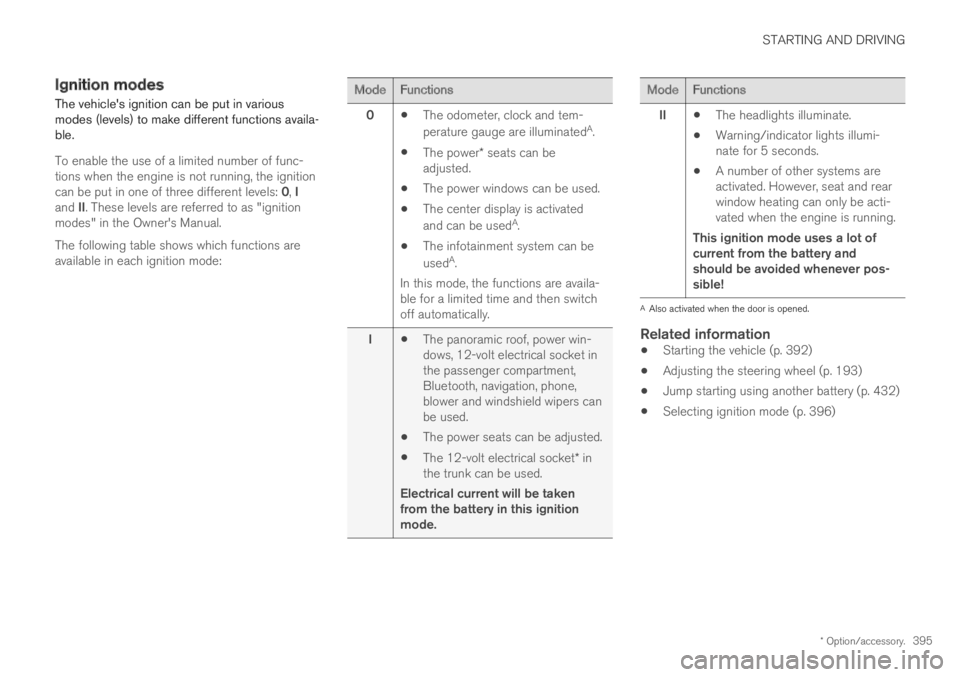
Ignition modes
The vehicle's ignition can be put in variousmodes (levels) to make different functions availa-ble.
To enable the use of a limited number of func-tions when the engine is not running, the ignitioncan be put in one of three different levels: 0, Iand II. These levels are referred to as "ignitionmodes" in the Owner's Manual.
The following table shows which functions areavailable in each ignition mode:
ModeFunctions
0The odometer, clock and tem-
perature gauge are illuminatedA.
The power* seats can beadjusted.
The power windows can be used.
The center display is activated
and can be usedA.
The infotainment system can be
usedA.
In this mode, the functions are availa-ble for a limited time and then switchoff automatically.
IThe panoramic roof, power win-dows, 12-volt electrical socket inthe passenger compartment,Bluetooth, navigation, phone,blower and windshield wipers canbe used.
The power seats can be adjusted.
The 12-volt electrical socket* inthe trunk can be used.
Electrical current will be takenfrom the battery in this ignitionmode.
ModeFunctions
IIThe headlights illuminate.
Warning/indicator lights illumi-nate for 5 seconds.
A number of other systems areactivated. However, seat and rearwindow heating can only be acti-vated when the engine is running.
This ignition mode uses a lot ofcurrent from the battery andshould be avoided whenever pos-sible!
AAlso activated when the door is opened.
Related information
Starting the vehicle (p. 392)
Adjusting the steering wheel (p. 193)
Jump starting using another battery (p. 432)
Selecting ignition mode (p. 396)