brakes VOLVO S60 TWIN ENGINE 2019 Owner's Manual
[x] Cancel search | Manufacturer: VOLVO, Model Year: 2019, Model line: S60 TWIN ENGINE, Model: VOLVO S60 TWIN ENGINE 2019Pages: 645, PDF Size: 13.96 MB
Page 292 of 645

||
DRIVER SUPPORT
* Option/accessory.290
The previous illustration34 shows that Pilot Assistis set to maintain a speed of 110 km/h (68 mph)and that there is no target vehicle ahead to fol-low.
Pilot Assist will provide steering assistancebecause it can detect the lane's side markinglines.
Related information
Pilot Assist (p. 281)
Collision risk warning from driversupport
The driver support systems Pilot Assist and
Adaptive Cruise Control*35 can help alert thedriver if the distance to the vehicle ahead sud-denly decreases to an unsafe distance.
Collision warning audible signal and symbol.
Acoustic collision warning signal
Collision warning symbol
Camera/radar sensor distance monitoring
Driver support uses approx. 40% of the vehicle'sbraking capacity. If a situation requires morebraking force than driver support can provide, andif the driver does not apply the brakes, a warning
light and audible warning signal will be activatedto alert the driver that immediate action isrequired.
WARNING
The driver support system only issues a warn-ing for vehicles detected by its radar unit –thus, a warning may come after a delay or notat all. Never wait for a warning. Apply thebrakes when necessary.
Collision warning symbol on the windshield.
In vehicles equipped with a head-up display*, aflashing warning symbol will be displayed on thewindshield.
34Note: This illustration is general and details may vary depending on model.35Adaptive Cruise Control
Page 293 of 645
DRIVER SUPPORT
* Option/accessory.291
NOTE
Visual warnings on the windshield may be dif-ficult to notice in cases of strong sunlight,reflections, extreme light contrasts, or if thedriver is wearing sunglasses or is not lookingstraight ahead.
Related information
Driver support systems (p. 260)
Adaptive Cruise Control* (p. 272)
Pilot Assist (p. 281)
Distance Alert* (p. 270)
Head-up display* (p. 140)
Switching target vehicles with driversupport
At certain speeds, vehicles with automatic trans-missions and the driver support functions Adap-
tive Cruise Control*36 and Pilot Assist canswitch target vehicles.
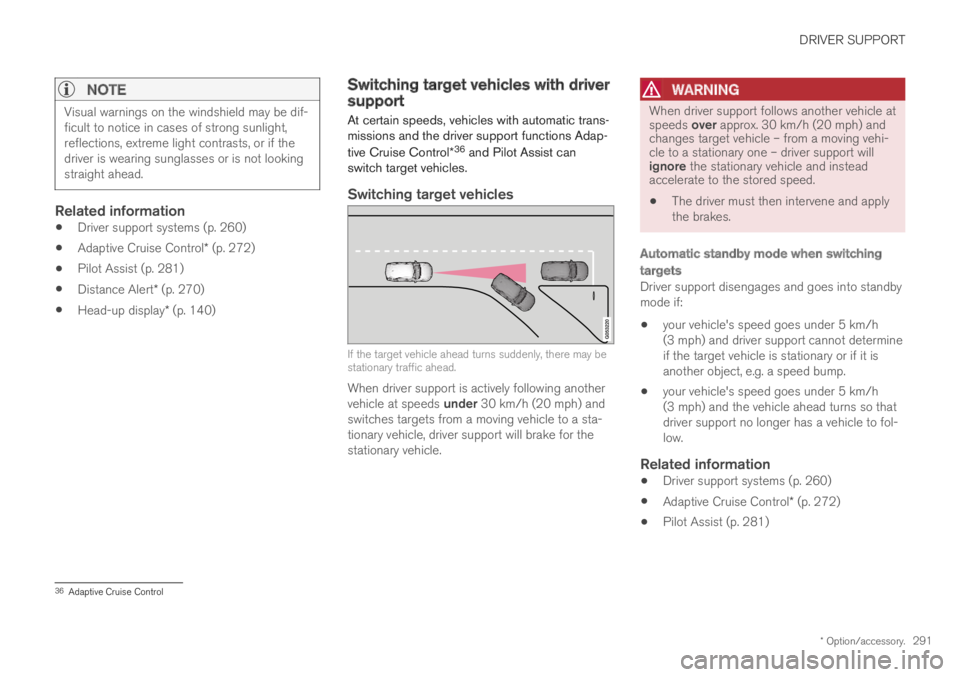
Switching target vehicles
If the target vehicle ahead turns suddenly, there may bestationary traffic ahead.
When driver support is actively following anothervehicle at speeds under 30 km/h (20 mph) andswitches targets from a moving vehicle to a sta-tionary vehicle, driver support will brake for thestationary vehicle.
WARNING
When driver support follows another vehicle atspeeds over approx. 30 km/h (20 mph) andchanges target vehicle – from a moving vehi-cle to a stationary one – driver support willignore the stationary vehicle and insteadaccelerate to the stored speed.
The driver must then intervene and applythe brakes.
Automatic standby mode when switching
targets
Driver support disengages and goes into standbymode if:
your vehicle's speed goes under 5 km/h(3 mph) and driver support cannot determineif the target vehicle is stationary or if it isanother object, e.g. a speed bump.
your vehicle's speed goes under 5 km/h(3 mph) and the vehicle ahead turns so thatdriver support no longer has a vehicle to fol-low.
Related information
Driver support systems (p. 260)
Adaptive Cruise Control* (p. 272)
Pilot Assist (p. 281)
36Adaptive Cruise Control
Page 297 of 645

DRIVER SUPPORT
}}
* Option/accessory.295
NOTE
Driver support can keep the vehicle stationaryfor no more than 5 minutes – after that timethe parking brake is applied and the functionis deactivated.
The parking brake must be released beforedriver support can be reactivated.
Deactivation of the Auto-hold brake function
In certain situations, auto-hold will be deactivatedwhen the vehicle is at a standstill and the func-tion will go into standby mode. This means thatthe brakes will be released and the vehicle couldbegin to roll. The driver must actively apply thebrakes to keep the vehicle stationary.
This can occur if:
the driver depresses the brake pedal
the parking brake is applied
the gear selector is moved to the P, N or Rpositions
the driver puts the function in standby mode.
Auto Activate Parking Brake
In certain situations, the parking brake will beapplied to keep the vehicle at a standstill.
This occurs if the function is keeping the vehiclestationary using the brakes and:
the driver opens the door or unbuckleshis/her seat belt
the function has kept the vehicle at a stand-still for more than approx. 5 minutes
the brakes overheat
the driver switches off the engine manually.
Related information
Driver support systems (p. 260)
Adaptive Cruise Control* (p. 272)
Pilot Assist (p. 281)
Brake functions (p. 396)
Passing assistance
Passing assistance can assist the driver whenpassing other vehicles. The function can beused with Pilot Assist or Adaptive Cruise Con-
trol* (ACC40).
How passing assistance works
When Pilot Assist or ACC is following anothervehicle and you indicate that you intend to pass
that vehicle by using the turn signal41, the systemwill begin accelerating toward the vehicle aheadbefore your vehicle has moved into the passinglane.
The function will then delay a speed reduction toavoid early braking as your vehicle approaches aslower-moving vehicle.
The function remains active until your vehicle haspassed the other vehicle.
WARNING
Please note that this function can be acti-vated in more situations than just passinganother vehicle, such as when a direction indi-cator is used to indicate a lane change orbefore exiting to another road – the vehiclewill then briefly accelerate.
39Adaptive Cruise Control40Adaptive Cruise Control41Only the left-hand turn signal for left-hand drive vehicles, or right-hand turn signal for right-hand drive vehicles.
Page 307 of 645

DRIVER SUPPORT
}}
305
City Safety™
City Safety47 can alert the driver with light,sound and pulsations in the brake pedal to helpthe driver detect pedestrians, cyclists, large ani-mals and vehicles that appear suddenly – thevehicle will then attempt to automatically brake ifthe driver does not act within a reasonableamount of time.
Location of the camera and radar sensor.
City Safety can help prevent a collision or lowerthe vehicle's speed at the point of impact.
City Safety is an aid intended to assist the driverif a collision with a pedestrian, large animal,cyclist or vehicle is imminent.
City Safety can help the driver avoid a collisionwhen e.g. driving in stop-and-go traffic, when
changes in the traffic ahead and driver distractioncould lead to an incident.
The function assists the driver by automaticallyapplying the brakes if there is an imminent risk ofa collision and the driver does not react in time bybraking and/or steering away.
City Safety activates a brief, forceful braking in anattempt to stop your vehicle immediately behindthe vehicle or object ahead.
City Safety is activated in situations in which thedriver should have applied the brakes much ear-lier, which means that the system will not be ableto assist the driver in all situations.
City Safety is designed to be activated as late aspossible to help avoid unnecessary intervention.
Normally, the occupants of the vehicle will not beaware of City Safety except when the systemintervenes when a collision is imminent.
WARNING
The City Safety auto-brake function canprevent a collision or reduce collisionspeed, but to ensure full brake perform-ance the driver should always depress thebrake pedal – even when the car auto-brakes.
The warning and steering assistance areonly activated if there is a high risk of col-lision – you must therefore never wait forthe collision warning or City Safety tointervene.
Warnings and brake interventions forpedestrians and cyclists are disengagedat vehicle speeds over 80 km/h(50 mph).
City Safety does not activate auto-brakingintervention during heavy acceleration.
47This function is not available on all markets.
Page 310 of 645

||
DRIVER SUPPORT
* Option/accessory.308
3 - Auto-brake
The automatic braking function is activated at thelast moment.
If the driver has not taken evasive action by thisstage and a collision is imminent, the automaticbraking function will be triggered. This occurswhether or not the driver is pressing the brakepedal. Full braking force will be applied to reducethe speed at impact or reduced braking effect willbe applied if this is sufficient to avoid the colli-sion.
The seat belt tensioner may be activated whenthe automatic braking function is triggered.
In certain situations, auto-braking may begin witha limited braking force before applying full brak-ing force.
If City Safety has prevented a collision, the vehi-cle will be kept at a standstill until the drivertakes action. If the vehicle has slowed to avoidcolliding with a slower-moving vehicle ahead, yourspeed will be reduced to that vehicle's speed.
Auto-braking can always be cancelled if thedriver presses hard on the accelerator pedal.
NOTE
When City Safety activates the brakes, thebrake lights come on.
When City Safety applies the brakes, a text mes-sage will appear in the instrument panel to notifythe driver that the function is/was activated.
WARNING
City Safety may not be used to change howthe driver operates the vehicle. The drivermust not only rely on City Safety to brake thevehicle.
Related information
City Safety™ (p. 305)
Head-up display* (p. 140)
Seat belt tensioners (p. 50)
Setting a warning distance for CitySafety
City Safety is always active, but the function'swarning distance can be adjusted.
NOTE
The City Safety function cannot be deacti-vated. It is activated automatically each timethe engine/electric motor is started.
The alert distance determines the sensitivity ofthe system and regulates the distance at whichthe light, sound and brake pulsations will be acti-vated.
To select warning distance:
1.Select SettingsMy CarIntelliSafe inthe center display's Top view.
2.Under City Safety Warning, tap Late,Normal or Early to set the desired warningdistance.
If the driver feels that the Early setting is givingtoo many warnings or finds them irritating, theNormal or Late warning distance settings canbe selected instead.
If the driver feels that the warnings are too fre-quent and distracting, the warning distance canbe reduced. This will reduce the total number ofwarnings, but it will also result in City Safety pro-viding warnings at a later stage.
Page 311 of 645
DRIVER SUPPORT
}}
309
The Late warning distance setting should there-fore only be used in exceptional cases, such aswhen a more dynamic driving style is preferred.
WARNING
No automatic system can guarantee100% correct function in all situations.You should therefore never test use ofCity Safety in the direction of people, ani-mals or vehicles – this could lead tosevere damage, serious personal injury oreven death.
City Safety warns the driver if there is arisk of collision, but the function cannotreduce the driver's reaction time.
Even if the warning distance has been setto Early, warnings may be perceived aslate in certain situations – e.g. when thereare large speed differences or if the vehi-cle ahead suddenly brakes heavily.
With the warning distance set to Early,warnings come further in advance. Thismay cause the warnings to come morefrequently than with warning distanceNormal, but is recommended since it canmake City Safety more effective.
NOTE
The warning with direction indicators for RearCollision Warning is deactivated if the colli-sion warning distance in the City Safety func-tion is set to the lowest level "Late".
The seat belt tensioning and braking func-tions remain active.
Related information
City Safety™ (p. 305)
Rear Collision Warning (p. 320)
Detecting obstacles with City Safety
City Safety can help the driver detect other vehi-cles, cyclists, large animals and pedestrians.
Vehicles
City Safety can detect most vehicles that are sta-tionary or are moving in the same direction asyour vehicle. In some cases, it can also detectoncoming vehicles and crossing traffic.
For City Safety to be able to detect a vehicle inthe dark, its headlights and taillights must be onand clearly visible.
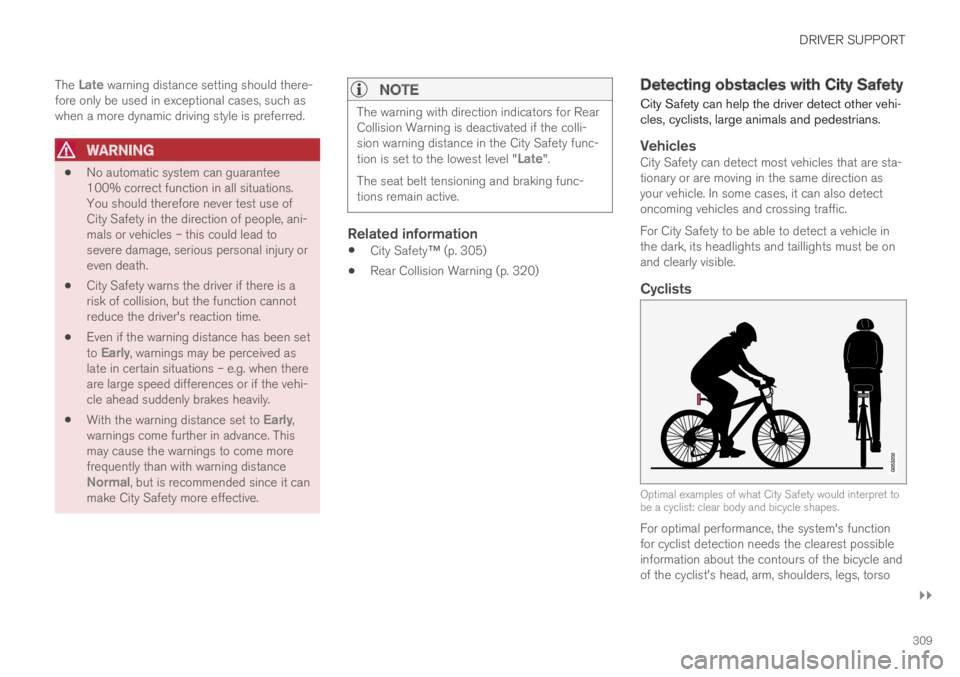
Cyclists
Optimal examples of what City Safety would interpret tobe a cyclist: clear body and bicycle shapes.
For optimal performance, the system's functionfor cyclist detection needs the clearest possibleinformation about the contours of the bicycle andof the cyclist's head, arm, shoulders, legs, torso
Page 314 of 645

||
DRIVER SUPPORT
312
WARNING
The driver support system only issues a warn-ing for obstacles detected by its radar sensor– thus, a warning may come after a delay ornot at all.
Never wait for a warning or assistance.Apply the brakes when necessary.
WARNING
The function is supplementary driver sup-port intended to facilitate driving and helpmake it safer – it cannot handle all situa-tions in all traffic, weather and road condi-tions.
The driver is advised to read all sectionsin the Owner's Manual about this functionto learn of its limitations, which the drivermust be aware of before using the func-tion.
Driver support functions are not a substi-tute for the driver's attention and judg-ment. The driver is always responsible forensuring the vehicle is driven in a safemanner, at the appropriate speed, with anappropriate distance to other vehicles,and in accordance with current trafficrules and regulations.
Related information
City Safety™ (p. 305)
Limitations of City Safety in crossing traffic(p. 312)
Limitations of City Safety incrossing traffic
In certain situations, it may be difficult for CitySafety to help the driver avoid a collision withcrossing traffic.
For example:
on slippery roads when Electronic StabilityControl (ESC) is actively operating
if an approaching vehicle is detected at a latestage
if the oncoming vehicle is partially obstructedby another vehicle or object
if the oncoming vehicle's headlights are off
if the oncoming vehicle is moving erraticallyand e.g. suddenly changes lanes at a latestage.
Page 316 of 645

||
DRIVER SUPPORT
314
Related information
City Safety™ (p. 305)
City Safety steering assistance limitationsduring evasive maneuvers (p. 314)
City Safety steering assistancelimitations during evasivemaneuvers
City Safety steering assistance may have limitedfunctionality in certain situations and not inter-vene, e.g.:
at speeds outside the range of 50-100 km/h(30-62 mph)
if the driver does not take evasive action
if speed-dependent power steering wheelresistance is working at reduced power – e.g.during cooling due to overheating.
NOTE
The function uses the vehicle's camera andradar sensor, which has certain general limita-tions.
Related information
City Safety steering assistance for evasivemaneuver (p. 313)
City Safety limitations (p. 316)
Speed-dependent steering wheel resistance(p. 260)
Camera/radar sensor limitations (p. 300)
City Safety and delayed evasivemaneuvers
City Safety can assist the driver by automaticallybraking the vehicle when it is not possible toavoid a collision by steering alone.
City Safety assists the driver by periodicallyattempting to predict possible "escape routes" tothe sides of the vehicle in the event a slow-mov-ing or stationary vehicle were to be detected at alate stage.
Your vehicle (1) cannot detect any potential escaperoutes for veering away from the vehicle ahead (2) andmay therefore apply the brakes at an earlier stage.
Own vehicle
Slow-moving/stationary vehicles
City Safety will not intervene to automaticallyapply the brakes if it is possible for the driver toavoid a collision by steering the vehicle.
Page 317 of 645

DRIVER SUPPORT
}}
315
However, if City Safety determines that an eva-sive maneuver would not be possible due to traf-fic in the adjacent lane(s), the function can assistthe driver by automatically starting to apply thebrakes at an earlier stage.
WARNING
The function is supplementary driver sup-port intended to facilitate driving and helpmake it safer – it cannot handle all situa-tions in all traffic, weather and road condi-tions.
The driver is advised to read all sectionsin the Owner's Manual about this functionto learn of its limitations, which the drivermust be aware of before using the func-tion.
Driver support functions are not a substi-tute for the driver's attention and judg-ment. The driver is always responsible forensuring the vehicle is driven in a safemanner, at the appropriate speed, with anappropriate distance to other vehicles,and in accordance with current trafficrules and regulations.
NOTE
The function uses the vehicle's camera andradar sensor, which has certain general limita-tions.
Related information
City Safety™ (p. 305)
City Safety limitations (p. 316)
Camera/radar sensor limitations (p. 300)
City Safety braking for oncomingvehicles
City Safety can help you apply the brakes for anoncoming vehicle in your lane.
If an oncoming vehicle veers into your lane and acollision is unavoidable, City Safety can helpreduce your vehicle's speed to attempt to miti-gate the force of the collision.
Own vehicle
Oncoming vehicles
The following criteria must be met for the func-tion to work:
your vehicle's speed must be above 4 km/h(3 mph)
the road must be straight
Page 318 of 645

||
DRIVER SUPPORT
316
your lane must have clear side lane markings
your vehicle must be positioned straight inyour lane
the oncoming vehicle must be positionedwithin your vehicle's lane markings
the oncoming vehicle's headlights must beon
the function can only handle “front-to-front”collisions
the function can only detect vehicles withfour wheels.
NOTE
The function uses the vehicle's camera andradar sensor, which has certain general limita-tions.
WARNING
The driver support system only issues a warn-ing for obstacles detected by its radar sensor– thus, a warning may come after a delay ornot at all.
Never wait for a warning or assistance.Apply the brakes when necessary.
WARNING
The function is supplementary driver sup-port intended to facilitate driving and helpmake it safer – it cannot handle all situa-tions in all traffic, weather and road condi-tions.
The driver is advised to read all sectionsin the Owner's Manual about this functionto learn of its limitations, which the drivermust be aware of before using the func-tion.
Driver support functions are not a substi-tute for the driver's attention and judg-ment. The driver is always responsible forensuring the vehicle is driven in a safemanner, at the appropriate speed, with anappropriate distance to other vehicles,and in accordance with current trafficrules and regulations.
Related information
City Safety™ (p. 305)
City Safety limitations (p. 316)
Camera/radar sensor limitations (p. 300)
City Safety limitations
City Safety48 functionality may be reduced incertain situations.
Surroundings
Low objects
Hanging objects, such as flags for overhangingloads or accessories such as auxiliary lights orfront protective grids that extend beyond theheight of the hood, may limit City Safety function-ality.
Slippery road conditions
The extended braking distance on slippery roadsmay reduce City Safety's capacity to help avoid acollision. In these types of situations, the Anti-lock Braking System and Electronic Stability Con-
trol (ESC49) will help provide optimal brakingpower with maintained stability.
Backlighting
The visual warning signal in the windshield maybe difficult to detect in bright sunlight, if there arereflections, or if the driver is wearing sunglassesor not looking straight ahead.
Heat
If the temperature in the passenger compartmentis high due to e.g. bright sunlight, the visual warn-ing signal in the windshield may be temporarilydisabled.
48This function is not available on all markets.49Electronic Stability Control