brakes VOLVO S60 TWIN ENGINE 2019 Service Manual
[x] Cancel search | Manufacturer: VOLVO, Model Year: 2019, Model line: S60 TWIN ENGINE, Model: VOLVO S60 TWIN ENGINE 2019Pages: 645, PDF Size: 13.96 MB
Page 398 of 645

STARTING AND DRIVING
396
Selecting ignition mode
The vehicle's ignition can be put in variousmodes (levels) to make different functions availa-ble.
Selecting an ignition mode
Start knob in the tunnel console.
Ignition mode 0 – Unlock the vehicle andkeep the remote key in the passenger com-partment.
NOTE
To set level I or II without engine start – donot depress the brake pedal (or clutch pedalfor vehicles with manual transmission) whenselecting this ignition mode.
Ignition mode I – Turn the start knob clock-wise and release it. The control will automati-cally return to the original position.
Ignition mode II – Turn the start knobclockwise and hold it there forapprox. 5 seconds. Release the knob, whichwill automatically return to its original posi-tion.
Back to ignition mode 0 – To return toignition mode 0 from modes I and II, turn thestart knob clockwise and release it. The con-trol will automatically return to the originalposition.
Related information
Starting the vehicle (p. 392)
Switching off the vehicle (p. 394)
Ignition modes (p. 395)
Adjusting the steering wheel (p. 193)
Jump starting using another battery (p. 432)
Brake functions
The vehicle's brakes are used to reduce speedor prevent the vehicle from rolling.
In addition to the wheel brakes and parkingbrakes, the vehicle is also equipped with a num-ber of automatic brake assist functions. Thesesystems help the driver by e.g. keeping the vehi-cle stationary when the brake pedal is notdepressed (e.g. at a traffic light or intersection) orwhen starting up a hill.
Depending on how the vehicle is equipped, thefollowing brake assist functions may be included:
Auto-hold brake function at a standstill (AutoHold)
Hill Start Assist (Hill Start Assist)
Braking assist after a collision
City Safety
Related information
Brakes (p. 397)
Parking brake (p. 400)
Auto-hold brakes (p. 403)
Braking assist after a collision (p. 405)
Hill Start Assist (p. 405)
City Safety™ (p. 305)
Page 399 of 645

STARTING AND DRIVING
}}
397
Brakes
The brake pedal is used to apply the vehicle'sregular brakes, which are part of the brake sys-tem.
The vehicle is equipped with two brake circuits. Ifone brake circuit is damaged, the brake pedal willgo down further when depressed. More pressurewill then be required from the driver for normalbraking effect.
WARNING
The power brakes only work when the electricmotor or combustion engine is running.
If the brake pedal is used when the engine isswitched off, greater pressure must be applied tobrake the vehicle.
In very hilly areas or when driving with a heavyload, gear position B can be used to augment thebrakes with engine braking.
Anti-lock brakes
The vehicle is equipped with an Anti-lock Braking
System (ABS2), which helps prevent the wheelsfrom locking and helps maintain steering controlwhen braking. Vibrations may be felt from thebrake pedal when ABS is operating, which is nor-mal.
After the vehicle is started, a brief test of theABS system is automatically performed when thedriver releases the brake pedal. An additionalautomatic test of the system may be performedwhen the vehicle is traveling at a low speed. Dur-ing the test, the brake pedal may feel as though itis pulsating.
Light braking charges the hybrid battery
When the brakes are applied lightly, the electricmotor braking function is used. This converts thevehicle's kinetic energy into electrical energy,which is used to charge the hybrid battery. Whenthe battery is being charged with the electricmotor braking function, this will be indicated inthe instrument panel.
When the battery is being charged with the electricmotor braking function, this will be indicated in theinstrument panel.
This function is active at speeds in the range of150-5 km/h (93-3 mph). When braking atspeeds outside of this range, or during harderbraking, the hydraulic braking system is used toaugment braking. This is indicated in the instru-ment panel with the pointer down in the red area.
Symbols in the instrument panel
SymbolMeaning
A
B
Check the brake fluid level. If thelevel is low, fill brake fluid andcheck to determine the reason forthe loss of brake fluid.
A
B
Fault in pedal sensor.
2Anti-lock Braking System
Page 400 of 645

||
STARTING AND DRIVING
398
SymbolMeaning
A
B
Steady glow for 2 seconds afterthe engine is started: Automaticfunction check.
Steady glow for more than 2 sec-onds: Fault in the ABS system. Thevehicle's regular brake system isstill working, but without the ABSfunction.
If the message Brake pedal Cha-racteristics changed Servicerequired is displayed, the "Brake-by-wire" system is not functioningproperly. Greater pressure will berequired to brake the vehicle.
AIn Canada.BIn the US.
WARNING
If the warning symbols for both brake faultand ABS fault are lit simultaneously, theremay be a fault in the brake system.
If the brake fluid reservoir level is normalwhen this occurs, drive carefully to thenearest workshop to have the brake sys-tem checked - an authorized Volvo work-shop is recommended.
If the brake fluid has fallen below the MINlevel in the brake fluid reservoir, the vehi-cle should not be driven until the brakefluid has been filled. The reason for thebrake fluid loss must be checked.
Related information
Brake Assist System (p. 398)
Auto-hold brakes (p. 403)
Hill Start Assist (p. 405)
Braking on wet roads (p. 399)
Braking on salted roads (p. 399)
Maintenance of the brake system (p. 399)
Brake lights (p. 159)
Brake Assist System
The brake enhancing system, (BAS3), helpsincrease braking force and can thereby reducebraking distance.
The system monitors the driver's braking habitsand increases braking force when necessary.Braking force can be increased up to the point atwhich the ABS intervenes. The function is deacti-vated when pressure on the brake pedal isdecreased.
Related information
Brakes (p. 397)
3Brake Assist System
Page 401 of 645

STARTING AND DRIVING
399
Braking on wet roads
Prolonged driving in heavy rain without brakingmay cause braking effect to be slightly delayedthe first time the brakes are applied.
This may also occur after washing the vehicle. Itwill then be necessary to apply greater pressureto the brake pedal. You should therefore maintaina greater distance to the vehicle ahead.
Firmly apply the brakes after washing the vehicleor driving on wet roads. This helps warm up thebrake discs, enabling them to dry more quicklyand protecting them against corrosion. Considerthe current traffic situation when braking.
Related information
Brakes (p. 397)
Braking on salted roads (p. 399)
Braking on salted roads
When driving on salted roads, a layer of salt mayform on the brake discs and brake pads.
This could increase stopping distance. Maintainan extra large safety distance to the vehicleahead. Make sure to also:
Apply the brakes from time to time to helpremove salt. Make sure braking does notpose a risk to any other road users.
Gently apply the brakes when you have fin-ished driving and before driving again.
Related information
Brakes (p. 397)
Braking on wet roads (p. 399)
Maintenance of the brake system
Regularly check the brake system componentsfor wear.
To keep the vehicle as safe and reliable as possi-ble, follow the Volvo service schedule specified inthe Warranty and Maintenance Records Informa-tion booklet. New and replaced brake pads andbrake discs do not provide optimal braking effectuntil they are "broken in" by driving a few hun-dred kilometers (miles). Compensate for thereduced braking effect by applying greater pres-sure to the brake pedal. Volvo recommends onlyusing brake pads approved for your Volvo.
CAUTION
The brake system's components should beregularly checked for wear.
Contact a workshop for advice on how to dothis or let a workshop perform the inspection- an authorized Volvo workshop is recom-mended.
Related information
Brakes (p. 397)
Page 402 of 645
STARTING AND DRIVING
400
Parking brake
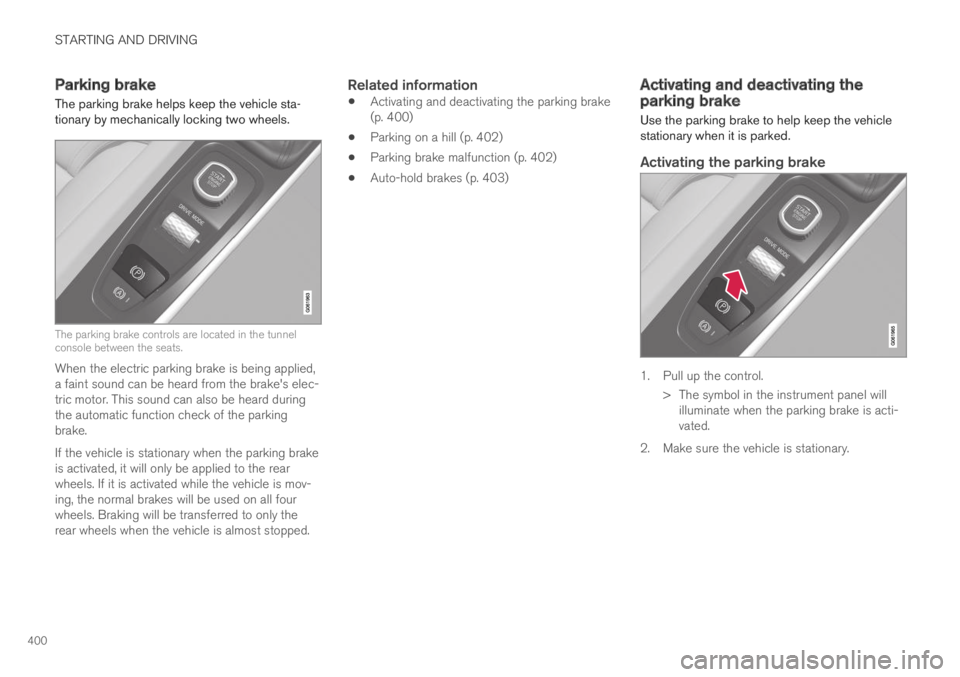
The parking brake helps keep the vehicle sta-tionary by mechanically locking two wheels.
The parking brake controls are located in the tunnelconsole between the seats.
When the electric parking brake is being applied,a faint sound can be heard from the brake's elec-tric motor. This sound can also be heard duringthe automatic function check of the parkingbrake.
If the vehicle is stationary when the parking brakeis activated, it will only be applied to the rearwheels. If it is activated while the vehicle is mov-ing, the normal brakes will be used on all fourwheels. Braking will be transferred to only therear wheels when the vehicle is almost stopped.
Related information
Activating and deactivating the parking brake(p. 400)
Parking on a hill (p. 402)
Parking brake malfunction (p. 402)
Auto-hold brakes (p. 403)
Activating and deactivating theparking brake
Use the parking brake to help keep the vehiclestationary when it is parked.
Activating the parking brake
1. Pull up the control.
>The symbol in the instrument panel willilluminate when the parking brake is acti-vated.
2. Make sure the vehicle is stationary.
Page 405 of 645
STARTING AND DRIVING
}}
403
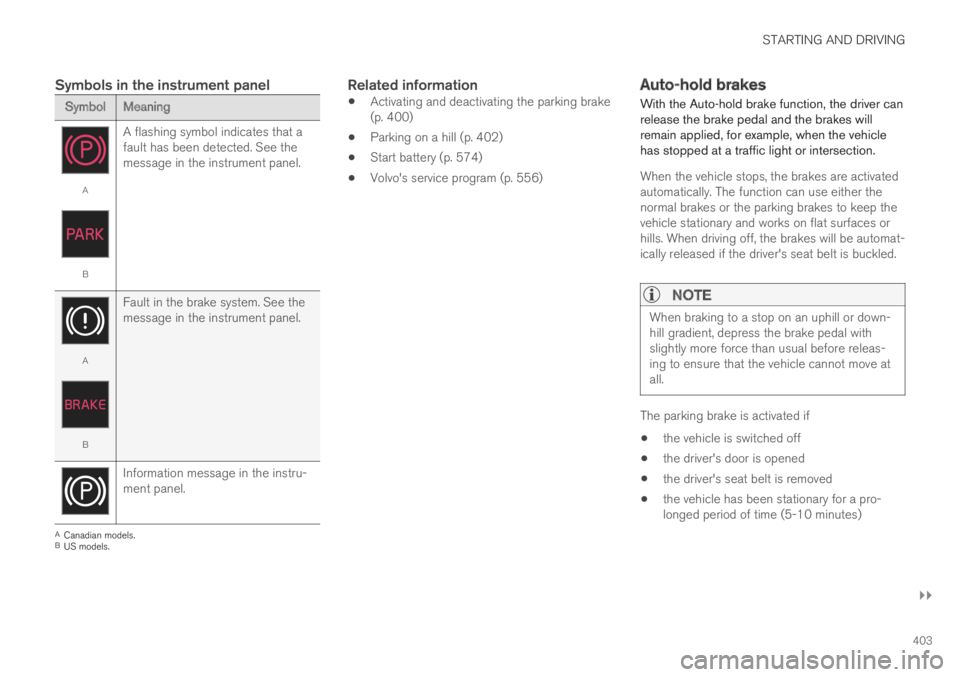
Symbols in the instrument panel
SymbolMeaning
A
B
A flashing symbol indicates that afault has been detected. See themessage in the instrument panel.
A
B
Fault in the brake system. See themessage in the instrument panel.
Information message in the instru-ment panel.
ACanadian models.BUS models.
Related information
Activating and deactivating the parking brake(p. 400)
Parking on a hill (p. 402)
Start battery (p. 574)
Volvo's service program (p. 556)
Auto-hold brakes
With the Auto-hold brake function, the driver canrelease the brake pedal and the brakes willremain applied, for example, when the vehiclehas stopped at a traffic light or intersection.
When the vehicle stops, the brakes are activatedautomatically. The function can use either thenormal brakes or the parking brakes to keep thevehicle stationary and works on flat surfaces orhills. When driving off, the brakes will be automat-ically released if the driver's seat belt is buckled.
NOTE
When braking to a stop on an uphill or down-hill gradient, depress the brake pedal withslightly more force than usual before releas-ing to ensure that the vehicle cannot move atall.
The parking brake is activated if
the vehicle is switched off
the driver's door is opened
the driver's seat belt is removed
the vehicle has been stationary for a pro-longed period of time (5-10 minutes)
Page 406 of 645
||
STARTING AND DRIVING
404
Symbols in the instrument panel
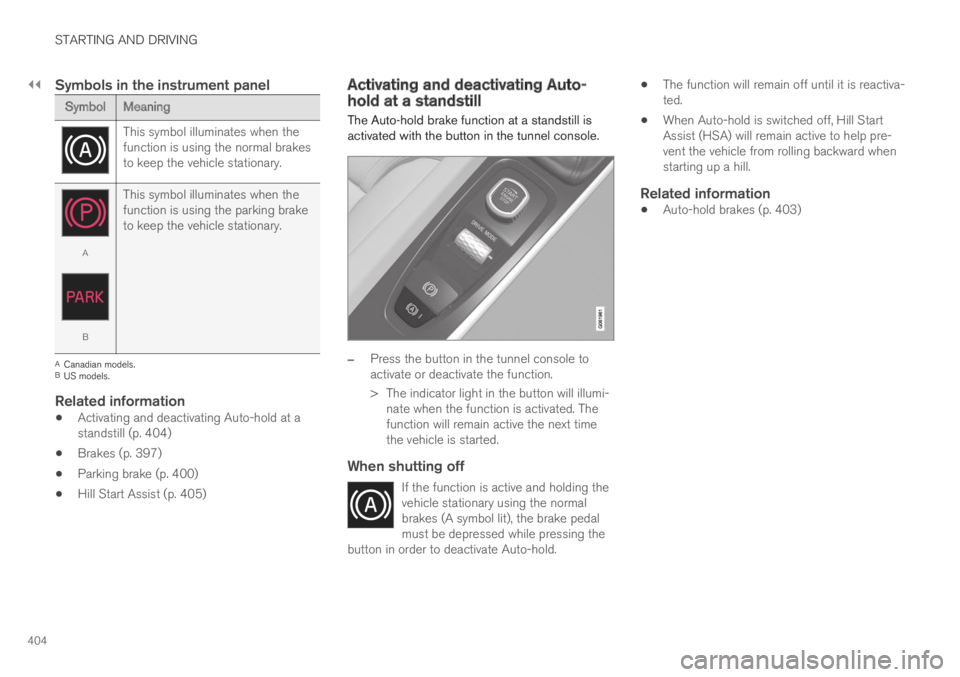
SymbolMeaning
This symbol illuminates when thefunction is using the normal brakesto keep the vehicle stationary.
A
B
This symbol illuminates when thefunction is using the parking braketo keep the vehicle stationary.
ACanadian models.BUS models.
Related information
Activating and deactivating Auto-hold at astandstill (p. 404)
Brakes (p. 397)
Parking brake (p. 400)
Hill Start Assist (p. 405)
Activating and deactivating Auto-hold at a standstill
The Auto-hold brake function at a standstill isactivated with the button in the tunnel console.
–Press the button in the tunnel console toactivate or deactivate the function.
>The indicator light in the button will illumi-nate when the function is activated. Thefunction will remain active the next timethe vehicle is started.
When shutting off
If the function is active and holding thevehicle stationary using the normalbrakes (A symbol lit), the brake pedalmust be depressed while pressing thebutton in order to deactivate Auto-hold.
The function will remain off until it is reactiva-ted.
When Auto-hold is switched off, Hill StartAssist (HSA) will remain active to help pre-vent the vehicle from rolling backward whenstarting up a hill.
Related information
Auto-hold brakes (p. 403)
Page 407 of 645
STARTING AND DRIVING
* Option/accessory.405
Hill Start Assist
The function for assisting when starting the vehi-
cle on inclines (HSA4) helps prevent the vehiclefrom rolling backward when starting on an uphillgradient. When backing up a hill, HSA helpsprevent the vehicle from rolling forward.
The function retains pressure from the brakepedal in the brake system for several secondsafter the brake pedal has been released.
This temporary braking effect is released after afew seconds or when the driver begins driving.
Hill Start Assist is available even when the Auto-hold brake function is switched off.
Related information
Auto-hold brakes (p. 403)
Brakes (p. 397)
Braking assist after a collision
In a collision in which the activation level isreached for the pyrotechnic seat belt tensionersor airbags, or if a collision with a large animal isdetected, the vehicle's brakes will be automati-cally activated. This function is intended to helpprevent or reduce the effects of any subsequentcollision.
After a serious collision, it may no longer be pos-sible to control and steer the vehicle. In order toavoid or mitigate a possible further collision witha vehicle or an object in the vehicle's path, thebrake assist system is activated automatically tohelp stop the vehicle safely.
The brake lights and hazard warning flashers areactivated during braking. When the vehicle hasstopped, the hazard warning flashers will con-tinue to flash and the parking brake will beapplied.
If braking is not appropriate, e.g. if there is a riskof being hit by passing traffic, the driver can over-ride the system by depressing the acceleratorpedal.
This function assumes that the brake system isintact after a collision.
Brake assist is part of the Rear Collision Warningand Blind Spot Information safety systems.
Related information
Rear Collision Warning (p. 320)
BLIS* (p. 321)
Brake functions (p. 396)
4Hill Start Assist
Page 410 of 645

||
STARTING AND DRIVING
* Option/accessory.408
Brake - B
From the B position, it is possible to manuallyshift down to lower gears. B can be selected atany time while driving. When the acceleratorpedal is released, the electric motor brakes thevehicle and the hybrid battery is recharged at thesame time. This offers additional opportunities torecharge the hybrid battery, since the battery ischarged even when the brake pedal is notdepressed.
Select brake by moving the gear selector rear-ward from the D position. The currently selectedgear will be displayed in the instrument panel.
Pull the gear selector backward once to shiftdown one gear.
Pull the gear selector backward again to shiftdown to lower gears.
To shift manually to a higher gear, the vehiclemust be equipped with steering wheel paddles*.
Push the gear selector forward to return to Dmode.
For smooth shifting and engine performance, thetransmission will shift down automatically if thevehicle's speed becomes too low for the selectedgear.
Related information
Shiftlock (p. 409)
Using the steering wheel paddles* to shift(p. 408)
The kickdown function (p. 410)
Using the steering wheel paddles*to shift
The steering wheel paddles are a supplement tothe gear selector and make it possible to shiftmanually without removing your hands from thesteering wheel.
"-": Shift down one gear.
"+": Shift up one gear.
Activating the steering wheel paddles
In order to shift gears using the paddles, theymust first be activated:
–Pull one of the paddles toward the steeringwheel.
>A number in the instrument panel indi-cates the current gear being used.
Page 414 of 645

||
STARTING AND DRIVING
412
reduced and affect how often the combustionengine automatically starts.
Emission control system
To help ensure that the emission control systemfunctions optimally, the combustion engine willrun for several minutes after it is started. Theamount of time the combustion engine needs tobe used varies depending on the temperature ofthe three-way catalytic converter.
WARNING
California Proposition 65
Operating, servicing and maintaining a pas-senger vehicle can expose you to chemicalsincluding engine exhaust, carbon monoxide,phthalates, and lead, which are known to theState of California to cause cancer and birthdefects or other reproductive harm. To mini-mize exposure, avoid breathing exhaust, donot idle the engine except as necessary, serv-ice your vehicle in a well ventilated area andwear gloves or wash your hands frequentlywhen servicing your vehicle. For more infor-mation go to www.P65Warnings.ca.gov/passenger-vehicle.
Related information
Drive systems (p. 410)
Economical driving (p. 420)
Drive modes (p. 412)
Drive modes
Drive modes affect the vehicle's driving charac-teristics in different ways to enhance and sim-plify the driving experience in certain types of sit-uations.
Drive modes enable easy access to the vehicle'smany functions and settings in different drivingsituations. The following systems are adapted tohelp optimize driving characteristics in each drivemode:
Steering
Engine/transmission/all-wheel drive
Brakes
Shock absorbers
Instrument panel
Climate control settings
Select the drive mode that is best suited to thecurrent driving conditions. Keep in mind that notall drive modes are available in all situations.
Available drive modes
WARNING
Keep in mind that the vehicle does not emitany engine noise when using the electricmotor and may therefore be difficult to detectfor children, pedestrians, cyclists or animals.This is particularly true at low speeds, e.g. inparking lots.
WARNING
Do not leave the vehicle in an unventilatedarea with a drive mode activated and the com-bustion engine switched off. The engine willstart automatically if the charge level in thehybrid battery is low and the resulting exhaustgases can be very harmful to people and ani-mals.