brakes VOLVO S60 TWIN ENGINE 2019 User Guide
[x] Cancel search | Manufacturer: VOLVO, Model Year: 2019, Model line: S60 TWIN ENGINE, Model: VOLVO S60 TWIN ENGINE 2019Pages: 645, PDF Size: 13.96 MB
Page 266 of 645

DRIVER SUPPORT
264
Electronic Stability Control symbolsand messages
A number of symbols and messages related to
Electronic Stability Control (ESC9) may be dis-played in the instrument panel.
Some examples of symbols and messages areshown in the table below.
SymbolMessageMeaning
Steady glow for approx. 2 seconds. System check when the engine is started.
Flashing light.The system is actively operating.
Steady glow.Sport mode is activated.
Note: The system is not deactivated in this mode, but has partially reduced functionality.
ESC
Temporarily off
The system's functionality has been temporarily reduced due to high brake system temperatures. The func-tion will be automatically reactivated when the brakes have cooled.
See the message in the instrument panel.
ESC
Service required
The system is not functioning properly.
Stop the vehicle in a safe place, turn off the engine and then restart it.
9Electronic Stability Control
Page 268 of 645
DRIVER SUPPORT
* Option/accessory.266
Cruise control
Cruise Control (CC10) can help the driver main-tain an even speed to provide a more relaxingdriving experience on highways and long,straight roads with even traffic flows.
Overview
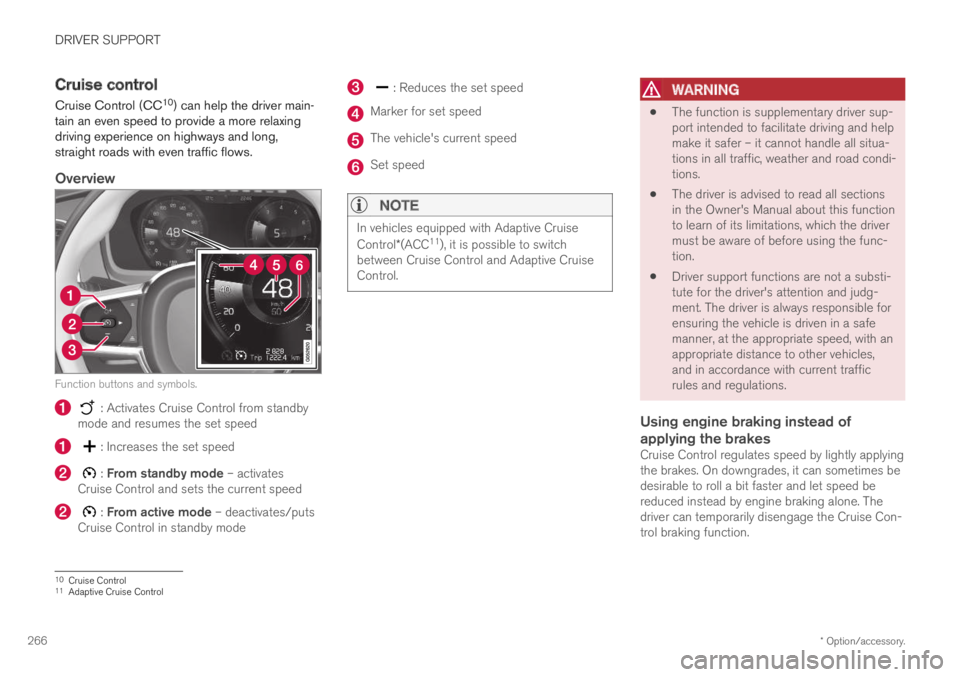
Function buttons and symbols.
: Activates Cruise Control from standbymode and resumes the set speed
: Increases the set speed
: From standby mode – activatesCruise Control and sets the current speed
: From active mode – deactivates/putsCruise Control in standby mode
: Reduces the set speed
Marker for set speed
The vehicle's current speed
Set speed
NOTE
In vehicles equipped with Adaptive Cruise
Control*(ACC11), it is possible to switchbetween Cruise Control and Adaptive CruiseControl.
WARNING
The function is supplementary driver sup-port intended to facilitate driving and helpmake it safer – it cannot handle all situa-tions in all traffic, weather and road condi-tions.
The driver is advised to read all sectionsin the Owner's Manual about this functionto learn of its limitations, which the drivermust be aware of before using the func-tion.
Driver support functions are not a substi-tute for the driver's attention and judg-ment. The driver is always responsible forensuring the vehicle is driven in a safemanner, at the appropriate speed, with anappropriate distance to other vehicles,and in accordance with current trafficrules and regulations.
Using engine braking instead of
applying the brakes
Cruise Control regulates speed by lightly applyingthe brakes. On downgrades, it can sometimes bedesirable to roll a bit faster and let speed bereduced instead by engine braking alone. Thedriver can temporarily disengage the Cruise Con-trol braking function.
10Cruise Control11Adaptive Cruise Control
Page 270 of 645

DRIVER SUPPORT
268
Deactivating and putting CruiseControl in standby mode
Cruise Control (CC13) can be temporarily putinto standby mode and then reactivated.
To put Cruise Control in standby mode:
–Press the button on the steering wheel(2).
>The Cruise Control markings and symbolswill change from WHITE to GRAY, indicat-ing that Cruise Control is temporarilydeactivated and the driver needs to con-trol the vehicle's speed.
Standby mode due to action by the driver
Cruise Control will be temporarily deactivated andput in standby mode if:
the brakes are applied
the gear selector is moved to N
the vehicle is driven faster than the setspeed for more than 1 minute
The driver must then control the vehicle's speed.
Temporarily increasing speed using the accelera-tor pedal, e.g. when passing another vehicle, willnot affect the setting. The vehicle will return tothe set speed when the accelerator pedal isreleased.
Automatic standby mode
Cruise Control will be temporarily deactivated andput in standby mode if:
the wheels lose traction
the engine speed (rpm) is too low/high
the temperature in the brake systembecomes too high
the vehicle's speed goes below 30 km/h(20 mph).
The driver must then control the vehicle's speed.
Related information
Cruise control (p. 266)
Reactivating Cruise Control from standbymode (p. 269)
Activating and starting Cruise Control(p. 267)
Switching off Cruise Control (p. 269)
13Cruise Control
Page 274 of 645
||
DRIVER SUPPORT
* Option/accessory.272
WARNING
The function is supplementary driver sup-port intended to facilitate driving and helpmake it safer – it cannot handle all situa-tions in all traffic, weather and road condi-tions.
The driver is advised to read all sectionsin the Owner's Manual about this functionto learn of its limitations, which the drivermust be aware of before using the func-tion.
Driver support functions are not a substi-tute for the driver's attention and judg-ment. The driver is always responsible forensuring the vehicle is driven in a safemanner, at the appropriate speed, with anappropriate distance to other vehicles,and in accordance with current trafficrules and regulations.
NOTE
The function uses the vehicle's camera andradar sensor, which has certain general limita-tions.
Related information
Distance Alert* (p. 270)
Camera/radar sensor limitations (p. 300)
Head-up display* (p. 140)
Adaptive Cruise Control*20
Adaptive Cruise Control (ACC21) helps thedriver maintain a constant speed with a set timeinterval to the vehicle ahead.
Adaptive Cruise Control can help provide a morerelaxed driving experience on long trips on high-ways or long, straight roads with even trafficflows.
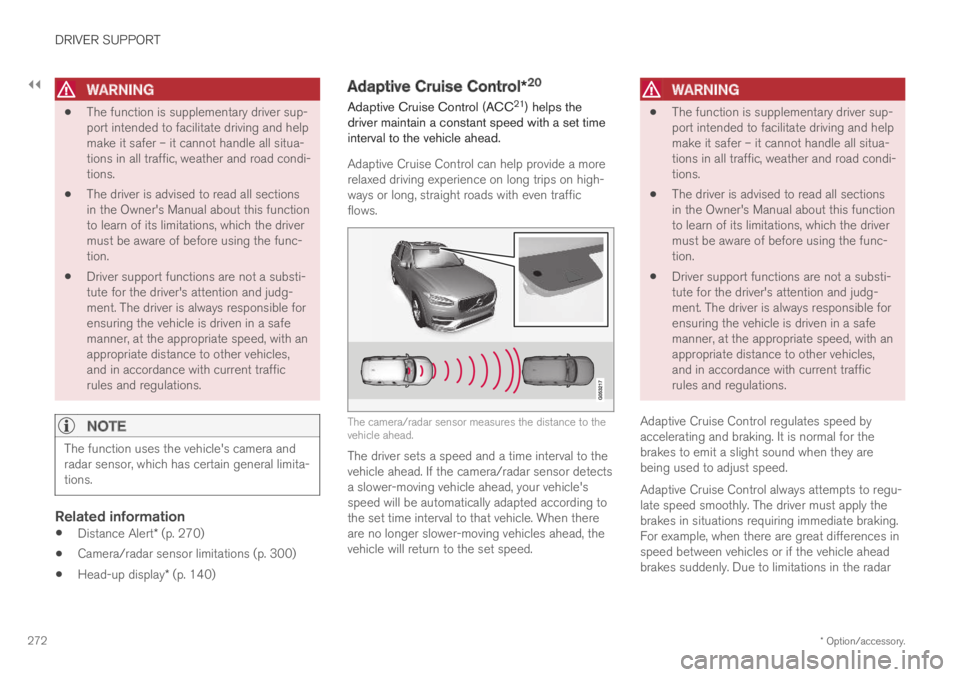
The camera/radar sensor measures the distance to thevehicle ahead.
The driver sets a speed and a time interval to thevehicle ahead. If the camera/radar sensor detectsa slower-moving vehicle ahead, your vehicle'sspeed will be automatically adapted according tothe set time interval to that vehicle. When thereare no longer slower-moving vehicles ahead, thevehicle will return to the set speed.
WARNING
The function is supplementary driver sup-port intended to facilitate driving and helpmake it safer – it cannot handle all situa-tions in all traffic, weather and road condi-tions.
The driver is advised to read all sectionsin the Owner's Manual about this functionto learn of its limitations, which the drivermust be aware of before using the func-tion.
Driver support functions are not a substi-tute for the driver's attention and judg-ment. The driver is always responsible forensuring the vehicle is driven in a safemanner, at the appropriate speed, with anappropriate distance to other vehicles,and in accordance with current trafficrules and regulations.
Adaptive Cruise Control regulates speed byaccelerating and braking. It is normal for thebrakes to emit a slight sound when they arebeing used to adjust speed.
Adaptive Cruise Control always attempts to regu-late speed smoothly. The driver must apply thebrakes in situations requiring immediate braking.For example, when there are great differences inspeed between vehicles or if the vehicle aheadbrakes suddenly. Due to limitations in the radar
Page 278 of 645

||
DRIVER SUPPORT
* Option/accessory.276
To temporarily deactivate Adaptive Cruise Controland put it in standby mode:
–Press the button on the steering wheel(2).
>The symbol in the instrument panelchanges color from WHITE to GRAY andthe set speed in the center of the speed-ometer will change from BEIGE to GRAY.
WARNING
If Adaptive Cruise Control is in standbymode, the driver must intervene and regu-late both speed and distance to the vehicleahead.
If the vehicle comes too close to a vehicleahead when Adaptive Cruise Control is instandby mode, the driver can be warned ofthe short distance by the Distance Alert*function.
Standby mode due to action by the driver
Adaptive Cruise Control will be temporarily deac-tivated and put in standby mode if:
the brakes are applied
the gear selector is moved to N
the vehicle is driven faster than the setspeed for more than 1 minute
Temporarily increasing speed using the accelera-tor pedal, e.g. when passing another vehicle, willnot affect the setting. The vehicle will return tothe set speed when the accelerator pedal isreleased.
Automatic standby mode
Adaptive Cruise Control is dependent on othersystems, such as Electronic Stability Control
(ESC25). If any of these other systems stopsworking, Adaptive Cruise Control will automati-cally switch off.
WARNING
With automatic standby mode, the driver iswarned by an acoustic signal and a messageon the instrument panel.
The driver must then regulate vehiclespeed, apply the brakes if necessary, andmaintain a safe distance to other vehicles.
Adaptive Cruise Control may go into standbymode if:
your vehicle's speed goes below 5 km/h(3 mph) and ACC cannot determine if thevehicle ahead is stationary or if it is anotherobject, e.g. a speed bump.
your vehicle's speed goes under 5 km/h(3 mph) and the vehicle ahead turns so thatACC no longer has a vehicle to follow.
the driver opens the door.
the driver unbuckles the seat belt.
the engine speed (rpm) is too low/high.
one or more of the wheels lose traction.
the brake temperature is high.
the parking brake is applied.
the camera/radar sensor is covered by snowor heavy rain (the camera lens/radar wavesare blocked).
Reactivating Adaptive Cruise Control
from standby mode
25Electronic Stability Control
Page 279 of 645

DRIVER SUPPORT
}}
* Option/accessory.277
To reactivate ACC from standby mode:
–Press the button on the steering wheel(1).
>Speed will be set to the most recentlystored speed.
WARNING
A noticeable increase in speed may follow
when the speed is resumed with the steering wheel button.
Related information
Adaptive Cruise Control* (p. 272)
Activating and starting Adaptive Cruise Con-trol* (p. 274)
Switching between Cruise Control and Adap-tive Cruise Control* (p. 277)
Adaptive Cruise Control* limitations
Adaptive Cruise Control (ACC26) may have lim-ited functionality in certain situations.
Steep roads and/or heavy loads
Adaptive Cruise Control is primarily intended tobe driven on flat roads. The function may not beable to maintain the correct time interval to thevehicle ahead when driving down steep hills. Thedriver should be extra attentive and prepared toapply the brakes.
Do not use Adaptive Cruise Control if thevehicle is carrying a heavy load or towing atrailer.
Other limitations
The Off Road drive mode cannot beselected if Adaptive Cruise Control is acti-vated.
NOTE
The function uses the vehicle's camera andradar sensor, which has certain general limita-tions.
Related information
Adaptive Cruise Control* (p. 272)
Camera/radar sensor limitations (p. 300)
Switching between Cruise Control
and Adaptive Cruise Control*
In vehicles equipped with Adaptive Cruise Con-
trol (ACC27), the driver can switch between
Cruise Control (CC28) and ACC.
A symbol in the instrument panel indicates whichcruise control system is active
CCACC
AA
Cruise controlAdaptive Cruise Control
AWHITE symbol: The function is active. GRAY symbol: Standbymode
Switching from ACC to CC
To do so:
1.Press the button on the steering wheelkeypad to put Adaptive Cruise Control instandby mode.
26Adaptive Cruise Control27Adaptive Cruise Control28Cruise Control
Page 280 of 645

||
DRIVER SUPPORT
* Option/accessory.278
2.Tap the Cruise Control button in the centerdisplay's Function view. The button's indica-tor will change from GRAY to GREEN.
>The symbol in the instrument panel will
change from ACC to CC, indicating that Adaptive Cruise Con-trol is off and Cruise Control is in standbymode.
3.Pressing the button on the steeringwheel keypad.
>Cruise Control will start and the vehicle'scurrent speed will be set.
WARNING
Switching from ACC to CC means that thevehicle:
will no longer maintain a preset timeinterval to the vehicle ahead.
will only follow the stored speed and thedriver must therefore apply the brakeswhen necessary.
If CC is active when the engine is turned off, ACCwill be automatically activated the next time theengine is started.
Switching from CC to ACC
To do so:
1.Press the button on the steering wheelkeypad to put Cruise Control in standbymode.
2.Tap the Cruise Control button in Functionview. The button's indicator will change fromGREEN to GRAY.
>The symbols in the instrument panel will
switch from CC to ACCto indicate that Adaptive Cruise Control isin standby mode.
3.Pressing the button on the steeringwheel keypad.
>Adaptive Cruise Control will go into activemode and set the vehicle's current speedand the selected time interval to the vehi-cle ahead.
Related information
Adaptive Cruise Control* (p. 272)
Cruise control (p. 266)
Page 284 of 645

||
DRIVER SUPPORT
282
WARNING
The function is supplementary driver sup-port intended to facilitate driving and helpmake it safer – it cannot handle all situa-tions in all traffic, weather and road condi-tions.
The driver is advised to read all sectionsin the Owner's Manual about this functionto learn of its limitations, which the drivermust be aware of before using the func-tion.
Driver support functions are not a substi-tute for the driver's attention and judg-ment. The driver is always responsible forensuring the vehicle is driven in a safemanner, at the appropriate speed, with anappropriate distance to other vehicles,and in accordance with current trafficrules and regulations.
Pilot Assist regulates speed by accelerating andbraking. It is normal for the brakes to emit a slightsound when they are being used to adjust speed.
Pilot Assist attempts to smoothly regulate speed.The driver must apply the brakes in situationsrequiring immediate braking. For example, whenthere are great differences in speed betweenvehicles or if the vehicle ahead brakes suddenly.
Due to limitations in the camera and radar sen-sor, braking may occur unexpectedly or not at all.
Pilot Assist is designed to follow a vehicle aheadin the same lane and maintain a time interval tothat vehicle set by the driver. If the radar sensordoes not detect a vehicle ahead, it will insteadmaintain the speed set by the driver. This will alsohappen if the speed of the vehicle aheadexceeds the set speed for your vehicle.
WARNING
This is not a collision avoidance system.The driver is always responsible and mustintervene if the system fails to detect avehicle ahead.
The function does not brake for people oranimals and does not brake for smallvehicles, such as bikes and motorcycles.Similarly, it does not brake for low trailers,oncoming, slow-moving or stationary vehi-cles and objects.
Do not use the function in demanding sit-uations, such as in city traffic, at intersec-tions, on slippery surfaces, with a lot ofwater or slush on the road, in heavy rain/snow, in poor visibility, on winding roads,or on on/off ramps.
CAUTION
Maintenance of driver support components
may only performed by a workshop31.
In curves and forks in the road
Pilot Assist is designed to interact with the driver.The driver should never wait for steering assis-tance from Pilot Assist, but instead should alwaysbe ready to increase his or her own steeringefforts, particularly in curves.
When the vehicle is approaching an off-rampor a fork in the road, the driver should steertoward the desired lane to indicate to PilotAssist the desired direction of travel.
Pilot Assist strives to keep the vehicle
in the center of the lane
When Pilot Assist provides steering assistance, itstrives to position the vehicle in the center of thelane between the lane markings. For the smooth-est driving experience possible, the driver shouldpermit the vehicle to find the optimal positioning.The driver should check that the vehicle is posi-tioned safely in the lane and can always adjustthe vehicle's position by applying more force tothe steering wheel.
If Pilot Assist does not position the vehicleappropriately in the lane, the driver should
31An authorized Volvo workshop is recommended.
Page 288 of 645

||
DRIVER SUPPORT
286
Standby mode due to action by the driver
Pilot Assist will be temporarily deactivated andput in standby mode if:
the brakes are applied.
the gear selector is moved to N.
a turn signal is used for more than 1 minute.
the vehicle is driven faster than the setspeed for more than 1 minute.
Temporarily increasing speed using the accelera-tor pedal, e.g. when passing another vehicle, willnot affect the setting. The vehicle will return tothe set speed when the accelerator pedal isreleased.
When the turn signals are used, Pilot Assist'ssteering assistance will be temporarily deacti-vated. When the turn signal is switched off, steer-ing assistance will be automatically reactivated ifthe traffic lane's side markings can still bedetected.
Automatic standby mode
Pilot Assist is dependent on other systems, such
as Electronic Stability Control (ESC32). If any ofthese other systems stops working, Pilot Assistwill automatically switch off.
WARNING
With automatic standby mode, the driver iswarned by an acoustic signal and a messageon the instrument panel.
The driver must then regulate vehiclespeed, apply the brakes if necessary, andmaintain a safe distance to other vehicles.
Adaptive Cruise Control may go into standbymode if, e.g.:
the driver opens the door.
the brake temperature is high.
the driver's hands are not on the steeringwheel.
the parking brake is applied.
the engine speed (rpm) is too low/high.
the driver unbuckles the seat belt.
one or more of the wheels lose traction.
the camera/radar sensor is covered by snowor heavy rain (the camera lens/radar wavesare blocked).
your vehicle's speed goes under 5 km/h(3 mph) and Pilot Assist cannot determine ifthe vehicle ahead is stationary or if it isanother object, e.g. a speed bump.
your vehicle's speed goes under 5 km/h(3 mph) and the vehicle ahead turns so thatPilot Assist no longer has a vehicle to follow.
Reactivating Pilot Assist from standby
mode
Note: This illustration is general and details may varydepending on model.
To reactivate Pilot Assist:
–Press the button on the steering wheel(1).
>Speed will be set to the most recentlystored speed.
32Electronic Stability Control
Page 290 of 645

||
DRIVER SUPPORT
* Option/accessory.288
The driver is responsible for ensuring thatthe vehicle maintains a suitable distancefrom such obstacles.
The camera and radar sensors do nothave the capacity to detect all oncomingobjects and obstacles in traffic environ-ments, e.g. potholes, stationary obstaclesor objects that completely or partiallyblock the route.
Pilot Assist does not "see" pedestrians,animals, etc.
The recommended steering input is lim-ited in force, which means that it cannotalways help the driver to steer and keepthe vehicle within the lane.
In vehicles equipped with SensusNavigation*, the function is able to useinformation from map data, which couldcause variations in performance.
Pilot Assist will be switched off if thespeed-dependent power steering wheelresistance is working at reduced power,e.g. during cooling due to overheating.
The driver can always correct or adjust steeringassistance provided by Pilot Assist by turning thesteering wheel to the desired position.
Steep roads and/or heavy loads
Pilot Assist is primarily intended to be driven onflat roads. The function may not be able to main-
tain the correct time interval to the vehicle aheadwhen driving down steep hills. The driver shouldbe extra attentive and prepared to apply thebrakes.
Do not use Pilot Assist if the vehicle is carry-ing a heavy load or towing a trailer.
NOTE
Pilot Assist cannot be activated if a trailer,bike carrier or similar is connected to thevehicle electrical system.
Other limitations
The Off Road drive mode cannot beselected when Pilot Assist is activated.
NOTE
The function uses the vehicle's camera andradar sensor, which has certain general limita-tions.
Related information
Pilot Assist (p. 281)
Camera/radar sensor limitations (p. 300)
Speed-dependent steering wheel resistance(p. 260)
Drive modes (p. 412)
Pilot Assist* symbols and messages
A number of symbols and messages relating toPilot Assist may be displayed in the instrumentpanel and/or the head-up display*.