lights VOLVO S60 TWIN ENGINE 2019 Owner's Manual
[x] Cancel search | Manufacturer: VOLVO, Model Year: 2019, Model line: S60 TWIN ENGINE, Model: VOLVO S60 TWIN ENGINE 2019Pages: 645, PDF Size: 13.96 MB
Page 170 of 645
WINDOWS, GLASS AND MIRRORS
* Option/accessory.168
Rearview/door mirrors
The rearview mirror and door mirrors can beused to improve the driver's visibility behind thevehicle.
Rearview mirror
The rearview mirror can be adjusted manually.The rearview mirror can be equipped with Home-Link*, auto-dim* and compass*.
Door mirrors
WARNING
The door mirror on the passenger side iscurved to improve visibility. Objects in the mir-ror may appear farther away than they actuallyare.
The joystick in the drivers' door control panel isused to adjust the position of the door mirrors.There are also several automatic settings thatcan also be connected to the memory functionbuttons for the power seat*.
Related information
HomeLink®* (p. 440)
Compass* (p. 443)
Adjusting the rearview mirror dimming func-tion (p. 168)
Adjusting the door mirrors (p. 169)
Storing positions for seats, mirrors and head-up display* (p. 182)
Activating and deactivating the heated rearwindow and door mirrors (p. 213)
Adjusting the rearview mirrordimming function
Bright light entering the vehicle from behind, e.g.from the headlights of following vehicles, couldreflect in the rearview mirror and door mirrorsand cause a glare. Use the dimming functionwhen light from behind is distracting.
Auto-dim
If bright light enters the vehicle from behind, thedoor mirrors will automatically dim. Auto-dim isalways active when the engine is running, exceptwhen reverse gear is engaged.
NOTE
Adjustments to the sensitivity level will not benoticeable immediately but will instead takeeffect after a short period of time.
The sensitivity level for dimming will affect boththe rearview mirror and door mirrors.
To change the dimming sensitivity level:
1.Tap Settings in the Top view in the centerdisplay.
2.Tap My CarMirrors and Convenience.
3.Under Rearview Mirror Auto Dimming,select Normal, Dark or Light.
The rearview mirror instead has two sensors -one pointing forward and one pointing rearward -
Page 171 of 645
WINDOWS, GLASS AND MIRRORS
}}
* Option/accessory.169
which work together to identify and eliminateglare. The forward-pointing sensor monitorsambient light, while the rearward-pointing sensormonitors light from the headlights of followingvehicles.
For the door mirrors to be equipped with auto-dim, the rearview mirror must also be equippedwith auto-dim.
NOTE
If the sensors are obstructed by e.g. a parkingpermit, transponder, sunshade or objects onthe seats or parcel shelf in a way that pre-vents light from reaching the sensors, theauto-dim function in the rearview and doormirrors will be reduced.
Related information
Rearview/door mirrors (p. 168)
Adjusting the door mirrors (p. 169)
Adjusting the door mirrors
To improve visibility to the rear, the door mirrorsneed to be adjusted to the driver's height andseating position. There are several automaticsettings that can also be connected to the mem-ory function buttons for the power seat*.
Controls used for door mirrors
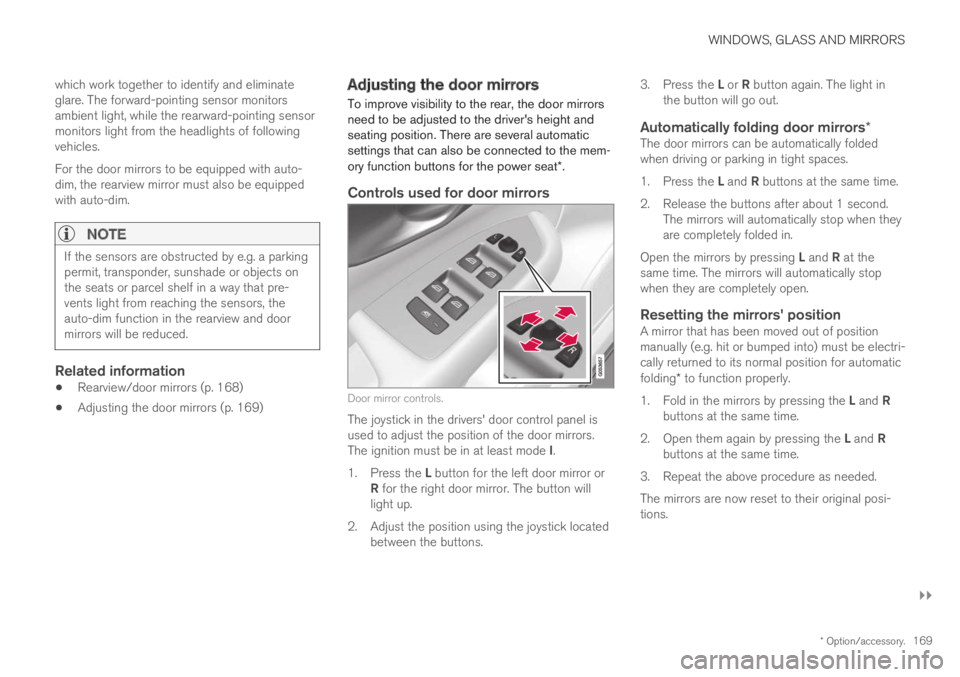
Door mirror controls.
The joystick in the drivers' door control panel isused to adjust the position of the door mirrors.The ignition must be in at least mode I.
1.Press the L button for the left door mirror orR for the right door mirror. The button willlight up.
2.Adjust the position using the joystick locatedbetween the buttons.
3.Press the L or R button again. The light inthe button will go out.
Automatically folding door mirrors *
The door mirrors can be automatically foldedwhen driving or parking in tight spaces.
1.Press the L and R buttons at the same time.
2. Release the buttons after about 1 second.The mirrors will automatically stop when theyare completely folded in.
Open the mirrors by pressing L and R at thesame time. The mirrors will automatically stopwhen they are completely open.
Resetting the mirrors' position
A mirror that has been moved out of positionmanually (e.g. hit or bumped into) must be electri-cally returned to its normal position for automaticfolding* to function properly.
1.Fold in the mirrors by pressing the L and Rbuttons at the same time.
2.Open them again by pressing the L and Rbuttons at the same time.
3. Repeat the above procedure as needed.
The mirrors are now reset to their original posi-tions.
Page 179 of 645

WINDOWS, GLASS AND MIRRORS
* Option/accessory.177
Using the windshield and headlightwashers
The windshield and headlight washers clean thewindshield and headlights. Use the right-sidesteering wheel lever to start the windshield andheadlight washers.
Starting the windshield and headlight
washers
Washing function, right-hand steering wheel lever.
–Move the right-hand steering wheel levertoward the steering wheel to start the wind-shield and headlight washers.
>After the lever is released, the wipersmake several extra sweeps.
CAUTION
Avoid activating the washer system when it isfrozen or the fluid reservoir is empty. Other-wise, there is a risk of damaging the pump.
Headlight washer *
To save washer fluid, the headlights are washedautomatically according to a defined intervalwhen the headlights are on.
Reduced washing
When there is about 1 liter (1 qt) of washer fluidleft in the reservoir and the Washer fluid Levellow, refill message is displayed in the instrument
panel together with the symbol, the washerfluid supply to the headlights is cut off. This is toprioritize windshield cleaning and visibilitythrough it. The headlights are only washed if highor low beam is on.
Related information
Using the rain sensor (p. 175)
Wiper blades and washer fluid (p. 174)
Using the rain sensor's memory function(p. 176)
Filling washer fluid (p. 609)
Windshield wipers in the service position(p. 608)
Replacing windshield wiper blades (p. 607)
Using the windshield wipers (p. 175)
Page 211 of 645

CLIMATE CONTROL
}}
* Option/accessory.209
Activating and deactivating the
heated front seat*
The seats can be heated for added comfort forthe driver and passengers in cold weather.
Seat heating can be set to automatically activatewhen the engine is started. When set to automat-ically activate, heating will be turned on at lowambient temperatures.
1.Tap Settings in the Top view in the centerdisplay.
2.Tap Climate.
3.Select Auto Driver Seat Heating Leveland Auto Passenger Seat Heating Levelto activate/deactivate automatic start ofheated driver's and passenger seat.
>An "A" will be displayed next to the rele-vant seat heating button in the climate barwhen auto start has been activated.
4.Select Low, Medium or High to select levelafter the function has been activated.
Related information
Climate system controls (p. 207)
Activating and deactivating power frontseats* (p. 208)
Activating and deactivating the
heated rear seats*
The seats can be heated for added comfort forthe driver and passengers in cold weather.
Activating and deactivating the heated
rear seats from the rear seat
Buttons for seat heating on the rear side of the tunnelconsole.
–Press repeatedly on the left or right seatheating buttons on the rear side of the tun-nel console to select one of four levels: Off,High, Medium or Low.
>The level is changed and the indicatorlights in the button display the level.
Related information
Climate system controls (p. 207)
Activating and deactivating front
seat ventilation*
The seats can be ventilated to provide increasedcomfort in warm weather.
The ventilation system consists of fans in theseats and backrest that draw air through the seatupholstery. The cooler the passenger compart-ment is, the greater the cooling effect of the ven-tilation. The system can be activated when theengine is running.
1. Tap the left- or right-side steering wheel andseat button in the center display's climatebar to open the controls for steering wheeland seat heating.
If the vehicle is not equipped with heatedseats or heated steering wheel (for the driv-er's side), the button for seat ventilation isdirectly accessible in the climate bar.
2. Tap the seat ventilation button repeatedly toselect one of the four levels: Off, High,Medium or Low.
>The level is changed and the set level isdisplayed in the button.
Page 213 of 645
CLIMATE CONTROL
}}
211
Activating auto climate control
If auto climate control is activated, several cli-mate system functions are controlled automati-cally.
1. Tap the symbol in the center of the climatebar to open Climate view in the center dis-play.
2.Tap or press and hold AUTO Climate
Tap - air recirculation, air conditioning andair distribution are controlled automati-cally.
Press and hold - air recirculation, air con-ditioning and air distribution are controlledautomatically. Temperature and blowerspeed are changed to standard settings:22 °C (72 °F) and speed 3.
>Auto climate mode is activated and thebutton lights up.
NOTE
It is possible to change the temperature andblower speed without deactivating automaticclimate control. Automatic climate control isdeactivated when the air distribution ischanged manually or when the max defrosteris activated.
Related information
Climate system controls (p. 207)Activating and deactivatingrecirculation
The climate system's recirculation function helpsshut out smog, smoke, exhaust fumes, etc. byreusing the air in the passenger compartment.
1. Tap the symbol in the center of the climatebar to open Climate view in the center dis-play.
2.Tap Recirc.
>Air recirculation is activated/deactivatedand the button lights up/goes out.
CAUTION
If the air in the vehicle is recirculated too long,there is a risk of fogging on the inside of thewindows.
NOTE
Recirculation cannot be activated when themax defroster is on.
Page 215 of 645
CLIMATE CONTROL
}}
213
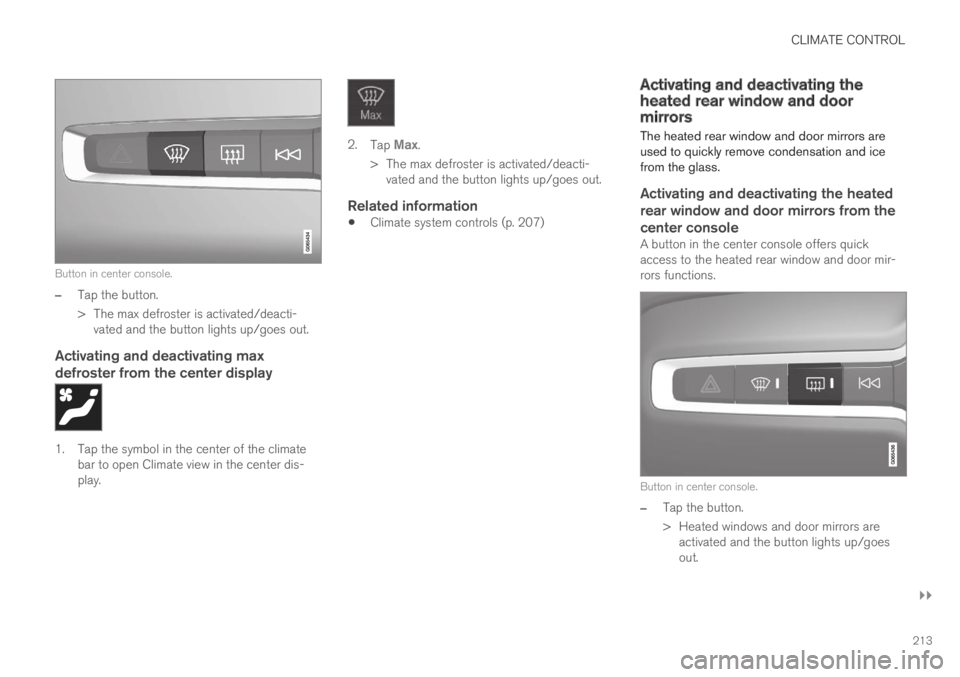
Button in center console.
–Tap the button.
>The max defroster is activated/deacti-vated and the button lights up/goes out.
Activating and deactivating max
defroster from the center display
1. Tap the symbol in the center of the climatebar to open Climate view in the center dis-play.
2.Tap Max.
>The max defroster is activated/deacti-vated and the button lights up/goes out.
Related information
Climate system controls (p. 207)
Activating and deactivating theheated rear window and doormirrors
The heated rear window and door mirrors areused to quickly remove condensation and icefrom the glass.
Activating and deactivating the heated
rear window and door mirrors from the
center console
A button in the center console offers quickaccess to the heated rear window and door mir-rors functions.
Button in center console.
–Tap the button.
>Heated windows and door mirrors areactivated and the button lights up/goesout.
Page 216 of 645

||
CLIMATE CONTROL
214
Activating and deactivating the heated
rear window and door mirrors from the
center display
1. Tap the symbol in the center of the climatebar to open Climate view in the center dis-play.
2.Tap Rear.
>Heated windows and door mirrors areactivated and the button lights up/goesout.
Related information
Climate system controls (p. 207)
Automatically activating and deactivating theheated rear window and door mirrors(p. 214)
Automatically activating anddeactivating the heated rear windowand door mirrors
The heated rear window and door mirrors areused to quickly remove condensation and icefrom the glass.
It is possible to select whether rear window anddoor mirror heating should be automatically acti-vated or deactivated when the engine is started.With automatic start activated, heating will beactivated when there is a risk of ice or condensa-tion on the windows or mirrors. Heating is auto-matically switched off when the window or doormirror is sufficiently warm and the condensationor ice is gone.
1.Tap Settings in the Top view in the centerdisplay.
2.Tap Climate.
3.Select Auto Rear Defroster to activate/deactivate automatic rear window and doorheating.
Related information
Activating and deactivating the heated rearwindow and door mirrors (p. 213)
Setting the blower speed for the
front seats2
The blower can be set to several different auto-matically controlled speeds for the front seat.
1. Tap the symbol in the center of the climatebar to open Climate view in the center dis-play.
Blower control buttons in Climate view.
2.Tap the desired blower speed: Off, 1-5 orMax.
>The blower speed will be changed and thebuttons for the set speed will light up.
2The same setting applies to the rear seats with the 2-zone climate system.
Page 218 of 645
CLIMATE CONTROL
* Option/accessory.216
Synchronize temperature
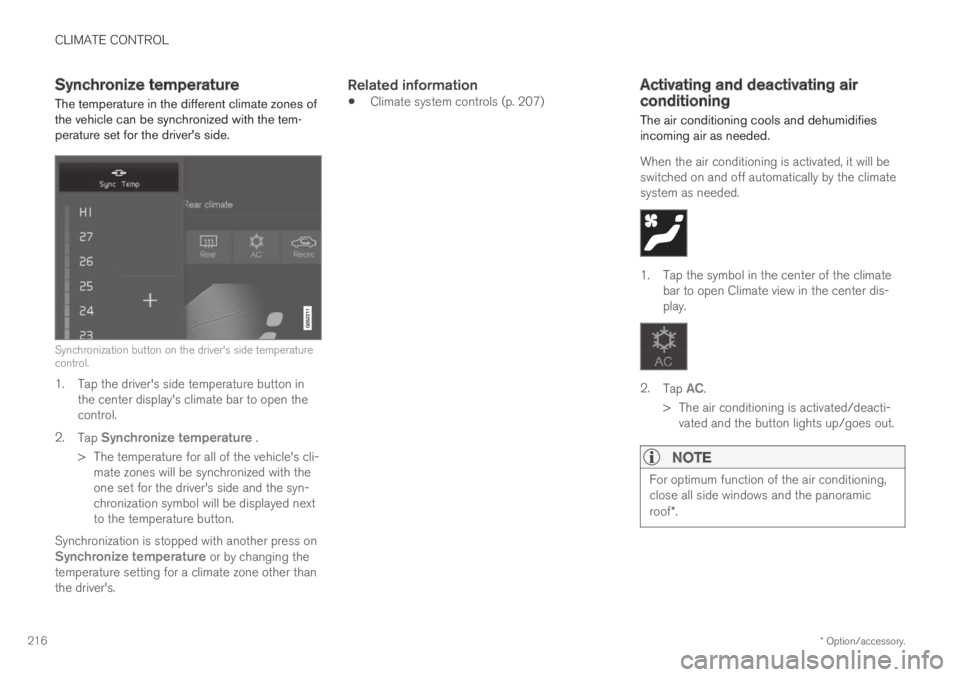
The temperature in the different climate zones ofthe vehicle can be synchronized with the tem-perature set for the driver's side.
Synchronization button on the driver's side temperaturecontrol.
1. Tap the driver's side temperature button inthe center display's climate bar to open thecontrol.
2.Tap Synchronize temperature .
>The temperature for all of the vehicle's cli-mate zones will be synchronized with theone set for the driver's side and the syn-chronization symbol will be displayed nextto the temperature button.
Synchronization is stopped with another press onSynchronize temperature or by changing thetemperature setting for a climate zone other thanthe driver's.
Related information
Climate system controls (p. 207)Activating and deactivating airconditioning
The air conditioning cools and dehumidifiesincoming air as needed.
When the air conditioning is activated, it will beswitched on and off automatically by the climatesystem as needed.
1. Tap the symbol in the center of the climatebar to open Climate view in the center dis-play.
2.Tap AC.
>The air conditioning is activated/deacti-vated and the button lights up/goes out.
NOTE
For optimum function of the air conditioning,close all side windows and the panoramicroof*.
Page 220 of 645

||
CLIMATE CONTROL
* Option/accessory.218
NOTE
Preconditioning is only available when the caris connected to an electrical outlet. A charg-ing post that is not always active, for examplebecause of a timer, can cause loss of functionfor preconditioning.
If the vehicle is not connected to an electricalsocket it is still possible in a warm climate toachieve brief cooling of the passenger com-partment by direct starting preconditioning.
NOTE
During preconditioning of the passengercompartment, the vehicle works to reach acomfortable temperature and not the tem-perature set in the climate system.
Related information
Parking climate (p. 217)
Starting and stopping preconditioning(p. 218)
Preconditioning timer (p. 219)
Starting and stoppingpreconditioning
Preconditioning heats or cools the passengercompartment, if possible, before driving. Thefunction can be started in the center display orfrom a cellular phone.
Starting and stopping from the vehicle
1. Tap the symbol in the center of the climatebar to open Climate view in the center dis-play.
2.Select the Parking climate tab.
3.Tap the boxes to select if seat/steeringwheel heating should be activated along withpreconditioning for each function.
4.Tap Preconditioning.
>Preconditioning starts/stops and the but-ton lights up/goes out.
NOTE
Preconditioning is only available when the caris connected to an electrical outlet. A charg-ing post that is not always active, for examplebecause of a timer, can cause loss of functionfor preconditioning.
If the vehicle is not connected to an electricalsocket it is still possible in a warm climate toachieve brief cooling of the passenger com-partment by direct starting preconditioning.
NOTE
The vehicle doors and windows should beclosed during preconditioning of the passen-ger compartment.
Starting from app *
A device with the Volvo On Call* app can be usedto start preconditioning or check settings. Pre-conditioning heats or cools the passenger com-partment (using the vehicle's air conditioning) toa comfortable temperature.
The passenger compartment can also be precon-
ditioned using the Engine Remote Start (ERS)4
function using the Volvo On Call* app.
4Certain markets only.
Page 222 of 645

||
CLIMATE CONTROL
220
4.Tap Date to set a time for a specific date.
Tap Days to set a time for one or more daysof the week.
With Days: Activate/deactivate the repeatfunction by selecting/deselecting theRepeat weekly checkbox.
5.With Date: Select a date for preconditioningby scrolling in the date list using the arrows.
With Days: Select days of the week for pre-conditioning by tapping the buttons for thedays.
6.Set the time at which preconditioning shouldbe completed by scrolling using the arrows inthe clock.
7.Tap Confirm to add a timer setting.
>The timer setting will be added to the listand activated.
Editing a timer setting
1. Open Climate view in the center display.
2.Select the Parking climate tab.
3.Tap the timer setting you would like tochange.
> A pop-up window will appear.
4. To edit a timer setting, follow the proceduresdescribed under the heading "Adding a timersetting" above.
Related information
Preconditioning (p. 217)
Preconditioning timer (p. 219)
Activating and deactivating preconditioningtimer (p. 220)
Deleting preconditioning timer settings(p. 221)
Activating and deactivatingpreconditioning timer
Timer settings in the preconditioning timer canbe activated or deactivated as needed.
Timer buttons in the Parking climate tab in Climateview.
1. Open Climate view in the center display.
2.Select the Parking climate tab.
3.Activate/deactivate a timer setting by tap-ping the timer button to the right of the set-ting.
> The timer setting is activated/deactivatedand the button lights up/goes out.
Related information
Preconditioning (p. 217)
Preconditioning timer (p. 219)