lights VOLVO S60 TWIN ENGINE 2019 Service Manual
[x] Cancel search | Manufacturer: VOLVO, Model Year: 2019, Model line: S60 TWIN ENGINE, Model: VOLVO S60 TWIN ENGINE 2019Pages: 645, PDF Size: 13.96 MB
Page 324 of 645

||
DRIVER SUPPORT
322
given, the indicator light will become brighter andbegin flashing.
NOTE
The light illuminates on the side of the vehiclewhere the system has detected the vehicle. Ifthe vehicle is passed on both sides simulta-neously, both lights come on.
WARNING
The function is supplementary driver sup-port intended to facilitate driving and helpmake it safer – it cannot handle all situa-tions in all traffic, weather and road condi-tions.
The driver is advised to read all sectionsin the Owner's Manual about this functionto learn of its limitations, which the drivermust be aware of before using the func-tion.
Driver support functions are not a substi-tute for the driver's attention and judg-ment. The driver is always responsible forensuring the vehicle is driven in a safemanner, at the appropriate speed, with anappropriate distance to other vehicles,and in accordance with current trafficrules and regulations.
NOTE
The function uses the vehicle's camera andradar sensor, which has certain general limita-tions.
Related information
Driver support systems (p. 260)
Activating or deactivating BLIS (p. 322)
BLIS limitations (p. 323)
BLIS messages (p. 324)
Activating or deactivating BLIS
The BLIS56 function can be activated or deacti-vated.
Location of BLIS indicator light.
Indicator light
Activate or deactivate the function using thisbutton in the center display's Function view.
GREEN button indicator light – the functionis activated.
GRAY button indicator light – the function isdeactivated.
If BLIS is activated when the engine is started,the indicator lights in the rearview mirrors willflash once.
56Blind Spot Information Systems
Page 325 of 645

DRIVER SUPPORT
* Option/accessory.323
If BLIS is deactivated when the engine is turnedoff, it will remain off the next time the engine isstarted and the indicator lights will not illuminate.
Related information
BLIS* (p. 321)
BLIS limitations
BLIS57 functionality may be reduced in certainsituations.
Keep the marked area clean (on both the left and rightsides of the vehicle)58.
Examples of limitations:
Dirt, ice and snow covering the sensors mayreduce functionality and prevent the systemfrom providing warnings.
The BLIS function is automatically deacti-vated if a trailer, bicycle holder or similar isconnected to the vehicle's electrical system.
For BLIS to function optimally, bicycle hold-ers, luggage racks or similar should not bemounted on the vehicle's towbar.
WARNING
BLIS does not work in sharp curves.
BLIS does not work when the vehicle isbeing reversed.
NOTE
The function uses the vehicle's camera andradar sensor, which has certain general limita-tions.
Related information
BLIS* (p. 321)
Camera/radar sensor limitations (p. 300)
57Blind Spot Information Systems58Note: This illustration is general and details may vary depending on model.
Page 353 of 645

DRIVER SUPPORT
}}
* Option/accessory.351
Related information
Driver support systems (p. 260)
Park Assist front, rear and sides* (p. 351)
Activating/deactivating Park Assist* (p. 352)
Park Assist symbols and messages (p. 354)
Camera/radar sensor limitations (p. 300)
Park Assist front, rear and sides*
Park Assist behaves differently depending onwhich part of the vehicle is approaching anobstacle.
Front camera
The warning signal has a continuous tone when theobstacle is less than approx. 30 cm (1 ft) from the vehi-cle.
The Parking Assist system's front sensors areautomatically activated when the engine isstarted. They are active at speeds below 10 km/h(6 mph).
The distance monitored extends approx. 80 cm(2.5 ft) in front of the vehicle.
NOTE
The Parking Assist system is deactivatedwhen the parking brake is used or when P isselected on vehicles with automatic transmis-sion.
CAUTION
When installing auxiliary lights: Make surethese do not obscure the sensors – the auxili-ary lights could be perceived as an obstacle.
Back
The warning signal has a continuous tone when theobstacle is less than approx. 30 cm (1 ft) from the vehi-cle.
The rear sensors will be activated if the vehiclebegins rolling backward or if reverse gear isengaged.
Page 378 of 645

||
HYBRID INFORMATION
376
Charging cable handle and charging socket.
Charging status is indicated in three ways:
The indicator lights in the charging module(the unit connected to the wall outlet).
Indicator light in the vehicle's chargingsocket.
Images and text in the instrument panel.
The start battery is charged while the hybrid bat-tery is charging and stops charging when thehybrid battery is fully charged.
If the hybrid battery's temperature is below-10 ºC (14 ºF) or above 40 ºC (104 ºF), some ofthe vehicle's functions may be reduced or notavailable at all.
The electric motor cannot be used if the battery'stemperature is too low or too high. If the PUREdrive mode is selected, the gasoline engine willstart.
Charging using the gasoline engine
The vehicle generates electrical current to charge thebattery, e.g. when the driver lightly presses the brakepedal or when engine braking is used on downgrades.
The vehicle can also generate current to thehybrid battery to charge it.
The hybrid battery can also be recharged bylightly depressing the brake pedal, i.e. duringlight braking. This converts the vehicle'skinetic energy to electrical energy, which isused to charge the hybrid battery.
In gear position B, the electric motor brakesthe vehicle when the accelerator pedal isreleased and the hybrid battery is rechargedat the same time.
The combustion engine can also helprecharge the hybrid battery.
Related information
Charge cable (p. 377)
Charging current (p. 377)
Opening and closing the charging socketcover (p. 380)
Initiating hybrid battery charging (p. 380)
Stopping hybrid battery charging (p. 386)
Charging status in the charging cable'scharging module (p. 383)
Charging status in the vehicle's chargingsocket (p. 382)
Charging status in the instrument panel(p. 384)
Twin Engine symbols and messages in theinstrument panel (p. 387)
Gear selector positions for automatic trans-missions (p. 406)
Changing drive mode (p. 416)
Long-term storage of vehicles with hybridbatteries (p. 389)
Page 385 of 645

HYBRID INFORMATION
383
LED indicatorlight's colorMeaning
WhiteCourtesy light.
YellowWait modeA – waiting forcharging to start.
Flashing greenCharging is in progressB.
GreenCharging completedC.
RedMalfunction.
AE.g. after a door has been opened or if the charging cable han-dle is not locked in place.BThe more slowly the light flashes, the closer the battery is tobeing fully charged.CThe light will go out after a short time.
Related information
Charging the hybrid battery (p. 375)
Charging status in the instrument panel(p. 384)
Charging status in the charging cable'scharging module (p. 383)
Stopping hybrid battery charging (p. 386)
Charging status in the chargingcable's charging module
The red and blue lights in the charging moduleindicate the status of ongoing and completedcharging.
Charge module: 1. Red warning light, 2. Blue status indi-cator
When the charge module is initially plugged intoa wall outlet, the red warning light will flash onceto indicate that a startup safety check has beenperformed. When the safety check has beencompleted, the blue status indicator will glowsteadily and the red warning light will be off. Thecharger is now ready to be used. If the red warn-ing light continues to flash or glows steadily, afault has been detected and the charger will notdeliver power to the vehicle. Contact a Volvoretailer or a certified Volvo service technician.
When the charging cable is connected to thevehicle's charging socket, the blue light will flashonce.
Charging cable connected to the vehicle's charg-ing socket:
Indicatorlight's colorMeaning
FlashingblueCharging is in progress. Thelight flashes about once everyother second
Solid blueCharging completed. This willalso be indicated in the instru-ment panel
Related information
Charging the hybrid battery (p. 375)
Charging status in the vehicle's chargingsocket (p. 382)
Charging status in the instrument panel(p. 384)
Stopping hybrid battery charging (p. 386)
Page 397 of 645
STARTING AND DRIVING
* Option/accessory.395
Ignition modes
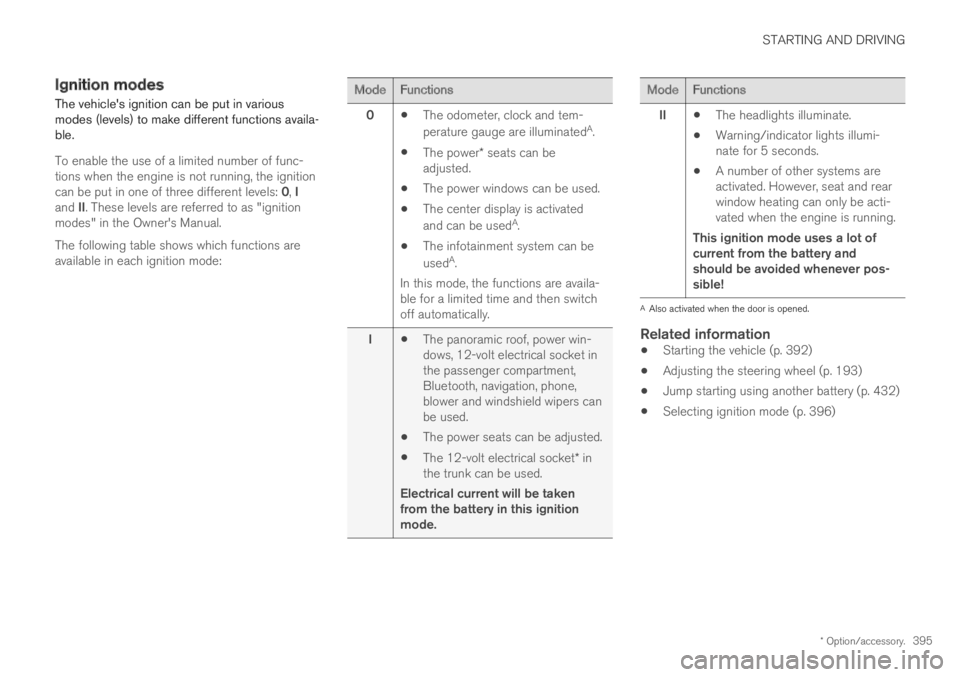
The vehicle's ignition can be put in variousmodes (levels) to make different functions availa-ble.
To enable the use of a limited number of func-tions when the engine is not running, the ignitioncan be put in one of three different levels: 0, Iand II. These levels are referred to as "ignitionmodes" in the Owner's Manual.
The following table shows which functions areavailable in each ignition mode:
ModeFunctions
0The odometer, clock and tem-
perature gauge are illuminatedA.
The power* seats can beadjusted.
The power windows can be used.
The center display is activated
and can be usedA.
The infotainment system can be
usedA.
In this mode, the functions are availa-ble for a limited time and then switchoff automatically.
IThe panoramic roof, power win-dows, 12-volt electrical socket inthe passenger compartment,Bluetooth, navigation, phone,blower and windshield wipers canbe used.
The power seats can be adjusted.
The 12-volt electrical socket* inthe trunk can be used.
Electrical current will be takenfrom the battery in this ignitionmode.
ModeFunctions
IIThe headlights illuminate.
Warning/indicator lights illumi-nate for 5 seconds.
A number of other systems areactivated. However, seat and rearwindow heating can only be acti-vated when the engine is running.
This ignition mode uses a lot ofcurrent from the battery andshould be avoided whenever pos-sible!
AAlso activated when the door is opened.
Related information
Starting the vehicle (p. 392)
Adjusting the steering wheel (p. 193)
Jump starting using another battery (p. 432)
Selecting ignition mode (p. 396)
Page 400 of 645

||
STARTING AND DRIVING
398
SymbolMeaning
A
B
Steady glow for 2 seconds afterthe engine is started: Automaticfunction check.
Steady glow for more than 2 sec-onds: Fault in the ABS system. Thevehicle's regular brake system isstill working, but without the ABSfunction.
If the message Brake pedal Cha-racteristics changed Servicerequired is displayed, the "Brake-by-wire" system is not functioningproperly. Greater pressure will berequired to brake the vehicle.
AIn Canada.BIn the US.
WARNING
If the warning symbols for both brake faultand ABS fault are lit simultaneously, theremay be a fault in the brake system.
If the brake fluid reservoir level is normalwhen this occurs, drive carefully to thenearest workshop to have the brake sys-tem checked - an authorized Volvo work-shop is recommended.
If the brake fluid has fallen below the MINlevel in the brake fluid reservoir, the vehi-cle should not be driven until the brakefluid has been filled. The reason for thebrake fluid loss must be checked.
Related information
Brake Assist System (p. 398)
Auto-hold brakes (p. 403)
Hill Start Assist (p. 405)
Braking on wet roads (p. 399)
Braking on salted roads (p. 399)
Maintenance of the brake system (p. 399)
Brake lights (p. 159)
Brake Assist System
The brake enhancing system, (BAS3), helpsincrease braking force and can thereby reducebraking distance.
The system monitors the driver's braking habitsand increases braking force when necessary.Braking force can be increased up to the point atwhich the ABS intervenes. The function is deacti-vated when pressure on the brake pedal isdecreased.
Related information
Brakes (p. 397)
3Brake Assist System
Page 407 of 645
STARTING AND DRIVING
* Option/accessory.405
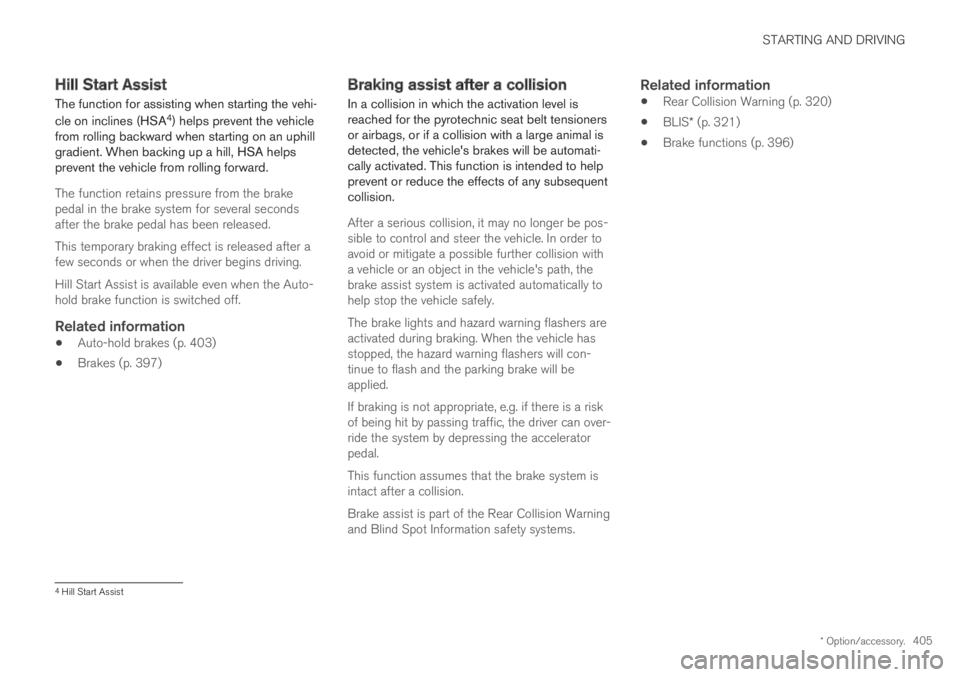
Hill Start Assist
The function for assisting when starting the vehi-
cle on inclines (HSA4) helps prevent the vehiclefrom rolling backward when starting on an uphillgradient. When backing up a hill, HSA helpsprevent the vehicle from rolling forward.
The function retains pressure from the brakepedal in the brake system for several secondsafter the brake pedal has been released.
This temporary braking effect is released after afew seconds or when the driver begins driving.
Hill Start Assist is available even when the Auto-hold brake function is switched off.
Related information
Auto-hold brakes (p. 403)
Brakes (p. 397)
Braking assist after a collision
In a collision in which the activation level isreached for the pyrotechnic seat belt tensionersor airbags, or if a collision with a large animal isdetected, the vehicle's brakes will be automati-cally activated. This function is intended to helpprevent or reduce the effects of any subsequentcollision.
After a serious collision, it may no longer be pos-sible to control and steer the vehicle. In order toavoid or mitigate a possible further collision witha vehicle or an object in the vehicle's path, thebrake assist system is activated automatically tohelp stop the vehicle safely.
The brake lights and hazard warning flashers areactivated during braking. When the vehicle hasstopped, the hazard warning flashers will con-tinue to flash and the parking brake will beapplied.
If braking is not appropriate, e.g. if there is a riskof being hit by passing traffic, the driver can over-ride the system by depressing the acceleratorpedal.
This function assumes that the brake system isintact after a collision.
Brake assist is part of the Rear Collision Warningand Blind Spot Information safety systems.
Related information
Rear Collision Warning (p. 320)
BLIS* (p. 321)
Brake functions (p. 396)
4Hill Start Assist
Page 426 of 645
STARTING AND DRIVING
424
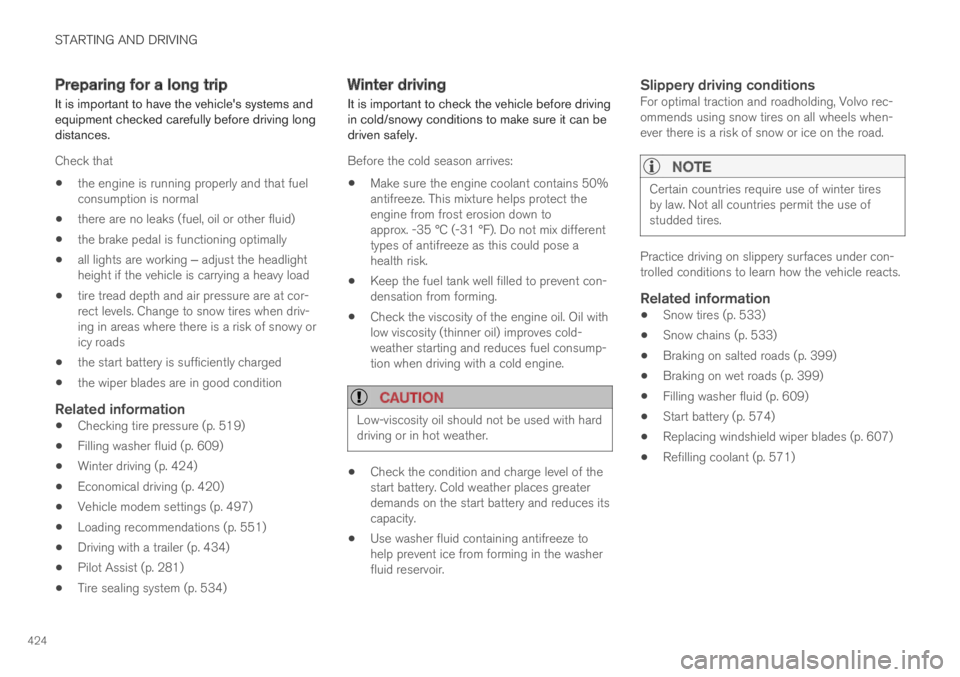
Preparing for a long trip
It is important to have the vehicle's systems andequipment checked carefully before driving longdistances.
Check that
the engine is running properly and that fuelconsumption is normal
there are no leaks (fuel, oil or other fluid)
the brake pedal is functioning optimally
all lights are working ‒ adjust the headlightheight if the vehicle is carrying a heavy load
tire tread depth and air pressure are at cor-rect levels. Change to snow tires when driv-ing in areas where there is a risk of snowy oricy roads
the start battery is sufficiently charged
the wiper blades are in good condition
Related information
Checking tire pressure (p. 519)
Filling washer fluid (p. 609)
Winter driving (p. 424)
Economical driving (p. 420)
Vehicle modem settings (p. 497)
Loading recommendations (p. 551)
Driving with a trailer (p. 434)
Pilot Assist (p. 281)
Tire sealing system (p. 534)
Winter driving
It is important to check the vehicle before drivingin cold/snowy conditions to make sure it can bedriven safely.
Before the cold season arrives:
Make sure the engine coolant contains 50%antifreeze. This mixture helps protect theengine from frost erosion down toapprox. -35 °C (-31 °F). Do not mix differenttypes of antifreeze as this could pose ahealth risk.
Keep the fuel tank well filled to prevent con-densation from forming.
Check the viscosity of the engine oil. Oil withlow viscosity (thinner oil) improves cold-weather starting and reduces fuel consump-tion when driving with a cold engine.
CAUTION
Low-viscosity oil should not be used with harddriving or in hot weather.
Check the condition and charge level of thestart battery. Cold weather places greaterdemands on the start battery and reduces itscapacity.
Use washer fluid containing antifreeze tohelp prevent ice from forming in the washerfluid reservoir.
Slippery driving conditions
For optimal traction and roadholding, Volvo rec-ommends using snow tires on all wheels when-ever there is a risk of snow or ice on the road.
NOTE
Certain countries require use of winter tiresby law. Not all countries permit the use ofstudded tires.
Practice driving on slippery surfaces under con-trolled conditions to learn how the vehicle reacts.
Related information
Snow tires (p. 533)
Snow chains (p. 533)
Braking on salted roads (p. 399)
Braking on wet roads (p. 399)
Filling washer fluid (p. 609)
Start battery (p. 574)
Replacing windshield wiper blades (p. 607)
Refilling coolant (p. 571)
Page 433 of 645
STARTING AND DRIVING
}}
431
or location or removing components, and/orrepeated use of leaded fuel.
NOTE
Unleaded fuel is required for vehicles withthree-way catalytic converters.
Heated oxygen sensors
The heated oxygen sensors monitor the oxygencontent of the exhaust gases. Readings are fedinto a control module that continuously monitorsengine functions and controls fuel injection. Theratio of fuel to air into the engine is continuouslyadjusted for efficient combustion to help reduceharmful emissions.
Related information
Octane rating (p. 429)
Fuel (p. 428)
Overheating of engine andtransmission
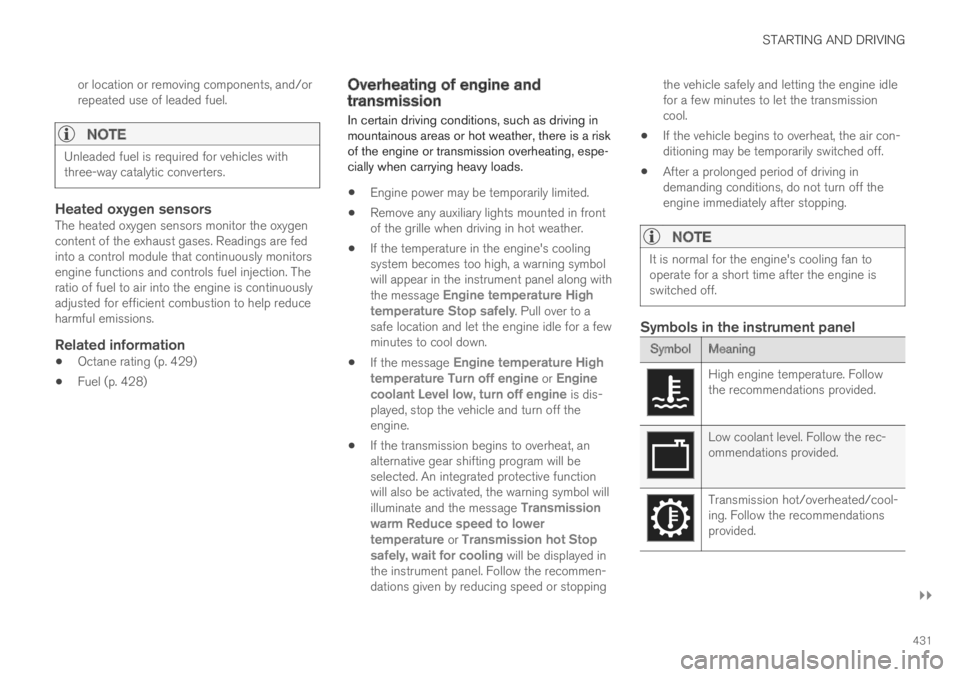
In certain driving conditions, such as driving inmountainous areas or hot weather, there is a riskof the engine or transmission overheating, espe-cially when carrying heavy loads.
Engine power may be temporarily limited.
Remove any auxiliary lights mounted in frontof the grille when driving in hot weather.
If the temperature in the engine's coolingsystem becomes too high, a warning symbolwill appear in the instrument panel along withthe message Engine temperature Hightemperature Stop safely. Pull over to asafe location and let the engine idle for a fewminutes to cool down.
If the message Engine temperature Hightemperature Turn off engine or Enginecoolant Level low, turn off engine is dis-played, stop the vehicle and turn off theengine.
If the transmission begins to overheat, analternative gear shifting program will beselected. An integrated protective functionwill also be activated, the warning symbol willilluminate and the message Transmissionwarm Reduce speed to lowertemperature or Transmission hot Stopsafely, wait for cooling will be displayed inthe instrument panel. Follow the recommen-dations given by reducing speed or stopping
the vehicle safely and letting the engine idlefor a few minutes to let the transmissioncool.
If the vehicle begins to overheat, the air con-ditioning may be temporarily switched off.
After a prolonged period of driving indemanding conditions, do not turn off theengine immediately after stopping.
NOTE
It is normal for the engine's cooling fan tooperate for a short time after the engine isswitched off.
Symbols in the instrument panel
SymbolMeaning
High engine temperature. Followthe recommendations provided.
Low coolant level. Follow the rec-ommendations provided.
Transmission hot/overheated/cool-ing. Follow the recommendationsprovided.