suspension VOLVO S60 TWIN ENGINE 2019 Owners Manual
[x] Cancel search | Manufacturer: VOLVO, Model Year: 2019, Model line: S60 TWIN ENGINE, Model: VOLVO S60 TWIN ENGINE 2019Pages: 645, PDF Size: 13.96 MB
Page 11 of 645

9
HYBRID INFORMATION
General information about Twin Engine374
Charging the hybrid battery375
Charging current377
Charge cable377
Charging cable residual current device379
Charging cable temperature monitoring380
Opening and closing the chargingsocket cover380
Initiating hybrid battery charging380
Charging status in the vehicle'scharging socket382
Charging status in the chargingcable's charging module383
Charging status in the instrument panel384
Stopping hybrid battery charging386
Twin Engine symbols and messagesin the instrument panel387
Long-term storage of vehicles withhybrid batteries389
STARTING AND DRIVING
Starting the vehicle392
Switching off the vehicle394
Ignition modes395
Selecting ignition mode396
Brake functions396
Brakes397
Brake Assist System398
Braking on wet roads399
Braking on salted roads399
Maintenance of the brake system399
Parking brake400
Activating and deactivating the park-ing brake400
Settings for automatically activatingthe parking brake402
Parking on a hill402
Parking brake malfunction402
Auto-hold brakes403
Activating and deactivating Auto-hold at a standstill404
Hill Start Assist405
Braking assist after a collision405
Transmission406
Gear selector positions for automatictransmissions406
Using the steering wheel paddles* toshift408
Shiftlock409
The kickdown function410
All Wheel Drive (AWD)410
Drive systems410
Starting and stopping the combus-tion engine in Twin Engine vehicles411
Drive modes412
Changing drive mode416
Energy distribution in hybrid modeusing map data*417
Leveling control* and suspension418
Leveling control settings*420
Economical driving420
Factors affecting electric motor range421
Hold and Charge functions423
Preparing for a long trip424
Winter driving424
Driving through standing water425
Opening/closing the fuel filler door425
Refueling426
Fuel428
Octane rating429
Emission controls430
Page 135 of 645
DISPLAYS AND VOICE CONTROL
}}
* Option/accessory.133
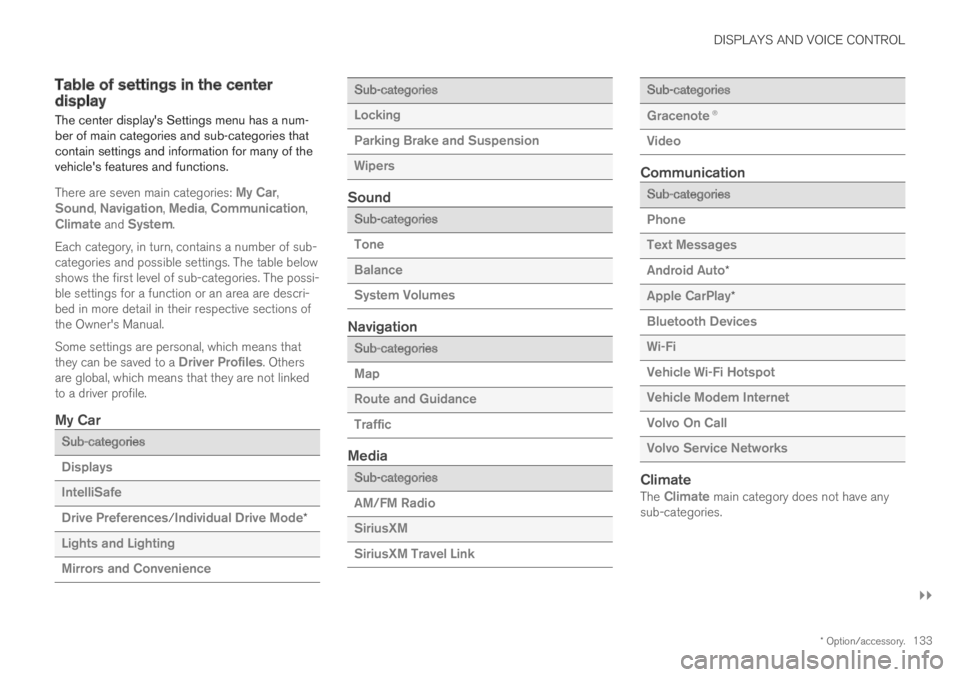
Table of settings in the centerdisplay
The center display's Settings menu has a num-ber of main categories and sub-categories thatcontain settings and information for many of thevehicle's features and functions.
There are seven main categories: My Car,Sound, Navigation, Media, Communication,Climate and System.
Each category, in turn, contains a number of sub-categories and possible settings. The table belowshows the first level of sub-categories. The possi-ble settings for a function or an area are descri-bed in more detail in their respective sections ofthe Owner's Manual.
Some settings are personal, which means thatthey can be saved to a Driver Profiles. Othersare global, which means that they are not linkedto a driver profile.
My Car
Sub-categories
Displays
IntelliSafe
Drive Preferences/Individual Drive Mode*
Lights and Lighting
Mirrors and Convenience
Sub-categories
Locking
Parking Brake and Suspension
Wipers
Sound
Sub-categories
Tone
Balance
System Volumes
Navigation
Sub-categories
Map
Route and Guidance
Traffic
Media
Sub-categories
AM/FM Radio
SiriusXM
SiriusXM Travel Link
Sub-categories
Gracenote®
Video
Communication
Sub-categories
Phone
Text Messages
Android Auto*
Apple CarPlay*
Bluetooth Devices
Wi-Fi
Vehicle Wi-Fi Hotspot
Vehicle Modem Internet
Volvo On Call
Volvo Service Networks
Climate
The Climate main category does not have anysub-categories.
Page 404 of 645

STARTING AND DRIVING
402
Settings for automatically activatingthe parking brake
Choose whether the parking brake should beactivated automatically when the vehicle isswitched off.
To change this setting:
1.Tap Settings in the center display's Topview.
2.Tap My CarParking Brake andSuspension and select or deselect theAuto Activate Parking Brake function.
Related information
Activating and deactivating the parking brake(p. 400)
Parking brake (p. 400)
Parking on a hill
Always use the parking brake when parking on ahill.
WARNING
Always apply the parking brake when parkingon an incline. Selecting a gear or putting theautomatic transmission in P may not be suffi-cient to keep the vehicle stationary in all sit-uations.
If the vehicle is pointing uphill:
Turn the front wheels so they are pointingaway from the curb.
If the vehicle is pointing downhill:
Turn the front wheels so they are pointingtoward the curb.
Heavy load uphill
Heavy loads, such as a trailer, could cause thevehicle to roll backward when the parking brakeis released automatically on steep uphill gradi-ents. To help avoid this, pull the control upwardwhile you are driving away. Release the controlwhen the vehicle gains traction.
Related information
Activating and deactivating the parking brake(p. 400)
Parking brake malfunction
If you are unable to deactivate or activate theparking brake after several attempts, contact anauthorized Volvo workshop.
A audible warning signal will sound if the parkingbrake is activated while the vehicle is beingdriven.
If the vehicle must be parked before the problemis rectified, turn the wheels as when parking onan incline and put the gear selector in P.
Low battery charge level
If the battery charge level is too low, it will not bepossible to activate or deactivate the parkingbrake. Connect an auxiliary battery to the vehicleif the battery is discharged.
Replacing brake pads
Due to the design of the electric parking brake,the rear brake pads must be replaced by a work-shop. An authorized Volvo workshop is recom-mended.
Page 416 of 645

||
STARTING AND DRIVING
414
This drive mode is optimized for maximum drivingdistance with electric propulsion and is primarilyintended for use in city driving. Pure helps pro-vide the lowest possible consumption even whenthe hybrid battery is fully discharged. ECO climateis activated to control the climate in the passen-ger compartment, and in slippery road conditionsslightly more wheel spin may be permitted beforeall-wheel drive is automatically activated.
ECO Climate
In Pure mode, ECO climate is automatically acti-vated in the passenger compartment to helpreduce energy consumption.
NOTE
When the Pure drive mode is activated, set-tings for certain climate system and electricityconsuming functions are reduced. Some ofthese settings can be reset manually, but fullfunctionality will only be restored by leavingPure mode or adapting the Individual drivemode to full climate system functionality.
If condensation forms on the windows, tap themax defroster button, which will function normally.
Constant AWD
Improves the vehicle's traction and handlingby increasing all-wheel drive.
This drive mode locks the vehicle in all-wheeldrive. An optimal distribution between front andrear axle torque helps provide the best possible
control, stability and traction, e.g. on slipperyroads or when towing a heavy trailer or anothervehicle. The Constant AWD drive mode isalways available regardless of the hybrid battery'scharge status.
Both the combustion engine and the electricmotor are engaged to enable all-wheel drive,which results in higher fuel consumption.
In the other drive modes, the vehicle automati-cally adapts the need for all-wheel drive accord-ing to the road surface, and can activate the elec-tric motor or start the combustion engine as nee-ded.
Power
The vehicle gets sportier driving characteris-tics and a faster acceleration response.
This drive mode maximizes the combined powerfrom the combustion engine and the electricmotor by providing power to both the front andrear wheels. Gear shifting will be faster and moredistinct and the transmission will prioritize gearswith a higher traction force. Steering response isfaster and suspension is stiffer.
Both the combustion engine and the electricmotor are engaged to enable all-wheel drive,which results in higher fuel consumption.
This drive mode is optimized for maximum per-formance and throttle response. It changes thethrottle response, gear shifting program andturbo boost system. Chassis settings and steer-ing and brake response are also optimized. The
Power drive mode is always available regardlessof the hybrid battery's charge status.
Page 417 of 645
STARTING AND DRIVING
}}
415
Individual
Customizes drive mode to personal preferen-ces.
Select one of the drive modes as a basis andadjust the settings to achieve your preferred driv-ing characteristics. These settings will be storedin your driver profile.
Individual drive mode is only available if it hasbeen activated in the center display.
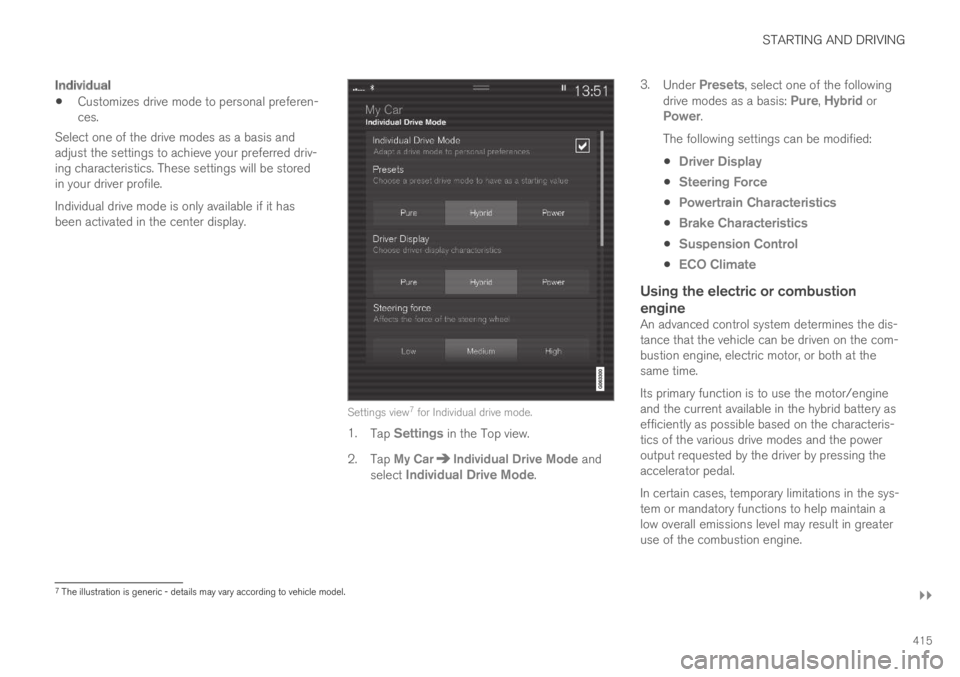
Settings view7 for Individual drive mode.
1.Tap Settings in the Top view.
2.Tap My CarIndividual Drive Mode andselect Individual Drive Mode.
3.Under Presets, select one of the followingdrive modes as a basis: Pure, Hybrid orPower.
The following settings can be modified:
Driver Display
Steering Force
Powertrain Characteristics
Brake Characteristics
Suspension Control
ECO Climate
Using the electric or combustion
engine
An advanced control system determines the dis-tance that the vehicle can be driven on the com-bustion engine, electric motor, or both at thesame time.
Its primary function is to use the motor/engineand the current available in the hybrid battery asefficiently as possible based on the characteris-tics of the various drive modes and the poweroutput requested by the driver by pressing theaccelerator pedal.
In certain cases, temporary limitations in the sys-tem or mandatory functions to help maintain alow overall emissions level may result in greateruse of the combustion engine.
7The illustration is generic - details may vary according to vehicle model.
Page 420 of 645
STARTING AND DRIVING
* Option/accessory.418
Leveling control* and suspension
Self-leveling and suspension functions are con-trolled automatically.
Shock absorbers (Four-C)
On vehicles equipped with Four-C, the shockabsorbers are adapted to the selected drivemode and the current vehicle speed. The shockabsorbers are normally set to provide the bestpossible comfort and are adjusted continuouslyaccording to the road surface and the vehicle'sacceleration, braking and cornering.
Manually adjustable shock absorbers
On vehicles equipped with adjustable shockabsorbers, these are preset to provide the bestpossible performance during active driving onregular roads. The shock absorber settings canbe adjusted for driving in other conditions or onparticular road surfaces.
The settings can be adjusted for driving on
dry roads
wet roads
snow9
ice9
poor roads.
There is also a comfort mode.
Volvo recommends that shock absorber adjust-ments are performed by an authorized Volvoworkshop.
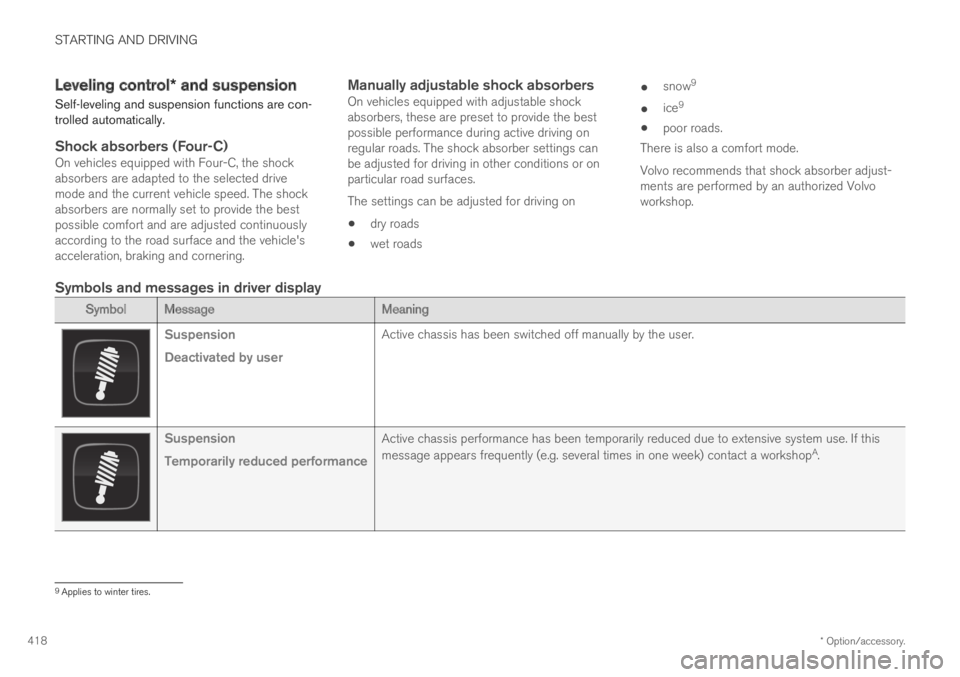
Symbols and messages in driver display
SymbolMessageMeaning
Suspension
Deactivated by user
Active chassis has been switched off manually by the user.
Suspension
Temporarily reduced performance
Active chassis performance has been temporarily reduced due to extensive system use. If this
message appears frequently (e.g. several times in one week) contact a workshopA.
9Applies to winter tires.
Page 421 of 645
STARTING AND DRIVING
* Option/accessory.419
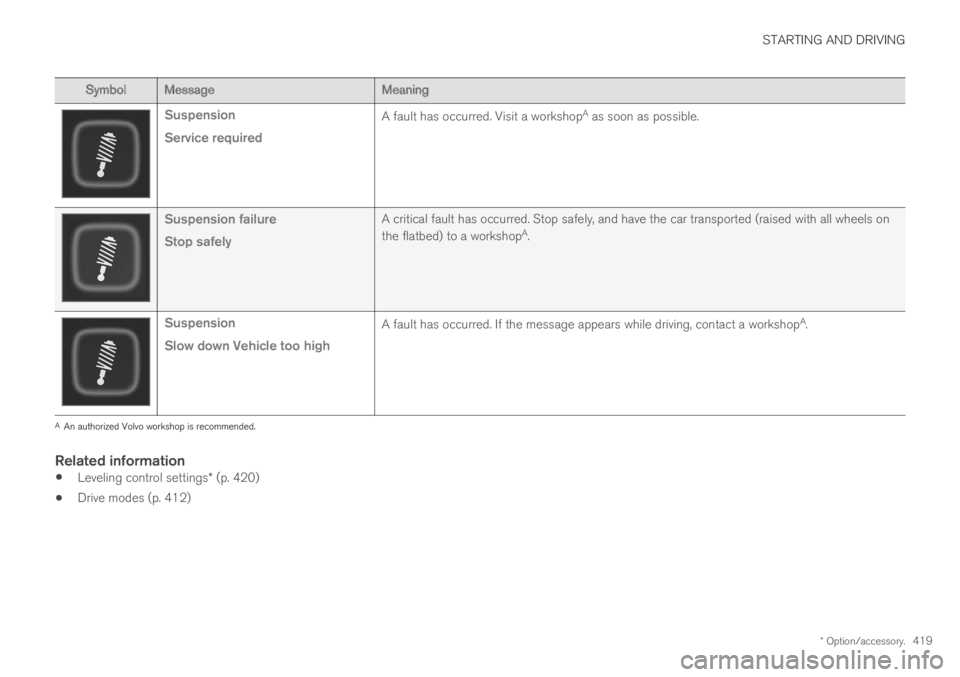
SymbolMessageMeaning
Suspension
Service required
A fault has occurred. Visit a workshopA as soon as possible.
Suspension failure
Stop safely
A critical fault has occurred. Stop safely, and have the car transported (raised with all wheels on
the flatbed) to a workshopA.
Suspension
Slow down Vehicle too high
A fault has occurred. If the message appears while driving, contact a workshopA.
AAn authorized Volvo workshop is recommended.
Related information
Leveling control settings* (p. 420)
Drive modes (p. 412)
Page 422 of 645

STARTING AND DRIVING
* Option/accessory.420
Leveling control settings*
Turn off leveling control before lifting the vehiclewith a jack to help avoid problems with thepneumatic suspension.
Center display settings
Disable Leveling Control
In certain situations, this function must be turnedoff, e.g. before the vehicle is raised using a jack*.The level difference caused by raising the vehiclewith a jack could cause problems with the pneu-matic suspension.
Turning off the function in the center display:
1.Tap Settings in the Top view.
2.Tap My CarParking Brake andSuspension.
3.Select Disable Leveling Control.
Related information
Leveling control* and suspension (p. 418)
Loading recommendations (p. 551)
Economical driving
Drive economically and more environmentallyconscious by thinking ahead and avoiding rapidstarts and stops.
Adapt your driving style and speed to the currenttraffic conditions.
To help achieve the greatest distance with thelowest fuel consumption with Twin Engine,observe the following:
Charge
Charge the vehicle regularly by plugging itinto an electrical outlet. Make it a habit toalways begin trips with the hybrid battery fullycharged.
Locate charging stations along your route.
If possible, choose parking spots with charg-ing stations.
NOTE
Charge the vehicle from the electricity grid asoften as possible!
Preconditioning
Whenever possible, precondition the vehiclebefore driving by connecting the chargingcable to an electrical outlet.
Avoid parking the vehicle somewhere wherethe interior will become too hot or too cold
while the vehicle is parked. If possible, parkthe vehicle in a climate-controlled garage.
During a short drive after passenger com-partment preconditioning, turn off the pas-senger compartment fan or the air condition-ing in a hot climate.
If preconditioning is not possible when it iscold outside, use seat and steering wheelheating first. Avoid heating the entire pas-senger compartment to reduce the amountof current being taken from the hybrid bat-tery.
Page 437 of 645

STARTING AND DRIVING
}}
* Option/accessory.435
Follow applicable regulations regarding per-mitted speed and weight.
Drive slowly when towing a trailer up a longand steep incline.
The maximum trailer weights given only applyto altitudes up to 1000 meters (3280 feet)above sea level. At higher altitudes, enginepower (and thus the vehicle's climbing ability)is decreased due to the reduced air density,and the maximum trailer weight must there-fore be reduced. The weight of the vehicleand trailer must be decreased by 10% foreach additional 1000 m (3280 feet) or partthereof.
Avoid driving with a trailer on inclines of morethan 12%.
Avoid overloading and other incorrect use.
The trailer's brakes must be balanced withthe vehicle's brakes to help ensure safestops (follow applicable local regulations).
CAUTION
Bumper-attached trailer hitches must notbe used on Volvos, nor should safetychains be attached to the bumper.
Trailer hitches attaching to the vehiclerear axle must not be used.
Never connect a trailer's hydraulic brakesystem directly to the vehicle brake sys-tem, nor a trailer's lighting system directlyto the vehicle lighting system. Consultyour nearest authorized Volvo retailer forcorrect installation.
When towing a trailer, the trailer's safetychains or wire must be correctly fastenedto the attachment points provided in thetrailer hitch on the vehicle. The safetychain or wire must never be fastened toor wound around the towing ball.
NOTE
The optional detachable trailer hitch may notbe available in all markets or on all models.Consult your Volvo retailer.
NOTE
Extreme weather conditions, towing a trailer,high altitude and lower fuel grade than rec-ommended are factors that can significantlyincrease the vehicle's fuel consumption.
Trailer weights
WARNING
Please adhere to the recommendations provi-ded for trailer weight. If the recommendationsare not followed, the vehicle and trailer maybe difficult to control during evasive maneu-vers and braking.
NOTE
The specified maximum trailer weights arethose permitted by Volvo. National vehicleregulations may set additional restrictions ontrailer weight and speed. The trailer hitchesmay be certified for higher towing weightsthan the vehicle is permitted to tow.
Self-leveling suspension *
The vehicle's self-leveling system attempts tokeep the vehicle at a constant level, regardless ofload (up to the maximum permitted weight).When the vehicle is stationary, the rear end of thevehicle will be slightly lowered, which is normal.
Driving in hilly terrain or hot weather
In certain conditions, there is a risk of overheat-ing when driving with a trailer. If overheating ofthe engine and drive system is detected, a warn-ing symbol will illuminate in the instrument paneland a message will appear.
Page 554 of 645
||
LOADING, STORAGE AND PASSENGER COMPARTMENT
* Option/accessory.552
Extra cargo space
The rear seat backrests can be folded down toincrease cargo compartment space and simplifyloading*. If the rear seat backrests are foldeddown, make sure that no objects loaded into thevehicle prevent the WHIPS system for the frontseats from functioning correctly.
The ski hatch* in the rear seat can be foldeddown to carry skis or other long, thin objects.
Related information
Load anchoring eyelets (p. 553)
Folding down the rear seat backrests*(p. 189)
Rear seat ski hatch* (p. 554)
Roof loads and load carriers (p. 552)
Leveling control* and suspension (p. 418)
Weights (p. 617)
Roof loads and load carriers
Volvo-developed load carriers are recommendedfor carrying loads on the roof of the vehicle.
Volvo load carriers are specially designed to helpprevent damage to your vehicle and help ensuremaximum safety while driving. Volvo load carriersare available from authorized Volvo retailers.
Carefully follow the installation instructions provi-ded with the load carriers.
Distribute the load evenly throughout theload carriers. Place heavier cargo at the bot-tom of the load.
Check periodically to ensure that the loadcarriers and load are properly secured.Secure the load firmly using tie straps orsimilar.
If the load is longer than the vehicle, such asa canoe or kayak, attach the towing eyelet inits front outlet and secure the tie straps in it.
The vehicle's wind resistance and fuel con-sumption increase with the size of the load.
Drive smoothly. Avoid rapid acceleration, hardbraking and fast cornering.
WARNING
The vehicle's center of gravity and drivingcharacteristics are altered by roof loads.
Follow the vehicle's specifications regardingweights and maximum permitted load.
Related information
Loading recommendations (p. 551)
Weights (p. 617)