belt VOLVO S60 TWIN ENGINE 2019 Service Manual
[x] Cancel search | Manufacturer: VOLVO, Model Year: 2019, Model line: S60 TWIN ENGINE, Model: VOLVO S60 TWIN ENGINE 2019Pages: 645, PDF Size: 13.96 MB
Page 277 of 645

DRIVER SUPPORT
}}
* Option/accessory.275
Starting/activating Adaptive Cruise
Control
To start ACC:
The driver's seat belt must be buckled andthe driver's door must be closed.
There must be a vehicle ahead (target vehi-cle) within a reasonable distance or yourvehicle's current speed must be at least15 km/h (9 mph).
–With the (4) function displayed, press
(1) on the steering wheel keypad.
>Adaptive Cruise Control will start and thecurrent speed will be stored, which will beshown by numbers in the center of thespeedometer.
ACC will only regulate the timeinterval to the vehicle aheadwhen the distance symbolshows two vehicles.
A speed interval will be markedat the same time.
The higher speed is the setspeed for your vehicle and thelower speed is the speed of thevehicle ahead (target vehicle).
Related information
Adaptive Cruise Control* (p. 272)
Deactivating/reactivating Adaptive CruiseControl* (p. 275)
Switching between Cruise Control and Adap-tive Cruise Control* (p. 277)
Deactivating/reactivating Adaptive
Cruise Control*
Adaptive Cruise Control (ACC24) can be tempo-rarily put into standby mode and then reactiva-ted.
Deactivating and putting Adaptive
Cruise Control in standby mode
24Adaptive Cruise Control
Page 278 of 645

||
DRIVER SUPPORT
* Option/accessory.276
To temporarily deactivate Adaptive Cruise Controland put it in standby mode:
–Press the button on the steering wheel(2).
>The symbol in the instrument panelchanges color from WHITE to GRAY andthe set speed in the center of the speed-ometer will change from BEIGE to GRAY.
WARNING
If Adaptive Cruise Control is in standbymode, the driver must intervene and regu-late both speed and distance to the vehicleahead.
If the vehicle comes too close to a vehicleahead when Adaptive Cruise Control is instandby mode, the driver can be warned ofthe short distance by the Distance Alert*function.
Standby mode due to action by the driver
Adaptive Cruise Control will be temporarily deac-tivated and put in standby mode if:
the brakes are applied
the gear selector is moved to N
the vehicle is driven faster than the setspeed for more than 1 minute
Temporarily increasing speed using the accelera-tor pedal, e.g. when passing another vehicle, willnot affect the setting. The vehicle will return tothe set speed when the accelerator pedal isreleased.
Automatic standby mode
Adaptive Cruise Control is dependent on othersystems, such as Electronic Stability Control
(ESC25). If any of these other systems stopsworking, Adaptive Cruise Control will automati-cally switch off.
WARNING
With automatic standby mode, the driver iswarned by an acoustic signal and a messageon the instrument panel.
The driver must then regulate vehiclespeed, apply the brakes if necessary, andmaintain a safe distance to other vehicles.
Adaptive Cruise Control may go into standbymode if:
your vehicle's speed goes below 5 km/h(3 mph) and ACC cannot determine if thevehicle ahead is stationary or if it is anotherobject, e.g. a speed bump.
your vehicle's speed goes under 5 km/h(3 mph) and the vehicle ahead turns so thatACC no longer has a vehicle to follow.
the driver opens the door.
the driver unbuckles the seat belt.
the engine speed (rpm) is too low/high.
one or more of the wheels lose traction.
the brake temperature is high.
the parking brake is applied.
the camera/radar sensor is covered by snowor heavy rain (the camera lens/radar wavesare blocked).
Reactivating Adaptive Cruise Control
from standby mode
25Electronic Stability Control
Page 286 of 645
||
DRIVER SUPPORT
284
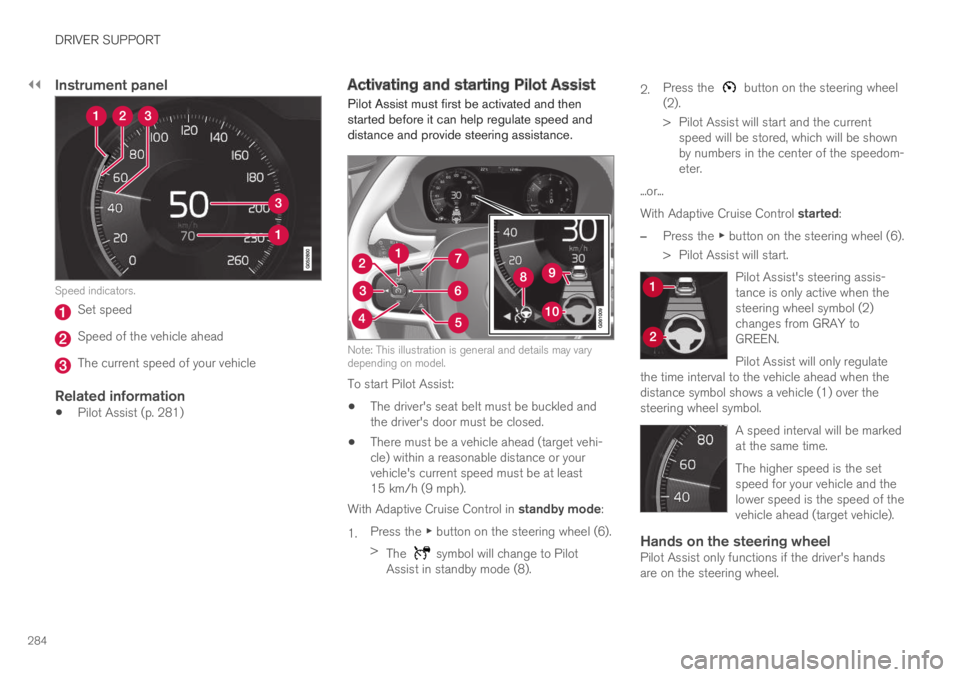
Instrument panel
Speed indicators.
Set speed
Speed of the vehicle ahead
The current speed of your vehicle
Related information
Pilot Assist (p. 281)
Activating and starting Pilot Assist
Pilot Assist must first be activated and thenstarted before it can help regulate speed anddistance and provide steering assistance.
Note: This illustration is general and details may varydepending on model.
To start Pilot Assist:
The driver's seat belt must be buckled andthe driver's door must be closed.
There must be a vehicle ahead (target vehi-cle) within a reasonable distance or yourvehicle's current speed must be at least15 km/h (9 mph).
With Adaptive Cruise Control in standby mode:
1.Press the ▶ button on the steering wheel (6).
>The symbol will change to PilotAssist in standby mode (8).
2.Press the button on the steering wheel(2).
>Pilot Assist will start and the currentspeed will be stored, which will be shownby numbers in the center of the speedom-eter.
...or...
With Adaptive Cruise Control started:
–Press the ▶ button on the steering wheel (6).
>Pilot Assist will start.
Pilot Assist's steering assis-tance is only active when thesteering wheel symbol (2)changes from GRAY toGREEN.
Pilot Assist will only regulatethe time interval to the vehicle ahead when thedistance symbol shows a vehicle (1) over thesteering wheel symbol.
A speed interval will be markedat the same time.
The higher speed is the setspeed for your vehicle and thelower speed is the speed of thevehicle ahead (target vehicle).
Hands on the steering wheel
Pilot Assist only functions if the driver's handsare on the steering wheel.
Page 288 of 645

||
DRIVER SUPPORT
286
Standby mode due to action by the driver
Pilot Assist will be temporarily deactivated andput in standby mode if:
the brakes are applied.
the gear selector is moved to N.
a turn signal is used for more than 1 minute.
the vehicle is driven faster than the setspeed for more than 1 minute.
Temporarily increasing speed using the accelera-tor pedal, e.g. when passing another vehicle, willnot affect the setting. The vehicle will return tothe set speed when the accelerator pedal isreleased.
When the turn signals are used, Pilot Assist'ssteering assistance will be temporarily deacti-vated. When the turn signal is switched off, steer-ing assistance will be automatically reactivated ifthe traffic lane's side markings can still bedetected.
Automatic standby mode
Pilot Assist is dependent on other systems, such
as Electronic Stability Control (ESC32). If any ofthese other systems stops working, Pilot Assistwill automatically switch off.
WARNING
With automatic standby mode, the driver iswarned by an acoustic signal and a messageon the instrument panel.
The driver must then regulate vehiclespeed, apply the brakes if necessary, andmaintain a safe distance to other vehicles.
Adaptive Cruise Control may go into standbymode if, e.g.:
the driver opens the door.
the brake temperature is high.
the driver's hands are not on the steeringwheel.
the parking brake is applied.
the engine speed (rpm) is too low/high.
the driver unbuckles the seat belt.
one or more of the wheels lose traction.
the camera/radar sensor is covered by snowor heavy rain (the camera lens/radar wavesare blocked).
your vehicle's speed goes under 5 km/h(3 mph) and Pilot Assist cannot determine ifthe vehicle ahead is stationary or if it isanother object, e.g. a speed bump.
your vehicle's speed goes under 5 km/h(3 mph) and the vehicle ahead turns so thatPilot Assist no longer has a vehicle to follow.
Reactivating Pilot Assist from standby
mode
Note: This illustration is general and details may varydepending on model.
To reactivate Pilot Assist:
–Press the button on the steering wheel(1).
>Speed will be set to the most recentlystored speed.
32Electronic Stability Control
Page 297 of 645

DRIVER SUPPORT
}}
* Option/accessory.295
NOTE
Driver support can keep the vehicle stationaryfor no more than 5 minutes – after that timethe parking brake is applied and the functionis deactivated.
The parking brake must be released beforedriver support can be reactivated.
Deactivation of the Auto-hold brake function
In certain situations, auto-hold will be deactivatedwhen the vehicle is at a standstill and the func-tion will go into standby mode. This means thatthe brakes will be released and the vehicle couldbegin to roll. The driver must actively apply thebrakes to keep the vehicle stationary.
This can occur if:
the driver depresses the brake pedal
the parking brake is applied
the gear selector is moved to the P, N or Rpositions
the driver puts the function in standby mode.
Auto Activate Parking Brake
In certain situations, the parking brake will beapplied to keep the vehicle at a standstill.
This occurs if the function is keeping the vehiclestationary using the brakes and:
the driver opens the door or unbuckleshis/her seat belt
the function has kept the vehicle at a stand-still for more than approx. 5 minutes
the brakes overheat
the driver switches off the engine manually.
Related information
Driver support systems (p. 260)
Adaptive Cruise Control* (p. 272)
Pilot Assist (p. 281)
Brake functions (p. 396)
Passing assistance
Passing assistance can assist the driver whenpassing other vehicles. The function can beused with Pilot Assist or Adaptive Cruise Con-
trol* (ACC40).
How passing assistance works
When Pilot Assist or ACC is following anothervehicle and you indicate that you intend to pass
that vehicle by using the turn signal41, the systemwill begin accelerating toward the vehicle aheadbefore your vehicle has moved into the passinglane.
The function will then delay a speed reduction toavoid early braking as your vehicle approaches aslower-moving vehicle.
The function remains active until your vehicle haspassed the other vehicle.
WARNING
Please note that this function can be acti-vated in more situations than just passinganother vehicle, such as when a direction indi-cator is used to indicate a lane change orbefore exiting to another road – the vehiclewill then briefly accelerate.
39Adaptive Cruise Control40Adaptive Cruise Control41Only the left-hand turn signal for left-hand drive vehicles, or right-hand turn signal for right-hand drive vehicles.
Page 310 of 645

||
DRIVER SUPPORT
* Option/accessory.308
3 - Auto-brake
The automatic braking function is activated at thelast moment.
If the driver has not taken evasive action by thisstage and a collision is imminent, the automaticbraking function will be triggered. This occurswhether or not the driver is pressing the brakepedal. Full braking force will be applied to reducethe speed at impact or reduced braking effect willbe applied if this is sufficient to avoid the colli-sion.
The seat belt tensioner may be activated whenthe automatic braking function is triggered.
In certain situations, auto-braking may begin witha limited braking force before applying full brak-ing force.
If City Safety has prevented a collision, the vehi-cle will be kept at a standstill until the drivertakes action. If the vehicle has slowed to avoidcolliding with a slower-moving vehicle ahead, yourspeed will be reduced to that vehicle's speed.
Auto-braking can always be cancelled if thedriver presses hard on the accelerator pedal.
NOTE
When City Safety activates the brakes, thebrake lights come on.
When City Safety applies the brakes, a text mes-sage will appear in the instrument panel to notifythe driver that the function is/was activated.
WARNING
City Safety may not be used to change howthe driver operates the vehicle. The drivermust not only rely on City Safety to brake thevehicle.
Related information
City Safety™ (p. 305)
Head-up display* (p. 140)
Seat belt tensioners (p. 50)
Setting a warning distance for CitySafety
City Safety is always active, but the function'swarning distance can be adjusted.
NOTE
The City Safety function cannot be deacti-vated. It is activated automatically each timethe engine/electric motor is started.
The alert distance determines the sensitivity ofthe system and regulates the distance at whichthe light, sound and brake pulsations will be acti-vated.
To select warning distance:
1.Select SettingsMy CarIntelliSafe inthe center display's Top view.
2.Under City Safety Warning, tap Late,Normal or Early to set the desired warningdistance.
If the driver feels that the Early setting is givingtoo many warnings or finds them irritating, theNormal or Late warning distance settings canbe selected instead.
If the driver feels that the warnings are too fre-quent and distracting, the warning distance canbe reduced. This will reduce the total number ofwarnings, but it will also result in City Safety pro-viding warnings at a later stage.
Page 311 of 645
DRIVER SUPPORT
}}
309
The Late warning distance setting should there-fore only be used in exceptional cases, such aswhen a more dynamic driving style is preferred.
WARNING
No automatic system can guarantee100% correct function in all situations.You should therefore never test use ofCity Safety in the direction of people, ani-mals or vehicles – this could lead tosevere damage, serious personal injury oreven death.
City Safety warns the driver if there is arisk of collision, but the function cannotreduce the driver's reaction time.
Even if the warning distance has been setto Early, warnings may be perceived aslate in certain situations – e.g. when thereare large speed differences or if the vehi-cle ahead suddenly brakes heavily.
With the warning distance set to Early,warnings come further in advance. Thismay cause the warnings to come morefrequently than with warning distanceNormal, but is recommended since it canmake City Safety more effective.
NOTE
The warning with direction indicators for RearCollision Warning is deactivated if the colli-sion warning distance in the City Safety func-tion is set to the lowest level "Late".
The seat belt tensioning and braking func-tions remain active.
Related information
City Safety™ (p. 305)
Rear Collision Warning (p. 320)
Detecting obstacles with City Safety
City Safety can help the driver detect other vehi-cles, cyclists, large animals and pedestrians.
Vehicles
City Safety can detect most vehicles that are sta-tionary or are moving in the same direction asyour vehicle. In some cases, it can also detectoncoming vehicles and crossing traffic.
For City Safety to be able to detect a vehicle inthe dark, its headlights and taillights must be onand clearly visible.
Cyclists
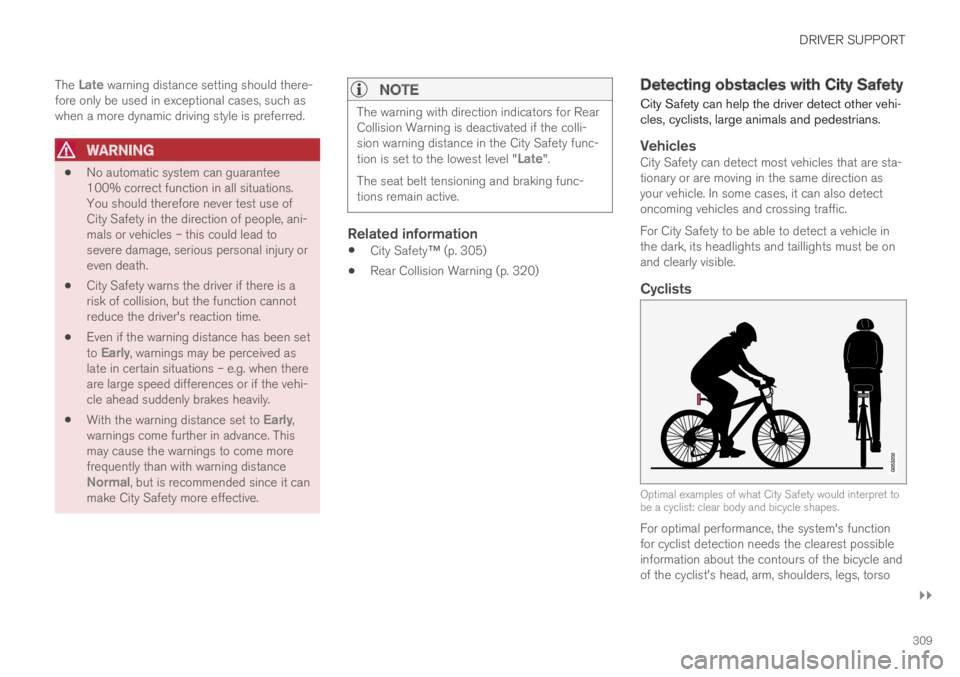
Optimal examples of what City Safety would interpret tobe a cyclist: clear body and bicycle shapes.
For optimal performance, the system's functionfor cyclist detection needs the clearest possibleinformation about the contours of the bicycle andof the cyclist's head, arm, shoulders, legs, torso
Page 322 of 645

DRIVER SUPPORT
320
Rear Collision Warning51
The Rear Collision Warning52 (RCW) functioncan help the driver avoid rear-end collisions fromvehicles approaching from behind.
The function is automatically activated each timethe engine is started.
The function can alert drivers of following vehi-cles of the risk of a collision by rapidly flashingthe turn signals.
If, at a speed below 30 km/h (20 mph), the func-tion detects that the vehicle is in danger of beinghit from behind, the seatbelt tensioners may ten-sion the front seat belts and activate theWhiplash Protection System safety system.
Immediately before a collision from behind, thefunction may also activate the brakes in order toreduce the forward acceleration of the vehicleduring the collision. However, the brakes will onlybe applied if your vehicle is stationary. The brakeswill be immediately released if the acceleratorpedal is depressed.
Related information
Driver support systems (p. 260)
Rear Collision Warning limitations (p. 320)
Whiplash Protection System (p. 46)
Rear Collision Warning53 limitations
In some situations, it may be difficult for RearCollision Warning (RCW) to warn the driver of acollision risk.
This may be the case if:
the vehicle approaching from the rear isdetected at a late stage
the vehicle approaching from the rearchanges lanes at a late stage
a trailer, bicycle holder or similar is con-nected to the vehicle's electrical system - thefunction will then be automatically deacti-vated.
NOTE
In certain markets RCW does not warn withthe direction indicators due to local trafficregulations – in such cases, that part of thefunction is deactivated.
NOTE
The warning with direction indicators for RearCollision Warning is deactivated if the colli-sion warning distance in the City Safety func-tion is set to the lowest level "Late".
The seat belt tensioning and braking func-tions remain active.
Related information
Rear Collision Warning (p. 320)
51RCW: Warning of collision from the rear.52This function is not available on all markets.53RCW: Warning of collision from the rear.
Page 394 of 645

STARTING AND DRIVING
* Option/accessory.392
Starting the vehicle
The vehicle can be started using the start knobin the tunnel console when the remote key is inthe passenger compartment.
Start knob in the tunnel console.
WARNING
Before starting:
Buckle your seat belt.
Adjust the seat, steering wheel and mir-rors.
Make sure you can fully depress thebrake pedal.
The remote key is not physically used to start theignition because the vehicle is equipped with thekeyless Passive Start system.
To start the vehicle:
1.The remote key must be inside the vehicle.For vehicles with Passive Start, the key mustbe in the front section of the passengercompartment. With the optional keyless lock-ing/unlocking function*, the key can be any-where in the vehicle.
2. Press and hold down the brake pedal1 as faras possible.
3. Turn the start knob clockwise and release.The control will automatically return to theoriginal position.
WARNING
Never use more than one inlay mat at atime on the driver's floor. If any other typeof floor mat is used, remove the originalmat from the driver's seat floor beforedriving. All types of mats must be securelyanchored in the attachment points in thefloor. Make sure the floor mat does notimpede the movement of the brake pedalor accelerator pedal in any way, as thiscould be a serious safety hazard.
Volvo's floor mats are specially manufac-tured for your vehicle. They must be prop-erly secured in the attachment points inthe floor to help ensure they cannot slideand become trapped under the pedals.
The starter motor will crank until the enginestarts or until overheating protection is triggered.
During normal start conditions, the vehicle's elec-tric motor will be prioritized and the gasolineengine will remain off. This means that once thestart knob is turned clockwise, the electric motorhas been "started" and the vehicle is ready to bedriven. The warning and information symbols inthe instrument panel will go out and the selectedtheme will be displayed to indicate that the elec-tric motor is activated.
1If the vehicle is moving, it is only necessary to turn the start knob clockwise to start the engine.
Page 403 of 645
STARTING AND DRIVING
401
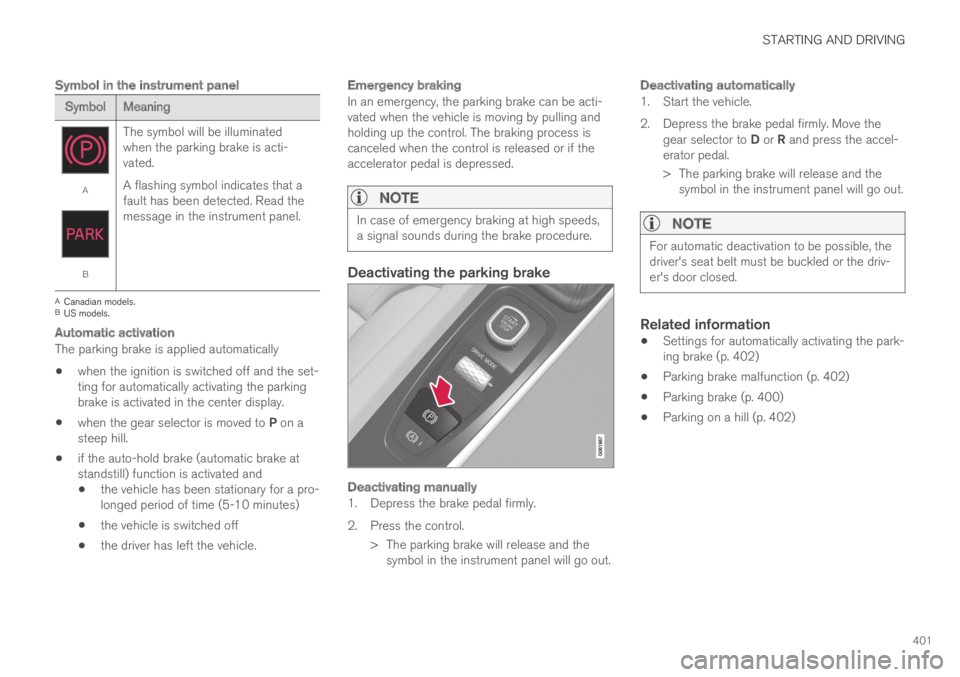
Symbol in the instrument panel
SymbolMeaning
A
B
The symbol will be illuminatedwhen the parking brake is acti-vated.
A flashing symbol indicates that afault has been detected. Read themessage in the instrument panel.
ACanadian models.BUS models.
Automatic activation
The parking brake is applied automatically
when the ignition is switched off and the set-ting for automatically activating the parkingbrake is activated in the center display.
when the gear selector is moved to P on asteep hill.
if the auto-hold brake (automatic brake atstandstill) function is activated and
the vehicle has been stationary for a pro-longed period of time (5-10 minutes)
the vehicle is switched off
the driver has left the vehicle.
Emergency braking
In an emergency, the parking brake can be acti-vated when the vehicle is moving by pulling andholding up the control. The braking process iscanceled when the control is released or if theaccelerator pedal is depressed.
NOTE
In case of emergency braking at high speeds,a signal sounds during the brake procedure.
Deactivating the parking brake
Deactivating manually
1. Depress the brake pedal firmly.
2. Press the control.
> The parking brake will release and thesymbol in the instrument panel will go out.
Deactivating automatically
1. Start the vehicle.
2. Depress the brake pedal firmly. Move thegear selector to D or R and press the accel-erator pedal.
> The parking brake will release and thesymbol in the instrument panel will go out.
NOTE
For automatic deactivation to be possible, thedriver's seat belt must be buckled or the driv-er's door closed.
Related information
Settings for automatically activating the park-ing brake (p. 402)
Parking brake malfunction (p. 402)
Parking brake (p. 400)
Parking on a hill (p. 402)