seats VOLVO S60 TWIN ENGINE 2019 Service Manual
[x] Cancel search | Manufacturer: VOLVO, Model Year: 2019, Model line: S60 TWIN ENGINE, Model: VOLVO S60 TWIN ENGINE 2019Pages: 645, PDF Size: 13.96 MB
Page 189 of 645
SEATS AND STEERING WHEEL
}}
* Option/accessory.187
2.Select Side bolsters in the seat settingsview.
Press the front part of the four-way button
to increase side bolster support .
Press the rear part of the four-way button
to decrease side bolster support.
Related information
Manual front seats (p. 180)
Power* front seats (p. 181)
Adjusting the power* front seats (p. 181)
Storing positions for seats, mirrors and head-up display* (p. 182)
Using stored positions for seats, mirrors andhead-up display* (p. 183)
Adjusting front seat massage settings*(p. 185)
Adjusting* front seat cushion length (p. 185)
Front seat massage* settings (p. 184)
Adjusting front seat lumbar support* (p. 187)
Adjusting the passenger seat from the driv-er's seat* (p. 188)
Adjusting front seat lumbar
support*
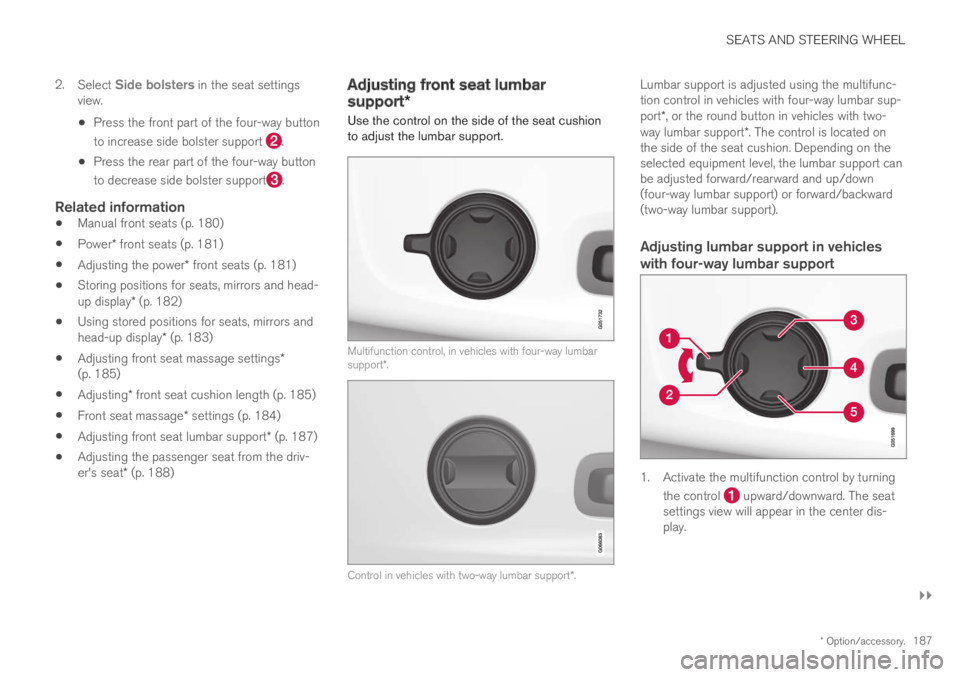
Use the control on the side of the seat cushionto adjust the lumbar support.
Multifunction control, in vehicles with four-way lumbarsupport*.
Control in vehicles with two-way lumbar support*.
Lumbar support is adjusted using the multifunc-tion control in vehicles with four-way lumbar sup-port*, or the round button in vehicles with two-way lumbar support*. The control is located onthe side of the seat cushion. Depending on theselected equipment level, the lumbar support canbe adjusted forward/rearward and up/down(four-way lumbar support) or forward/backward(two-way lumbar support).
Adjusting lumbar support in vehicles
with four-way lumbar support
1. Activate the multifunction control by turning
the control upward/downward. The seatsettings view will appear in the center dis-play.
Page 190 of 645
||
SEATS AND STEERING WHEEL
* Option/accessory.188
2.Select Lumbar in the seat settings view.
Press the round button up /down to move the lumbar support upward/downward.
Press the front part of the button toincrease lumbar support.
Press the rear part of the button todecrease lumbar support.
Adjusting lumbar support in vehicles
with two-way lumbar support
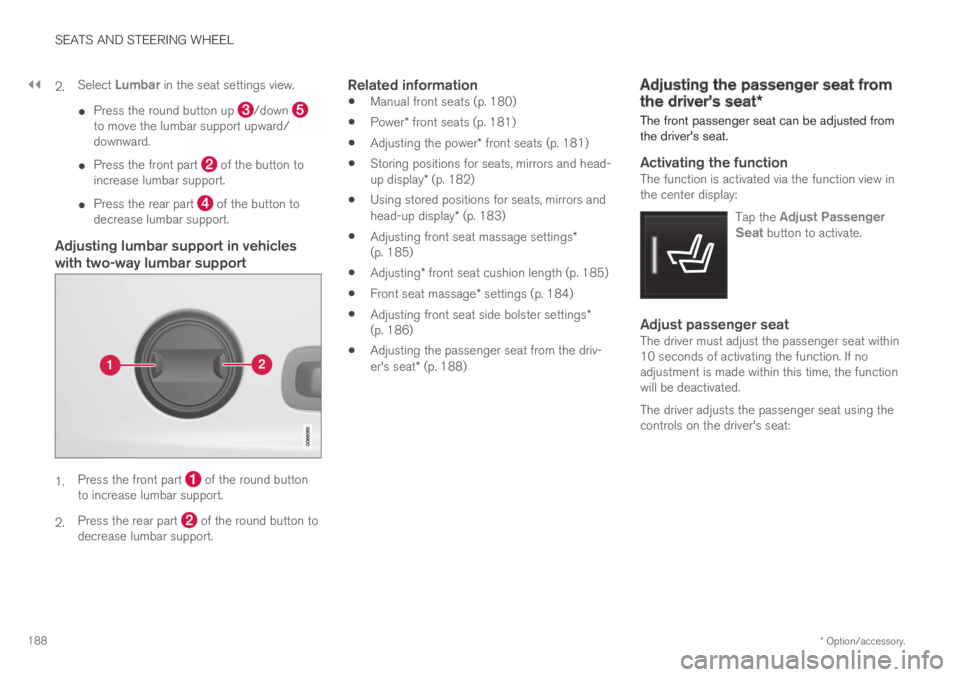
1.Press the front part of the round buttonto increase lumbar support.
2.Press the rear part of the round button todecrease lumbar support.
Related information
Manual front seats (p. 180)
Power* front seats (p. 181)
Adjusting the power* front seats (p. 181)
Storing positions for seats, mirrors and head-up display* (p. 182)
Using stored positions for seats, mirrors andhead-up display* (p. 183)
Adjusting front seat massage settings*(p. 185)
Adjusting* front seat cushion length (p. 185)
Front seat massage* settings (p. 184)
Adjusting front seat side bolster settings*(p. 186)
Adjusting the passenger seat from the driv-er's seat* (p. 188)
Adjusting the passenger seat from
the driver's seat*
The front passenger seat can be adjusted fromthe driver's seat.
Activating the function
The function is activated via the function view inthe center display:
Tap the Adjust PassengerSeat button to activate.
Adjust passenger seat
The driver must adjust the passenger seat within10 seconds of activating the function. If noadjustment is made within this time, the functionwill be deactivated.
The driver adjusts the passenger seat using thecontrols on the driver's seat:
Page 191 of 645

SEATS AND STEERING WHEEL
}}
* Option/accessory.189
Move the passenger seat forward/rearwardby moving the control forward/rearward.
Change the backrest tilt of the passengerseat by moving the control forward/back-ward.
Related information
Manual front seats (p. 180)
Power* front seats (p. 181)
Adjusting the power* front seats (p. 181)
Storing positions for seats, mirrors and head-up display* (p. 182)
Using stored positions for seats, mirrors andhead-up display* (p. 183)
Adjusting front seat massage settings*(p. 185)
Adjusting* front seat cushion length (p. 185)
Front seat massage* settings (p. 184)
Adjusting front seat side bolster settings*(p. 186)
Adjusting front seat lumbar support* (p. 187)
Folding down the rear seat
backrests*
The rear seat backrest is split into two sections.The two sections can be folded forward individu-ally.
WARNING
Adjust the seat and ensure it locks intoposition before driving. Use caution whenadjusting the seat. Uncontrolled or care-less adjustments could lead to injury.
Long objects must always be securelytied down to help prevent injury or dam-age in the event of sudden braking.
Always turn off the engine and apply theparking brake when loading or unloadingthe vehicle.
Put the gear selector in P to help preventthe gear selector from being inadvertentlymoved.
CAUTION
When the backrest is folded down, make surethere are no objects in the rear seat, and theseat belts are not buckled. Otherwise there isa risk of damage to the upholstery.
Page 192 of 645
||
SEATS AND STEERING WHEEL
* Option/accessory.190
CAUTION
The armrest* in the center seat must beraised before the seat backrest is foldeddown.
The ski hatch* must be closed before theseat backrest is folded down.
NOTE
The rear seat must be in the upright positionwhen private locking is activated in order forthe seats to lock. Seats in the folded-downposition will not lock.
NOTE
The front seats may need to be pushed for-ward and/or the backrest adjusted so that therear seat backrests can be fully lowered.
Folding down the backrests
The vehicle must be stationary and at least oneof the rear doors must be open before a backrestcan be folded down.
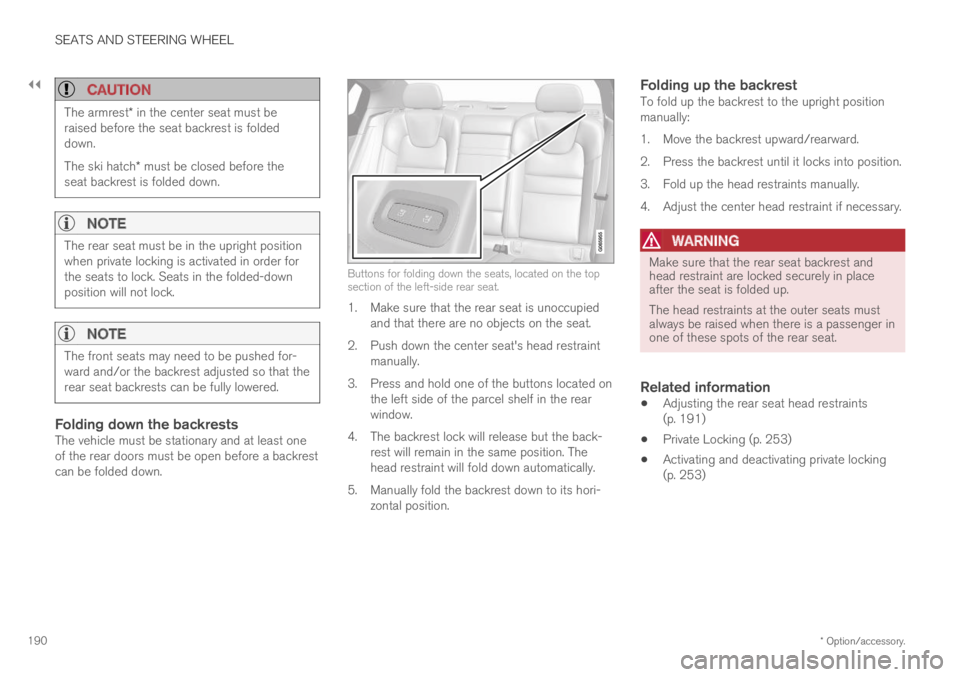
Buttons for folding down the seats, located on the topsection of the left-side rear seat.
1. Make sure that the rear seat is unoccupiedand that there are no objects on the seat.
2.Push down the center seat's head restraintmanually.
3. Press and hold one of the buttons located onthe left side of the parcel shelf in the rearwindow.
4. The backrest lock will release but the back-rest will remain in the same position. Thehead restraint will fold down automatically.
5. Manually fold the backrest down to its hori-zontal position.
Folding up the backrest
To fold up the backrest to the upright positionmanually:
1. Move the backrest upward/rearward.
2. Press the backrest until it locks into position.
3. Fold up the head restraints manually.
4. Adjust the center head restraint if necessary.
WARNING
Make sure that the rear seat backrest andhead restraint are locked securely in placeafter the seat is folded up.
The head restraints at the outer seats mustalways be raised when there is a passenger inone of these spots of the rear seat.
Related information
Adjusting the rear seat head restraints(p. 191)
Private Locking (p. 253)
Activating and deactivating private locking(p. 253)
Page 193 of 645

SEATS AND STEERING WHEEL
}}
* Option/accessory.191
Adjusting the rear seat headrestraints
Adjust the center head restraint in the rear seatto the seat occupant's height. Fold down theoutboard head restraints* to improve rear visibil-ity.
Adjusting the center seat head restraint
The center head restraint should be adjusted tosuit the passenger's height. The entire back ofthe head should be covered if possible. Manuallymove the restraint up or down as needed.
To lower the restraint, push and hold the button(see illustration) while carefully lowering the headrestraint.
WARNING
The center seat head restraint must be in itslowest position when the seat is not occupied.When the center seat is occupied, the headrestraint must be correctly adjusted to thepassenger's height, covering the entire backof the head if possible.
Folding the rear seat outboard head
restraints using the center display *
The outer head restraints can be folded via thecenter display's function view. The head restraintcan be folded down when the vehicle is in igni-tion mode 0.
Tap the Headrest Fold buttonto activate/deactivate folding.
Manually push the head restraint until it clicksinto position.
WARNING
Do not lower the head restraint if there arepassengers in any of the rear seats.
WARNING
The head restraint must be locked in theupright position after it has been folded up.
Page 194 of 645
||
SEATS AND STEERING WHEEL
* Option/accessory.192
Related information
Folding down the rear seat backrests*(p. 189)
Steering wheel controls and horn
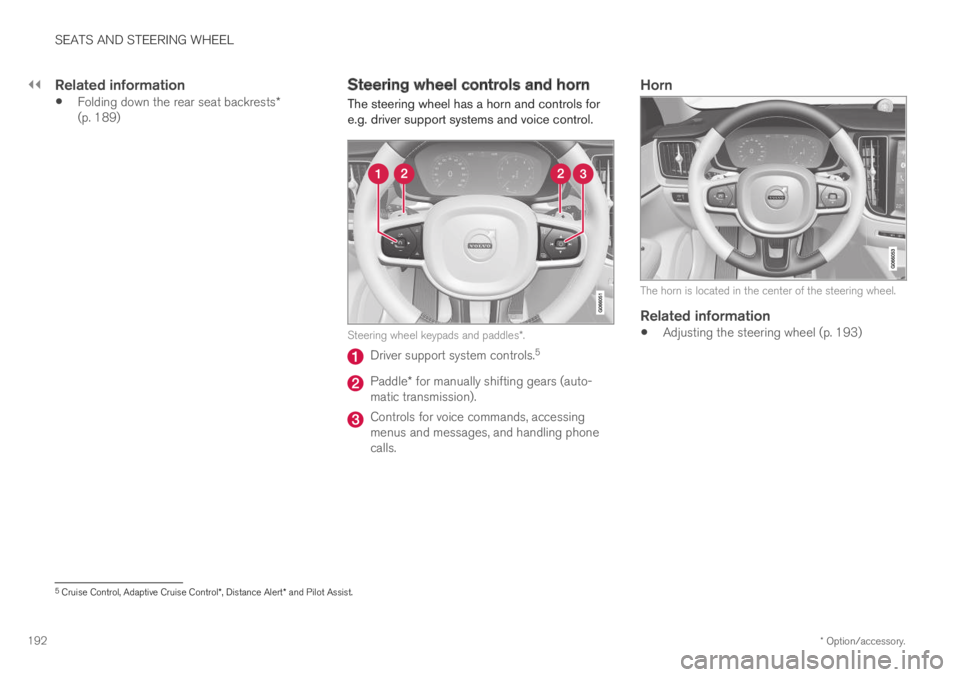
The steering wheel has a horn and controls fore.g. driver support systems and voice control.
Steering wheel keypads and paddles*.
Driver support system controls.5
Paddle* for manually shifting gears (auto-matic transmission).
Controls for voice commands, accessingmenus and messages, and handling phonecalls.
Horn
The horn is located in the center of the steering wheel.
Related information
Adjusting the steering wheel (p. 193)
5Cruise Control, Adaptive Cruise Control*, Distance Alert* and Pilot Assist.
Page 195 of 645
SEATS AND STEERING WHEEL
* Option/accessory.193
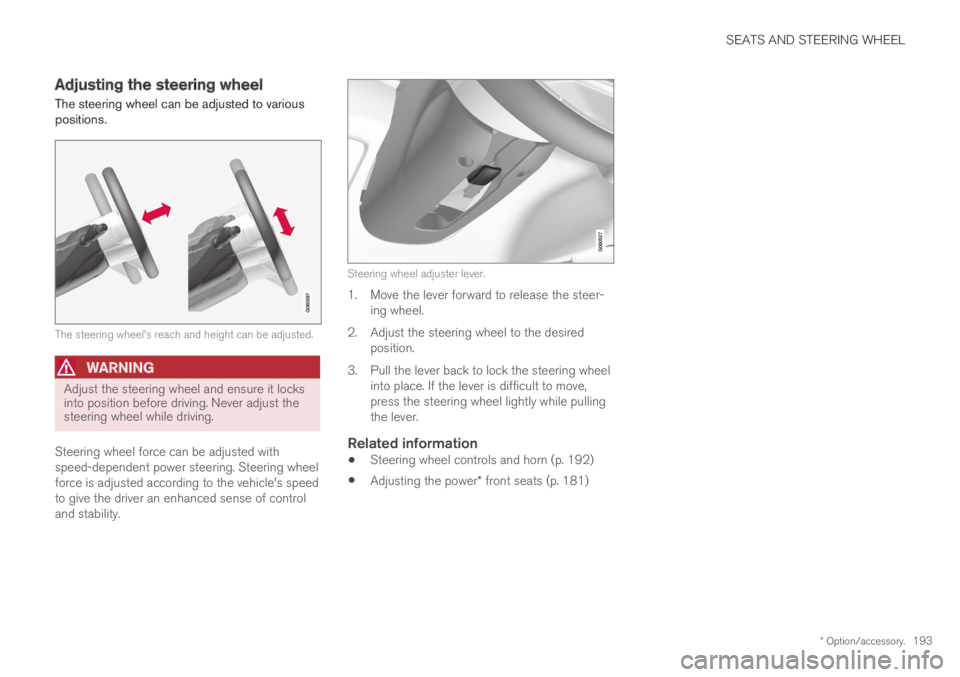
Adjusting the steering wheel
The steering wheel can be adjusted to variouspositions.
The steering wheel's reach and height can be adjusted.
WARNING
Adjust the steering wheel and ensure it locksinto position before driving. Never adjust thesteering wheel while driving.
Steering wheel force can be adjusted withspeed-dependent power steering. Steering wheelforce is adjusted according to the vehicle's speedto give the driver an enhanced sense of controland stability.
Steering wheel adjuster lever.
1. Move the lever forward to release the steer-ing wheel.
2.Adjust the steering wheel to the desiredposition.
3. Pull the lever back to lock the steering wheelinto place. If the lever is difficult to move,press the steering wheel lightly while pullingthe lever.
Related information
Steering wheel controls and horn (p. 192)
Adjusting the power* front seats (p. 181)
Page 210 of 645

||
CLIMATE CONTROL
* Option/accessory.208
Blower control.
AUTO - Automatic climate control.
Parking climate
Parking climate functions can be controlled fromthe Parking climate tab.
Climate controls on the rear side of the
tunnel console *
If the vehicle is equipped with heated rear seats*,there are physical buttons on the rear side of thetunnel console to control this function.
Related information
Climate (p. 196)
Activating and deactivating power frontseats* (p. 208)
Activating and deactivating the heated rearseats* (p. 209)
Activating and deactivating front seat ventila-tion* (p. 209)
Activating and deactivating the heated steer-ing wheel* (p. 210)
Activating auto climate control (p. 211)
Activating and deactivating recirculation(p. 211)
Activating and deactivating max defroster(p. 212)
Activating and deactivating the heated rearwindow and door mirrors (p. 213)
Setting the blower speed for the front seats(p. 214)
Synchronize temperature (p. 216)
Activating and deactivating air conditioning(p. 216)
Activating and deactivating power
front seats*
The seats can be heated for added comfort forthe driver and passengers in cold weather.
1. Tap the left- or right-side steering wheel andseat button in the center display's climatebar to open the controls for steering wheeland seat heating.
If the vehicle is not equipped with ventilatedseats or heated steering wheel (for the driv-er's side), the button for seat heating isdirectly accessible in the climate bar.
2. Tap the seat heating button repeatedly toselect one of the four levels: Off, High,Medium or Low.
>The level is changed and the set level isdisplayed in the button.
Related information
Climate system controls (p. 207)
Activating and deactivating the heated frontseat* (p. 209)
Page 211 of 645

CLIMATE CONTROL
}}
* Option/accessory.209
Activating and deactivating the
heated front seat*
The seats can be heated for added comfort forthe driver and passengers in cold weather.
Seat heating can be set to automatically activatewhen the engine is started. When set to automat-ically activate, heating will be turned on at lowambient temperatures.
1.Tap Settings in the Top view in the centerdisplay.
2.Tap Climate.
3.Select Auto Driver Seat Heating Leveland Auto Passenger Seat Heating Levelto activate/deactivate automatic start ofheated driver's and passenger seat.
>An "A" will be displayed next to the rele-vant seat heating button in the climate barwhen auto start has been activated.
4.Select Low, Medium or High to select levelafter the function has been activated.
Related information
Climate system controls (p. 207)
Activating and deactivating power frontseats* (p. 208)
Activating and deactivating the
heated rear seats*
The seats can be heated for added comfort forthe driver and passengers in cold weather.
Activating and deactivating the heated
rear seats from the rear seat
Buttons for seat heating on the rear side of the tunnelconsole.
–Press repeatedly on the left or right seatheating buttons on the rear side of the tun-nel console to select one of four levels: Off,High, Medium or Low.
>The level is changed and the indicatorlights in the button display the level.
Related information
Climate system controls (p. 207)
Activating and deactivating front
seat ventilation*
The seats can be ventilated to provide increasedcomfort in warm weather.
The ventilation system consists of fans in theseats and backrest that draw air through the seatupholstery. The cooler the passenger compart-ment is, the greater the cooling effect of the ven-tilation. The system can be activated when theengine is running.
1. Tap the left- or right-side steering wheel andseat button in the center display's climatebar to open the controls for steering wheeland seat heating.
If the vehicle is not equipped with heatedseats or heated steering wheel (for the driv-er's side), the button for seat ventilation isdirectly accessible in the climate bar.
2. Tap the seat ventilation button repeatedly toselect one of the four levels: Off, High,Medium or Low.
>The level is changed and the set level isdisplayed in the button.
Page 212 of 645

||
CLIMATE CONTROL
* Option/accessory.210
Related information
Climate system controls (p. 207)Activating and deactivating the
heated steering wheel*
The steering wheel can be heated for addedcomfort in cold weather.
1. Tap the driver's side steering wheel and seatbutton in the climate bar in the center displayto open the controls for steering wheel andseat heating.
If the vehicle is not equipped with heated orventilated seats, the button for steeringwheel heating is directly accessible in the cli-mate bar.
2. Tap the steering wheel heating buttonrepeatedly to select one of the four levels:Off, High, Medium or Low.
>The level is changed and the set level isdisplayed in the button.
Related information
Climate system controls (p. 207)
Activating and deactivating automatic steer-ing wheel heating* (p. 210)
Activating and deactivating
automatic steering wheel heating*
The steering wheel can be heated for addedcomfort in cold weather.
Steering wheel heating can be set to automati-cally activate when the engine is started. Whenset to automatically activate, heating will beturned on at low ambient temperatures.
1.Tap Settings in the Top view in the centerdisplay.
2.Tap Climate.
3.Select Auto Steering Wheel HeatingLevel to activate/deactivate automatic startof heated steering wheel.
>An "A" will be displayed next to theheated steering wheel button in the cli-mate bar when auto start has been acti-vated.
4.Select Low, Medium or High to select levelafter the function has been activated.
Related information
Activating and deactivating the heated steer-ing wheel* (p. 210)