seats VOLVO S60 TWIN ENGINE 2019 Workshop Manual
[x] Cancel search | Manufacturer: VOLVO, Model Year: 2019, Model line: S60 TWIN ENGINE, Model: VOLVO S60 TWIN ENGINE 2019Pages: 645, PDF Size: 13.96 MB
Page 216 of 645

||
CLIMATE CONTROL
214
Activating and deactivating the heated
rear window and door mirrors from the
center display
1. Tap the symbol in the center of the climatebar to open Climate view in the center dis-play.
2.Tap Rear.
>Heated windows and door mirrors areactivated and the button lights up/goesout.
Related information
Climate system controls (p. 207)
Automatically activating and deactivating theheated rear window and door mirrors(p. 214)
Automatically activating anddeactivating the heated rear windowand door mirrors
The heated rear window and door mirrors areused to quickly remove condensation and icefrom the glass.
It is possible to select whether rear window anddoor mirror heating should be automatically acti-vated or deactivated when the engine is started.With automatic start activated, heating will beactivated when there is a risk of ice or condensa-tion on the windows or mirrors. Heating is auto-matically switched off when the window or doormirror is sufficiently warm and the condensationor ice is gone.
1.Tap Settings in the Top view in the centerdisplay.
2.Tap Climate.
3.Select Auto Rear Defroster to activate/deactivate automatic rear window and doorheating.
Related information
Activating and deactivating the heated rearwindow and door mirrors (p. 213)
Setting the blower speed for the
front seats2
The blower can be set to several different auto-matically controlled speeds for the front seat.
1. Tap the symbol in the center of the climatebar to open Climate view in the center dis-play.
Blower control buttons in Climate view.
2.Tap the desired blower speed: Off, 1-5 orMax.
>The blower speed will be changed and thebuttons for the set speed will light up.
2The same setting applies to the rear seats with the 2-zone climate system.
Page 217 of 645

CLIMATE CONTROL
215
CAUTION
The air conditioning will not engage if theblower is turned off completely, which maycause fogging on the inside of the windows.
NOTE
The climate system automatically adapts air-flow as needed within the set blower speed,which means that airflow speed may varyslightly within the same blower speed.
Related information
Climate system controls (p. 207)
Setting the temperature for the
front seats3
The temperature can be set to the desired num-ber of degrees for the front seat climate zones.
Temperature buttons in the climate bar.
1. Tap the left- or right-side temperature but-tons in the center display's climate bar toopen the control.
Temperature control.
2. Set the temperature by doing one of the fol-lowing:
dragging the control to the desired tem-perature, or
tapping +− to raise/lower the tempera-ture.
> The temperature will be set and the but-ton will display the new temperature.
NOTE
Heating/cooling cannot be accelerated bychoosing a higher/lower temperature thanthe desired temperature.
Related information
Climate system controls (p. 207)
3The same setting applies to the rear seats with the 2-zone climate system.
Page 219 of 645
CLIMATE CONTROL
}}
* Option/accessory.217
NOTE
The air conditioning cannot be activated whenthe fan speed is set to Off.
Related information
Climate system controls (p. 207)
Parking climate
Parking climate is an umbrella term for variousfunctions that improve the passenger compart-ment climate when the vehicle is parked, e.g.preconditioning.
Parking climate functions are con-trolled from the Parking climate tabin the center display's Climate view.Tap the symbol in the center of the cli-mate bar to open Climate view.
Related information
Climate (p. 196)
Preconditioning (p. 217)
Climate comfort retaining function (p. 222)
Parking climate symbols and messages(p. 223)
Preconditioning
Preconditioning is a climate function that, if pos-sible, attempts to achieve a comfortable tem-perature in the passenger compartment beforedriving.
Preconditioning can be started immediately orstarted at a preset time using a timer.
The function utilizes several of the vehicle's sys-tems:
In cold weather, the parking heater heats thepassenger compartment to a comfortabletemperature.
In warm weather, air conditioning cools thepassenger compartment to a comfortabletemperature.
The electrically heated steering wheel* andseats* can be activated.
Heating for the windshield, rear window anddoor mirrors are automatically activated asneeded.
During preconditioning in a hot climate, conden-sation from the air conditions may drip under thevehicle. This is normal.
Page 256 of 645
||
KEY, LOCKS AND ALARM
254
To create a security code:
1. Tap the button for private locking in Functionview.
> A pop-up window will appear.
2.Enter the desired security code and pressConfirm.
>The security code is saved. The privatelocking function is now ready for activa-tion.
Activating private locking
NOTE
The rear seat must be in the upright positionwhen private locking is activated in order forthe seats to lock.
1. Tap the button for private locking in Functionview.
> A pop-up window will appear.
2.Enter the code you would like to use tounlock the trunk lid and rear seats and tapConfirm.
>The trunk lid and rear seats will lock. Agreen indicator light will illuminate next tothe button in Function view to confirmlocked status.
Deactivating private locking
1. Tap the button for private locking in Functionview.
> A pop-up window will appear.
2.Enter the code used for locking and tapConfirm.
>The trunk lid and rear seats will unlock.The green indicator light next to the but-ton in Function view will go out to confirmunlocked status.
Forgotten PIN code
If you have forgotten your PIN code or entered itincorrectly more than three times, the securitycode can be used to deactivate private locking.
If the vehicle is unlocked using Volvo On Call orthe Volvo On Call app, private locking will beautomatically deactivated.
Forgotten security code
If you have forgotten your security code, contactan authorized Volvo retailer for assistance deacti-vating private locking.
Related information
Private Locking (p. 253)
Page 397 of 645
STARTING AND DRIVING
* Option/accessory.395
Ignition modes
The vehicle's ignition can be put in variousmodes (levels) to make different functions availa-ble.
To enable the use of a limited number of func-tions when the engine is not running, the ignitioncan be put in one of three different levels: 0, Iand II. These levels are referred to as "ignitionmodes" in the Owner's Manual.
The following table shows which functions areavailable in each ignition mode:
ModeFunctions
0The odometer, clock and tem-
perature gauge are illuminatedA.
The power* seats can beadjusted.
The power windows can be used.
The center display is activated
and can be usedA.
The infotainment system can be
usedA.
In this mode, the functions are availa-ble for a limited time and then switchoff automatically.
IThe panoramic roof, power win-dows, 12-volt electrical socket inthe passenger compartment,Bluetooth, navigation, phone,blower and windshield wipers canbe used.
The power seats can be adjusted.
The 12-volt electrical socket* inthe trunk can be used.
Electrical current will be takenfrom the battery in this ignitionmode.
ModeFunctions
IIThe headlights illuminate.
Warning/indicator lights illumi-nate for 5 seconds.
A number of other systems areactivated. However, seat and rearwindow heating can only be acti-vated when the engine is running.
This ignition mode uses a lot ofcurrent from the battery andshould be avoided whenever pos-sible!
AAlso activated when the door is opened.
Related information
Starting the vehicle (p. 392)
Adjusting the steering wheel (p. 193)
Jump starting using another battery (p. 432)
Selecting ignition mode (p. 396)
Page 402 of 645
STARTING AND DRIVING
400
Parking brake
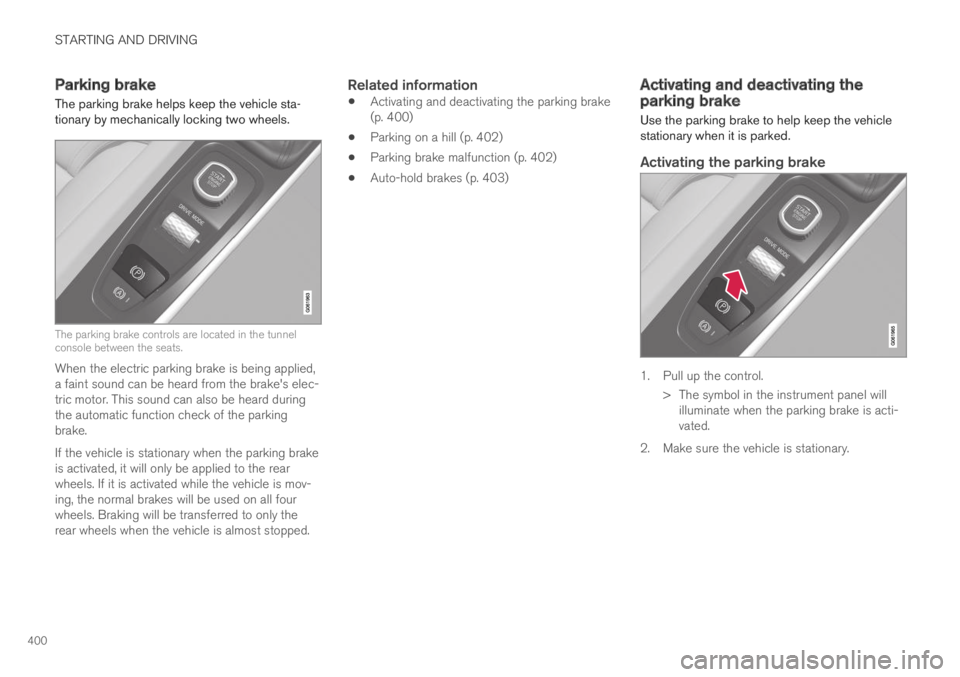
The parking brake helps keep the vehicle sta-tionary by mechanically locking two wheels.
The parking brake controls are located in the tunnelconsole between the seats.
When the electric parking brake is being applied,a faint sound can be heard from the brake's elec-tric motor. This sound can also be heard duringthe automatic function check of the parkingbrake.
If the vehicle is stationary when the parking brakeis activated, it will only be applied to the rearwheels. If it is activated while the vehicle is mov-ing, the normal brakes will be used on all fourwheels. Braking will be transferred to only therear wheels when the vehicle is almost stopped.
Related information
Activating and deactivating the parking brake(p. 400)
Parking on a hill (p. 402)
Parking brake malfunction (p. 402)
Auto-hold brakes (p. 403)
Activating and deactivating theparking brake
Use the parking brake to help keep the vehiclestationary when it is parked.
Activating the parking brake
1. Pull up the control.
>The symbol in the instrument panel willilluminate when the parking brake is acti-vated.
2. Make sure the vehicle is stationary.
Page 423 of 645

STARTING AND DRIVING
}}
* Option/accessory.421
Driving
Choose the Pure drive mode to help mini-mize electric power consumption.
Maintain a steady speed and a generous fol-lowing distance to traffic ahead to minimizebraking. This drive mode has the lowestpower consumption.
Balance energy requirements using theaccelerator pedal. Use the indicator on theinstrument panel to see available electricpower and avoid starting the combustionengine unnecessarily. The electric motor ismore effective than the combustion engine,especially at low speeds.
When braking is necessary, brake gentlyusing the brake pedal. This will help rechargethe hybrid battery. A regenerative function isintegrated in the brake pedal and can beaugmented by the electric motor's brakingcapacity when the gear selector is in modeB.
Higher speeds increase energy consumption- air resistance increases with speed.
Activate the Hold function in the Functionview at high speeds when traveling fartherthan is possible using the hybrid battery'scapacity.
Whenever possible, avoid using the Chargefunction to charge the hybrid battery. Charg-ing the battery using the combustion engine
increases fuel consumption and carbon diox-ide emissions.
In a cold climate, reduce heating of the wind-shield/rear window, mirrors, seats and thesteering wheel.
Maintain the correct pressure in the tires andcheck pressure regularly.
The type of tires used could affect energyconsumption - consult a retailer for advice onsuitable tires.
Remove unnecessary items from the vehicle- the heavier the load, the higher the fuelconsumption.
Roof loads increase air resistance andincrease fuel consumption. Remove roofboxes, ski racks, etc. that are not in use.
Avoid driving with the windows open.
Do not keep the vehicle still on an upwardgradient by using the accelerator pedal. Usethe brakes instead.
Related information
Drive-E ‒ purer driving pleasure (p. 27)
Energy distribution in hybrid mode using mapdata* (p. 417)
Factors affecting electric motor range(p. 421)
Hybrid gauge (p. 85)
Checking tire pressure (p. 519)
Factors affecting electric motorrange
A number of factors affect the electric motor'sdriving range. The ability to achieve a long driv-ing range varies according to the outside condi-tions and to how the vehicle is driven.
The certified value for the distance that can bedriven using the electric motor should not beconsidered an expected driving range. The actualrange is dependent on a number of factors.
Factors affecting driving range
The driver can influence some factors affectingdriving range, but not all.
The longest range is achieved under very favora-ble conditions when all factors positively influ-ence range.
Page 546 of 645
LOADING, STORAGE AND PASSENGER COMPARTMENT
* Option/accessory.544
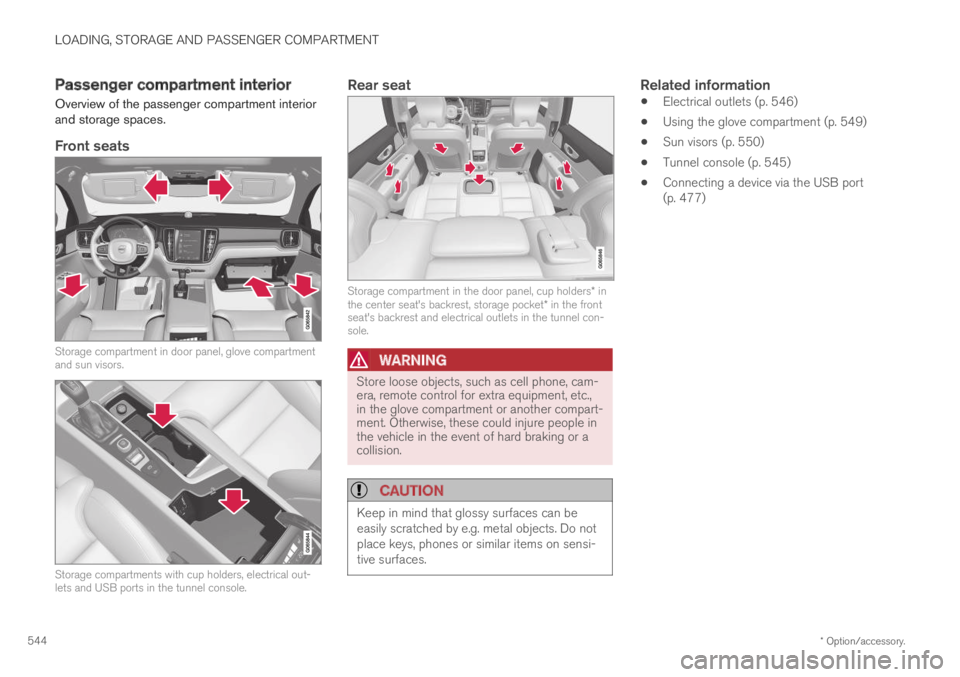
Passenger compartment interior
Overview of the passenger compartment interiorand storage spaces.
Front seats
Storage compartment in door panel, glove compartmentand sun visors.
Storage compartments with cup holders, electrical out-lets and USB ports in the tunnel console.
Rear seat
Storage compartment in the door panel, cup holders* inthe center seat's backrest, storage pocket* in the frontseat's backrest and electrical outlets in the tunnel con-sole.
WARNING
Store loose objects, such as cell phone, cam-era, remote control for extra equipment, etc.,in the glove compartment or another compart-ment. Otherwise, these could injure people inthe vehicle in the event of hard braking or acollision.
CAUTION
Keep in mind that glossy surfaces can beeasily scratched by e.g. metal objects. Do notplace keys, phones or similar items on sensi-tive surfaces.
Related information
Electrical outlets (p. 546)
Using the glove compartment (p. 549)
Sun visors (p. 550)
Tunnel console (p. 545)
Connecting a device via the USB port(p. 477)
Page 547 of 645

LOADING, STORAGE AND PASSENGER COMPARTMENT
* Option/accessory.545
Tunnel console
The tunnel console is located between the frontseats.
Storage compartment with cup holder.
Storage compartment with 12 V outlet andUSB port under the armrest.
Climate control panel for the rear seats* orstorage compartment.
WARNING
Store loose objects, such as cell phone, cam-era, remote control for extra equipment, etc.,in the glove compartment or another compart-ment. Otherwise, these could injure people inthe vehicle in the event of hard braking or acollision.
CAUTION
Keep in mind that glossy surfaces can beeasily scratched by e.g. metal objects. Do notplace keys, phones or similar items on sensi-tive surfaces.
NOTE
One of the sensors for the alarm* is locatedunder the cup holder in the center console.Avoid placing coins, keys and other metalobjects in the cup holder as this could triggerthe alarm.
Related information
Passenger compartment interior (p. 544)
Electrical outlets (p. 546)
Climate system controls (p. 207)
Page 552 of 645

||
LOADING, STORAGE AND PASSENGER COMPARTMENT
* Option/accessory.550
The illustration is generic – the design may vary.
To lock the glove compartment:
Insert the key into the lock on the glove com-partment.
Turn the key 90 degrees clockwise.
Remove the key from the lock.
–To unlock, perform the above steps inreverse.
Using the glove box as a cooled area *
The glove compartment can be used to cool e.g.drinks or food. Cooling is possible when the cli-mate system is active (i.e. when the ignition is inmode II or when the engine is running).
The illustration is generic – the design may vary.
Activate cooling
Deactivate cooling
–Activate or deactivate cooling by moving thecontrol as far as possible toward the passen-ger compartment/glove compartment.
Related information
Passenger compartment interior (p. 544)
Private Locking (p. 253)
Sun visors
In the ceiling in front of the driver's and frontpassenger's seats, there are sun visors that canbe lowered and angled to the side as necessary.
The illustration is generic – the design may vary.
The mirror lighting* comes on automatically whenthe visor is lifted up.
The mirror frame has a holder for e.g. cards ortickets.
Related information
Passenger compartment interior (p. 544)